

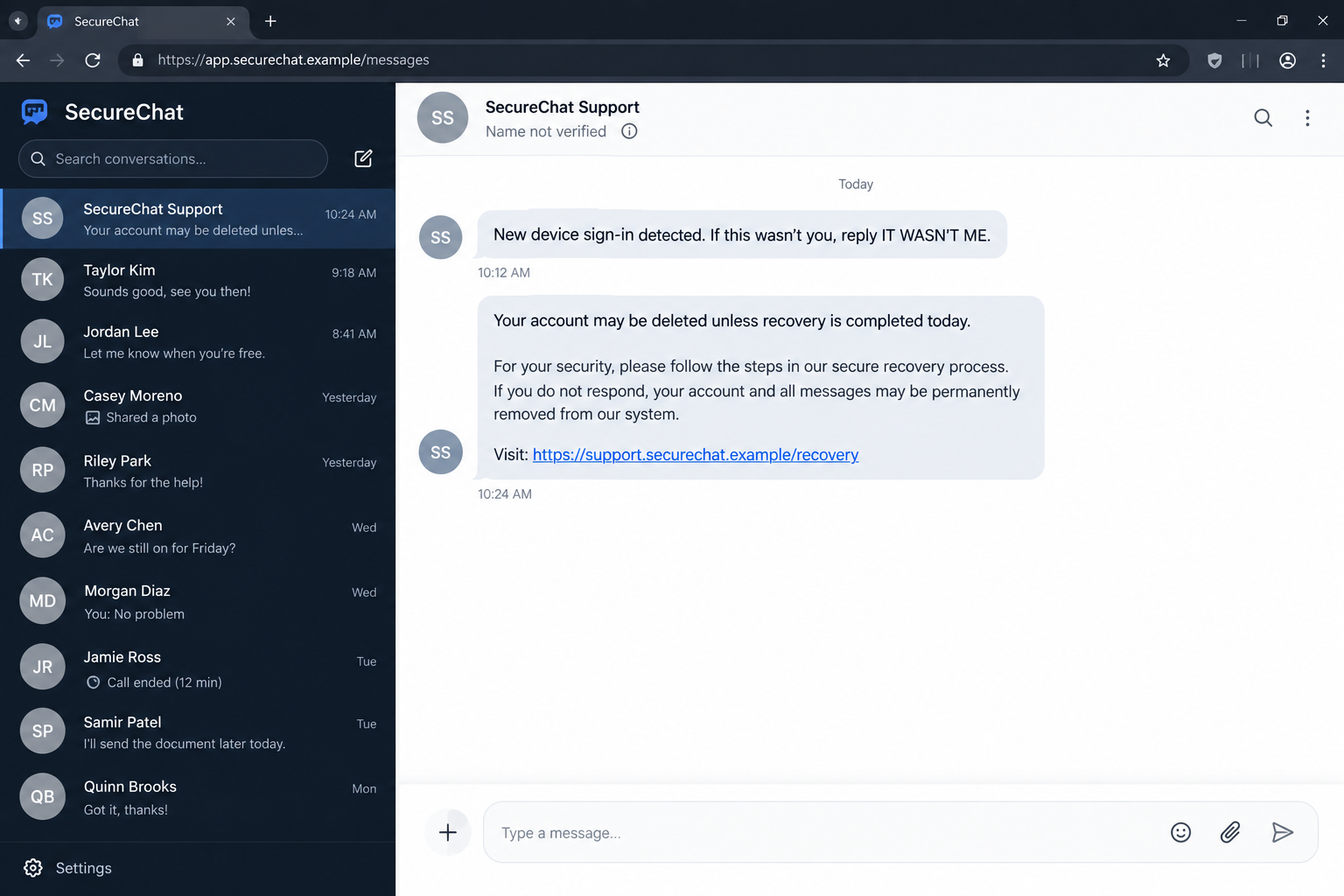
A message appears inside Signal from an account calling itself support. It says a new device tried to sign in and asks you to reply if the activity was not yours.
A second warning raises the stakes: your account or message history may disappear unless you complete a recovery check. The fake Signal backup alert scam looks connected to a real security feature, but one request changes everything.
Overview
The warning arrives inside the app
The fake Signal backup alert scam begins with an unsolicited message from a profile named Signal Support, Signal Team, Security Bot, or something similar. The profile may copy familiar colors or use a recognizable icon, but its display name was chosen by the sender.
The message claims that a new device signed in, a backup stopped synchronizing, or the account will soon be deleted. It may ask the recipient to reply with a short phrase before presenting the supposed recovery steps.
Receiving the approach inside an encrypted messenger gives it extra credibility. Encryption protects messages while they travel between accounts. It does not prove that an unknown account belongs to the company named in its profile.
The recovery key is the real target
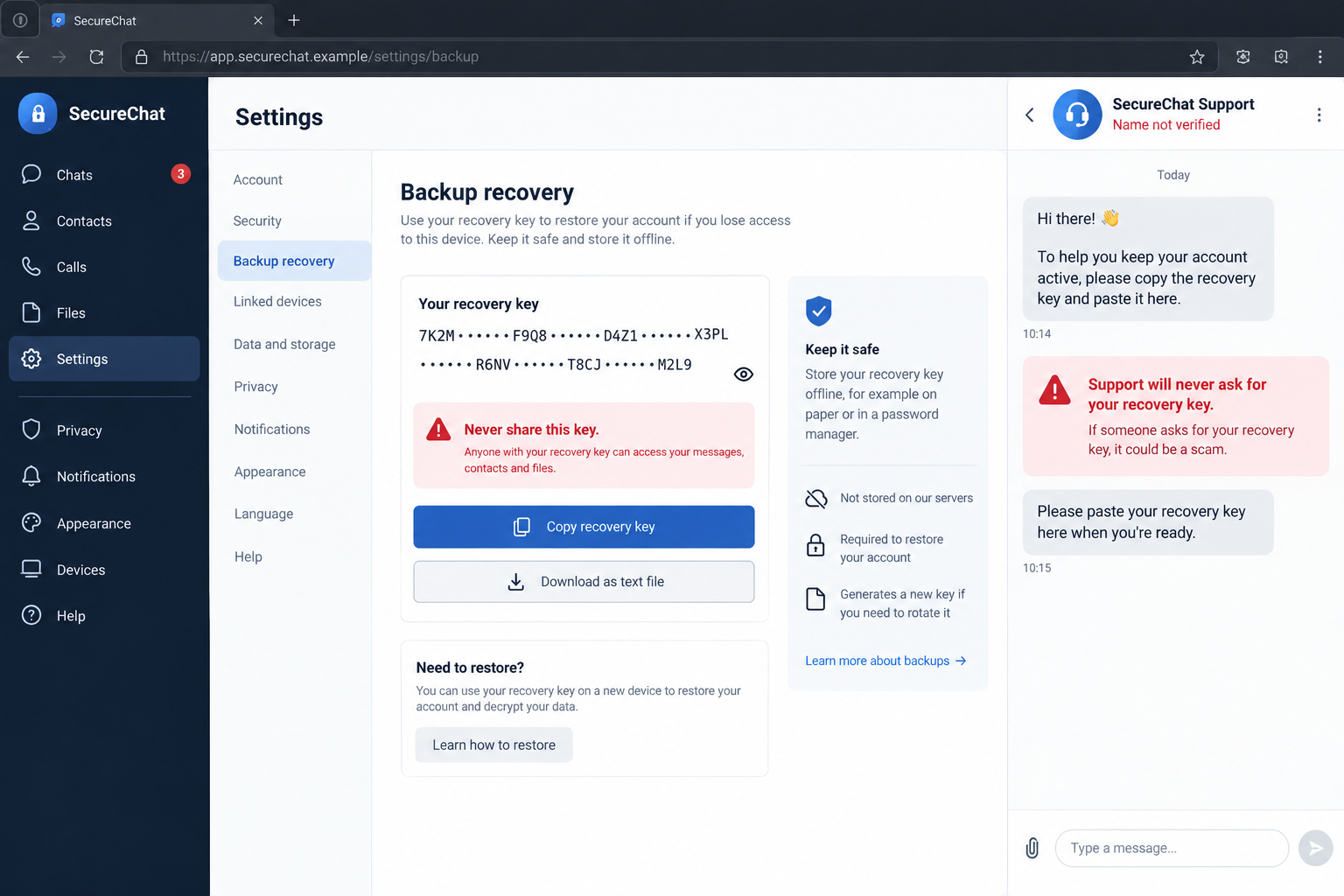
After creating urgency, the impostor tells the user to open Signal settings, locate the backup recovery key, copy it, and paste it into the chat. Another version supplies a link or asks for a verification code, PIN, or QR scan.
A recovery key is not a support ticket or harmless device identifier. It protects an encrypted backup. Anyone who obtains the necessary key and archive may be able to restore private message history and media that the backup contains.
Signal’s Secure Backups documentation says the archive is protected by a unique recovery key that is never shared with the service. Even Signal cannot read or restore the archive without it.
Real account features are used as camouflage
Signal can legitimately show PIN or recovery-key reminders inside its own interface. That makes a fake request harder to judge when it mentions the same menus and security terms.
The difference is where the secret is entered. A legitimate in-app flow keeps the process inside the relevant settings or restoration screen. A person, bot, chat account, email sender, or caller does not need the key.
Warning signs include:
- an unknown message request uses Signal or Support in its display name;
- the profile is marked Name not verified or has no groups in common;
- a new-device warning exists only inside the stranger’s message;
- the sender threatens deletion, suspension, or loss of chat history;
- the user is told to copy a recovery key from settings;
- a PIN, verification code, QR scan, or payment is requested;
- the account asks for a reply even though it claims to be an automated notice;
- the supplied link leads outside official Signal support pages.
The Campaign Has Been Confirmed by Official Warnings
This is not a theory built around one confusing support interaction. The FBI and CISA have documented phishing operations that impersonate messaging-app support and seek verification codes, account PINs, and backup recovery keys.
A June 2026 FBI and CISA public warning describes fake support messages telling Signal users to enable backups, view the recovery key, and paste that key into a chat. The alert attributes the observed targeting to Russian intelligence services.
The agency examples include a supposed data-recovery problem and a claim that messages or media are at risk. The language turns a security feature into a deadline, then makes disclosure of the secret sound like the solution.
The campaign has focused on high-value targets such as officials, military personnel, political figures, journalists, and people connected to Ukraine. The same social-engineering pattern can be copied by other criminals and aimed at ordinary users.
A person does not need advanced malware to imitate the approach. A convincing profile name, copied image, and accurate menu directions are enough to make the request look technical.
Signal’s own official-chat guidance says the company will never contact a user through a message, email, phone call, support chat, or another person to request a PIN, verification code, or backup recovery key.
How the Fake Signal Backup Alert Scam Works
Step 1: An impostor creates a support identity
The attacker opens an ordinary messaging account and chooses a display name such as Signal Support or Security Notifications. A copied icon and formal wording make the account look like an internal service instead of another user.
Display names are not ownership records. The same label can be selected by a stranger, and copied artwork does not create a relationship with Signal.
Step 2: A security event starts the conversation
The first message reports a new-device login, sync error, backup failure, or policy change. It may invite the recipient to answer “not me” if the event is unfamiliar.
That reply serves two purposes. It confirms that the target reads the account and creates a conversational opening where later instructions feel like a response to the user’s own request for help.
Step 3: The warning becomes a deadline
If the user hesitates, another message threatens account deletion, permanent message loss, or exposure of private chats. A date, case number, or countdown can make the invented process feel automatic.
Urgency reduces the chance that the recipient will inspect the profile, check linked devices, or visit official documentation. The scammer wants the settings menu opened before the sender’s identity is questioned.
Step 4: Real menu directions create false authority
The impostor may accurately describe where backup controls appear. Correct instructions are easy to copy from public help pages and are not evidence of staff access.
The user sees genuine settings on a genuine device. That authenticity can spill over onto the fraudulent chat, even though the two screens are controlled by different parties.
Step 5: The victim is told to expose the recovery key
The criminal asks the user to copy and paste the key, send a screenshot, upload a text file, or type the characters into a linked form. The request may be described as linking, synchronizing, validating, or preserving the backup.
There is no safe version of sending that secret to a support profile. The key is useful precisely because it can unlock the protected archive. Verification never requires giving it to another person.
Step 6: Stolen access is used against private communications
Depending on what the attacker collects, the compromise may expose a backup, enable account takeover, or connect an unauthorized device. A verification code can register an account elsewhere. A malicious QR code can link another device.
Historical messages can reveal contacts, documents, plans, images, work conversations, and sensitive relationships. That information can support espionage, impersonation, blackmail, or more targeted phishing.
Step 7: Persistence survives the first password change
A victim may change an email password and assume the problem is over. That action does not automatically invalidate a disclosed recovery key, remove a linked device, or revoke every token and session.
The attacker may also return as a different support account and claim the first repair was incomplete. Each new request for a code, key, QR scan, or payment continues the same compromise.
Why Encryption Does Not Make the Sender Trustworthy
End-to-end encryption answers an important question: who can read a message while it travels between the accounts in a conversation? It does not answer a different question: who created the account on the other side?
A private channel can carry a fraudulent request as securely as it carries a genuine conversation. The app protects the criminal’s message from interception, but it does not turn the criminal into support staff.
This distinction explains why the scam can succeed without breaking Signal’s encryption. The attacker persuades the user to disclose a secret or authorize access voluntarily. The protection is bypassed through the person, not cracked through mathematics.
Profile names, avatars, and polished language should therefore be treated as claims. Shared groups, saved safety-number checks, known contact history, and independent communication can provide stronger identity evidence, but official support still does not need account secrets.
How to Check a Signal Security Warning Safely
Do not follow the stranger’s directions while deciding whether the warning is real. Close the conversation and open Signal settings independently.
Review the list of linked devices. Remove any computer or tablet you do not recognize. If uncertain, removing all linked devices and reconnecting only trusted ones creates a clearer starting point.
Send a message to Note to Self. Signal’s guidance says a check mark shows that the account is working. A genuine registration problem may also appear as an app-level banner rather than a demand inside an unknown conversation.
Inspect the sender’s profile. A message request, Name not verified label, reply box, call buttons, unknown number, and absence of shared groups are strong signs that the message came from another user.
Open help through the application or type `support.signal.org` into a new browser tab. Do not use the link, email address, or contact route supplied by the warning.
Keep these rules simple:
- never paste a recovery key into a chat;
- never read a verification code to a caller;
- never scan an unexpected QR code to fix an account;
- never approve a linked device you did not initiate;
- never pay a person who claims to protect a Signal account;
- verify security issues through settings and official support pages.
Company, Address, and Fulfillment Checks
The profile is not a Signal support department
An account that writes to you under a support name is still an ordinary messaging profile. Signal says its staff do not initiate this type of in-app contact, and customer-service bots do not privately request account secrets.
The label at the top of the conversation is therefore not a company credential. Treat it the way you would treat a username chosen on any social platform.
The contact route contradicts the official process
Legitimate help begins through Signal’s published support pages and in-app flows. An unknown number, private message request, external form, or newly created profile is not made official by using the correct product vocabulary.
Do not test the sender by asking more questions. A prepared operator can answer with copied documentation while continuing to push for the key.
The address bar can expose a second trap
Some versions add a website that imitates a recovery portal. Check the complete hostname, not the page title, padlock, or Signal name placed before an unrelated domain.
A page can use encrypted HTTPS and still belong to a criminal. Official instructions can be read by navigating to `support.signal.org` independently.
There is no support service to fulfill after disclosure
The impostor cannot repair a backup, cancel a deletion, or protect an account. Those invented services exist only to obtain the recovery key, verification code, PIN, device link, or payment.
No confirmation message after disclosure proves that a repair happened. The only useful outcome for the operator is the secret or access the victim supplied.
What to Do if You Have Fallen Victim to This Scam
- Stop responding. Do not send another key, code, screenshot, document, or payment. Preserve the profile, conversation, timestamps, links, and any QR code before blocking the account.
- Report and block the impostor in Signal. Use the controls attached to the message request or profile. Do not keep the conversation open to gather more evidence.
- Replace a disclosed recovery key. Open the genuine backup settings and create a new key where the feature allows it. The FBI warns that an exposed key can remain useful even after a new registration unless it is replaced.
- Review linked devices. Remove every unfamiliar entry. If you scanned a QR code or are uncertain which sessions are legitimate, disconnect all linked devices and reconnect only equipment you control.
- Protect the phone number. Contact the carrier if service stopped unexpectedly or a SIM change is suspected. Add an account PIN and request protection against unauthorized number transfers.
- Secure the email account. Change its unique password from a clean device, revoke unknown sessions, remove altered recovery options, and enable strong multifactor authentication.
- Warn sensitive contacts through another route. Tell them that messages from the compromised account may be fraudulent. Avoid placing classified, private, or identifying incident details into the channel under review.
- Preserve technical evidence. Save screenshots, profile information, message text, dates, linked-device details, domains, and any files. Do not publish the recovery key while reporting the incident.
- Report targeted activity. U.S. victims can file at IC3.gov. High-risk organizations should also notify their security team. Others should contact their national cybercrime service or local police.
- Scan if software or files were involved. If you installed an application, opened an attachment, or followed a download prompt, run an updated scan with Malwarebytes or another trusted security tool.
- Reduce malicious links and ads. AdGuard can help block some dangerous destinations during normal browsing, but it cannot invalidate a disclosed recovery key or remove an unauthorized linked device.
- Reject recovery offers. Anyone who promises to undo the compromise for cryptocurrency, gift cards, remote access, or another account secret may be starting a follow-up scam.
Frequently Asked Questions
Does Signal support send private messages to users?
No. Signal says its staff will not initiate contact by in-app message, telephone, SMS, or social media to request a PIN, verification code, recovery key, or payment information.
Can Signal legitimately ask me to enter a recovery key?
The application may show a legitimate reminder or request the key during an authentic backup-restoration flow. It should not be pasted into a conversation or sent to someone calling themselves support.
Is a Name not verified label proof of a scam?
The label alone does not prove criminal intent, but it means the displayed identity has not been verified. Combined with a support claim and request for a secret, it is a decisive warning.
Will changing my Signal PIN fix a disclosed backup key?
Not by itself. A PIN, verification code, recovery key, and linked-device authorization have different functions. Replace the exposed key and remove unauthorized devices as separate actions.
What can an attacker do with my recovery key?
The key protects the encrypted backup archive. If the attacker can pair it with the required backup data or access path, private message history and stored media may be exposed.
What if I replied but did not share anything?
Block and report the profile, then review linked devices. A simple reply does not reveal the recovery key, but it confirms that the account is active and may invite more targeted messages.
The Bottom Line
The fake Signal backup alert scam borrows a real security feature and places it inside a fraudulent support conversation. The menus may be accurate and the warning may look professional, but no support profile needs the secret that unlocks your backup.
Never paste a recovery key, PIN, or verification code into chat, and never scan an unexpected device-linking QR code. Verify the account through Signal settings and official help pages. If a secret was exposed, replace it, remove linked devices, preserve evidence, and report the contact promptly.

Join the discussion
0 commentsShare your experience or ask a question about this article.
Discussion
Start the conversation
Have a question or something useful to share? Add the first comment.