

A water fountain that keeps a dog’s bowl cleaner and fresher can sound like a small household upgrade. Selene wraps that ordinary idea in unusually ambitious promises.
The interesting question is not whether water can flow through a filter. It is whether this particular offer earns its price, confidence, and health-focused presentation.
Overview
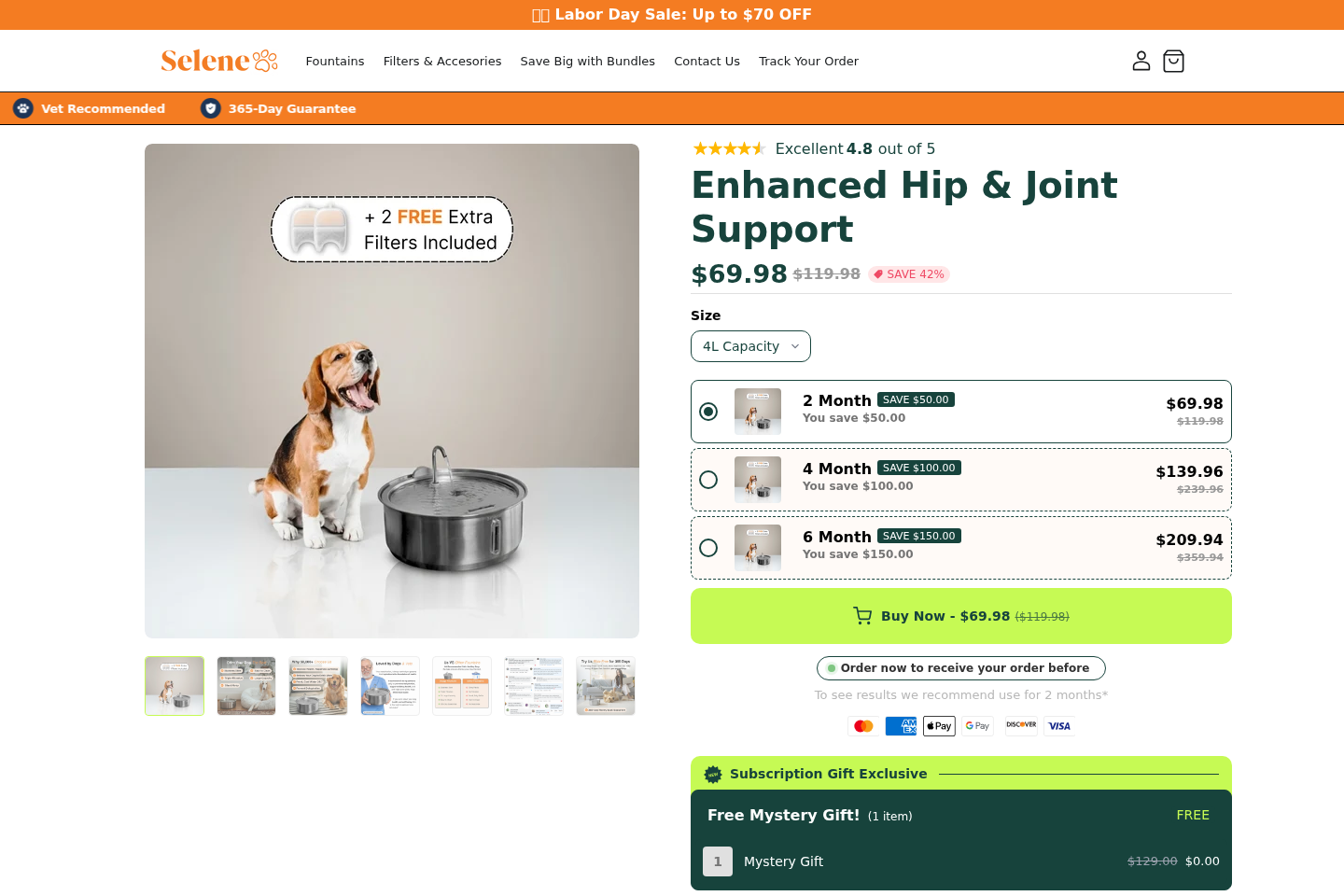
Selene sells a recognizable type of pet appliance
The advertised product is a large dog water fountain with a pump, filter, basin, and raised drinking surface.
Pet fountains are not novel technology. Many established manufacturers sell similar devices in plastic, ceramic, or stainless steel.
Water moves through a filter and returns to the drinking area. That circulation can catch some hair and debris while making water more noticeable.
Nothing about this basic mechanism proves a seller dishonest. The concern begins when ordinary functions are promoted as broad solutions for health, behavior, and hydration.
The page stretches practical benefits into health-heavy marketing
Selene’s page uses statements about better hydration, kidney support, hip and joint support, cleaner water, and veterinarian recommendations.
Some dogs may drink more from moving water. Others prefer a familiar bowl, and individual behavior cannot be predicted from a polished advertisement.
A fountain can make water convenient, but it does not treat kidney disease, joint problems, infection, dehydration, or another medical condition.
Owners may reasonably buy one for capacity or convenience. They should not treat sales language as veterinary evidence.
The complete cost extends beyond the fountain
The reviewed offer presents two fountain sizes and then adds optional filters, a mat, replacement coverage, and other accessories during checkout.
A displayed fountain price can therefore become a substantially larger order before payment.
Filters and pumps also create continuing costs. The practical price includes replacement supplies, cleaning time, electricity, and any return shipping.
The main findings are straightforward:
- The product category is real and widely available from many sellers.
- Selene’s health claims deserve more skepticism than its mechanical claims.
- The checkout can add filters, mats, warranties, or other extras.
- Accessories have narrower return conditions than the main fountain.
- Subscription orders are excluded from the headline 365-day guarantee.
- The fountain still requires regular cleaning and filter replacement.
- A normal water bowl should remain available during any transition.
- Comparable products should be evaluated by materials, capacity, and support.
What a Dog Water Fountain Can Actually Do
A fountain can hold more water than a small bowl. That may help in homes with large dogs, several pets, or frequent refilling.
Circulation can reduce visible stagnation and collect loose fur inside a filter. It does not make neglected water permanently sanitary.
Saliva, food particles, biofilm, dust, and bacteria still enter the basin. The pump and internal channels can become dirty where owners cannot immediately see them.
Filters also have limits. They may reduce particles, odors, or certain tastes, depending on their materials and replacement schedule.
A small disposable cartridge does not turn questionable water into medically safe drinking water. Start with water suitable for household consumption.
Some dogs notice moving water and drink more frequently. The sound, height, or movement may discourage other dogs instead.
The American Kennel Club has noted that fountains may attract some pets, while evidence does not show dogs universally prefer running water.
That distinction matters. A behavioral possibility should not become a guaranteed health outcome.
Owners should measure real behavior after installation. Check the reservoir level, observe urination, and notice whether the dog comfortably reaches the drinking surface.
If a dog suddenly drinks much more or less, contact a veterinarian. A new fountain should never distract from a meaningful medical change.
Where Selene’s Advertising Gets Ahead of the Evidence
The sales page presents the fountain as more than a water dispenser. Its copy connects hydration with kidneys, mobility, energy, digestion, and overall well-being.
Hydration is important, but that fact does not validate every claimed result attached to a hydration product.
A dog with painful joints may benefit from an accessible bowl height. That does not mean the fountain itself supplies joint support.
A dog with kidney disease needs veterinary evaluation, laboratory monitoring, and an individual care plan. Filtered circulating water is not a kidney treatment.
Statements such as vet recommended also need context. Buyers should ask which veterinarian, what qualifications apply, and whether the endorsement covers this exact model.
A photograph of someone in clinical clothing is not a clinical study. Neither is a customer testimonial describing an energetic or healthier dog.
Testimonials can reflect genuine satisfaction while still being poor evidence for cause and effect.
Dogs change diets, routines, medications, seasons, and activity levels. A favorable story cannot isolate the fountain as the reason.
Look for measurements that can be checked: reservoir capacity, material grade, pump specifications, filter composition, noise level, warranty terms, and replacement availability.
Those details describe the actual appliance. Broad wellness language mostly describes how the seller wants the purchase to feel.
How the Selene Dog Water Fountain Offer Works
Step 1: The advertisement starts with an anxious pet owner
The opening message often suggests a normal bowl becomes dirty quickly, encourages dehydration, or quietly threatens a dog’s long-term health.
That framing creates urgency around a familiar inconvenience. The owner is encouraged to see a fountain as preventive care rather than optional equipment.
The strongest campaigns alternate concern with affection. A caring owner is told that upgrading the water source demonstrates responsibility.
This emotional appeal is powerful because nobody wants to overlook a simple improvement for a pet.
Step 2: Common fountain features receive premium labels
Circulation, filtration, a raised surface, and a large reservoir are presented as special breakthroughs.
These may be useful features, but shoppers can find them across many competing fountains.
The relevant comparison is not feature versus no feature. It is Selene’s specification, durability, replacement parts, and price versus credible alternatives.
Marketing can make an ordinary charcoal filter sound like advanced purification without explaining exactly what it removes.
Step 3: Wellness claims make comparison shopping feel risky
Once the page connects the fountain with kidneys, joints, or longer-term wellness, a cheaper alternative may feel medically inferior.
That conclusion does not follow unless the seller provides reliable comparative evidence.
A stainless drinking surface may be easier to clean than scratched plastic. Material alone does not prove every internal component is stainless or hygienic.
Buyers should examine the pump housing, tubing, seams, and reservoir, not only the visible tray.
Step 4: Reviews and authority cues lower resistance
Testimonials describe cleaner water, enthusiastic drinking, and relieved owners. Badges emphasize recommendations, guarantees, popularity, or customer satisfaction.
These signals make the page feel independently validated even when the seller controls their selection and presentation.
A review should be most useful when it discusses cleaning difficulty, pump life, noise, filter cost, leaks, and support after several months.
Short emotional praise reveals much less about long-term value.
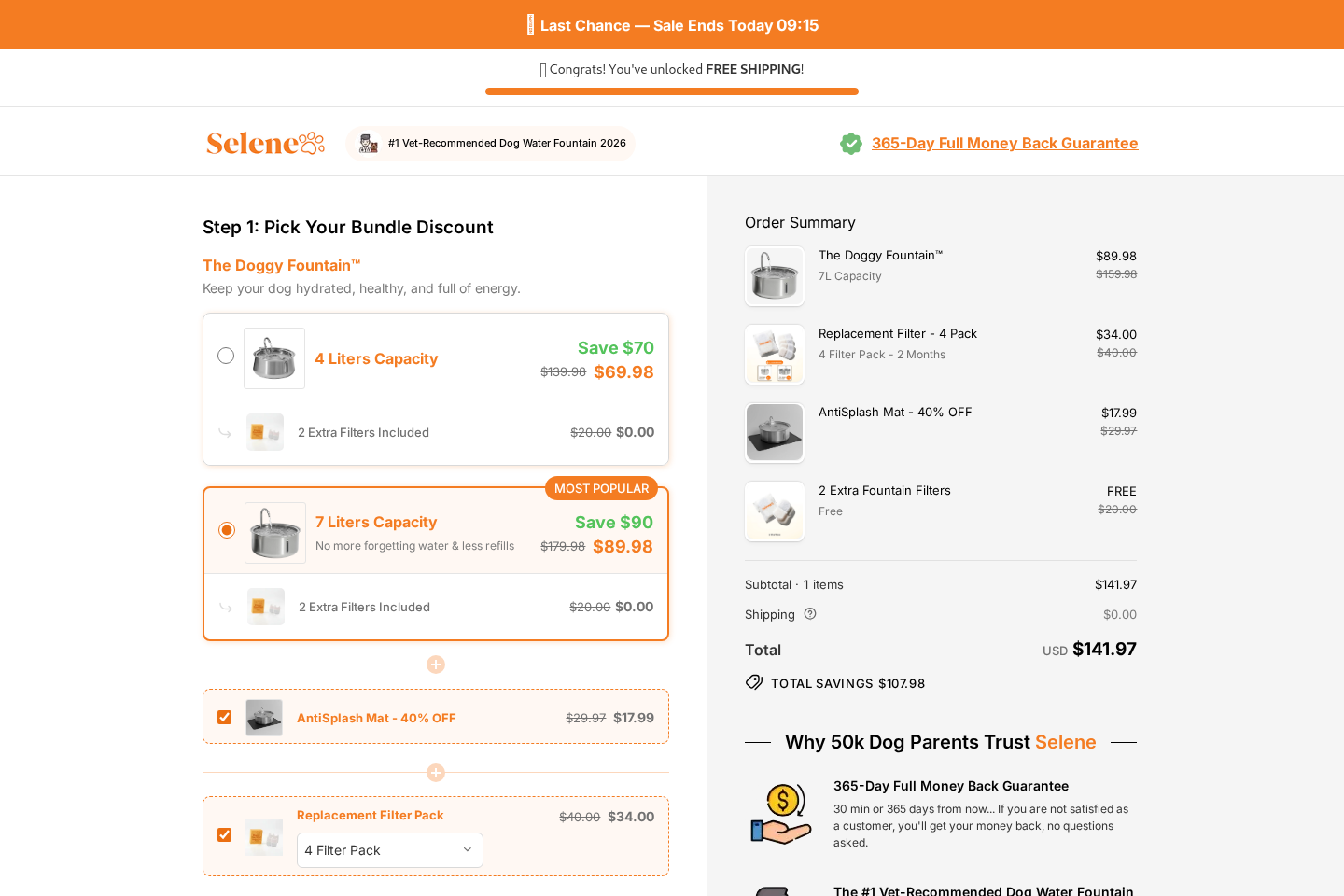
Step 5: The advertised price expands inside checkout
The customer chooses a fountain, then sees replacement filters, a mat, protection, or another add-on.
Each addition may look modest alone. Together, they can move the total far beyond the initial price that attracted the click.
The reviewed checkout displayed a combined order above $140 when multiple additions were selected.
Shoppers should review every line before submitting payment. Remove anything that was selected automatically or added without a deliberate choice.
Step 6: The guarantee carries conditions the headline cannot explain
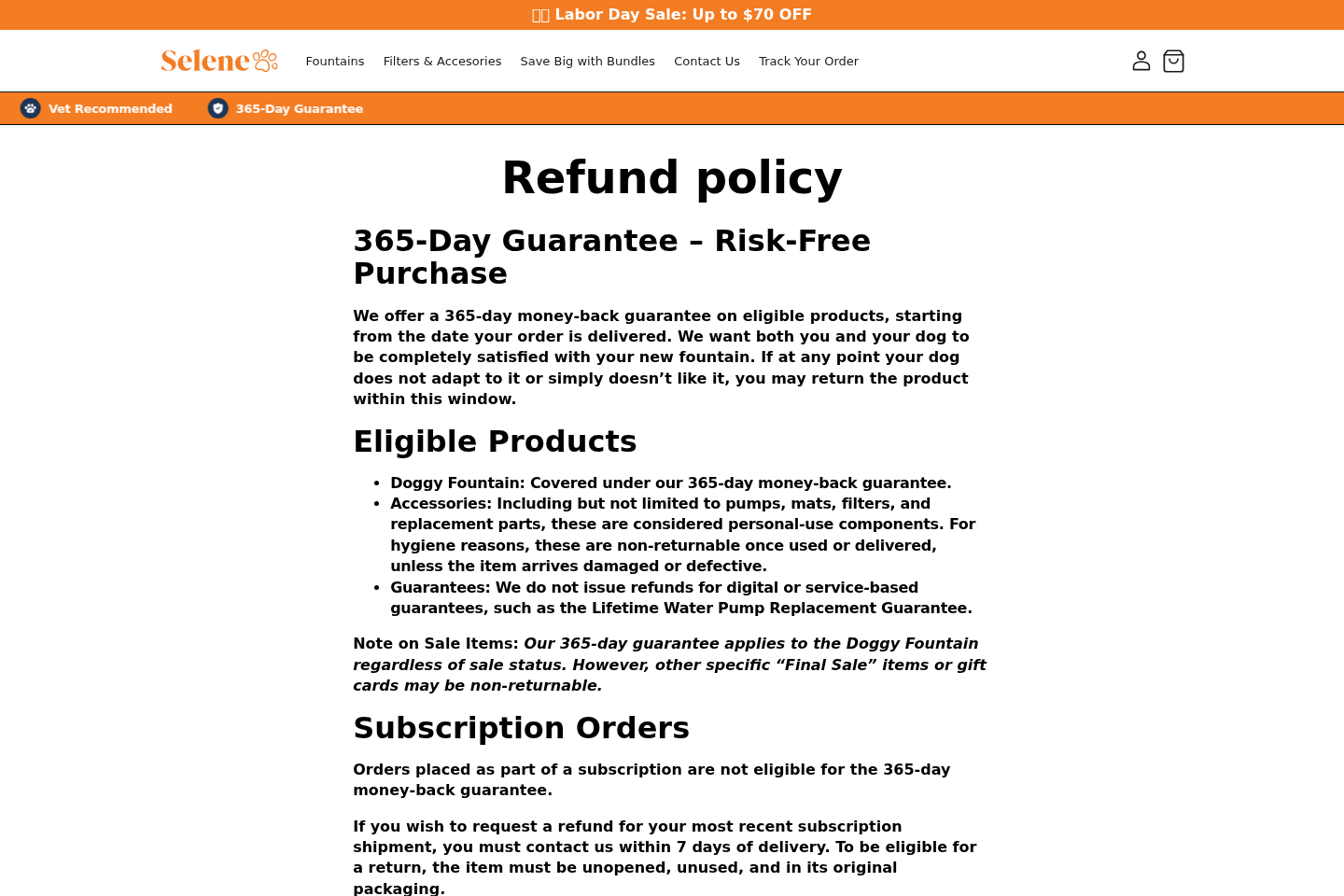
Selene currently promotes a 365-day guarantee for the main fountain. Its refund policy defines eligible products and separate restrictions.
Accessories, used personal components, service guarantees, final-sale items, and subscription orders may receive different treatment.
The policy says subscription orders do not qualify for the 365-day guarantee. A recent subscription shipment requires contact within seven days.
That is a material difference. The broad badge should never replace reading the product-specific and subscription terms.
The 365-Day Guarantee Needs Careful Reading
A long refund window can reassure a cautious buyer. Its practical value depends on eligibility, deadlines, proof requirements, return costs, and seller responsiveness.
Selene’s published policy says the main fountain is covered regardless of sale status. That sounds stronger than many short trial offers.
However, the same policy excludes several accessories once used or delivered, except when damaged or defective.
It also says lifetime pump replacement guarantees are services and do not receive refunds.
Subscription orders are another important exception. They are not eligible for the headline 365-day money-back guarantee.
The policy gives seven days after delivery to request a refund for the latest subscription shipment, with the item unopened and unused.
A buyer considering recurring filters should save the exact subscription frequency, price, cancellation method, and refund language visible at checkout.
Take screenshots before paying. Online terms can change, while the order confirmation may omit details that influenced the purchase.
Do not assume the fountain and every accessory can return in one box under identical rules.
Ask support for written confirmation when the package contains products with different eligibility.
Cleaning and Safety Matter More Than the Advertisement Suggests
Filtered water can still become unpleasant when the fountain is not dismantled and washed frequently.
Biofilm feels slippery and can grow inside corners, tubes, pump covers, impellers, and filter compartments.
Top up the fountain only between complete cleanings. Continually adding fresh water to dirty equipment does not restore cleanliness.
Follow the manufacturer’s cleaning schedule, then adjust it for pet count, drooling, food debris, room temperature, and visible buildup.
Disconnect power before removing the pump. Inspect the cable for chewing, cracking, heat damage, or moisture around the connector.
Place the unit where spilled water cannot reach an unsuitable outlet or create a slipping hazard.
Replace filters at the stated interval, but do not assume a discolored filter caused every color change in the water.
Wash new components before use according to their instructions. Manufacturing dust or packaging residue should not enter a dog’s drinking water.
Keep an ordinary clean bowl available while the dog learns the fountain. Never force a nervous animal to rely on unfamiliar equipment.
For puppies, older dogs, flat-faced breeds, or animals with mobility problems, confirm the height and access are genuinely comfortable.
Monitor water intake during power failures or pump problems. A full reservoir does not help if its drinking surface becomes inaccessible.
Company, Address, and Fulfillment Checks
The storefront name may not reveal every operator
Selene branding appears across the sales site and a separate checkout domain. That arrangement does not automatically indicate fraud.
It does mean buyers should identify the legal entity charging the card and the company responsible for returns.
Compare the footer, terms, privacy policy, receipt, parcel label, and card descriptor. Unexplained names can complicate a dispute.
A returns location is not necessarily a headquarters
An address may belong to a warehouse, fulfillment contractor, mailbox, registered agent, residence, or unrelated tenant.
Search it independently before ordering. Confirm whether customers may send returns there and whether authorization is required first.
Never mail an expensive fountain to an address found in an advertisement without written return instructions.
Support must answer specific product questions
Ask whether filters renew automatically, where the fountain ships from, who pays return postage, and which accessories become nonreturnable.
Also request the pump voltage, plug type, material breakdown, filter composition, and replacement-part availability.
A working support channel should provide direct answers. Repeated scripts, silence, or contradictory promises are warning signs.
Fulfillment quality determines the real ownership experience
Even a functional generic fountain can become a poor purchase when shipping, parts, documentation, and warranty handling are unreliable.
Check whether the product ships domestically or crosses borders. International fulfillment can lengthen delivery and make a return expensive.
Mass-produced pet fountains are sold under many names. Branding alone does not establish a unique design, factory, safety standard, or support network.
Look for model numbers and certification marks that can be verified, especially on the electrical adapter and pump.
How to Compare Selene With Other Dog Fountains
Begin with the dog’s needs instead of the advertisement’s story. Capacity, drinking height, noise, cleaning access, and stable construction should drive the decision.
Calculate the first year’s full cost. Include the fountain, shipping, taxes, filters, pump replacement, accessories, and likely return postage.
Compare stainless steel carefully. Some fountains have only a steel top over a plastic reservoir, while others use more metal throughout.
Check whether every wet component can be reached by hand or brush. Decorative channels can hide residue.
Search for replacement filters before buying. A proprietary cartridge becomes a problem if stock disappears or shipping costs exceed its value.
Review pump specifications and replacement availability. Pumps are moving parts and may fail before the body of the fountain.
Ignore countdowns and permanent sale banners. A pet appliance rarely requires an immediate decision.
Read low-scoring reviews across independent retailers. Repeated complaints about leaks, noise, cleaning, and support are more informative than isolated enthusiasm.
Confirm the return address and estimated cost for a tracked parcel of the fountain’s size and weight.
Pay with a credit card or trusted payment service that provides a dispute path. Avoid bank transfers, cryptocurrency, and debit when uncertainty remains.
Most importantly, separate convenience from treatment. Choose a fountain as equipment, not as a substitute for veterinary care.
Warning Signs That Should Stop the Purchase
One bold statement may be ordinary marketing. Several unresolved inconsistencies together should pause the order.
Leave the checkout when the seller will not identify the legal business, return destination, recurring charges, or complete cost.
Be cautious when health claims repeatedly replace product specifications.
A page that discusses kidneys and joints without explaining pump wattage or filter composition has its priorities reversed.
Watch for add-ons that appear selected without a clear action. Check the order summary again after changing quantities or navigating backward.
Do not rely on a guarantee badge when the underlying policy excludes the products or purchase type in your cart.
Pressure tactics are another concern. Repeated low-stock messages, expiring discounts, and timers can rush a decision that deserves comparison.
Finally, stop if support cannot explain cancellations in writing. A filter subscription should be as easy to understand as the fountain itself.
What to Do if You Have Fallen Victim to This Scam
- Save the complete offer. Capture the product page, checkout, guarantee, subscription selection, order summary, and confirmation before pages or terms change.
- Identify every charge. Compare the receipt with your card statement and note unfamiliar descriptors, duplicate amounts, or later filter renewals.
- Cancel recurring deliveries in writing. Use the account portal and email support, then save the confirmation and cancellation date.
- Request a return authorization. Describe the problem clearly and ask which items qualify, where they must go, and who pays postage.
- Document defects safely. Photograph leaks, damaged cables, missing parts, incorrect plugs, packaging, labels, and the fountain’s condition before repacking it.
- Do not use unsafe equipment. Disconnect a leaking, overheating, damaged, or unstable unit and provide an ordinary clean water bowl.
- Contact the payment provider. Dispute unauthorized renewals or materially misrepresented goods when the seller does not provide a reasonable resolution.
- Ask a veterinarian about health concerns. Seek professional advice if drinking changes, vomiting, lethargy, urinary symptoms, or dehydration appear.
- Scan after suspicious support contact. Use Malwarebytes if someone directed you to install software, open strange files, or visit an unrelated support page.
- Reduce dangerous advertising. AdGuard can block many deceptive ads and trackers, although it cannot cancel a legitimate purchase or subscription.
- Report misleading conduct. Send evidence to consumer-protection authorities and the advertising platform when guarantees, endorsements, or recurring terms were materially deceptive.
Is Your Device Infected? Run a Free Malware Scan
Slow performance, constant pop-ups, or strange behavior? These are classic signs of a malware infection. The fastest way to find out is to scan your device with Malwarebytes Free — one of the most trusted malware removal tools available.
The free version detects and removes the most common threats, including:
- Adware — the cause of those annoying pop-ups
- Browser hijackers — unwanted redirects and changed homepages
- Trojans and spyware — hidden programs stealing your data
- Potentially unwanted programs (PUPs) — software you never asked for
👉 Select your device below — Windows, Mac, or Android — then follow the simple steps to download Malwarebytes, scan your system, and remove any threats it finds. The scan usually takes 5 to 20 minutes.
Run a Malware Scan with Malwarebytes for Windows
Malwarebytes is one of the most popular and trusted anti-malware tools for Windows — and it’s completely free for removing infections. It catches threats that many antivirus programs miss, including adware, browser hijackers, and trojans. Follow the steps below to scan and clean your PC in just a few minutes.
Download Malwarebytes
Click the button below to download the latest version of Malwarebytes for Windows from the official source. The free version is all you need — it will scan your computer and remove adware, browser hijackers, and other malicious software at no cost.
Download MalwarebytesOfficial installer for Windows 11 and 10. Your download starts right away.Want real-time protection? See Malwarebytes Premium Malwarebytes Free for WindowsScans and removes malware at no cost
-
Install Malwarebytes
When the download finishes, open your Downloads folder and double-click the MBSetup file. If Windows shows a User Account Control pop-up, click “Yes” to allow the installation.

Follow the On-Screen Prompts to Install Malwarebytes
The setup wizard will walk you through a few quick screens:
-
Choose where you’re installing the program — “Personal Computer” or “Work Computer” — then click Next.

-
Malwarebytes will now install on your device. This usually takes under a minute.

-
When installation is complete, the “Welcome to Malwarebytes” screen will open automatically.

-
On the final screen, click Open Malwarebytes to launch the program.

-
Enable “Scan for Rootkits”
Before scanning, turn on rootkit detection so Malwarebytes can find even the most hidden threats. Click the Settings gear icon on the left side of the screen.

In the settings menu, find “Scan for rootkits” and click the toggle so it turns blue.

Done? Click “Dashboard” in the left pane to return to the main screen.
Start the Scan
Click the blue Scan button. Malwarebytes will automatically update its virus database and start checking your computer for malware.

-
Wait for the Scan to Finish
The scan checks your entire system for browser hijackers and other malicious programs, so it can take 5 to 20 minutes depending on your computer. Feel free to do something else — just check back occasionally to see the progress.

-
Quarantine the Detected Threats
When the scan is done, you’ll see a list of everything Malwarebytes found — malware, adware, and potentially unwanted programs. Click the “Quarantine” button to remove all of them at once.

Malwarebytes will now remove the malicious files and registry entries and move them safely into quarantine.

-
Restart Your Computer
Some threats can only be fully removed after a reboot. If Malwarebytes asks you to restart, click Yes. Once you’re logged back in, Malwarebytes has finished removing the threats it found.

That’s it — your Windows PC is now clean of trojans, adware, and other malware, and should be back to running smoothly.
If you are still having problems with your computer after completing these instructions, then please follow one of the steps:
- Run a computer scan with ESET Online Scanner
- Ask for help in our Windows Malware Removal Help & Support forum.
Run a Malware Scan with Malwarebytes for Mac
Malwarebytes for Mac is a free on-demand scanner that removes the malware other security software tends to miss — adware, browser hijackers, and unwanted programs included. Cleaning an infected Mac with Malwarebytes has always been completely free, and it’s our go-to recommendation. Follow the steps below to scan and clean your Mac in just a few minutes.
-
Download Malwarebytes for Mac
Click the button below to download the latest version of Malwarebytes for Mac.
Download MalwarebytesOfficial installer for macOS. Your download starts right away.Want real-time protection? See Malwarebytes PremiumMalwarebytes Free for MacScans and removes malware at no cost -
Open the Malwarebytes setup file
When the download finishes, open your Downloads folder and double-click the setup file to begin the installation.

-
Follow the On-Screen Prompts to Install Malwarebytes
The Malwarebytes for Mac Installer will guide you through a few quick screens. Click “Continue” and keep following the prompts until the installation completes.



When the installation is complete, Malwarebytes opens to the Welcome to Malwarebytes screen. Click “Get started“.
-
Select “Personal Computer” or “Work Computer”
Malwarebytes will ask what type of computer you’re installing it on. Click either Personal Computer or Work Computer, whichever applies.

-
Start the Scan
Click the “Scan” button. Malwarebytes will automatically update its detection database and begin checking your Mac for malware.

-
Wait for the Scan to Finish
Malwarebytes will scan your Mac for adware, browser hijackers, and other malicious programs. This can take a few minutes, so feel free to do something else — just check back occasionally to see the progress.

-
Quarantine the Detected Threats
When the scan is done, you’ll see a list of everything Malwarebytes found. Click the “Quarantine” button to remove all the threats at once.

-
Restart Your Mac
Malwarebytes will now remove all the malicious files it found. Some threats can only be fully removed after a reboot — if Malwarebytes asks you to restart, allow it. Once you’re logged back in, your Mac is clean.

That’s it — your Mac is now free of adware, rogue browser extensions, and other potentially harmful software.
If you are still experiencing problems while trying to remove a malicious program from your computer, please ask for help in our Mac Malware Removal Help & Support forum.
Run a Malware Scan with Malwarebytes for Android
Malwarebytes for Android automatically detects and removes dangerous threats like malware and ransomware so you don’t have to worry about your most-used device being compromised. Aggressive detection of adware and potentially unwanted programs keeps your Android phone or tablet running smooth.
-
Download Malwarebytes for Android.
You can download Malwarebytes for Android by clicking the link below.
Get Malwarebytes for AndroidOpens Google Play in a new tab.Want real-time protection? See Malwarebytes Premium for AndroidMalwarebytes for AndroidScans your phone and removes malware at no cost -
Install Malwarebytes for Android on your phone.
In the Google Play Store, tap “Install” to install Malwarebytes for Android on your device.

When the installation process has finished, tap “Open” to begin using Malwarebytes for Android. You can also open Malwarebytes by tapping on its icon in your phone menu or home screen.

-
Follow the on-screen prompts to complete the setup process
When Malwarebytes will open, you will see the Malwarebytes Setup Wizard which will guide you through a series of permissions and other setup options.
This is the first of two screens that explain the difference between the Premium and Free versions. Swipe this screen to continue.
Tap on “Got it” to proceed to the next step.
Malwarebytes for Android will now ask for a set of permissions that are required to scan your device and protect it from malware. Tap on “Give permission” to continue.
Tap on “Allow” to permit Malwarebytes to access the files on your phone.
-
Update database and run a scan with Malwarebytes for Android
You will now be prompted to update the Malwarebytes database and run a full system scan.

Click on “Update database” to update the Malwarebytes for Android definitions to the latest version, then click on “Run full scan” to perform a system scan.

-
Wait for the Malwarebytes scan to complete.
Malwarebytes will now start scanning your phone for adware and other malicious apps. This process can take a few minutes, so we suggest you do something else and periodically check on the status of the scan to see when it is finished.

-
Click on “Remove Selected”.
When the scan has been completed, you will be presented with a screen showing the malware infections that Malwarebytes for Android has detected. To remove the malicious apps that Malwarebytes has found, tap on the “Remove Selected” button.

-
Restart your phone.
Malwarebytes for Android will now remove all the malicious apps that it has found. To complete the malware removal process, Malwarebytes may ask you to restart your device.
That’s it — your Android phone is now clean — no more malicious apps, adware, or browser redirects.
If you are still having problems with your phone after completing these instructions, then please follow one of the steps:
- Restore your phone to factory settings by going to Settings > General management > Reset > Factory data reset.
- Ask for help in our Mobile Malware Removal Help & Support forum.
Stay Protected: Block Ads and Malicious Sites
Now that your device is clean, keep it that way. Most infections start with a malicious ad or a fake download button — so blocking them at the source is your best defense.
We recommend AdGuard, which blocks malicious ads, phishing pages, and dangerous redirects before they can reach you.
👉 Download AdGuard and browse safely
Frequently Asked Questions
Is the Selene dog water fountain a scam?
The reviewed pages show a real product category and detailed policies. The strongest concerns involve health-heavy marketing, add-ons, and important guarantee exclusions.
Will a Selene fountain make my dog drink more?
Some dogs prefer moving water, while others do not. Keep a bowl available and measure your dog’s actual response rather than trusting a guarantee.
Does filtered fountain water prevent kidney disease?
No fountain can promise that result. Clean accessible water supports hydration, but kidney disease requires veterinary diagnosis and individualized management.
Is the 365-day Selene guarantee unconditional?
No. The published policy gives different treatment to the main fountain, accessories, service guarantees, final-sale goods, and subscription orders.
Are Selene replacement filters a subscription?
Recurring options may appear in the purchasing flow. Read the selected frequency, total, cancellation method, and refund window before authorizing payment.
Should I throw away my dog’s regular bowl?
No. Keep a clean bowl as a backup during training, cleaning, power interruptions, pump failures, travel, or any period when intake seems uncertain.
The Bottom Line
Selene sells a plausible appliance, but the marketing asks ordinary fountain features to carry broad health promises. Buyers should judge the hardware, cost, and policies separately.
Compare alternatives, document checkout, inspect recurring terms, and keep the fountain clean. If a dog shows health changes, call a veterinarian instead of trusting advertising.

Join the discussion
0 commentsShare your experience or ask a question about this article.
Discussion
Start the conversation
Have a question or something useful to share? Add the first comment.