

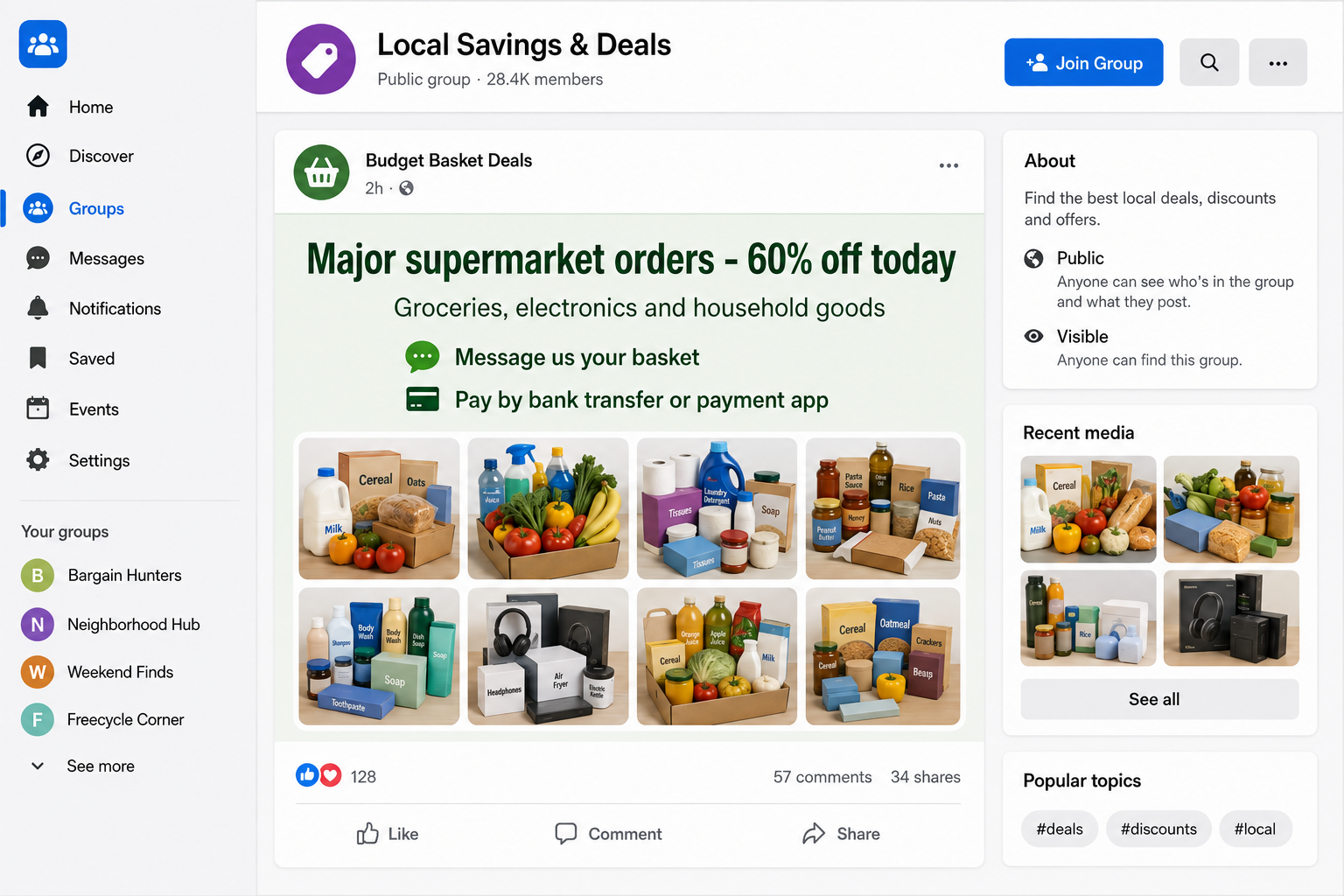
A local deals account offers to cut a supermarket basket almost in half. You choose the groceries on a major retailer’s site, send the list privately, and pay the seller a smaller amount.
The order can even appear to go through before it is canceled. The social media grocery discount scam is not a secret coupon club. Police say organized criminals are using these offers to take payments and personal information.
Overview
The ad promises genuine goods through an unofficial seller
This fraud is different from a fake supermarket website. The advertiser may claim to place a real order with a known grocery chain, electronics retailer, or high-street store after the customer sends a shopping list.
The customer is told that the seller has staff discounts, wholesale access, reward points, promotional credit, surplus vouchers, or a private ordering system. None of those explanations can be checked through the retailer.
The offer commonly appears in a social media group, marketplace post, direct message, or short-lived page. A profile may show screenshots of completed baskets and comments from supposed customers.
The discount is often large enough to matter to a household budget but not so absurd that every viewer dismisses it immediately.
Payment happens outside the real retailer
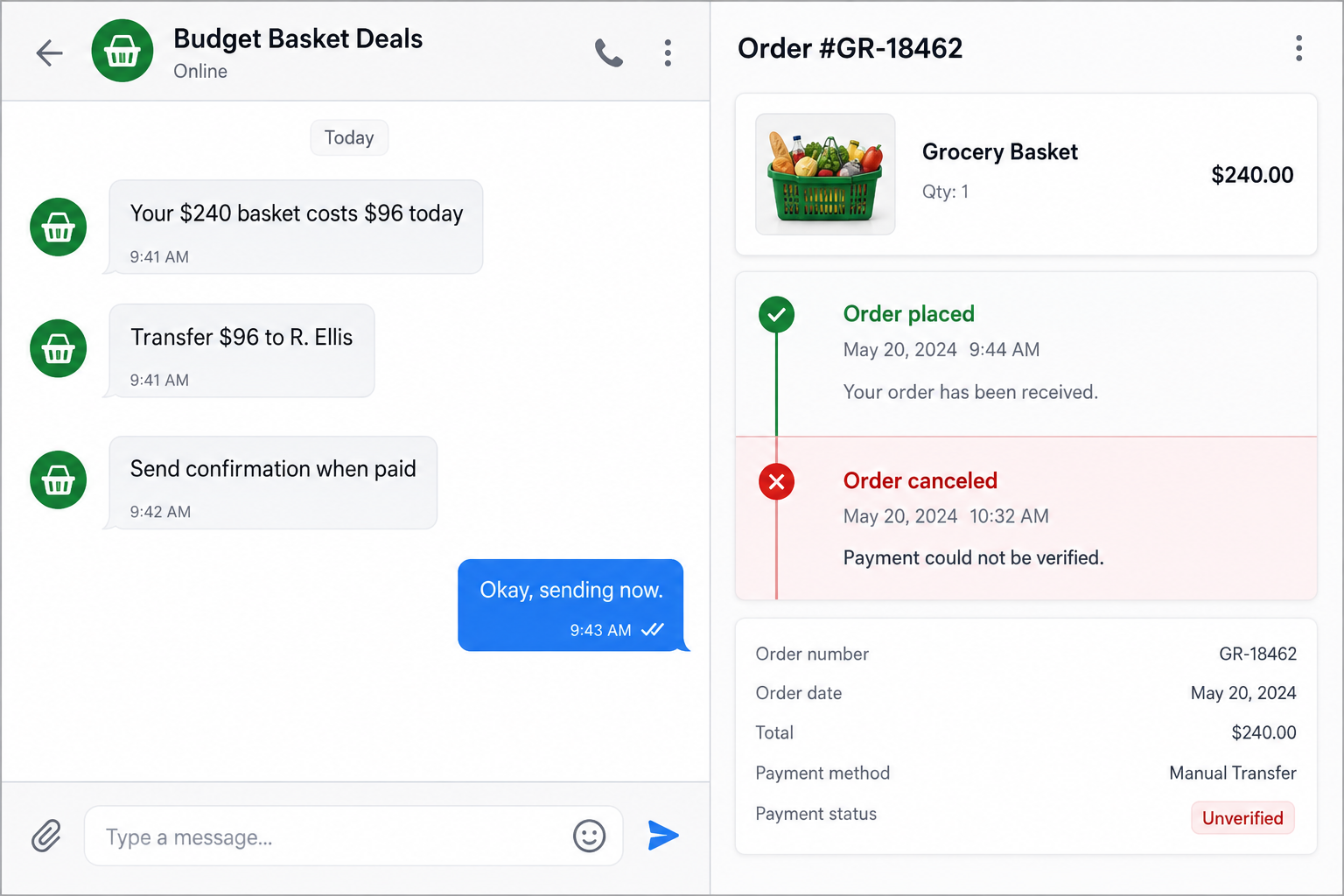
The customer does not pay the supermarket. The social media seller asks for a bank transfer, payment-app transfer, or cryptocurrency payment sent to a personal recipient.
That separation is the central warning. The customer may receive a retailer order number or delivery screenshot, but the payment goes somewhere the retailer cannot trace as the customer’s own purchase.
The seller may ask for a full name, delivery address, phone number, email, preferred delivery slot, and screenshots of the desired basket. That information can support account takeover, payment fraud, or further impersonation.
A cheap order can be canceled after payment, never arrive, or be funded through compromised accounts and later reversed.
Police are investigating the organized campaign
In August 2026, Derbyshire Constabulary appealed for victims of social media supermarket scams. Police described organized criminals advertising heavily discounted supermarket deliveries, electronics, and household goods.
The warning says people who transfer money often find that orders do not arrive or are canceled by the retailer. It identifies private bank transfers, payment apps, and cryptocurrency as payment warning signs.
Look for this combination:
- a social account offering 40% to 70% off ordinary retail orders;
- a claim of staff, voucher, wholesale, or insider access;
- a request to send the contents of your basket privately;
- payment to a person rather than the named retailer;
- a bank transfer or payment app with little purchase protection;
- an order confirmation that appears only as a screenshot;
- a retailer cancellation soon after the order is placed;
- a seller who disappears or changes profile names.
Where the Impossible Discount May Come From
The precise backend can vary, and a buyer may never learn which route funded the attempted order. The safest conclusion does not require guessing.
If an unknown social media account can supposedly sell any normal retailer’s basket far below checkout price, while collecting payment privately, there is no sustainable legitimate margin behind the offer.
Some operators simply take the customer’s transfer and never place an order. A polished confirmation can be edited, copied, or generated without touching the retailer.
Others may try to place a real order using stolen card details, compromised customer accounts, abused promotional credit, or another victim’s funds. The order can look genuine until the retailer or payment provider detects the fraud.
A third route uses account credentials collected from the buyer. The scammer may ask the customer to share a retailer login, one-time code, loyalty account, or card verification step under the pretext of applying the discount.
Customers can lose even when groceries arrive. Receiving goods bought with stolen payment information can create disputes, police questions, canceled accounts, and demands from the legitimate payer.
The seller’s mystery method is not a harmless trade secret. It is the part of the transaction that prevents the buyer from checking whether the order is lawful.
How the Social Media Grocery Discount Scam Works
Step 1: A deals profile advertises a dramatic saving
The account posts in local groups or runs a paid advertisement. It offers supermarket deliveries, electronics, clothing, or household orders at a fixed reduction from the normal checkout total.
Photos of groceries and order confirmations make the service look established. Comments may say an order arrived, but those accounts can be fake, compromised, or connected to the seller.
Step 2: The customer sends a basket and delivery details
Interested buyers are told to build a basket on the genuine retailer’s website, then send screenshots or a list. The seller calculates the reduced amount and asks for address and contact information.
This borrowed retailer workflow makes the service feel more credible. The goods and normal prices are real even though the discount source is not.
Step 3: The seller demands an off-platform transfer
Payment goes to a personal bank account, payment handle, or crypto wallet. The recipient name may change between orders and may not match the social profile.
The seller says this method is necessary because the discount cannot be processed through the retailer’s public checkout. In reality, it removes the payment from the retailer’s protection and records.
Step 4: A confirmation creates temporary confidence
The customer receives an order number, delivery window, receipt screenshot, or message saying the basket was accepted. Some confirmations may relate to a real retailer order.
That stage encourages the buyer to recommend the service, place another order, or wait instead of reporting the transfer.
Step 5: The order fails, reverses, or never existed
The retailer may cancel the order after payment cannot be verified or an account owner reports fraud. In simpler versions, the delivery slot passes and the screenshot proves nothing.
The social seller blames stock, verification, a frozen voucher, or a retailer system error. A refund is promised later.
Step 6: The seller asks for more or disappears
The buyer may be asked to pay a rebooking fee, verification charge, replacement order, or larger amount that will supposedly unlock the refund.
Once warnings spread, the page closes and the same operators can reopen under a new deals name. The retailer did not run the promotion and cannot refund money it never received from the customer.
Why a Real Order Number Does Not Make the Deal Legitimate
An order number proves that a record may exist. It does not prove who paid, whether the payment was authorized, or whether the social media seller had a right to place it.
Criminals can also create screenshots with browser tools, image editors, or copied templates. A picture is weaker evidence than an order visible inside an account you opened through the retailer’s official app or website.
Even an order visible in the retailer’s system can be canceled after fraud checks. The person whose card or account was used may dispute it after the goods leave the store.
The safe route is ordinary checkout with the retailer or an authorized delivery partner. Discounts should appear in that checkout and be governed by published terms.
Do not let a small successful order certify the seller. Fraud groups sometimes allow early deliveries, use stolen funds that have not yet been disputed, or selectively fulfill orders to generate testimonials.
The FTC reports that in 2025 people reported losses above $95 million from scams that began with products ordered after social media ads. Its social media ad guidance says seeing an advertisement does not mean the platform verified the offer.
Checks to Make Before Paying for a Discounted Basket
Search the retailer’s official promotions page and contact support through the app or website. Ask whether the advertised discount program and seller are authorized.
Inspect the social profile’s creation date, name changes, location, old posts, and comments. A long history can still belong to a compromised account, so profile age is context rather than proof.
Ask for written program terms, a legal business name, and a payment route that identifies the merchant. Vague claims about secret staff codes or private vouchers are not verifiable authority.
Use this checklist:
- the promotion appears on the retailer’s official site;
- the retailer confirms the seller is authorized;
- checkout occurs inside the official retailer account;
- payment goes to the named merchant, not a stranger;
- the discount has published eligibility and limits;
- the order remains visible without following a message link;
- the payment method provides meaningful purchase protection;
- the seller does not need your password or one-time code.
A genuine promotion survives verification. An illicit offer depends on secrecy, urgency, and the buyer accepting that the method cannot be explained.
Company, Address, and Fulfillment Checks
The social page is not the supermarket
Logos, product photos, and order screenshots can be copied. Check whether the retailer itself lists the promotion and the account running it.
If the supermarket has no record of the scheme, do not treat the page as an unofficial branch.
The payment recipient should match the merchant
A personal bank name or rotating payment handle is not normal evidence of a major retailer sale. Ask why the money is not going through the retailer’s checkout.
Do not accept “staff discount” as an explanation for sending funds to an unrelated stranger.
A delivery address can become identity data
The scammer may collect names, phone numbers, addresses, emails, shopping habits, and household schedules. Share delivery information only through a verified retailer or authorized partner.
If the page wants a retailer password or code, the risk has expanded from non-delivery to account takeover.
Fulfillment must remain valid after payment checks
A screenshot, pending order, or scheduled slot is not final fulfillment. The order must be authorized, paid lawfully, delivered as described, and remain undisputed.
A cancellation shortly after placement is a warning that the payment source or account could not survive verification.
What to Do if You Have Fallen Victim to This Scam
- Contact your bank or payment service immediately. Explain that you sent money for a fraudulent retail-order discount. Ask about a transfer recall, fraud report, recipient-account alert, or purchase dispute.
- Do not pay to rebook or unlock a refund. A second transfer usually creates a second loss. The real retailer cannot require a private payment to fix money sent to a stranger.
- Contact the retailer through its official channel. Provide the order number if one exists and ask whether the order is valid, canceled, or connected to unauthorized payment activity.
- Preserve the evidence. Save the advertisement, page address, profile identifier, chat, basket, payment recipient, transaction reference, order confirmation, cancellation message, and every telephone number.
- Report the social media account and ad. Report the profile, group post, advertisement, and private conversation. Include that the offer impersonates or misuses a retailer.
- Report the fraud to authorities. United Kingdom victims can use Action Fraud. United States victims can use ReportFraud.ftc.gov. Use the appropriate national service elsewhere.
- Secure exposed retailer and email accounts. If you shared a password or code, change credentials from a trusted device, revoke sessions, and enable multi-factor authentication.
- Protect payment cards and identity details. Replace an exposed card and monitor transactions. If you shared identity documents or sensitive numbers, follow local credit-freeze and identity-theft guidance.
- Scan devices after suspicious downloads. If the seller sent an app, extension, receipt viewer, or file, run an updated scan with Malwarebytes or another trusted security product.
- Block malicious ad routes. AdGuard can reduce exposure to known scam pages and harmful ads. It cannot verify a private seller or reverse a bank transfer.
- Warn contacts carefully. Share the account name and method with the platform or group moderators, but avoid publishing private victim data or unverified accusations against unrelated people whose accounts may have been used.
Frequently Asked Questions
Can a discounted grocery order actually appear in the retailer’s system?
Yes, an order may be attempted with unauthorized payment or a compromised account. Its existence does not prove that the social seller’s method is lawful.
What if my first order arrived?
That does not certify future orders or the funding source. Early fulfillment can build trust, and unauthorized payments may be disputed later.
Why would the retailer cancel the order?
Possible reasons include failed payment verification, suspected account misuse, a fraud report, or an order that never existed beyond the seller’s screenshot.
Is a staff discount explanation believable?
Real employee programs have rules and do not normally authorize public resale of unlimited discounted baskets through strangers and personal transfers.
Can the retailer refund my bank transfer?
Usually not if the money went to the social media seller rather than the retailer. Contact the bank or payment service that handled your transfer.
Should I keep an order that arrives?
Contact the retailer if you suspect unauthorized payment. Do not send additional money or follow the social seller’s instructions to conceal the transaction.
The Bottom Line
The social media grocery discount scam wraps an off-platform transfer in the appearance of a normal supermarket basket. A confirmation or delivery slot can make the offer look real without proving that the order was lawfully funded.
Pay the retailer through its official checkout, not a social account claiming secret access. If the saving depends on a private transfer, hidden method, or unrelated recipient, leave the basket where it is and report the offer.

Join the discussion
0 commentsShare your experience or ask a question about this article.
Discussion
Start the conversation
Have a question or something useful to share? Add the first comment.