

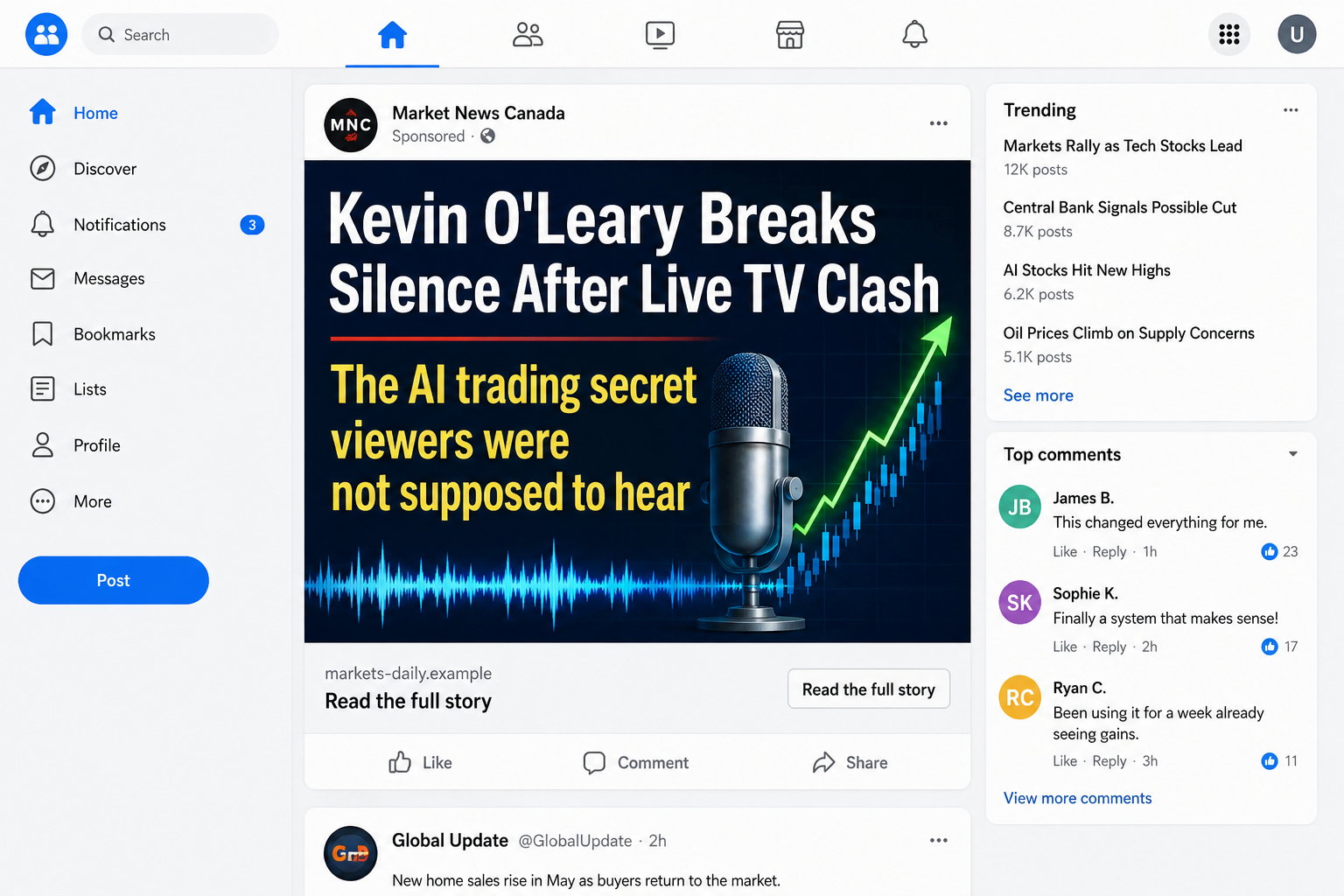
A sponsored post claims Kevin O’Leary lost his temper on live television after someone revealed an AI trading system that banks wanted hidden. The headline feels like celebrity news, not an investment pitch.
That distinction lasts only until the click. The fake Kevin O’Leary ad is a doorway into a copied news story, a registration form, and a high-pressure trading scam built to change names whenever one site is exposed.
Overview
The argument is invented to make the ad feel like news
The headline may say a television interview was cut short, a host stormed off set, a bank tried to suppress a secret, or a teenager embarrassed professional investors with an automated trading tool.
None of that drama needs to have happened. The ad uses a public figure’s name and a familiar television format to create curiosity before the reader realizes money is involved.
Video versions can use edited clips, cloned audio, AI-generated speech, or unrelated footage with new captions. Static versions imitate breaking-news cards and include fabricated comments from supposed users.
The social account running the ad may have no connection to Kevin O’Leary, the television program, or the news organization being copied.
The fake article quietly becomes a sales funnel
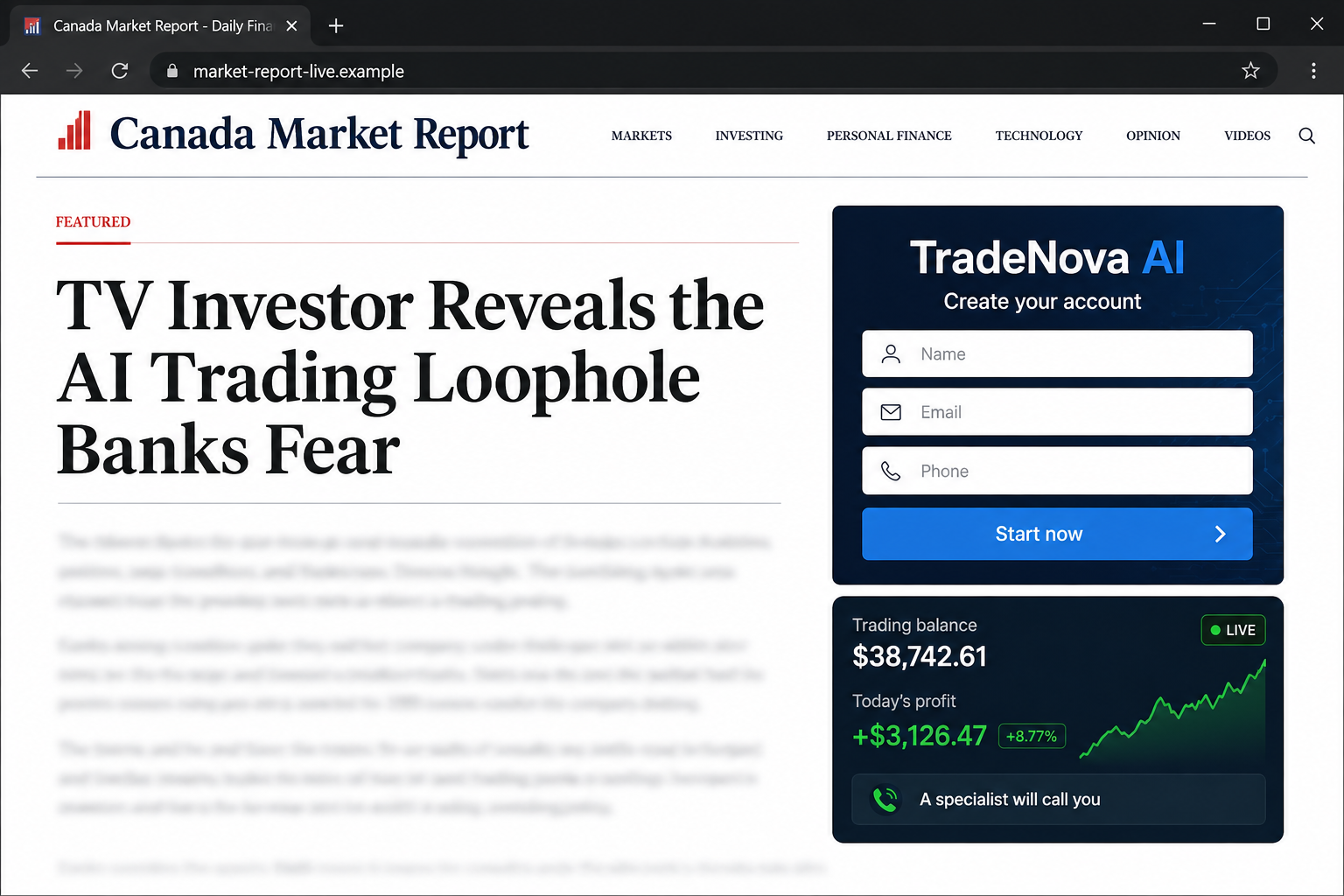
After the click, the visitor lands on a page designed to resemble a respected Canadian broadcaster or financial publication. The story repeats the television dispute and claims an ordinary person tested the system live.
A profit table, account screenshot, or interview transcript appears to prove that the software makes money automatically. The article rarely explains the trading strategy, risk controls, custody, fees, or legal entity receiving the deposit.
A registration form asks for a name, email address, and phone number. Submitting it can trigger repeated calls from sales agents posing as account managers or investment specialists.
The platform name is disposable. Regulators may warn about one entity while the same creative is redirected to another domain days later.
Regulators have confirmed the impersonation
The Financial and Consumer Affairs Authority of Saskatchewan issued an investor alert about fake social media videos claiming Kevin O’Leary endorsed an online investment platform called Enterprise2u.
The authority said the named online entity was not registered to trade or sell securities or derivatives in Saskatchewan. It also warned that scammers create fraudulent news articles that imitate real media sources.
Common signs across this campaign include:
- a sensational television argument that cannot be found on the real broadcaster’s site;
- a celebrity endorsement presented only inside an advertisement or advertorial;
- a news domain that differs from the publication shown in the design;
- a form that asks for a phone number before explaining the investment;
- guaranteed, effortless, or unusually consistent returns;
- a minimum deposit demanded during an unsolicited call;
- pressure to install remote-access software;
- a trading balance that rises but cannot be withdrawn.
Why the Platform Name Is the Least Stable Part
Searches for one trading brand can create a false sense of safety. A new name may have no complaints simply because it launched yesterday, while an older name may disappear as soon as warnings rank in search results.
The durable story is the funnel: celebrity-bait ad, fake news page, lead form, sales call, deposit, simulated account, and blocked withdrawal.
Operators can reuse the same ad video and page template while changing the logo, company name, contact number, and registration domain. Affiliate networks may send different visitors to different destinations based on location or device.
That is why the title of this warning describes the fake Kevin O’Leary ad rather than treating one rotating supplement, broker, or software name as the whole scam.
Kevin O’Leary is a real public figure. A regulator warning about criminals using his image does not mean he created, approved, or benefited from the campaign.
The same is true of a copied broadcaster. A convincing page header does not show that the publication reported the story. Open the real outlet independently and search for the article there.
Why the Fake Kevin O’Leary Ad Looks Convincing
The campaign mixes facts that can be checked with claims that cannot. Kevin O’Leary is a recognizable entrepreneur, television investment programs exist, and AI is genuinely used in financial analysis. The fake story borrows those truths, then inserts an endorsement and secret system without evidence.
Dynamic pages can display the visitor’s city, current date, local currency, and comments timed minutes apart. Those details feel personal, but software can generate them automatically for every visitor.
The page may also place risk language in small print while the headline promises easy gains. A disclaimer does not cancel a deceptive celebrity claim or make an unregistered operator safe.
The decisive checks remain outside the funnel: the real broadcaster, the celebrity’s authenticated channels, and the regulator’s record for the exact company and website.
How the Fake Kevin O’Leary Ad Scam Works
Step 1: A sponsored post borrows celebrity attention
The campaign buys social media placement or distributes posts through compromised pages. The creative uses Kevin O’Leary’s name, television persona, and investment reputation to stop the scroll.
Instead of saying “invest now,” the post promises gossip or breaking news. The commercial intent stays hidden until curiosity has already produced the click.
Step 2: A fake broadcaster page tells the invented story
The landing page copies fonts, colors, navigation, bylines, and article spacing from a recognizable news site. Its domain belongs to the scammer or an unrelated host.
Links in the navigation may be dead or lead back to the same registration form. A current date, live-looking comments, and countdown elements can be inserted automatically for every visitor.
Step 3: The article promises an AI advantage
The text claims artificial intelligence scans markets faster than professionals and wins trades without experience. It may say banks fear the tool because it lets ordinary people earn what institutions earn.
The CFTC warns that AI cannot predict sudden market changes. Fraudsters use AI hype to promote bots, signals, and crypto schemes with unreasonable or guaranteed returns.
Step 4: The visitor becomes a sales lead
The form collects contact details before providing a prospectus, registration record, risk statement, or clear company identity. Submitting the form can distribute the lead to a call center.
The first call may arrive within minutes. Speed keeps the victim inside the emotional momentum created by the ad.
Step 5: An account manager pushes the first deposit
The caller sounds confident and helpful, offers to guide setup, and describes the initial amount as a test. Payment may be requested by card, bank transfer, cryptocurrency, or a third-party processor.
Remote-access software may be presented as a way to help open the account. Granting access lets the caller observe banking activity, move money, or alter what appears on screen.
Step 6: A dashboard manufactures confidence
The victim sees trades, charts, and a balance that appears to grow. Those figures can be entries in a private website rather than assets held in a regulated brokerage account.
A small withdrawal may be allowed to build trust. The caller then recommends a larger deposit, loan, retirement transfer, or crypto purchase to capture a supposedly time-limited opportunity.
Step 7: Withdrawal triggers fees and threats
When the victim asks for money back, the platform demands tax, insurance, anti-money-laundering clearance, wallet activation, or another deposit. Paying does not release the displayed balance.
The site may disappear, switch domains, or assign a new recovery agent. The impressive dashboard never proved that real trades or profits existed.
How to Check the Ad Before Giving Your Phone Number
Open the broadcaster’s genuine site by typing its address or using a saved bookmark. Search for the exact headline and event. Do not trust links inside the suspect page, including its logo and menu.
Search for the celebrity’s statement through verified channels. A cropped clip can remove the original subject, and a blue check copied into a video is only an image.
Check the firm in the official registration database for your jurisdiction. Match the legal name, domain, telephone number, address, and permitted activities. A similarly named registered company may be unrelated to the website contacting you.
Do not treat a domain certificate as licensing. HTTPS protects the connection to the operator. It does not turn an unregistered platform into a regulated broker.
Before submitting anything, ask:
- Can the television segment be found on the real network?
- Does the page domain exactly match the publisher?
- Is the receiving firm registered for this activity?
- Do the legal name and website match the regulator’s record?
- Are losses, fees, custody, and withdrawals explained clearly?
- Why does a news article need my phone number?
- Why is an unsolicited caller controlling the timetable?
- Can an independent licensed adviser verify the offer?
If the opportunity depends on acting before you can answer those questions, the pressure is part of the design.
Company, Address, and Fulfillment Checks
The celebrity name is not the operating company
Kevin O’Leary’s name in the ad does not identify the entity receiving money. Find the legal operator in the terms, account agreement, and regulator record.
If the page cannot state one consistent legal name, stop.
The fake news page is not a corporate address
A copied masthead and local headline can make the offer feel domestic. Inspect the actual domain and corporate disclosures rather than the city named in the story.
Search the real broadcaster independently. A missing article is more important than visual similarity.
Registration must match the exact entity and website
A salesperson may point to a registered firm with a similar name. Confirm that the official record lists the same domain, telephone number, legal company, and investment service.
The Saskatchewan alert states that the specified Enterprise2u online entity was not registered there. A different visitor may see another rotating name and must check that exact destination.
A dashboard is not proof of custody or trading
Fulfillment means being able to verify where assets are held, what trades occurred, which regulated entity executed them, and how withdrawals work.
Numbers controlled by the same website that wants another deposit are not independent account statements.
What to Do if You Have Fallen Victim to This Scam
- Stop all payments and contact your financial institutions. Tell the fraud team how each payment was made. Ask about card disputes, transfer recalls, recipient-account alerts, and protections for any linked accounts.
- Do not pay a withdrawal fee. Taxes, insurance, verification deposits, and account-unlock charges are common extensions of the same fraud.
- Preserve the funnel. Save the original ad, page address, fake article, registration form, emails, telephone numbers, chat, payment records, wallet addresses, remote-access session details, and dashboard screenshots.
- Report the investment solicitation. Contact the securities or derivatives regulator in your jurisdiction. United States victims can also report to CFTC, IC3.gov, and the FTC.
- Remove remote-access tools. Disconnect the device if the caller had control. Have a trusted technician inspect it before using financial accounts again.
- Run a full security scan. Use an updated product such as Malwarebytes if you installed software, browser extensions, or files supplied by the platform.
- Change credentials from a clean device. Prioritize email, banking, cryptocurrency, password manager, and any account visible during remote access. Revoke sessions and replace exposed authentication codes.
- Protect identity information. If you supplied a passport, license, tax number, proof of address, or selfie, contact the relevant issuer and follow local identity-theft protections.
- Report the social media ad. Report both the advertisement and the page that placed it. Include the destination domain because the ad creative may reappear under another account.
- Reduce malicious follow-up. AdGuard can filter many known scam and malvertising destinations, but it cannot verify an investment or recover transferred funds.
- Reject recovery offers. People promising guaranteed retrieval for an advance payment often target names and contact details exposed by the first scam.
Frequently Asked Questions
Did Kevin O’Leary endorse the platform in the ad?
Do not assume so. Saskatchewan’s regulator warned about fake videos claiming his endorsement. Verify statements through the public figure’s authenticated channels and the relevant regulator.
Is the copied news organization involved?
Usually the publication is being impersonated too. Open its genuine site independently and search for the headline rather than following the ad’s links.
Can an AI trading bot guarantee profits?
No. Markets change and every trading strategy carries risk. A guarantee or near-perfect win claim conflicts with that reality and deserves immediate skepticism.
Why does the form ask for my phone number?
The form can turn a curious reader into a sales lead. Callers then use urgency, rapport, and repeated contact to push the first deposit.
What if the dashboard shows real-looking trades?
A private website can display any balance or chart its operator chooses. Verify assets through an independently confirmed regulated custodian or broker.
Will paying the tax unlock my withdrawal?
Not in this scam. An extra charge usually leads to another excuse. Stop sending money and report the platform to your bank and regulator.
The Bottom Line
The fake Kevin O’Leary ad does not sell investment evidence. It sells a dramatic television story that carries the reader into an unverified AI trading funnel before ordinary questions begin.
Ignore the rotating platform name long enough to examine the structure. Verify the alleged broadcast, check the exact legal entity with a regulator, refuse remote access, and never use a screen balance as proof that your money is safe.

Join the discussion
0 commentsShare your experience or ask a question about this article.
Discussion
Start the conversation
Have a question or something useful to share? Add the first comment.