


A familiar jar from the medicine cabinet becomes the center of a startling promise about damaged lungs and easier breathing.
The message feels comforting because the product is real. The cure story surrounding it is something else entirely.
Overview
The fake remedy story viewers encounter
The campaign presents altered footage resembling physician and broadcaster Dr. Sanjay Gupta discussing a Vicks VapoRub technique that supposedly repairs lungs.
Other clips attach celebrity names and personal recovery stories to make the discovery appear widely tested and independently confirmed.
The narration promises dramatic improvement for smokers, people using oxygen, and viewers living with serious breathing problems.
It eventually promotes a supplement called Pure Lung, although the buying path currently leads somewhere different.
What Vicks VapoRub is actually labeled to do
Vicks VapoRub is a genuine topical medicine for temporary cough relief from minor throat and bronchial irritation associated with the common cold.
Its official directions say to rub a thick layer on the throat and chest.
The product is not labeled to regenerate lung tissue, reverse emphysema, remove smoking damage, replace oxygen, or cure chronic respiratory disease.
The manufacturer’s page describes temporary cough suppression and topical relief of minor muscle and joint pain.
What our live test found
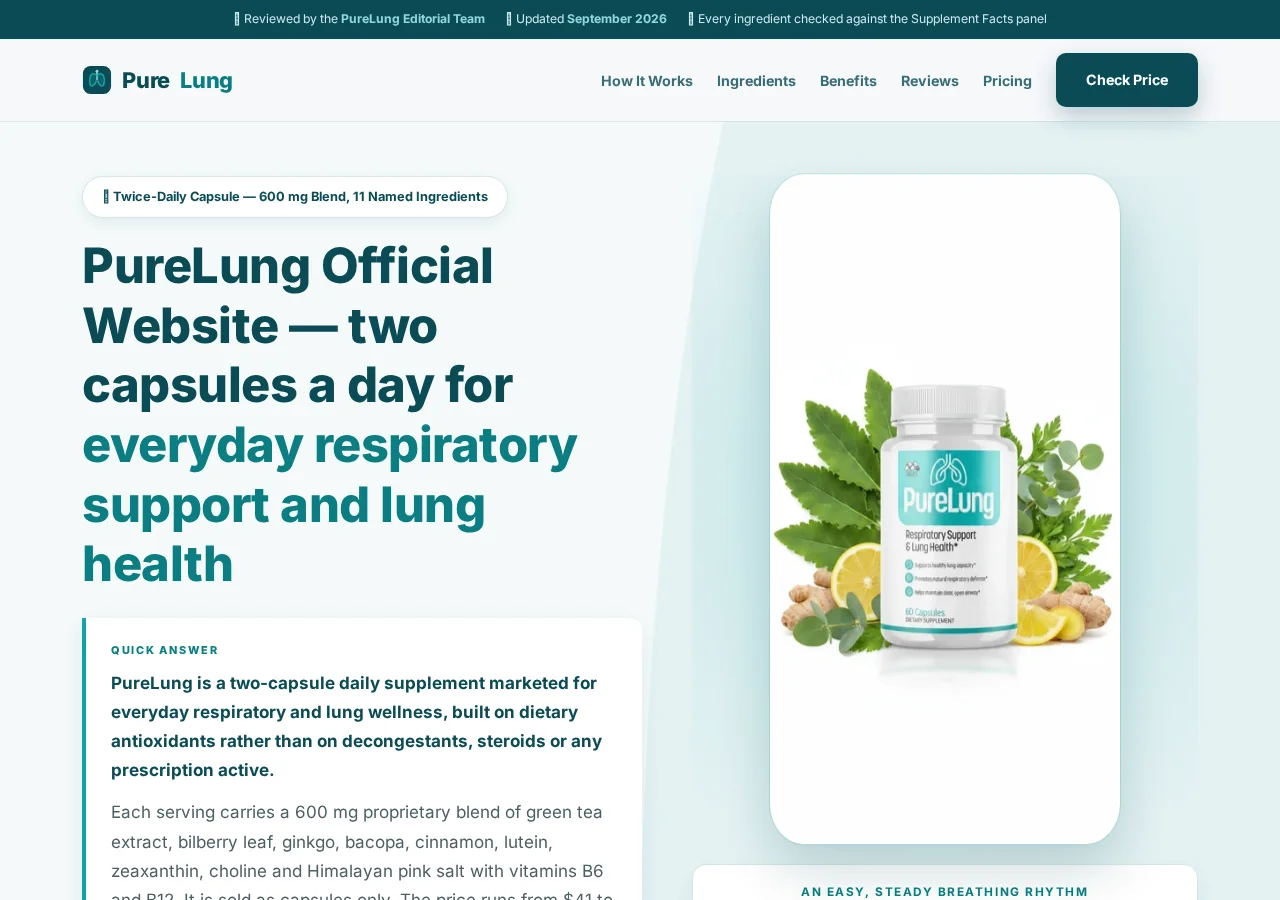
Purellung.com was registered on July 28, 2026, and describes itself as an independent editorial affiliate rather than the manufacturer or store.
Its current page promotes Pure Lung capsules and says orders are one-time purchases without rebilling.
However, the order button redirected our test to a BreathEaseX and CardioEaseX bundle on a separate domain.
The clearest concerns are:
- An apparent AI-generated doctor endorsement.
- Misuse of a familiar over-the-counter product.
- Claims that imply reversal of serious lung damage.
- Dangerous suggestions about oxygen or prescribed treatment.
- Fake news and medical-institution styling.
- A product switch between Pure Lung and BreathEaseX.
- An affiliate page unable to handle orders or refunds.
- No product-specific clinical evidence proving lung repair.
The Advertisement Borrows Trust From a Real Medicine
Vicks VapoRub has been used for generations, so many viewers recognize the jar, scent, and familiar chest-application routine immediately.
That familiarity gives the scam a foundation that an invented ingredient could not provide.
The campaign does not need to prove Vicks exists. It only needs to add a secret use that sounds close enough to something people know.
Official directions are much narrower than the viral story.
VapoRub contains camphor, eucalyptus oil, and menthol. Its vapors temporarily suppress coughs associated with a common cold when used as directed.
The official labeling does not say the ointment removes tar, rebuilds alveoli, restores oxygen capacity, or reverses chronic lung disease.
It also warns against swallowing the product, placing it in nostrils, heating it, microwaving it, or adding it to hot water.
Those warnings matter because deceptive “tricks” often encourage improvised uses that were never tested or approved.
A real household product can become part of a fraudulent health claim without the manufacturer participating.
Consumers should separate what the label promises from what an anonymous advertisement invents.
How the Fake Vicks VapoRub Lung Repair Scam Works
Step 1: A doctor appears inside a trusted broadcast format
The social-media video resembles a television health segment, using studio graphics, interview framing, and authoritative medical language.
A face resembling Dr. Sanjay Gupta delivers statements that cannot be traced to a complete original report.
AI-generated lip movement and voice synthesis make the invented script feel like a genuine warning from a respected physician.
The FTC warns that fake celebrity endorsements increasingly use doctored video and audio to sell products.
Step 2: The story targets fear surrounding breathlessness
Shortness of breath is frightening, particularly for people who smoke, use oxygen, or have chronic respiratory diagnoses.
The presentation tells them conventional care manages symptoms while ignoring the hidden damage that one simple method can repair.
That framing can make ordinary medical caution sound indifferent or outdated.
It also creates urgency because the viewer may worry that every day without the trick causes further harm.
Step 3: Vicks becomes the low-cost curiosity hook
The title suggests the answer involves a common ointment already available at home.
Viewers continue watching for the precise application, mixture, or timing that supposedly produces the dramatic result.
The video delays the answer through testimonials, lung animations, hidden-study claims, and stories about doctors being astonished.
By the reveal, the viewer is emotionally invested and more willing to accept a commercial solution.
Step 4: Fake institutional authority replaces verifiable evidence
The promotion invokes famous hospitals, universities, broadcasters, physicians, and celebrities without linking to authentic announcements or clinical publications.
Logos and scientific images create visual authority, while the underlying study remains unnamed or impossible to locate.
A genuine lung-repair breakthrough would include researchers, methods, participant numbers, outcomes, risks, and peer-reviewed results.
The funnel supplies anecdotes and urgency instead of that documentation.
Step 5: The home remedy quietly becomes a supplement order
The promised Vicks technique does not remain a simple, independently testable instruction.
The story pivots toward capsules said to provide the real botanical support behind the supposed discovery.
Pure Lung is presented as a two-capsule daily formula with an 11-ingredient proprietary blend.
That change converts curiosity about a $10 household product into a much larger online supplement purchase.
Step 6: The checkout changes the product again
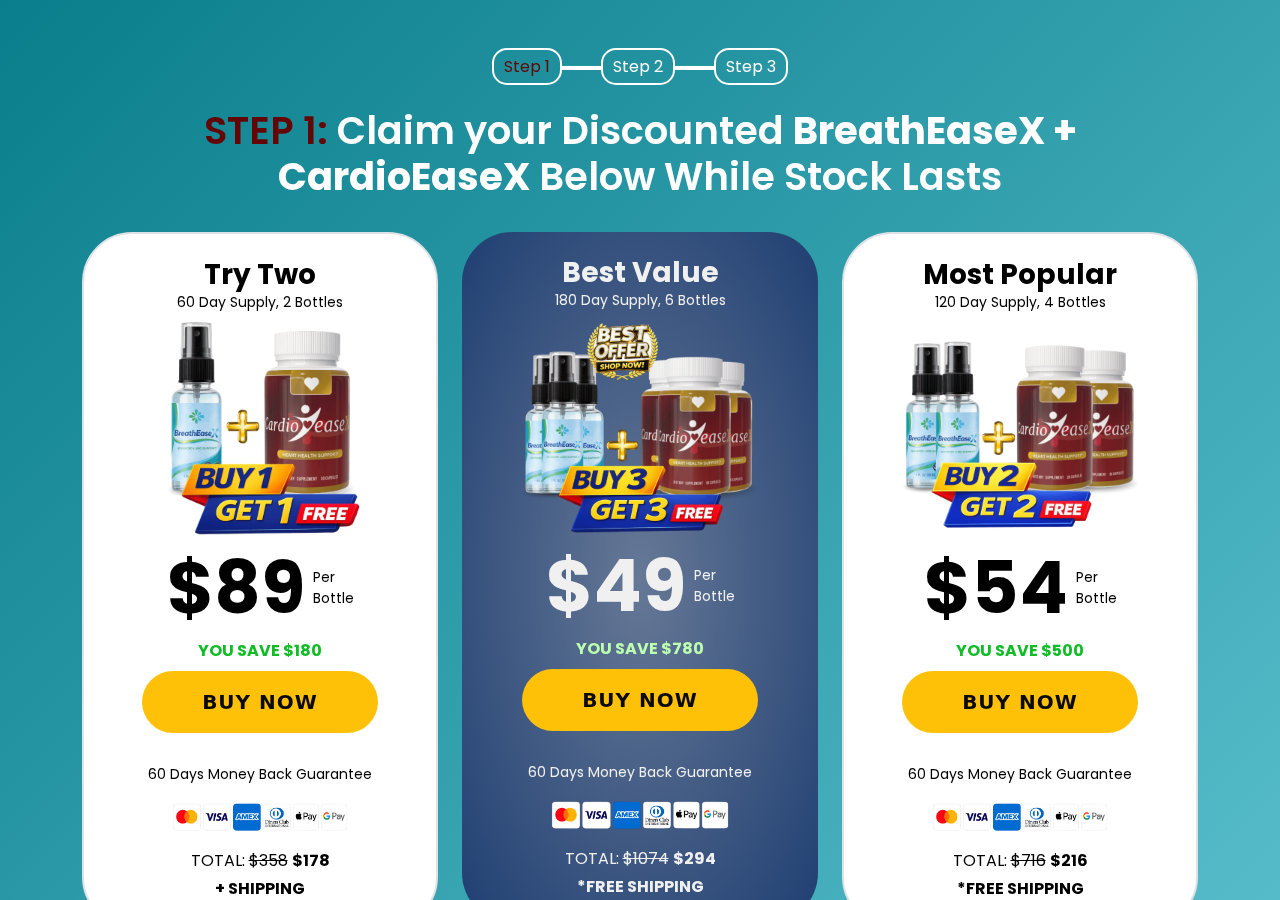
When we selected the order link, the destination offered BreathEaseX sprays and CardioEaseX capsules instead of Pure Lung.
The packages included two bottles for $178 plus shipping, four for $216, and six for $294.
A buyer should not assume these formulas, manufacturers, guarantees, or support systems are interchangeable.
The product change is a documented reason to stop before entering card information.
Step 7: Large bundles turn fear into a high first charge
The checkout labels six bottles as the best value and four as most popular.
Buy-one-get-one and buy-three-get-three graphics make the order feel generous while committing the buyer to $178 through $294 immediately.
The reviewed pages say no automatic rebilling, so we found no basis to call the current path a proven subscription trap.
The central documented harm is deceptive medical promotion and product switching, not recurring billing unsupported by the current checkout.
The Medical Claims Can Create Immediate Safety Risks
A supplement advertisement becomes especially dangerous when it encourages changes to oxygen, inhalers, steroids, antibiotics, or other prescribed care.
Feeling temporarily less congested does not establish that damaged lung tissue has repaired.
Menthol can create a cooling sensation, while aromatic vapors may make breathing feel subjectively different.
That sensation is not proof of improved oxygen exchange, reduced disease severity, or healed airways.
Shortness of breath can arise from asthma, chronic obstructive pulmonary disease, infection, heart disease, blood clots, anemia, anxiety, or other causes.
A video cannot diagnose which cause applies to a particular viewer.
Sudden or severe breathlessness, chest pain, blue lips, confusion, fainting, or rapidly worsening symptoms require urgent medical attention.
No affiliate funnel should delay that decision.
People using oxygen should never alter flow, timing, or equipment based on a social-media testimonial.
Those instructions belong to the healthcare team responsible for the underlying condition.
A temporary cooling sensation should never be used as permission to postpone evaluation of worsening respiratory symptoms.
When breathing changes suddenly, seek qualified help first and investigate the advertisement later.
Pure Lung’s Own Page Makes Much Narrower Claims
The current Pure Lung page does not openly repeat the most extreme claims from the viral Vicks presentation.
It describes everyday respiratory and antioxidant support and states that the product is not intended to diagnose, treat, cure, or prevent disease.
It also says users should not stop inhalers, oxygen, or prescribed treatment.
That difference is revealing. The viral advertisement creates medical urgency, while the destination page adopts safer wellness language.
The label shown online lists a 600 mg proprietary blend spread across green tea, bilberry, ginkgo, bacopa, cinnamon, lutein, zeaxanthin, choline, and other ingredients.
A proprietary blend states the combined amount without showing the quantity of each botanical.
That makes it difficult to compare the formula with research doses or evaluate which ingredient contributes most to interaction risk.
No product-specific human trial located during this review demonstrated that Pure Lung repairs smoking damage or reverses chronic lung disease.
The Order Redirect Breaks the Connection Between Claim and Product
A visitor reading Pure Lung’s ingredient discussion and reviews may believe the order button purchases that same bottle.
The tested link instead opened a page headed “Claim Your Discounted BreathEaseX + CardioEaseX.”
The new offer uses a spray alongside heart-support capsules, creating a materially different product proposition.
Its page also displays more than 2,000 reviews and a 4.98 out of 5 rating, claims ordinary buyers cannot easily audit.
At this stage, the original Vicks story has moved through three distinct identities.
The hook uses a familiar ointment, the editorial bridge discusses Pure Lung, and the checkout sells BreathEaseX with CardioEaseX.
Each change makes it harder to know which evidence, label, testimonial, and guarantee belongs to the paid order.
Do not continue when the product name changes unless the relationship is explained clearly and documented by the responsible seller.
Company, Address, and Fulfillment Checks
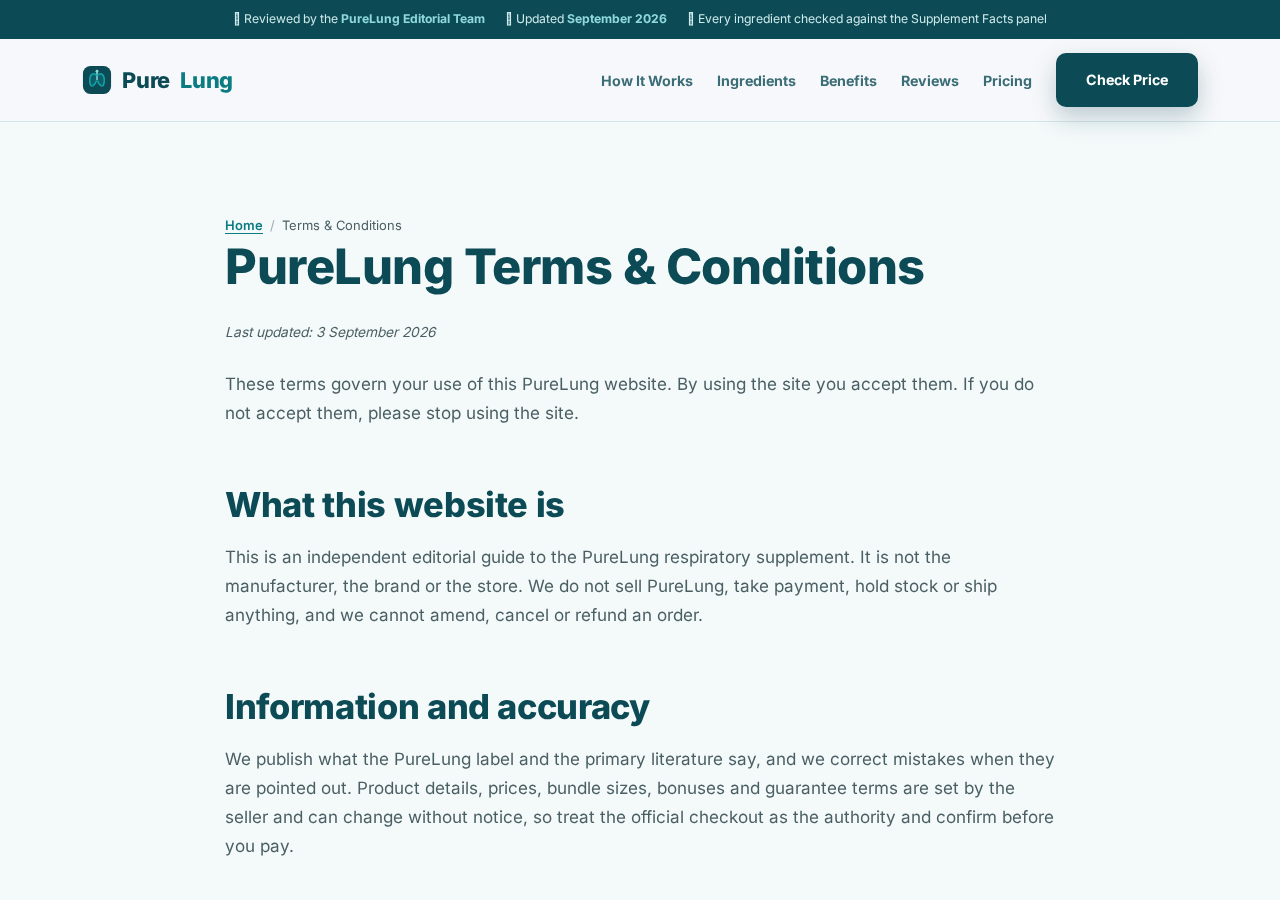
Pure Lung identifies itself as an affiliate guide
The site’s terms state that it does not manufacture, stock, ship, charge, amend, cancel, or refund orders.
Its purchase links are affiliate links, meaning the website may earn a commission when visitors buy through them.
That commercial relationship deserves attention when reading its positive ingredient analysis and reviews.
The bottle label names a distributor, not a factory
Pure Lung’s displayed label refers to MJO of Sheridan, Wyoming, as the distributor.
A distributor can arrange branding and sales without operating the facility that blended, bottled, tested, or warehoused the supplement.
Ask for the actual manufacturer’s identity and lot-specific certificate instead of assuming the distributor address proves production.
BuyGoods processes the redirected order
The BreathEaseX checkout identifies BuyGoods as the retailer and provides a Wilmington, Delaware address.
Its footer also says BuyGoods does not endorse the merchant’s claims, views, opinions, or statements.
A known payment platform can facilitate a transaction without validating medical effectiveness.
Support and return routes must match the purchased item
Pure Lung directs order questions to the seller shown after checkout, while a direct BreathEaseX contact URL returned a missing-page response during our test.
That may be session-dependent, but it still shows why buyers should save the exact confirmation link.
Before paying, obtain a working phone number, email, return address, refund deadline, and legal seller for the precise bundle.
Supplement Safety Cannot Be Proven With Badges
The FDA does not approve dietary supplements for safety and effectiveness before they are marketed.
Manufacturers and distributors remain responsible for lawful labeling, safe products, and substantiated claims.
A GMP badge or “made in the USA” statement does not show the ingredient origin, tested lot, analytical method, or contaminant results.
Respiratory products deserve extra caution because users may already take medicines with meaningful interactions.
Ginkgo, green tea extracts, cinnamon, and other botanicals can have physiological effects and may not suit every person.
The FDA warns that fraudulent health products may contain hidden ingredients and can delay effective diagnosis or treatment.
That warning does not prove this particular bottle is contaminated.
It explains why unknown manufacturing and extraordinary disease claims should not be dismissed as harmless marketing.
How to Check a Viral Lung Remedy Safely
Begin with the official label of the familiar product named in the video.
If the viral instruction conflicts with labeled directions, do not improvise the application.
Search the doctor’s verified channels for the complete original segment, not a reposted thirty-second clip.
Look for the claimed hospital study through its title, authors, journal, and clinical-trial registration.
Ask whether the advertisement discusses symptom relief, disease treatment, or actual tissue regeneration.
Those claims require very different evidence.
Check every name in the funnel: home remedy, editorial product, checkout product, card merchant, distributor, and return recipient.
Never change oxygen or prescription treatment without the clinician who manages it.
What to Do if You Have Fallen Victim to This Scam
- Save the entire path. Capture the social ad, altered video, Vicks claim, Pure Lung page, redirected checkout, order total, receipt, and policies.
- Identify what you bought. Compare the confirmation, delivered label, card descriptor, and checkout to determine whether the order was Pure Lung, BreathEaseX, or another product.
- Request cancellation quickly. Use the seller and retailer contacts in the confirmation and reject additional shipments or charges in writing.
- Confirm return eligibility. Ask for authorization, address, deadline, bottle condition, postage responsibility, deductions, and the precise expected refund.
- Contact the card issuer. Explain any product substitution, unauthorized quantity, non-delivery, unexpected charge, or failure to honor written terms.
- Do not follow unsafe Vicks instructions. Use the ointment only according to its official label and never swallow, heat, or place it inside nostrils.
- Protect prescribed treatment. Contact your clinician promptly if you reduced oxygen, stopped an inhaler, or changed medicine because of the advertisement.
- Report adverse effects. Seek urgent care for serious symptoms and submit appropriate product reports to the FDA.
- Scan suspicious devices. Run Malwarebytes if the pages initiated downloads, notifications, pop-ups, or unfamiliar browser changes.
- Limit future redirects. AdGuard can block many deceptive advertisements and tracking links, but it cannot diagnose breathing problems or recover money.
Is Your Device Infected? Run a Free Malware Scan
Slow performance, constant pop-ups, or strange behavior? These are classic signs of a malware infection. A quick way to check is to scan your device with Malwarebytes Free, one of the most trusted malware removal tools available. If you only visited a scam page and didn’t download or install anything, this scan is optional.
The free version detects and removes the most common threats, including:
- Adware — the cause of those annoying pop-ups
- Browser hijackers — unwanted redirects and changed homepages
- Trojans and spyware — hidden programs stealing your data
- Potentially unwanted programs (PUPs) — software you never asked for
👉 Select your device below — Windows, Mac, or Android — then follow the simple steps to download Malwarebytes, scan your system, and remove any threats it finds. The scan usually takes 5 to 20 minutes.
Run a Malware Scan with Malwarebytes for Windows
Malwarebytes is one of the most popular and trusted anti-malware tools for Windows — and it’s completely free for removing infections. It catches threats that many antivirus programs miss, including adware, browser hijackers, and trojans. Follow the steps below to scan your PC and remove what Malwarebytes finds.
Download Malwarebytes
Click the button below to download the latest version of Malwarebytes for Windows from the official source. The free version is all you need — it will scan your computer and remove adware, browser hijackers, and other malicious software at no cost.
Download MalwarebytesOfficial installer for Windows 11 and 10. Your download starts right away.Want real-time protection? See Malwarebytes Premium Malwarebytes Free for WindowsScans and removes malware at no cost
-
Install Malwarebytes
When the download finishes, open your Downloads folder and double-click the MBSetup file. If Windows shows a User Account Control pop-up, click “Yes” to allow the installation.

Follow the On-Screen Prompts to Install Malwarebytes
The setup wizard will walk you through a few quick screens:
-
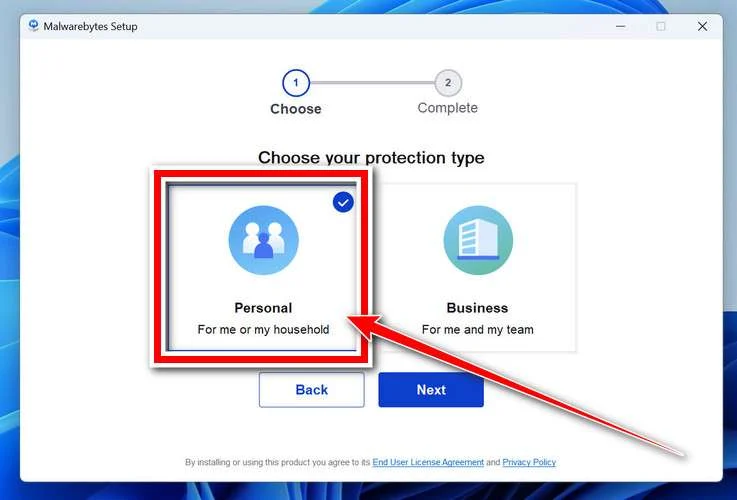
Choose where you’re installing the program — “Personal Computer” or “Work Computer” — then click Next.
-
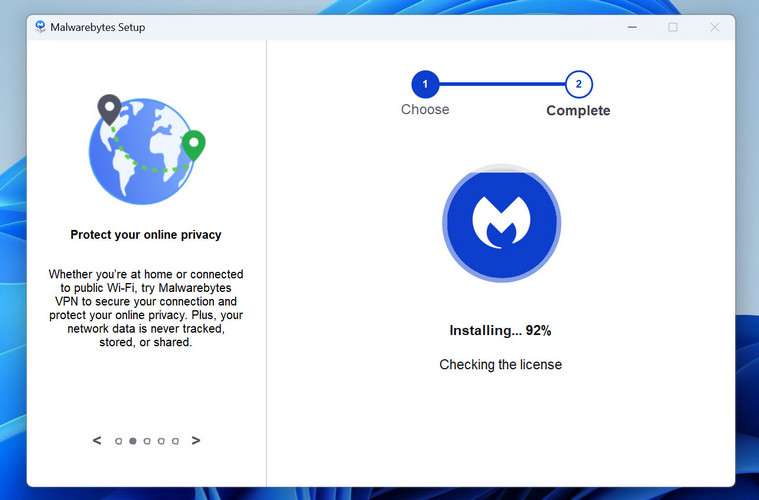
Malwarebytes will now install on your device. This usually takes under a minute.
-
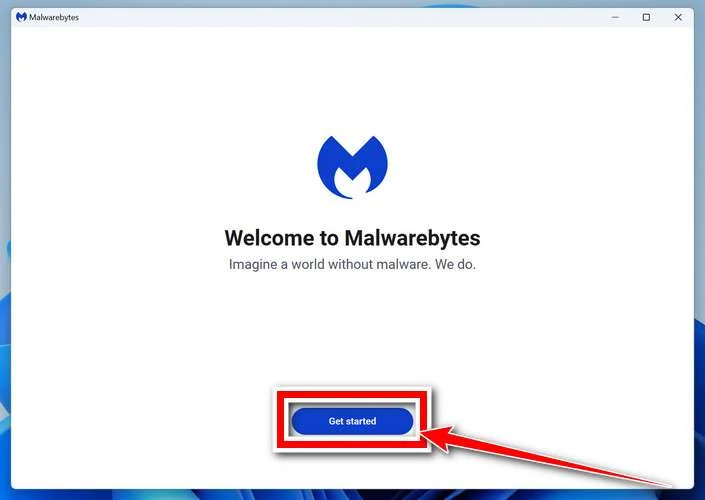
When installation is complete, the “Welcome to Malwarebytes” screen will open automatically.
-
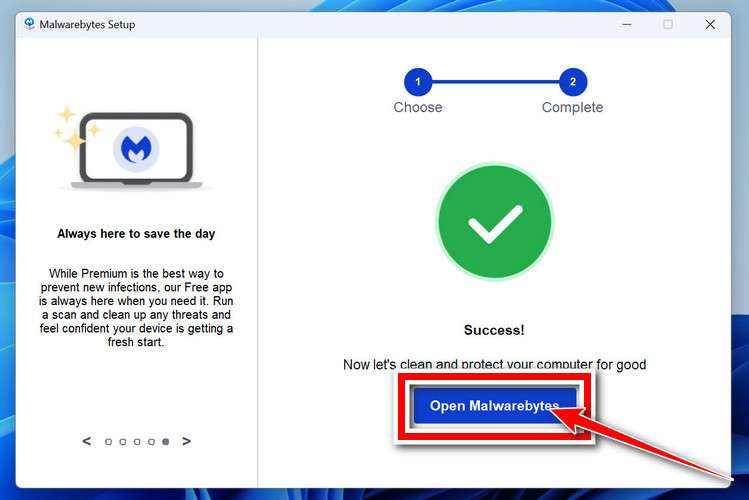
On the final screen, click Open Malwarebytes to launch the program.
-
Optional: Check for rootkits with a Custom Scan
You don’t need to change any settings for a normal scan. The standard Threat Scan in the next step is enough for most problems, so you can go straight to it.
If you also want to check for rootkits, use a Custom Scan. In current versions of Malwarebytes, rootkit scanning is only available there:
- On the Scanner tile, click the three-dot menu and select Advanced Scan.
- Choose Custom Scan. In its options, check Scan for rootkits.
- Select your system drive (usually C:\) as the location to scan, then start the scan. It takes longer than a Threat Scan.
- When it finishes, review and quarantine the results as described in the steps below.
Rootkit scanning isn’t available on Windows devices with ARM processors.
Start the Scan
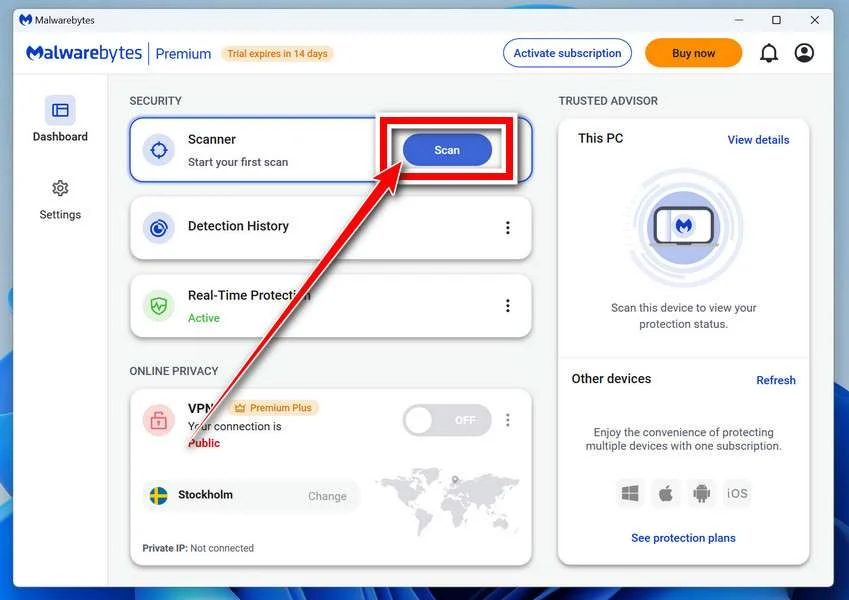
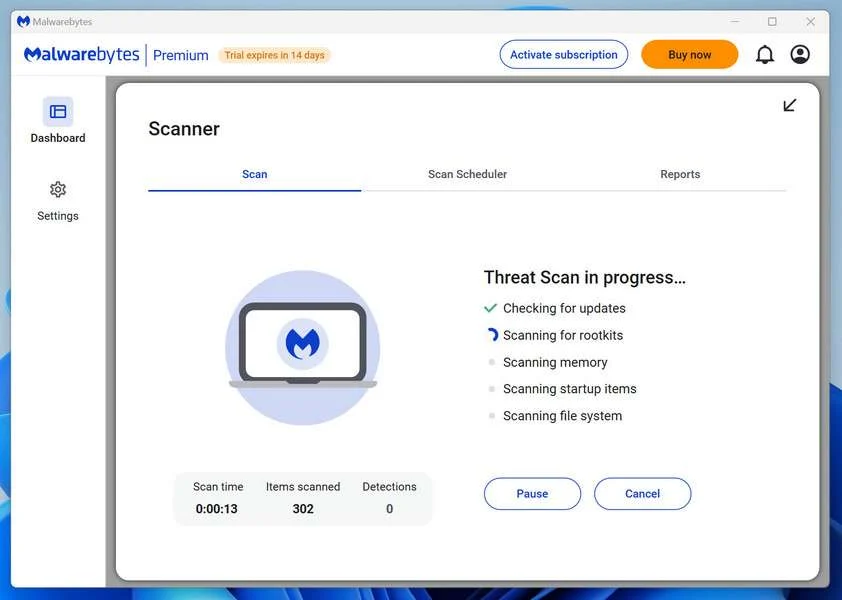
Click the blue Scan button. Malwarebytes will automatically update its virus database and start checking your computer for malware.
-
Wait for the Scan to Finish
The scan checks your entire system for browser hijackers and other malicious programs, so it can take 5 to 20 minutes depending on your computer. Feel free to do something else — just check back occasionally to see the progress.
-
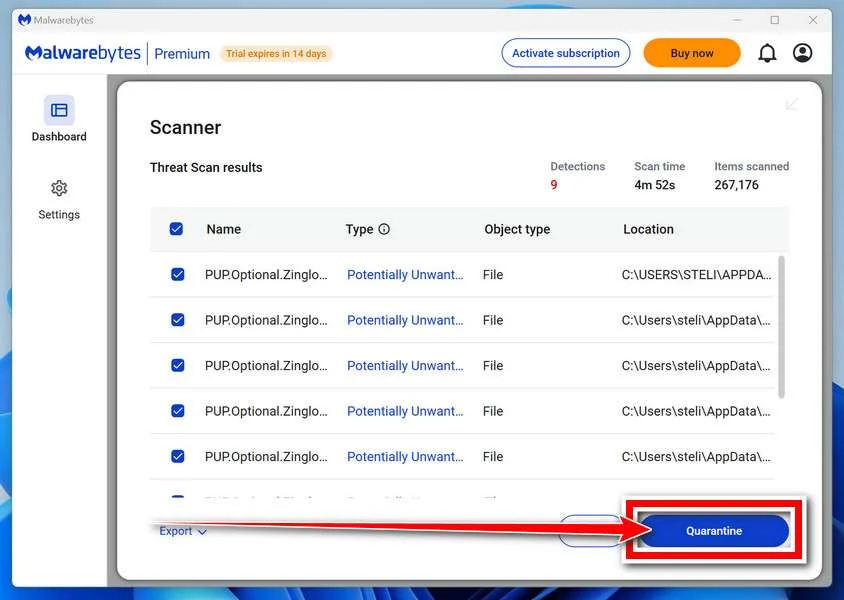
Quarantine the Detected Threats
When the scan is done, you’ll see a list of everything Malwarebytes found — malware, adware, and potentially unwanted programs. Click the “Quarantine” button to remove all of them at once.
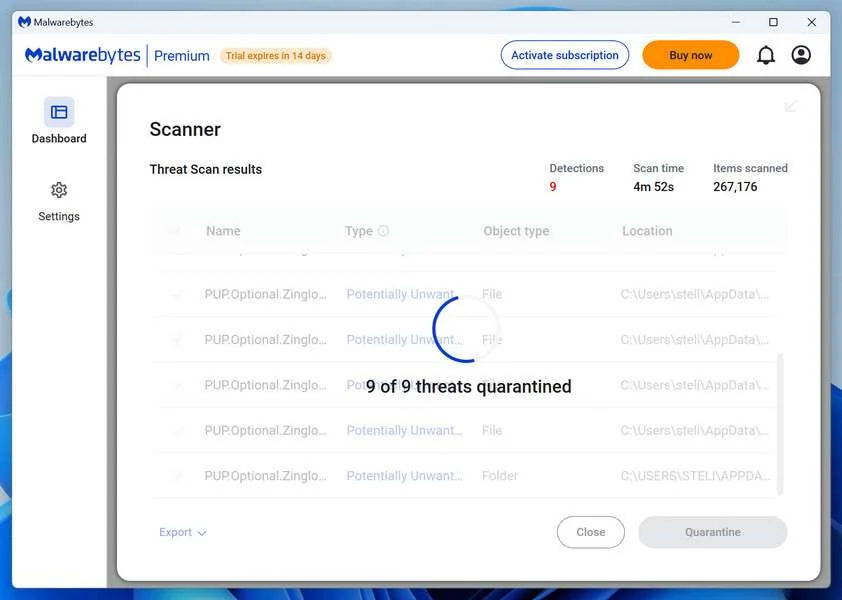
Malwarebytes will now remove the malicious files and registry entries and move them safely into quarantine.
-
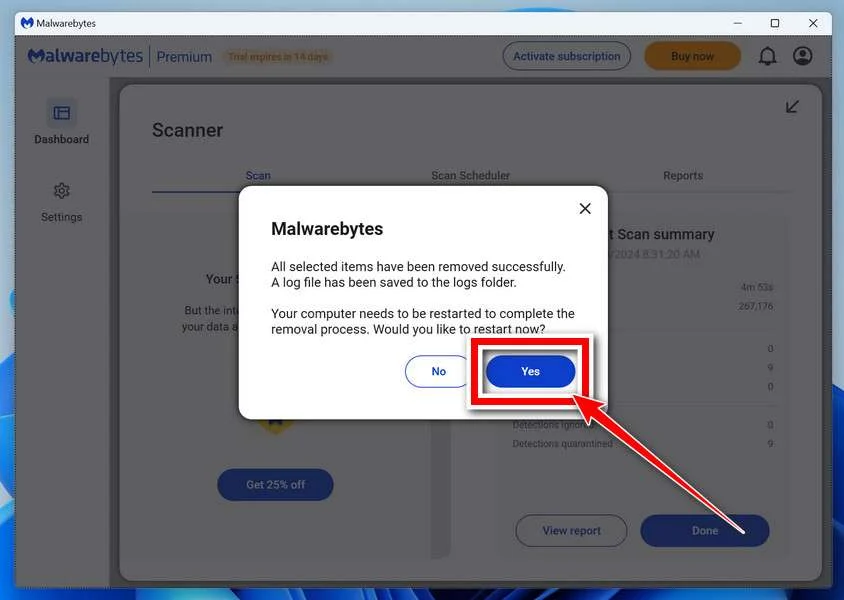
Restart Your Computer
Some threats can only be fully removed after a reboot. If Malwarebytes asks you to restart, click Yes. Once you’re logged back in, Malwarebytes has finished removing the threats it found.
When the scan is done, check whether the problems you noticed have stopped. If they continue, see the options below.
If you are still having problems with your computer after completing these instructions, then please follow one of the steps:
- Run a computer scan with ESET Online Scanner
- Ask for help in our Windows Malware Removal Help & Support forum.
Run a Malware Scan with Malwarebytes for Mac
Malwarebytes for Mac is a free on-demand scanner that removes the malware other security software tends to miss — adware, browser hijackers, and unwanted programs included. Cleaning an infected Mac with Malwarebytes has always been completely free, and it’s our go-to recommendation. Follow the steps below to scan your Mac and remove what Malwarebytes finds.
-
Download Malwarebytes for Mac
Click the button below to download the latest version of Malwarebytes for Mac.
Download MalwarebytesOfficial installer for macOS. Your download starts right away.Want real-time protection? See Malwarebytes PremiumMalwarebytes Free for MacScans and removes malware at no cost -
Open the Malwarebytes setup file
When the download finishes, open your Downloads folder and double-click the setup file to begin the installation.
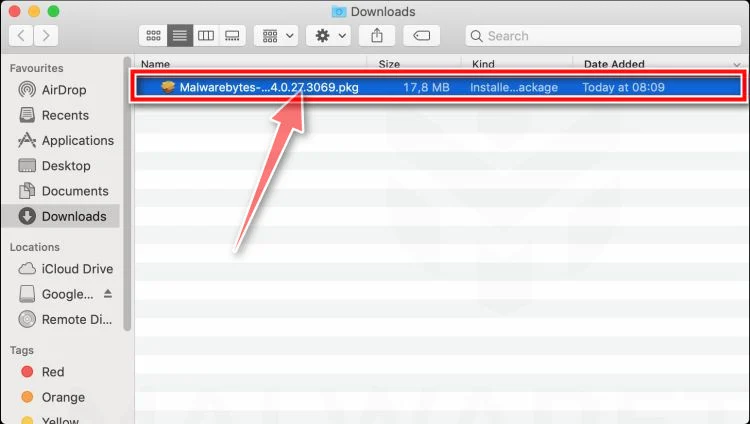
-
Follow the On-Screen Prompts to Install Malwarebytes
The Malwarebytes for Mac Installer will guide you through a few quick screens. Click “Continue” and keep following the prompts until the installation completes.
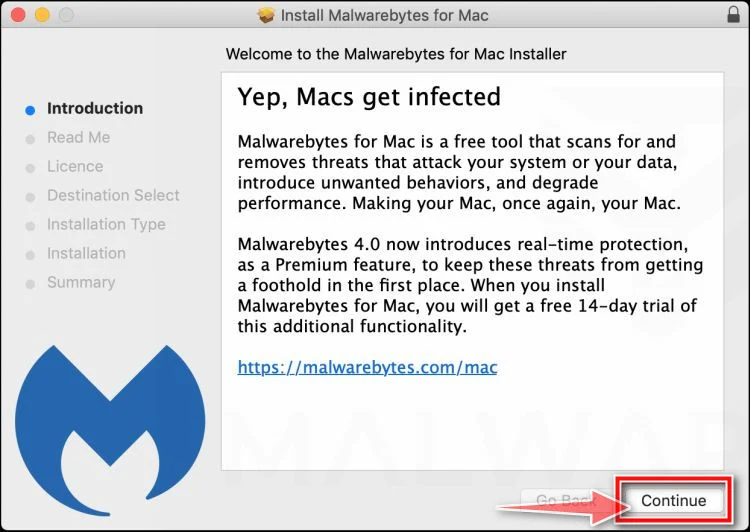
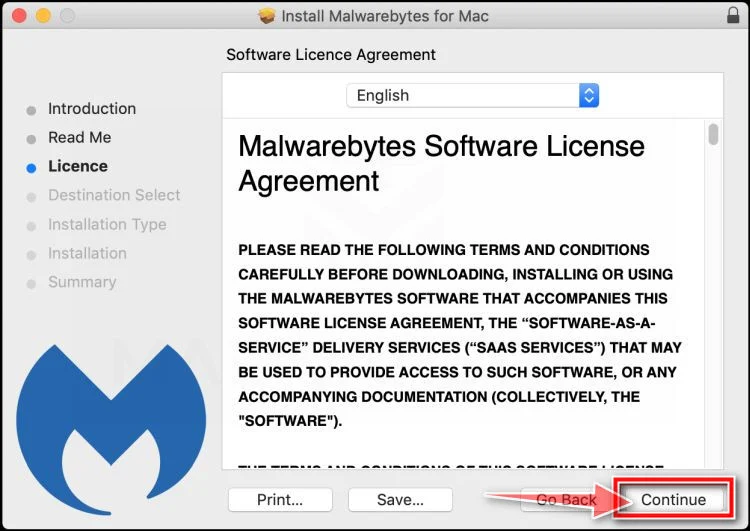
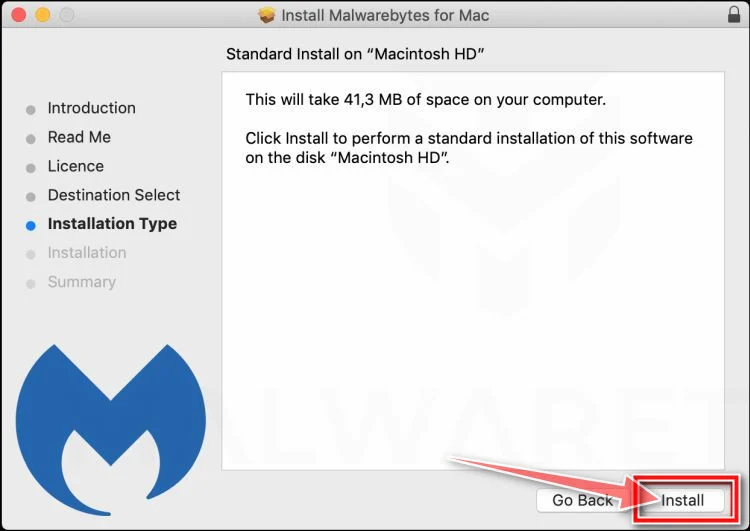
When the installation is complete, Malwarebytes opens to the Welcome to Malwarebytes screen. Click “Get started“.
Malwarebytes needs Full Disk Access to check your whole Mac. When it asks, open System Settings > Privacy & Security > Full Disk Access, turn on Malwarebytes (it may be listed as Malwarebytes Protection), and confirm with your password or Touch ID. Then return to Malwarebytes. On macOS Monterey and earlier, this setting is in System Preferences > Security & Privacy > Privacy.
-
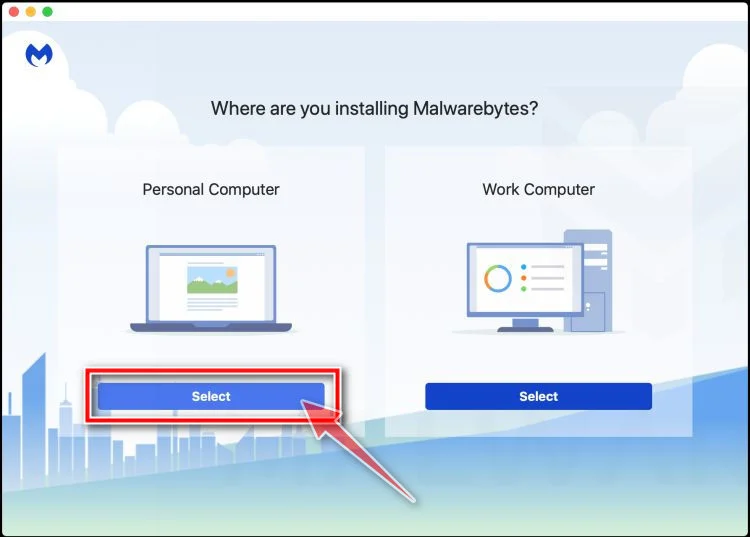
Select “Personal Computer” or “Work Computer”
Malwarebytes will ask what type of computer you’re installing it on. Click either Personal Computer or Work Computer, whichever applies.
-
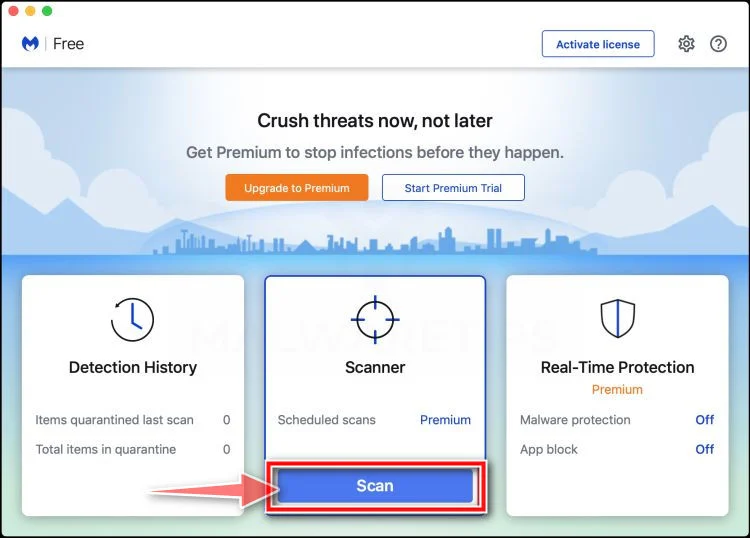
Start the Scan
Click the “Scan” button. Malwarebytes will automatically update its detection database and begin checking your Mac for malware.
-
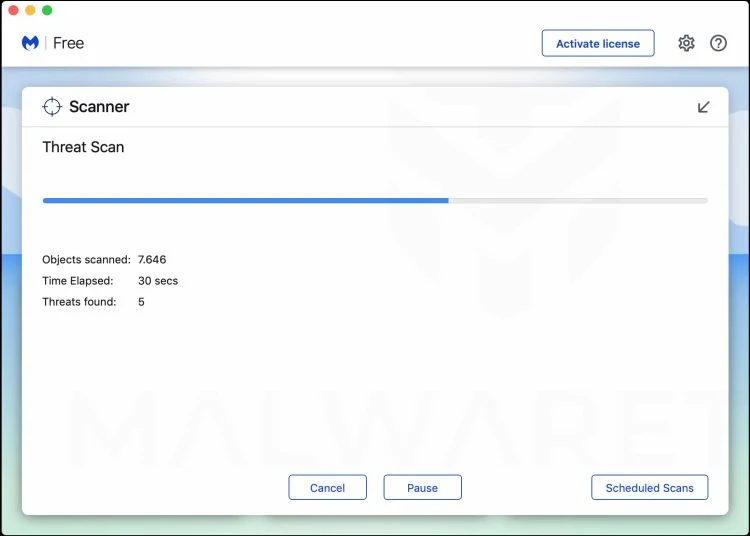
Wait for the Scan to Finish
Malwarebytes will scan your Mac for adware, browser hijackers, and other malicious programs. This can take a few minutes, so feel free to do something else — just check back occasionally to see the progress.
-
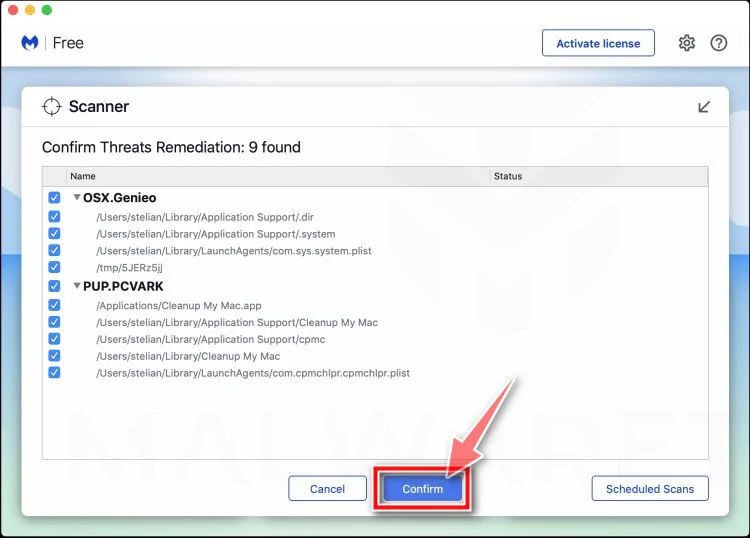
Quarantine the Detected Threats
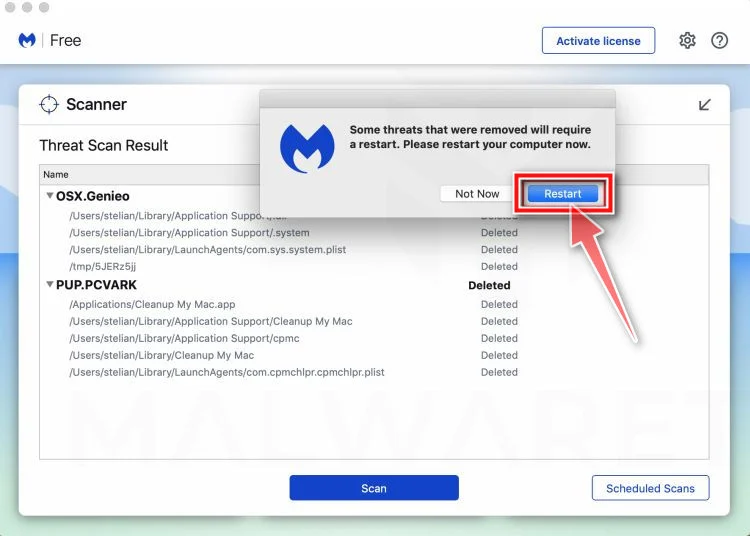
When the scan is done, you’ll see a list of everything Malwarebytes found. Click the “Quarantine” button to remove all the threats at once.
-
Restart Your Mac
Malwarebytes will now remove all the malicious files it found. Some threats can only be fully removed after a reboot — if Malwarebytes asks you to restart, allow it. Once you’re logged back in, check whether the problems you noticed have stopped. If they come back, save the scan report and ask for help in our forum.
If the problems you noticed continue after the scan, see the options below.
If you are still experiencing problems while trying to remove a malicious program from your computer, please ask for help in our Mac Malware Removal Help & Support forum.
Run a Malware Scan with Malwarebytes for Android
Malwarebytes for Android scans your phone or tablet for malware, adware, and potentially unwanted apps. The free version scans only when you start a scan. Real-time protection, which checks apps automatically, is part of the paid Premium version.
-
Download Malwarebytes for Android.
You can download Malwarebytes for Android by clicking the link below.
Get Malwarebytes for AndroidOpens Google Play in a new tab.Want real-time protection? See Malwarebytes Premium for AndroidMalwarebytes for AndroidScans your phone and removes malware at no cost -
Install Malwarebytes for Android on your phone.
In the Google Play Store, tap “Install” to install Malwarebytes for Android on your device.
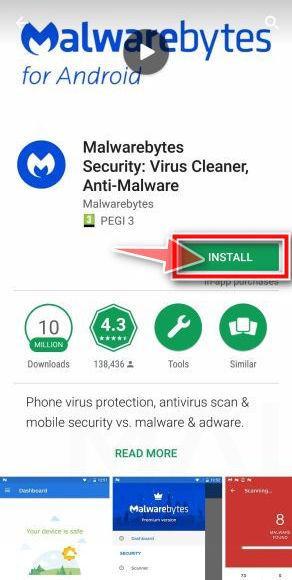
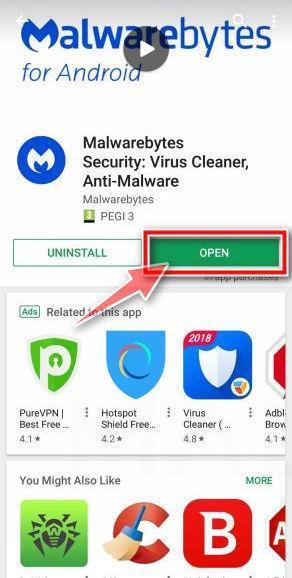
When the installation process has finished, tap “Open” to begin using Malwarebytes for Android. You can also open Malwarebytes by tapping on its icon in your phone menu or home screen.
-
Follow the on-screen prompts to complete the setup process
When Malwarebytes opens, it walks you through a short setup. Tap Get started and follow the prompts. If you see an offer for a trial or a paid plan, read it before you accept. You can skip it and keep using the free scanner.
Malwarebytes will ask for permission to access the files on your phone so it can scan them. Tap Allow, or turn on the permission in the Android screen that opens, then return to Malwarebytes.
-
Run a scan with Malwarebytes for Android
On the main screen, tap Scan now. In some versions, you open the menu, tap Scanner, and then tap Run a scan.
-
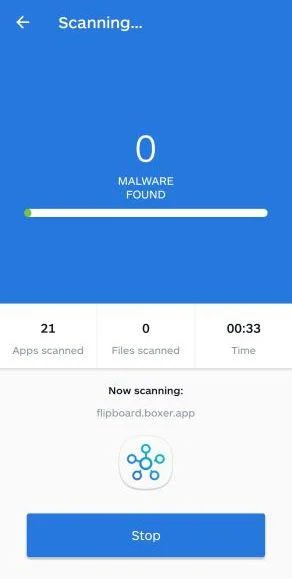
Wait for the Malwarebytes scan to complete.
Malwarebytes will now start scanning your phone for adware and other malicious apps. This process can take a few minutes, so we suggest you do something else and periodically check on the status of the scan to see when it is finished.
-
Remove the detected apps.
When the scan has been completed, you will see a list of the threats that Malwarebytes for Android has detected. Next to each detected item, tap the menu icon (three dots), then choose to uninstall the app or delete the file. Android then asks you to confirm. Tap OK or Uninstall to remove the app.
-
Restart your phone.
When the detected apps are removed, restart your phone if Malwarebytes asks you to. Then check whether the problems you noticed have stopped.
If the problems you noticed continue after the scan, see the options below.
If you are still having problems with your phone after completing these instructions, then please follow one of the steps:
- Ask for help in our Mobile Malware Removal Help & Support forum.
- Only as a last resort, reset your phone to factory settings. Read the warning below first.
- Back up your photos, videos, files, and messages, for example to your Google account or a computer.
- Make sure you know your Google account email and password. The phone asks for them after the reset. If you changed the password recently, Google recommends waiting 24 hours before you reset.
- On a Samsung phone, also make sure you know your Samsung account password.
- If you use an authenticator app for two-step verification, move your accounts to another device or save your backup codes first.
Stay Protected: Block Ads and Malicious Sites
No scan can prove a device is completely clean, so it helps to block threats before they reach you. Most infections start with a malicious ad or a fake download button — so blocking them at the source is your best defense.
We recommend AdGuard, which blocks malicious ads, phishing pages, and dangerous redirects before they can reach you.
👉 Download AdGuard and browse safely
Frequently Asked Questions
Can Vicks VapoRub repair damaged lungs?
No. Its labeled use is temporary cough relief from minor cold-related irritation and topical relief for minor muscle or joint aches.
Did Dr. Sanjay Gupta reveal this Vicks remedy?
We found no reliable original broadcast supporting the campaign. The circulating presentation appears artificially generated or materially altered.
Is Pure Lung the product sold at checkout?
Not during our test. The order button redirected to a BreathEaseX and CardioEaseX bundle on another domain.
Is Pure Lung a subscription?
The reviewed Pure Lung page says orders are one-time with no rebill. Verify the final checkout and receipt because destinations can change.
Can I stop oxygen after using a supplement?
No. Never alter prescribed oxygen or respiratory medicine because of an advertisement. Speak with the clinician managing your condition.
Where should Vicks VapoRub be applied?
For cough suppression, official directions say the throat and chest. Follow the label and avoid ingestion, nostrils, damaged skin, and heating.
The Bottom Line
The fake Vicks lung-repair story turns a trusted household medicine into bait for an unsupported medical promise and a changing supplement funnel.
Our test moved from Vicks claims to Pure Lung content, then to BreathEaseX and CardioEaseX at checkout.
Breathing problems deserve proper diagnosis. Trust the product label and your healthcare team, not an altered celebrity video designed to sell a bundle.

Join the discussion
0 commentsShare your experience or ask a question about this article.
Community experiences
Did this happen to you?
Your experience could help someone recognize the same scam. Submit a private report for our team to review.
I experienced this tooReports are reviewed before publication. Sharing publicly is always your choice.
Discussion
Start the conversation
Have a question or something useful to share? Add the first comment.