

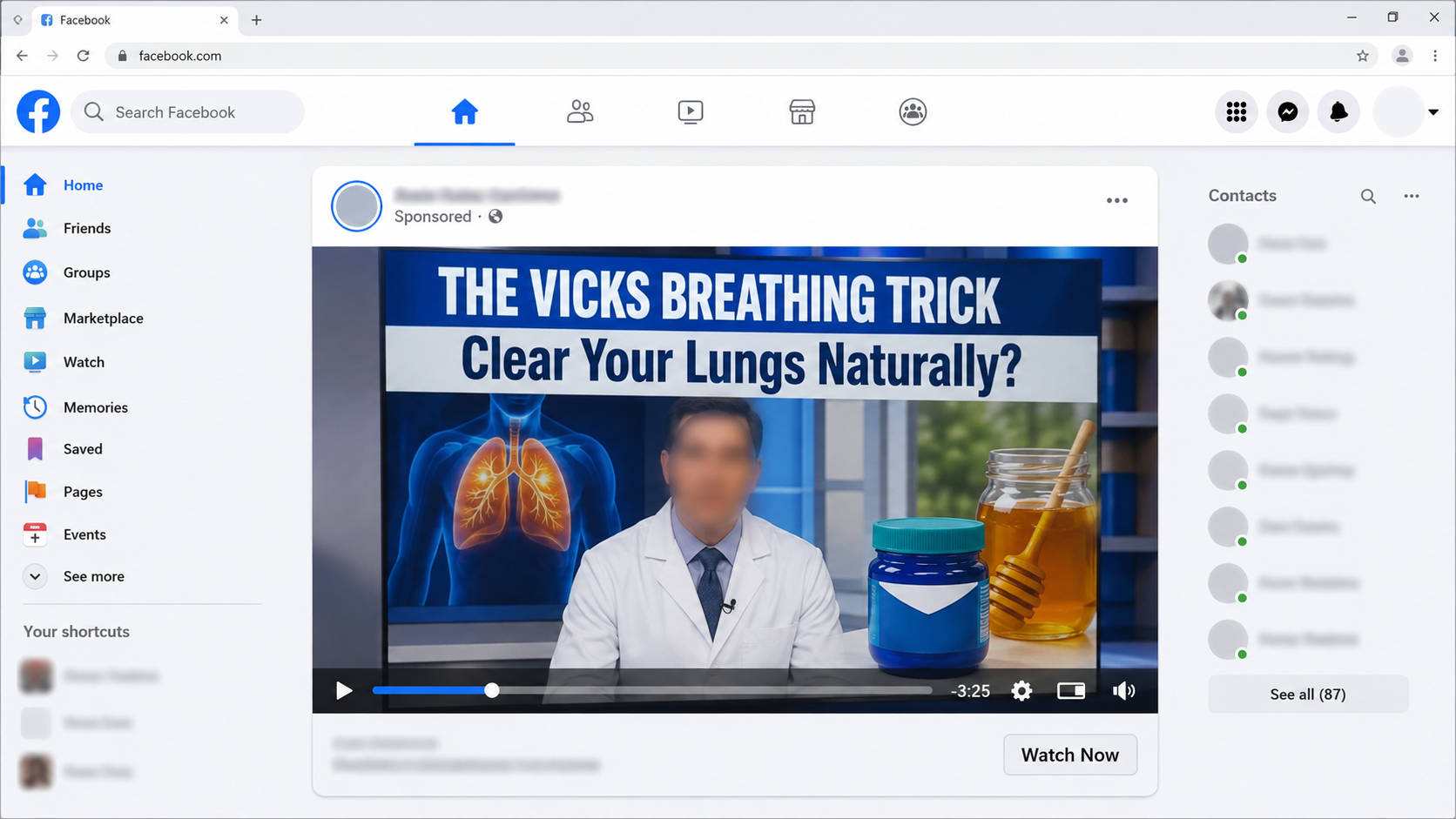
A familiar blue ointment, a television doctor, and a breathless promise are appearing together in social feeds. The clip looks like practical advice that escaped a newsroom.
That combination deserves a closer look, especially when breathing worries make people eager for anything that sounds simple, natural, and immediate.
Overview
The story viewers are shown
The advertisement appears to feature Dr. Sanjay Gupta explaining a hidden Vicks VapoRub or Manuka honey method for clearing damaged lungs.
Some versions add familiar entertainers, hospital imagery, or a network-news frame. The supposed discovery promises easier breathing without ordinary treatment.
The pitch may mention mucus, COPD, smoking damage, oxygen levels, chronic coughing, or “dirty” airways to reach several anxious audiences at once.
Where the video eventually leads
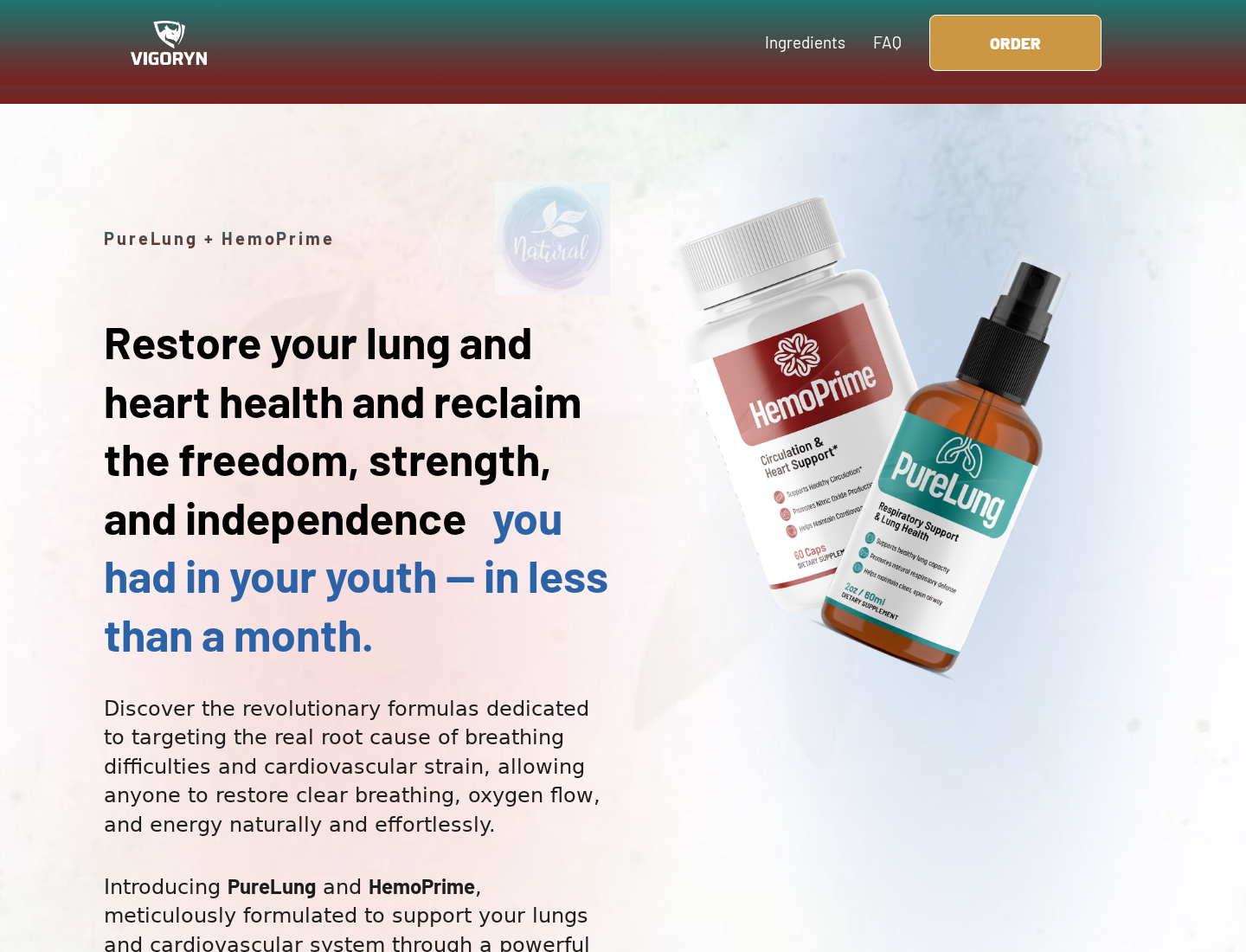
The practical household tip does not remain the real solution. The funnel reveals PureLung, often paired with a second supplement called HemoPrime.
PureLung is sold as an oral spray containing ingredients such as mullein, ginger, bromelain, lemon, and cordyceps. HemoPrime is presented as cardiovascular support.
The official-looking offer sells two, four, or six total bottles at prices ranging from $158 to $294, depending on the chosen package.
Why the campaign is deceptive
- The public figures shown are not documented endorsers of PureLung.
- A household ointment provides the hook, but an unrelated supplement closes the sale.
- The advertisement exaggerates respiratory outcomes beyond the seller’s disclaimer.
- The page imitates independent medical or broadcast authority.
- Contact and refund pages list inconsistent support numbers.
- The website header contains another product name, suggesting a reused sales template.
The Vicks Claim Conflicts With the Actual Product Directions
Vicks says VapoRub should be applied externally to the chest and throat for coughs associated with a common cold.
Its published directions do not describe swallowing it, placing it inside the nose, detoxifying lungs, or restoring lung tissue.
A commercial that turns a labeled external-use ointment into a secret respiratory protocol is not offering routine product guidance.
The risk is not limited to wasting money. Improvised use can expose people to ingredients in ways the manufacturer never directed.
Persistent shortness of breath, chest pain, blue lips, confusion, or low oxygen can require urgent care. A social-media recipe should never delay it.
Even less dramatic breathing changes deserve a clinician’s attention when they persist, worsen, or follow smoking, infection, or known lung disease.
How the Scam Works
Step 1: The ad borrows a trusted doctor’s identity
Viewers first see a person who resembles Dr. Sanjay Gupta in a studio, interview, or medical-office setting.
The voice may be cloned, the mouth may be synchronized artificially, or authentic footage may be cut around invented narration.
Because Gupta is associated with health reporting, his appearance reduces the viewer’s instinct to ask who paid for the message.
Additional celebrity clips make the campaign seem widely confirmed. Repetition across unrelated famous faces actually points toward manufactured endorsement.
Step 2: Vicks and honey make the promise feel familiar
Many families already recognize vapor rub and honey from ordinary cold care. Scammers exploit that familiarity to lower resistance.
The ad does not begin with an unfamiliar spray. It begins with something found in a bathroom cabinet or kitchen.
That is psychologically useful. A viewer thinks, “I know this ingredient,” then unconsciously extends that trust to unsupported medical claims.
The campaign may alternate between Vicks and Manuka honey. Changing the hook helps affiliates test which familiar story produces more clicks.
Step 3: A fake broadcast frames the trick as suppressed news
The click opens a page styled like a television report or health feature. Colors, lower-thirds, and play buttons simulate independent journalism.
Look closely at the address bar. The domain is usually unrelated to the broadcaster suggested by the visual design.
The report claims doctors, universities, or pharmaceutical companies ignored a discovery. Named institutions are rarely linked to traceable statements.
This manufactured conflict keeps viewers watching. It also discourages them from checking with the professionals supposedly hiding the answer.
Step 4: Symptoms are made frightening and universal
The narration treats coughing, tiredness, mucus, reduced stamina, and poor sleep as signs of one hidden respiratory blockage.
Those symptoms can arise from many conditions. Compressing them into one explanation makes a single product appear relevant to almost everyone.
Dramatic animations may show clogged air sacs becoming clear. These graphics are demonstrations, not clinical imaging from verified PureLung users.
The viewer is then told ordinary approaches address symptoms while the promoted method attacks a secret root cause.
Step 5: The free trick becomes a two-product system
After the long explanation, the campaign introduces PureLung spray and HemoPrime capsules. Vicks is no longer the item being ordered.
The seller says the spray supports airways while the capsules support circulation. Combining two products increases the apparent completeness and the order value.
PureLung’s own disclaimer says its products are not intended to diagnose, treat, cure, or prevent disease.
That cautious footer does not erase an advertisement that created a much stronger impression through celebrity footage and miracle language.
Step 6: Large bundles are presented as the sensible choice
The packages use “buy one get one,” “buy two get two,” and “buy three get three” framing.
However, the displayed totals are $158, $207, and $294. The word “free” describes package math, not a cost-free trial.
Struck-through reference prices create savings as high as $780. We found no evidence showing those larger totals were regular market prices.
The offer encourages six bottles because respiratory improvement supposedly takes continued use. That shifts risk toward the buyer before results are known.
Step 7: Refund conditions add work and deadlines
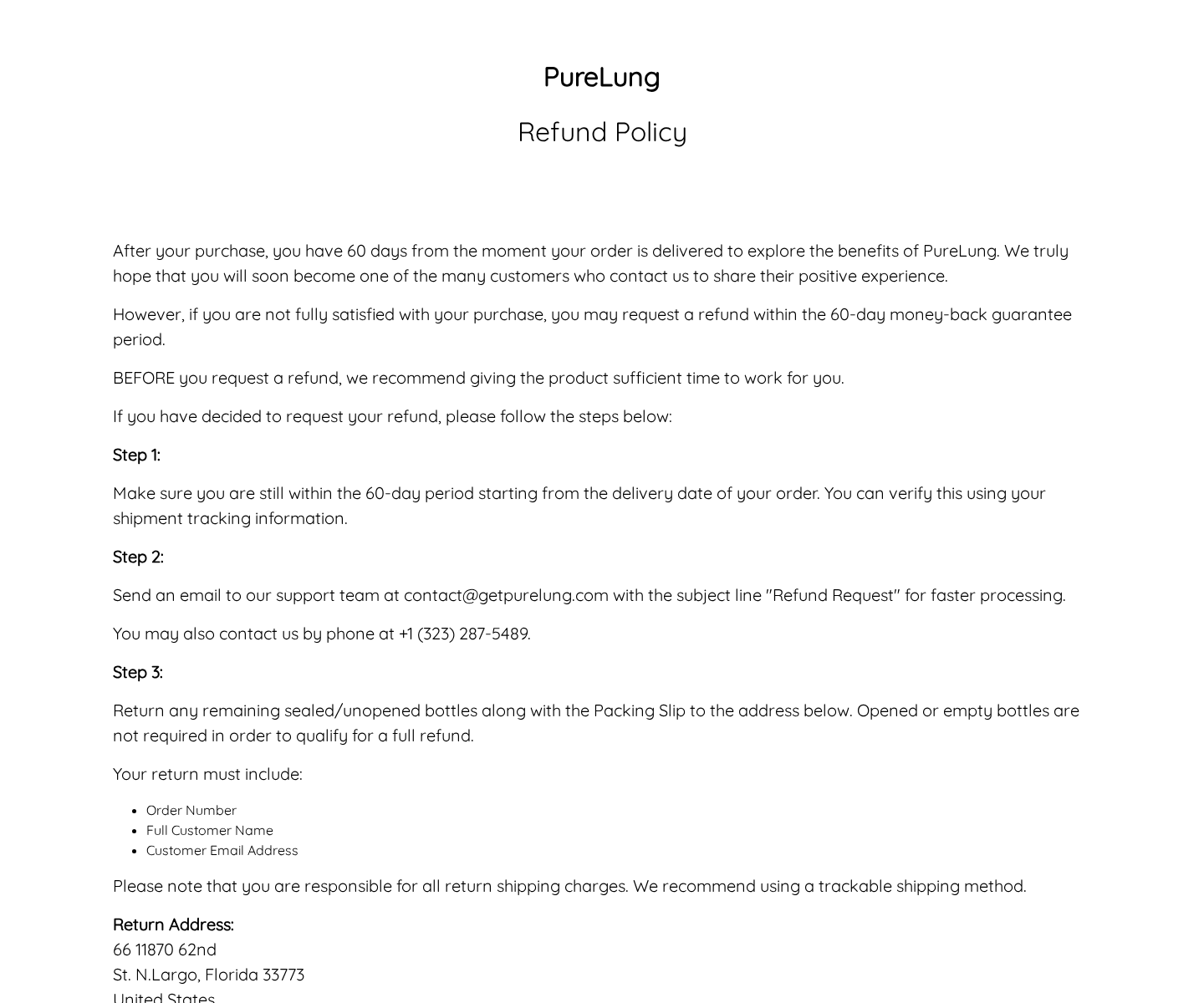
The main page emphasizes a 60-day guarantee. The detailed policy requires contacting support, obtaining instructions, and mailing remaining sealed bottles.
The customer pays return postage and must include order details and the packing slip. Missing documentation can complicate a time-sensitive claim.
The refund page names +1 (323) 287-5489 during its steps, then lists +1 (323) 287-9028 in the contact block.
Two phone numbers on one policy are not proof nobody answers. They are a concrete reason to preserve every email and call record.
Step 8: Affiliates can keep the story after the product changes
The campaign’s valuable asset is the “doctor reveals Vicks trick” script. PureLung can be swapped without rebuilding the emotional setup.
A future landing page might promote drops, capsules, tea, or another spray. The celebrity footage can also be replaced quickly.
That is why consumers should search the story, not just the current bottle. Exact phrases often uncover warnings even after brands rotate.
The FTC warns that doctored video and audio are already used to create fake celebrity endorsements for health products.
Why Respiratory Claims Need Extra Scrutiny
Breathlessness is a symptom, not a sales category
Shortness of breath can involve asthma, infection, COPD, heart disease, anemia, allergies, anxiety, blood clots, or other causes.
A commercial cannot diagnose those possibilities from age, mucus, coughing, or smoking history. Different causes require very different decisions.
New severe breathlessness, blue lips, chest pain, fainting, confusion, or rapidly worsening symptoms require urgent medical attention.
Waiting for a spray or capsule to “detox” the lungs can lose valuable time. The advertisement cannot examine oxygen levels or listen to the chest.
Mucus language makes normal biology sound contaminated
The respiratory tract naturally produces mucus. It traps particles and helps protect delicate tissue, although excessive mucus can accompany illness.
Scare-driven promotions describe ordinary protective functions as toxic buildup. That framing makes a cleansing product feel necessary before any diagnosis exists.
Words like cleanse, regenerate, restore, and flush are broad enough to sound medical while avoiding a measurable clinical promise.
Ask what endpoint was tested. Better breathing, lung function, infection rate, oxygen saturation, and symptom scores are different outcomes.
A household ointment cannot validate an unrelated supplement
Vicks VapoRub has labeled directions for external application. Those directions do not establish that honey, capsules, or oral sprays repair lung tissue.
The manufacturer’s guidance describes VapoRub use on the chest and throat. It does not present the advertised hidden cure.
Even if someone enjoys the scent or temporary sensation, that experience cannot demonstrate removal of toxins or reversal of chronic lung disease.
The campaign borrows familiarity from one product, then transfers it to products with different ingredients, doses, manufacturers, and claimed effects.
Testimonials cannot establish safety for vulnerable buyers
People with lung disease often use inhalers, steroids, oxygen, anticoagulants, heart medicines, or antibiotics. Supplement interactions and delays can carry real consequences.
A smiling testimonial reveals nothing about diagnosis, concurrent treatment, adverse effects, or whether the pictured customer used the advertised products.
Ask a pharmacist or clinician to review the complete label. Bring every ingredient amount, not only the front-panel promises.
If the seller hides the facts panel until after payment, that alone is a reason to leave.
Company, Address, and Fulfillment Checks
The homepage carries another brand’s logo
Our screenshot of getpurelung.com showed “VIGORYN” in the header while the page sold PureLung and HemoPrime.
That looks like a reused template that was not fully cleaned. It weakens confidence in the site’s product-specific quality controls.
Support numbers conflict
The main contact page lists +1 (323) 287-9028. The refund instructions introduce +1 (323) 287-5489 before repeating the first number later.
Buyers should contact the email and both published numbers, recording dates and outcomes. A verbal promise should be followed by written confirmation.
The address is shared by many supplement brands
The refund page prints a malformed version of 11870 62nd Street North, Largo, Florida 33773.
That address appears across return instructions for numerous unrelated supplement brands. It functions as a fulfillment destination, not proof of PureLung’s headquarters.
Product origin remains unclear
The site says ingredients are natural and tested, but it does not prominently identify the contract manufacturer or publish batch certificates.
We cannot conclude the bottles were made in China without shipment or customs evidence. We can conclude that the public supply chain is insufficiently documented.
Unknown manufacturing and unverified dosing deserve caution, especially for people with lung disease, cardiovascular conditions, allergies, or prescription medicines.
What to Do if You Have Fallen Victim to This Scam
- Get medical guidance first. Stop experimenting with any off-label Vicks method. Seek urgent help for severe breathing difficulty, chest pain, confusion, or bluish skin.
- Identify every charge. Compare the receipt with your statement. Note merchant descriptors, shipping fees, package quantities, and any amount you did not approve.
- Send a written cancellation. Email the published support address and copy yourself. State clearly that no additional products, programs, or recurring charges are authorized.
- Start the guarantee process promptly. Ask which bottles must return, where they must go, and whether an RMA is required. Demand the answer in writing.
- Build return evidence. Photograph sealed bottles, the packing slip, and the parcel. Purchase tracked postage and keep the delivery confirmation until money returns.
- Ask your bank for options. Describe the false endorsement and any billing discrepancy. Request a dispute and merchant block when the facts support one.
- Clean up the click trail. Scan the device with Malwarebytes, remove unexpected browser permissions, and use AdGuard to block deceptive redirects and repeat ads.
- File focused complaints. Report the fake endorsement to the FTC and platform. Send supplement reactions to FDA MedWatch, including label photographs and lot details.
Is Your Device Infected? Run a Free Malware Scan
Slow performance, constant pop-ups, or strange behavior? These are classic signs of a malware infection. The fastest way to find out is to scan your device with Malwarebytes Free — one of the most trusted malware removal tools available.
The free version detects and removes the most common threats, including:
- Adware — the cause of those annoying pop-ups
- Browser hijackers — unwanted redirects and changed homepages
- Trojans and spyware — hidden programs stealing your data
- Potentially unwanted programs (PUPs) — software you never asked for
👉 Select your device below — Windows, Mac, or Android — then follow the simple steps to download Malwarebytes, scan your system, and remove any threats it finds. The scan usually takes 5 to 20 minutes.
Run a Malware Scan with Malwarebytes for Windows
Malwarebytes is one of the most popular and trusted anti-malware tools for Windows — and it’s completely free for removing infections. It catches threats that many antivirus programs miss, including adware, browser hijackers, and trojans. Follow the steps below to scan and clean your PC in just a few minutes.
Download Malwarebytes
Click the button below to download the latest version of Malwarebytes for Windows from the official source. The free version is all you need — it will scan your computer and remove adware, browser hijackers, and other malicious software at no cost.
Download MalwarebytesOfficial installer for Windows 11 and 10. Your download starts right away.Want real-time protection? See Malwarebytes Premium Malwarebytes Free for WindowsScans and removes malware at no cost
-
Install Malwarebytes
When the download finishes, open your Downloads folder and double-click the MBSetup file. If Windows shows a User Account Control pop-up, click “Yes” to allow the installation.

Follow the On-Screen Prompts to Install Malwarebytes
The setup wizard will walk you through a few quick screens:
-
Choose where you’re installing the program — “Personal Computer” or “Work Computer” — then click Next.

-
Malwarebytes will now install on your device. This usually takes under a minute.

-
When installation is complete, the “Welcome to Malwarebytes” screen will open automatically.

-
On the final screen, click Open Malwarebytes to launch the program.

-
Enable “Scan for Rootkits”
Before scanning, turn on rootkit detection so Malwarebytes can find even the most hidden threats. Click the Settings gear icon on the left side of the screen.

In the settings menu, find “Scan for rootkits” and click the toggle so it turns blue.

Done? Click “Dashboard” in the left pane to return to the main screen.
Start the Scan
Click the blue Scan button. Malwarebytes will automatically update its virus database and start checking your computer for malware.

-
Wait for the Scan to Finish
The scan checks your entire system for browser hijackers and other malicious programs, so it can take 5 to 20 minutes depending on your computer. Feel free to do something else — just check back occasionally to see the progress.

-
Quarantine the Detected Threats
When the scan is done, you’ll see a list of everything Malwarebytes found — malware, adware, and potentially unwanted programs. Click the “Quarantine” button to remove all of them at once.

Malwarebytes will now remove the malicious files and registry entries and move them safely into quarantine.

-
Restart Your Computer
Some threats can only be fully removed after a reboot. If Malwarebytes asks you to restart, click Yes. Once you’re logged back in, Malwarebytes has finished removing the threats it found.

That’s it — your Windows PC is now clean of trojans, adware, and other malware, and should be back to running smoothly.
If you are still having problems with your computer after completing these instructions, then please follow one of the steps:
- Run a computer scan with ESET Online Scanner
- Ask for help in our Windows Malware Removal Help & Support forum.
Run a Malware Scan with Malwarebytes for Mac
Malwarebytes for Mac is a free on-demand scanner that removes the malware other security software tends to miss — adware, browser hijackers, and unwanted programs included. Cleaning an infected Mac with Malwarebytes has always been completely free, and it’s our go-to recommendation. Follow the steps below to scan and clean your Mac in just a few minutes.
-
Download Malwarebytes for Mac
Click the button below to download the latest version of Malwarebytes for Mac.
Download MalwarebytesOfficial installer for macOS. Your download starts right away.Want real-time protection? See Malwarebytes PremiumMalwarebytes Free for MacScans and removes malware at no cost -
Open the Malwarebytes setup file
When the download finishes, open your Downloads folder and double-click the setup file to begin the installation.

-
Follow the On-Screen Prompts to Install Malwarebytes
The Malwarebytes for Mac Installer will guide you through a few quick screens. Click “Continue” and keep following the prompts until the installation completes.



When the installation is complete, Malwarebytes opens to the Welcome to Malwarebytes screen. Click “Get started“.
-
Select “Personal Computer” or “Work Computer”
Malwarebytes will ask what type of computer you’re installing it on. Click either Personal Computer or Work Computer, whichever applies.

-
Start the Scan
Click the “Scan” button. Malwarebytes will automatically update its detection database and begin checking your Mac for malware.

-
Wait for the Scan to Finish
Malwarebytes will scan your Mac for adware, browser hijackers, and other malicious programs. This can take a few minutes, so feel free to do something else — just check back occasionally to see the progress.

-
Quarantine the Detected Threats
When the scan is done, you’ll see a list of everything Malwarebytes found. Click the “Quarantine” button to remove all the threats at once.

-
Restart Your Mac
Malwarebytes will now remove all the malicious files it found. Some threats can only be fully removed after a reboot — if Malwarebytes asks you to restart, allow it. Once you’re logged back in, your Mac is clean.

That’s it — your Mac is now free of adware, rogue browser extensions, and other potentially harmful software.
If you are still experiencing problems while trying to remove a malicious program from your computer, please ask for help in our Mac Malware Removal Help & Support forum.
Run a Malware Scan with Malwarebytes for Android
Malwarebytes for Android automatically detects and removes dangerous threats like malware and ransomware so you don’t have to worry about your most-used device being compromised. Aggressive detection of adware and potentially unwanted programs keeps your Android phone or tablet running smooth.
-
Download Malwarebytes for Android.
You can download Malwarebytes for Android by clicking the link below.
Get Malwarebytes for AndroidOpens Google Play in a new tab.Want real-time protection? See Malwarebytes Premium for AndroidMalwarebytes for AndroidScans your phone and removes malware at no cost -
Install Malwarebytes for Android on your phone.
In the Google Play Store, tap “Install” to install Malwarebytes for Android on your device.

When the installation process has finished, tap “Open” to begin using Malwarebytes for Android. You can also open Malwarebytes by tapping on its icon in your phone menu or home screen.

-
Follow the on-screen prompts to complete the setup process
When Malwarebytes will open, you will see the Malwarebytes Setup Wizard which will guide you through a series of permissions and other setup options.
This is the first of two screens that explain the difference between the Premium and Free versions. Swipe this screen to continue.
Tap on “Got it” to proceed to the next step.
Malwarebytes for Android will now ask for a set of permissions that are required to scan your device and protect it from malware. Tap on “Give permission” to continue.
Tap on “Allow” to permit Malwarebytes to access the files on your phone.
-
Update database and run a scan with Malwarebytes for Android
You will now be prompted to update the Malwarebytes database and run a full system scan.

Click on “Update database” to update the Malwarebytes for Android definitions to the latest version, then click on “Run full scan” to perform a system scan.

-
Wait for the Malwarebytes scan to complete.
Malwarebytes will now start scanning your phone for adware and other malicious apps. This process can take a few minutes, so we suggest you do something else and periodically check on the status of the scan to see when it is finished.

-
Click on “Remove Selected”.
When the scan has been completed, you will be presented with a screen showing the malware infections that Malwarebytes for Android has detected. To remove the malicious apps that Malwarebytes has found, tap on the “Remove Selected” button.

-
Restart your phone.
Malwarebytes for Android will now remove all the malicious apps that it has found. To complete the malware removal process, Malwarebytes may ask you to restart your device.
That’s it — your Android phone is now clean — no more malicious apps, adware, or browser redirects.
If you are still having problems with your phone after completing these instructions, then please follow one of the steps:
- Restore your phone to factory settings by going to Settings > General management > Reset > Factory data reset.
- Ask for help in our Mobile Malware Removal Help & Support forum.
Stay Protected: Block Ads and Malicious Sites
Now that your device is clean, keep it that way. Most infections start with a malicious ad or a fake download button — so blocking them at the source is your best defense.
We recommend AdGuard, which blocks malicious ads, phishing pages, and dangerous redirects before they can reach you.
👉 Download AdGuard and browse safely
Safer Ways to Evaluate Respiratory Claims
Begin by separating symptom relief from claims to repair, cleanse, or restore lungs. Those are very different promises requiring different evidence.
Check whether the exact finished product was studied. Research on one ingredient does not prove a multi-ingredient spray produces the advertised result.
Look for participant numbers, comparison groups, measured outcomes, and adverse-event reporting. A list of scientific references can still be unrelated to the formula sold.
Ask who manufactured the batch and whether a certificate of analysis is available. Marketing terms such as “pure” and “natural” are not laboratory results.
Finally, show the label to a pharmacist or clinician. Mullein, ginger, bromelain, cordyceps, and circulation ingredients may not suit every medical history.
Frequently Asked Questions
Did Dr. Sanjay Gupta recommend PureLung?
We found no authorized endorsement connecting him to PureLung, HemoPrime, or the advertised Vicks respiratory routine.
Does Vicks VapoRub clean the lungs?
Vicks directs VapoRub for external use on the chest and throat for certain cough symptoms. It does not claim to clean or regenerate lungs.
Is PureLung the same as the Vicks trick?
No. The story uses Vicks or honey to attract attention, then reveals a separate commercial spray and capsule package.
Is PureLung sold by subscription?
The page we reviewed says the order is a one-time transaction. Capture that statement because checkout terms and affiliate funnels can change.
How does the 60-day refund work?
The policy asks buyers to contact support and return remaining sealed bottles with identifying information. Customers pay tracked return postage.
Can a supplement replace COPD treatment?
No online supplement should replace prescribed care. Changes to inhalers, oxygen, or other treatment require the clinician managing the condition.
The Bottom Line
The fake Dr. Sanjay Gupta Vicks lung cure campaign dresses a supplement sale as independent medical news. The household remedy is bait, not the product delivered.
PureLung’s reused branding, aggressive claims, opaque manufacturing, and inconsistent support details add practical reasons to avoid ordering through this funnel.
For breathing problems, verified medical care is slower than a miracle video but far safer. Close the advertisement, preserve evidence, and choose advice accountable to your health.

Join the discussion
2 commentsShare your experience or ask a question about this article.
Discussion
I’m in Australia and was intrigued when I first noticed this scam. Lots of things simply didn’t add up. It all seemed too good to be true. Dr. Gupta evidently believed he could get rich quick. There are too many of these scammers out there and they prey on the gullible and those looking for a miracle cure.
This post bears out what I initially thought was off, or not quite right. Being familiar with Dr. Gupta’s work I immediately looked it up on another device and found out that I was right in my suspicions! There always is a need to check the ads that sound to good to be true just to be sure that one doesn’t get “ripped off”. Having some of the listed complications with COPD I’m always looking for REAL help and/or cures. I have said enough. Thank you!