

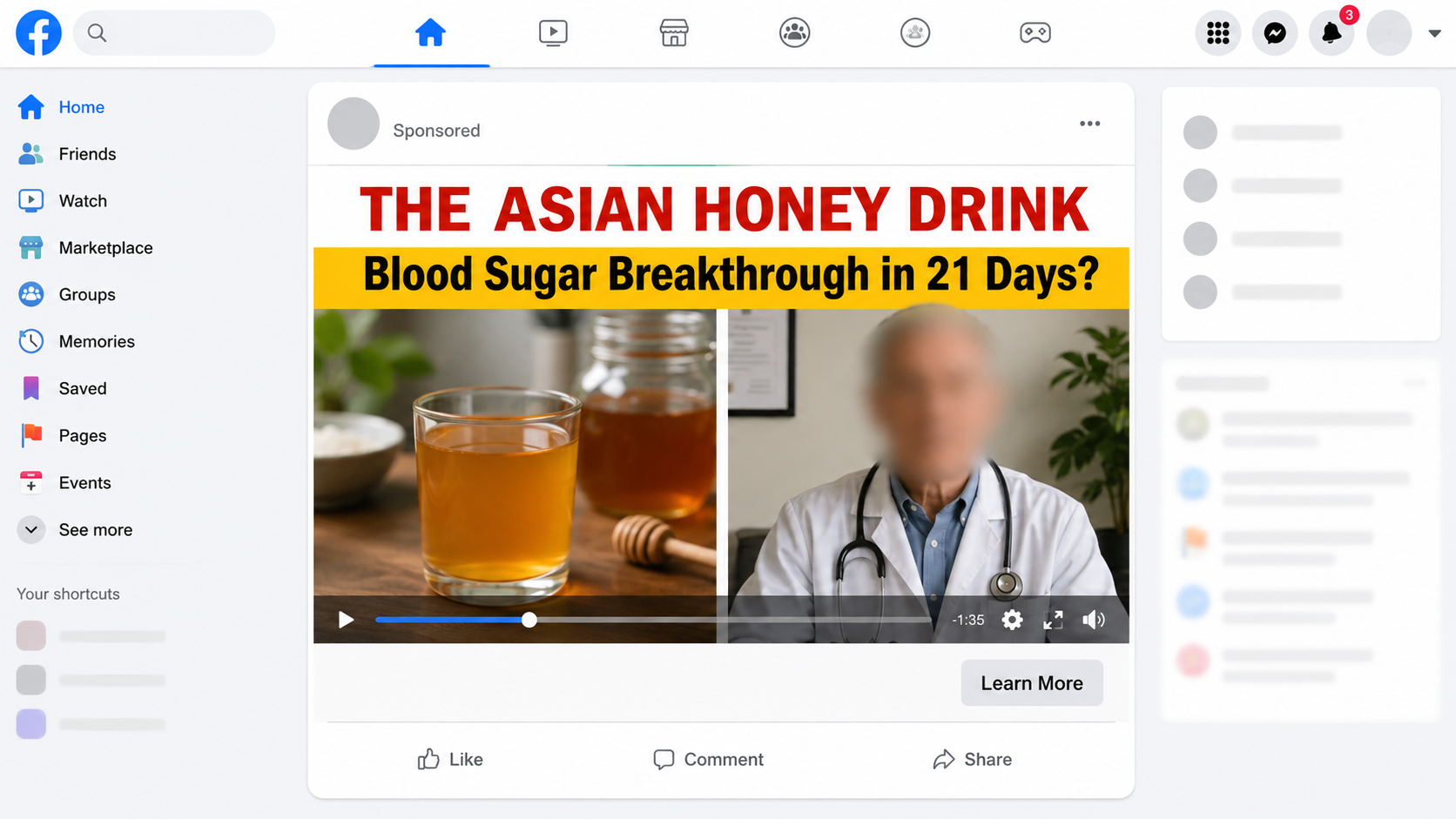
A familiar doctor appears beside a spoonful of honey, promising an overlooked answer to stubborn blood sugar. The video feels personal, urgent, and unusually specific.
Before following its recipe or buying the drops revealed later, pause. Several details deserve a closer look, especially if diabetes treatment is already part of your life.
Overview
A medical story designed to feel discovered
The Dr. William Li blood sugar drops promotion does not begin like an ordinary supplement commercial. It opens as supposed health reporting about a dramatic discovery.
Viewers may see a news-style page called “Diabetes Health News,” an interview clip, or a social video carrying a well-known physician’s face.
The presentation claims a doctor’s wife used a simple Asian honey drink after conventional treatment failed. Her blood sugar allegedly changed within days.
That emotional story supplies what the seller lacks: borrowed authority, a relatable patient, and the impression that journalists independently investigated the remedy.
The recipe is a bridge to Sugar Reset
The advertisement talks about honey, morning habits, parasites, and secret ingredients. Yet the visitor is eventually directed toward a branded liquid called Sugar Reset.
The recipe is therefore not the real offer. It keeps viewers watching until the page introduces a bottle, bulk packages, and a purchase button.
Names can change without changing this sales structure. Another dropper bottle could replace Sugar Reset while the same doctor, honey, and miracle timeline remain.
- A recognizable doctor appears to validate the story.
- A fake patient recovery creates emotional proof.
- A household ingredient makes the claim sound accessible.
- A hidden product reveal turns curiosity into a sale.
- Urgency discourages independent checking.
What our investigation found
We found no reliable evidence that Dr. William Li endorsed Sugar Reset or presented the claimed honey method. The medical claims also conflict with established guidance.
The campaign says thousands reversed type 2 diabetes quickly. It describes an “insulin-eating parasite” and suggests two daily drops can address the supposed cause.
Those statements are extraordinary, yet the sales page does not provide clinical trials supporting the exact product, dose, outcome, and advertised timeline.
The current Sugar Reset website displays broadcaster logos and a 4.9 rating from 12,847 reviews. We could not verify those figures through an independent review platform.
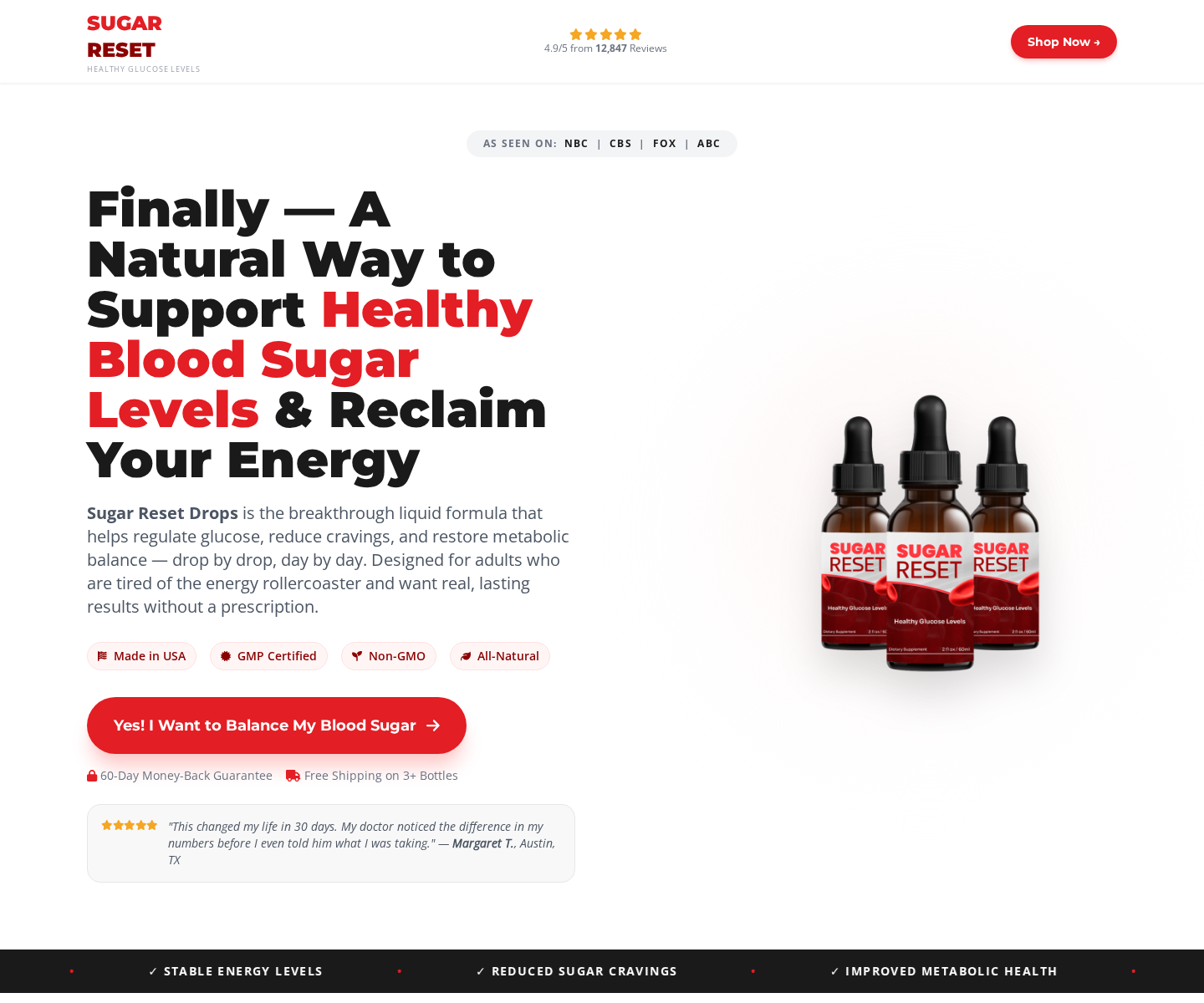
The domain was registered in July 2026, making the enormous review count especially difficult to reconcile with the site’s brief visible history.
Its checkout uses another domain, mynewsera.com. Packages shown during our review cost $158 for two bottles, $207 for three, or $294 for six.
We did not confirm automatic refills on the checkout inspected. The proven concerns are the deceptive medical story, unsupported claims, bulk pricing, and weak seller transparency.
How the Scam Works
Step 1: A short social video borrows a doctor’s credibility
The first encounter often happens while scrolling Facebook, Instagram, YouTube, or another feed. The clip resembles a television interview or health-news segment.
Dr. William Li’s image, voice, or name gives the message immediate authority. Many viewers recognize a physician before they notice the unfamiliar website hosting the clip.
Modern editing and generative tools can create convincing speech from old footage. Lip movement, cadence, and lighting may look plausible on a small phone screen.
The important question is not whether the clip looks polished. Ask whether the doctor published the recommendation through a verified account or reputable medical source.
Step 2: A fake news page turns advertising into apparent reporting
Clicking the video may open an advertorial that imitates a health publication. Logos, navigation bars, quotation marks, and comment sections make it feel editorial.
The page may claim the discovery was censored, removed from television, or opposed by pharmaceutical companies. Those claims explain why legitimate coverage supposedly cannot be found.
This is a useful manipulation. Missing evidence becomes “proof” of suppression instead of a warning that the story may have been invented.
Fake news branding also separates the sales pitch from the checkout. Readers may not realize both pages belong to one marketing funnel.
Step 3: A personal recovery story lowers medical skepticism
The advertorial introduces a spouse or ordinary patient who allegedly struggled despite medication, diet changes, and repeated medical appointments.
Her numbers supposedly improve after trying a honey drink. The account includes exact days, emotional frustration, and family details to resemble lived experience.
These details are not the same as medical evidence. A testimonial cannot establish diagnosis, laboratory results, ingredient identity, or whether any improvement came from the product.
The story may also encourage distrust of Metformin or doctors. That is particularly dangerous when viewers interpret advertising as permission to change treatment.
Step 4: Pseudoscience supplies a memorable villain
The campaign reportedly blames an “insulin-eating parasite” for high blood sugar. This dramatic explanation is easier to remember than the complex biology of type 2 diabetes.
A hidden enemy gives the drops a purpose. If the invented cause sounds frightening enough, the visitor may stop asking how the formula was tested.
Real diabetes care considers insulin resistance, pancreatic function, weight, activity, medicines, sleep, other conditions, and individual laboratory results. One sensational cause does not replace that evaluation.
The CDC explains that type 2 diabetes has no cure, although some people can reach remission through established, supervised approaches.
Step 5: The harmless kitchen ritual becomes a commercial product
Honey gives the promotion a familiar starting point. Viewers may expect a recipe requiring ingredients already sitting in their kitchen.
Instead, the presentation pivots toward Sugar Reset. The final recommendation is not ordinary honey but a dropper formula available only through the linked offer.
This switch matters. The household story attracts people who might ignore a direct supplement advertisement, then transfers their interest to a bottle.
The product name is replaceable. Once a landing page stops converting or attracts complaints, marketers can connect the same narrative to another brand.
Step 6: Bulk bundles make the first purchase much larger
The package page emphasizes per-bottle savings rather than the full card charge. A six-bottle option can look cheaper while committing $294 immediately.
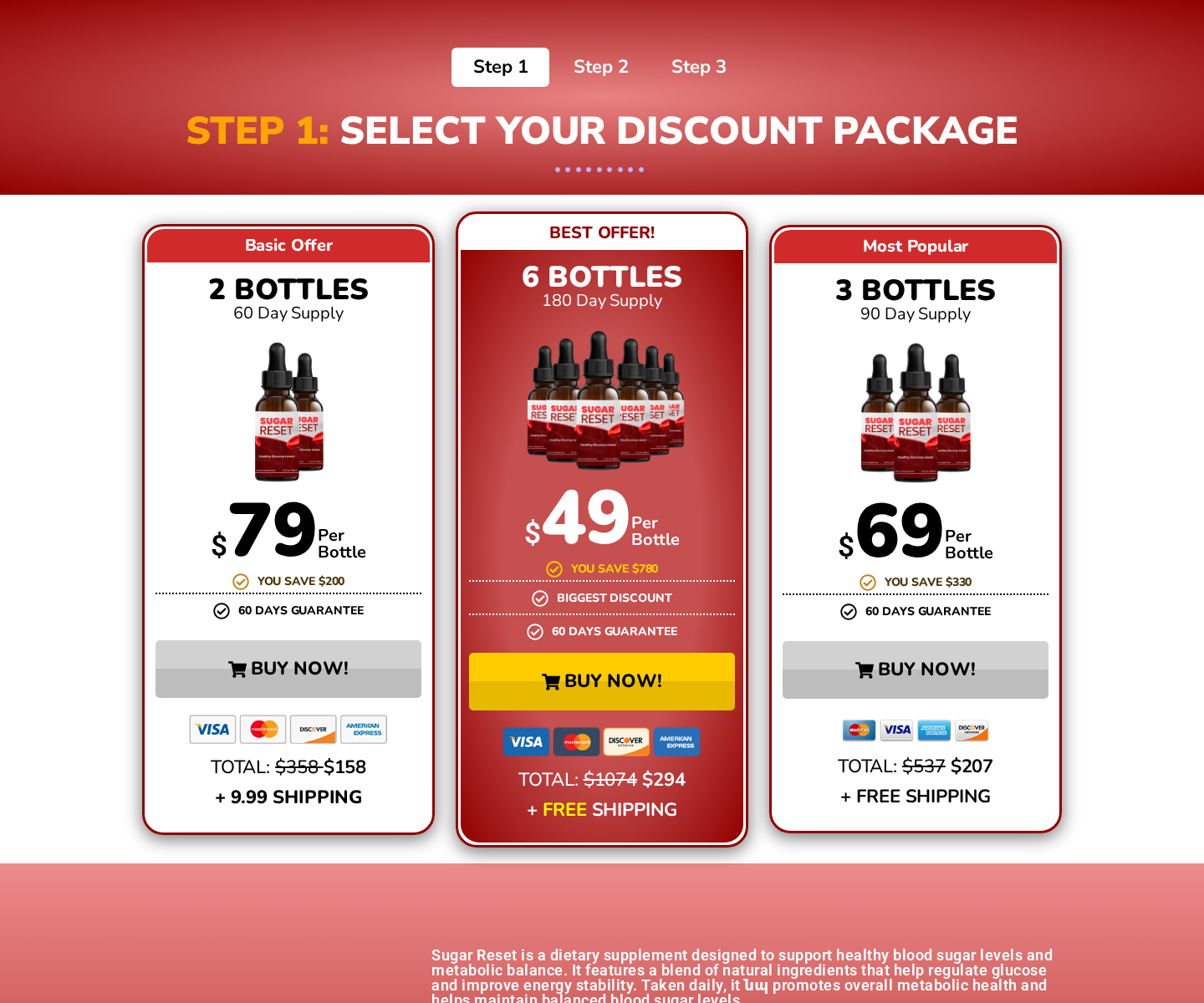
Crossed-out comparison prices and “best value” labels anchor attention on savings. The shopper must calculate what will actually leave the account today.
Large bundles also complicate refunds. A buyer may open several bottles before deciding the claims do not match the experience, potentially affecting return eligibility.
Read the final order summary, not the headline price. Confirm quantity, shipping, taxes, memberships, trials, and any recurring language before submitting payment.
Step 7: Weak identity details make problems harder to resolve
The Sugar Reset page reviewed lists support@getsugarreset.com. Its footer also contains the literal text “[Company Address Placeholder]” instead of a completed business address.
That unfinished field is not a minor cosmetic issue when a seller accepts health-product payments. Customers need a legal entity and workable destination for disputes and returns.
The sales domain and checkout domain are different. That does not automatically prove fraud, but it makes ownership and responsibility less obvious.
If a charge appears under another descriptor, customers may struggle to connect it with the bottle they ordered or identify which company should answer.
Why the Health Claims Are Dangerous
“Reversal” can prompt harmful treatment decisions
A person who believes diabetes disappeared may stop medication, testing, or appointments. High blood sugar can continue causing damage even when symptoms feel manageable.
The National Center for Complementary and Integrative Health warns against replacing effective diabetes treatment with unproven products.
Remission is a specific clinical outcome monitored over time. It is not established by feeling better after a few drops or by a testimonial inside an advertisement.
Natural does not mean proven or interaction-free
Plant extracts can affect blood sugar, digestion, liver enzymes, or medication response. A formula can also contain amounts that differ from what advertising implies.
People using insulin or glucose-lowering medicines need particular caution. Combining products without clinical guidance can contribute to unexpectedly low or unstable glucose.
The FDA notes that dietary supplements are not approved before sale for safety and effectiveness like prescription medicines.
Broadcaster logos do not prove broadcaster approval
“As seen on” graphics can be copied onto a storefront. Their presence does not establish that NBC, CBS, FOX, or ABC evaluated this formula.
Look for a traceable report on the broadcaster’s own domain. A logo on the seller’s page is not independent confirmation.
Company, Address, and Fulfillment Checks
The legal seller is not clearly presented
A product name is not necessarily a company name. We looked for a legal entity responsible for billing, manufacturing, complaints, and recalls.
The visible page did not provide that basic clarity. Customers should not need detective work to learn who took payment for an ingestible product.
The published address is a placeholder
The footer displayed “[Company Address Placeholder]” during our review. That is a serious transparency failure, not a reassuring headquarters or return address.
Without a complete address, buyers cannot check state registrations, identify a returns location, or send a trackable dispute letter.
The sales and payment domains are split
The promotional page runs on getsugarreset.com, while package selection appears on mynewsera.com. Record both addresses because either may later change or disappear.
A separate checkout provider can be legitimate. However, the receipt must still identify the merchant, total, refund rules, and recurring terms without ambiguity.
Manufacturing details remain opaque
Marketing language cannot substitute for a readable Supplement Facts panel, ingredient quantities, lot information, manufacturer, warnings, and domestic contact information.
We cannot establish from the storefront where every bottle was produced or independently tested. That uncertainty is enough to reject strong medical promises.
Claims that supplements are mass-produced in China should require documentation. The clearer finding here is that the seller leaves essential sourcing and accountability questions unanswered.
Warning Signs to Check Before Ordering
- A famous doctor appears in an advertisement not posted by the doctor’s verified channels.
- The story claims one simple cause explains nearly every case of diabetes.
- A fake news page predicts censorship before presenting evidence.
- The recipe unexpectedly becomes a branded supplement purchase.
- Huge health improvements rely on testimonials instead of product-specific trials.
- The site displays thousands of reviews despite a recently registered domain.
- Broadcaster logos appear without links to genuine reports.
- The footer contains a placeholder instead of a company address.
- The checkout pushes multi-bottle packages and focuses on per-unit pricing.
How to Check a Diabetes Claim in Five Minutes
Search the exact product name with “clinical trial,” then inspect who funded the research. A study on one ingredient does not validate the finished formula.
Look for the promised outcome and timeframe. “Supports wellness” cannot substantiate claims that thousands stopped medication or reversed diabetes within days.
Check the supposed doctor’s verified website and social accounts. An endorsement existing only inside paid advertisements is not reliable confirmation.
Read the full label for amounts, warnings, and contact details. Proprietary blends can hide whether ingredients match doses used in published research.
Finally, ask a pharmacist or clinician who knows your medicines. That conversation is more useful than testimonials selected by the company taking payment.
What to Do if You Have Fallen Victim to This Scam
- Do not stop prescribed treatment. Contact the clinician managing your diabetes before changing medication, insulin, monitoring, or diet because of the advertisement.
- Save every page. Capture the video, advertorial, package choice, checkout total, guarantee, confirmation email, bottle label, and card descriptor.
- Contact the seller in writing. Request cancellation and a refund through the published support address. Ask for a return authorization and exact tracked destination.
- Keep unopened bottles sealed. Return policies sometimes exclude opened inventory. Photograph the package and use tracking if the seller authorizes a return.
- Review future statements. Although we did not verify an automatic refill, watch for unfamiliar renewals, memberships, or charges under a different merchant name.
- Dispute misleading or unauthorized charges. Give your bank the saved advertisement, order terms, cancellation request, and delivery records. Follow its deadlines.
- Report deceptive health marketing. Submit the campaign to the FTC and FDA. Report impersonated videos through the platform that displayed them.
- Check the device used to order. If you downloaded anything or allowed notifications, scan with Malwarebytes and remove unfamiliar extensions, profiles, or applications.
- Block repeat advertising and malicious redirects. AdGuard can reduce deceptive ads, tracking, and nuisance pages, but it cannot make an unsafe supplement medically effective.
Is Your Device Infected? Run a Free Malware Scan
Slow performance, constant pop-ups, or strange behavior? These are classic signs of a malware infection. The fastest way to find out is to scan your device with Malwarebytes Free — one of the most trusted malware removal tools available.
The free version detects and removes the most common threats, including:
- Adware — the cause of those annoying pop-ups
- Browser hijackers — unwanted redirects and changed homepages
- Trojans and spyware — hidden programs stealing your data
- Potentially unwanted programs (PUPs) — software you never asked for
👉 Select your device below — Windows, Mac, or Android — then follow the simple steps to download Malwarebytes, scan your system, and remove any threats it finds. The scan usually takes 5 to 20 minutes.
Run a Malware Scan with Malwarebytes for Windows
Malwarebytes is one of the most popular and trusted anti-malware tools for Windows — and it’s completely free for removing infections. It catches threats that many antivirus programs miss, including adware, browser hijackers, and trojans. Follow the steps below to scan and clean your PC in just a few minutes.
Download Malwarebytes
Click the button below to download the latest version of Malwarebytes for Windows from the official source. The free version is all you need — it will scan your computer and remove adware, browser hijackers, and other malicious software at no cost.
Download MalwarebytesOfficial installer for Windows 11 and 10. Your download starts right away.Want real-time protection? See Malwarebytes Premium Malwarebytes Free for WindowsScans and removes malware at no cost
-
Install Malwarebytes
When the download finishes, open your Downloads folder and double-click the MBSetup file. If Windows shows a User Account Control pop-up, click “Yes” to allow the installation.

Follow the On-Screen Prompts to Install Malwarebytes
The setup wizard will walk you through a few quick screens:
-
Choose where you’re installing the program — “Personal Computer” or “Work Computer” — then click Next.

-
Malwarebytes will now install on your device. This usually takes under a minute.

-
When installation is complete, the “Welcome to Malwarebytes” screen will open automatically.

-
On the final screen, click Open Malwarebytes to launch the program.

-
Enable “Scan for Rootkits”
Before scanning, turn on rootkit detection so Malwarebytes can find even the most hidden threats. Click the Settings gear icon on the left side of the screen.

In the settings menu, find “Scan for rootkits” and click the toggle so it turns blue.

Done? Click “Dashboard” in the left pane to return to the main screen.
Start the Scan
Click the blue Scan button. Malwarebytes will automatically update its virus database and start checking your computer for malware.

-
Wait for the Scan to Finish
The scan checks your entire system for browser hijackers and other malicious programs, so it can take 5 to 20 minutes depending on your computer. Feel free to do something else — just check back occasionally to see the progress.

-
Quarantine the Detected Threats
When the scan is done, you’ll see a list of everything Malwarebytes found — malware, adware, and potentially unwanted programs. Click the “Quarantine” button to remove all of them at once.

Malwarebytes will now remove the malicious files and registry entries and move them safely into quarantine.

-
Restart Your Computer
Some threats can only be fully removed after a reboot. If Malwarebytes asks you to restart, click Yes. Once you’re logged back in, Malwarebytes has finished removing the threats it found.

That’s it — your Windows PC is now clean of trojans, adware, and other malware, and should be back to running smoothly.
If you are still having problems with your computer after completing these instructions, then please follow one of the steps:
- Run a computer scan with ESET Online Scanner
- Ask for help in our Windows Malware Removal Help & Support forum.
Run a Malware Scan with Malwarebytes for Mac
Malwarebytes for Mac is a free on-demand scanner that removes the malware other security software tends to miss — adware, browser hijackers, and unwanted programs included. Cleaning an infected Mac with Malwarebytes has always been completely free, and it’s our go-to recommendation. Follow the steps below to scan and clean your Mac in just a few minutes.
-
Download Malwarebytes for Mac
Click the button below to download the latest version of Malwarebytes for Mac.
Download MalwarebytesOfficial installer for macOS. Your download starts right away.Want real-time protection? See Malwarebytes PremiumMalwarebytes Free for MacScans and removes malware at no cost -
Open the Malwarebytes setup file
When the download finishes, open your Downloads folder and double-click the setup file to begin the installation.

-
Follow the On-Screen Prompts to Install Malwarebytes
The Malwarebytes for Mac Installer will guide you through a few quick screens. Click “Continue” and keep following the prompts until the installation completes.



When the installation is complete, Malwarebytes opens to the Welcome to Malwarebytes screen. Click “Get started“.
-
Select “Personal Computer” or “Work Computer”
Malwarebytes will ask what type of computer you’re installing it on. Click either Personal Computer or Work Computer, whichever applies.

-
Start the Scan
Click the “Scan” button. Malwarebytes will automatically update its detection database and begin checking your Mac for malware.

-
Wait for the Scan to Finish
Malwarebytes will scan your Mac for adware, browser hijackers, and other malicious programs. This can take a few minutes, so feel free to do something else — just check back occasionally to see the progress.

-
Quarantine the Detected Threats
When the scan is done, you’ll see a list of everything Malwarebytes found. Click the “Quarantine” button to remove all the threats at once.

-
Restart Your Mac
Malwarebytes will now remove all the malicious files it found. Some threats can only be fully removed after a reboot — if Malwarebytes asks you to restart, allow it. Once you’re logged back in, your Mac is clean.

That’s it — your Mac is now free of adware, rogue browser extensions, and other potentially harmful software.
If you are still experiencing problems while trying to remove a malicious program from your computer, please ask for help in our Mac Malware Removal Help & Support forum.
Run a Malware Scan with Malwarebytes for Android
Malwarebytes for Android automatically detects and removes dangerous threats like malware and ransomware so you don’t have to worry about your most-used device being compromised. Aggressive detection of adware and potentially unwanted programs keeps your Android phone or tablet running smooth.
-
Download Malwarebytes for Android.
You can download Malwarebytes for Android by clicking the link below.
Get Malwarebytes for AndroidOpens Google Play in a new tab.Want real-time protection? See Malwarebytes Premium for AndroidMalwarebytes for AndroidScans your phone and removes malware at no cost -
Install Malwarebytes for Android on your phone.
In the Google Play Store, tap “Install” to install Malwarebytes for Android on your device.

When the installation process has finished, tap “Open” to begin using Malwarebytes for Android. You can also open Malwarebytes by tapping on its icon in your phone menu or home screen.

-
Follow the on-screen prompts to complete the setup process
When Malwarebytes will open, you will see the Malwarebytes Setup Wizard which will guide you through a series of permissions and other setup options.
This is the first of two screens that explain the difference between the Premium and Free versions. Swipe this screen to continue.
Tap on “Got it” to proceed to the next step.
Malwarebytes for Android will now ask for a set of permissions that are required to scan your device and protect it from malware. Tap on “Give permission” to continue.
Tap on “Allow” to permit Malwarebytes to access the files on your phone.
-
Update database and run a scan with Malwarebytes for Android
You will now be prompted to update the Malwarebytes database and run a full system scan.

Click on “Update database” to update the Malwarebytes for Android definitions to the latest version, then click on “Run full scan” to perform a system scan.

-
Wait for the Malwarebytes scan to complete.
Malwarebytes will now start scanning your phone for adware and other malicious apps. This process can take a few minutes, so we suggest you do something else and periodically check on the status of the scan to see when it is finished.

-
Click on “Remove Selected”.
When the scan has been completed, you will be presented with a screen showing the malware infections that Malwarebytes for Android has detected. To remove the malicious apps that Malwarebytes has found, tap on the “Remove Selected” button.

-
Restart your phone.
Malwarebytes for Android will now remove all the malicious apps that it has found. To complete the malware removal process, Malwarebytes may ask you to restart your device.
That’s it — your Android phone is now clean — no more malicious apps, adware, or browser redirects.
If you are still having problems with your phone after completing these instructions, then please follow one of the steps:
- Restore your phone to factory settings by going to Settings > General management > Reset > Factory data reset.
- Ask for help in our Mobile Malware Removal Help & Support forum.
Stay Protected: Block Ads and Malicious Sites
Now that your device is clean, keep it that way. Most infections start with a malicious ad or a fake download button — so blocking them at the source is your best defense.
We recommend AdGuard, which blocks malicious ads, phishing pages, and dangerous redirects before they can reach you.
👉 Download AdGuard and browse safely
Frequently Asked Questions
Did Dr. William Li create Sugar Reset?
We found no reliable evidence that he created, endorsed, or prescribed Sugar Reset. His appearance should be verified through official channels, not the seller’s video.
Does the Asian honey drink reverse type 2 diabetes?
No credible product-specific clinical evidence supports the advertised rapid reversal. Type 2 diabetes requires individualized, ongoing medical management.
Is Sugar Reset FDA approved?
Dietary supplements are not preapproved by the FDA for safety and effectiveness like drugs. Facility registration or label compliance is not product approval.
Does Sugar Reset automatically enroll buyers?
We did not confirm automatic refills in the checkout reviewed. Buyers should still save the final terms and monitor statements for unexpected charges.
Why does the checkout use mynewsera.com?
The separate domain appears to host package selection. Its use makes careful review of the merchant identity, receipt, and policies especially important.
What should I do if my glucose is unusually high or low?
Follow your medical plan and seek prompt professional help. Severe symptoms or dangerous readings require urgent medical attention, not an online supplement.
The Bottom Line
The Dr. William Li blood sugar drops campaign uses a fabricated honey story, borrowed medical authority, and unsupported reversal claims to sell Sugar Reset packages.
The placeholder address, new domain, unverifiable review volume, and split checkout deepen the concern. None supplies the clinical evidence the extraordinary promise demands.
Keep diabetes decisions between you and qualified clinicians. A dramatic video can be generated overnight, but your treatment should rest on evidence and accountable care.

Join the discussion
0 commentsShare your experience or ask a question about this article.
Discussion
Start the conversation
Have a question or something useful to share? Add the first comment.