

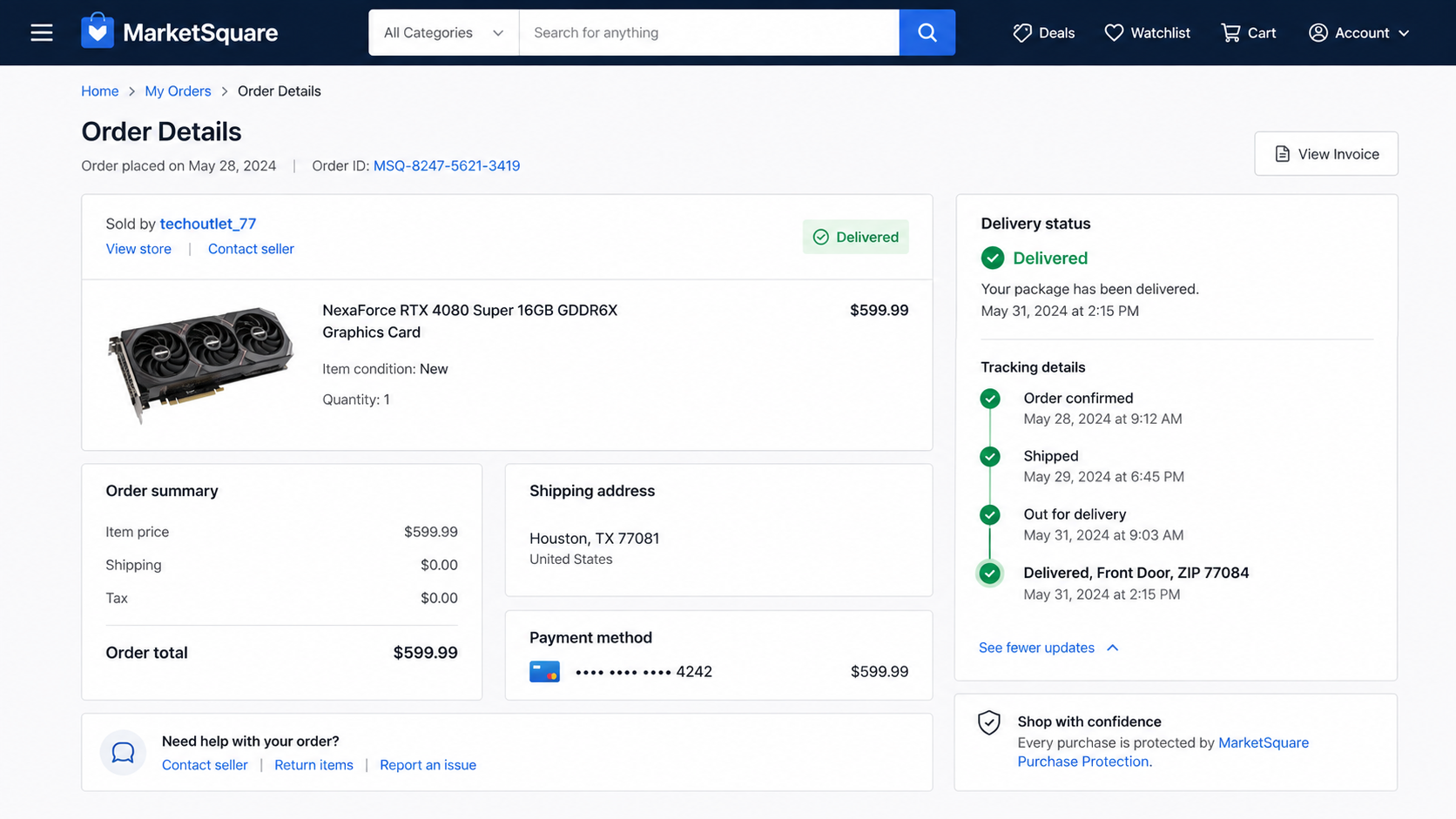
The order page turns green and says “Delivered.” The expensive item is nowhere near your door, the seller has stopped answering, and the tracking number appears completely real.
The eBay fake tracking scam begins with that contradiction. The status can make a buyer question the address, the carrier, or even someone at home.
Sometimes the parcel was delivered exactly where the tracking says. It was simply never your parcel.
Overview
The seller attaches someone else’s shipment to your order
In the eBay fake tracking scam, a fraudulent seller does not always invent a tracking number. The number may be valid, active, and connected to a real package traveling through a real carrier network.
The deception is that the package belongs to another transaction. It may be addressed to a different person, business, or street in the buyer’s city. The seller finds or obtains tracking that will show a delivery scan near the correct time, then uploads it to the eBay order.
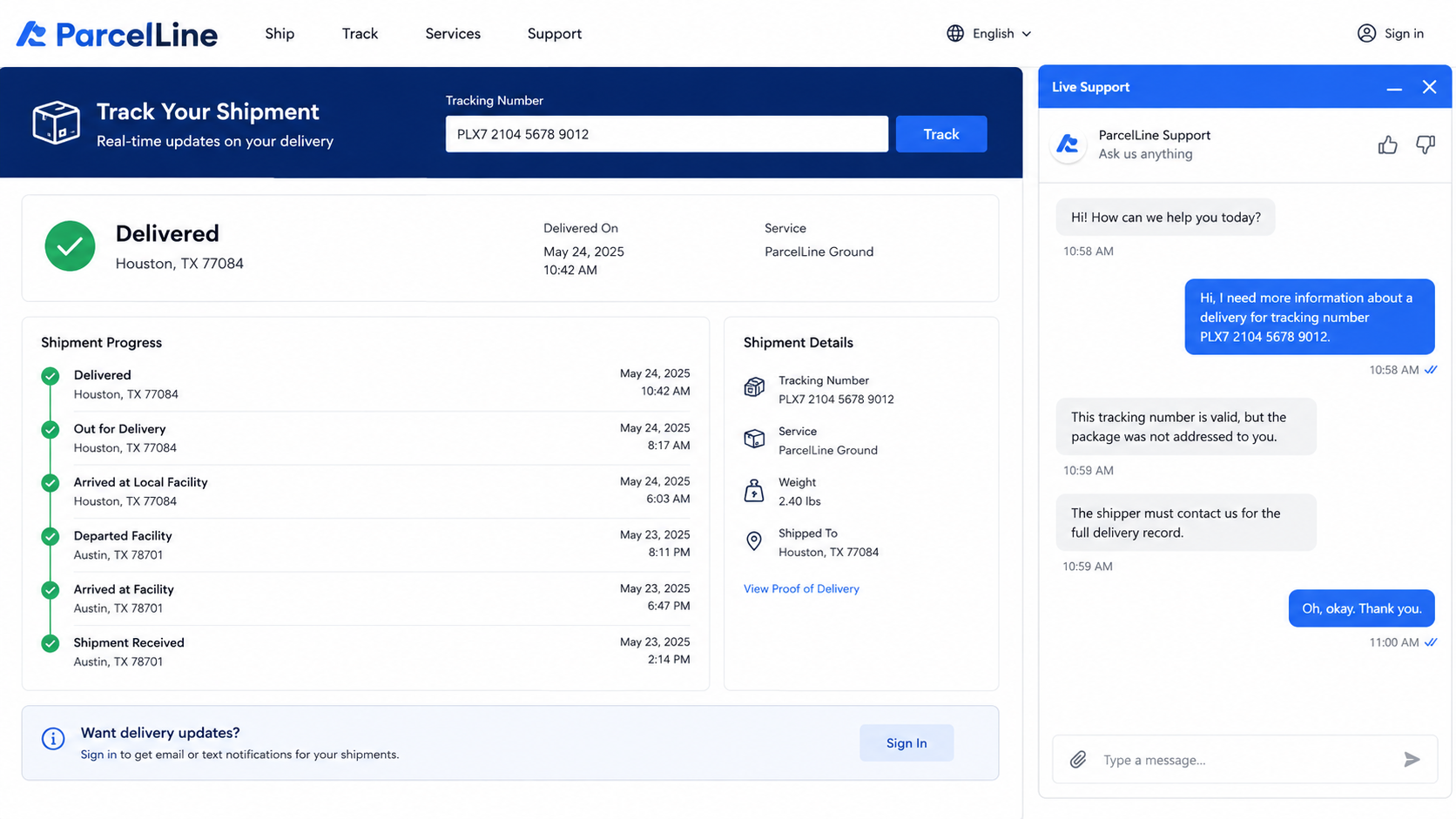
A public tracking page normally hides the recipient’s full address for privacy. The buyer sees the city or ZIP, a delivery time, and perhaps “front door” or “reception,” but not enough information to prove who received it.
The delivered scan is used to defeat an early complaint
When the buyer opens an item-not-received request, the seller points to the carrier record. An automated system or first review may treat the delivered scan as evidence that the order was completed.
eBay’s published tracking guidance says item-not-received requests can close automatically when integrated-carrier tracking shows delivery to the buyer’s ZIP. That feature helps honest sellers, but it also explains why a same-ZIP tracking number is valuable to a scammer.
The buyer’s task is not to prove that the tracking is fake. It may be genuine. The buyer needs evidence that the tracked parcel was not addressed to the shipping address shown in the order.
A carrier address check can break the illusion
Carrier representatives may not reveal another customer’s full address, and they should not. They may, however, be able to confirm that the shipment was not addressed to your name or street, that its weight is inconsistent with the item, or that the tracking number belongs to a different shipper.
That distinction matters under eBay’s Money Back Guarantee policy. The policy says sellers must deliver to the address in the order details and that proof of delivery must match the recipient location requirements.
Warning signs include:
- A high-value item is listed far below comparable prices.
- The seller has little recent history or a burst of unrelated listings.
- Tracking appears immediately but shows activity that began before the purchase.
- The origin, package weight, or service level does not fit the item.
- The status changes to delivered unusually quickly.
- The public tracking page shows only the city or ZIP, not your address.
- The delivery scan names a mailroom, front desk, or dock you do not use.
- No package appears in doorbell footage or building logs.
- The seller repeats the tracking number instead of answering specific questions.
- The carrier confirms the parcel was not addressed to you.
How the eBay Fake Tracking Scam Works
Step 1: A fraudulent listing attracts a quick purchase
The seller offers a graphics card, phone, camera, tool, collectible, or other desirable item at a price that feels like a rare opportunity. Product photos and descriptions may be copied from a legitimate listing.
Some fraudulent accounts are new. Others are old accounts taken over from real users, which can leave believable feedback and a long registration date attached to the listing.
Step 2: The seller sources a compatible tracking number
The scammer needs tracking that will reach the buyer’s city or ZIP within the order window. The number may come from another shipment the operator controls, leaked shipping data, an accomplice, or a low-value parcel sent elsewhere in the area.
The strongest match is a real carrier scan in the same ZIP. A weak version shows a different ZIP, impossible dates, or a package that was already moving before the order existed.
Step 3: Unrelated tracking is uploaded to eBay
The number appears in the buyer’s purchase history and begins receiving normal carrier events. Because eBay and the carrier exchange legitimate scan data, every update can look authentic.
This is why calling the tactic “fake tracking” can be misleading. The record itself may not be fabricated. Its connection to your order is false.
Step 4: A real package is delivered somewhere else
The unrelated parcel reaches a different home or business. Public tracking changes to delivered, while the intended eBay item was never shipped.
If the recipient is in the same ZIP, the visible information may seem to agree with the order. Delivery photographs can help, but not every service provides one, and a picture of an unfamiliar door still needs to be documented.
Step 5: The seller relies on the delivery status
When contacted, the seller may say to check with neighbors or the carrier. They may copy the same tracking line into every reply or simply wait for the platform to see “delivered.”
The delay benefits the operator. Dispute deadlines continue to run, memories fade, and the seller may be trying the same trick across many orders.
Step 6: The first claim may be closed
If the tracking meets an automated delivery test, the buyer can receive an unfavorable result before anyone examines the destination. That is frustrating, but it is not the end of the evidence trail.
eBay allows appeals with new information. A carrier statement that the package was not addressed to the order address is more useful than repeating that nothing arrived.
Step 7: The buyer proves the tracking is unrelated
Contact the carrier through its official site and request written confirmation of the mismatch. If a written letter is not available, note the case number, date, representative, shipper, weight, and any statement the carrier can lawfully provide.
Submit that evidence through the eBay case or appeal. Keep the dispute inside eBay and your payment provider. A seller who asks you to close the case before issuing a refund is asking you to surrender leverage.
What Evidence Helps With an Appeal
Start with a screenshot of the eBay order details showing the shipping address and the tracking number assigned to the transaction. Capture the carrier timeline and any delivery photograph before the page changes.
Then contact the carrier. Ask a precise privacy-safe question: was this tracking number addressed to the street address on my eBay order? You do not need the other recipient’s address. You need confirmation that it was not yours.
Package weight can also matter. A half-pound envelope cannot contain a desktop computer, and a two-pound carton is not a full-size appliance. Weight alone is not perfect evidence because carriers and sellers sometimes enter estimates, but it can reinforce an address mismatch.
Doorbell footage, building entry logs, mailroom records, and statements from household members help show that no matching delivery occurred. The FTC advises keeping order confirmations, receipts, tracking records, and communications when goods do not arrive as agreed.
Present the evidence in a short chronology: order placed, tracking uploaded, carrier delivery shown, carrier confirms different recipient or address, no item received. A clean timeline is easier to review than a long argument about the seller’s intentions.
Why a Same-ZIP Delivery Is Not Enough
A ZIP code can contain thousands of homes, apartment units, offices, stores, schools, and warehouses. A scan showing delivery somewhere inside that area narrows the destination, but it does not establish that the parcel reached the address on your order.
Public carrier pages hide full destination details to protect recipients. That privacy is sensible, yet it creates an information gap: the seller can see a favorable “delivered” status while the buyer cannot see the address needed to challenge it. The carrier and marketplace must bridge that gap without disclosing another customer’s private information.
Do not try to obtain or visit the unrelated recipient’s address. You are not looking for your purchase at another person’s home. You are establishing that the seller never sent the purchased item to you.
Ask whether the tracking number matches your name and exact street address. If support cannot provide a letter, request a case ID and ask the representative to record the mismatch in the carrier’s system. Some carriers may have a local office that can stamp or print a confirmation without revealing the other recipient.
Also compare the package facts as a group. A shipment created before the order, sent by an unrelated merchant, weighing far less than the product, and delivered to a different street is a much stronger record than any single clue.
Keep the tone factual when submitting an appeal. Say, “The carrier confirmed tracking number X was not addressed to the shipping address on order Y.” That statement gives the reviewer a policy issue to resolve. “The seller is obviously lying” may be true, but it does not supply the missing delivery evidence.
Company, Address, and Fulfillment Checks
Compare the tracking start with the order time
If the carrier accepted the package before you paid, the number cannot belong to a shipment created for your purchase. Save both timestamps.
Check origin, weight, and service
Compare the listing’s claimed location and item size with the carrier record. A major mismatch is not proof by itself, but it is a reason to seek address confirmation immediately.
Verify the destination without seeking private data
Ask the carrier whether the package was addressed to your exact order address. Do not ask for the other recipient’s full details, and do not visit an unfamiliar address to recover a parcel that was never yours.
Keep all communication inside the platform
Messages sent through eBay create a reviewable record. Do not move to private email, WhatsApp, or an off-platform refund page supplied by the seller.
What to Do if You Have Fallen Victim to This Scam
- Open an item-not-received request promptly. Use the order in your eBay purchase history and watch the stated deadlines.
- Save the order and tracking pages. Capture the item, seller, order address, number, scan history, delivery time, weight, and any photo.
- Contact the carrier through its official website. Ask whether the package was addressed to your name and street. Request written confirmation or a support case number.
- Ask eBay to step in. Explain that the tracking is valid but unrelated to the order, then attach the carrier evidence.
- Appeal with new evidence if necessary. eBay’s policy provides an appeal route after a case decision. Focus on the address mismatch, not speculation.
- Contact the payment provider. If the platform process fails, ask the card issuer or payment service what dispute rights apply. Do not pursue two conflicting resolution processes at once without checking the rules.
- Report the seller and listing. This can help connect your order with other buyers who received the same tactic.
- Change your password if you used an outside link. End unfamiliar sessions and enable two-factor authentication, especially if the seller sent a supposed refund or carrier page.
- Scan after any download. If an “invoice,” “proof of delivery,” or “refund tool” installed a file or extension, run a full Malwarebytes scan.
- Use web protection as a second layer. AdGuard can block many known phishing and malicious-ad pages, but it cannot determine whether valid tracking belongs to your order.
- Reject recovery offers. No stranger needs cryptocurrency or remote access to appeal an eBay case for you.
Frequently Asked Questions
Is the tracking number itself counterfeit?
Often it is a real number for a different package. The fraudulent part is attaching that shipment to your order and claiming it proves your item was delivered.
Why will the carrier not tell me the delivery address?
Privacy rules can prevent disclosure of another customer’s details. Ask the carrier to confirm only whether the destination matches your own address and to provide a case reference.
What if the tracking shows my ZIP?
A ZIP match is not a street-address match. The package may have gone to another home or business in the same area. Ask the carrier to verify the exact destination against your order.
Can eBay close the claim automatically?
Its help pages say item-not-received requests may close when integrated tracking shows delivery to the buyer’s ZIP. If the parcel was unrelated, appeal with new carrier evidence.
Should I ask neighbors for the package?
A quick check is reasonable, but do not let it replace a carrier address verification. Never confront a stranger at an address obtained through private shipping information.
Can I safely accept an off-platform refund?
Keep the resolution inside eBay whenever possible. Do not close a case because the seller promises a later refund or sends a link that asks for payment details or login credentials.
The Bottom Line
The eBay fake tracking scam uses a real carrier event to prove a delivery that never belonged to you. “Delivered” answers where one parcel ended its trip; it does not automatically prove that the seller sent the item in your order.
Move quickly, preserve the timeline, and ask the carrier to confirm whether the destination matches your address. That narrow piece of evidence can turn a confusing missing package into a clear case of unrelated tracking.

Join the discussion
0 commentsShare your experience or ask a question about this article.
Discussion
Start the conversation
Have a question or something useful to share? Add the first comment.