

A cheap household item appears at the top of a search page, the retailer name looks familiar, and the result is marked Sponsored. Nothing about that sequence feels unusual.
The fake Walmart search ad scam is built for exactly that moment. It borrows the trust of a major store and the placement of a paid result, then quietly sends the shopper somewhere else.
The difference may be only a few characters in an address most people never stop to read.
Overview
The ad appears where shoppers expect Walmart
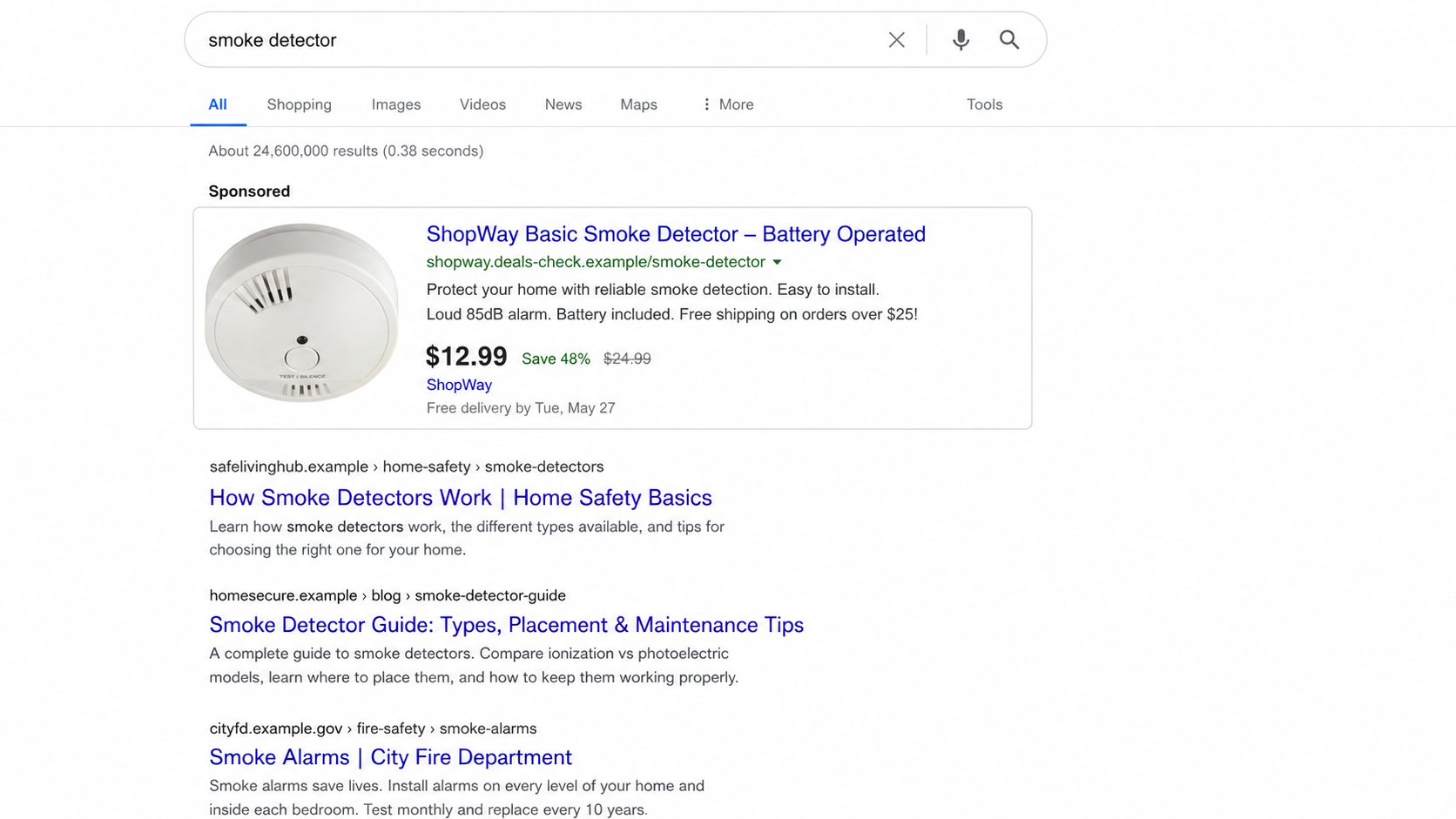
The fake Walmart search ad scam starts with a normal product search. A shopper may be looking for a smoke detector, television, tool, appliance, or seasonal bargain. Above the ordinary results sits an ad using Walmart’s name, familiar product language, and a price designed to invite an immediate click.
Paid placement is not a trust certificate. Criminals can buy search ads, copy a retailer’s wording, and choose a display name that looks legitimate at a glance. The Federal Trade Commission warns that scammers use paid search results to impersonate companies and steal money or personal information.
One recent campaign used a Walmart-branded result that led to a lookalike address under walmart.jsxnc[.]com. The name “Walmart” appeared in the hostname, but it was not Walmart’s official domain. That reversal is a favorite phishing trick: the trusted brand becomes merely a subdomain controlled by someone else.
The landing page is interested in the account, not the item
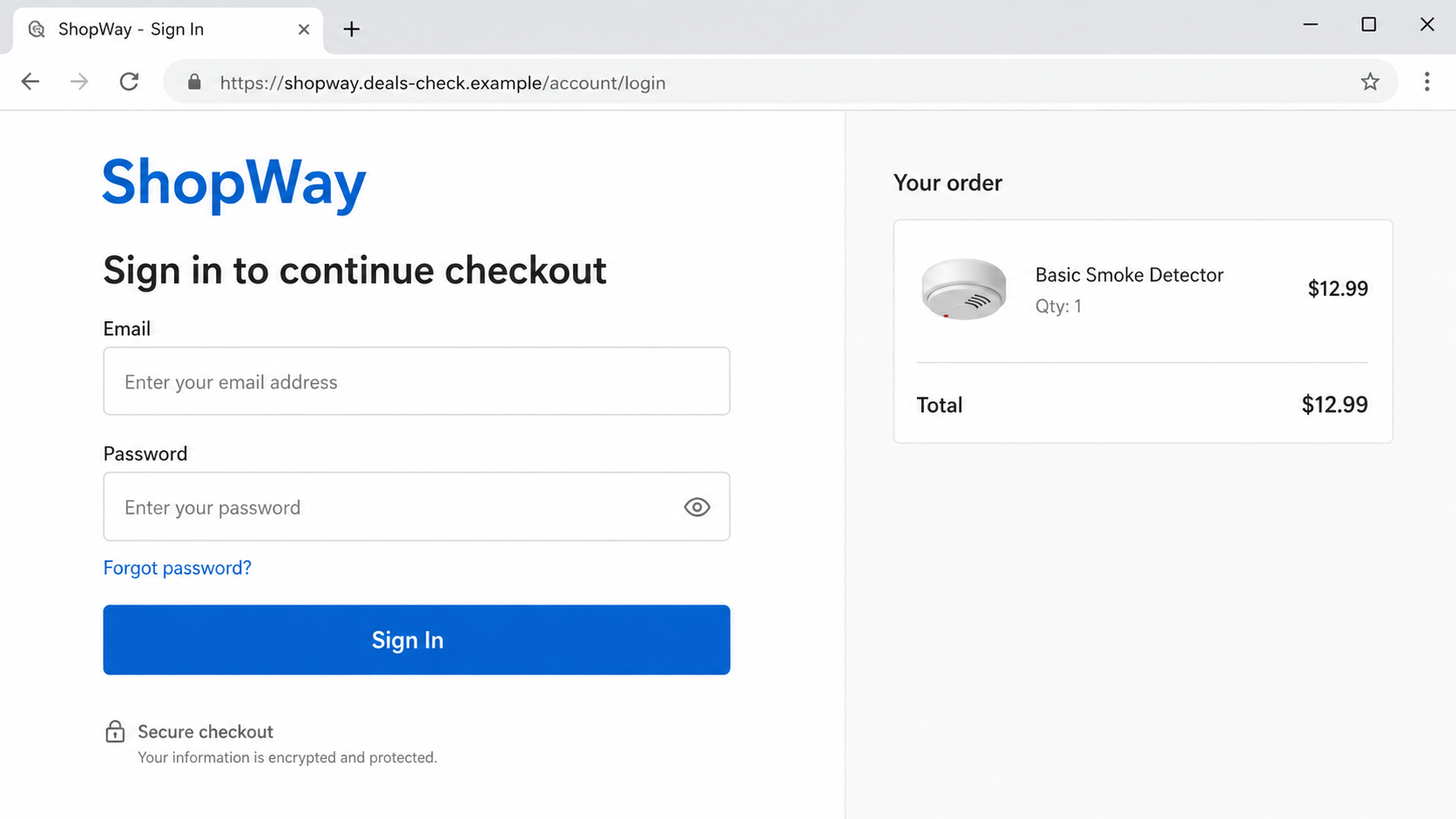
The low-priced product is bait. After the click, the page may show a copied storefront, a cart, or a sign-in prompt that claims the shopper must log in to see the offer. Anything typed there goes to the operator of the imitation site.
A stolen Walmart username and password may expose saved addresses, order history, account details, gift card balances, and any reused credentials. If the same password protects email, another retailer, or a payment account, the damage can spread well beyond the fake purchase.
Some pages proceed to a counterfeit checkout and collect card details. Others display an error after the form is submitted, encouraging the victim to try a second card. The shopper sees a failed order; the criminal receives two sets of payment information.
The browser address is the detail that gives it away
Walmart’s legitimate U.S. shopping site uses walmart.com. A long address containing the word Walmart somewhere else is not equivalent. In walmart.jsxnc.com, for example, the registered domain is jsxnc.com. The word before it does not transfer ownership or trust.
Walmart’s fraud guidance tells customers to watch for phishing and fraudulent websites that misuse the company’s identity. A sponsored label, padlock, polished design, or copied logo does not prove that a page belongs to Walmart.
Warning signs include:
- The price is dramatically lower than the same item on the official store.
- The result is sponsored, but the destination does not end in
walmart.com. - The brand name appears before an unfamiliar registered domain.
- The page asks for a full login before showing basic product details.
- The checkout claims the first card failed and requests another one.
- Links for policies, customer service, or store locations do not work.
- The site offers only a form, chat box, or unfamiliar email address for support.
- The browser or password manager does not recognize the page as the retailer.
- The offer becomes more urgent when you try to leave.
How the Fake Walmart Search Ad Scam Works
Step 1: The scammer chooses a product people search for
The best bait is ordinary. A safety device, replacement part, popular gift, or household appliance already has steady search demand. The criminal does not need to persuade people to want it; the search query proves that interest already exists.
A low price creates the final nudge. It is tempting without being so absurd that every shopper immediately rejects it. Seasonal shortages, clearance events, and flash sales give the discount a believable explanation.
Step 2: A paid ad borrows the retailer’s identity
The advertiser uses Walmart’s name in the headline and may copy wording or images from a real listing. Search pages visually separate ads from organic results, but the label can be small compared with the bold brand and product title.
People often assume the search company or retailer approved the advertiser. Ad platforms do review campaigns, but criminals rotate accounts, domains, redirects, and landing pages. An ad can appear professional during the brief window before it is detected.
Step 3: The click is redirected to a lookalike domain
The visible link may seem close enough to the expected address. Sometimes the destination changes after the click. Tracking services and multiple redirects make it harder for a shopper to notice where the browser finally lands.
HTTPS does not solve this problem. The padlock only means the connection to that domain is encrypted. A scammer can obtain a valid certificate for a malicious domain just as a legitimate business can obtain one for its site.
Step 4: A copied login page captures the password
The fake page says the sale is available to account holders, the session expired, or the shopper must sign in to continue checkout. The form can look nearly identical to the real login because logos, fonts, colors, and page layouts are easy to copy.
After the victim submits the credentials, the page may deliberately report an incorrect password. That gives the criminal a second attempt, which can reveal a corrected password or another password the victim commonly uses.
Step 5: The scammer collects payment or verification codes
A fake checkout asks for the card number, expiration date, security code, billing address, phone number, and email. If a bank sends a one-time code, the site may immediately request it under the label “verify your order.”
That code may actually authorize a card enrollment, password reset, or transaction. Read the bank’s entire message before entering any code. A merchant does not need you to forward a security code that the bank says must not be shared.
Step 6: The page hides the theft behind an error
The victim may see “item unavailable,” “payment declined,” or an endless loading screen. There is no confirmation because there was never a real order. The error buys time and makes the victim blame a technical problem.
The operator can then test the password on Walmart, email providers, and other popular sites. Card details may be used directly, sold, or enrolled in mobile wallets while the victim is still trying to complete the bargain.
Step 7: The campaign moves to another domain
Once reports accumulate, the ad and landing page disappear. A new advertiser account can promote the same copied design from another domain. This churn is why searching a suspicious hostname may produce little history even when the scam pattern is well established.
Evaluate the ownership and behavior, not just the age of a single report. A newly registered lookalike that asks for retail credentials through an ad is dangerous even before reviews appear.
Why a Sponsored Result Is Not an Endorsement
Search advertising is placement purchased by an advertiser. It is not a recommendation from Walmart, the search engine, or a consumer-protection agency. The word Sponsored describes how the result reached that position, not whether the seller will fulfill an order.
Scammers exploit a habit formed over years: people click the first result and use the brand name as their main verification check. On a small screen, the destination may be shortened or pushed below the headline, making that habit even riskier.
The safer routine is simple. For a major retailer, use its saved app, a bookmark you created earlier, or type the known domain yourself. Search can help you find information, but it should not decide which payment or login page receives your credentials.
This matters beyond Walmart. The same method impersonates airlines, banks, utility companies, antivirus vendors, government services, and delivery companies. The FTC has also warned that bill-payment impersonators use search ads to intercept people who are trying to reach a real company.
What Can Be Stolen From a Fake Retail Login
The immediate prize is the credential pair. Criminals know many people reuse passwords, so a retail login can become a test key for email, shopping, streaming, and financial accounts. Email access is particularly serious because it can reset nearly everything else.
A real retail account may hold delivery addresses, phone numbers, purchase history, saved cards, gift balances, and loyalty rewards. Those details can support fraudulent orders or make later impersonation messages sound personal.
Payment forms add card data and billing information. Even if no charge appears immediately, the card should be treated as exposed. Delayed use is common because it separates the fraudulent charge from the page that collected the information.
One-time codes can be even more time-sensitive. A code submitted to a phishing page may let the criminal complete an action in real time. Do not assume two-factor authentication protected the account if the code was entered into the fake site.
Finally, the operator learns that the email address, phone number, and shopping interest are active. That information can feed follow-up delivery texts, refund calls, prize notices, or account-security messages tailored to the original lure.
Company, Address, and Fulfillment Checks
Read the registered domain from right to left
Ignore the path and promotional words at first. Identify the name immediately before .com, .net, or another ending. If that core domain is unfamiliar, do not sign in. For Walmart in the United States, the expected domain is walmart.com.
Open the retailer independently
Close the ad page and type the official address yourself or use the retailer’s app. Search for the same product there. If the price or listing exists only through the ad link, treat the offer as bait.
Verify support and physical details
A copied logo is not a company record. Check whether customer-service links remain on the same official domain, whether the return policy names the actual seller, and whether a listed address belongs to the business it claims.
Confirm fulfillment before paying
Marketplace items can have third-party sellers, but the checkout should still occur through the official platform. A seller that moves payment to another site, bank transfer, gift card, cryptocurrency, or messaging app has removed the platform’s protection.
What to Do if You Have Fallen Victim to This Scam
- Close the fake page. Do not submit another card or password to test whether the error clears. Save the ad, URL, and screenshots first if it is safe to do so.
- Change the exposed Walmart password. Open Walmart from its official app or typed address. Sign out other sessions and review account details, addresses, orders, and payment methods.
- Change every reused password. Start with the email account connected to Walmart, then financial and shopping accounts. Use a unique password for each service.
- Secure your email. Review recovery details, recent sign-ins, app passwords, forwarding rules, and connected applications. Remove anything you did not create.
- Call the card issuer. Use the number printed on the card. Say the complete card details were entered on a phishing site and ask for replacement, not merely monitoring.
- Review one-time codes. Tell the bank if you entered a code and quote what the original message said it authorized. This can reveal a transaction or wallet enrollment that is not yet visible.
- Check the device. If the site downloaded a file, extension, or “security update,” disconnect it from sensitive accounts and run a full Malwarebytes scan.
- Reduce repeat exposure. After cleanup, AdGuard can block many known malicious-ad and phishing destinations. It is an extra layer, not a substitute for checking the final domain.
- Report the ad. Use the search platform’s ad-reporting option and submit the domain to Walmart through its official fraud channel.
- Document losses. Keep card statements, emails, screenshots, order claims, and case numbers. Report identity theft or financial loss to the FTC at ReportFraud.ftc.gov and to local authorities when appropriate.
- Reject recovery offers. A stranger who promises to recover the money for an upfront fee is starting a second scam.
Frequently Asked Questions
Can a fake Walmart ad appear above the real Walmart result?
Yes. An advertisement can occupy a higher position than an organic result. Position alone does not establish ownership. Check the destination domain before signing in or paying.
Does the Sponsored label mean the advertiser was verified?
No. It means the placement was paid for. Platforms use screening and enforcement, but deceptive advertisers still get through and may operate briefly before removal.
Is a padlock enough to prove the page is Walmart?
No. A padlock shows that the connection to the displayed domain is encrypted. It does not say Walmart owns that domain or that the operator is honest.
What if the fake page rejected my password?
Assume the first submission was captured. Change that password anywhere it was used, even if the page displayed an error and no order appeared.
What if I entered card details but was not charged?
Call the issuer and replace the card. Criminals can wait before using or selling the data, so the absence of an immediate charge is not evidence that the details are safe.
Can an ad blocker prevent every sponsored-result scam?
No single tool catches every campaign. Blocking known malicious ads helps, but direct navigation and domain checking remain essential because new advertiser accounts and domains appear constantly.
The Bottom Line
The fake Walmart search ad scam does not depend on a convincing sales pitch. It depends on a familiar name, a high search position, and a shopper moving quickly enough to overlook who owns the final page.
Open major retailers independently, read the domain before entering credentials, and treat an unexpected login inside a bargain ad as a stop sign. A sponsored result can buy attention. It cannot buy legitimacy.

Join the discussion
0 commentsShare your experience or ask a question about this article.
Discussion
Start the conversation
Have a question or something useful to share? Add the first comment.