

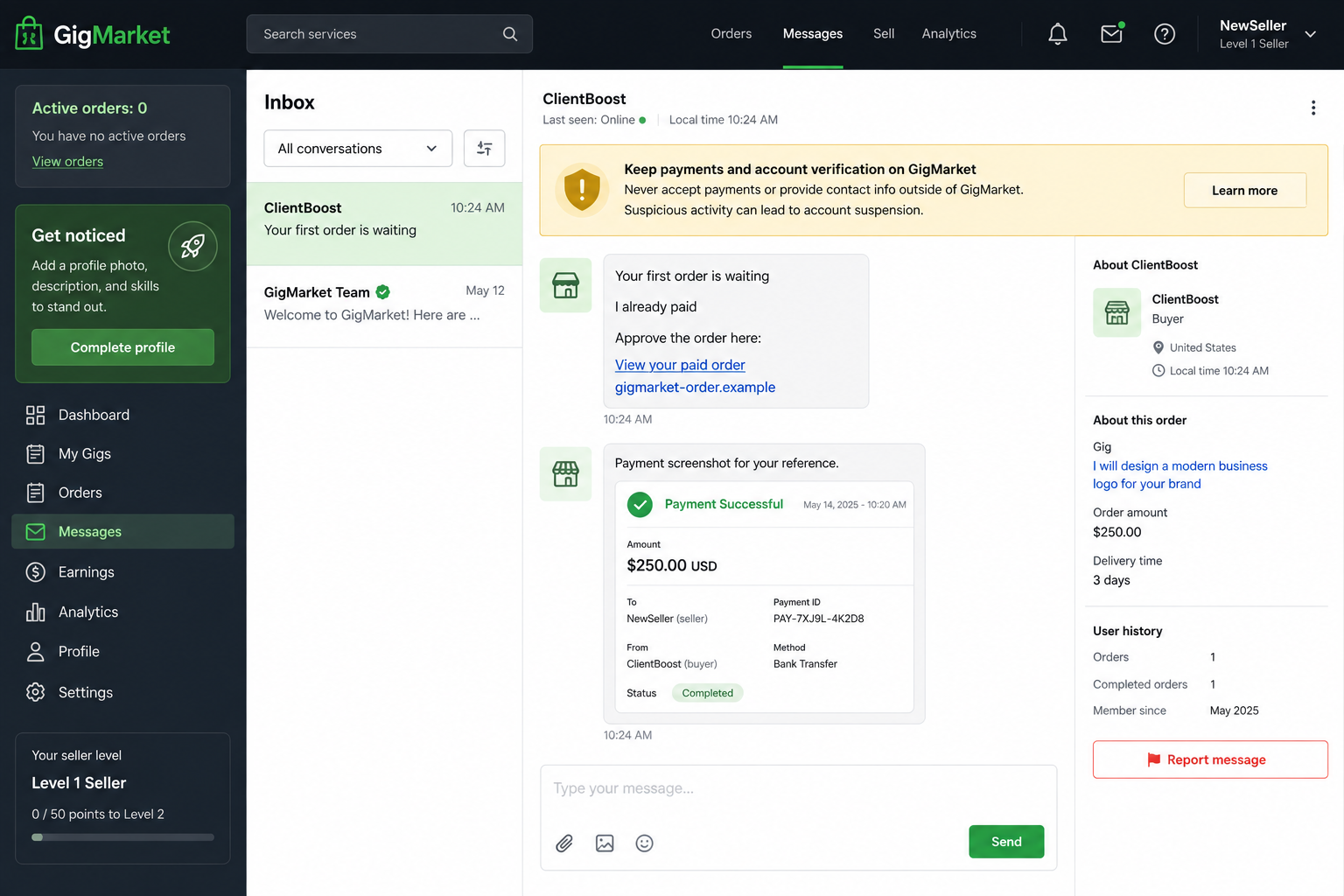
A new freelancer publishes a first gig and, within minutes, a buyer appears. The message says the order is paid, but one final approval is waiting at a link.
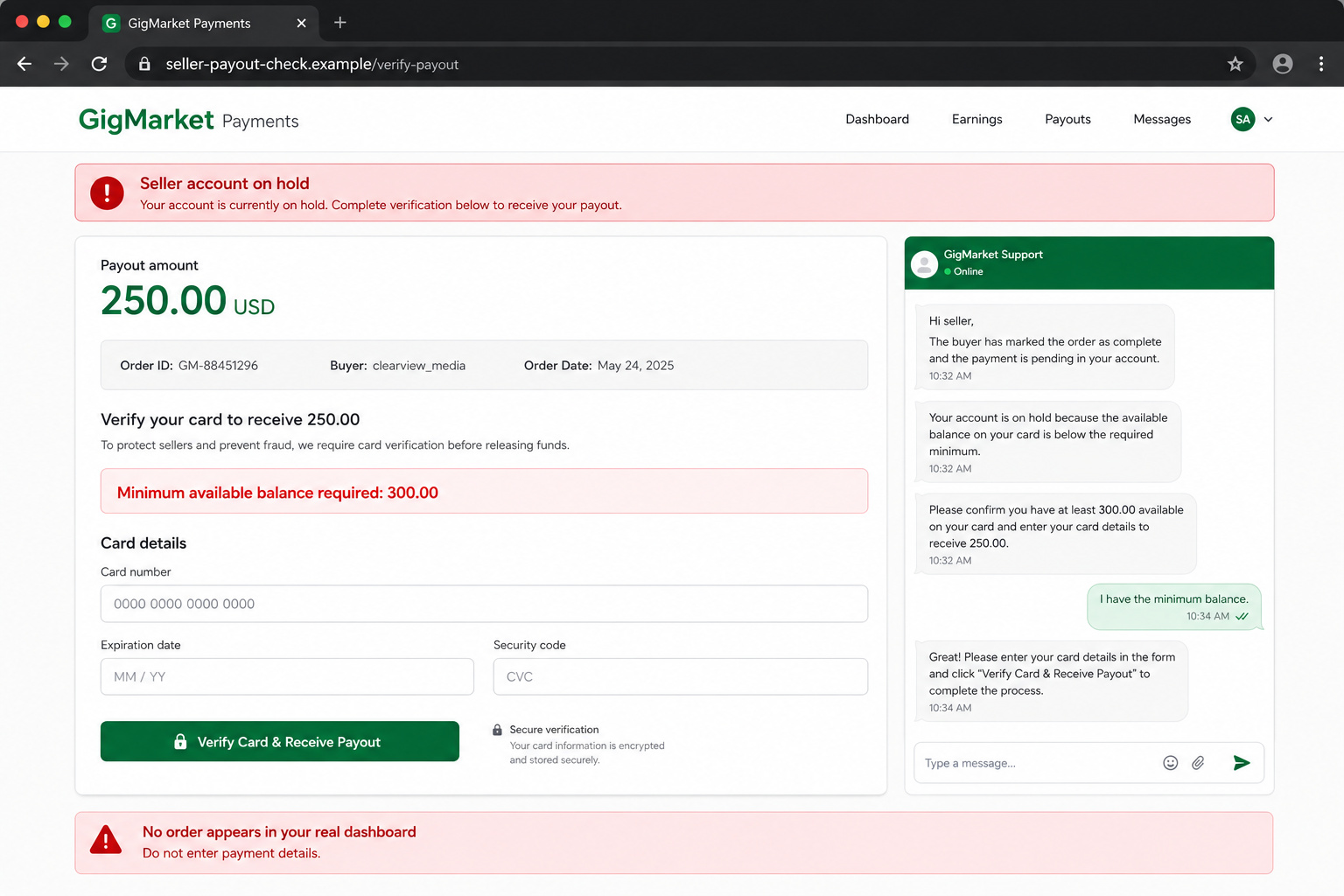
The page knows the seller’s username and service. It looks like the marketplace, shows a payout, and explains that a card must be verified before the money can be released.
The Fiverr fake order scam depends on the excitement of a first sale lasting just long enough to hide one impossible request.
Overview
A fake buyer targets the newest sellers first
The Fiverr fake order scam is a phishing campaign aimed at freelancers who have just published a gig or opened a seller account. A supposed buyer claims to have placed an order, then sends a link, QR code, screenshot, or request for the seller’s email.
New sellers are ideal targets because they do not yet know exactly how a genuine order appears. They are waiting for the first notification, want to respond quickly, and may assume an unfamiliar step is part of seller onboarding.
Fiverr is a genuine marketplace and is not asking for the card through these messages. Its official safety guidance says representatives will not ask users to scan a QR code, verify an account with a credit card, or provide payment details in conversation.
The real dashboard and the message tell different stories
The buyer’s screenshot may say “payment successful,” “order pending,” or “seller action required.” The external page can copy the gig title, profile name, colors, menus, and a payout amount. None of that creates an order inside Fiverr.
The decisive check is the authenticated dashboard opened independently. If no order appears under the seller’s real orders, there is nothing to approve, release, accept, or verify through a link sent by a stranger.
A buyer does not need the seller’s email address, card balance, card number, or one-time bank code to purchase a gig. The platform already has the information required to process legitimate orders through its own system.
The fake payout form is actually a collection page
The external site may say the account is on hold until a card is connected. It can ask for the number, expiration date, security code, billing address, available balance, or an exact amount of money to be added before verification.
That reverses the direction of payment. A freelancer expecting to receive earnings is pushed into proving how much can be taken from the card. A later one-time code may authorize a charge, wallet enrollment, or bank action rather than a payout.
Warning signs include:
- A buyer claims to have paid but no order exists in the dashboard.
- The message arrives moments after a new gig is published.
- The buyer asks for the seller’s personal email address.
- A screenshot includes a field the seller supposedly must complete.
- The order link opens outside Fiverr’s official domain.
- A QR code is presented as a way to receive payment.
- The page says a debit or credit card must be verified.
- A chat agent asks how much money is available on the card.
- The seller is told to add funds before receiving earnings.
- A bank code is described as payout confirmation.
How the Fiverr Fake Order Scam Works
Step 1: A fresh gig reveals a new target
New listings are public and easy to monitor. Automated accounts can find a recently published service, copy its title and seller name, and send a message before a genuine buyer arrives.
The speed is part of the persuasion. The seller connects the message with the work just completed and may interpret immediate attention as proof that the listing is already performing well.
Step 2: The buyer claims an order already exists
The message usually skips normal questions about scope, files, deadline, revisions, or requirements. Instead, it says payment is complete and asks the seller to check an order, accept a delivery request, or solve a problem blocking checkout.
A fake screenshot can display the correct gig image and an invented receipt. Images are not live marketplace records. The seller should open Fiverr independently and look for the order there.
Step 3: Contact is moved toward an external route
The buyer may request an email address because “Fiverr needs it,” send a shortened link, attach a QR code, or place a web address inside an image to avoid automatic filtering.
The external domain can contain words such as order, seller, Fiverr, payout, support, or verification. The brand name appearing somewhere in an address does not make it an official Fiverr page.
Step 4: A copied seller page creates a false hold
The landing page imports public details from the gig and says the buyer paid. A warning claims the seller account is unverified, frozen, or unable to receive funds. The supposed problem did not appear in the real dashboard because it was invented on the fake site.
A chat widget can make the page feel interactive. The “support agent” answers quickly because the conversation is controlled by the same operation that sent the buyer message.
Step 5: Card details and available balance are requested
The page asks for payment information under the label “payout verification.” It may claim the card will not be charged, then insist that a minimum balance is required to prove ownership or prevent fraud.
Legitimate marketplaces deduct service charges from earnings according to their published process. They do not need a seller to reveal the available balance or load a card to receive a buyer’s payment.
Step 6: A real bank prompt is misrepresented
After card details are submitted, the criminal may attempt a purchase or add the card to a digital wallet. The bank sends a genuine code or approval prompt, which the fake page calls the final step in releasing the payout.
Read the bank’s message rather than the website’s explanation. If the code authorizes a payment, new device, or wallet, approving it gives the criminal exactly what the bank is trying to block.
Step 7: Errors are used to collect more
The site may reject the first card, ask for a different one, increase the required balance, or claim the bank reversed the test. Each new attempt can expose another payment method.
The fake buyer stays helpful and urges the seller to finish so work can begin. Once charges succeed or the victim calls the real platform, the account and site disappear.
Why the First Order Is Such Effective Bait
A new freelancer has invested time in a profile, samples, pricing, and a gig description. The first buyer feels like confirmation that the effort worked. That emotional reward can arrive before platform habits are established.
The scam also places the seller in a customer-service role. A buyer says payment is stuck, so the freelancer feels pressure to fix the issue quickly and avoid a poor review. The criminal acts like the customer while giving instructions.
Professional design fills the knowledge gap. If the seller does not know what a real order page looks like, a convincing imitation can define the process. That is why the independent dashboard matters more than appearance.
Experienced sellers can still be targeted with changed wording, large projects, business accounts, or claims that a returning client needs special approval. The rule remains the same: the order and payment must exist inside the platform account.
How a Real Fiverr Order Should Be Verified
Close the buyer’s link. Open the Fiverr app or type the official address yourself, sign in, and check the orders area. A genuine purchase should have an order record, requirements, buyer information, and platform-managed workflow.
Keep communication and file exchange inside Fiverr when the platform requires it. An external messaging app or email removes useful context and reporting controls. It also lets the criminal use domains and support identities that Fiverr does not control.
Never use a screenshot as proof of payment. The seller’s authenticated balance and order list are the record. A buyer can edit an image, browser page, or PDF to show any amount and status.
Report the message before blocking the account. Platform investigators can remove links and identify related profiles. Do not click again merely to collect more evidence; the original conversation and visible URL are enough for an initial report.
What the Fake Page May Try to Steal
Card details can support unauthorized purchases or resale. The billing address and telephone number improve identity matching. A stated account balance tells the operator whether another charge is likely to succeed.
A Fiverr login can expose messages, client files, earnings, and reputation. If the password was reused, the attacker may test it against email, social, cloud storage, and payment services.
Email access is particularly serious. It can receive password resets and hide alerts with forwarding rules. Secure the mailbox before chasing every secondary account.
Identity documents should never be sent to a buyer or external “support” chat. If a platform requires verification, begin from the authenticated account and confirm that the address belongs to the official service.
Company and Checkout Checks
The company is Fiverr, not the lookalike page
Read the registered domain in the browser address bar. A brand word in a subdomain or path does not establish ownership. Open Fiverr independently rather than repairing the address sent by the buyer.
The buyer must have a real order record
A profile, screenshot, and friendly conversation do not create a purchase. If the order is absent from the authenticated dashboard, do not begin work, release files, or enter payment information.
The domain must remain inside the platform workflow
Shorteners, QR codes, cloud forms, and external payout pages break the trusted route. Report the destination without signing in. Even HTTPS only encrypts the connection to whoever owns that domain.
The payment must flow toward the seller
Receiving earnings does not require revealing a card balance, paying an activation amount, or approving a bank charge. Any process that turns a payout into an urgent deposit is a scam.
What to Do if You Have Fallen Victim to This Scam
- Stop using the fake page. Do not try another card, send a code, add funds, or continue with the chat agent.
- Lock the exposed card immediately. Contact the issuer through its official app or number, explain that details were entered on a phishing page, dispute charges, and request replacement where advised.
- Review wallet and bank enrollment. Tell the issuer if a one-time code or approval prompt was accepted. Ask whether the card was added to a digital wallet or new merchant credential.
- Change the Fiverr password. Use the real app or official site, sign out unknown sessions, review account details, and enable stronger authentication.
- Secure the connected email account. Change reused credentials, inspect sign-ins, forwarding rules, recovery contacts, app passwords, and connected applications. Email can unlock the seller profile again.
- Report the buyer and link to Fiverr. Use the message-reporting controls and include screenshots, the external domain, timestamps, and the claimed order. State clearly that no real order appeared.
- Warn clients if the seller account sent messages. Preserve the unauthorized conversation first, then tell recipients not to open links or submit payment information.
- Scan the device if anything downloaded. Remove unexpected extensions, installers, or remote-support applications and run a full Malwarebytes scan.
- Add blocking after cleanup. AdGuard can block many known phishing pages and malicious ads. New lookalikes appear quickly, so the real order dashboard remains the decisive check.
- Document and report financial loss. Keep statements, bank case numbers, messages, URLs, and screenshots. In the United States, report at ReportFraud.ftc.gov; use the relevant fraud service elsewhere.
- Ignore recovery messages. A stranger who promises to retrieve card losses or restore a profile for an upfront payment is beginning another scam.
Frequently Asked Questions
Does a Fiverr buyer need my email to place an order?
No. A normal buyer can order through the platform. Treat a request for personal email or payment details as a warning and keep the conversation inside Fiverr.
Can the fake page know my real gig title?
Yes. Public listing details can be copied automatically. Correct public information does not prove that the page is connected to the marketplace.
What if the buyer sends a payment screenshot?
Ignore it as payment evidence. Open the real dashboard and verify the order there. An image can be edited or generated in seconds.
Would Fiverr ask for my card balance?
No legitimate payout verification needs the available balance on a seller’s card. That question helps a criminal choose how much to attempt.
What if the page says my card was declined?
Assume the submitted details were captured. Do not enter a second card. Lock the first card and contact its issuer immediately.
Is Fiverr itself running this scam?
No. Criminal accounts and external phishing sites are impersonating the platform and its payment process. Report them through Fiverr’s official controls.
The Bottom Line
The Fiverr fake order scam makes a new seller feel paid before any order exists. Public gig details, a polished receipt, and a copied dashboard create the illusion, while the real account quietly shows zero orders.
Open Fiverr independently and trust only the order record inside your authenticated account. A buyer who needs your card, balance, email, QR scan, or bank code is not trying to hire you.

Join the discussion
0 commentsShare your experience or ask a question about this article.
Discussion
Start the conversation
Have a question or something useful to share? Add the first comment.