


A Flap rewards page invites you to help decide how a distribution should work. The familiar dark interface makes voting feel like another ordinary community activity.
You may only want to participate, not move any cryptocurrency. Keep that intention in mind when the page asks your wallet to get involved.
Overview
A distribution vote is the reason given for connecting
The Flap Vote Rewards scam impersonates the token platform through a separate website. The reported campaign address was voting-flap[.]com.
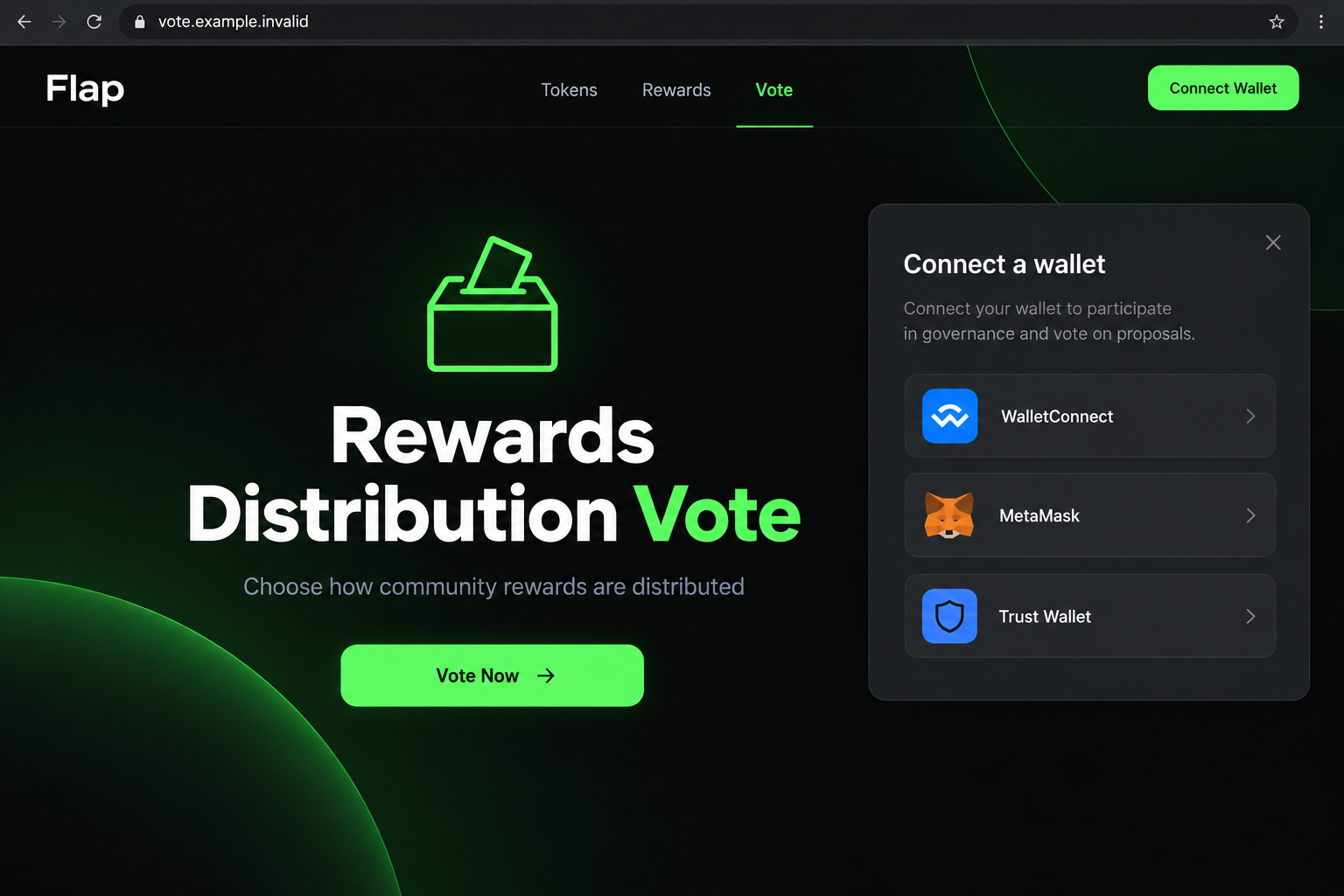
Its offer invites visitors to vote on the distribution of rewards. That civic-looking task provides the excuse for asking people to bring a wallet into the interaction.
A community vote does not inherently sound like a spending decision. This mismatch can make a consequential wallet request easier to accept without scrutiny.
Do not use the counterfeit voting offer. The campaign is reported as a wallet-drainer operation, not an authenticated reward program from the real platform.
The actual Flap platform is a separate service
The established project site is flap.sh. It presents a programmable token launchpad with creation and trading features, including BNB-related activity.
This warning is about the impersonating vote. It is not a finding that every Flap token, project participant, or platform transaction is fraudulent.
The counterfeit borrowed Flap’s visual identity, including dark styling and green accents. Shared colors cannot establish that two websites share an operator.
- Confirm a reward announcement through the genuine project, not the invitation.
- Read the domain as carefully as the branding.
- Compare each wallet request with the limited action you intended.
- Decline requests you cannot independently explain.
A wallet connection is not the whole incident
The voting address could not provide a usable live capture when checked. The historical offer is described without claiming to have completed its wallet flow.
The exact transaction requested in your encounter matters. Merely recognizing a wallet brand in a connection menu does not explain what a later approval authorizes.
If you participated, examine the requests you accepted. Do not assume that connecting automatically emptied the wallet, or that a missing visible transfer proves everything is safe.
Why a Vote Can Lower Your Guard
Giving feedback feels different from buying a token. You may expect to select an option, prove that you belong to the community, and finish.
The voting pitch benefits from that expectation. It directs attention toward the reward decision instead of the authority being requested from the wallet.
Picture the difference in plain language: choosing how rewards are distributed is one action; allowing a contract to spend an asset is another.
A website can describe the second action as part of the first. The description does not change what your wallet actually approves.
The same applies to a request labeled participation or validation. A friendly label should never replace an understandable explanation of its effect.
If the real proposal is genuine, you should be able to find its rules through verified channels. An unfamiliar page insisting that verification must happen immediately is inadequate.
You can decline without proving that the operator is guilty in a legal sense. An unverified invitation is enough reason not to grant financial authority.
How the Flap Vote Rewards Scam Works
Step 1: The rewards story attracts a community participant
The lure presents participation as a useful contribution to the platform. Its theme is reward distribution rather than a straightforward request for a payment.
That gives an existing user a reason to explore. Someone unfamiliar with the platform may also see the vote as an easy way to qualify for something.
Neither situation verifies the offer. Being eligible for a genuine program would not make a different website’s invitation authentic.
Find the original announcement yourself. Start from the known project and locate the participation route it actually publishes.
If the link arrived through a chat or social account, review that account’s identity. A displayed name and a copied logo are not independent confirmation.
A project-themed reply under a real discussion can also be untrusted. Do not treat proximity to genuine content as approval by the project.
Step 2: The lookalike interface disguises a separate destination
The reported page uses recognizable Flap styling and a voting call to action. Familiarity supplies reassurance before a sensitive prompt appears.
Check the address itself. Voting-flap[.]com and flap.sh are different registered domains, not two pages under one address.
A descriptive prefix does not create affiliation. Words such as vote, rewards, claim, and governance are often chosen because they sound related to the intended activity.
Do not use the presence of HTTPS as the final test. An encrypted connection can protect communication with a dishonest website just as readily as an honest one.
A landing page should not authenticate itself by listing popular wallets. Those options show how it wants to interact, not who authorized the promotion.
Step 3: Vote Now leads toward a wallet prompt
The reported voting button opens a connection panel with recognizable wallet options. This can make the flow feel compatible and professionally maintained.
Compatibility is not safety. Your wallet can display a request from an untrustworthy page without certifying the page’s claims.
A connection normally lets the site identify a permitted public account and request further actions. It is not, by itself, permission to transfer every asset.
Stay alert after the connection stage. The following signature or transaction may have a different consequence from sharing a public address.
Use the wallet’s own interface to inspect the request. Text printed on the website should not overrule information displayed by the wallet.
If a request mentions spending, an unfamiliar recipient, or a network change unrelated to the vote, stop. Participation does not justify an unexplained financial action.
Do not supply secret recovery words to make a connection work. A page asking for them is seeking more than the public account needed for ordinary interaction.
Step 4: A disguised authorization can enable theft
A drainer flow seeks authority that can move assets. That authority may come through a transaction, spending approval, or consequential signed message.
The precise request must be assessed in its network and protocol context. It would be misleading to claim one identical transaction was used for every visitor.
A permission request can be dangerous even when no purchase total is shown. Focus on what may be spent, by whom, and under which conditions.
Do not approve because the amount shown by the website is zero. The wallet’s authorization can involve future asset movement rather than a displayed checkout price.
If you accepted something, save the actual record. The transaction hash, network, token, and permission details are more useful than the site’s promise of a vote.
Prompt action can reduce continuing exposure, but a permission change does not undo a completed transfer. Treat containment and any loss investigation as separate tasks.
What the Wallet’s Network and Permission Details Tell You
The selected account can matter as much as the selected site
Keep screenshots of the actual request if available, with private information removed. A vote-page screenshot explains the lure, but the wallet prompt explains the authority you accepted.
Include the request’s time when asking support for help. Matching it to the activity history is more useful than describing only the website’s colors.
A wallet may contain several accounts and support more than one network. Confirm which account a request involves before deciding what was exposed.
The legitimate platform’s BNB context does not guarantee that a counterfeit page only requests actions on that network. Read the prompt that actually appeared.
If you changed networks during the interaction, include that in your incident notes. A review of only the originally selected network can miss a relevant action.
Do not randomly approve another network switch to revisit the offer. You can investigate recorded activity without resuming its claim process.
Connection management and on-chain permissions are different
Removing a website connection prevents some further interaction with that account. An existing token allowance can remain after the visible connection is removed.
Wallet makers provide separate guidance for reviewing and revoking those allowances. Use instructions that fit the chain and token concerned.
MetaMask’s approval guidance explains this distinction. Open trusted tools through verified links, not through a stranger’s cleanup message.
Some signatures have effects that are not resolved by a generic disconnect button. Ask verified support about the specific request if you cannot interpret it.
A hardware wallet still needs an informed decision
A hardware wallet can help keep keys isolated, but it cannot know whether you intended the financial effect of a request you confirm.
Read the available device and application details. A physical confirmation is useful only when you understand and agree with the action being confirmed.
Never transfer recovery words from a hardware backup into a website to troubleshoot a vote. That would discard the protection the hardware is meant to provide.
What to Do if You Have Fallen Victim to This Scam
-
Leave the voting offer and cancel pending requests. Stop signing, stop claiming, and remove the untrusted site’s connection through your wallet’s controls.
If you never approved anything beyond a basic connection, confirm that in the activity record. Avoid making the exposure sound larger or smaller than it was.
-
Collect the relevant wallet records. Note accepted requests, transaction references, affected accounts, networks, and assets. Save the promotional message privately.
Exclude recovery phrases from screenshots. Public transaction details help explain an incident without giving a helper the keys to your remaining funds.
-
Address unwanted contract authority. Review approvals with a trusted provider-supported tool and revoke inappropriate permissions where applicable. Check the exact token and chain.
A revocation can require its own transaction and fee. Understand that legitimate action before confirming it, rather than trusting a supposed free cleanup button.
-
Replace keys if secret material was disclosed. A phrase or private key entered into a fraudulent form creates a broader problem than a single unwanted allowance.
Set up fresh wallet secrets through trusted software or hardware guidance. Obtain verified assistance if a compromised account’s remaining assets are difficult to move safely.
-
Report actual theft through the right channels. Contact any relevant exchange using its published support process. Supply the blockchain evidence and timeline.
Submit a fraud report to appropriate authorities, including IC3 in the US. Keep provider responses and case numbers with the incident record.
-
Ignore people offering guaranteed recovery. Do not send a release payment or grant a new wallet access to someone responding to your public complaint.
Warn community members through a verified channel with the address defanged. Do not invite others to connect wallets to confirm your findings.
What Not to Do While Checking a Missing Balance
A balance that looks wrong deserves investigation, but not another visit to the reward offer. Start from the wallet and trusted network records.
Check the account, chain, and asset display before concluding that funds moved. A display issue and an unauthorized transfer need different responses.
If a transfer is recorded, keep its reference and recipient. Do not replace that evidence with an unverified claim that the voting page can reimburse you.
Do not send a test payment to the page’s support address. Nothing about a rewards vote requires you to finance a stranger’s troubleshooting.
Be cautious about new tokens appearing unexpectedly. Their names or attached messages may lead toward another claim site rather than explain your original loss.
A genuine wallet-support discussion can work with public records. It should not require a remote-control session to obtain your recovery sheet.
Keep your original account notes even after revocation. They explain which permission was removed and allow later suspicious activity to be compared with the incident.
The decision to decline an unclear invitation is complete on its own. You do not have to finish a malicious flow to justify leaving it.
Frequently Asked Questions
Is the Flap Vote Rewards offer official?
The voting-flap[.]com campaign described here is an impersonation. Verify any real proposal through Flap’s own site and communication channels, not this reward page.
Does this mean flap.sh itself is a scam?
No. The warning concerns a separate voting website borrowing the platform’s identity. It does not establish fraud by the real project or every token using its infrastructure.
Can I lose assets without revealing my seed phrase?
Yes, a malicious authorization can enable asset movement without a disclosed phrase. Examine the specific transaction, signature, or spending permission accepted by your wallet.
What if I connected but refused to sign?
Remove the connection and inspect activity. A basic connection alone is not proof that cryptocurrency was transferred or that private keys were exposed.
Will an antivirus scan revoke a malicious token approval?
No. An on-chain allowance needs an appropriate wallet or contract-permission response. Seeing the voting page alone does not demonstrate a malware infection.
Should I trust a recovery link sent by a community member?
Verify it independently before interacting. Community familiarity is not proof of authority, especially when the proposed fix requests payment, signatures, or wallet secrets.
The Bottom Line
Do not participate through the counterfeit Flap voting offer. It turns a simple rewards decision into an opportunity to obtain dangerous wallet authority.
If you accepted a request, review the account and network involved, remove unwanted permissions, and document any loss. Replace disclosed keys rather than trusting another reward or recovery link.

Join the discussion
0 commentsShare your experience or ask a question about this article.
Discussion
Start the conversation
Have a question or something useful to share? Add the first comment.