


A wallet recovery page offers to bring your cryptocurrency back within reach. It recognizes familiar networks and promises a private, encrypted process.
If you are worried about access to your funds, that sounds reassuring. Before entering anything, look closely at what the recovery form actually needs from you.
Overview
The supposed recovery tool asks for a wallet’s most important secret
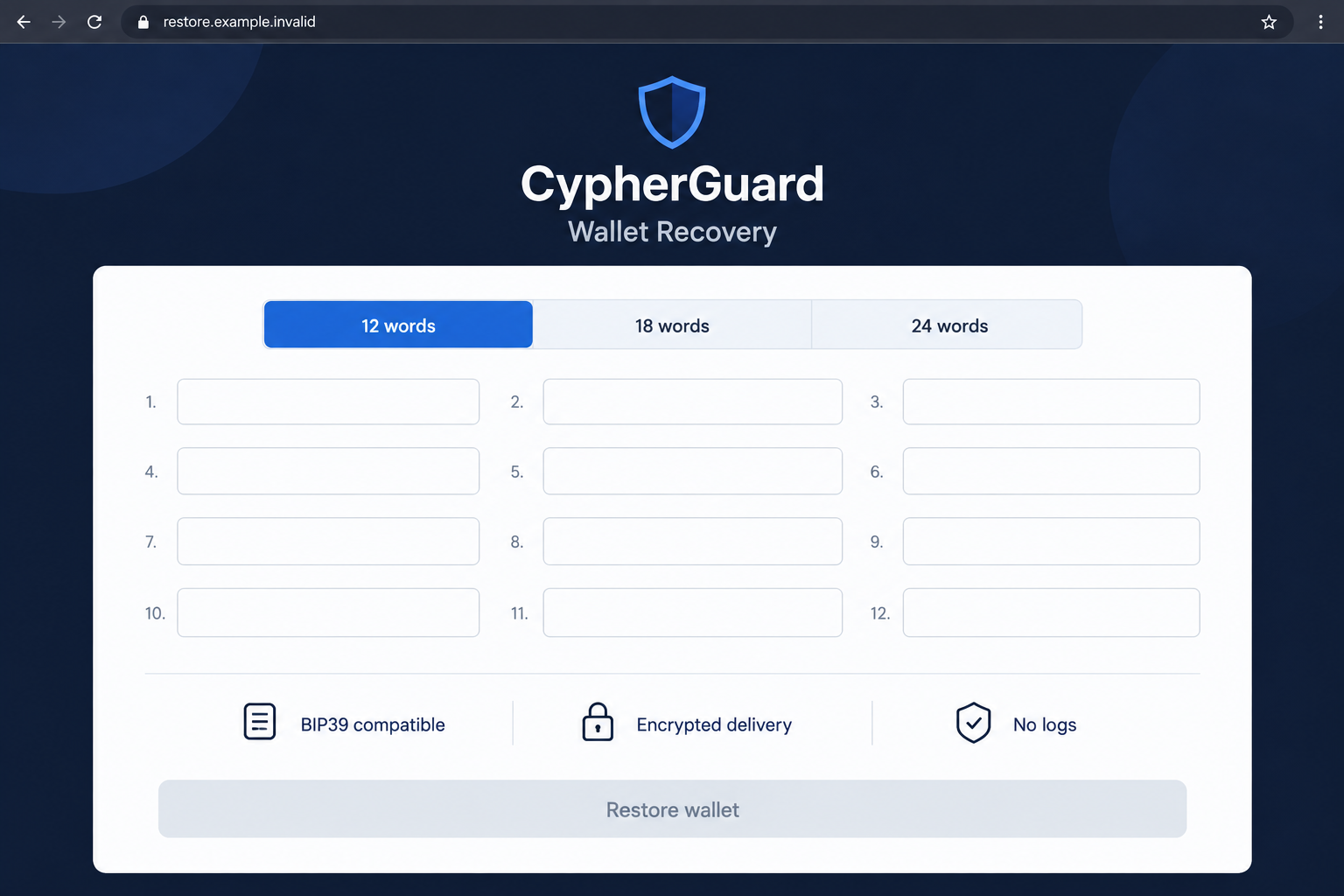
The fraudulent CypherGuard recovery offer presents a form for restoring cryptocurrency wallets. Its central request is a mnemonic phrase, commonly called a seed or recovery phrase.
The reported page advertised compatibility with BIP39 wallets and supported several phrase lengths. Technical terminology made the request look like ordinary wallet maintenance.
But a recovery phrase is not a support-ticket reference. For a standard self-custody wallet, it can provide the information needed to recreate control of its accounts.
Do not enter that secret into this recovery offer. The form’s purpose is to obtain wallet access, not provide an independently verified restoration service.
Privacy promises do not make the recipient trustworthy
The pitch uses claims about encrypted delivery, privacy, and a lack of logs. Those claims distract from the more important question: who receives the secret?
A confidential-looking form can still deliver information to an attacker. Protecting data in transit would not make the receiving party safe.
- A phrase-entry form is a request for highly sensitive wallet access.
- Compatibility with familiar networks does not authenticate the operator.
- A support label cannot turn a public website into your trusted wallet application.
- An exposed phrase requires a different response from an ordinary disconnected website.
The risk is especially serious when the wallet still contains assets. A person with the necessary secret may act without another approval from your device.
The warning concerns the recovery offer, not every later use of a domain
The fraudulent form was reported on ledgercryptoservice[.]com. That address no longer displayed the same recovery interface when checked, so its present appearance is not used as evidence.
The enduring warning is the phrase-harvesting offer described here. A changed page does not authenticate an old message or make a previously disclosed secret private again.
This report does not establish that Ledger operates CypherGuard. The presence of a wallet manufacturer’s name in a domain is not confirmation of affiliation.
What a Recovery Phrase Actually Does
A wallet application lets you manage accounts. The assets themselves are recorded on their blockchain, rather than stored inside the application like files in a folder.
A recovery phrase can recreate the keys for supported accounts. That is why it helps restore a wallet after a device is replaced.
The same property makes disclosure dangerous. Someone who can recreate those keys may authorize activity without borrowing your original device.
That is different from giving someone a public receiving address. An address lets another person identify where to send funds; it does not ordinarily supply spending control.
It is also different from a transaction hash. A hash identifies a recorded transaction and can help a provider investigate without receiving your private wallet material.
Do not send a photograph of your recovery sheet to illustrate a support problem. The image can expose the same secret as typing the words into a form.
Wallet makers provide their own restoration instructions. For a hardware wallet, follow the manufacturer’s device-based procedure rather than moving the phrase into a web page.
Ledger’s phishing guidance explicitly warns against sharing recovery words with people claiming to represent support.
How the CypherGuard Wallet Recovery Scam Works
Step 1: A recovery problem becomes an opening
The offer appeals to someone who cannot access a wallet, does not recognize a balance, or is looking for reassurance after a suspicious transaction.
In that situation, a restoration tool can feel more useful than a warning. You want a practical answer, and the page seems ready to provide one.
Pause before adopting its diagnosis. A missing asset display can involve an account, network, or application setting rather than a wallet that needs an unknown recovery service.
Describe the problem through the wallet maker’s established support route. Begin with public information and the error, not your phrase or private keys.
Step 2: Familiar terminology makes the form seem legitimate
BIP39 is a real recovery-phrase standard. Using its name does not demonstrate that the service asking for the phrase is trustworthy.
A list of supported phrase lengths can serve the same purpose. The page appears technically prepared to handle your wallet, which makes the secret request feel routine.
The question is not whether the words look compatible. It is whether you should hand control-related material to this particular recipient.
A legitimate-looking selector can be built by anyone. It should never be treated as evidence of approval by the wallet manufacturer or blockchain network.
Do not experiment with variations of your real phrase to test the service. Testing an untrusted form with sensitive information defeats the point of verification.
Step 3: Security language changes how the disclosure feels
The reported offer describes encrypted handling and privacy. A claim about protection can make surrendering the phrase feel like following a security procedure.
Encryption is not a verdict about intent. A dishonest recipient can receive data through an encrypted connection and then misuse it.
Likewise, a no-logs promise is something the operator says about itself. You cannot depend on it to erase a secret that has already been transmitted.
Do not let a Telegram reference or other delivery label change the rule. Sending recovery words through a chat remains disclosure to another party.
A private conversation can also be fraudulent. The channel’s appearance is less important than the authority and purpose of the request.
Step 4: Entered recovery words expose the wallet
Once the required secret reaches the attacker, the problem changes from a questionable website to compromised wallet access.
The precise scope depends on the wallet, accounts, and any additional security arrangement. Do not interpret uncertainty about the details as permission to keep using exposed keys.
A browser error after submission does not prove that nothing arrived. A fake service has no obligation to display a successful result after collecting information.
If you typed the words into an untrusted page, treat them as exposed even if you did not see a final confirmation.
Some web forms can transmit input before a final button is pressed. There is no reliable reassurance in assuming that an unfinished form kept everything local.
Do not return to ask the operator to delete the phrase. That would leave your safety dependent on the same recipient you no longer trust.
Step 5: Continued use can put additional deposits at risk
A compromised wallet may remain visibly usable. You can still see an address or open an application even when another person has the keys.
That familiarity can encourage a test deposit or another attempt to pay a transaction fee. Avoid putting more value into the exposed account.
Automated theft can intercept incoming funds in some compromised-wallet incidents. It is a possible consequence of key exposure, not a demonstrated feature of every CypherGuard encounter.
Read the wallet provider’s advice about compromised wallets and sweeper activity before attempting a difficult rescue.
Do not try to beat an automated transfer by repeatedly sending funds faster. Use verified assistance appropriate to the actual network and remaining assets.
Which Changes Help, and Which Do Not?
A local password change does not replace the exposed phrase
A wallet application’s password usually protects access on that installation. It does not necessarily change the underlying keys derived from the recovery phrase.
If someone already has the phrase, changing that local password is not the same as creating a fresh wallet with new secret material.
A new account created under the compromised phrase can carry the same underlying exposure. Follow the provider’s instructions for genuinely fresh keys.
Revoking an approval solves a different problem
Token approvals concern permissions granted to particular contracts. Revocation can be important after a malicious approval, but it does not invalidate a stolen private key.
For this phrase-entry trap, do not rely on a permission cleanup alone. Establish whether secrets were disclosed and address that broader control problem.
If you also signed requests, keep those records. Multiple exposure types can coexist, and each may need its own response.
Closing the website prevents further interaction, not past disclosure
Leaving the page is the right immediate decision. It stops you from following another instruction, but cannot make a recipient forget information already obtained.
Deleting browser history has the same limitation. It removes a local record, not an attacker’s copy or an existing blockchain transaction.
Preserve useful evidence privately before clearing anything. You may need the address, messages, and transaction details when reporting the incident.
What to Do if You Have Fallen Victim to This Scam
-
End the phrase-entry interaction. Close the form and stop communicating with its operator. Do not provide additional words, passwords, verification codes, or payment.
If you only saw the page and entered nothing, there is no basis to assume your recovery phrase was stolen. Keep that exposure distinction clear.
-
Identify what you disclosed. Record whether the information was a public address, complete recovery phrase, private key, local password, or account credential.
Do not reproduce the secret in your incident notes or support screenshots. Record the type of exposure without creating another unnecessary copy.
-
Stop using accounts controlled by exposed secrets. Establish a new wallet with a newly generated recovery phrase through a trusted application or hardware-device procedure.
Before moving remaining assets, consider the network, transaction requirements, and signs of immediate theft. Seek verified specialist guidance when an automated sweeper complicates the move.
-
Review transfers and notify relevant providers. Preserve transaction hashes, affected networks, token details, and destinations. Contact an exchange involved through its genuine support system.
A provider may be able to investigate or flag an address, but do not assume it can reverse a completed self-custody transaction.
-
Report the offer and the loss. Give the appropriate authorities the page address, correspondence, timeline, and public transaction evidence. In the US, use IC3.
Warn others with redacted material. A helpful warning identifies the phrase request without publishing the words or inviting people to try the malicious form.
-
Reject paid recovery guarantees. Do not send another fee to a person claiming they can restore the stolen assets through privileged access.
Anyone asking for the new wallet’s phrase would recreate the original danger. Keep further approaches as evidence and verify help through the wallet provider independently.
If You Still Need to Restore a Legitimate Wallet
Restoring access and recovering stolen funds are different tasks. A legitimate wallet restoration recreates your access; it does not retrieve assets already sent elsewhere.
Start with the manufacturer’s official instructions for your exact wallet. Confirm whether the problem is access, the selected account, or simply an asset display.
Do not import a phrase into an unfamiliar application because a search result calls it a repair tool. Verify the application and publisher first.
Keep the original recovery backup secure while troubleshooting. Copying it into email or cloud notes for convenience can create another route to exposure.
If the phrase itself is lost, avoid promises that an operator can magically reconstruct any wallet. The actual recovery options depend on what access and backups remain.
Do not confuse a branded commercial backup service with an anonymous phrase-entry form. Evaluate the genuine service through its own documented process rather than a lookalike name.
For wallet software, follow its verified restoration workflow. For hardware, use the manufacturer-directed device process. Neither requires handing the secret to a stranger.
Make a clear stopping point before each troubleshooting action. If the next step reveals private keys to an unverified party, leave it unfinished and ask official support.
Keep account recovery conversations separate from investment decisions. Restoring a wallet is not a reason to deposit into a new token or buy an operator’s recommended asset.
Once safe access is restored, review your backup practice. The goal is to prevent another urgent recovery search from becoming an invitation to disclose control.
Frequently Asked Questions
Is the CypherGuard recovery offer safe?
The phrase-harvesting offer described here is not safe. Do not submit recovery words to it, regardless of its compatibility or encryption claims.
Does the word Ledger in the domain prove affiliation?
No. A manufacturer’s name can appear in an unrelated address. Use Ledger’s own channels to verify any claimed relationship or recovery process.
What does BIP39 compatibility mean?
It refers to a real recovery-phrase standard. Using that technical label does not establish that the person requesting the words is an authorized or trustworthy recipient.
What if I entered the phrase but never pressed Restore?
Treat the secret as exposed. An untrusted page may collect typed input before final submission, and an absent confirmation does not prove that nothing was transmitted.
Will changing the wallet password make the phrase safe again?
Not by itself. A local application password does not invalidate a recovery phrase already copied elsewhere. Establish fresh keys using your provider’s verified guidance.
Is every wallet-restoration process a scam?
No. Trusted wallet applications and hardware manufacturers provide legitimate restoration procedures. The danger here is disclosing the secret to an unverified recovery website or operator.
The Bottom Line
Do not put your recovery phrase into the CypherGuard offer. A privacy promise cannot make sharing wallet control with an unverified recipient safe.
If you already entered it, stop using the exposed keys and obtain verified migration guidance. Preserve transaction evidence, report any loss, and refuse another paid rescue promise.

Join the discussion
0 commentsShare your experience or ask a question about this article.
Discussion
Start the conversation
Have a question or something useful to share? Add the first comment.