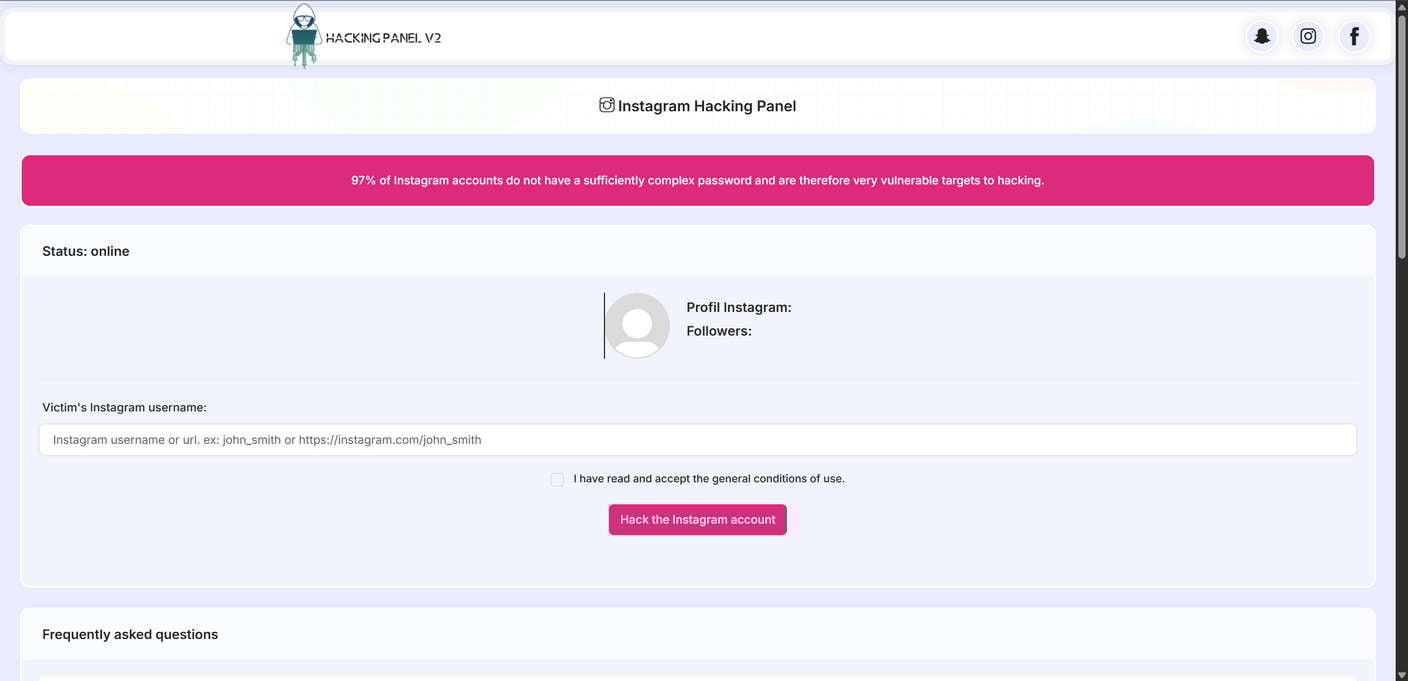
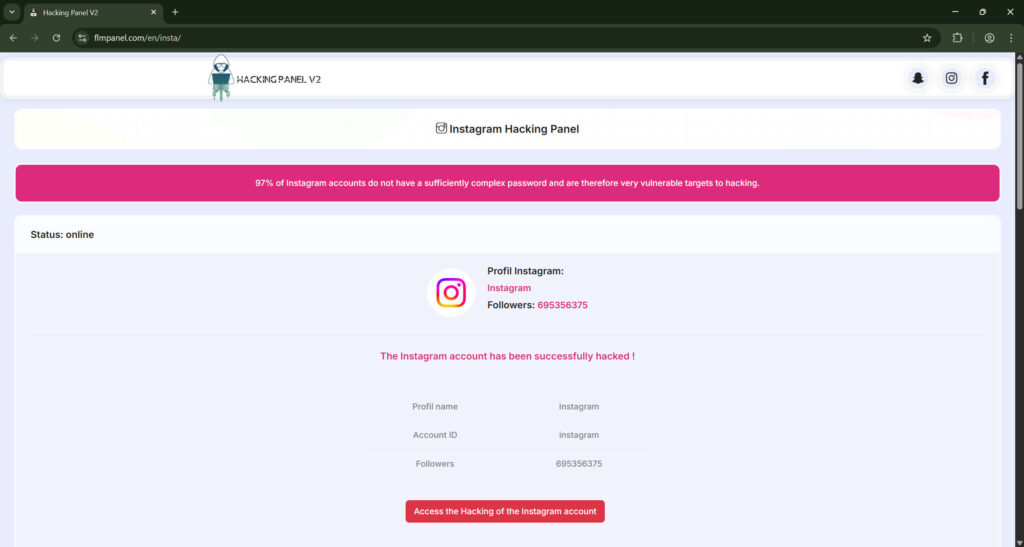
Imagine finding a website that promises to hack an Instagram account in seconds. It looks sleek, shows animated code sequences, and claims to protect your anonymity. It’s called Flmpanel.com, and at first glance, it seems like a powerful online hacking panel that can unlock anyone’s account.
But behind those flashy visuals lies a web of deception. Flmpanel.com is not a real hacking platform. It is a scam designed to exploit users’ curiosity, trick them into completing fake tasks, and push them toward paying for unrelated services or downloading harmful software. The operators of this site aren’t hackers—they’re marketers profiting from deceit.
This article uncovers exactly how the Flmpanel.com scam operates, the tactics used to mislead users, and the steps to take if you have already fallen victim.
Scam Overview
What Is Flmpanel.com?
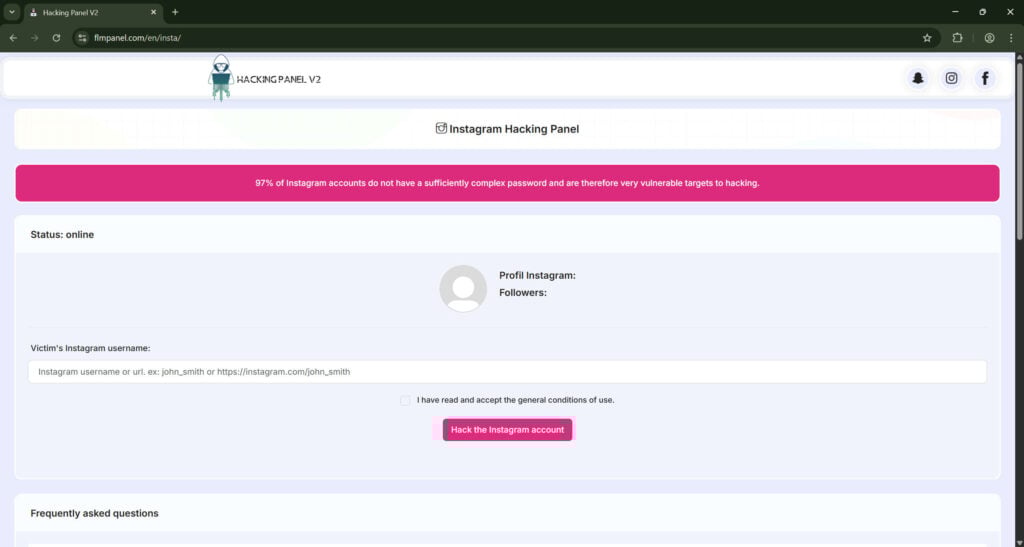
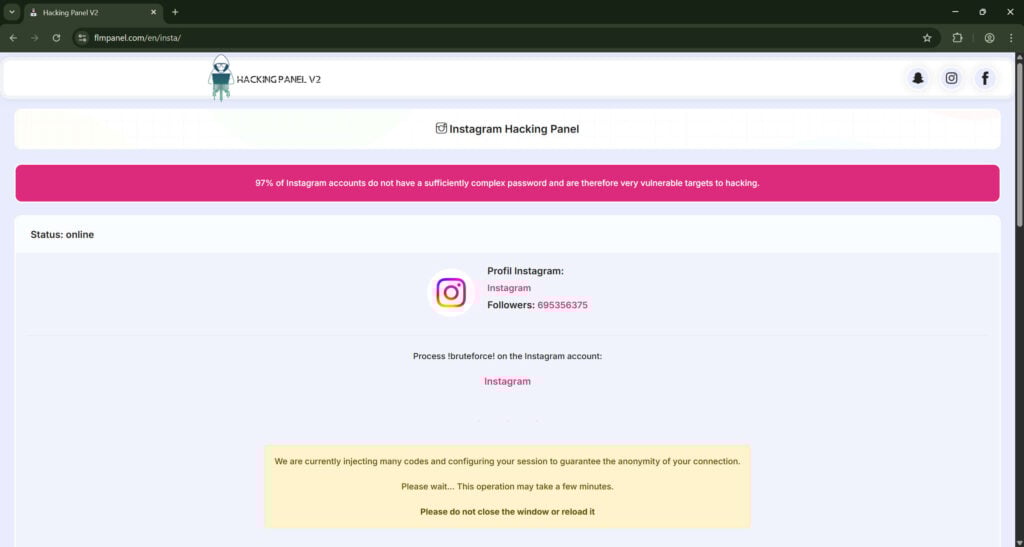
Flmpanel.com presents itself as an “Instagram hacking panel,” a web-based tool that allegedly allows anyone to hack Instagram accounts by entering a username. Once users type in the username of the account they want to “hack,” the site starts showing a fake process: scrolling lines of code, animated progress bars, and fake system messages claiming to be “injecting” or “decrypting” data.
After this simulation, the website proudly displays a message stating that the “hack” was successful. The next step is where the real scam begins. The site tells users that to reveal the hacked password, they must either:
Complete an online survey
Download a program or mobile app
Sign up for a subscription service
Or pay a small “verification” or “trial” fee
None of these actions will ever deliver the promised Instagram password. Instead, they generate income for the scammers behind Flmpanel.com, either through affiliate commissions, data collection, or recurring billing schemes.
Why It’s Called a Scam
The Flmpanel.com scam is a typical example of a fake hacking service—a deceptive website designed to appear legitimate but built solely to manipulate users into performing monetized actions. While it markets itself as a hacking tool, its real purpose is to:
Drive affiliate traffic to partner websites (such as mSpy or similar tracking products)
Collect personal data like emails and device information
Trick users into recurring subscriptions
Install potentially unwanted programs (PUPs) on users’ devices
No password is ever retrieved. No Instagram account is hacked. Every part of the site’s design and process is staged to look authentic while serving one purpose: monetizing unsuspecting visitors.
How People Discover Flmpanel.com
The website spreads primarily through deceptive online marketing tactics, including:
Search Engine Optimization (SEO) Manipulation: Flmpanel.com is optimized for keywords like “Instagram hack,” “hack Instagram account,” and “Instagram password finder.” It ranks temporarily on Google, luring curious users who search for ways to access accounts.
Social Media Promotion: Fake YouTube videos, TikTok clips, or Telegram channels share “tutorials” showing the site in action. These videos are staged and often use edited footage to make it seem like the hacking panel really works.
Comment Spam and Forums: Bots post links to Flmpanel.com on Reddit, Instagram, and tech forums, claiming it’s “the best free hack tool.”
Direct Messages: Some scammers send links directly via Instagram DMs or WhatsApp, pretending to offer help recovering a lost account.
Each of these distribution channels targets people who are curious or desperate—either wanting to spy on someone, recover a forgotten account, or test “how hacking works.”
How the Website Looks Legitimate
Flmpanel.com uses design tricks to build credibility:
A modern dashboard layout that mimics professional software
Fake indicators like “Server Status: Online” or “Connection secured via proxy”
Testimonial boxes with fake usernames praising the tool
A progress bar that always reaches 100%
A final “trial version expired” notice to push payment or survey completion
These visual elements convince users that something technical is happening, even though it’s entirely scripted. The site never communicates with Instagram’s servers. Everything runs locally through JavaScript and pre-written animations.
The Affiliate Funnel Hidden Behind the Scam
Once the “hacking process” finishes, Flmpanel.com redirects users to monetized offers using affiliate links. These may include:
Subscription services for ebooks, movies, or games that bill monthly
Monitoring apps like mSpy, marketed deceptively as hacking tools
Survey networks that collect personal data under the guise of “human verification”
Installer bundles offering “support tools” that contain adware or tracking software
Each time a user completes a survey, signs up for a service, or downloads a file, the operator of Flmpanel.com earns a commission. This setup transforms the fake hacking website into a high-volume affiliate funnel built on deception.
Common Lies Used by the Site
Flmpanel.com relies on several repeated claims to make users believe it’s legitimate:
“We use advanced algorithms to brute-force Instagram passwords.”
“Our servers ensure your anonymity while hacking.”
“No password required—just the username.”
“Trial version available—upgrade to full access.”
Every one of these statements is false. Instagram’s password system is protected by encryption and rate-limiting features that make brute-force attacks virtually impossible. And no site that only asks for a username can ever access another account’s data.
The Real Purpose of Flmpanel.com
Behind its flashy interface, Flmpanel.com serves four main purposes:
Affiliate Revenue Generation: Redirecting users to legitimate but unrelated products earns the site’s operator money.
Lead Harvesting: Collecting personal details such as email addresses, IPs, and device data for resale or later targeting.
Traffic Monetization: Using survey completions and pop-up ads to earn pay-per-click or pay-per-action revenue.
Behavioral Tracking: Monitoring user behavior through tracking scripts, often shared with partner networks.
The operator doesn’t need to deliver any product—the deception itself drives profit.
Psychological Manipulation Behind the Scam
Flmpanel.com’s success lies in understanding how people think online. It exploits psychological triggers to increase engagement:
Curiosity: The site invites users to “see how easy hacking can be.”
Greed: People want something valuable (an account password) for free.
Authority Bias: Technical language like “token injection” makes the process sound credible.
Illusion of Progress: Watching a bar fill or “codes” scroll gives a sense of real work being done.
By manipulating these instincts, scammers make users lower their guard and follow the instructions—whether it’s completing a survey, paying a fee, or downloading an app.
The Broader Pattern
Flmpanel.com is not unique. It’s part of a growing wave of Instagram hacking panel scams that use nearly identical templates and scripts. The domain name changes frequently (e.g., “instahackpanel,” “igtoolpanel,” or “hackpanelv2”), but the structure and deception remain the same.
Cybersecurity researchers call these sites “affiliate-driven fake utilities.” They rely on volume, targeting thousands of visitors daily, earning small commissions per conversion but generating significant profits overall.
Who Is Behind It?
The identity of the people running Flmpanel.com is hidden behind anonymous domain registrations and offshore hosting providers. Typically, such operations originate from networks that specialize in gray-hat marketing—activities that exist between legitimate affiliate marketing and outright fraud.
These operators often:
Host websites on servers in countries with weak cybercrime enforcement
Use privacy protection services to hide their identity
Launch new domains weekly to replace blacklisted ones
Register domains that mimic previous scams to capture residual traffic
This strategy allows them to stay one step ahead of takedowns and continue profiting.
Legal and Ethical Issues
Visiting or using Flmpanel.com not only risks your personal data but can also put you on the wrong side of the law. In most countries, attempting to hack an account—even through a fake service—violates computer misuse and data protection laws.
Legally, users who attempt to hack accounts through such tools can face:
Criminal charges for unauthorized access attempts
Civil penalties for privacy violations
Permanent bans from social media platforms
Ethically, engaging with sites like Flmpanel.com fuels the ecosystem of online fraud. Every survey completed, every product purchased, and every download helps scammers profit and expand their operations.
Why It’s So Hard to Take Down
Despite being fraudulent, sites like Flmpanel.com persist because:
They constantly rotate domains and hosting providers
Ad networks continue approving their paid campaigns
Victims rarely report the sites due to embarrassment or fear
The combination of anonymity, automation, and global hosting makes these scams extremely resilient.
How to Recognize It Instantly
You can spot the Flmpanel.com scam or any similar fake hacking site by remembering these key indicators:
The site promises to hack accounts using only a username
It displays fake technical logs or progress bars
It asks you to complete a survey, sign up, or pay before “revealing” results
It redirects to unrelated product pages
It lacks legitimate contact information or business credentials
It misuses Instagram’s branding or logo
If a website fits any of these criteria, it’s a scam. No exceptions.
How the Scam Works
Even though no real hacking occurs, Flmpanel.com uses a consistent technical and psychological structure to appear legitimate. Understanding this sequence helps you identify similar scams instantly.
Step 1: Luring Victims
The operators optimize the site for common search keywords and distribute links through YouTube, Telegram, and social-media comment bots. The message is always the same: “Hack any Instagram account easily—no software required.”
Step 2: The Illusion of Functionality
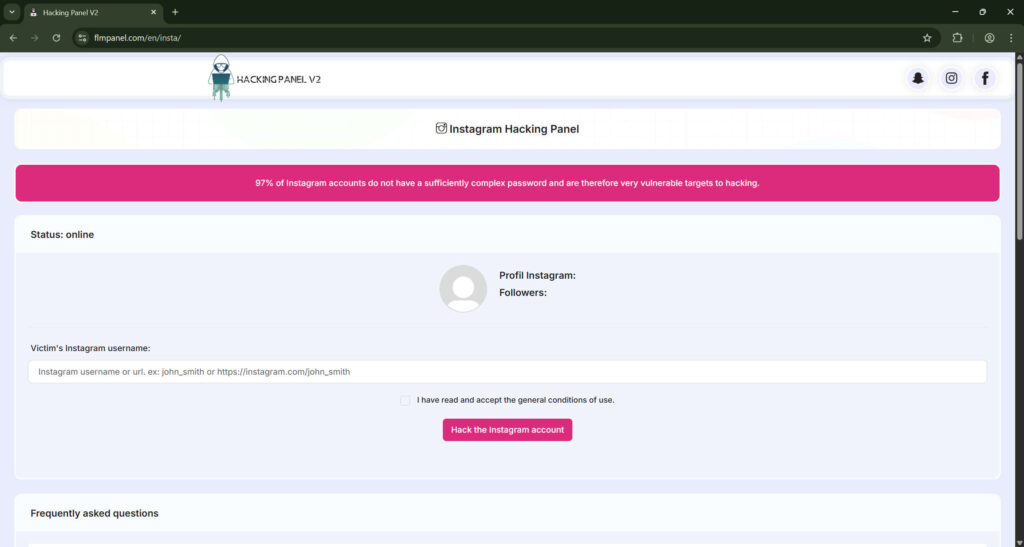
When you visit the page, it looks like professional software. After entering an Instagram username, you see a simulated console. Fake commands scroll by, and progress bars move smoothly while phrases such as “connecting to Instagram servers” appear. This design convinces users that a real system is working.
Step 3: The “Success” Message
After a minute, a banner pops up: “Hack completed successfully!” The page may even display the target’s profile photo or follower count (which are public details fetched from Instagram) to enhance credibility. Then it prompts: “Click below to reveal the password.”
Step 4: The Gate
At this stage, the scam activates its money-making mechanism. Instead of revealing a password, users encounter one of several obstacles:
Payment page: The user is told to pay a small fee for “full access” or a “premium unlock.”
Survey wall: The site demands completion of surveys to “prove you’re human.”
Affiliate redirect: The button leads to a real product page, such as a monitoring app or ebook service, through an affiliate link.
Download link: The site offers a file that allegedly contains the password but actually installs adware or tracking software.
Each path generates revenue for the scammer through commissions or data collection.
Step 5: Data and Money Collection
Users who enter email addresses or payment details give the operators exactly what they want: usable personal data. Those who install software risk infecting their devices with potentially unwanted programs. Some are signed up for recurring charges that continue monthly until they notice and cancel.
Step 6: Disappearance or Rebranding
When complaints begin to appear online, the scam’s domain is shut down. But a new version—using a slightly different name like “FlmPanelPro” or “IGPanelV2”—appears days later. This constant rebranding keeps the operation alive.
What To Do If You Fell Victim to Flmpanel.com
If you have interacted with the site, acted on its instructions, or paid money, take these immediate steps to protect yourself.
1. Stop Using the Site
Close the browser tab and do not visit again. Do not follow any further instructions or links sent from the same source.
2. Change All Passwords
Change your Instagram password immediately using a secure device. If you reused that password on other sites, change those as well. Use unique, strong passwords generated by a password manager.
3. Enable Two-Factor Authentication (2FA)
Activate 2FA on Instagram and your email account. Use an authenticator app rather than SMS when possible. This adds an extra layer of security against unauthorized logins.
4. Remove Suspicious Apps or Browser Extensions
If you downloaded software or allowed browser permissions from Flmpanel.com, uninstall it. Check for unknown extensions and remove them. Then run a complete malware scan with trusted antivirus tools such as Malwarebytes, Windows Defender, or Bitdefender.
5. Contact Your Bank or Payment Provider
If you paid any fee, contact your card issuer or payment service immediately. Explain that you were deceived by a fraudulent website and request to cancel or reverse the transaction. Ask to block any future recurring charges from the merchant.
6. Monitor Your Financial Accounts
Keep an eye on your bank statements for the next few months. Scam charges may appear under unfamiliar company names. Report any suspicious activity immediately.
7. Report the Scam
Report the site to Google Safe Browsing using the “Report Phishing” form.
Notify Instagram through the “Report a hacked account” or “Report a scam” option in the Help Center.
File a complaint with your local cybercrime or consumer-protection agency. In the U.S., you can use reportfraud.ftc.gov.
8. Check for Identity Theft
If you entered personal data like your email, phone number, or address, watch for unusual messages or login attempts. Consider placing a fraud alert or credit freeze with credit bureaus if you notice suspicious activity.
9. Educate Your Contacts
Warn friends or followers who might receive scam links shared from compromised accounts. Public awareness helps stop the spread.
10. Strengthen Future Security Habits
Never trust sites that promise illegal or unethical actions.
Verify the legitimacy of websites before providing any personal data.
Keep your devices updated with security patches.
Use a password manager and enable 2FA on all important accounts.
Following these steps limits damage and ensures long-term protection.
Is Your Device Infected? Scan for Malware
If your computer or phone is slow, showing unwanted pop-ups, or acting strangely, malware could be the cause. Running a scan with Malwarebytes Anti-Malware Free is one of the most reliable ways to detect and remove harmful software. The free version can identify and clean common infections such as adware, browser hijackers, trojans, and other unwanted programs.
Malwarebytes works on Windows, Mac, and Android devices. Choose your operating system below and follow the steps to scan your device and remove any malware that might be slowing it down.
Malwarebytes for WindowsMalwarebytes for MacMalwarebytes for Android
Run a Malware Scan with Malwarebytes for Windows
Malwarebytes stands out as one of the leading and widely-used anti-malware solutions for Windows, and for good reason. It effectively eradicates various types of malware that other programs often overlook, all at no cost to you. When it comes to disinfecting an infected device, Malwarebytes has consistently been a free and indispensable tool in the battle against malware. We highly recommend it for maintaining a clean and secure system.
Download Malwarebytes
Download the latest version of Malwarebytes for Windows using the official link below. Malwarebytes will scan your computer and remove adware, browser hijackers, and other malicious software for free.
(The above link will open a new page from where you can download Malwarebytes)
Install Malwarebytes
After the download is complete, locate the MBSetup file, typically found in your Downloads folder. Double-click on the MBSetup file to begin the installation of Malwarebytes on your computer. If a User Account Control pop-up appears, click “Yes” to continue the Malwarebytes installation.
Follow the On-Screen Prompts to Install Malwarebytes
When the Malwarebytes installation begins, the setup wizard will guide you through the process.
You’ll first be prompted to choose the type of computer you’re installing the program on—select either “Personal Computer” or “Work Computer” as appropriate, then click on Next.
Malwarebytes will now begin the installation process on your device.
When the Malwarebytes installation is complete, the program will automatically open to the “Welcome to Malwarebytes” screen.
On the final screen, simply click on the Open Malwarebytes option to start the program.
Enable “Rootkit scanning”.
Malwarebytes Anti-Malware will now start, and you will see the main screen as shown below. To maximize Malwarebytes’ ability to detect malware and unwanted programs, we need to enable rootkit scanning. Click on the “Settings” gear icon located on the left of the screen to access the general settings section.
In the settings menu, enable the “Scan for rootkits” option by clicking the toggle switch until it turns blue.
Now that you have enabled rootkit scanning, click on the “Dashboard” button in the left pane to get back to the main screen.
Perform a Scan with Malwarebytes.
To start a scan, click the Scan button. Malwarebytes will automatically update its antivirus database and begin scanning your computer for malicious programs.
Wait for the Malwarebytes scan to complete.
Malwarebytes will now scan your computer for browser hijackers and other malicious programs. This process can take a few minutes, so we suggest you do something else and periodically check the status of the scan to see when it is finished.
Quarantine detected malware
Once the Malwarebytes scan is complete, it will display a list of detected malware, adware, and potentially unwanted programs. To effectively remove these threats, click the “Quarantine” button.
Malwarebytes will now delete all of the files and registry keys and add them to the program’s quarantine.
Restart your computer.
When removing files, Malwarebytes may require a reboot to fully eliminate some threats. If you see a message indicating that a reboot is needed, please allow it. Once your computer has restarted and you are logged back in, you can continue with the remaining steps.
Once the scan completes, remove all detected threats. Your Windows computer should now be clean and running smoothly again, free of trojans, adware, and other malware.
If your current antivirus allowed this malicious program on your computer, you may want to consider purchasing Malwarebytes Premium to protect against these types of threats in the future. If you are still having problems with your computer after completing these instructions, then please follow one of the steps:
Malwarebytes for Mac is an on-demand scanner that can destroy many types of malware that other software tends to miss without costing you absolutely anything. When it comes to cleaning up an infected device, Malwarebytes has always been free, and we recommend it as an essential tool in the fight against malware.
Download Malwarebytes for Mac.
You can download Malwarebytes for Mac by clicking the link below.
When Malwarebytes has finished downloading, double-click on the setup file to install Malwarebytes on your computer. In most cases, downloaded files are saved to the Downloads folder.
Follow the on-screen prompts to install Malwarebytes.
When the Malwarebytes installation begins, you will see the Malwarebytes for Mac Installer which will guide you through the installation process. Click “Continue“, then keep following the prompts to continue with the installation process.
When your Malwarebytes installation completes, the program opens to the Welcome to Malwarebytes screen. Click the “Get started” button.
Select “Personal Computer” or “Work Computer”.
The Malwarebytes Welcome screen will first ask you what type of computer are you installing this program, click either Personal Computer or Work Computer.
Click on “Scan”.
To scan your computer with Malwarebytes, click on the “Scan” button. Malwarebytes for Mac will automatically update the antivirus database and start scanning your computer for malware.
Wait for the Malwarebytes scan to complete.
Malwarebytes will scan your computer for adware, browser hijackers, and other malicious programs. This process can take a few minutes, so we suggest you do something else and periodically check on the status of the scan to see when it is finished.
Click on “Quarantine”.
When the scan has been completed, you will be presented with a screen showing the malware infections that Malwarebytes has detected. To remove the malware that Malwarebytes has found, click on the “Quarantine” button.
Restart computer.
Malwarebytes will now remove all the malicious files that it has found. To complete the malware removal process, Malwarebytes may ask you to restart your computer.
After scanning, delete any detected threats. Your Mac should now be free from adware, unwanted extensions, and other potentially harmful software.
If your current antivirus allowed a malicious program on your computer, you might want to consider purchasing the full-featured version of Malwarebytes Anti-Malware to protect against these types of threats in the future. If you are still experiencing problems while trying to remove a malicious program from your computer, please ask for help in our Mac Malware Removal Help & Support forum.
Run a Malware Scan with Malwarebytes for Android
Malwarebytes for Android automatically detects and removes dangerous threats like malware and ransomware so you don’t have to worry about your most-used device being compromised. Aggressive detection of adware and potentially unwanted programs keeps your Android phone or tablet running smooth.
Download Malwarebytes for Android.
You can download Malwarebytes for Android by clicking the link below.
In the Google Play Store, tap “Install” to install Malwarebytes for Android on your device.
When the installation process has finished, tap “Open” to begin using Malwarebytes for Android. You can also open Malwarebytes by tapping on its icon in your phone menu or home screen.
Follow the on-screen prompts to complete the setup process
When Malwarebytes will open, you will see the Malwarebytes Setup Wizard which will guide you through a series of permissions and other setup options. This is the first of two screens that explain the difference between the Premium and Free versions. Swipe this screen to continue. Tap on “Got it” to proceed to the next step. Malwarebytes for Android will now ask for a set of permissions that are required to scan your device and protect it from malware. Tap on “Give permission” to continue. Tap on “Allow” to permit Malwarebytes to access the files on your phone.
Update database and run a scan with Malwarebytes for Android
You will now be prompted to update the Malwarebytes database and run a full system scan.
Click on “Update database” to update the Malwarebytes for Android definitions to the latest version, then click on “Run full scan” to perform a system scan.
Wait for the Malwarebytes scan to complete.
Malwarebytes will now start scanning your phone for adware and other malicious apps. This process can take a few minutes, so we suggest you do something else and periodically check on the status of the scan to see when it is finished.
Click on “Remove Selected”.
When the scan has been completed, you will be presented with a screen showing the malware infections that Malwarebytes for Android has detected. To remove the malicious apps that Malwarebytes has found, tap on the “Remove Selected” button.
Restart your phone.
Malwarebytes for Android will now remove all the malicious apps that it has found. To complete the malware removal process, Malwarebytes may ask you to restart your device.
When the scan is finished, remove all detected threats. Your Android phone should now be free of malicious apps, adware, and unwanted browser redirects.
If your current antivirus allowed a malicious app on your phone, you may want to consider purchasing the full-featured version of Malwarebytes to protect against these types of threats in the future. If you are still having problems with your phone after completing these instructions, then please follow one of the steps:
Restore your phone to factory settings by going to Settings > General management > Reset > Factory data reset.
After cleaning your device, it’s important to protect it from future infections and annoying pop-ups. We recommend installing an ad blocker such as AdGuard. AdGuard blocks malicious ads, prevents phishing attempts, and stops dangerous redirects, helping you stay safe while browsing online.
How To Recognize Similar Scams
Because sites like Flmpanel.com often return under new names, learning to spot them quickly is essential. Watch for these warning signs:
Claims to hack or unlock accounts with only a username.
Fake progress bars and technical jargon.
Promises of “trial versions” or “premium unlocks.”
Requests to complete surveys, pay, or download software before receiving results.
Lack of contact details, privacy policies, or secure (HTTPS) certificates.
Redirects to unrelated products or subscription offers.
If you see any of these signs, close the page immediately.
Preventing Future Scams
Rely only on official recovery tools. For lost accounts, use Instagram’s built-in recovery and security pages. Never trust third-party tools claiming faster results.
Use reliable antivirus software. Modern security tools can warn you about phishing and unsafe websites before you enter them.
Be skeptical of “success stories.” Most video or comment testimonials for hacking tools are fake. Check independent cybersecurity websites instead of random videos or posts.
Educate others. Talk to friends, family, or coworkers about online scams. Many victims fall because no one warned them beforehand.
Stay updated on scam trends. Follow cybersecurity blogs and trusted tech news to stay aware of new threats and fraudulent domains.
Frequently Asked Questions
What is the Flmpanel.com scam?
The Flmpanel.com scam is a fraudulent website that pretends to be an Instagram hacking tool. It claims to hack any Instagram account by simply entering a username. After simulating a fake hacking process with animated codes and progress bars, it tells users that the account has been “successfully hacked.” Then, it asks for payment, survey completion, or software downloads to reveal the password. In reality, Flmpanel.com never hacks anything. Its goal is to collect user data, generate affiliate commissions, or trick users into unwanted subscriptions.
Is Flmpanel.com a real Instagram hacking tool?
No, Flmpanel.com is not real. It cannot access or hack Instagram accounts. Instagram uses advanced encryption and security systems that cannot be bypassed by a simple web page. The fake code and animations are designed to trick users into believing the site is performing technical actions. In truth, everything displayed is pre-programmed, and no communication occurs with Instagram’s servers.
How does the Flmpanel.com scam work?
The scam follows a predictable pattern:
Users discover the website through search results, social media, or YouTube videos claiming it can hack Instagram accounts.
After entering a target username, a fake hacking process begins, complete with code animations and fake logs.
The website displays a success message and prompts users to verify or unlock the results.
The “verification” step requires users to either pay, fill out surveys, download apps, or sign up for subscriptions.
The scammers earn money from these actions through affiliate programs, data collection, or recurring charges. At no point does the site retrieve a real password or access any Instagram data.
Why do people fall for the Flmpanel.com scam?
Flmpanel.com succeeds because it uses emotional triggers and visual deception. It looks professional and uses complex terms like “proxy injection” or “decryption.” Users are curious to test the tool, especially those wanting to recover lost accounts or spy on others. The scam plays on that curiosity and creates a sense of progress with fake bars and logs. Once users believe the process is working, they are more willing to complete the final “verification” step, which is where the scam profits.
What are the risks of using Flmpanel.com?
There are several serious risks associated with this scam:
Financial risk: Users who pay may face unauthorized or recurring charges.
Data theft: Personal information, emails, or payment details may be collected and sold.
Malware infection: Downloaded files may contain spyware or adware.
Identity exposure: Completing surveys can leak personal details to third parties.
Legal risk: Attempting to hack or gain unauthorized access to accounts is illegal. Even visiting such sites can expose your device to malicious tracking scripts.
Is it illegal to use Flmpanel.com?
Yes. Attempting to hack any online account without permission is a violation of computer and privacy laws in most countries. Even if the site itself is fake, trying to use it for unauthorized access could still be considered an illegal act. It is always safer to use Instagram’s official recovery options instead of third-party tools.
How do scammers make money from this website?
Scammers behind Flmpanel.com use multiple monetization methods:
Affiliate marketing: They redirect users to legitimate products (such as monitoring apps) using affiliate links to earn commissions.
Survey networks: Each survey completion generates income for the operator.
Subscription traps: Users may unknowingly sign up for services with recurring monthly fees.
Adware distribution: Some downloads install programs that serve ads or track activity. These revenue streams make the scam profitable without needing to actually hack anything.
What should I do if I entered my information on Flmpanel.com?
If you entered any personal or payment details on the site, take immediate action:
Change your Instagram and email passwords using a secure device.
Enable two-factor authentication for all important accounts.
Contact your bank or credit card provider to block charges or replace your card.
Run a full antivirus or anti-malware scan to remove potential threats.
Report the website to Google Safe Browsing and Instagram.
Monitor your bank statements and email accounts for suspicious activity.
What if I paid money to unlock results?
If you made a payment, contact your bank or card issuer as soon as possible. Explain that you were misled by a fraudulent website and request a chargeback or refund. Ask the bank to block future recurring charges from the same merchant. Keep screenshots of the transaction and the website as evidence.
What if I downloaded a file from Flmpanel.com?
Immediately uninstall the file or application and run a malware scan. Many of these files contain adware, trojans, or browser hijackers. On Windows, use trusted antivirus tools such as Malwarebytes or Microsoft Defender. On Android, use Google Play Protect or reputable mobile security apps. Avoid running unknown .exe or .apk files downloaded from unofficial websites.
What if I completed surveys or gave my email?
If you entered your email or other personal details, expect an increase in spam messages or phishing attempts. Do not click on links or attachments in unfamiliar emails. Consider creating a new email address for important accounts. You can also use spam filters or unsubscribe tools to clean your inbox.
Can Flmpanel.com hack my Instagram account or steal it?
No, the site cannot hack anyone’s Instagram account. However, if you entered your own Instagram login credentials for “verification,” the scammers might attempt to use those details elsewhere. Change your password immediately and check active login sessions on Instagram to ensure no unauthorized devices are connected.
Why do sites like Flmpanel.com keep reappearing?
Scam operators frequently change domain names to avoid being blacklisted. Once users report or expose one domain, they launch a new one with similar design and wording. This rapid rebranding allows them to continue earning money while avoiding detection. Because these operations are often hosted on overseas servers, they are difficult to shut down permanently.
How can I tell if a website like Flmpanel.com is fake?
Look for these red flags:
The site promises to hack or unlock accounts instantly.
It uses fake progress bars and meaningless code displays.
It requests payment, surveys, or downloads before showing results.
It redirects to unrelated commercial offers.
It lacks an official “About,” contact information, or privacy policy. If a website exhibits these signs, it is almost certainly a scam.
What should I do if someone sent me the link to Flmpanel.com?
Do not click the link or share it with others. Inform the sender that the site is fraudulent—if they are unaware, they may have been tricked into promoting it. Report the message on the platform where you received it (Instagram, WhatsApp, Telegram, etc.) to help limit its spread.
Can Flmpanel.com infect my phone or computer?
Yes, indirectly. The site may use scripts that prompt pop-ups, download requests, or redirects to third-party installers. These downloads may contain potentially unwanted programs (PUPs) or spyware. Always deny installation requests from unknown sources and keep antivirus protection active.
How do I report the Flmpanel.com scam?
You can report the website using the following channels:
Google Safe Browsing: Use the “Report Phishing” tool to flag it as unsafe.
Instagram: Go to the Help Center and report the site as a scam or impersonation.
National cybercrime centers: In the U.S., use the FTC website (reportfraud.ftc.gov). In the U.K., report to Action Fraud.
Hosting provider: Use WHOIS lookup to find the domain host and file an abuse complaint.
What are the legal consequences for the operators?
Running a website like Flmpanel.com violates multiple laws, including fraud, deceptive marketing, and computer misuse regulations. If traced, the operators could face criminal prosecution, fines, and imprisonment. However, their use of offshore servers and anonymous domain registration makes identification challenging.
How can I protect myself from scams like Flmpanel.com in the future?
Never trust websites that offer illegal or unethical actions.
Use strong, unique passwords and enable two-factor authentication.
Keep your software and browsers updated.
Use antivirus tools and secure your network with a firewall.
Educate yourself about phishing and online fraud trends.
Rely only on official support channels for account recovery.
Why is it important to report scams even if I wasn’t affected?
Reporting scams like Flmpanel.com helps authorities and tech companies identify and remove fraudulent domains faster. It also protects others who might not recognize the deception. The more reports a site receives, the quicker it can be blacklisted by browsers and search engines.
The Bottom Line
Flmpanel.com is not a secret hacking tool or recovery utility—it’s a scam built to generate affiliate revenue and harvest user data. Every feature of the site, from its progress bars to its “trial expired” messages, is designed to look technical while hiding a simple truth: nothing on the page connects to Instagram or retrieves passwords.
If you have interacted with this site, change your passwords, enable two-factor authentication, remove suspicious software, and contact your bank if you made any payments. Report the website to search engines and authorities to help shut it down.
Online scams evolve constantly, but their patterns stay the same: unrealistic promises, false urgency, and requests for personal information or money. By understanding how Flmpanel.com and similar operations work, you can avoid becoming the next victim and help others recognize the warning signs.
Thomas is an expert at uncovering scams and providing in-depth reporting on cyber threats and online fraud. As an editor, he is dedicated to keeping readers informed on the latest developments in cybersecurity and tech.