

A delivery problem seems like the sort of thing you should fix quickly. The message mentions an order, a cancellation, or money you expect to receive.
Before replying, check which conversation you are actually in. A message about a real-looking order can come from outside the service handling it.
Overview
One pretext, three groups of targets
Scamwatch warns that food delivery scammers target customers, restaurants, and delivery workers. They may impersonate a platform, a restaurant, or a customer.
The contact may concern an order, refund, cancellation, account problem, or payment. It asks the recipient to resolve an issue before checking through the real app.
DoorDash and Uber Eats are examples of platforms whose identities criminals may borrow. The warning does not accuse those services of running the fraud.
What the criminal needs
One-time codes, passwords, bank details, and account information can let an outsider take over an account or change where money is paid.
For a customer, that may mean unauthorized orders or exposed payment details. For a worker, a changed payout setting can redirect earned income.
For a restaurant, account access can create payment and order confusion. The exact damage depends on which account and permission the criminal obtains.
A single warning therefore needs different responses. Checking a customer’s saved card is not enough to protect a driver’s weekly payout.
The common point is account control. The supposed helper asks for information that lets someone else act as the person receiving the message.
The safe place to check
Open the platform’s official app or a bookmarked website yourself. Check order history, security alerts, and payout settings there.
- Do not read a one-time code to a caller or paste it into an unexpected chat.
- Do not send payment details to “correct” an order outside the app.
- Contact support through the platform’s established help route.
- Change credentials promptly if an unauthorized login appears.
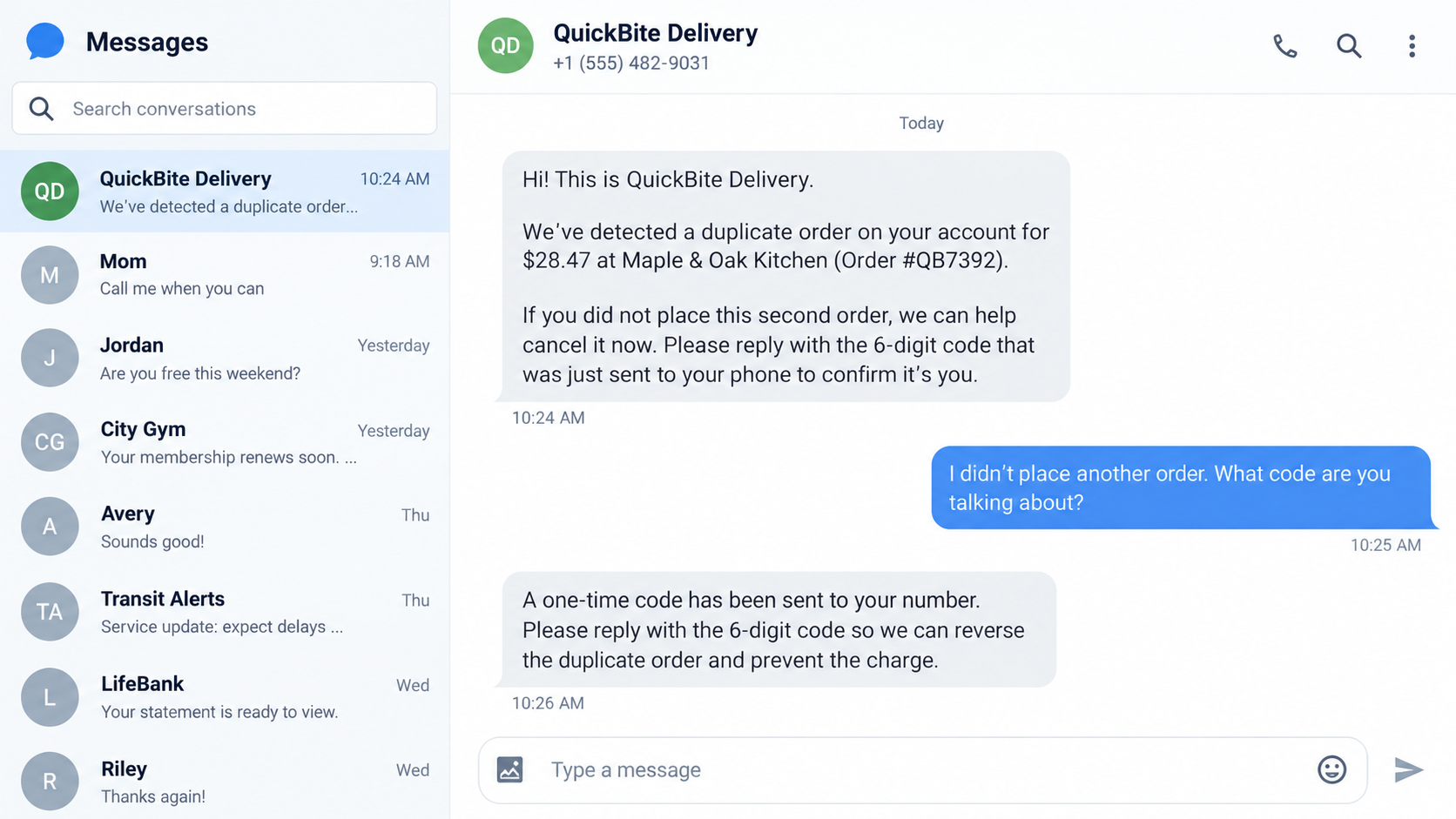
The message shown above is a fictional reconstruction. Its sender, restaurant, and order amount are examples, not a captured case from Scamwatch.
How the Food Delivery Account Takeover Scam Works
Step 1: Create a believable order problem
The contact may claim a duplicate order, a failed payment, or a refund that cannot be processed. Those issues are common enough to sound routine.
A worker may be told an order was cancelled as “fraudulent” or entered twice. Scamwatch reports that this pretext can be used to ask for details.
The fraudster does not need to control a real order to raise concern. A broad message can catch someone who recently used the app.
Delivery happens so often that a generic “recent order” message can feel personally timed. The recipient may supply the missing order details in reply.
A restaurant during a rush is especially exposed to interruptions. Staff may prioritize clearing an order issue over verifying the caller’s identity.
If they know an actual order number, that information still does not authenticate them. Details can be seen, guessed, copied, or supplied during the conversation.
Step 2: Move the conversation outside the platform
A text or phone call may say the platform needs immediate action. The recipient is nudged away from the order screen, where the truth is easier to check.
Some callers claim to be a customer or restaurant. The role matters less than the attempt to make you use their instructions instead of official support.
Scamwatch warns about demands for extra payment or details outside the app, even when the caller says they can see the order.
Never treat the ability to name a delivery as permission to ask for your login code. Support should not need you to surrender account control.
A caller might offer to “walk you through” a refund. If the steps lead outside the app and into your account security settings, stop.
For workers, the pretext may be compensation after a supposedly fraudulent order. The promised credit is used to justify collecting details.
Step 3: Trigger a genuine one-time code
The operator may initiate a login or password reset using the victim’s contact details. A genuine code then arrives from the real platform.
The scammer says the code is needed to reverse a charge, verify a refund, or compensate a driver. The real purpose may be access to the account.
This is why a legitimate-looking code message can accompany a scam. The platform sent it, but the person asking to receive it is an outsider.
Read the code message carefully. Many such messages explain that the code is for signing in or that it should never be shared.
Do not type the code into a form reached through the stranger’s link either. That can deliver it to the same operator without a phone conversation.
If a code arrived when you did not request one, someone may already be trying to enter your account. Review security settings through the real app.
One-time codes are brief by design. Their short lifetime can make the caller insist that you hurry, which is another reason to pause.
Step 4: Enter the account and alter its settings
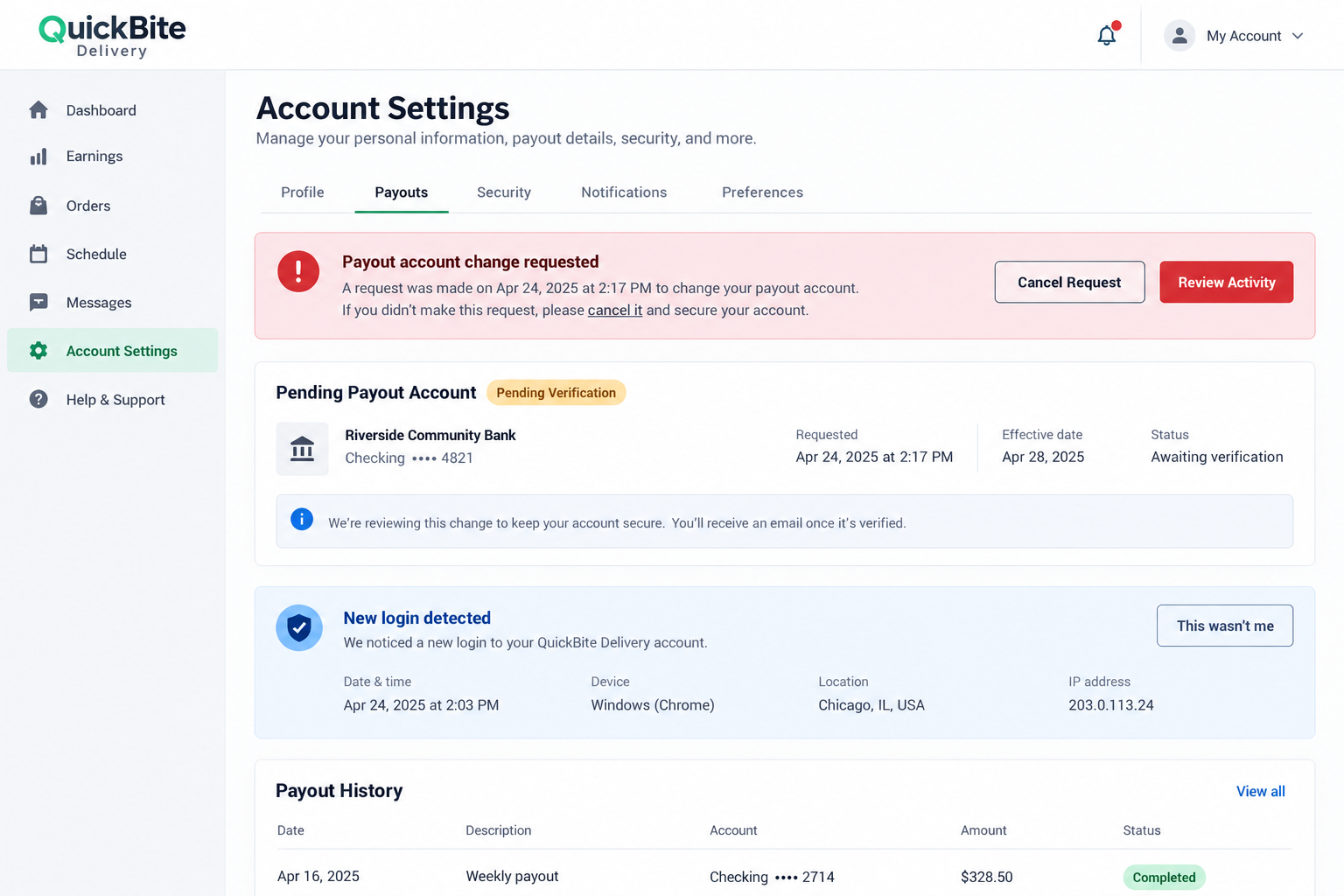
Once inside, a criminal may change the password, recovery contact, payment details, or payout destination. Scamwatch identifies account takeover and payment redirection as risks.
For delivery workers, this can mean earnings already accumulated are paid to someone else. A worker might discover the change only on the next payout date.
For restaurants, access to a merchant account can affect operations, contact details, or payment settings. The response should involve the platform’s merchant support.
A customer account may hold saved cards and addresses. The response should include both account recovery and a review of card activity.
If an account uses a shared restaurant email, the incident can affect multiple staff members. Reset access centrally and review who still has permission.
A worker should pay special attention to changes that happen just before payday. A redirected transfer can arrive before the next login alert is noticed.
Step 5: Explain away the warning signs
The victim may receive a password reset email or unfamiliar-login notice. The impostor might call it a normal side effect of resolving the order.
Do not accept that explanation from the person who asked for the code. Open the app independently and inspect the account’s security history.
The outsider may say the warning will disappear after the refund completes. There is no reason to let a suspected intruder finish a process first.
The second image illustrates a payout change alert in a fictional worker portal. It is not an actual platform screen or a documented victim account.
Step 6: Redirect money or keep access
If the payout change is not stopped, earned money may be sent to the criminal’s chosen account. A customer might see charges or orders they never placed.
The operator may also continue using the account until the victim regains control. The precise sequence differs between workers, restaurants, and customers.
Scamwatch’s core warning is not one universal text script. It is the handoff from an order pretext to codes, credentials, and payment changes.
That handoff is easy to miss because each step sounds like customer service. Look at the final effect: who gains access, and who receives money?
Why “I Can See Your Order” Proves Very Little
People expect a real support agent to know their order. That expectation makes the statement persuasive, even when the caller provides no verifiable detail.
Someone posing as a restaurant may have information visible to a customer. A compromised account can reveal even more, but the first contact still needs verification.
Ask the platform to confirm any order issue through its own app. Do not use a link in the unexpected message to reach the supposed support page.
If an order is genuinely wrong, the official app should show a record or an established support route. A caller demanding secrecy or urgency deserves extra caution.
Do not ask the caller to recite more personal details as a test. That can invite them to fish for answers or repeat information already in the message.
A stronger test is channel independence: you initiate contact with the platform rather than continuing the stranger’s thread.
Check the timing too. An alert about an order that is not in your history may be a broad lure rather than a real service message.
Even when an order is real, the platform may show a different status from the caller’s story. Let the app record guide your next question.
Different Risks for Customers, Restaurants, and Workers
Customers: saved payment methods and addresses
Review recent orders, refunds, saved cards, addresses, and account email. Unrecognized changes may point to unauthorized access.
Contact your card provider if an unfamiliar order or charge appears. The platform can address account access while the provider handles payment disputes.
If a refund was promised, verify it in the original payment account. A screenshot supplied by the caller cannot prove money returned.
Remove an unfamiliar saved card or address only after recording evidence for support. Then ask the platform to terminate unknown sessions.
Restaurants: merchant access and order operations
Managers should check who can sign in, edit store details, and update deposit accounts. A supposed order problem should not require sharing owner credentials.
Tell staff where real platform support appears. A clear internal escalation path makes an urgent outside call less persuasive during a busy service.
Decide in advance who may change the merchant payout account. Limiting that permission can reduce damage when a front-line login is compromised.
Train staff to route suspicious calls to a manager without sharing a code. That is a specific action they can take during a crowded shift.
Workers: earnings and payout destinations
Open the worker app and verify the payout account, recent withdrawals, and contact information. A small change in routing can affect a full week’s earnings.
Report unauthorized changes to the platform immediately. Keep screenshots of the old and new settings where possible, without exposing full bank numbers publicly.
Check the last payout date and the next scheduled one. That tells support which transfer may need investigation.
If the app still shows your correct account, continue monitoring. The scammer may have tried and failed to change it, or may return later.
What to Do If You Fell for the Food Delivery Scam
- Open the official app yourself. Do not follow the caller’s link. Check whether an actual order problem exists and whether your account is still under your control.
- Change the password and secure recovery options. Use a unique password, review active sessions, and verify the phone number and email address attached to the account.
- Contact platform support through its genuine channel. Say that an outsider obtained a code or account details. Ask support to lock suspicious access and review recent changes.
- Inspect payment or payout activity. Customers should review cards and orders. Workers and restaurants should verify the bank account receiving earnings or sales.
- Notify the bank if money moved. Explain unauthorized orders, transfers, or diverted payouts. Ask what disputes or protective actions are available.
- Preserve messages and alerts. Keep the unexpected text, sender number, login notifications, order references, and screenshots of changed settings for the platform and authorities.
- Warn people sharing the account. Family members, restaurant staff, or a worker’s business partner may encounter follow-up messages or still have compromised sessions.
If the message led to a download or suspicious browser page, run a Malwarebytes scan. AdGuard can reduce some deceptive ads and malicious destinations.
Neither tool replaces account recovery. The urgent step is to revoke the outsider’s access and correct any payment destination.
If you reused the same password elsewhere, change those accounts too. Start with email because control of it can support additional resets.
Ask support whether it can provide a timeline of sign-ins and payout edits. That can help separate a suspicious message from completed account takeover.
Frequently Asked Questions
Can a real platform send a one-time code during a scam?
Yes. A thief can trigger a genuine login or reset code, then trick you into sharing it. The code’s authenticity does not authenticate the caller.
What if the caller knows my order number?
That detail alone is not proof of authority. Open the official app and contact support through its known help route.
Can a worker lose earnings without sharing a bank password?
Potentially. Access to a worker account may let an outsider change payout settings. Report any unfamiliar change to the platform immediately.
Does the warning mean DoorDash or Uber Eats is fraudulent?
No. Scamwatch says criminals may impersonate these services or other participants. The platforms’ names are borrowed in the scam.
Should I pay outside the app to fix a duplicate order?
No. Check the order inside the platform and use official support. An unexpected demand for separate payment is a warning sign.
Where can I report a food delivery impersonation?
Report it to the affected platform and your bank if money moved. Australian readers can also report to Scamwatch.
The Bottom Line
Food delivery account takeover scams use an ordinary order problem to obtain the one code or credential that opens the account.
Resolve the problem only inside the real app. If you shared a code, secure the account and inspect payments or payouts before the next transaction.

Join the discussion
0 commentsShare your experience or ask a question about this article.
Discussion
Start the conversation
Have a question or something useful to share? Add the first comment.