

The “free streaming stick” pitch is everywhere right now. Ads claim a small TV smart stick can unlock Netflix, Disney+, live sports, and thousands of channels with no subscriptions, just a one-time purchase.
In reality, these devices are usually cheap, rebranded Android TV sticks sold through aggressive marketing funnels. The promises are exaggerated, the fine print changes the meaning of “no monthly fees,” and refunds often become difficult once you discover returns require shipping back to China.
This guide explains how the free streaming stick scam works, why brands like MoxiPlayer, Flixy, and TellyStick keep popping up, and what to do if you already bought one.
Overview
The free streaming stick scam is not one single company. It is a repeating online sales model.
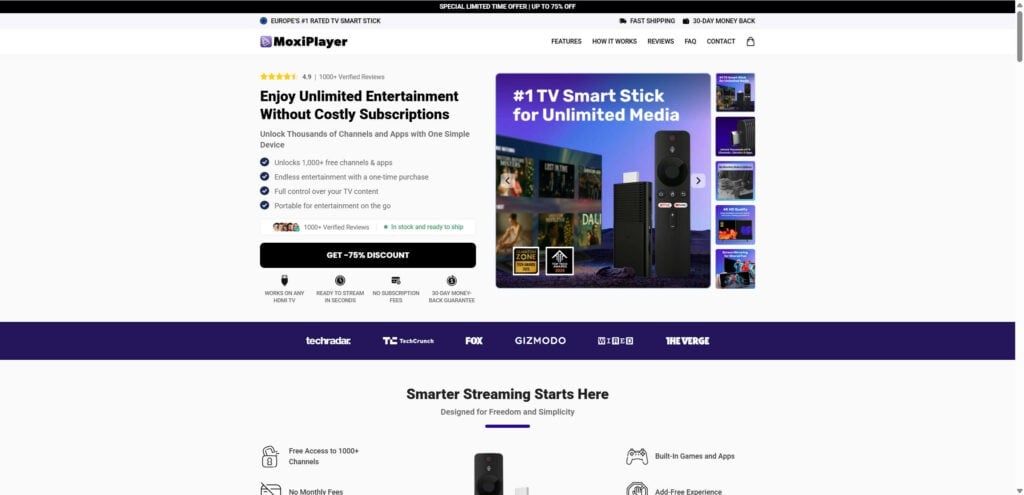
A seller takes a cheap, basic Android TV stick, rebrands it, then markets it with exaggerated promises about “free streaming,” “no subscriptions,” and “unlimited entertainment.” The same product is often sold under multiple names, across multiple websites, with nearly identical layouts, scripts, and claims.
Some buyers receive a device that technically turns a TV into a basic smart interface. But the big promise, free Netflix, free Disney+, free Max, free sports, is not real. In many cases, the device can’t do what it was advertised to do, and the return process is so difficult that customers feel stuck.
Let’s unpack the scam in a way that actually makes sense.
What these “free streaming sticks” promise
Most scam campaigns use a familiar checklist of claims:
- “Watch Netflix, Disney+, Max, Prime Video, and more for free”
- “No monthly fees”
- “Unlimited entertainment”
- “Thousands of channels”
- “Works on any TV with HDMI”
- “Instant setup”
- “AI-powered recommendations”
- “4K or 8K streaming”
- “One-time purchase, stream for life”
- “Sold out in stores, only available here”
- “$139 today, now only $69 with 50% off, or $34 with bundle deals”
These promises are designed to hit common pain points.
People are tired of juggling subscriptions. They are tired of price hikes. They want a simple solution, and the scam offers exactly that.
The problem is that the offer is built on implication, not reality.
Why “free Netflix” and “free Disney+” should immediately raise alarms
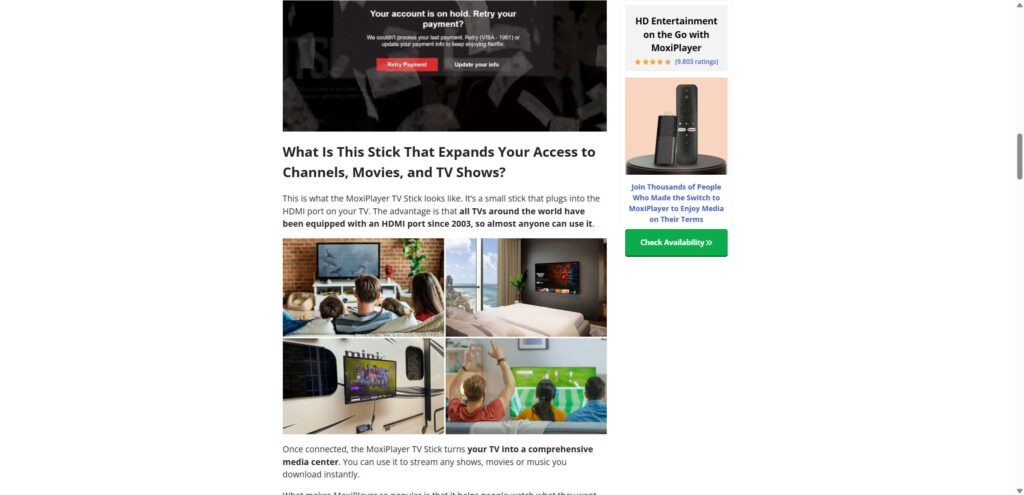
Netflix, Disney+, Max, and other major services are not just apps you download. They are subscription platforms with licensing, account verification, and digital rights management.
A $10 stick cannot “unlock” paid content legally.
If a device truly enabled free access to premium streaming libraries, it would be headline news. It would be a legal and business earthquake. It would not be sold through a random advertorial funnel with a countdown timer.
In the real world, legal streaming works like this:
- The device provides access to apps.
- The apps provide access to content.
- The content requires a subscription, unless it is free and ad-supported.
So when a site says “no monthly fees,” what it often means is “we do not charge you monthly.” The streaming services still do.
That tiny shift in wording is where many people get misled.
The “advertorial” trick that makes it feel legitimate
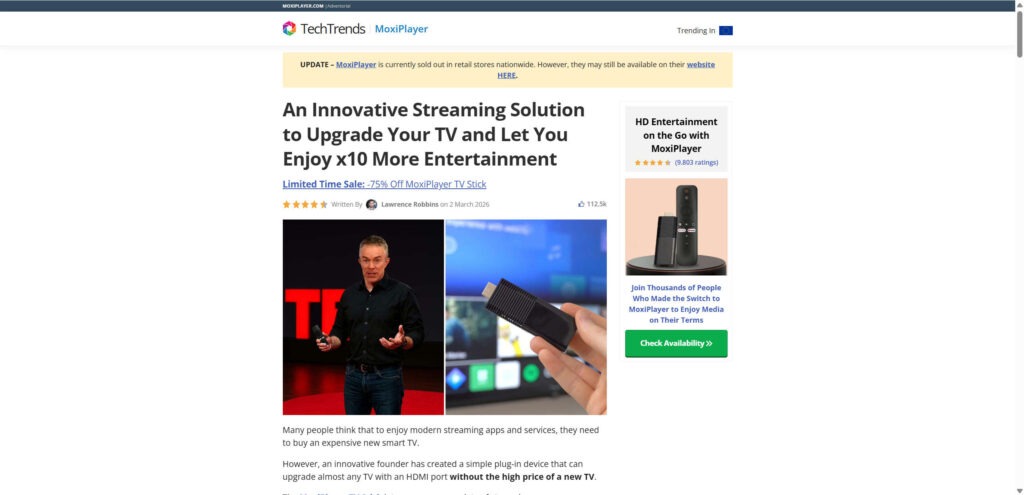
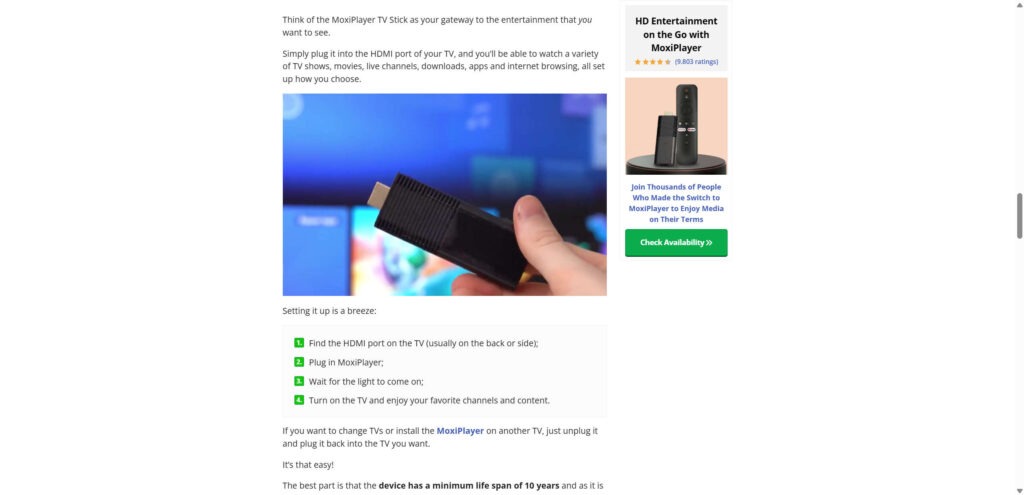
Many free streaming stick scam campaigns use advertorial pages that mimic real tech journalism.
You might see:
- A publication-style header, like “TechTrends”
- A named author and a date
- An “UPDATE” banner claiming the product is sold out nationwide
- A huge number of likes or shares
- Star ratings and review counts that look official
- A long story about a founder who built the product to solve a personal problem
This format is deliberate. It is designed to make your brain say, “This isn’t an ad. This is a review.”
But it is an ad.
The page exists to push you into a checkout funnel, fast, before you search for independent reviews.
The rebranding pattern: different names, same stick
This scam is sold under many names, including campaigns like:
- TellyStick TV Smart Stick
- MoxiPlayer TV Stick
- Flixy TV Smart Stick
- Other “TV smart sticks” with different brand names but similar promises
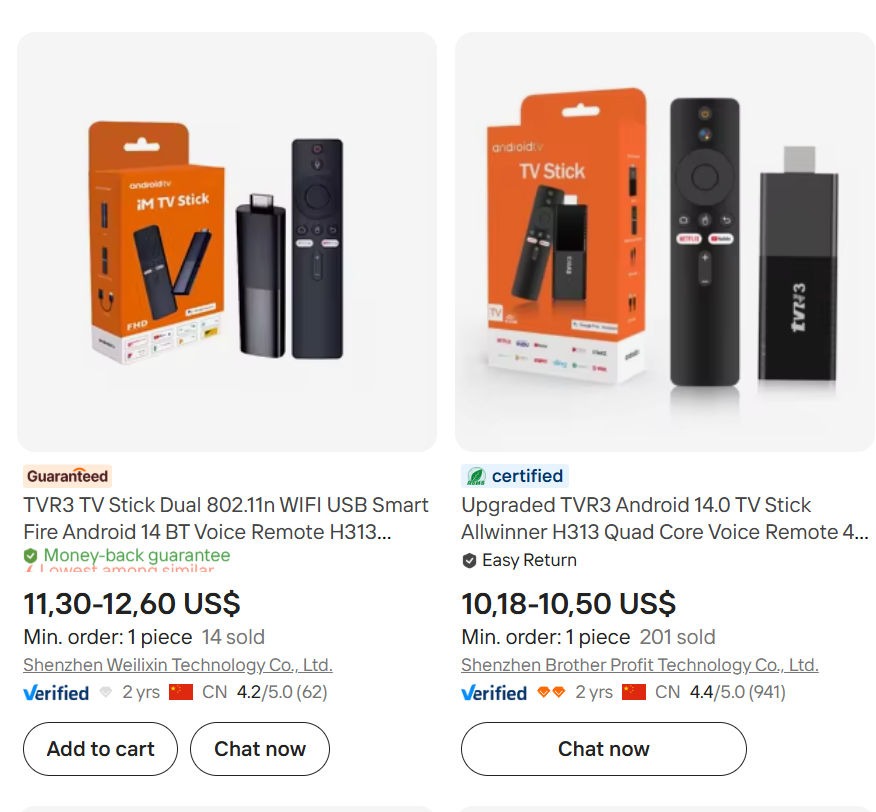
Even when the branding changes, the product photos often look nearly identical. The remotes look the same. The stick shape looks the same. The claims look the same.
That is because many of these campaigns are not unique products. They are rebranded versions of low-cost Android TV sticks sold wholesale.
A common wholesale price range for similar sticks is around $10 to $15 per unit. Some listings go lower in bulk.
Then the same device is sold to consumers for $69, $79, $99, or more, using discount anchors like “was $139.”
That markup alone is not automatically a scam. Businesses mark up products all the time.
What makes this a scam model is the combination of:
- inflated claims
- misleading wording
- controlled reviews
- urgency pressure
- and return barriers that make refunds unrealistic
What buyers often receive
Many customers report receiving:
- a basic Android TV stick that runs slowly
- a device that crashes or buffers frequently
- low storage and low memory performance
- apps that require subscriptions, exactly as normal
- interfaces that do not match the advertising
- instructions that push third-party apps or questionable “free TV” sources
In other words, they receive a cheap stick that functions like a cheap stick.
Not a miracle device that replaces paid streaming.
The returns problem: “money-back guarantee” that isn’t practical
This is one of the biggest reasons people call it a scam.
Many sites advertise a 30-day money-back guarantee. But when you try to use it, you may run into obstacles like:
- You must ship the item back to China
- You must pay return shipping yourself
- You must get approval first, which can take days or weeks
- The address may be unclear or delayed
- Support may respond with templates, or not at all
- You may be offered a partial refund, so you keep the device and stop asking questions
Even if the refund policy exists, the structure can make real refunds rare.
If shipping costs $25 to $50, many people will not return a $69 item. That is not an accident. It is part of why the model works.
A growing complaint pattern: charged for multiple sticks
Another common issue reported by buyers is quantity problems.
People say they ordered one stick, but:
- they were charged for 2, 3, or 4 sticks
- they received multiple sticks they did not intend to buy
- the checkout page defaulted to a bundle option
- the final price was different than expected
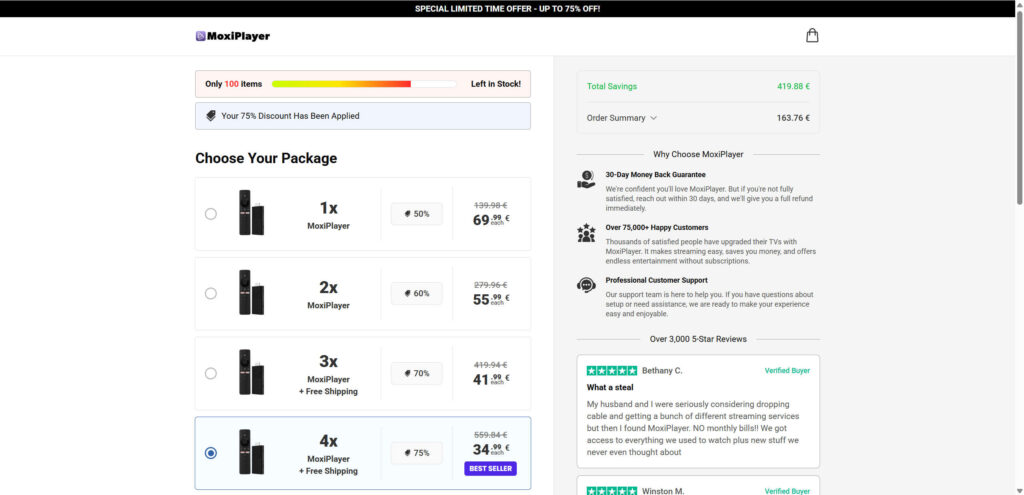
This often happens because checkout pages are designed to push bundles.
Sometimes the bundle is selected by default. Sometimes the discount “best value” box nudges you into buying more. Sometimes an upsell appears after you click “buy now,” and one more click adds extra items.
Regardless of how it happens, the result is the same. People are shocked when they see the charge.
Why these campaigns explode on social media
These scams thrive on social platforms because short-form advertising makes it easy to simplify the story.
You can compress a complex product into a 15-second pitch:
“Plug this in and watch everything for free.”
And you can target exactly the people most likely to respond:
- cord-cutters frustrated by cable bills
- older audiences who prefer TV over phone screens
- families trying to reduce monthly expenses
- sports fans who are tired of paywalls
- people who want a “simple fix” for streaming
Social platforms reward engagement, not accuracy.
That is why exaggerated claims spread fast.
The hidden risk most people miss: security and privacy
Not every generic Android TV stick is dangerous, but many are not held to the same standards as major brands.
If you install unknown apps, sign into accounts, or store payment info, you are trusting a device ecosystem that may not provide consistent security updates.
Practical reality:
- reputable devices invest in updates and certification
- generic sticks often do not
- unknown firmware can be messy and unsupported
This does not mean every stick is malware. It means the risk is higher than most buyers realize, especially when the seller is not transparent.
The bottom-line truth of the free streaming stick scam
Here is the simplest way to understand the scam:
- The product exists.
- The promises are exaggerated.
- The “free premium streaming” angle is misleading.
- The price is inflated compared to the wholesale value.
- The refund process is often designed to discourage returns.
If you keep that framework in mind, these campaigns become easier to spot.
How The Scam Works
The free streaming stick scam is not random. It follows a carefully engineered path designed to move you from curiosity to purchase before you have time to verify anything.
Below is a step-by-step breakdown of how it works, with clear section breaks so you can recognize the pattern the next time you see it.
Step 1: The hook, a simple promise that hits a real frustration
The first step is the ad.
It often looks like a quick product demo. Someone plugs in a stick and suddenly has “endless entertainment.” The message is intentionally simple.
Common hooks include:
- “Cancel Netflix, this does it all”
- “Watch thousands of channels free”
- “No subscription fees, ever”
- “Stream for life with one device”
- “Works on any TV”
The goal is to create a quick emotional response.
You are not thinking about licensing. You are thinking, “Finally, something that saves me money.”
Step 2: The trust layer, an advertorial that looks like a review
After you click, you often land on an advertorial page.
This is where campaigns like MoxiPlayer lean heavily into credibility signals.
You might see:
- “Written by” with a name and photo
- a date that makes it feel current
- star ratings and a large number of reviews
- “sold out nationwide” updates
- a story about a founder
- comparisons to expensive smart TVs
- quotes and testimonials that sound enthusiastic
The advertorial is not there to educate you. It is there to calm your doubts and push you forward.
It is designed to answer your internal questions without you asking them:
“Is it legit?”
“Yes, look at all the reviews.”
“Is it popular?”
“Yes, sold out nationwide.”
“Is this risky?”
“No, money-back guarantee.”
“Is it hard to use?”
“No, plug and play.”
Step 3: The careful wording that implies “free streaming” without clearly stating it
This is one of the most important steps.
The funnel is crafted to make you believe you will get premium entertainment for free, while avoiding explicit wording that could trigger legal problems.
The copy often says:
- “content found on Netflix, Disney+, Max”
- “all in one interface”
- “no subscription fees”
Then it adds a line that protects the seller:
- “subscriptions may apply from streaming platforms”
This wording is why many buyers feel tricked later.
They did not imagine “no subscription fees” meant “no subscription fees from us.”
They heard it as “no subscriptions needed.”
The funnel relies on that misunderstanding.
Step 4: The urgency stack, scarcity messages that push you to buy now
Next comes pressure.
You might see:
- “Only 100 left”
- “First 1,000 buyers get the discount”
- “Today only”
- “Limited time sale”
- “Update: demand has spiked”
- “Act now before it sells out again”
Scarcity works because it interrupts logical thinking.
Instead of comparing options, you feel like you must decide right now.
That is the point.
Step 5: The checkout funnel that nudges you into bundles
Once you click “check availability,” you are funneled into checkout.
This is where many people accidentally buy more than they planned.
Common tactics include:
- bundle pricing that makes multiple units look like the smart choice
- “best seller” labels on the largest bundle
- default selection on a higher quantity option
- upsells that appear right after you click buy
- layout tricks that make the 1-unit option look less attractive
Some buyers later report being charged for 3 or 4 sticks when they believed they ordered 1.
Sometimes it is a true error. Often it is a funnel design that encourages quantity without making it feel obvious.
Step 6: Payment processing that feels “normal,” even when the seller is not
Many scam campaigns use familiar payment tools or checkout layouts.
That can create a false sense of security.
But the merchant name on your statement may not match the brand you bought from. Sometimes it is a different company entirely.
That matters if you need a refund or chargeback later. It can make tracking down the right party more confusing.
Step 7: Fulfillment that ships from overseas, even when the branding implies local stock
Even when the page suggests local popularity and fast shipping, many of these devices ship from overseas.
This can lead to:
- tracking numbers that take days to activate
- longer delivery times than expected
- limited shipping updates
- unclear origin information
A device that costs $10 wholesale is often shipped directly from a supplier network, not from a local warehouse.
Step 8: The device arrives, and the promise collapses in real life
When the stick arrives, buyers often discover a gap between expectation and reality.
Instead of “free Netflix,” they get:
- a basic Android interface
- apps that require logins and subscriptions
- free ad-supported apps that were always free
- buffering or lag due to low hardware power
- limited storage that fills up quickly
- questionable app recommendations
For many people, the product is not totally useless. It may run YouTube, free streaming apps, and basic browsing.
But it does not do what most people believed they were buying.
That is why the free streaming stick scam is so effective.
It delivers something, just not what was promised.
Step 9: Customer support becomes slow, vague, or unreachable
When buyers complain, the support experience often shifts.
Common patterns:
- email-only support
- slow responses
- scripted replies
- requests for video proof
- delays that eat into the refund window
This is frustrating, and it is also strategic.
The longer the process takes, the more likely the buyer gives up.
Step 10: The return trap, shipping back to China makes refunds unrealistic
Here is where most consumers hit the wall.
The policy may say “30-day money-back guarantee,” but the reality can be:
- you must ship the product back to China
- you must pay return shipping
- you must use tracked shipping
- you must wait for processing after it arrives
- you may be offered partial refunds to avoid the return
Even if refunds are technically possible, the friction is high.
That friction is part of the scam model.
Step 11: The brand disappears or rebrands when complaints grow
Finally, when a campaign becomes too negative, sellers often pivot.
They may:
- rename the product
- launch a new website
- run a new advertorial
- sell the same stick under a new brand
That is how you end up with multiple names like Flixy, MoxiPlayer, TellyStick, and others, all promising the same “free streaming” miracle.
What To Do If You Have Fallen Victim to This Scam
If you bought one of these free streaming sticks and feel misled, you are not alone. The good news is there are practical steps you can take. The key is to act calmly and quickly.
- Take screenshots of what you were promised
Before anything changes, capture the evidence.
Screenshot:
- the ad claims about free streaming
- the product page promises
- the refund policy
- the pricing and discount claims
- the checkout page showing what you selected
This helps if you need to dispute the charge.
- Check your bank statement for multiple charges or bundle billing
Look for:
- more than one transaction
- a higher amount than expected
- a different merchant name than the product brand
- recurring charges, if any
If you were charged for multiple sticks, document it clearly.
- Contact the seller in writing, keep it short and firm
Send one clear message requesting a full refund.
Include:
- your order number
- the date of purchase
- the reason, item not as described or misleading advertising
- a request for a full refund
- a clear deadline for a response, such as 48 hours
Do not rely on phone calls. Written proof matters.
- If it has not shipped, request cancellation immediately
If the order is not fulfilled yet, cancellation is often easier than returning.
Ask directly:
- “Cancel my order and confirm refund.”
- Do not accept a partial refund unless you truly want it
Many sellers offer partial refunds to stop complaints.
If you accept it, you may lose leverage later.
If you want a full refund, stay consistent.
- Start a dispute with your payment provider if the seller stalls
If the seller delays, ignores you, or refuses, go to your payment provider.
If you paid by credit card:
- request a chargeback for “item not as described” or “misleading advertising”
If you paid by PayPal:
- open a dispute in the resolution center and upload screenshots
Time matters here. Dispute windows close.
- Be cautious about returning it overseas without a strategy
If they demand you ship it back to China, check the cost first.
If return shipping is high compared to the item price, tell your bank or payment provider. It supports the argument that the “money-back guarantee” is not practical in real terms.
- Secure your accounts if you logged into anything on the device
If you used the stick and logged into accounts:
- change your streaming passwords
- remove the device from your account device list
- avoid storing payment methods on the stick
- consider using a separate email account for streaming devices in the future
This is simple protection, not panic.
- Reset the device and avoid installing unknown “free TV” apps
If the stick came with strange apps or prompts:
- factory reset it
- only install apps from official app stores
- avoid side-loading unknown APKs
Many scam campaigns steer users toward questionable apps to create the illusion of “free premium content.”
- Report the scam to help others
You can report misleading advertising and fraud patterns to consumer protection agencies.
Also report the ad to the platform where you saw it. Social ad systems respond to patterns when enough people report them.
- Leave a factual review on independent sites
Keep it calm, specific, and helpful.
Include:
- what was promised
- what arrived
- whether Netflix and Disney+ were actually free
- whether you were charged for multiple sticks
- whether returns required overseas shipping
This is one of the best ways to reduce future victims.
The Bottom Line
The free streaming stick scam works because it sells hope.
It takes a real frustration, expensive subscriptions, confusing streaming, endless paywalls, and offers a simple miracle fix. Then it wraps a cheap Android TV stick in a glossy story, heavy social proof, and urgency pressure.
Brands like MoxiPlayer, Flixy TV Smart Stick, TellyStick TV Smart Stick, and many others are often the same pattern under different names. Buyers end up with a basic device that cannot deliver what was implied, then discover that refunds are difficult because returns require shipping back to China, often at their own expense. Some buyers even report being charged for multiple sticks when they intended to order only one.
If you are considering buying a “free streaming” TV stick, the safest move is to pause. Read every line. Assume premium streaming still requires subscriptions. And only buy from sellers with transparent support, verified reviews, and easy local returns.
If you already bought one, act quickly, document everything, and use your payment provider’s dispute process if the seller does not cooperate.
A good streaming setup should feel simple and reliable. If a product needs a countdown timer, a fake news-style advertorial, and a too-good-to-be-true promise to sell, that is usually the real story.
FAQ
Is the “Free Streaming Stick” offer real?
In most cases, no. These offers are usually built on misleading wording that makes people believe paid streaming becomes free. What you typically get is a basic Android TV stick that can install apps, not unlock premium subscriptions.
Can a streaming stick really unlock Netflix, Disney+, Max, or Prime Video for free?
No. Those platforms require paid subscriptions and account logins. A device cannot legally bypass those paywalls, no matter what the ad implies.
What does “no monthly fees” actually mean on these websites?
It usually means the seller does not charge a monthly fee for the device. It does not mean streaming services are free. Many pages hide this truth in small-print disclaimers.
Why do these ads claim “sold out nationwide” or “only a few left”?
That is a common urgency tactic. Scarcity messages are used to push impulse purchases before buyers compare prices, read the fine print, or search for independent reviews.
Why do these products have so many “verified reviews” on the sales page?
Because the reviews are often controlled by the seller. A sales page can display only positive comments or create the appearance of social proof. Independent reviews across multiple platforms are usually far more mixed.
Are MoxiPlayer, Flixy, and TellyStick the same product?
Often, yes or very close. Many of these brands are re-skins of the same low-cost Android TV sticks sold wholesale for around $10 to $15, then rebranded and marked up heavily.
What do people usually receive after ordering?
Many buyers receive a cheap stick with limited performance, basic menus, and apps that still require subscriptions. The device often does not match the “free streaming” promise that motivated the purchase.
Why do some people say they were charged for 3 or 4 sticks when they ordered 1?
This can happen when bundle options are selected by default, upsells are added during checkout, or the pricing layout nudges buyers into multi-unit packages. Always check the final quantity and total before confirming payment.
Why are refunds so hard with these “TV smart stick” websites?
Because returns often require shipping back to China at your expense, with strict conditions and slow customer service. Even when a “30-day money-back guarantee” is advertised, the process can be so inconvenient that many people give up.
What should I do if I already bought one and regret it?
Save screenshots of the claims, your order, and the refund policy. Contact the seller in writing and request a full refund. If they stall, open a dispute with your bank or payment provider as “item not as described” or “misleading advertising.”
Is it safe to log into my accounts on a random Android TV stick?
Be cautious. Unknown devices may have weak update support and unclear firmware quality. Avoid saving payment methods, consider using a separate account, and remove the device from your streaming account’s device list if you feel uncomfortable.
How can I avoid these scams in the future?
If the ad promises free Netflix or free Disney+, treat it as a red flag. Buy from well-known retailers, look for independent reviews, and avoid any offer that relies on countdown timers, “sold out nationwide” claims, or hard-to-verify review totals.









Thankyou so much for sharing. It is very good.
Thank you – glad it was useful. If you spot the same scam advertised somewhere else, reporting the ad on that platform helps the next person, since these get pulled on complaint volume rather than on anything we write.