

Have you received a text claiming you owe money for unpaid Peach Pass tolls in Georgia? Don’t fall for it. This is a sneaky phishing scam aiming to get your personal information. Keep reading to learn all about how the GATollInvoice text scam works and how to protect yourself.
Overview of the GATollInvoice Text Scam
Text messages claiming your vehicle owes unpaid tolls or fees to Georgia’s Peach Pass system should raise instant red flags. This is a common phishing scam aiming to trick drivers into providing personal information and credit card details, which the criminals then use for identity theft and financial fraud.
This scam has targeted drivers across the country, not just in Georgia, since phone numbers are easy for scammers to spoof and send mass texts to. Don’t make the mistake of thinking you’re safe if you haven’t driven Georgia toll roads recently.
How the Scam Texts Reach Victims’ Phones
The criminals utilize automation technology to send hundreds of thousands of text messages at once to random phone numbers. This mass texting approach allows them to cast a wide net hoping to catch unaware victims off guard.
The texts are made to look like they come from an official toll road source, with “Georgia Peach Pass” in the message. But it’s just a technique to make the scam more convincing. There’s no real way to know who’s behind the messages.
Some speculate it’s the work of international cybercriminal groups who have the technical capabilities for mass texting and website creation. They operate these text scams all around the country under different toll road authority names.
No Real Unpaid Tolls Owed
Rest assured these texts are completely fake and no one receiving them actually has outstanding tolls or fees owed to the Georgia Peach Pass.
The scammers are just sending the messages out en masse hoping to trick people into thinking an unpaid bill exists so they hand over their information and money. Don’t fall for it!
The Fake Invoices Look Legitimate
One reason the scam is so effective is the texts and fake websites look professional and convincing. The criminals put effort into making the invoices appear real.
For example, the texts reference specific dollar amounts like “$117.50” owed rather than a round number, which looks more official. And the fake websites use logos, colors, and terminology mimicking the actual Georgia toll authority.
This makes victims more likely to think the invoices are real. But it’s all an act by scammers to build trust so you hand over personal details that they steal.
The Goal is Always Identity Theft
Make no mistake – the scammers behind these fake Georgia Peach Pass texts have no intention of collecting real toll payments from victims. Their only goal is to steal personal and financial information for identity theft and fraud.
Once victims enter details like their name, address, and credit card number into the fraudulent websites the criminals control, they take that sensitive data and use it criminally.
For example, they may make unauthorized purchases, open fake accounts, take out loans in your name, steal your tax refund, and commit other types of identity theft and financial fraud.
The toll invoice scam gives them an easy way to collect the data needed to wreak this havoc on victims’ lives.
Don’t Become Another Victim of This Scam
Now that you understand how sneaky and deceptive this phishing scam is, be sure to avoid becoming another victim. Remember:
- The texts are fake – you do not owe any Peach Pass tolls
- Don’t click on any links or call phone numbers in messages
- Verify invoices directly with the real Peach Pass before paying
- Report scam texts to carriers and file complaints
- Monitor accounts closely for fraud if you shared any info
Stay vigilant against toll invoice text scams to keep your identity and financial data safe
How the GATollInvoice Text Scam Works
Now that you know the basics, let’s break down step-by-step how the criminals operate this scam:
Step 1: The Initial Scam Text
You’ll receive a text out of the blue stating your vehicle owes money to Georgia’s Peach Pass for unpaid toll charges. It threatens additional fees and urges you to pay now.
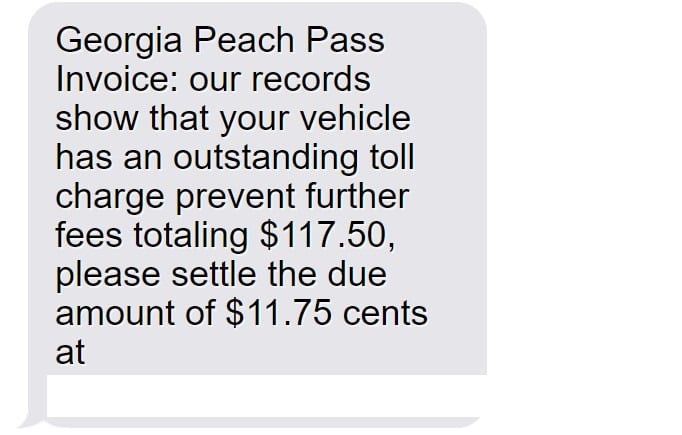
Here’s a sample fake invoice text:
“Georgia Peach Pass Invoice: our records show that your vehicle has an outstanding toll charge prevent further fees totaling $117.50, please settle the due amount of $11.75 cents at https://GATollInvoice.com”
Of course, this domain is completely made up and controlled by scammers rather than any real toll agency.
Step 2: Visiting the Fake Invoice Website
If you click the link, it takes you to a very legit-looking but completely fake website. Everything from the logo to the terminology mirrors official toll sites, but it’s all an act by criminals.
The site reiterates you must pay immediately to avoid extra fees. But this is just to build urgency so victims enter personal information without thinking.
Step 3: Entering Personal and Financial Details
The fake Peach Pass site has an online form asking for private data, including:
- Full legal name
- Home address
- Phone number
- Vehicle information
- Credit card number
Claiming they need this data to look up your account and process payment. But it actually goes straight to criminals.
Step 4: Criminals Steal Your Details
Once you complete the form, all your personal and financial information gets directly sent to scammers. They will use it to steal your identity, make unauthorized purchases, or commit other types of fraud.
You may even get a “payment successful” confirmation. But your data is now compromised, no actual tolls paid.
Step 5: Shut Down the Fake Site
After collecting stolen info from victims, the scammers quickly disable the fraudulent website and phone numbers associated with the phishing texts to avoid getting caught.
But the damage is done – your details already got stolen and can be used or sold on the black market by cybercriminals.
What to Do if You Get a Fake GATollInvoice Text
If you receive one of these phishing texts, here are important steps to take right away:
1. Avoid Clicking Links or Calling Back
Do not click, tap, or otherwise engage with any links or phone numbers in a suspicious text claiming you owe tolls or fees. Avoid calling numbers in texts you aren’t sure about.
2. Report as Spam
On iPhone, forward the text to 7726 to report it to carriers as spam. Android users can forward to SPAM (7726). Reporting helps identify scams.
3. Contact Phone Provider
Your wireless provider may have guidance on blocking numbers associated with this scam to prevent more phishing texts from coming through.
4. Verify with the Real Peach Pass
Go directly to the official Georgia Peach Pass website or call their customer service at 1-855-PCH-PASS to confirm whether any legitimate invoices exist for your account.
5. Check Accounts and Credit Reports
If you did provide any information, immediately review all financial accounts and credit reports for any signs of misuse or identity theft. Report unauthorized activity ASAP.
6. Enable Credit Monitoring
Sign up for credit monitoring which alerts you anytime new accounts open in your name or other suspicious credit activity is detected. This helps catch fraud early.
7. Report Scam Texts and Sites
File complaints about fake texts or websites impersonating businesses with the Federal Trade Commission, Federal Communications Commission, and Georgia Attorney General.
8. Increase Text Message Security
Update account passwords, enable two-factor authentication, and check security settings for your phone carrier account to add extra protection against text scams.
9. Spread the Word
Let contacts know about scam texts impersonating the Georgia Peach Pass so they can protect themselves and avoid becoming victims.
Frequently Asked Questions about the GATollInvoice Text Scam
1. I got a text from “Georgia Peach Pass” saying I owe money. Is it real?
No. This is a common phishing scam. The texts are fake and sent randomly hoping to trick people. No real unpaid tolls are owed.
2. How can I tell if a Peach Pass text is fake or real?
Fake ones have poor grammar, threatening language, or links to sketchy sites. Real ones originate in the Peach Pass app or customer account. Verify through official channels.
3. What happens if I click the link or call the number?
You’ll end up at a fake lookalike site asking for private data that scammers will steal. Never click links or call numbers in suspicious texts.
4. Could I get in trouble if I don’t pay the text toll bill?
No, there are zero consequences for ignoring these fake toll invoices since no money is actually owed. Avoid calling back numbers in suspicious texts.
5. What do the scammers want from the Peach Pass scam?
These texts are phishing attempts to collect your personal and financial information which the scammers then use to commit identity theft and fraud.
6. What should I do if I entered my info into the fake site?
Immediately contact banks and credit bureaus to lock down accounts and monitor for fraud. Report identity theft to the FTC. Check your credit reports regularly.
7. How can I help shut down these Peach Pass text scams?
Report fake texts to wireless carriers, file complaints with authorities, educate others on recognizing phishing attempts, and push for stronger anti-scam laws.
8. Are toll invoice scams increasing?
Yes, as more toll roads go digital, scammers take advantage by impersonating them in phishing texts and emails hoping to steal peoples’ details.
9. How can I protect myself from text message scams?
Avoid unknown links and numbers, report suspicious texts, install security apps that block spam texts, and verify bills directly with businesses using official contact info.
10. Who can I contact if I have more questions?
Contact the real Peach Pass customer service, the Federal Trade Commission, the FCC, and your wireless provider. Never call numbers or click links in suspicious texts.
The Bottom Line on Toll Invoice Text Scams
Phishing texts claiming you owe unpaid toll fees are on the rise. But any message out of the blue demanding payment via text or website should be considered suspicious. Verify invoices directly with the business before giving up your information.
Use caution against invoice-related text scams by never clicking unknown links, reporting suspicious messages, and keeping personal data private unless you initiate contact with the company and verify legitimacy. Together we can stop these scammers.








