

A Google security email says an app password was created. You did not create one, and a support reference inside the warning makes it feel urgent.
The Google app password alert scam can arrive with details that seem unusually convincing. Before contacting anyone, there is one account detail you should examine.
Overview
A genuine notification can repeat an attacker’s words
This is a confirmed Google impersonation mechanism. Criminals misuse an account notification to deliver their own support instructions inside an email genuinely generated by Google.
The email’s origin and the instruction’s authority are separate questions. An automated template can repeat a name entered by a user without endorsing what that name says.
Google is the service being abused. A fake case handler, telephone number or sign-in request inserted by an attacker is the scam.
Official reports explain the account behind the warning
The Swiss federal cybersecurity warning describes several reports involving attacker-controlled Google accounts, recovery addresses and security notices carrying invented support-case text.
The recipient’s address was used as a recovery contact for another account. Activity in that account generated a notice that appeared relevant to the recipient.
An October report independently describes a support number placed in an app-password label. The poster reproduced the notification format, but did not report a completed financial loss.
Receiving such a notice does not, by itself, establish that someone entered your own Google account. Read which account the message actually describes.
Check your account before accepting the support story
Open your Google Account independently and inspect its security activity. Do not let a case number or urgent label choose your next contact method.
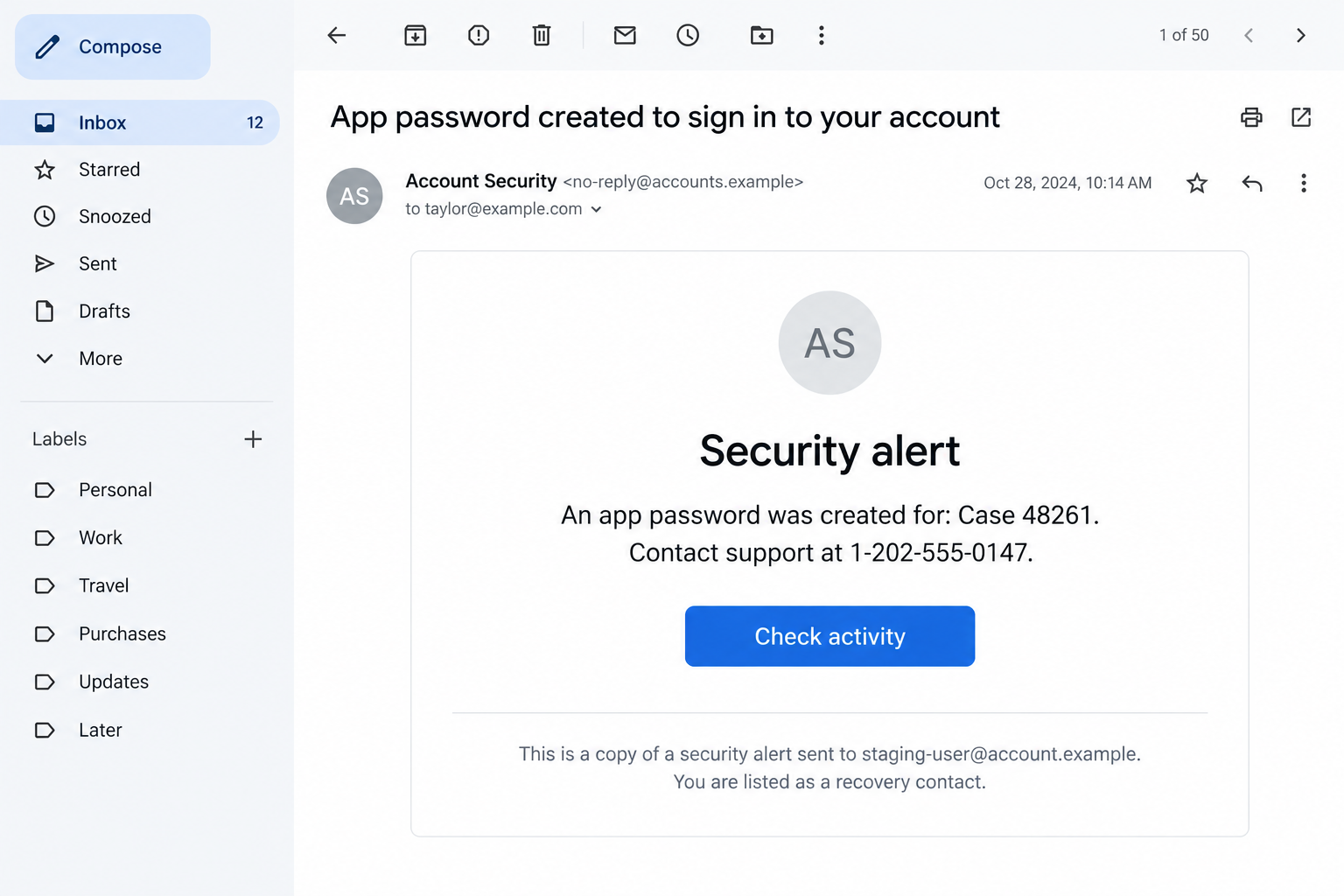
- The notice may say it is a copy of an alert for another address.
- An app or device name may read like a support instruction.
- The instruction supplies an unfamiliar telephone number or case link.
- A caller pressures you to verify while staying on the line.
- A supposed security page asks for credentials or new account permissions.
If the activity really belongs to your account, investigate it through Google’s security controls. If it belongs elsewhere, do not assume the inserted support instruction is legitimate.
The Detail Hidden in Plain Sight: Whose Account Is This?
A notification can reach your inbox because you are named as a recovery contact. That is different from someone signing into the account you use daily.
People often skim the alarming heading and their own recipient address. The smaller line identifying the affected account receives much less attention.
That line deserves your attention here. An unfamiliar account address can explain why an unexpected security event appeared even though your own activity looks normal.
It also changes the response. You should not reset everything in a panic solely because another account sent a copied notice to your mailbox.
At the same time, do not dismiss an alert that actually refers to you. Check the activity in your own account through a route you normally trust.
A mistaken recovery address is possible too. The decisive danger is when the notification contains a deceptive support instruction and someone tries to steer you through it.
Keep those observations separate: an email arrived, an account generated it, and somebody wants you to take an action. Each deserves its own check.
The fraud succeeds when the recipient treats all three as one conclusion: Google must have found a problem, so this case handler must be helping.
How the Google App Password Alert Scam Works
Step 1: Another account is connected to your inbox
The documented campaign used an account controlled by the attacker. The target’s email address was entered as a recovery contact for that account.
This created a way to send the target real service notifications. It did not establish that the target had approved a support case or changed their own settings.
To the recipient, the arrival can still look personal. Their familiar mailbox receives a security message from a platform they already use.
Do not verify an unexpected recovery association merely to stop the messages. First establish which account it concerns and whether you intended to be connected.
Step 2: User-controlled text is dressed up as a security case
An app-password label normally identifies an application. In the observed abuse, that label carried a fake case reference or instructions to contact supposed support.
The service repeated the label in its notification. The surrounding security template gave the inserted wording more weight than the same sentence in ordinary spam.
A name field can describe almost anything. Its appearance inside an official format does not transform it into a vetted statement by a security employee.
Read the sentence for its actual purpose. A label that instructs you to call a number is doing something quite different from naming a mail application.
Step 3: A caller or callback instruction takes control of the situation
The notice supplies an apparent reason for a conversation. A person can introduce themselves as the handler responsible for the case you just received.
Matching the reference number proves little if the same operator arranged the text. It is agreement between two parts of the lure, not independent confirmation.
The Swiss warning describes fake support calls alongside the notices. A recent U.S. report instead highlights the callback number inside the email itself.
Either approach asks the reader to give the embedded instruction authority. Leave that route and verify any concern through your account’s established help options.
Step 4: A support page asks you to sign in on the attacker’s terms
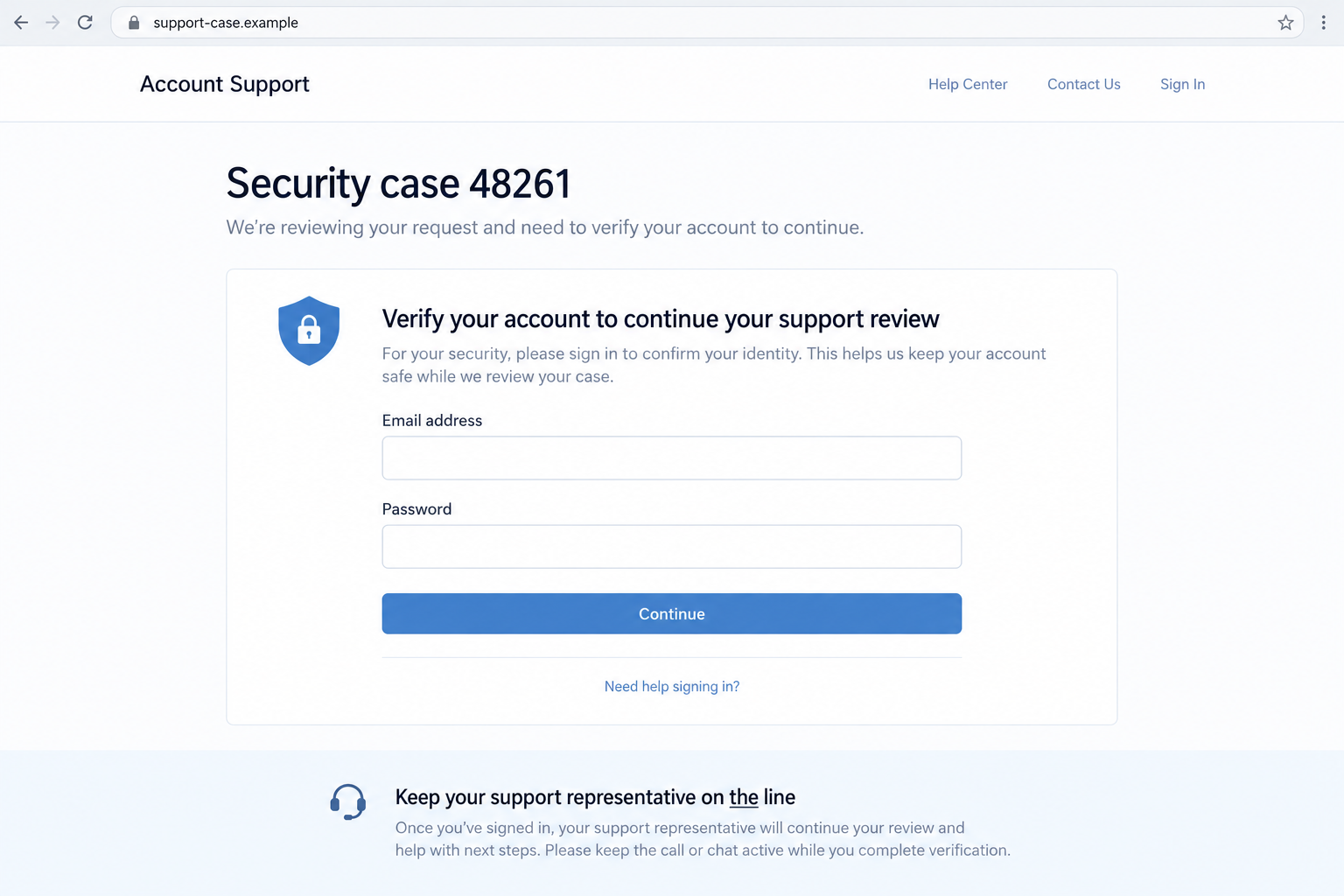
The federal report describes a Google Sites page containing an embedded malicious login form. The trusted hosting address made the page appear reassuring.
A hosted page is not automatically an official Google sign-in page. Users can create content on hosting services without becoming the service’s security department.
Stay alert to what the form requests and why. A caller who pressures you to enter secrets removes the time you need to inspect that request.
The two screens shown here are generated, nonfunctional examples with fictional details. They explain the stages without pretending to be captures of the reported messages.
Step 5: A claimed repair can become an account-access grant
Beyond a password, a support conversation may request a code, sign-in approval or application access. Each can authorize something the recipient did not intend.
Do not create or disclose an app password for an unsolicited caller. It is an access credential, not a support ticket number or harmless diagnostic detail.
The reported outcomes vary. The official warning describes unauthorized account access, while the recent notification report does not establish that its recipient entered credentials.
That distinction matters during recovery. A suspicious email, a phone conversation and an actual credential disclosure are not interchangeable evidence of a completed takeover.
What an App Password Does, and What It Does Not Prove
Google describes an app password as a 16-digit passcode that lets certain applications or devices access an account with two-step verification enabled.
It exists for applications that cannot use the usual sign-in method. Google says it is unnecessary in most cases and recommends more secure sign-in options.
Those facts do not mean a stranger needs you to make one during a support call. The name of the feature does not establish the caller’s identity.
There are also two different uses in this story. One account generated the notification; another could become exposed if the recipient follows the subsequent instructions.
An app password created in the attacker’s account is not proof that an app password was created in yours. Read the account address before connecting those events.
If you actually created one in your own account during the conversation, however, treat that access grant seriously. Review and remove anything you did not knowingly authorize.
You do not need to send the credential to a supposed examiner to find out whether it is dangerous. Sharing it creates the very exposure you want assessed.
Support references can be discussed without disclosing passwords. Stop when the proposed verification depends on giving somebody the ability to sign in as you.
Do App Passwords Survive a Password Change?
Google’s current help page explicitly says that changing the Google Account password revokes app passwords. That is the rule readers should use for this recovery step.
The Swiss account described continuing access after a password change. Its wording should not be turned into a universal claim that every app password survives.
A compromised account can have other changed settings or permissions. Review those separately rather than assuming one action settles every possible route.
For example, check unfamiliar devices, recovery contacts and connected applications. Inspect mail forwarding and filters if messages may have been accessed or redirected.
Each item asks a concrete question: did I authorize this device, address, application or rule? That is more useful than treating every security feature as the same thing.
Record unexpected changes before removing them when practical. Those details can help support understand the incident without requiring you to preserve a harmful access grant.
If the account belongs to your employer, involve its security team promptly. Workspace controls and recovery options can differ from those on a personal account.
Keep the cleanup attached to what happened. An email about somebody else’s account does not automatically justify deleting the applications you deliberately use.
What to Do if You Have Fallen Victim to This Scam
-
End the support conversation and keep the original email. Record the account address mentioned, the inserted label, the number supplied and the time of contact.
Do not ring the same number to ask whether it is genuine. That would give the alleged case handler another opportunity to control the answer.
-
Open your Google Account independently. Review its actual recent security activity and devices, then compare those findings with what the caller claimed.
If the notice identifies an unfamiliar account, keep that distinction in your report. Receiving a copied alert is not proof of access to your mailbox.
-
If credentials were entered, follow Google’s compromised-account instructions. Change the exposed password from a trusted device and address any loss of access.
Replace the same password on other services if it was reused. Start with accounts that depend on this mailbox for password resets or important notices.
-
Review app passwords and remove unauthorized entries. Check connected applications, account recovery details and sign-in methods for changes you did not make.
Do not approve a new credential or prompt because the caller says it reverses the old one. Use the account’s own controls.
-
Inspect Gmail forwarding, filters and other mail settings. Review sent messages for anything distributed while you were away from the account.
Warn affected contacts through a dependable separate route if your mailbox sent unexpected requests. Avoid forwarding the attack’s links as part of that warning.
-
If software was downloaded or installed, have the device checked. Malwarebytes can help inspect suspicious files; it does not revoke Google permissions or recover a mailbox.
AdGuard can reduce exposure to known malicious pages. It cannot verify that a caller represents Google or make an embedded sign-in form official.
-
Tell your organization’s security team if work data or accounts were involved. Supply the original message and the sequence of actions, rather than only an image.
For personal accounts, use Google’s help and reporting routes. Describe the field carrying the false support instruction so the abuse can be assessed accurately.
-
Check financial services only if relevant details or access were exposed. Contact the real provider promptly about unfamiliar transactions or changes.
Be wary of recovery offers promising a guaranteed fix for a fee. Knowledge of the email’s case number does not make a new caller trustworthy.
If You Received the Email but Did Nothing Else
You have time to examine the account reference calmly. Do not create a support emergency by calling a number that arrived inside an unexpected label.
Inspect your own security activity without using that instruction. If you find an unauthorized event in your account, deal with the event through Google’s official controls.
If your account looks normal and the notice concerns an unfamiliar address, record that fact. It is a reason to question the association, not proof of a takeover.
A phone number inside an app name remains unverified even if the email’s technical origin checks out. Authentication does not approve every user-entered field.
You can report the message and stop engaging. Do not reply with a screenshot containing personal details to a stranger offering to inspect your account.
And do not test the suspicious sign-in page. The useful check is already available through your own account and the provider’s published guidance.
Frequently Asked Questions
Can a real Google email contain a scam instruction?
Yes. An automated notification can repeat attacker-supplied text from an account field. Its origin does not validate a telephone number embedded in that text.
Does this mean Google itself is running the scam?
No. Criminals are misusing a notification feature and impersonating support. Google is the legitimate service whose credibility they borrow.
Does receiving the alert prove my account was hacked?
No. Check which account the notice identifies and review your own activity independently. The described lure can originate from an attacker-controlled account.
Should I create an app password to help support investigate?
Do not create or disclose one for an unsolicited caller. It grants access and should never be treated as a simple support reference.
Does changing my Google password revoke app passwords?
Google says it does. Also review devices, application access, recovery information and mailbox settings for separate changes you did not authorize.
Is a Google Sites address the official Google sign-in page?
No. Sites hosts user-created content. Verify a sign-in request through your normal Google Account route, especially when somebody is pressuring you by phone.
The Bottom Line
The Google app password alert scam turns attacker-written account text into an apparent security instruction. A genuine notification does not authenticate its embedded support story.
Check the affected account and your own security activity independently. Keep passwords, approvals and application access out of the unsolicited conversation.

Join the discussion
0 commentsShare your experience or ask a question about this article.
Discussion
Start the conversation
Have a question or something useful to share? Add the first comment.