

If you are a fan of the Home Shopping Network (HSN), you may have seen some online shopping sites that look very similar to the official HSN website. However, these sites are not affiliated with HSN and are actually part of a scam that aims to steal your money and personal information. In this blog post, we will explain what the Fake Home Shopping Network Online Shopping Sites Scam is, how it works, and what you can do if you have fallen victim to it.
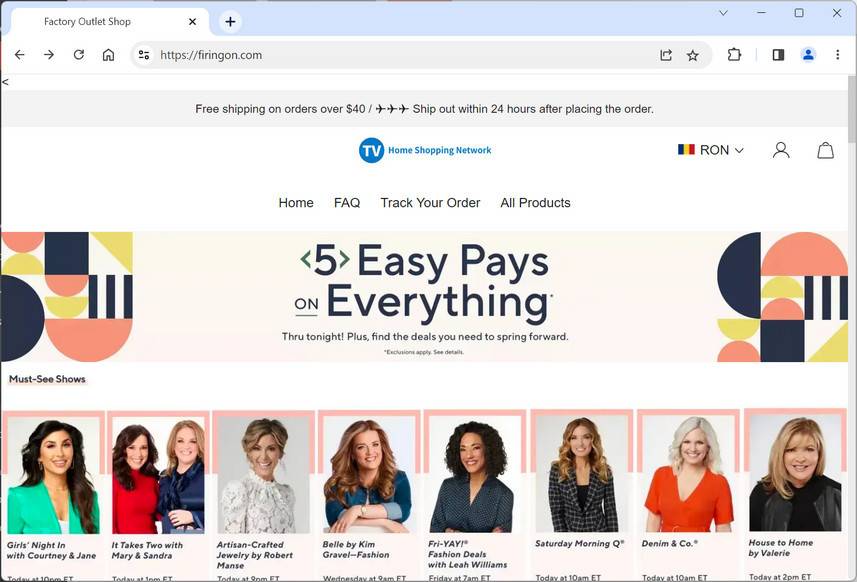
What is the Fake Home Shopping Network Online Shopping Sites Scam?
The Fake Home Shopping Network Scam Sites is a type of phishing scam that uses the HSN logo and brand to lure unsuspecting shoppers into fake websites. These websites offer products that are similar or identical to those sold by HSN, but at much lower prices. The scammers hope that you will be tempted by these deals and enter your credit card details or other personal information on their site.
However, once you do that, you will not receive the products you ordered, and your information will be used for fraudulent purposes. You may also be charged for recurring subscriptions or memberships that you did not sign up for. The scammers may also send you emails or texts with links to more fake sites or malware.
How does the Fake Home Shopping Network Online Shopping Sites Scam work?
The Fake Home Shopping Network Online Shopping Sites Scam works by using various methods to direct you to their fake websites. Some of these methods include:
- Sending you emails or texts that claim to be from HSN or its partners, offering you discounts, coupons, free shipping, or other incentives. These messages may look legitimate, but they contain links to the fake sites.
- Creating fake social media accounts or pages that pretend to be HSN or its fans, and posting links to the fake sites or inviting you to join groups or events related to HSN.
- Buying ads on search engines or other websites that use the HSN name or logo, and redirecting you to the fake sites when you click on them.
- Registering domain names that are similar to the official HSN website, such as hsnshop.com, hsnstore.com, hsnonline.com, etc., and creating websites that mimic the look and feel of the real HSN website.
The fake websites may also use techniques such as:
- Displaying fake reviews, ratings, testimonials, or endorsements from celebrities or customers.
- Showing fake countdown timers, limited stock alerts, or pop-ups that urge you to buy quickly before the offer expires.
- Asking you to fill out surveys, quizzes, or forms that require your personal information in order to access the deals or enter a sweepstakes.
- Requesting you to verify your account, update your payment method, or confirm your order by clicking on a link or calling a number.
What to do if you have fallen victim to the Fake Home Shopping Network Online Shopping Sites Scam?
If you have fallen victim to the Fake Home Shopping Network Online Shopping Sites Scam, you should take the following steps as soon as possible:
- Contact your bank or credit card company and report the fraudulent charges. Ask them to cancel your card and issue a new one.
- Change your passwords and security questions for any online accounts that may have been compromised by the scammers.
- Scan your computer or device for any malware or viruses that may have been downloaded from the fake sites or links.
- Report the scam to the Federal Trade Commission (FTC) at https://reportfraud.ftc.gov/, the Better Business Bureau (BBB) at https://www.bbb.org/scamtracker/, and HSN at https://www.hsn.com/content/ContactUs/7.
- Warn your friends and family about the scam and advise them not to click on any suspicious links or messages related to HSN.
Conclusion
The Fake Home Shopping Network Online Shopping Sites Scam is a serious threat that can cause you financial and emotional harm. To avoid falling for this scam, you should always:
- Check the URL of any website that claims to be HSN or its partner. The official HSN website is https://www.hsn.com/.
- Look for signs of legitimacy, such as secure encryption (https), contact information, privacy policy, terms and conditions, etc.
- Compare the prices and products offered by the website with those on the official HSN website. If they are too good to be true, they probably are.
- Never give out your personal information, credit card details, or passwords on any website that you do not trust or recognize.
- Delete any emails or texts that claim to be from HSN or its partners but ask you to click on a link or call a number. Instead, contact HSN directly through its official channels.
Remember, if it sounds too good to be true, it probably is. Stay safe and happy shopping!

Join the discussion
0 commentsShare your experience or ask a question about this article.
Discussion
Start the conversation
Have a question or something useful to share? Add the first comment.