

The trading screen shows your balance climbing. The contact sounds pleased for you, and withdrawing the gains looks like the natural next step.
Then another requirement appears. The Invesco trading app scam turns an impressive-looking account into a problem you are urged to solve with more money.
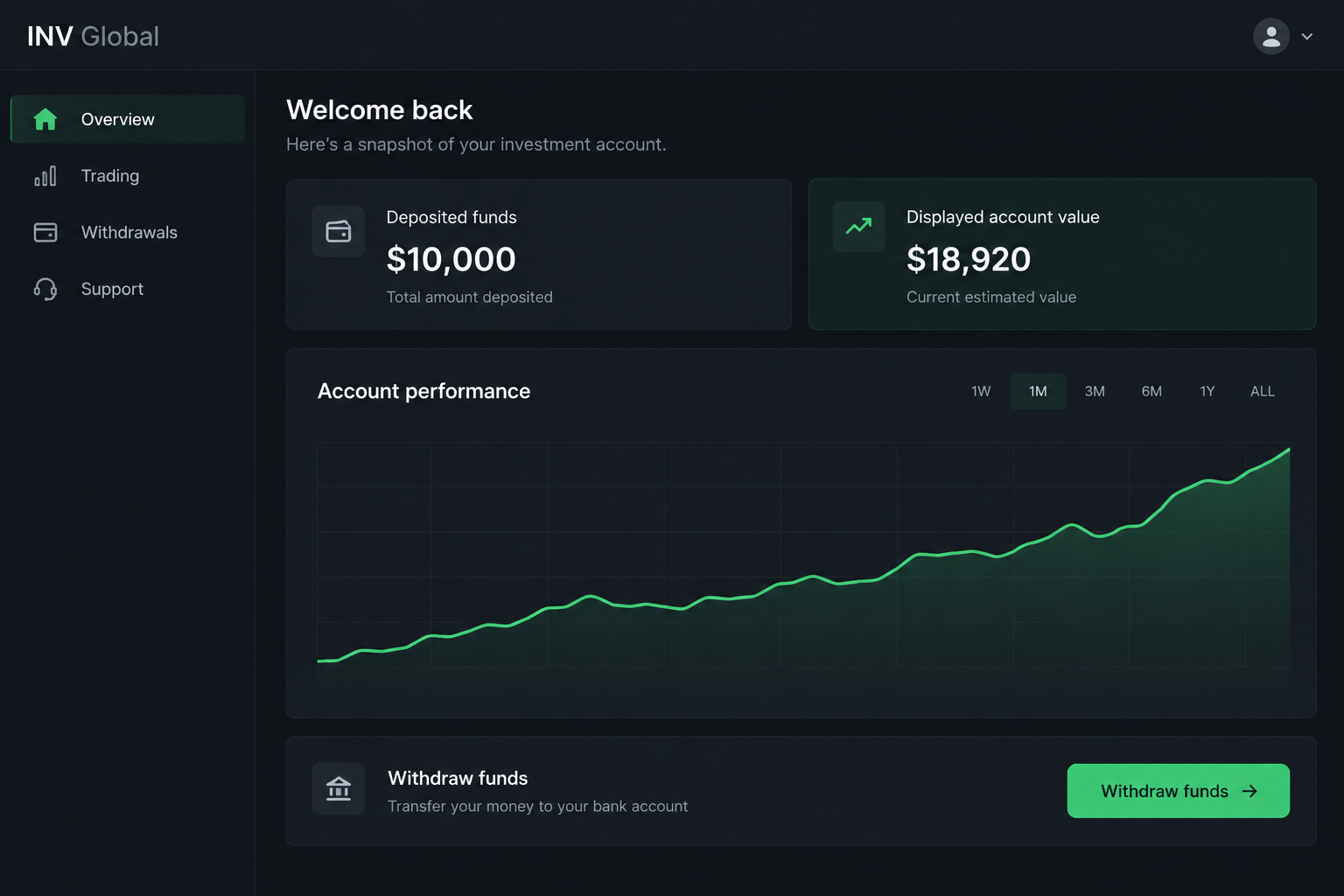
Overview
Invesco has warned about fake portals and withdrawal-release demands
Invesco is a legitimate investment manager. The scam involves outsiders falsely claiming a connection to it while directing people into counterfeit apps or online investment portals.
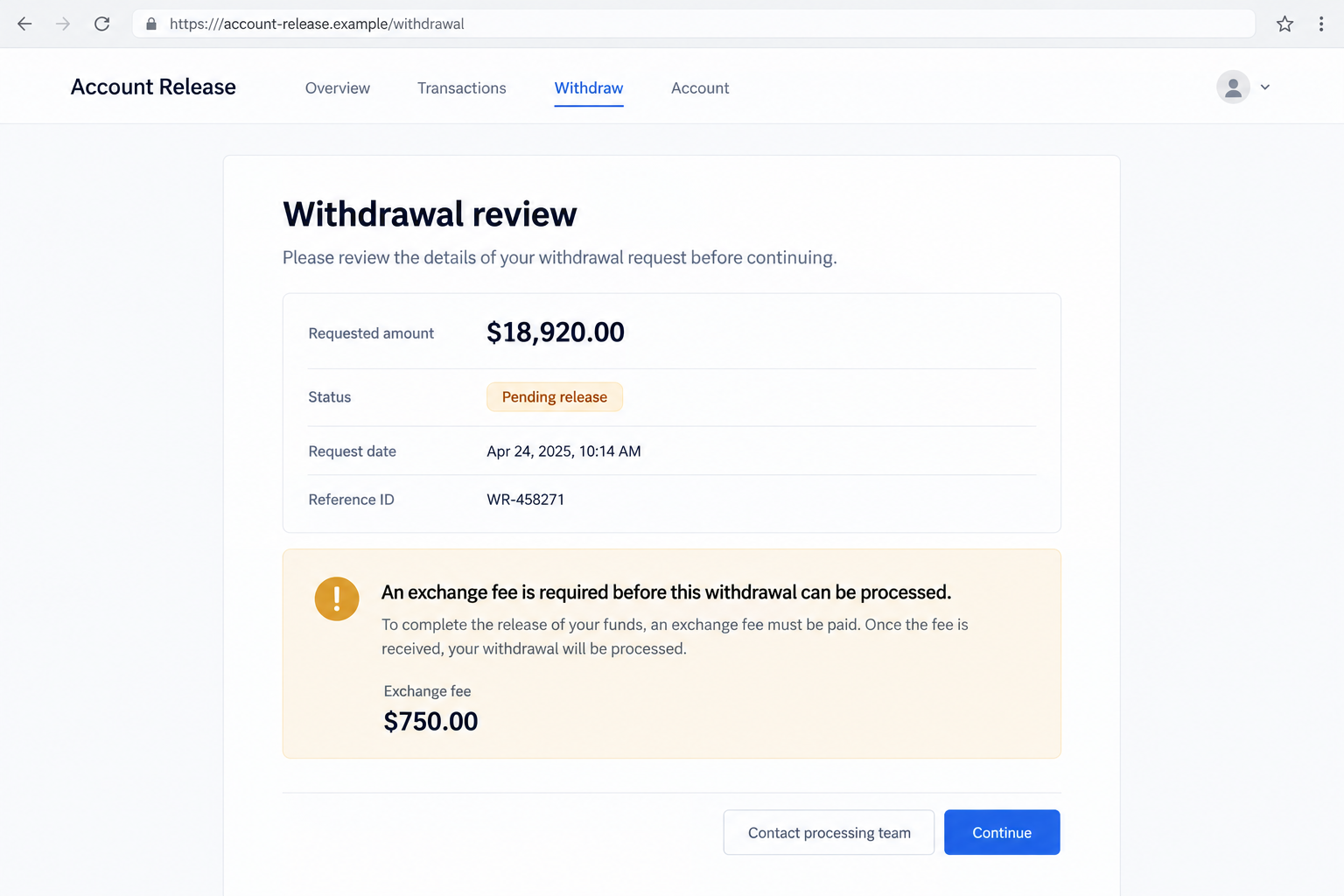
The firm’s German fraud warning describes reported fake trading profits and demands for an additional payment, such as an exchange fee, before money can be released.
This is a documented deceptive mechanism. A balance controlled by an impostor is used to persuade the person to send another real payment.
Do not pay the release demand or rely on the portal’s support contact. Verify the claimed affiliation and transaction through the real firm and your financial provider.
The promotion can borrow employees, addresses, and public authority
Reported versions use emails, calls, Facebook, or WhatsApp. Some copy professional identities or real branch-location details to make the operator appear connected to Invesco.
The warning also identifies fabricated videos suggesting German politicians recommend investments. A familiar face or government-looking presentation does not authenticate the actual offer.
These features vary. They should not be described as one identical funnel that every person sees or proof that all versions share one operator.
- A claimed Invesco representative introduces an investment through unsolicited contact.
- An app or portal appears to show trading gains.
- The sender supplies documents or contact details that resemble a real financial organization.
- Funding may be requested through cryptocurrency or another payment route.
- A withdrawal or refund becomes dependent on an additional fee.
- The contact keeps control of the explanation and supposed release process.
Genuine Invesco products and ordinary market losses are separate
The finding is not that Invesco’s official products are fraudulent. It concerns the false affiliation and counterfeit account described in its own fraud guidance.
A real investment can rise or fall, and legitimate financial services can charge fees. Those facts do not validate an impostor’s demand.
Likewise, not every call mentioning QQQ or shareholder voting is this scam. Check the actual purpose and route rather than labeling ordinary investor communications fraudulent.
The screen examples are reconstructions with fictional URLs and illustrative figures. They are not official Invesco interfaces or financial records from a particular victim.
Why a Growing Balance Makes the Next Fee Feel Smaller
The portal gives you something to protect: apparent gains. Once those figures feel like your money, an extra charge can seem like a manageable inconvenience.
You may compare the fee with the displayed balance instead of with the verified money you have already sent.
That comparison is the trap. The fee is a real payment, while the balance may be a number the operator can change without any corresponding investment.
A chart can make the claim feel measured. Green lines, transaction lists, and account identifiers resemble information supplied by a genuine financial service.
But a presentation is not custody of funds. The useful question is which authenticated institution actually holds the assets and confirms the transactions.
The contact can also frame the problem as administrative. An exchange fee or release review sounds like a procedure, not a request for another donation to a stranger.
Ask where that procedure comes from. If the only explanation is inside the same unverified portal, the fee has not been independently established.
Do not accept a deadline because the screen says funds will be lost. A person controlling the screen can also control the urgency it displays.
How the Invesco Trading App Scam Works
Step 1: A financial promotion or private message introduces the opportunity
The contact reaches you through an ad, social platform, messaging app, email, or call and presents an attractive investment associated with a recognizable name.
Invesco’s guidance confirms misuse of genuine firms and name variations in fake financial promotions. A familiar brand is part of the persuasion, not evidence of approval.
Do not treat a public advertisement as verification. Advertising placement does not establish that the publisher checked the investment or the person offering it.
Before continuing, find the real firm’s contact information independently. Do not ask the promoter to provide the only route you use to authenticate them.
Step 2: An alleged employee or adviser supplies borrowed authority
The person may use an employee name, copied profile information, office details, or a formal-looking document. These can make an informal conversation feel institutional.
A genuine employee’s public biography does not authenticate the person messaging you. The same information can be copied by someone with no connection to the firm.
A second assistant or processing team does not independently confirm the first contact. They may be introduced through the same unverified route.
Check the specific person and proposal with the real organization. Matching a name to a search result is not enough to authorize a payment.
Step 3: The contact sends you into an app or online portal
The platform gives the proposal a place to happen. Account setup, menus, trade screens, and customer support can resemble a genuine investing workflow.
The official warning identifies counterfeit apps and portals that purport to demonstrate trading profits. Their appearance cannot establish a legitimate Invesco relationship.
Do not install a file or grant unusual permissions because the contact calls it a private version. Verify the publisher and access route independently.
A website can also create financial deception without installing malware. Device risk and the authenticity of the investment are separate questions.
Step 4: You are asked to fund the supposed investment
The requested payment moves actual money, regardless of what the app later displays. Confirm the beneficiary, method, and institutional relationship before transferring anything.
Some reported versions request cryptocurrency. That does not mean every case uses it, or that an ordinary bank-transfer version is automatically safer.
Do not accept an unrelated recipient because the contact describes them as an exchange, partner, or administrator. That explanation needs independent verification.
A payment confirmation can show funds were sent. It does not prove the recipient is holding an authentic investment on your behalf.
Step 5: Apparent profits encourage continued trust
The account can show returns, transaction activity, or a growing total. Those entries are persuasive because they look like the results you hoped to obtain.
In a counterfeit portal, the operator can present figures without providing verified assets or a recoverable account at the genuine firm.
Keep your own record of transfers and independently confirmed receipts. Do not count a screen balance as cash you have actually received.
If a small payout occurs, it still does not authenticate the larger balance. The payment may be used to make a later funding request easier to accept.
Step 6: Withdrawal becomes conditional on another payment
When you ask for money back, the contact introduces a fee or other release condition. The German alert specifically documents this additional-payment trap.
The demand can be called an exchange charge, commission, processing requirement, or another administrative label. Focus on what it makes you do.
You are being asked to send more real funds to obtain a balance whose legitimacy has not been established.
Do not pay to find out whether the withdrawal will work. A promise of release is still controlled by the same unverified operator.
Names and Documents Used in the Impersonation
A platform label is not an affiliation certificate
The German warning names reported labels including INV Global, Acces-Inv-Amd, Inv-Amd, invesco-trading, and InvescPortfolio.
Those names help people recognize the described activity. They do not prove that every unrelated business using similar words is part of the same fraud.
The important connection is the false claim to act for Invesco. Verify the exact entity and contact, not just a familiar fragment of its name.
Copied branch details can make a false document look official
The warning describes use of buildings associated with genuine offices in London or Frankfurt. A real location can appear in a document the firm never issued.
Do not assume an address proves who receives your transfer or operates the app. A footer can be copied without access to the office it names.
Ask the real organization to authenticate the communication through its established process. Do not visit or confront an address based solely on the promoter’s paperwork.
A fabricated recommendation does not authorize the transaction
Invesco has warned about false videos suggesting political recommendations. A clip should not replace checking the actual investment and recipient.
You do not need to determine exactly how a video was edited before declining an unverified offer. The affiliation and payment route still need authentication.
Our images avoid real people’s likenesses and genuine financial logos. They illustrate the portal mechanics without creating another false endorsement.
The Difference Between a Normal Fee and This Release Trap
Real financial services may disclose transaction or account charges. The existence of ordinary fees does not justify a charge introduced by an impostor.
Check the underlying institution, contract, beneficiary, and process. A fee explanation inside a counterfeit portal cannot independently establish any of those.
Be especially cautious when every attempted withdrawal creates a new obstacle. Paying one amount does not prove that the next request is legitimate.
Do not let the displayed balance determine your risk limit. Your exposure is the real money and information you provide, not the gains the operator claims.
Stop further payments while you contact the genuine firm and financial provider. You can investigate without funding the alleged release procedure.
What to Do if You Have Fallen Victim to This Scam
-
Reject the new release payment. Do not pay another fee, commission, or deposit to test whether the portal will let you withdraw.
Pause any pending transfers through your real financial provider. Do not follow the contact’s suggestion to use a different account after a bank warning.
-
Save the portal and conversation evidence. Preserve displayed balances, fee notices, URLs, app names, messages, payment instructions, and receipts privately.
Record actual amounts sent and received separately from the app’s figures. That distinction helps legitimate responders understand the loss.
-
Contact the payment provider promptly. Use your bank, card issuer, payment service, or exchange’s genuine support process.
Explain the false Invesco connection and supply transaction details. Ask about available protection, recall, dispute, or fraud-reporting options without assuming a refund is guaranteed.
-
Report the impersonation to the real company. Invesco’s corporate fraud page lists BrandProtection@invesco.com for suspicious communications.
Verify the reporting address on the genuine site first. A company report does not replace the financial provider’s handling of your payment.
-
Protect credentials and identity records you disclosed. Change exposed passwords through official services and review unfamiliar sessions or recovery details.
If identity documents were submitted, tell relevant institutions and ask about additional safeguards. Do not upload further documents to the portal’s supposed compliance team.
-
Inspect an untrusted application or download. Malwarebytes can assist on supported devices after suspicious software exposure.
AdGuard may help reduce known malicious investment pages, ads, and redirects. Neither tool validates the account balance or cancels a transfer already completed.
If you granted wallet permissions or disclosed secrets, follow the genuine wallet provider’s security guidance. Removing an app may not address that separate exposure.
-
Use appropriate law-enforcement and regulator channels. Report online investment fraud through IC3 in the United States or the relevant service in your jurisdiction.
Keep report references and the private evidence file. Do not identify an unrelated genuine employee as the perpetrator because an impostor used their photograph.
-
Refuse private recovery offers. Another contact may claim that the balance has been traced and can be released after a final charge.
Work through authenticated institutions instead. Involve someone you trust so the promised payout does not keep you isolated in the same conversation.
Frequently Asked Questions
Is Invesco itself operating the fake trading app?
No. The company has warned about unauthorized parties falsely claiming affiliation. The counterfeit portal and release demand are the scam, not its genuine products.
Why does the screen show trading profits?
A counterfeit platform can present numbers without verified underlying assets. The display encourages trust but is not proof that a legitimate institution holds that balance.
Are the platform names in the warning permanent?
No name should be your only check. Aliases can change, and unrelated businesses can share words. Verify the exact claimed relationship with Invesco independently.
Does a real office address prove the contact is genuine?
No. A branch address can be copied into false paperwork. It does not authenticate the person contacting you or the beneficiary receiving your money.
Should I pay an exchange fee to release the withdrawal?
Do not fund the unverified release request. Establish the legitimate institution and payment process outside the portal before treating any charge as a valid obligation.
What if the account has already paid me a small amount?
A completed payment does not prove every displayed gain exists. Stop further deposits and assess actual transactions with your financial provider.
The Bottom Line
The Invesco trading app scam uses a genuine firm’s identity and counterfeit profits to make another payment feel like the final step toward withdrawal.
Do not fund that step. Save the evidence, verify the claimed affiliation independently, and ask your real payment provider what protections remain available.

Join the discussion
0 commentsShare your experience or ask a question about this article.
Discussion
Start the conversation
Have a question or something useful to share? Add the first comment.