

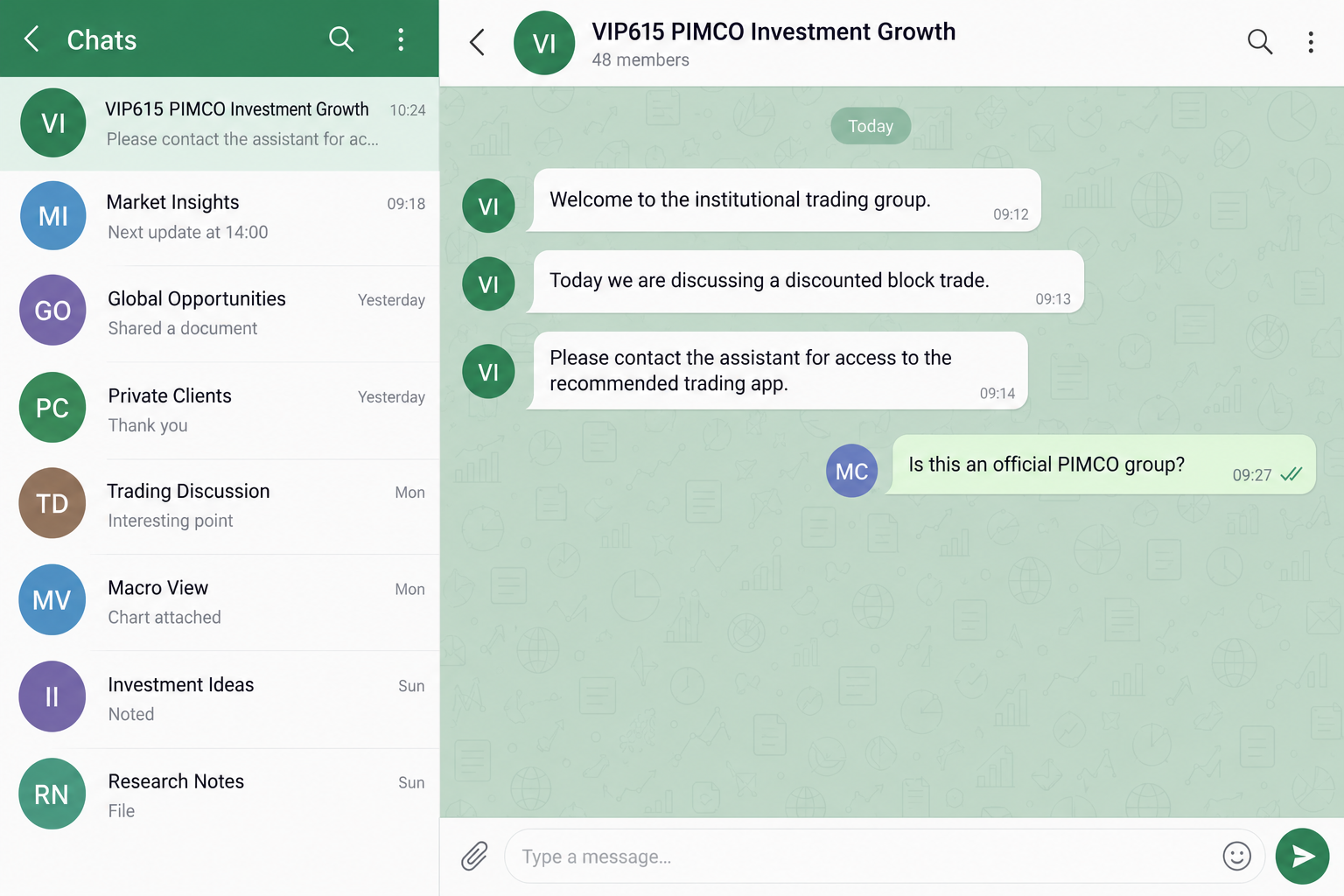
A WhatsApp group calls itself a VIP investment club. The messages discuss institutional trades, an assistant answers questions, and PIMCO’s name appears throughout the conversation.
The PIMCO WhatsApp scam uses that setting to make an unfamiliar opportunity feel established. Before joining the next trading round, check who actually runs the group.
Overview
PIMCO has explicitly rejected these investor messaging groups
PIMCO is a legitimate investment firm. Its name, employee identities, and public material are being borrowed by people promoting unauthorized groups and fraudulent financial offers.
The firm’s official fraud warning states that it does not provide securities recommendations through social media or create investor groups on messaging platforms.
That makes the claimed affiliation the decisive issue. A VIP group offering stock recommendations under PIMCO’s identity is not authenticated by its profile name or professional presentation.
Do not install the group’s app or send money to its assistant. Check any claimed relationship with the real firm outside the messaging conversation.
VIP language and an app create a believable investment routine
Public reports describe groups using PIMCO’s name, institutional or discounted block-trade claims, and instructions to obtain a separate trading application.
The presentation suggests access to something ordinary investors cannot obtain alone. A guide or assistant makes the technical steps feel manageable.
A trading app can then appear to formalize the relationship. But software supplied by an unverified group does not establish a legitimate brokerage or connection to the firm.
- PIMCO’s name appears in a VIP group title or account profile.
- Someone acts as an analyst, instructor, professor, or assistant.
- Members discuss special trades or show apparent profits.
- The opportunity is tied to a separate app or account setup.
- Funding instructions come through the group’s own contacts.
- The claimed affiliation cannot be confirmed independently.
The scam is the impersonation, not PIMCO or every trading app
This is not a finding that PIMCO’s genuine investments or accounts are fraudulent. It concerns people falsely presenting a messaging group as part of the firm.
Nor does the word app automatically establish malware. An unauthorized investment app can present financial deception without a verified malware finding.
The older public reports do not establish one current app name, operator, or loss amount for every group. The official warning independently confirms the broader impersonation activity.
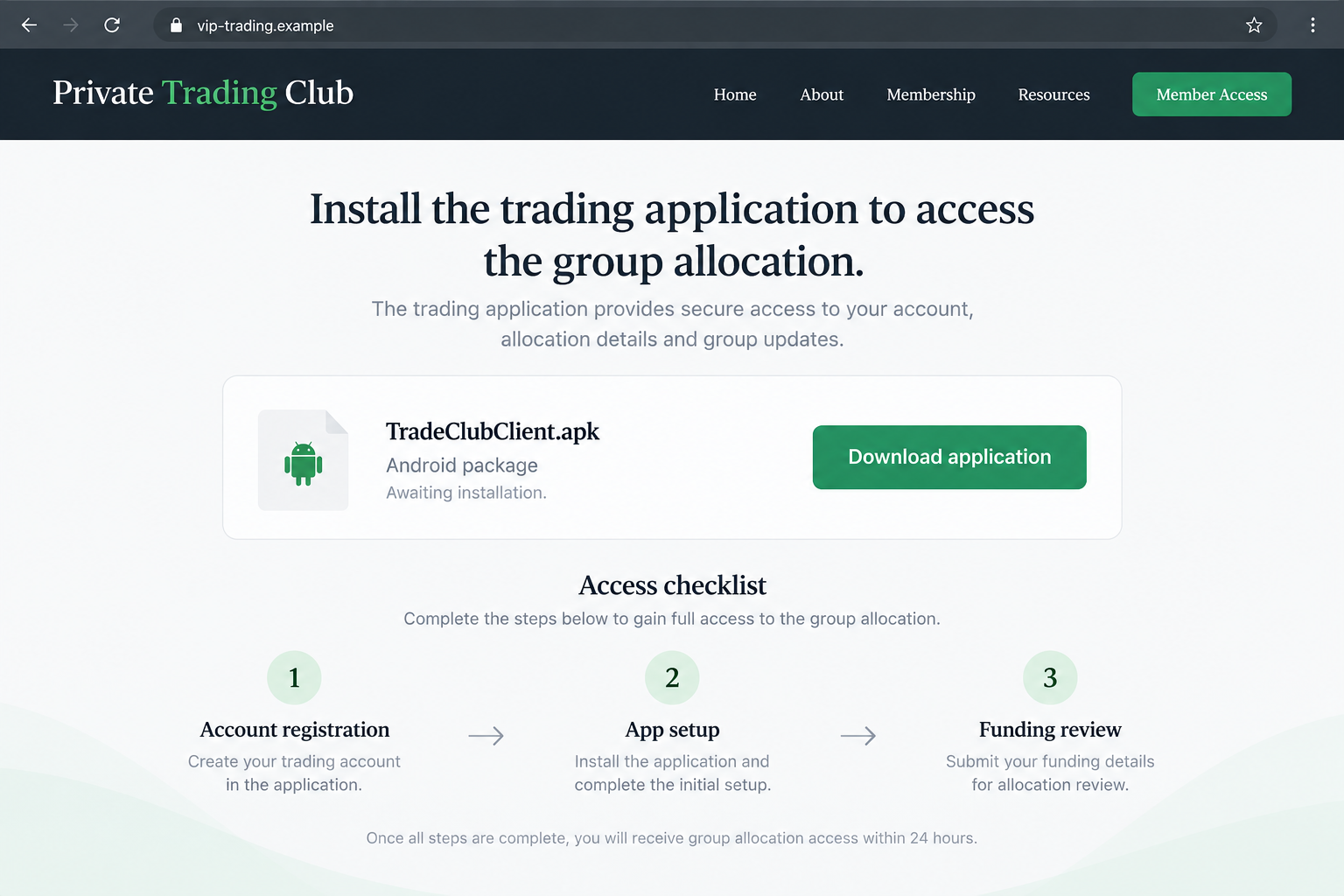
Our reconstructed screens use fictional addresses and filenames. They show the group-to-app route, rather than claiming to capture an official PIMCO application or a tested malicious file.
Why the Group Can Feel Like Independent Proof
A private chat gives you one person’s claim. A group gives you an apparent community, complete with questions, answers, and people discussing results.
That can make the offer feel tested by others. You may assume somebody else has already checked the company’s relationship or withdrawn money successfully.
But messages inside the group’s own environment are not independent verification. The people posting may be strangers whose identities and experience you cannot establish.
A screenshot of a successful trade can also be edited or taken out of context. Even a genuine result would not prove that the group belongs to PIMCO.
The assistant’s role is persuasive because it seems practical. They answer the small questions that make the larger trust decision feel less urgent.
While you are discussing how to install the app, you may stop asking whether the person recommending it has any authority to do so.
Institutional vocabulary adds another distraction. Block trades and professional strategies exist, but the terminology cannot verify the particular offer in your messages.
A numbered VIP group is a label chosen by its organizer. It is not a license, firm account number, or certification of anyone’s employment.
Step outside the group before evaluating the claim. You should not have to use the organizer’s own proof to decide whether the organizer is genuine.
How the PIMCO WhatsApp Scam Works
Step 1: The organizer borrows the firm’s identity
The group title, profile, or initial invitation implies a connection to PIMCO. A familiar financial name makes the opportunity easier to take seriously.
The firm warns that impostors can also use employee names, photographs, or fraudulent videos. Those details are part of the borrowed identity, not proof of authorization.
Finding a genuine professional online only proves that person exists. It does not show that they created the account or sent the invitation you received.
Do not message a newly introduced assistant to verify the supposed analyst. Both contacts may belong to the same unverified environment.
Ask the real firm whether the group and offer are associated with it. Its independently published contact channels are the appropriate starting point.
Step 2: Advice and group activity build confidence
The group discusses markets, particular opportunities, or a trading lesson. This can resemble ordinary financial education before any payment request appears.
Members may share praise, questions, or apparent results. A busy conversation makes the group feel active and can encourage you to remain involved.
You do not need to identify every account as fake to decline the offer. The claimed firm affiliation already needs an independent answer.
Be careful when education becomes an instruction to trade through the organizer’s route. A useful-sounding lesson cannot authenticate the destination where you are told to send money.
Reading a message does not commit you to the next step. There is no obligation to continue because an assistant spent time answering your questions.
Step 3: Special access is tied to a separate application
The contact introduces a trading app or portal as necessary for the group’s opportunity. Setup can be framed as routine onboarding.
A direct application file deserves particular scrutiny. Do not bypass your device’s security warnings because the assistant says the software is private or institutional.
An app-store listing is not sufficient on its own either. Verify the actual publisher and relationship through the organization being claimed.
The application may use charts, balances, account identifiers, and familiar trading terms. These interface features do not establish who holds your funds.
The illustrative download shown here is not a forensic filename. It demonstrates the request to install software supplied through an unverified investment group.
Step 4: Funding instructions convert the group story into a real payment
Once the account appears ready, the contact may ask you to fund it. The payment route must be authenticated separately from the app’s appearance.
A bank account or payment receipt can be real without the investment being genuine. The useful question is who receives the money and under what verified relationship.
Do not accept a personal account, unrelated beneficiary, or unexplained payment route merely because the assistant says it is an administrator.
A claim that the trade is closing can make this check feel inconvenient. That is precisely when an independent pause becomes more important.
Never provide a banking password, wallet recovery phrase, or login code to prove that you are eligible for a trading allocation.
Step 5: Apparent gains can keep the person committed
A dashboard may display activity or a growing balance. Those figures are not proof that an independently verified institution holds the funds for you.
Do not assume every fake PIMCO group uses an identical withdrawal-fee script. The published warning covers several kinds of fraudulent investments and services.
If a new payment is demanded to release the balance, treat it as another unverified request. The displayed profits do not validate that demand.
Likewise, an early payout would prove only that a payment occurred. It would not establish the organizer’s authority or guarantee larger withdrawals.
Keep a record of money actually sent and received outside the app. Do not let the screen balance become the only measure of your exposure.
What to Check Before Trusting a PIMCO Contact
Compare the activity with the firm’s published warning
The official warning addresses investment recommendations and investor groups on messaging platforms. Use that policy to assess what the group actually claims to be doing.
Do not rely on the assistant’s explanation that your group is a special exception. The exception itself needs confirmation from the real firm.
Also separate official public information from private contact. A genuine company video or social account does not authenticate a stranger offering to manage your money.
Read the actual communication address
PIMCO lists several authorized email domains, including pimco.com and certain regional or related domains. Check its current warning rather than assuming there is only one possible address.
Even a plausible-looking sender needs context. A display name, copied address, or forwarded document is not sufficient to prove who is communicating with you.
For suspicious contact, the firm’s published reporting address is fraud@pimco.com. Obtain it from the genuine site rather than a message supplied by the group.
Verify the app and recipient without the group’s help
Ask who legally provides the account, holds funds, and issues statements. Confirm the answers through independent institutional and regulatory sources.
A regulator record for the real firm does not automatically cover the app in your chat. Impostors can copy genuine registration details into their own presentation.
If the setup cannot be explained outside the group, do not fund it. Your decision can be to decline, even before you identify the operator.
If You Already Installed the Recommended App
Stop using it for new deposits or sensitive logins. Note what permissions you granted and whether you supplied identity documents, financial credentials, or wallet information.
Do not assume uninstalling the application reverses every exposure. Account changes, payments, or permissions may need separate attention through the real service provider.
On Android, review unfamiliar applications and their permissions through device settings. Use established security tools and trusted technical assistance when appropriate.
If the app asked for access beyond a normal trading task, explain those requests to the technician. Avoid guessing that every device component is compromised.
Save relevant records without opening another file from the group. Do not accept its proposed replacement app as a way to investigate the first one.
Receiving the group invitation alone is a different situation. An unwanted message does not, by itself, show that software ran or your account was accessed.
What to Do if You Have Fallen Victim to This Scam
-
Stop funding the group or application. Decline another allocation, top-up, cancellation charge, or withdrawal-release payment.
Do not borrow money to rescue a displayed balance. Check actual payments and verified account records instead of relying on the group’s promise.
-
Collect the conversation and payment evidence. Save group names, profiles, app names, URLs, receipts, dates, and the instructions that led to each transaction.
Keep screenshots in a private folder. Exclude passwords, recovery phrases, and identity-document images from anything you share publicly.
-
Alert the bank, payment service, or exchange. Explain the claimed PIMCO affiliation and the payment destination, using the provider’s genuine support route.
Ask about available fraud-reporting and recovery options. Describe authorized and unauthorized transactions accurately; do not assume every payment has the same protections.
-
Report the brand impersonation to PIMCO. Use its independently published fraud contact and provide copies of relevant communications.
A brand report helps identify misuse. It is separate from asking your payment provider to assess a transfer or dispute.
-
Protect accounts exposed during registration. Replace credentials you entered on an untrusted site or reused elsewhere, starting with important email and financial accounts.
Review sessions, recovery details, and any permissions you granted. Use official services from a trusted device, not links supplied by the assistant.
-
Assess an untrusted installation. Malwarebytes can help inspect supported devices after suspicious app or file exposure.
AdGuard may add protection against known malicious trading sites and ads. Neither tool proves the investment is authentic or recovers a payment.
If wallet secrets were disclosed, consult the wallet provider’s genuine security guidance. An app cleanup does not make a disclosed recovery phrase private again.
-
Make the appropriate police or cybercrime report. In the United States, use IC3; elsewhere use your jurisdiction’s established fraud-reporting channels.
Include the actual payment details and claimed identities. Do not accuse a genuine employee solely because their name appeared in a copied profile.
-
Leave the group after preserving evidence. Block the contacts and report the accounts through the messaging platform.
Reject new private contacts promising to unlock funds for a fee. Discuss the situation with someone you trust rather than returning to the group’s reassurance.
Frequently Asked Questions
Does PIMCO run VIP investment groups on WhatsApp?
The firm’s fraud warning says it does not create investor groups or provide securities recommendations through social media and messaging platforms. Verify claimed exceptions directly with PIMCO.
Is every group member necessarily a scammer?
That cannot be established from a chat alone. Other recipients may also be deceived. The claimed affiliation and payment instructions still need independent verification.
Do institutional or block-trade claims prove the offer is real?
No. Those terms can describe genuine financial activity, but they do not authenticate the organizer, recommended application, beneficiary, or relationship with the firm.
Does an unofficial app always contain malware?
No universal malware finding is established here. The app can be part of financial deception regardless, and unverified downloads create an additional device-security concern.
Can a real bank receipt validate the investment?
A receipt can show a payment occurred. It does not prove that the recipient is affiliated with PIMCO or that the promised investment exists.
Should I pay a fee to unlock the app’s balance?
Do not send another unverified payment. Contact legitimate financial providers and reporting channels rather than funding a release request controlled by the same group.
The Bottom Line
The PIMCO WhatsApp scam uses a respected name, VIP language, and an unofficial app to make a stranger’s investment route feel legitimate.
Check the group’s claimed authority outside the chat. Do not install its software or transfer funds because an assistant or apparent member says the opportunity is genuine.

Join the discussion
0 commentsShare your experience or ask a question about this article.
Discussion
Start the conversation
Have a question or something useful to share? Add the first comment.