

A text message arrives with what looks like an official court notice. It names Judge Carolyn Hayes, lists a traffic or toll violation, and warns that a Notice of Default or Enforcement Action has been initiated.
The document may include a QR code, a court date, and a demand to pay immediately.
It is not a real court notice. It is a phishing scam designed to scare people into scanning a code, clicking a link, or entering payment details on a fake website.
Scam Overview
The Judge Carolyn Hayes NOTICE OF DEFAULT scam texts are part of a fast-spreading traffic violation phishing campaign. These messages impersonate courts, traffic divisions, county clerks, and state agencies to make people believe they have an unpaid toll, parking ticket, or traffic citation.
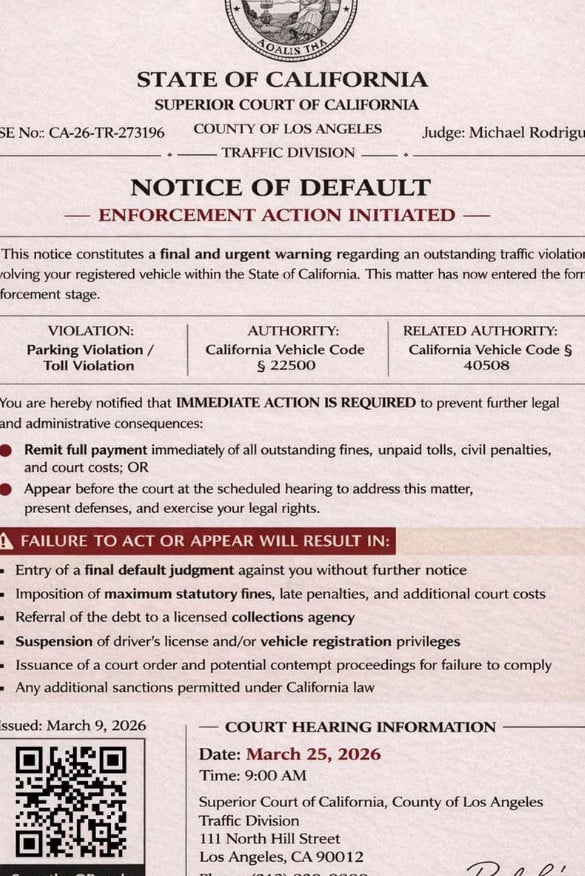
The scam usually arrives by text message as an image attachment. The image looks like a legal document and often includes:
- A state seal or court-style emblem
- A heading such as Traffic Division
- A fake case number like 26-TR-273196
- The name Judge Carolyn Hayes
- A title such as NOTICE OF DEFAULT
- Warnings about fines, license suspension, collections, or court enforcement
- A QR code or link to “settle” the unpaid balance
The Federal Trade Commission has warned about a spike in this exact type of traffic violation text scam, where scammers send a picture that looks like an official hearing notice, include a fake case number and QR code, and threaten default judgments, fines, or enforcement actions if the recipient does not respond quickly.
Why the Judge Carolyn Hayes name matters
The name Judge Carolyn Hayes is one of the biggest red flags in this scam.
The same judge name has appeared in fake traffic notices across multiple states and jurisdictions. In Indiana, WRTV reported that scam texts claiming to come from the Marion County Superior Court’s Traffic Division used “Judge Carolyn Hayes” and referenced electronic toll, parking, and speeding violations. A Marion Superior Court official said there is no Judge Carolyn Hayes in Marion County, and the Marion County Clerk said the office does not text payment requirements or court dates
That is important because scammers are not building real case files. They are recycling a template.
They change the state, county, court name, and legal codes, but keep the same structure. Sometimes they keep the same fake judge name too.
What the fake notice usually says
The wording changes from state to state, but most versions use the same pressure pattern.
Common phrases include:
- NOTICE OF DEFAULT
- ENFORCEMENT ACTION INITIATED
- FINAL NOTICE
- COURT ENFORCEMENT ACTION
- IMMEDIATE ACTION REQUIRED
- FAILURE TO ACT OR APPEAR WILL RESULT IN
The notice usually claims that your vehicle is connected to an unpaid traffic violation, toll violation, parking violation, or speeding violation. It may say that prior notices have expired and that the matter has now entered “formal enforcement.”
This is meant to make you feel like the situation is already serious and that you have no time to question it.
Why the scam looks official
These scam notices are designed to look like real court paperwork.
They often include:
- A large state name at the top
- A court or county name
- A traffic division label
- A case number
- A hearing date
- A judge name
- Legal citations
- A court address
- A QR code
That level of detail can make the message feel believable. But scammers add these details because they know most people will not verify them before reacting.
The San Francisco District Attorney and Santa Cruz County District Attorney warned that fake traffic violation notices may arrive by text or email, appear to come from a court, include titles such as “Notice of Hearing,” and instruct recipients to pay through a QR code or hyperlink. They stated plainly that courts do not send traffic notices by text or email and advised people not to click links, scan QR codes, or make payments from these messages.
The case number is usually fake
Many versions of this scam use similar case numbers, such as:
- CA-26-TR-273196
- IN-26-TR-273196
- KS-26-TR-273196
- TX-26-TR-273196
- CO-26-TR-273196
- NJ-26-TR-273196
The prefix may change depending on the state being impersonated, but the core format is often reused.
That is not how legitimate court case numbers work. Real case numbers are tied to a specific court, case, and filing system. They are not mass-produced across different states using the same template.
The repeated use of the same judge name and similar case numbers is one of the strongest signs that the message is fraudulent.
The QR code is the trap
Most Judge Carolyn Hayes scam texts include a QR code. The document usually tells you to scan it to:
- Pay your unpaid balance
- Settle your ticket
- Avoid court
- Stop enforcement action
- Resolve the violation immediately
A QR code may feel safer than a random link, but it is still a link. It opens a website, and in this scam that website is controlled by criminals.
The FTC warns that scanning the QR code in these fake traffic violation texts can lead to attempts to steal personal information, including Social Security or credit card numbers, install malware, and steal money.
What scammers are trying to steal
The fake payment website may ask for:
- Full name
- Home address
- Phone number
- Email address
- License plate or vehicle details
- Driver’s license information
- Credit card number
- Expiration date
- CVV
- Billing ZIP code
The payment amount may be small, often framed as a fine, toll fee, court cost, or administrative penalty. The small amount is part of the trick.
A low fee makes the payment feel easier than calling the court or checking a government website. But the real value to the scammer is not the fake fine. It is your card data and personal information.
Why this scam spreads so fast
This scam is easy to scale because scammers can reuse the same fake document layout.
They only need to change:
- The state name
- The county or city
- The court name
- The case number prefix
- The legal code
- The hearing date
- The QR code destination
That is why similar Judge Carolyn Hayes notices have appeared in multiple places. One version may claim to be from California. Another may claim Indiana. Another may claim Kansas, Georgia, Texas, Florida, or another jurisdiction.
The more local the notice looks, the more likely the recipient is to pause and worry.
Common red flags in Judge Carolyn Hayes NOTICE OF DEFAULT texts
Look for these warning signs:
- The notice arrives by random text message
- It includes a QR code to pay a court or traffic balance
- It uses dramatic phrases like Notice of Default or Enforcement Action Initiated
- It names Judge Carolyn Hayes across multiple states
- The case number looks generic or reused
- The notice is not addressed to you by full legal name
- It gives no specific plate number or real citation details
- It threatens fines, collections, or license suspension if you do not act immediately
- It pushes payment through a link or QR code instead of official court channels
One red flag is enough to pause. Several together strongly indicate a scam.
How The Scam Works
Step 1: You receive a text with a fake court document
The scam starts with a text message, usually from an unknown number.
Instead of a normal written message, the text often includes an image. That image looks like a court notice and may show a state seal, case number, judge name, and traffic division heading.
The document is built to make you feel like you are already in trouble.
The FTC says this scam often starts with a text message containing a QR code and a picture that looks like an official traffic hearing notice.
Step 2: The notice claims you have a traffic, toll, or parking violation
The fake document may list one or more violations, such as:
- Failure to pay electronic toll
- Toll evasion
- Parking violation
- Speeding violation
- Unpaid traffic citation
- Outstanding vehicle violation
Some versions list multiple violations at once because scammers do not know what will sound believable to you. They throw several possibilities into the notice and hope one feels plausible.
Step 3: The scam creates legal pressure
The notice usually says the matter is now in default or active enforcement.
It may warn that if you do not act immediately, you could face:
- Final default judgment
- Maximum statutory fines
- Court costs
- Collections
- License suspension
- Registration suspension
- Contempt proceedings
- Credit damage
The FTC specifically notes that these texts list frightening consequences like default judgments, fines, and enforcement actions to push victims into acting quickly.
Step 4: The fake hearing date makes it feel urgent
Many versions include a court hearing date and time, often very soon.
This creates panic.
You may think:
- “Did I miss a real ticket?”
- “Will I get in trouble if I ignore this?”
- “Is it safer to just pay?”
- “What if this affects my license?”
That is the emotional trap. The scam is trying to make the payment feel like the fastest way to make the fear stop.
Step 5: The QR code becomes the “solution”
After scaring you, the notice offers an easy way out.
It tells you to scan the QR code to settle the unpaid balance.
This is the most dangerous step.
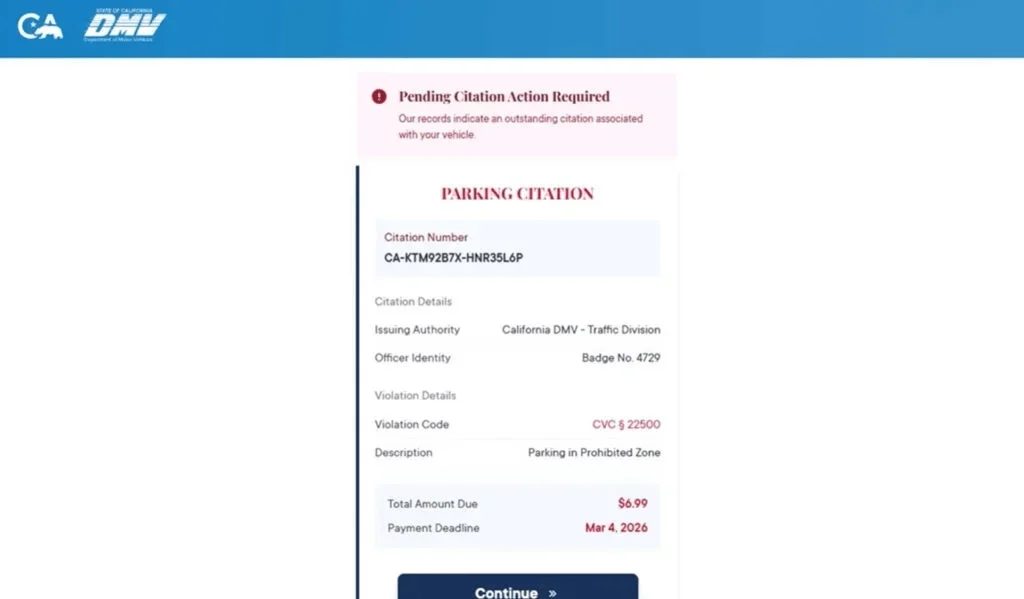
If you scan the code, you are redirected to a fake website that may look like a court, DMV, toll, or traffic payment portal.
Step 6: The fake website asks for personal details
The site may ask you to “verify” your record by entering:
- Name
- Address
- Phone number
- Vehicle information
This makes the process feel legitimate. But it also gives scammers more data to use against you.
Even if you stop before paying, the information you entered may already be captured.
Step 7: The payment form steals card information
The fake portal then asks for payment.
You may be asked for:
- Card number
- Expiration date
- CVV
- Billing address
- Billing ZIP code
Once you enter those details, your card should be treated as compromised.
The site may show a fake confirmation. It may also claim the payment failed and ask you to try again, sometimes with another card.
Both outcomes help the scammer.
Step 8: Fraud may happen immediately or later
Some victims see unauthorized charges right away.
Others may not notice anything for days or weeks.
Scammers may:
- Run small test charges
- Attempt larger transactions later
- Sell the card data
- Use your personal information in future scams
- Send more fake court or DMV notices
That is why it is risky to assume you are safe just because no charge has appeared yet.
Why “Judge Carolyn Hayes” Is a Clear Warning Sign
The name appears in different fake court systems
A real judge would not be assigned to traffic notices in multiple unrelated courts across the country. Yet the name Judge Carolyn Hayes has appeared in fake notices tied to different states and counties.
That repetition is a sign of a template scam.
In Indiana, the Marion County court system publicly addressed a version using this name, and officials confirmed there is no Judge Carolyn Hayes in Marion County. The clerk also said payment requirements and court dates are not sent by text.
The documents mix real and fake details
The scam works because it often combines real locations with fake legal claims.
For example, it might use:
- A real county name
- A real court building address
- A real legal term
- A fake case number
- A fake judge
- A fake QR code payment demand
This blend can confuse people. The presence of one real detail does not make the whole notice legitimate.
The notices are often not personalized
Many scam notices do not include:
- Your full name
- Your actual license plate
- A real citation number
- A specific incident date
- A real issuing officer
- A verified court docket link
A real traffic case should be traceable through official court or citation systems. A generic image in a text is not proof of anything.
What To Do If You Receive One
Do not scan the QR code
Do not scan the code, even out of curiosity.
The QR code can lead to a phishing site, and the FTC warns these scams may also try to install malware or steal sensitive information.
Do not click links
Do not use any link included in the text.
If you are worried the notice might be real, open your browser and manually visit the official court or agency website.
Do not reply
Replying confirms that your phone number is active. That can lead to more scam attempts.
Check through official channels
Use only contact information you find yourself.
You can:
- Search the official court website
- Use the court’s official phone number
- Check an official case search tool
- Contact your local DMV, BMV, or court clerk directly
Do not use the phone number, link, QR code, or email address inside the suspicious message.
Report and delete the message
Report the message as spam or junk in your messaging app.
You can also forward scam texts to 7726 (SPAM) if your mobile carrier supports it. The FTC recommends reporting traffic violation scam texts and tells consumers not to respond or scan the QR code.
What To Do If You Have Fallen Victim to This Scam
1. Call your bank or card issuer immediately
If you entered card details, call the number on the back of your card.
Tell them:
- You entered your card details on a fraudulent traffic violation site
- The site came from a scam text
- You need the card blocked and replaced
- You want recent transactions reviewed
Do this even if you do not see fraud yet.
2. Review all recent transactions
Look for:
- Small test charges
- Unknown online purchases
- Subscription charges
- Repeated declined attempts
- Charges from unfamiliar merchants
Dispute anything you do not recognize.
3. Turn on real-time card alerts
Enable alerts for:
- Every transaction
- Online purchases
- Transactions over $1
- International activity, if available
Fast alerts help you stop fraud early.
4. Change passwords if you entered login details
If the fake site asked you to create an account or sign in, change that password immediately.
Also change it anywhere else you reused it.
Turn on two-factor authentication where possible.
5. Monitor for identity misuse
If you entered personal information, watch for:
- New phishing texts
- Fake bank calls
- Password reset emails
- Unknown credit inquiries
- Unfamiliar accounts
A credit freeze may be appropriate if you shared sensitive identity information.
6. Save evidence
Take screenshots of:
- The text message
- The sender number
- The fake notice
- The QR code
- The website
- Any confirmation screen
This may help with bank disputes or fraud reports.
7. Report the scam
Report the scam through:
- Your phone’s spam reporting feature
- 7726 (SPAM) if supported by your carrier
- The FTC at ReportFraud.gov
- Local law enforcement or the court being impersonated, if appropriate
8. Watch for follow-up scams
After one scam attempt, more may follow.
Be suspicious of messages claiming:
- Your payment failed
- A refund is available
- A court clerk needs more information
- Your bank needs to verify the transaction
- You must pay a new fee to stop enforcement
These are often secondary scams.
The Bottom Line
The Judge Carolyn Hayes NOTICE OF DEFAULT scam texts are fake court notices designed to frighten people into scanning QR codes, paying fake fines, or entering personal and credit card information.
The scam uses official-looking formatting, traffic violation language, fake case numbers, and a repeated judge name to create credibility. But courts and clerks have warned that these notices are not how legitimate traffic matters are handled. The FTC has also warned that these traffic violation text scams use QR codes, fake hearing dates, fake case numbers, and threats of default judgments or enforcement actions to steal money and information.
If you receive one of these texts, do not scan the code, do not click links, and do not pay. Verify only through official court or government websites you access yourself.
FAQ: Judge Carolyn Hayes NOTICE OF DEFAULT Scam Texts
What is the Judge Carolyn Hayes NOTICE OF DEFAULT scam?
It is a phishing scam where criminals send fake court-style text messages claiming you have an unpaid traffic, parking, or toll violation. The notice often names Judge Carolyn Hayes, uses a fake case number, and tells you to scan a QR code or pay immediately.
Is the Judge Carolyn Hayes notice real?
No. These notices are part of a scam campaign. The same judge name and similar case numbers have appeared in fake court notices across multiple states.
Why does the notice look like a real court document?
Scammers use court-style formatting, state seals, legal language, case numbers, and hearing details to make the document look legitimate. The professional appearance is part of the trap.
What does “NOTICE OF DEFAULT” mean in the scam?
It is used to scare you. The phrase makes it sound like you already missed a deadline and enforcement has started, so you feel pressured to act quickly.
What happens if I scan the QR code?
You may be taken to a fake payment website that asks for your personal information and credit card details.
Why do these scams mention traffic, parking, or toll violations?
Those violations sound common and believable. Scammers use them because many people worry they may have missed a small fine or toll charge.
What information are scammers trying to steal?
Usually:
- Full name
- Address and ZIP code
- Phone number and email
- Credit card number
- Expiration date and CVV
- Vehicle or license plate details
I scanned the QR code but did not enter anything. Am I safe?
Your risk is much lower if you did not submit any information. Close the page, do not return to it, and watch for follow-up scam texts.
I entered my card details. What should I do now?
- Call your card issuer immediately
- Report the card as compromised
- Freeze or replace the card
- Review transactions for fraud
- Dispute anything unfamiliar
- Turn on real-time transaction alerts
Can a real court demand payment through a QR code in a text?
A surprise court notice sent by text with a QR code payment demand is a major red flag. Real court or citation issues should be verified only through official court websites or phone numbers you look up yourself.
How do I verify whether I really owe anything?
Do not use the QR code, link, or phone number in the message. Go directly to the official court, DMV, toll agency, or city citation website by typing the address yourself.
How do I report the scam?
- Mark the message as spam or junk
- Block the sender
- Forward the text to 7726 (SPAM) if your carrier supports it
- Keep screenshots of the message, QR code, and fake website as evidence








