

Konawex.com appears in short videos and comment sections with the same pitch: sign up now and receive free crypto that turns into real winnings inside a blockchain casino. The graphics move fast, the numbers look big, and the message feels urgent.
People who click through usually land on a clean page that shows live wins, large bonus balances, and games they already know. The site claims it has run since 2017, yet the domain was registered just five days ago through Fewmoretaps OU d/b/a Trustname.com.
10 antivirus engines out of 92 flagged the URL as malicious or phishing. That detail matters once you realize the site asks visitors to send crypto with no listed email, phone, or address anywhere on the page.
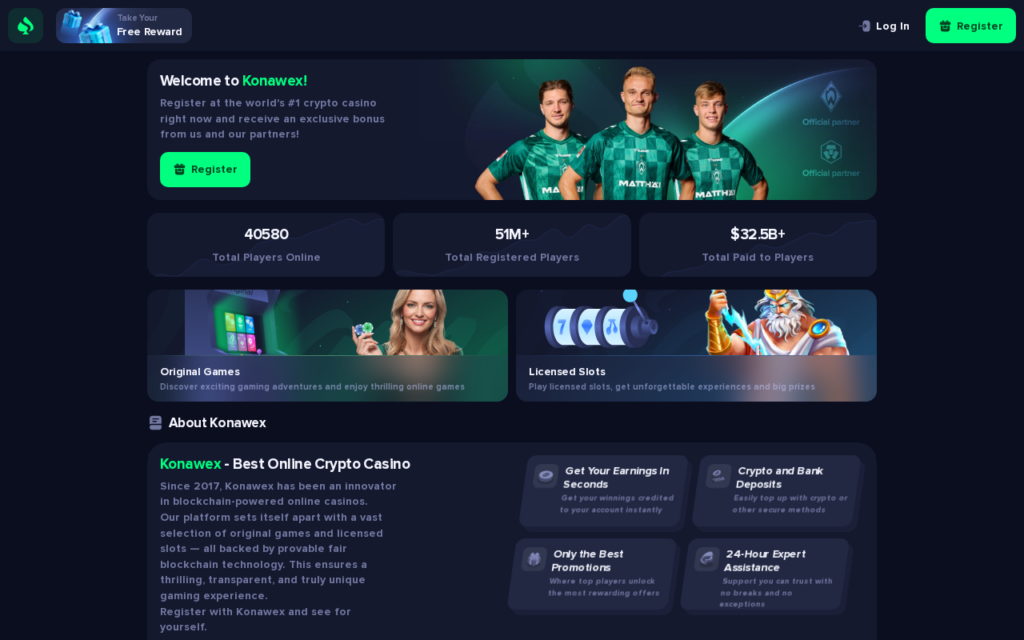
Scam Overview
Konawex.com presents itself as a ready-to-play crypto casino built on blockchain. The page title says it is the most popular option of its kind, and the text promises transparent smart contracts plus service since 2017. The real picture is narrower: a brand-new domain that security tools already mark as risky, paired with the usual pressure to deposit quickly.
The domain was created on July 7, 2026. 10 security engines, including alphaMountain.ai, BitDefender, CRDF, Forcepoint ThreatSeeker, and G-Data, returned malicious or phishing results. The registrar is Fewmoretaps OU d/b/a Trustname.com and the page carries no visible contact information. Those facts sit behind the bright interface and the promise of instant winnings.
The celebrity video is the first hook
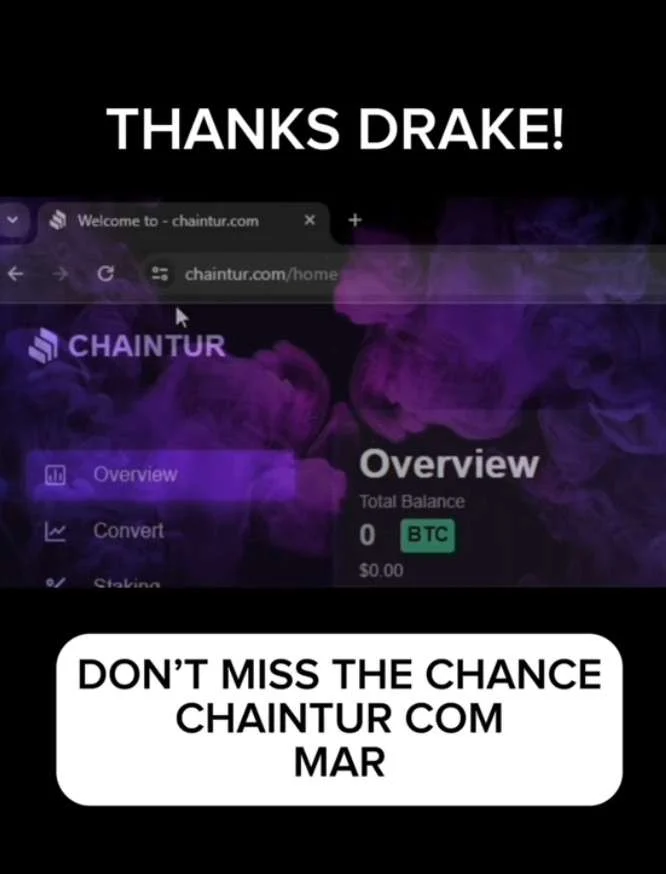
Many of the videos that point to Konawex.com use familiar faces. Short clips show clips or deepfake-style footage of Elon Musk, MrBeast, Bill Gates, Drake, or Jeff Bezos talking about a new crypto casino. The clips rarely come with sources, and the people named have never confirmed any link to the site.
The pattern works because viewers scroll quickly. A well-known name lowers the guard long enough for the next step: clicking the link and landing on a page that already shows a bonus balance waiting to be claimed.
Social media and deepfake ad examples
These examples show the type of fake social-media and news-style promotion this scam family uses: celebrity names, AI-looking clips, fake interviews, and short-form posts that try to make a crypto casino feel official before a visitor checks the details.




The bonus is designed to feel like money
Once registration finishes, visitors see a large credit balance labeled as a welcome reward. The amount is visible immediately and the interface treats it like spendable cash. In practice the balance sits behind rules that block real withdrawals until more deposits are made or certain playthrough targets are met.
This setup keeps people inside the site longer. The displayed number feels real, yet every attempt to cash out can trigger new conditions that were never explained on the landing page.
Activity counters and live-win sections build the crowd effect
Konawex.com displays running totals of players online, recent big wins, and withdrawal amounts. The counters move constantly and the names change often. These numbers create the sense that many people are already winning and cashing out without trouble.
The same style of activity feed appears across dozens of short-lived casino domains. When the domain is only five days old, the live numbers cannot reflect years of real traffic. They are generated to match the story the videos are selling.
Crypto-only deposits remove the safety net
The site accepts deposits only in cryptocurrency. Once the coins leave a personal wallet they cannot be reversed by a bank or card company. The lack of any listed support channel means the only way to ask questions is through whatever chat window appears after login.
That structure matches the pattern seen in other disposable crypto-casino sites. Pressure to deposit quickly, no way to pull funds back, and no verifiable company behind the page.
The withdrawal wall is where problems surface
Users who reach the withdrawal screen often report extra steps that were never mentioned earlier. The site may request wallet verification deposits, tax-style fees, or KYC documents that cannot be completed through any listed contact address. Each new demand keeps the original deposit locked while asking for more crypto.
Because the domain is new and carries no public business registration, there is no independent place to send complaints or demand answers. The process stalls and the money stays out of reach.
What stands out about Konawex.com
- Domain registered July 7, 2026, only five days before the scan.
- 10 of 92 security engines flagged the URL as malicious or phishing.
- Page title claims operation since 2017 despite the recent registration date.
- No email, phone number, or postal address appears anywhere on the page.
- Registrar listed as Fewmoretaps OU d/b/a Trustname.com with no privacy shield noted.
- Page content focuses on crypto branding with minimal supporting text or legal pages.
- Security engines that returned detections include alphaMountain.ai, BitDefender, CRDF, Forcepoint ThreatSeeker, and G-Data.
- Scam-network detection linked the domain to a known crypto-casino template pattern.
- Social videos promoting the site rely on unverified celebrity footage rather than verified endorsements.
- Bonus balances appear immediately after signup but remain inaccessible for withdrawal.
- Activity counters show wins and player counts that cannot be verified against the domain age.
- Crypto-only deposit flow leaves no traditional payment trail once funds are sent.
The missing accountability matters
A legitimate gambling site keeps a registered company, listed contacts, and clear withdrawal rules. Konawex.com offers none of these. The combination of a five-day-old domain, multiple security flags, and the absence of any way to reach the operators leaves visitors with no practical path if the displayed balance cannot be withdrawn.
The videos keep circulating because they are cheap to produce and the promise travels fast. Once the deposit is sent the story changes, and the site has already moved on to the next visitor.
Fake casino network screenshots
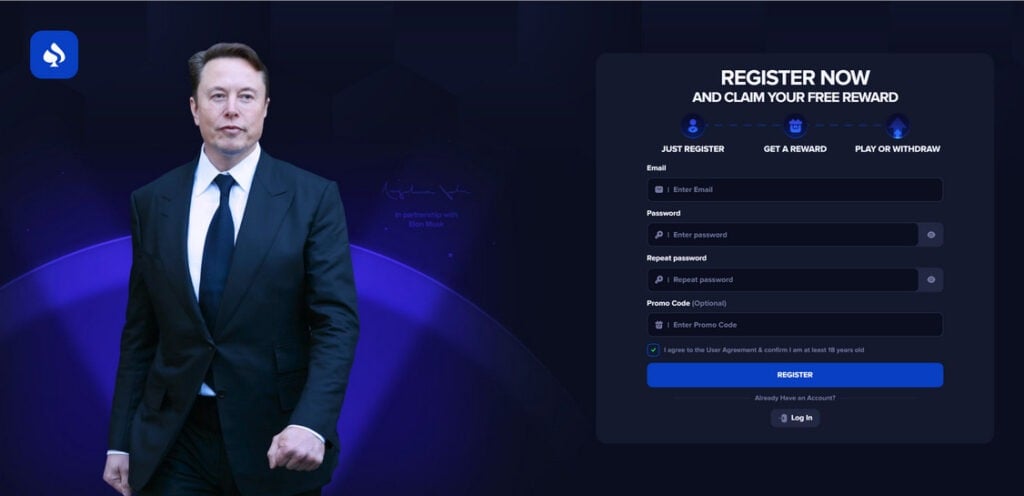
How The Scam Works
Konawex.com follows a predictable funnel designed to turn curiosity into deposits. The steps below explain how users are typically drawn in, how trust is built, and how the withdrawal trap is deployed.
1. Users are attracted through aggressive promotions
Most people do not find Konawex.com through careful research.
They encounter it through marketing on platforms where trust is low and speed is high:
- TikTok-style short videos
- YouTube ads or creator-like clips
- Facebook posts and sponsored ads
- Instagram reels and stories
- Posts inside chat groups and communities
The promotion usually highlights:
- A promo code
- A sign-up bonus, often $2,000 to $10,000
- A “limited-time” claim
- A founder story involving billionaires or famous names
- Screenshots of big balances or withdrawals
This marketing strategy aligns with the broader pattern, where scammers pushed promo codes and free credits through social and community channels to get fast signups.


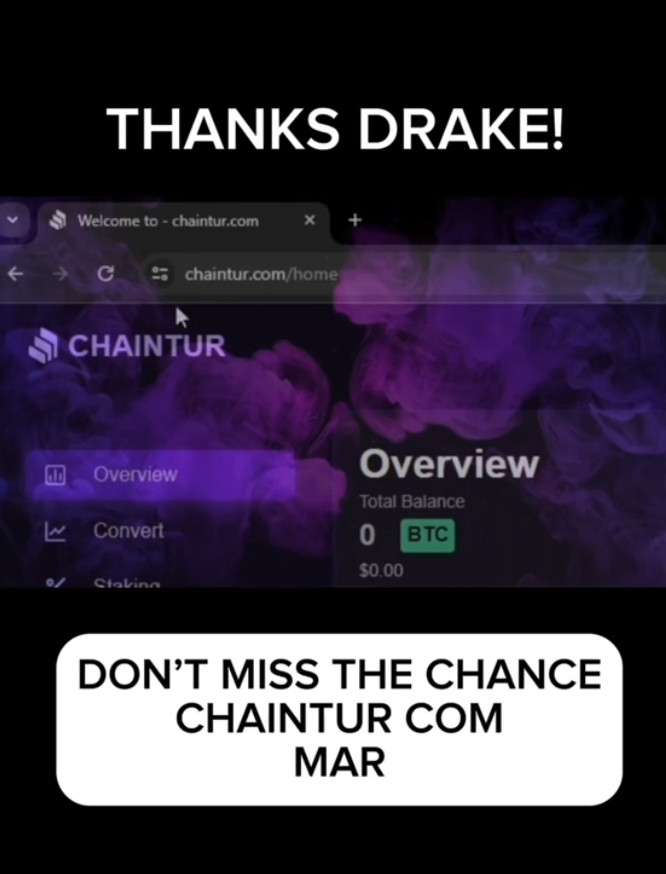
2. Registration is fast and frictionless
Once a user lands on the site, sign-up typically takes seconds.
This is intentional. The longer you hesitate, the more likely you are to research the brand and see warnings.
After registering, the user often sees:
- A bonus credited instantly
- A prompt to start playing
- A dashboard showing a large balance
This instant reward creates a psychological commitment. Users feel like they already gained something, which makes them more likely to continue.
3. Users play with bonus funds and “win”
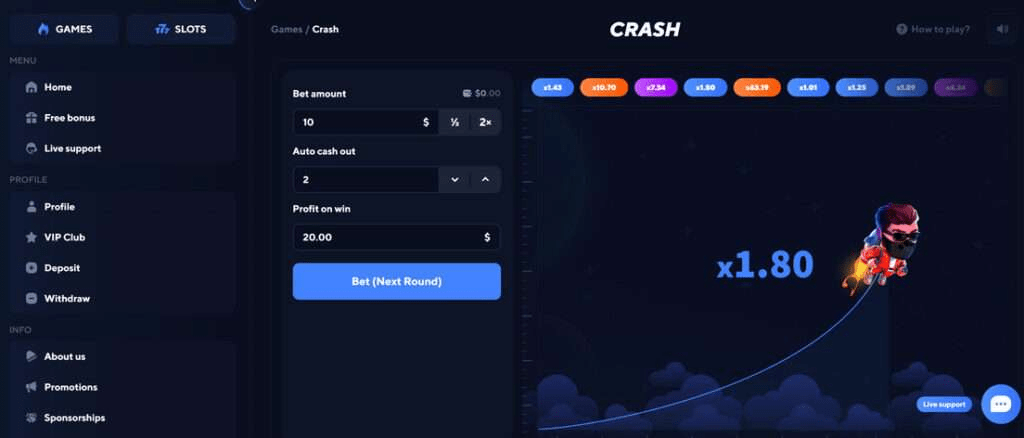
Konawex.com usually allows users to play games using the bonus balance.
This is a critical part of the scam because it creates:
- Emotional investment
- A sense of momentum
- The belief that withdrawals are the next logical step
Some users report early wins or quick balance growth, which reinforces the idea that the platform is functioning normally.
The goal is not to create a fair gambling experience. The goal is to get the user to the withdrawal attempt, where the deposit demand appears.
4. The first withdrawal attempt triggers restrictions
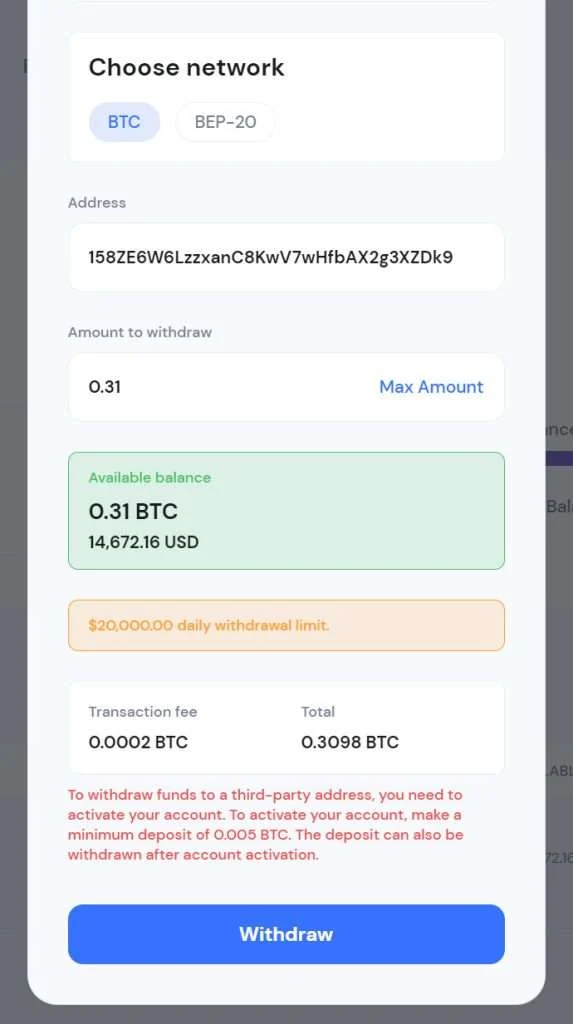
When the user tries to withdraw, the tone changes.
Instead of processing the request, Konawex.com often displays an error or message stating the user must complete “verification” or meet additional requirements.
Common messages include:
- “Withdrawals are locked until verification is complete”
- “You must verify your wallet”
- “Minimum deposit required to withdraw”
- “Account verification required”
- “Security check in progress”
This step is designed to keep hope alive. The platform does not usually say “you cannot withdraw.” It says “you can withdraw after you do this one thing.”
5. The “verification deposit” is demanded
This is the core extraction step.
Konawex.com support or the platform itself demands an additional deposit, commonly $100 to $500, to “verify” the account or “activate withdrawals.”
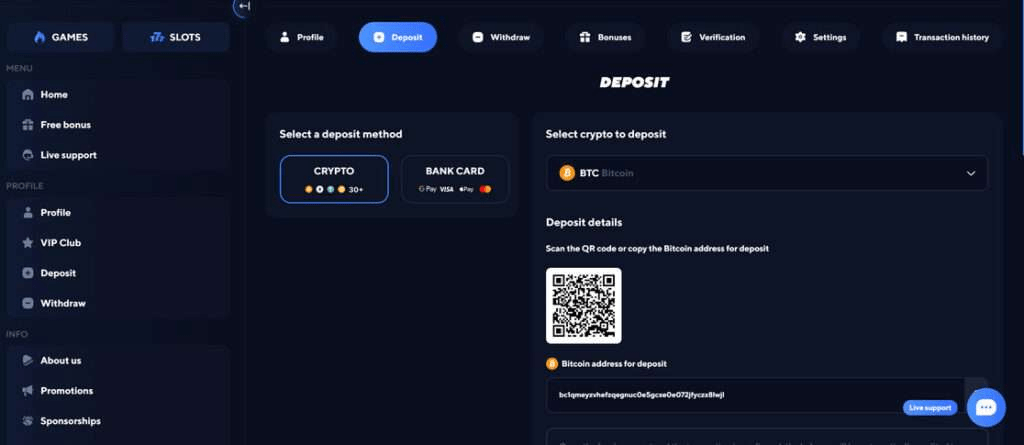
Victims are told they needed to make a cryptocurrency verification deposit before funds could be distributed, and after paying they were hit with more payment demands.
The deposit is usually framed as something official:
- A compliance requirement
- A network fee
- A wallet validation step
- A security deposit
But it is not a normal verification process. It is a payment demand.
6. After the deposit, the goalposts move
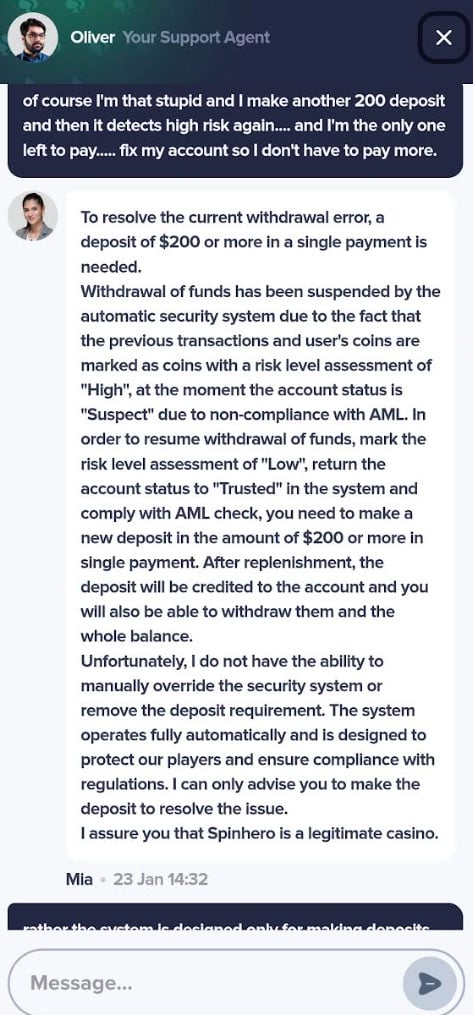
If the user pays the first deposit, one of two things typically happens:
- The site demands a second payment
- The site stalls indefinitely with excuses
Common excuses include:
- “Technical issue, try again later”
- “Your withdrawal is pending”
- “You selected the wrong network”
- “You need VIP verification”
- “Additional compliance is required”
- “Deposit more to unlock withdrawals”
This is not random. It is a deliberate loop designed to extract more funds while the user still believes a payout is possible.
7. Support becomes less helpful, then disappears
Many victims report that support becomes:
- Repetitive
- Vague
- Slow
- Pushy about deposits
- Suddenly unresponsive
Victims described being handled by support systems that included automated responses and human operators, and then eventually being blocked or ignored.
Once the scam operation believes you will not pay again, engagement often stops.
Same scam playbook, different domains
Konawex.com does not look like a one-off website. It matches a broader pattern where the same crypto casino layout, the same claims, and the same withdrawal trap are reused across many different domain names.
In practice, this means the brand name changes, but the experience stays the same: a slick site promises a huge bonus, lets you play, then blocks withdrawals until you send an additional “verification” deposit.
What domain-rotation looks like in the real world
When you compare these sites side by side, you often see the same fingerprints repeated:
- The same hero headline style (for example “Decentralized Crypto Gaming Platform #1”)
- The same page structure and UI blocks
- The same game carousel and game list
- The same “big bonus” marketing angle
- The same withdrawal message that demands a new deposit to “verify” or “activate” cashouts
- The same fake celebrity story used to manufacture trust, most often claiming involvement from Elon Musk and very often MrBeast, plus other frequently recycled names like Bill Gates, Jeff Bezos, Mark Zuckerberg, Warren Buffett, Drake, Taylor Swift and many more.
This is a widespread pattern, with many lookalike sites published under different domains, including:
- Bunodex.com
- TryGamb.cc
- Olympus-games.net
- KaiWin.cc
- Betaras.com
- Bezhope.bet
- Acegam.com
- 8BitWin.com
- 7Spiny.com
- Nexusball.com
- Germibet.cc
- Telaxplay.com
- EnyBex.com
- Roarax.com
- Siodex.com
- RuseWin.cc
- Epicdrops.life
Why scammers rotate domains
This tactic helps the operators:
- Replace a domain quickly after complaints, reports, or bad reviews pile up
- Keep ads running by switching to a “fresh” URL
- Make it harder for victims to find warnings when they search the exact domain name
- Spread the same funnel across many sites, increasing the number of targets
Do not judge legitimacy by the domain name alone. With schemes like Konawex.com, the safer approach is to judge the behavior.
If the site blocks withdrawals and demands an extra deposit to unlock your funds, that is the pattern that matters, even if the logo and domain are different.
The Withdrawal Wall Test
Most Konawex.com victims get trapped at the same moment: the first withdrawal. The site turns a simple cashout into a demand for an extra crypto deposit labeled “verification,” “activation,” or a “network fee.”
Here’s a fast way to spot it.
The 2-minute test
- Go to Withdraw and try a small cashout (even $10)
- Read the message carefully
- If it says you must deposit first to unlock withdrawals, stop
- If it asks for a separate transfer to “verify” your wallet, stop
A real platform can process withdrawals without demanding a new deposit from you.
Phrases that expose the trap
If you see wording like this, you’re looking at the same playbook:
- “Verification deposit required to withdraw”
- “Activate withdrawals by making a deposit”
- “Wallet verification required before payout”
- “Pay the network fee to process withdrawal”
- “One final step to unlock your funds”
The simplest credibility question
Ask support this:
Can you deduct any required fee from the withdrawal amount instead of asking for a separate deposit?
If the answer is no, do not pay. Save screenshots, record the wallet address, and report the transaction details to your exchange.
What To Do If You Have Fallen Victim to This Scam
If you have deposited money or shared details with Konawex.com, the priority is to stop losses, secure your accounts, and preserve evidence.
Here is a practical, calm checklist.
- Stop sending money immediately
Do not send a verification deposit, activation fee, or “network fee.”
If you already sent one payment, do not send another. These demands are designed to keep you paying.
- Document everything
Save proof before anything changes:
- Screenshots of your Konawex.com dashboard and balances
- Withdrawal error messages
- Chat logs and emails from support
- The promo code and bonus offer page
- Deposit addresses shown on the site
- Transaction hashes from your wallet or exchange
The FBI advises victims to collect detailed cryptocurrency transaction information such as wallet addresses, transaction hashes, amounts, and dates when reporting crypto fraud.
- Contact the exchange or service you used to send crypto
If you sent funds from a centralized exchange, contact their support immediately with:
- The recipient wallet address
- The transaction hash
- The amount and coin type
- The date and time
- A brief description of the scam
They may not be able to reverse it, but rapid reporting can help flag the destination address and support investigations.
- Secure your email, exchange, and wallet access
Do the basics right away:
- Change your email password
- Turn on 2FA for email and exchanges
- Change any reused passwords
- Review your device for suspicious extensions or downloads
If you connected a wallet or approved permissions, consider revoking permissions and moving remaining funds to a fresh wallet.
- Watch out for recovery scams
After a crypto scam, victims are often targeted again by “recovery agents” who promise to retrieve funds for an upfront fee.
The FBI warns people to be cautious of cryptocurrency recovery services, especially those charging fees upfront.
Treat unsolicited recovery offers as highly suspicious.
- Report the scam to the right places
Reporting helps build cases and protects others.
If you are in the United States:
- Report to the FTC at ReportFraud.ftc.gov
- Report to IC3
- Report to your exchange
The FTC provides guidance on reporting cryptocurrency scams and emphasizes acting quickly.
If you are outside the United States:
- Report to your national cybercrime unit
- Report to local law enforcement
- Report to the platform where the ads appeared
- Report the ads and accounts promoting Konawex.com
If you found Konawex.com through social media, report:
- The ad
- The posting account
- The landing page URL
- Any screenshots of the offer
This can reduce reach and prevent new victims.
- Share a factual warning
Posting a short factual report can help others avoid the trap. Focus on:
- The bonus claim
- What happened when you tried to withdraw
- The deposit demand
- How support responded
- Any wallet address involved
Avoid exaggeration. Facts travel farther and hold up better.
The Bottom Line
Konawex.com uses a high-pressure marketing funnel built around huge promo bonuses, credibility signals like billionaire name-dropping, and a polished gaming interface that builds trust quickly.
For many users, the failure point is predictable: withdrawals.
When a platform requires you to deposit additional crypto to “verify” or “activate” a withdrawal, that is a major warning sign. This pattern aligns with the tactics documented in large-scale networks of slick online gaming scam sites, where victims were lured with free credits and then hit with verification deposit demands that led to more payment requests and no payouts.
If you have already been pulled in, stop paying, save evidence, secure your accounts, and report the incident. If someone offers to recover your crypto for an upfront fee, be cautious, because recovery scams often target victims right after the first loss.
Frequently Asked Questions
1. What is Konawex.com?
Konawex.com presents itself as a decentralized crypto gaming platform with casino-style games and large promo bonuses. Many users report that the site looks legitimate at first, but withdrawal attempts trigger extra requirements that keep funds locked.
2. Why does Konawex.com claim it was created by billionaires?
That kind of claim is meant to borrow instant credibility from famous names like Elon Musk or Bill Gates. In scams like this, the celebrity story is marketing, not proof.
3. Is the $10,000 sign-up bonus real money?
A displayed bonus balance can be just a number on a screen. In many slick crypto gaming scams, promo credits are used to get you playing and emotionally invested, but they are not truly withdrawable funds.
4. Can you withdraw winnings from Konawex.com?
Victims commonly report that withdrawals are blocked until they complete “verification,” which often includes sending an additional deposit. This deposit demand is a known pattern in large scam networks of polished gaming sites.
5. Why does Konawex.com require a deposit to “verify” withdrawals?
That is the trap. It is framed as verification, an activation fee, or a network fee, but it functions like an advance-fee demand: you pay more money to access money you supposedly already have.
6. I paid the verification deposit. Why am I being asked to pay again?
In many cases, once a victim pays once, the site introduces new “requirements” (more fees, higher verification tiers, or delays) to extract additional deposits. This escalating-payments pattern is documented in reports on these gaming-site scams.
7. What games does Konawex.com usually show?
Sites like Konawex.com typically list familiar games like crash, plinko, slots, dice, mines, tower, and coin flip. The goal is to look like a real crypto casino, even if payouts never happen.
8. Where do people usually see Konawex.com advertised?
Many victims encounter promotions on social platforms and community channels, including Discord, TikTok, YouTube, Facebook, and Instagram. Large scam networks have used these kinds of channels to push “free credits” via promo codes.
9. Are the “players online” and “recent withdrawals” stats trustworthy?
Not necessarily. Scam sites often use activity widgets to simulate popularity and payouts. Treat these numbers as marketing until you can verify independent proof.
10. What should I do if Konawex.com is demanding a fee to withdraw?
Stop sending money immediately. Save screenshots, chat logs, deposit addresses, and transaction hashes. The Federal Bureau of Investigation warns that paying extra “fees” or “taxes” to access funds is a red flag and typically will not result in recovery.
11. How do I report Konawex.com?
If you are in the US, report to the Federal Trade Commission via ReportFraud and file a complaint with Internet Crime Complaint Center (IC3). Both provide guidance on what details to include (wallet addresses, hashes, amounts, dates).
12. Can my crypto transaction be reversed?
Usually not. Crypto transfers are generally irreversible once confirmed, which is why scammers prefer them. Your best move is fast reporting and evidence preservation.
13. I found someone who says they can recover my funds for a fee. Should I trust them?
Be extremely careful. Recovery scams commonly target victims after the first loss, and IC3 specifically warns to be wary of recovery services that charge an up-front fee.
14. How can I avoid crypto casino scams like Konawex.com in the future?
Use a strict checklist before you deposit:
- Verify the operator, licensing, and real-world accountability
- Treat celebrity founder claims as a red flag until proven
- Avoid platforms offering huge “free” bonuses like $10,000 with minimal terms
- Never pay extra to unlock a withdrawal
- Test only with small amounts on reputable, established platforms

Reviews & discussion
0 commentsShare a firsthand experience, or ask a question.
Community reviews
konawex.com
Moderated reader experiences, not an editorial verdict.
Start the conversation
Have a question or something useful to share? Add the first comment.