

Live Security Platinum is a malicious program also known as rogue security software, which will display fake security alerts in an attempt to scare you into buying this fake security product.
In addition, Live Security Platinum has also hijacked your PC,blocking your from running files,so now when your trying to open and executable file (file ending with .exe), this program will instead display this fake alerts:
Warning!

Application cannot be executed. The file rdpclip.exe is infected. Please active your antivirus software.
Security Monitor: WARNING!

Attention! System detected a potential hazard (TrojanSPM/LX) on your computer that may infect executable files. Your private information and PC safety is at risk.

To get rid of unwanted spyware and keep your computer safe you need to update your current security software.

Click Yes to download official intrusion detection system (IDS software).
Live Security Platinum Warning Spyware.IEMonster activity detected. This is spyware that attempts to steal passwords from Internet Explorer, Mozilla FireFox, Outlook and other programs. Click here to remove it immediately with Live Security Platinum
Live Security Platinum Firewall Alert Live Security Platinum Firewall has blocked a program from accessing the Internet. Internet Explorer Internet Browser is infected with SVCHOST.Stealth.Key-logger. This worm is trying to send your credit card details using Internet Explorer Internet Browser to connect to remove host
Live Security Platinum will also cause malicious browser redirects and system slowdowns so it needs to be removed from your computer as soon as possible.
This is are a few images of Live Security Platinum:
![[Image: Live Security Platinum virus]](http://malwaretips.com/blogs/wp-content/uploads/2012/06/Live-Security-Platinum.png "Live Security Platinum")
![[Image: Live Security Platinum Alert]](http://malwaretips.com/blogs/wp-content/uploads/2012/06/Live-Security-Platinum-alert1.png "Live Security Platinum fake alert")
![[Image: Live Security Platinum Warning]](http://malwaretips.com/blogs/wp-content/uploads/2012/06/Live-Security-Platinum-warning1.png "Live Security Platinum fake warning")
Registration codes for Live Security Platinum
As an optional step,you can use the following license key to register Live Security Platinum and stop the fake alerts.
AA39754E-715219CE
Please keep in mind that entering the above registration code will NOT remove Live Security Platinum from your computer , instead it will just stop the fake alerts so that you’ll be able to complete our removal guide more easily.
Live Security Platinum Removal Guide
STEP 1 : Start your computer in Safe Mode with Networking
- Remove all floppy disks, CDs, and DVDs from your computer, and then restart your computer.
- Press and hold the F8 key as your computer restarts.Please keep in mind that you need to press the F8 key before the Windows start-up logo appears.
Note: With some computers, if you press and hold a key as the computer is booting you will get a stuck key message. If this occurs, instead of pressing and holding the “F8 key”, tap the “F8 key” continuously until you get the Advanced Boot Options screen. - On the Advanced Boot Options screen, use the arrow keys to highlight Safe Mode with Networking , and then press ENTER.
![[Image: Safemode.jpg]](data:image/gif;base64,R0lGODlhAQABAAAAACH5BAEKAAEALAAAAAABAAEAAAICTAEAOw== "Safe Mode with Networking screen")
![[Image: Safemode.jpg]](http://malwaretips.com/images/removalguide/safemode.jpg "Safe Mode with Networking screen")
STEP 2: Remove Live Security Platinum malicious proxy server
Live Security Platinum may add a proxy server which prevents the user from accessing the internet,follow the below instructions to remove the proxy.
- Start the Internet Explorer browser and if you are using Internet Explorer 9 ,click on the gear icon (Tools for Internet Explorer 8 users) ,then select Internet Options.
- Go to the tab Connections.At the bottom, click on LAN settings.
- Uncheck the option Use a proxy server for your LAN. This should remove the malicious proxy server and allow you to use the internet again.
![[Image: IE gear icon]](http://malwaretips.com/images/removalguide/icongear.jpg "Gear Icon") (Tools for Internet Explorer 8 users) ,then select Internet Options.
(Tools for Internet Explorer 8 users) ,then select Internet Options.![[Image: Internet-options-IE.png]](http://malwaretips.com/images/removalguide/ie1.png "Internet Options in IE")
![[Image: Remove-proxy-server2.png]](http://malwaretips.com/images/removalguide/ie2.png "Connections tab in Internet Explorer")
![[Image: Remove-proxy-server3.png]](http://malwaretips.com/images/removalguide/ie3.png "Uncheck the option Use a proxy server for your LAN")
If you are a Firefox users, go to Firefox(upper left corner) → Options → Advanced tab → Network → Settings → Select No Proxy
STEP 3: Repair your Windows Registry from Live Security Platinum malicious changes.
Smart Fortress 2012 has changed your Windows registry settings so that when you try to run a executable file (ending with .exe ) , it will instead launch the infection rather than the desired program.
- Download the registryfix.reg file to fix the malicious registry changes from Live Security Platinum.
REGISTRYFIX.REG DOWNLOAD LINK (This link will automatically download the registry fix called registryfix.reg) - Double-click on registryfix.reg file to run it. Click “Yes” for Registry Editor prompt window,then click OK.
![[Image: fix registry]](http://malwaretips.com/blogs/wp-content/uploads/2011/12/registry.png "Remove Live Security Platinum (Uninstall Guide) 1")
STEP 4: Run RKill to terminate known malware processes associated with Live Security Platinum.
RKill is a program that will attempt to terminate all malicious processes associated with Live Security Platinum,so that we will be able to perform the next step without being interrupted by this malicious software.
Because this utility will only stop Live Security Platinum running process, and does not delete any files, after running it you should not reboot your computer as any malware processes that are configured to start automatically will just be started again.
- While your computer is in Safe Mode with Networking ,please download the latest official version of RKill.Please note that we will use a renamed version of RKILL so that Live Security Platinum won’t block this utility from running.
RKILL DOWNLOAD LINK (This link will automatically download RKILL renamed as iExplore.exe) - Double-click on the iExplore.exe icon in order to automatically attempt to stop any processes associated with Live Security Platinum.
- RKill will now start working in the background, please be patient while the program looks for various malware programs and tries to terminate them.
IF you are having problems starting or running RKill, you can download any other renamed versions of RKill from here. - When Rkill has completed its task, it will generate a log. You can then proceed with the rest of the guide.
![[Image: run-rkill-1.png]](http://malwaretips.com/images/removalguide/rkill1.png "RKILL ICON")
![[Image: run-rkill-2.png]](http://malwaretips.com/images/removalguide/rkill2.png "RKILL Command prompt")
![[Image: Live Security Platinum rkill3.jpg]](http://malwaretips.com/images/removalguide/rkill3.png "RKILL LOG")
WARNING: Do not reboot your computer after running RKill as the malware process will start again , preventing you from properly performing the next step.
STEP 5: Remove Live Security Platinum malicious files with Malwarebytes Anti-Malware FREE
- Download the latest official version of Malwarebytes Anti-Malware FREE.
MALWAREBYTES ANTI-MALWARE DOWNLOAD LINK (This link will open a download page in a new window from where you can download Malwarebytes Anti-Malware Free) - Start the Malwarebytes’ Anti-Malware installation process by double clicking on mbam-setup file.
- When the installation begins, keep following the prompts in order to continue with the setup process. Do not make any changes to default settings and when the program has finished installing, make sure you leave both the Update Malwarebytes’ Anti-Malware and Launch Malwarebytes’ Anti-Malware checked. Then click on the Finish button. If Malwarebytes’ prompts you to reboot, please do not do so.
- Malwarebytes Anti-Malware will now start and you’ll be prompted to start a trial period , please select ‘Decline‘ as we just want to use the on-demand scanner.
- On the Scanner tab,select Perform full scan and then click on the Scanbutton to start scanning your computer.
- Malwarebytes’ Anti-Malware will now start scanning your computer for Live Security Platinum malicious files as shown below.
- When the scan is finished a message box will appear, click OK to continue.
- You will now be presented with a screen showing you the malware infections that Malwarebytes’ Anti-Malware has detected.Please note that the infections found may be different than what is shown in the image.Make sure that everything is Checked (ticked) and click on the Remove Selectedbutton.
- Malwarebytes’ Anti-Malware will now start removing the malicious files.After completing this task it will display a message stating that it needs to reboot,please allow this request and then let your PC boot in Normal mode.
![[Image: Malwarebytes Installer]](http://malwaretips.com/images/removalguide/malwarebytes-setup.png "Malwarebytes Anti-Malware Installer")
![[Image: Finishing Malwarebytes installation]](http://malwaretips.com/images/removalguide/update-malwarebytes.png "Malwarebytes last setup screen")
![[Image: Decline Malwarebytes trial]](http://malwaretips.com/images/removalguide/mbam3.PNG "Decline trial period in Malwarebytes Anti-Malware")
![[Image: Starting a full system sca]](http://malwaretips.com/images/removalguide/start-scan-malwarebytes.png "Perform a Full System Scan with Malwarebytes Anti-Malware")
![[Image: Malwarebytes scanning for malicious files]](http://malwaretips.com/images/removalguide/scan-malwarebytes.png "Malwarebytes Anti-Malware scanning for Live Security Platinum")
![[Image: Malwarebytes scan results]](http://malwaretips.com/images/removalguide/results-malwarebytes.png "Malwarebytes when the system scan has finished")
![[Image: Infections found by Malwarebytes]](http://malwaretips.com/images/removalguide/detection-malwarebytes.png "Removing the infections found by Malwarebytes")
STEP 6: Double check your system for any left over infections with HitmanPro
- This step can be performed in Normal Mode ,so please download the latest official version of HitmanPro.
HITMANPRO DOWNLOAD LINK(This link will open a download page in a new window from where you can download HitmanPro) - Double click on the previously downloaded fileto start the HitmanPro installation.
IF you are experiencing problems while trying to starting HitmanPro, you can use the “Force Breach” mode.To start this program in Force Breach mode, hold down the left CTRL-key when you start HitmanPro and all non-essential processes are terminated, including the malware process. (How to start HitmanPro in Force Breach mode – Video) - Click on Next to install HitmanPro on your system.
- The setup screen is displayed, from which you can decide whether you wish to install HitmanPro on your machine or just perform a one-time scan, select a option then click on Next to start a system scan.
- HitmanPro will start scanning your system for malicious files. Depending on the size of your hard drive, and the performance of your computer, this step will take several minutes.
- Once the scan is complete,a screen displaying all the malicious files that the program found will be shown as seen in the image below.After reviewing each malicious object click Next.
- Click Activate free license to start the free 30 days trial and remove the malicious files.
- HitmanPro will now start removing the infected objects, and in some instances, may suggest a reboot in order to completely remove the malware from your system. In this scenario, always confirm the reboot action to be on the safe side.
![[Image: hitmanpro-icon.png]](http://malwaretips.com/images/removalguide/hpro1.png "HitmanPro Installer")
![[Image: installing-hitmanpro.png]](http://malwaretips.com/images/removalguide/hpro2.png "HitmanPro installation process")
![[Image: hitmanpro-setup-options.png]](http://malwaretips.com/images/removalguide/hpro3.png "HitmanPro setup options")
![[Image: hitmanpro-scanning.png]](http://malwaretips.com/images/removalguide/hpro4.png "HitmanPro scanning for Live Security Platinum")
![[Image: hitmanpro-scan-results.png]](http://malwaretips.com/images/removalguide/hpro5.png "HitmanPro Live Security Platinum scan results")
![[Image: hitmanpro-activation.png]](http://malwaretips.com/images/removalguide/hpro6.png "Activate HitmanPro free license to remove detected infections")
STEP 7: Remove any left over malicious registry keys and files
Live Security Platinum has sadded some malicious registry keys to your Windows installation , to remove this malicious changes we need to run a scan with RogueKiller
- Please download the latest official version of RogueKiller.
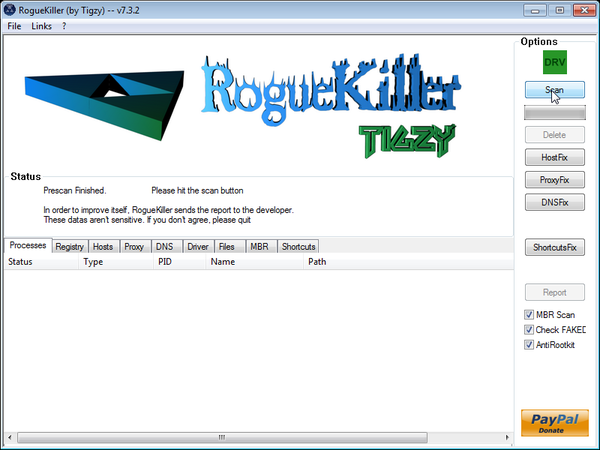
ROGUEKILLER DOWNLOAD LINK (This link will automatically download RogueKiller on your computer) - Double click on RogueKiller.exe to start this utility and then wait for the Prescan to complete.This should take only a few seconds and then you can click the Start button to perform a system scan.
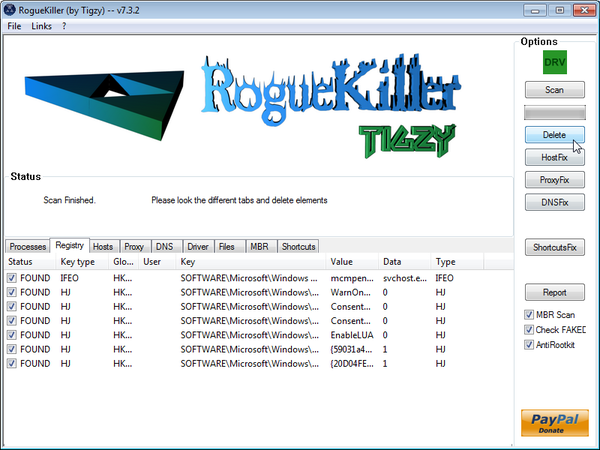
- After the scan has completed, press the Delete button to remove any malicious registry keys.
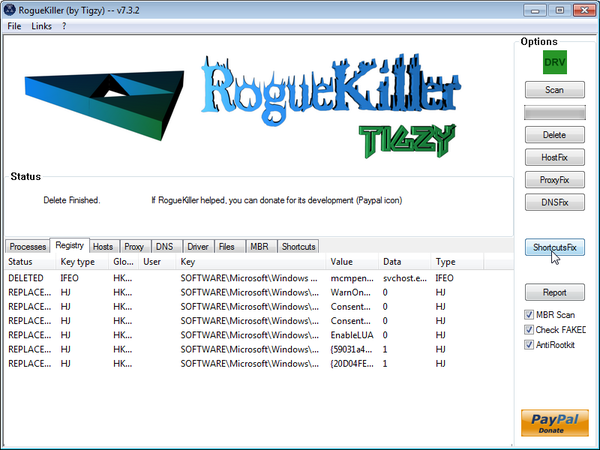
- Next we will need to restore your shortcuts, so click on the ShortcutsFix button and allow the program to run.









Thank yoU!!!
omg…thank you soooooo much. I spent nearly 1 day trying to remove (several boot cd’s etc.) that frigging malware until I found your post. THANK YOU!
Still one question: Should I reinstall my OS to be 100% sure that this malware is gone?
Hello,
HitmanPro and Malwarebytes should have removed this rogue antivirus,however for your peace of mind I would suggest that you perform a scan with the following utilities:
1.Run a scan with Kaspersky Virus Removal Tool
Click here to download the Kaspersky Virus Removal Tool.
2.Run a scan with Eset Online Scanner.
ESET Online Scanner Download Link (This link will automatically download ESET Online Scanner on your computer.)
Thank you so much! This all worked great right up to the last step. Windows will not allow me to download Roguekiller. I am not given an option like do you want to download anyway….it just will not let me, saying it is unsafe. Is there another option/program?
Hello Cristy,
You can ignore that alert…Internet Explorer has displayed that alert because this file isn’t commonly downloaded …
Also:
1.Run a scan with Kaspersky Virus Removal Tool
Click here to download the Kaspersky Virus Removal Tool.
2.Run a scan with Eset Online Scanner.
ESET Online Scanner Download Link (This link will automatically download ESET Online Scanner on your computer.)
can i do this step on safe mode ? im using windows xp
– i already done the STEP 5: Remove Live Security Platinum malicious files with Malwarebytes Anti-Malware FREE coz i had the software before this sh*t virus infected
Yes,run a scan with Malwarebytes and then go ahead with the HitmanPro scan… keep me up-to-date with what’s going on!:)
Hi Stelian,
Great job!!! Thanks for your post. I still need some help. Hope you can answer. I got my office’s computer infected with the Live Security Platinum one week ago and tried to remove it with my usual desinfection tool, Kaspersky Antivirus 2011. I scanned my pc with this application, which detected the virus and seemed to delete it. But whenever I restarted my computer, I still got messages from Platinum still working and downslowing my system. Then I scanned my PC with Kaspersky Virus Removal Tool and this detected a lot of infections and got rid of them. At that moment I thought my computer was already clean, but after the following restart, Kaspersky Antivirus 2011 collapsed. It stopped working. and did not started any more. I was advised to reinstall it. However, that has turned to be impossible, as during the setup process, I always get a black screen and the computer switches off all of a sudden. This continues to happen: whenever I try to install Kaspersky Antivirus 2011, my computer switches off and never get the chance to finish setup. Yesterday, I installed Kaspersky Internet Security 2013, but during the process I got a message reporting that my computer may be infected and wassuggested to download Kaspersky Virus Removal Tool. I downloaded this tool again and scanned my computer, but on this occasion it didn’t find any virus. Every time I install Kaspersky Internet Security 2013 (complete installation is possible) I get this message reporting possible infection. And every time I try to install Kaspersky Antivirus 2011, I get a black screen and my PC goes down. Could you please help me with any suggestion? Thanks a lot.
Best regards from Seville, Spain
Hello Eloy,
Can you please run a scan with Combofix and ESET online scanner and post the logs here so that I can get an idea on what’s going on :
STEP 1 : Run a scan with Combofix
Download ComboFix from one of the following locations:
COMBOFIX DOWNLOAD LINK #1 (This link will automatically download Combofix on your computer)
COMBOFIX DOWNLOAD LINK #2 (This link will automatically download Combofix on your computer)
VERY IMPORTANT !!! Save as Combo-Fix.exe during the download.ComboFix must be renamed before you download to your Desktop
Notes:
STEP 2: Run a scan with ESET Online Scanner:
ESET Online Scanner Download Link (This link will automatically download ESET Online Scanner on your computer.)
Waiting for your reply to tell me if your machine is ok and the logs from this utilit
Hi Stelian,
Thanks a lot for your answer and your attention. I followed your instructions closely and ran ComboFix and ESSET Online Scanner. The report created by ComboFix is to be found at the end of my this post. As for ESSET Online Scanner, it didn’t find any threat. However, as I described in my previous post, I’m still unable to install Kaspersky Internet Security 2011. In the middle of the process, I get an unexpected black screen and a sudden reboot. When I try to install Kaspersky Internet Security 2013, I still get a report stating that my PC could be infected and am recommended to scan my system with Kaspersky Virus Removal Tool. Something new happens now: Kaspersky Virus Removal Tool cannot be run now as I also get a black screen and a reboot when I try to install it. I hope you can help me with this. Many thanks in advance.
Best regards,
Eloy
Seville
Spain
COMBOFIX REPORT *****************************************
Hello Eloy,
Your Combofix log shows that you’ve still got some infection on this machine.Can you please start a thread in our Malware Removal Assistance forum as we need to remove this viruses.
Thanks a lot Stelian. I’ll do so.
Kindest Regards,
Eloy
Seville
Hi i had this problem and my friend recomended to install malwarebytes and it removed the malware, so then i uninstall malwarebytes but on the next day the malware still showed up. Again i had to install the malwarebyted and it removed the malware i also used comboflix. Still on the lower right when i click customize it shows something like 9d62tmp. live security premium. Please help me to completely remove it
Thanx
Hello jiwan,
Can you perform a scan with the following utilities:
1.Run a scan with Kaspersky Virus Removal Tool
Click here to download the Kaspersky Virus Removal Tool.
2.Run a scan with Eset Online Scanner.
ESET Online Scanner Download Link (This link will automatically download ESET Online Scanner on your computer.)
VERY IMPORTANT!: NEXT,please delete Combofix from your desktop and download a fresh copy of this utility.After you have disabled your antivirus,run a scan with Combofix and post the log here.
Thanks for the help. Got through all the steps and I seem to be doing ok except 1 major problem.
I cannot run any programs that require connecting to the internet after login and username. For example Tweetdeck or Thinkorswim.
Unable to connect. Please check your network.
nevermind it had something to do with firewall i guess.
Hello Barry,
Exactly what’s happening…This infection has compromised your firewall… Please uninstall your firewall and run the below scans:
1.Run a scan with Kaspersky Virus Removal Tool
Click here to download the Kaspersky Virus Removal Tool.
2.Run a scan with Eset Online Scanner.
ESET Online Scanner Download Link (This link will automatically download ESET Online Scanner on your computer.)
The link that you have provided on step 3 for the Registryfix.reg download link doesn’t work for me. :/ It says it was blocked due to containing walware and exploits. How exactly does this virus get into a computer? Because I don’t download any programs on this laptop ever. I save a few pictures, but that’s about it. :(
Hello Jodi,
That alert is most likely generated by Live Security Platinum!
Anyway,here is how you can create your own registryfix.reg :
1.Create and run your registryfix.reg
A.Copy all the text in bold below and paste to Notepad/Text Document
B.THIS IS VERY IMPORTANT! Save file as fix.reg to your Desktop. NOTE: (Save as type: All files)
C. Double-click on fix.reg file to run it. Click “Yes” for Registry Editor prompt window. Then click OK.
NEXT,follow the guide to remove the malicious file from your computer.
Good luck!
you are the best, great instructions and worked like a charm, thank you very much
Thanks from my 13 year old son! He got Live Security and this has been a great step by step to follow. All seems fine now. Took some time, but worth it!
Thank you very much, you save my lap…
Thanks !
Hi, Stelian. My problem is still exist, hope you can me some advice.
I followed your Step 1 to Step 6, so that my PC got back to Internet and IE browsing. Unfortunately when I conducted Step 7 Roguekiller, I got blue Screen when the program started prescan. Then I tried ESET Online Scanner and it cleared 10 files with threads. But I still encounter same problem when I conducted Roguekiller, I worry about the status of my PC, is it safe to use? What else can I do? Please give your expert comment, thanks.
Hello JohnnyW,
Can you please run a scan with Combofix, ESET online scanner and post the logs here so that I can get an idea on what’s going on :
STEP 1 : Run a scan with Combofix
Download ComboFix from one of the following locations:
COMBOFIX DOWNLOAD LINK #1 (This link will automatically download Combofix on your computer)
COMBOFIX DOWNLOAD LINK #2 (This link will automatically download Combofix on your computer)
VERY IMPORTANT !!! Save as Combo-Fix.exe during the download.ComboFix must be renamed before you download to your Desktop
Notes:
STEP 2: Run a scan with ESET Online Scanner:
ESET Online Scanner Download Link (This link will automatically download ESET Online Scanner on your computer.)
Waiting for your reply to tell me if your machine is ok and the logs from this utilities.
hello i was wondering if anyone can help me. live security platinum virus appears to have taken over my laptop. i have started it in safemode and can now finally access the internet however i have no clue how to remove it. i tried to unistall it but this did not work. i have read numerous posts on ways to remove it by downloading things and typing in stuff but it all seems complicated to me (im not the best with technology) can anyone explain and give me an easy method to get rid of this horrible virus? thank you
Hello nat,
Read the guide above and you’ll get rid of this fake antivirus! :)
My computer won’t let me d/l roguekiller..
What type of error do you get when trying to download this utility?Can you try to download RogueKiller from here,if it doesn’t work then go ahead with the below steps:
1.Run a scan with Kaspersky Virus Removal Tool
Click here to download the Kaspersky Virus Removal Tool.
2.Run a scan with Eset Online Scanner.
ESET Online Scanner Download Link (This link will automatically download ESET Online Scanner on your computer.)
Cheers Stelian, this was great to follow and heaps of help, now I should ban my wife from using the computer.
thanks again
For some weird reason i didn’t do all of those things mentioned above…i tried the old skool ways lol….shut down my modem and let the PC running without any internet connection whatsoever, i just right clicked the Platinum AV icon on my desktop and open File Location, delete any files related to this crap fake AV. eventho u CAN’T delete the whole files on that folder (3 files listed inside the folder), but you CAN delete 2 of them, except the main Platinum AV.exe file. Once you delete those files turn your PC off, completely OFF!!. Turn it back on after a while and put your internet back on and download SUPERantispyware and Malwarebytes’ Anti-Malware to your PC, install them apps and run complete scan with both applications just to make sure your PC is clean from the virus. Restart your PC and it should running without any problem.
I know it looks simple and very old skool, but it worked! i’m running Windows 7 Ultimate x64.
Good luck folks..
I followed your step by step process and it worked magically to remove a virus called “Live Security Platinum” fake software that took over my computer instantly! I am blessed to have found your site.
Thanks for all you do!
Jerry Kelly
fake alerts keep coming up though i have done everything
Hello aisling,
Can you please run a scan with Combofix, ESET online scanner and post the logs here so that I can get an idea on what’s going on :
STEP 1 : Run a scan with Combofix
Download ComboFix from one of the following locations:
COMBOFIX DOWNLOAD LINK #1 (This link will automatically download Combofix on your computer)
COMBOFIX DOWNLOAD LINK #2 (This link will automatically download Combofix on your computer)
VERY IMPORTANT !!! Save as Combo-Fix.exe during the download.ComboFix must be renamed before you download to your Desktop
Notes:
STEP 2: Run a scan with ESET Online Scanner:
ESET Online Scanner Download Link (This link will automatically download ESET Online Scanner on your computer.)
Waiting for your reply to tell me if your machine is ok and the logs from this utilities.
thanks, iam linux but my mom no :/ very useffuly!
Thanks for sharing! I am having trouble with step 7, RogueKIller. My computer is saying it is not commonly downloaded and could harm computer. It won’t let me run this. Should I save? Try another Roguekiller ???
Hello Nichole,
You can ignore that alert .. The program is safe otherwise I wouldn’t recommended :)
Thankyou soooooo much !!!
was in the middle of doing a high school certificate assignment when the stupid live whatever platnum crap appeared !!
not sure what that last stuff did though – the rogue killer stuff
but im just glad the virus is gone.
again thanks so much for this ! youre a legend !!!
Thanks a lot. You should be nominated for the Nobel-price.
THANK YOU…………………..
was just doing some work at home in the office and the Live-Security-Platnium somehow started ans in less than 4 mins i could not use anything on my laptop.
luckily a had my mac for other programs i used and googled the damn thing.
i looked at a couple links and yours loked the best.
I tried everything you said and it all worked great except for “Rogue Killer” I was unable to download or open it.
Anyway, all is GREAT and working again.
THANKS A MILLION
You are a life saver. Thank you so much for this!
I followed your instructions and my computer works fine again.