


A shipment is due, and a message says there’s a new procedure for paying the freight bill. It points to a real Maersk security advisory.
The advisory is worth reading. But it doesn’t answer whether the payment instructions in your inbox belong to your shipment.
Overview
Maersk confirmed unauthorized access and data extraction
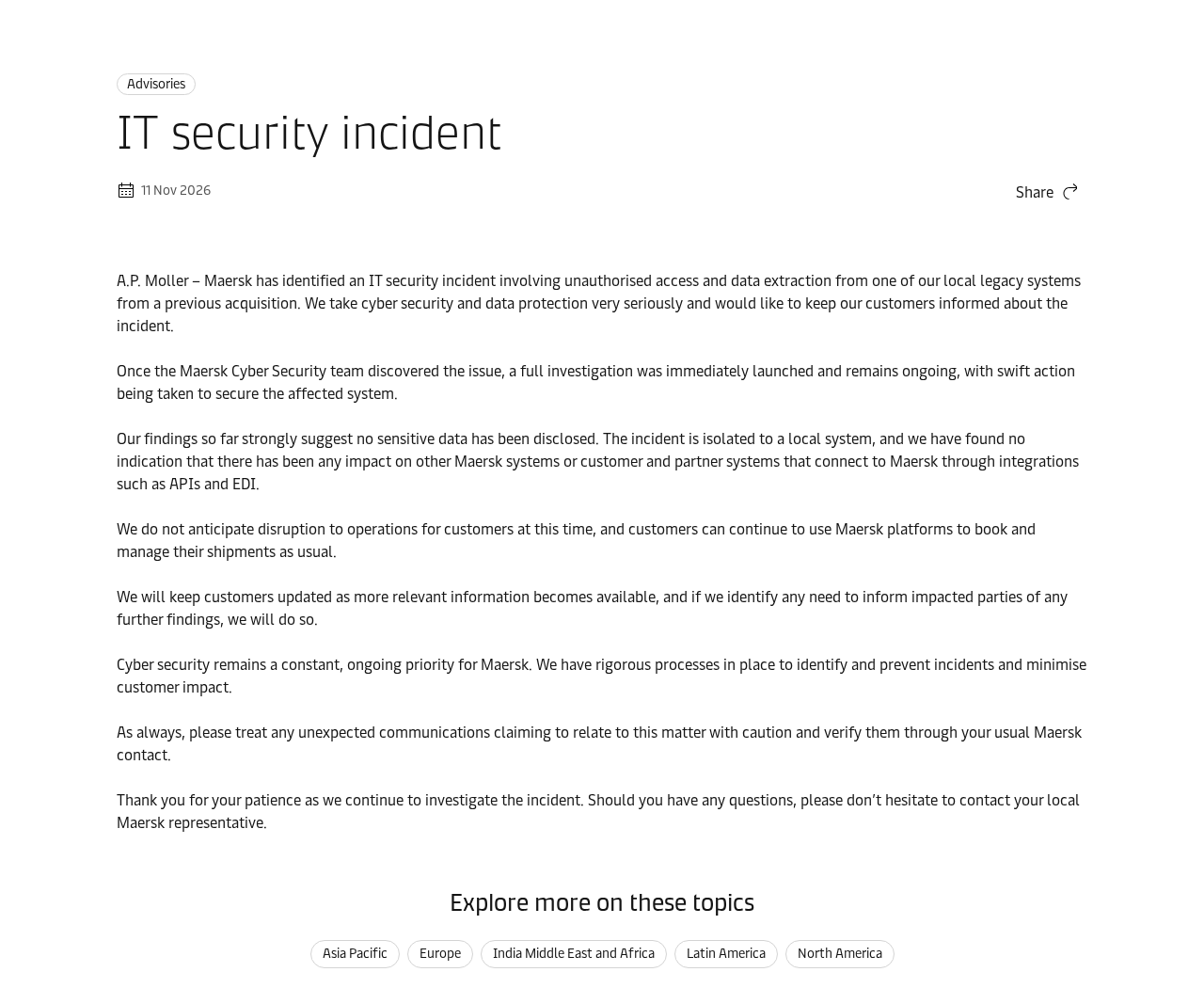
In its November 11 security advisory, Maersk says someone accessed and extracted data from a local legacy system it inherited through an acquisition.
The company says its initial findings strongly suggest that sensitive data was not disclosed. That is the company’s assessment during an investigation, not a complete inventory of the extracted data.
Maersk reported no indication of impact to its other systems or connected partners and customers. It told customers to keep using its booking and shipment platforms.
A claim by a group is not a notice from Maersk
WhiteArmor claimed responsibility and described data it said it had taken. Maersk’s advisory does not confirm those specific claims or identify individual affected drivers, partners, or customers.
That distinction is useful if you receive an email that includes a shipment reference or claims your company’s details were leaked. The sender still needs to prove they’re authorized.
Ask these questions before acting on an incident-related request:
- Does the action appear in Maersk’s own advisory?
- Can your usual Maersk contact confirm it through an established channel?
- Does it change who gets paid, where cargo goes, or who receives documents?
- Is your team being asked to bypass a control because of the incident?
The incident notice doesn’t change your payment instructions
Maersk specifically recommends verifying unexpected communications through your usual contact. It didn’t announce a general switch to a new billing account in the advisory.
Keep genuine shipments moving through established tools. Pause only the request you can’t verify, such as an altered invoice, a new release fee, or a change of delivery destination.
What to Check When a Freight Invoice Changes
Begin with the invoice record you already trust. Look up the booking and the original invoice through the route your team normally uses, without touching the new message’s links.
Compare the legal beneficiary, currency, amount, payment reference, and destination account. Don’t rely on a familiar invoice template or assume a matching total confirms everything else.
A person can copy an invoice number from an old document. The number helps you locate the transaction. It does not authorize a change to the destination account.
Changing even a few account digits can send money somewhere else. Verify that change just as you would a new payee.
Call the representative already listed in your internal records or contact the office through an established account portal. Don’t use a replacement number printed beside the new bank details.
Ask the representative to confirm the change for this invoice. A broad statement that Maersk had an incident doesn’t tell you whether anyone changed its collection account.
If the change is legitimate, put it through your company’s usual payee update process. Record who confirmed it and have the authorized approver check the final details before release.
If you can’t confirm it, keep the wire on hold and escalate internally. Ask your usual contact when the payment is actually due.
Why Shipment Details Aren’t Proof of Authority
Freight moves through several hands. A booking can involve a forwarder, a carrier, a broker, a warehouse, and people who aren’t responsible for paying the invoice.
That means someone who knows a shipment exists might still have no right to ask for money or documents. Check the relationship, not just the reference they quote.
A message may attach an authentic-looking document and ask you to send a new copy somewhere else. Before sharing it, check whether the new recipient belongs to the shipment.
Don’t send extra records merely to find out who’s asking. A shipment number or invoice reference is usually enough to open a conversation with a contact you already know.
If someone requests a change to where a container or delivery should go, use the approved dispatch process. Don’t treat a confirmed billing contact as automatic authority over cargo instructions.
Involve the staff who own the relevant decision. A transport coordinator can check routing, while accounts payable can decide whether to hold a wire. One check doesn’t replace the other.
Keep changes in the system that normally records them. A side conversation may never reach the colleague who is preparing the shipment or the person who releases the payment.
These are precautions for the kinds of requests a real incident could make more believable. They aren’t reports of an observed wave of fake Maersk invoices.
What the Advisory Says About Connected Systems
Some companies send bookings or receive shipment updates automatically. Maersk’s advisory specifically says it found no indication of impact to customer or partner systems connected through integrations.
That finding doesn’t call for disconnecting every integration. An unexpected email asking for a new endpoint, login token, or connection file should go to the team that manages the integration.
If a feed stops working, record the time, service name, and error. Check the official support route before assuming the problem is connected to this incident.
Don’t give a caller an integration secret to prove you’re a customer. An authorized support process can identify your case without requesting a working credential over an unsolicited call.
If your security team identifies exposure in your systems, follow its incident process. Use your own records and the provider’s findings, not a generic warning.
Separate continuity from incident response. Keep unaffected booking and shipment work on the routes Maersk supports. Handle a specific account problem without creating an unnecessary interruption across the business.
How to Hand Off a Suspicious Request Without Losing the Details
When a message moves between a shipping desk and a finance team, it’s easy for the reason it was suspicious to disappear. Keep the question attached to the request.
For example, say that a known invoice is still valid but the destination account in a new message is unverified. That’s clearer than telling everyone to stop paying the carrier.
Give the next person a reference they can trace: the shipment, invoice, and time of the request. Keep bank numbers and customer records inside the approved case system.
Ask who owns the next action and when they expect to respond. If the shipper calls back, tell them the instruction is being verified rather than discussing private incident details.
If a scheduled payment run will pick up the invoice, ask finance to confirm the hold there. Flagging an email doesn’t necessarily change the status of a queued transfer.
Once the question is resolved, update the record that caused the uncertainty. Staff shouldn’t have to rely on somebody’s memory to know which payee was approved.
Check Who Actually Bills You for the Shipment
The carrier moving a container may not be the company that invoices you. If you booked through a freight forwarder, start with that relationship and your own booking paperwork.
Don’t assume a recognizable Maersk logo tells you which organization should receive payment. Look at the agreed billing party on the contract, invoice, or approved vendor record.
A legitimate shipment can have several separate charges. Freight, customs brokerage, and local handling may be billed by different companies. Verify the specific charge rather than just the shipment.
Ask for the reference that connects the amount to your agreement. If someone says the fee is for releasing cargo, ask your usual contact to confirm the actual hold.
A duplicate invoice may have a simple explanation, such as a corrected amount or a reminder. Resolve that question with the original issuer before you approve another payment.
When there are multiple entities in your own group, verify which one placed the booking. Sending the invoice to the wrong finance team can make an unfamiliar payee look ordinary.
Keep the approved invoice and any replacement together. Whoever releases the payment should be able to see which version is current and why the other one was rejected.
If a replacement arrives after a payment run, reconcile it with the payment that actually settled. Don’t assume a correction cancels money that already left the bank.
What a Security Update Can and Cannot Tell Your Team
A company advisory can describe the affected system without listing every file. Read the boundaries the company gives, rather than extending its finding to systems it hasn’t discussed.
There’s also a difference between a company finding no sign of an impact and a company promising that an impact is impossible. Maersk describes the findings of its ongoing investigation.
Use those findings to decide what needs attention now. If no authorized contact has told you to change how you book or pay, keep using your established procedures.
When an official notice actually names your organization or account, keep that notice in the incident record. Ask the sender to specify the affected information and the action they recommend.
Staff on different shifts should share the confirmed update through their normal handoff. A short note with the source and the affected workflow is more useful than a forwarded rumor.
Give customers a clear route to check their own shipment. Don’t tell them to send identification or transaction documents to a new address simply because they’re worried.
Before a real procedure change, make sure the people following it can independently reach the team that approved it. Otherwise every correction looks like another unexplained exception.
Keep the date with any excerpt you circulate. A later notice may clarify the data involved, but it won’t retroactively authenticate a payment message that arrived earlier.
If a partner asks whether you received an official change notice, share the verified advisory link rather than forwarding a message with unverified attachments.
What to Do If You Received a Suspicious Maersk Request
-
Hold the specific change. If you haven’t acted, don’t send the wire, change the routing, or release the document. Keep unrelated work on its normal path.
Tell your team which instruction is on hold so nobody else approves it from a forwarded copy.
-
Check with your established Maersk contact. Give them the shipment or invoice reference and ask them to confirm the requested change, not just the existence of the incident.
Record the answer and how you reached them. Escalate to your own finance or transport lead if it differs from what the sender told you.
-
If the transfer went out, call your bank now. Use your established treasury or fraud contact. Give the original wire reference and request the available recovery options.
The FBI’s business payment fraud guidance recommends asking the originating bank about a recall or reversal promptly. Recovery is not guaranteed.
-
If a document went to the wrong person, report exactly what was sent. Tell the team responsible for the shipment and follow your organization’s incident reporting process.
Don’t assume that every document contains the same data. Note the file, recipient, and time so the team can assess what actually needs to be protected.
-
If you entered a password or supplied an access token, notify security. Explain which account or integration it belonged to so the appropriate owner can secure it.
Don’t circulate the credential in a ticket or group email. Use your team’s approved channel and follow its instructions about password changes or credential rotation.
-
Preserve the relevant records. Keep the original email, invoice, transaction reference, and any instructions you received. Don’t revisit a suspicious site just to obtain another screenshot.
If the request also affected cargo, retain the dispatch and tracking records. Tell the responsible operations team promptly rather than waiting for a billing dispute to be resolved.
Frequently Asked Questions
Did Maersk confirm that data was extracted?
Yes. Maersk confirmed extraction from a local legacy system. Its advisory did not confirm the exact records claimed by the group that took responsibility.
Does the Maersk advisory say customers should stop booking?
No. Maersk said customers could continue booking and managing shipments through its platforms. Check any newer notice if a particular service is unavailable.
Should I change the account used to pay my freight bill?
Not because of the advisory alone. Verify any change through your usual Maersk contact and follow your company’s normal approval process before using the new account.
Did Maersk say customer integrations were affected?
No. Its advisory says it found no indication of impact to connected customer or partner systems. A specific integration problem should still be investigated through established support.
Does a valid booking reference prove that a request is genuine?
No. Use it to find the shipment in your established system. Verify the person making the request and the action they want you to take.
What if I sent the payment before noticing the discrepancy?
Contact the sending bank immediately and provide the wire reference. Tell your own finance team and retain the message that led to the transfer.
The Bottom Line
Use Maersk’s normal tools for routine work. Don’t send money, reroute a shipment, or hand over credentials because an unsolicited message cites the security incident.
Verify the specific change through a contact you already trust. If you sent a suspicious payment, call your bank now and alert your finance team.

Join the discussion
0 commentsShare your experience or ask a question about this article.
Discussion
Start the conversation
Have a question or something useful to share? Add the first comment.