


Your Vanderbilt class is still on the schedule, but a campus service you need won’t open. Then you see a message about changing your password.
The hard part isn’t finding instructions. It’s knowing which instructions are current and which ones actually apply to your account or device.
Overview
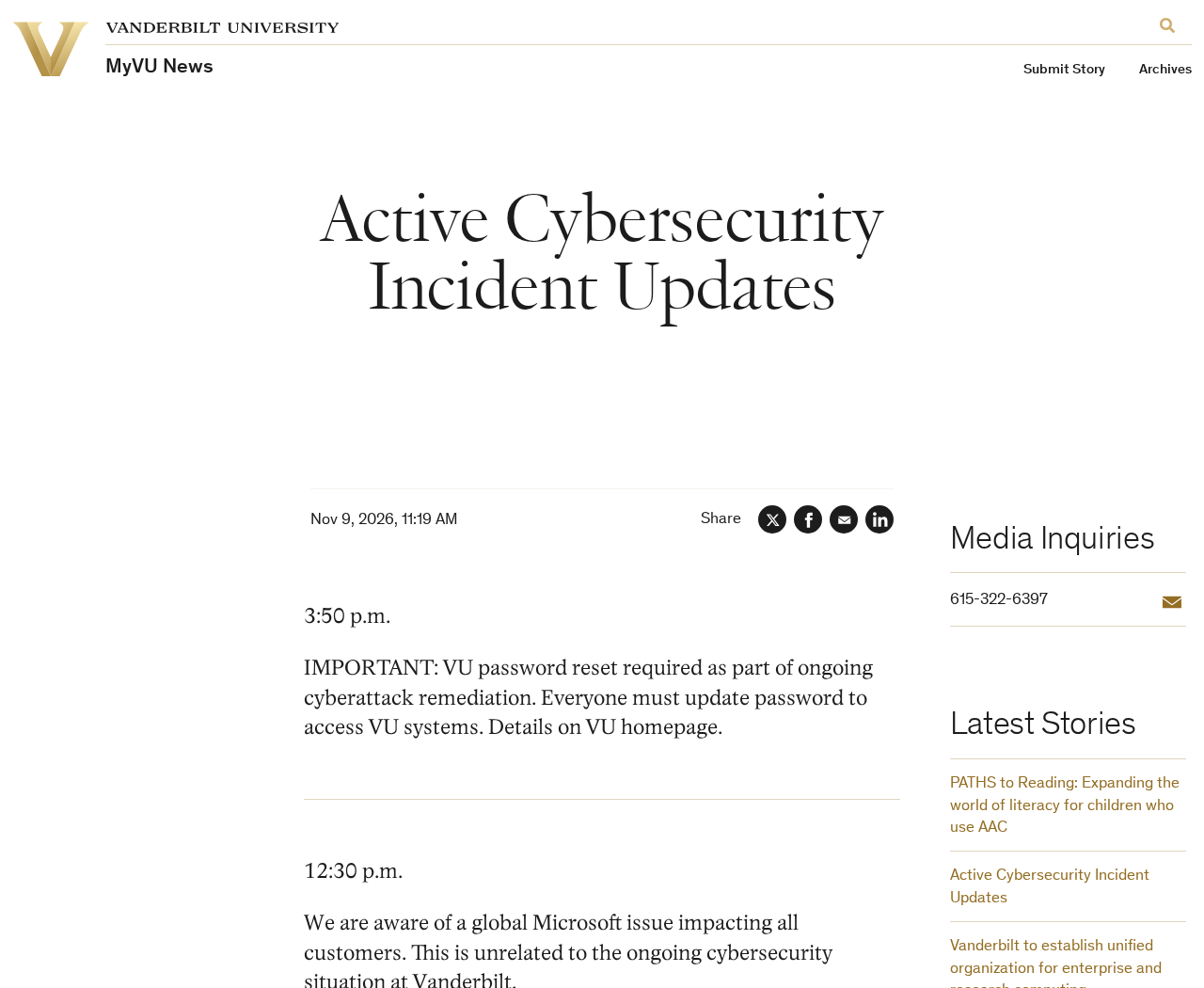
The university confirmed an incident and announced a reset
The Vanderbilt cyberattack prompted restrictions on campus systems while university IT worked on containment. Vanderbilt later announced that users must update their university passwords to regain access.
The reset is real. That doesn’t make every link that says “Vanderbilt password reset” real. Start with the university’s incident updates, not with a search ad or an unexpected message.
The incident notice also distinguishes a separate Microsoft service problem from Vanderbilt’s own response. An error on one service isn’t enough to tell which issue you’re seeing.
What a restored service actually tells you
Recovery is happening service by service. Access to Outlook doesn’t mean that all Microsoft 365 apps are available, and a working classroom tool doesn’t mean payroll uses the same system.
Check these separately before deciding what to do:
- Whether your Vanderbilt password needs to be updated.
- Whether the specific app you need is approved for use.
- Whether your device is university-managed or personal.
- Whether an unfamiliar prompt appeared during an action you actually started.
The university’s incident FAQ is the place to check for service restrictions. Don’t treat a generic green status indicator as permission to use every system.
Data theft claims are not an individual breach notice
A group claimed it took sensitive information. Vanderbilt was still assessing what data, if any, was accessed. The claim cannot confirm exposure for any individual.
Monitor official updates and scrutinize unexpected messages. Don’t upload an ID or Social Security number to a site claiming it can check the attacker’s list.
Use the Latest Instruction for Your Device
At the start of the incident, Vanderbilt asked people to shut down university devices and disconnect from campus Wi-Fi. Later instructions allowed people to resume using university devices.
Those messages were issued at different points in the response. Read the time and date of the update, then check whether a more recent instruction changes what you should do.
A newer general instruction to resume work doesn’t cancel a specific direction that IT gave you about a device you already reported. Ask your assigned support contact if they conflict.
If your usual device shows an unexpected screen or prompt, contact the help desk from another device. Don’t rely on the device you’re reporting to reach support.
Don’t install a scanner, reset a managed device, or remove its software yourself. Let the university decide how to handle a device that might be affected.
If the computer behaves normally but one campus app is unavailable, compare that app with the approved list. Repeatedly reinstalling the app will not bring an intentionally restricted service back.
Similarly, a working personal email account doesn’t tell you that your university account is working. Note which account you selected before sending a support request about a sign-in error.
When reporting a problem, include the device type, the app, when you saw it, and whether you had just tried to sign in. Leave passwords and verification codes out.
How to Reach the Real Vanderbilt Password Reset
Open the Vanderbilt homepage yourself and look for the university’s current instructions. You can also navigate through Vanderbilt’s Office of Cybersecurity rather than using a link sent to you.
Start on a trusted device. If you already opened a message that asked you to reset, you can close it and take the official route instead.
Know which account you’re changing. A Vanderbilt account, a personal Microsoft account, and an account issued by another employer can all appear in the same browser.
Choose a password you don’t use anywhere else. A password manager can help you store it and keep it distinct from personal email, school applications, or other employers’ accounts.
If a login prompt asks for MFA, check that it belongs to the session you just started. An approval request appearing by itself is not an instruction to tap yes.
An app may need a fresh sign-in after the password change. Open the app you already use and follow its ordinary login process, not a separate “sync” tool.
If you can’t complete the reset, open a help desk case through Vanderbilt. Describe the point where it failed instead of trying several different links from messages or search results.
The university’s OneVU account management guidance also explains how to manage recovery methods. If your phone changed, use the official recovery process instead of sharing a code with a caller.
What to Verify Before Moving Coursework or Payments
When a course or office tool is unavailable, the pressure to find a workaround is real. The fastest substitute isn’t necessarily approved for the data you need to move.
If a course submission isn’t working, check the instructor’s established contact route. Ask where to submit the assignment and how they want the missed timestamp recorded.
Keep your own copy of the work and any error details. That gives the instructor something to review without requiring you to upload the assignment to a random file-sharing link.
For research data, use a workflow approved by your supervisor and the appropriate university office. Availability of a personal account does not authorize moving protected research there.
Staff handling invoices or payroll should verify alternate instructions with the relevant campus office. A notice that a payment system is being restored isn’t a reason to send funds elsewhere.
Check a new bank account or payee through your regular approval process. Don’t treat an interruption as permission to replace a known beneficiary with the one in an email.
Keep sensitive records in the places the university approves. If you need to show an error, crop out unrelated records before sharing the screenshot with the help desk.
For a service whose status you can’t confirm, ask the office responsible for it rather than guessing from somebody else’s experience. Different roles may have different access during recovery.
How to Recognize a Message That Needs a Separate Check
Imagine a message tells you that your account must be “reactivated” before tonight’s assignment. It mentions the real incident and asks you to approve a sign-in you didn’t start.
The incident reference is public information. It doesn’t establish that the sender works for Vanderbilt or that the approval belongs to you.
Look at the request, not only the display name. A request to disclose a code, buy something, move a payment, or install software needs verification through a trusted contact.
If the message is about an existing class, job, or invoice, go back to the conversation you already had. Confirm the action through that route before doing anything new.
A genuine-looking university email address isn’t a reason to ignore a surprising request. Verify it with the office concerned, especially if the requested action differs from the incident instructions.
In Outlook, Vanderbilt’s cybersecurity office recommends using the Phish Alert button for suspected phishing. If you’re unable to use Outlook, follow the reporting directions on the office’s official site.
These are precautions for messages that may exploit confusion. They are not a claim that every member received a phishing message or that any particular message came from the incident.
When You Can’t Tell Whether Your Account or the Service Is Failing
Write down the last thing that worked. If you could read Outlook but not open a file shared through OneDrive, those are two different service checks.
A link inside an email may lead to a service that isn’t available yet. That doesn’t make the email fake, and it doesn’t make your password wrong.
Compare the destination with the current approved list before assuming the reset failed. If a service is restricted, use an approved alternative rather than trying to bypass the restriction.
If you manage a group, tell people which tools they should use for specific work. “Everything is back” isn’t helpful when their next task depends on an unavailable application.
In a support ticket, separate problems by service. Mention whether a failure happened before or after you changed the password, and whether you could reach any approved apps afterward.
If you got an approval notification, note whether you had just entered your own credentials. That detail helps distinguish a normal authentication step from an unsolicited request.
Don’t keep approving prompts to make them stop. End the attempt and ask support to confirm whether the account requires another step or whether something needs investigation.
It can help to keep an offline note of the ticket number. If your normal university inbox is unavailable, you’ll still have a reference when you reach support.
When Someone Claims Your Data Was Exposed
A headline about records is not a list of individuals. Don’t use it to assume that a particular student, former employee, applicant, or patient had a record accessed.
If a notice addressed to you arrives, confirm it through the university before following any enrollment or document-upload instructions. Keep a copy of the notice once you’ve verified it.
Pay attention to the fields it actually names. Exposure of an email address calls for a different response from confirmed misuse of a financial account.
Don’t share a full personal identifier with a class group, public forum, or unofficial account offering to search for it. That can create another exposure.
If you see an actual unauthorized charge, account change, or unfamiliar application in your name, don’t wait for Vanderbilt to settle the broader question. Report the specific problem promptly.
People who have multiple university roles may receive different instructions from different offices. Follow the guidance attached to the account or service in question, not a forwarded summary.
What to Do If You’re Affected by the Vanderbilt Cyberattack
-
Read the newest university instruction first. Check the incident page and the FAQ before using old guidance copied into a group chat or forwarded email.
Compare the update with any directions IT gave you for your own device. Keep following the device-specific instructions until support tells you otherwise.
-
Complete the required reset through Vanderbilt. Go to the university homepage independently. If the official process fails, contact VUIT rather than trying a new reset provider.
Afterward, sign in to one known service that’s approved for use. If you still see an error, report which service and account you used.
-
Report abnormal behavior on a managed device. Don’t open unfamiliar attachments or follow prompts that appear unexpectedly. Use another device to contact the help desk if needed.
Say what you saw, when you saw it, and whether you clicked, typed anything, or approved a request. Let VUIT decide how to handle the device.
-
If you supplied a password or approved an unexpected prompt, say so immediately. Report it as a possible account compromise, not merely a failed password reset.
Follow VUIT’s instructions for securing the account and reviewing recovery methods. If you used the same password elsewhere, replace it on those services from a trusted device.
-
If you moved money, call the payment provider. Use a verified number and explain the exact transfer or charge. Report the incident to the relevant Vanderbilt office too.
Keep the transaction record and message that led to it. Don’t send more money to anyone offering to reverse the charge for a fee.
-
Handle a confirmed data notice separately. If Vanderbilt tells you your personal data was affected, note the information named in that notice and follow the response it describes.
Don’t assume a payment card was exposed just because someone claimed a large data haul. Contact your financial institution if you find actual suspicious activity.
Frequently Asked Questions
Is the Vanderbilt password reset real?
Yes. Vanderbilt announced a required password update as part of its response. Start at the university’s own website, not the first reset link you receive.
Does a working Outlook login mean all campus services are restored?
No. Vanderbilt is restoring services individually. Check the current incident FAQ for the app you need instead of assuming that access to email settles it.
Did Vanderbilt confirm that my Social Security number was taken?
The university said it was assessing what data may have been accessed. A group’s public claims do not confirm exposure for any particular person.
Should I reinstall Windows on my university laptop?
No. Report suspicious behavior to VUIT and follow its instructions. Don’t erase or modify a managed computer to try to fix an institutional incident yourself.
Is this necessarily a Vanderbilt Health breach?
No. The university’s FAQ describes Vanderbilt Health and the university as separate entities. Follow the organization that issued your account for instructions specific to it.
What if I already approved an unfamiliar sign-in?
Contact VUIT promptly through an official channel and describe the approval. Include the approximate time so the team can distinguish it from your normal sign-in.
The Bottom Line
Complete Vanderbilt’s required reset through its own site, then check the latest guidance for the particular service and device you need. Don’t follow unsolicited recovery links.
If you approved a sign-in you didn’t start or noticed strange behavior on a managed device, report it directly to VUIT. Don’t wait for the investigation to finish.

Join the discussion
0 commentsShare your experience or ask a question about this article.
Discussion
Start the conversation
Have a question or something useful to share? Add the first comment.