

A fraud alert from your bank is unsettling enough. Now imagine replying that you did not authorize the charge, only to watch more payments leave your account anyway.
That is the question at the center of the reported Metro Bank Claude credits fraud case. The unusual merchant name made headlines, but the lesson reaches far beyond one chatbot.
Overview
What happened in the reported Metro Bank case
A Metro Bank customer in the UK reported £14,244 in unauthorized debit-card purchases used to buy credits for Claude, Anthropic’s AI service. The customer had previously paid for a legitimate Claude subscription, so the merchant name was not entirely unfamiliar.
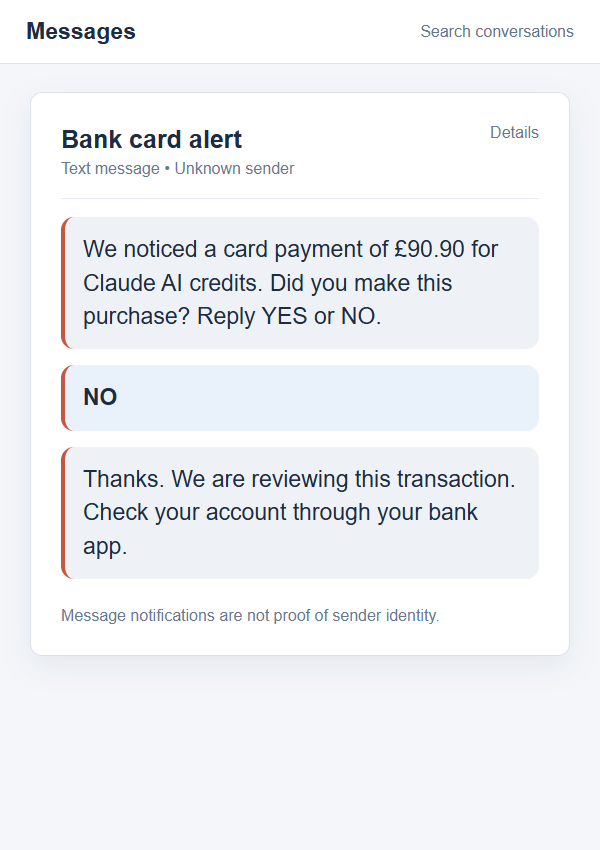
According to The Guardian’s original reporting, Metro Bank flagged a £90.90 transaction on June 19, 2026. The customer replied that he had not made it. The bank blocked that transaction, but additional payments were processed before the card was fully stopped the following day.
What is known, and what remains unknown
The reported purchases were unauthorized. Anthropic said a coordinated group used the customer’s card to buy credits, banned the fraudulent account, and found no evidence that the card details came from Anthropic’s systems. It later refunded the customer, while Metro Bank acknowledged a delay in fully blocking the card.
Those facts do not establish how the criminals obtained the payment details or gained the ability to spend against the account. The publicly reported case is not proof of an Anthropic data breach, a Metro Bank breach, or malware on the customer’s device. Avoid anyone who claims otherwise without evidence.
Why readers should care even if they do not use Claude
This is a card-fraud story with an AI-credit twist. A familiar merchant descriptor can make a new charge less obvious, and a failed first attempt does not always mean every later attempt will be stopped. The pattern is worth recognizing on any service where a payment method is saved.
Keep the key distinctions straight:
- The customer’s genuine subscription was not authorization for the later credit purchases.
- One declined or challenged charge did not end the reported run of transactions.
- A card replacement can be necessary even when the first suspicious amount was reversed.
- Merchant and bank investigations can move on different timelines.
- The source of stolen card details must be investigated, not guessed from the merchant name.
The Fraud Alert Did Not Tell the Whole Story
The customer, Zoli Rutter, had been paying about £15 a month for Claude while using it for business invoices. That context matters. Someone scanning a statement might notice the Anthropic name and assume another legitimate subscription charge had posted.
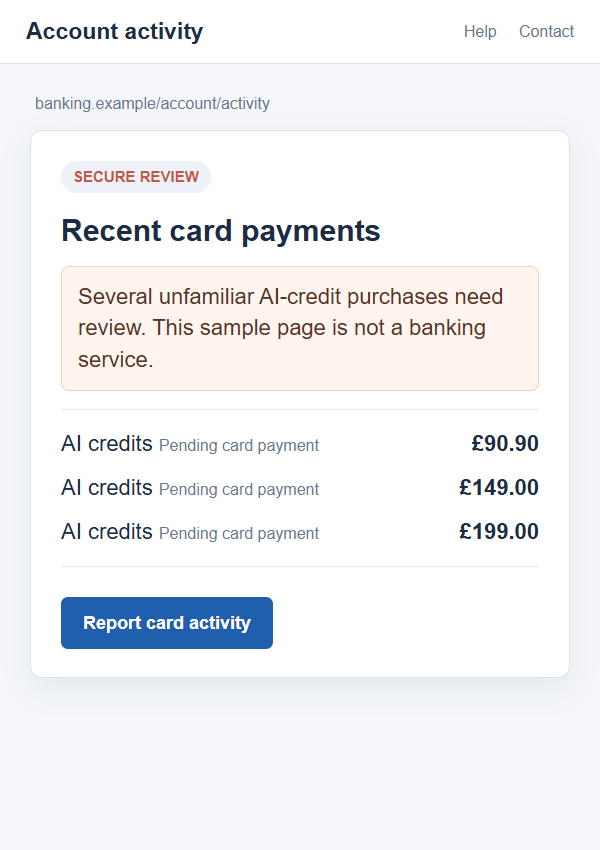
The unauthorized activity was different in frequency and purpose. The Guardian reported a string of purchases between roughly £90 and £200, not a normal monthly subscription. The repeated amounts created a large total quickly, even though each individual entry looked smaller.
Metro Bank said its systems blocked some attempts but processed others because of the complex nature of the fraud. The bank later issued a temporary refund during a chargeback process. Anthropic subsequently refunded the customer, and the bank said it had taken steps to prevent a similar blocking delay.
This outcome is important but should not become a promise. Other customers may face different card rules, evidence requests, and refund timelines. What you can control is how quickly you report every suspicious transaction and how clearly you ask the bank to secure the payment instrument itself.
The images here are nonfunctional reconstructions. They illustrate the alert and account-activity stages; they are not screenshots of Rutter’s banking app or a claim about the exact wording he received.
How the Metro Bank Claude Credits Fraud Worked
Step 1: Criminals had a way to use the payment card
The first necessary ingredient was a usable card payment method. The public reporting does not identify the route by which the criminals obtained it. Card details can be exposed through many routes, including a phishing page, compromised merchant elsewhere, stolen records, or direct access to an account.
Do not infer that the AI platform itself leaked data merely because the fraudulent charges appeared there. Anthropic expressly said it had no evidence its systems were the source. A careful incident response leaves the acquisition route open until facts support a conclusion.
Step 2: The card was used for AI-credit purchases
Instead of buying a physical item, the fraudsters purchased credits for Claude. Digital credits are attractive to an abuser because delivery can be immediate and there is no parcel address for a victim to recognize. A stolen card can fund usage on a separate fraudulent account.
In this case, Anthropic said it banned the account associated with the fraud. The report does not disclose the contents of that account, how much credit was consumed, or whether other customers were affected. The useful signal for a cardholder is the unexplained charge, not speculation about what the credits were used to produce.
Step 3: A smaller suspicious charge triggered a warning
Metro Bank sent an alert about a £90.90 transaction. The customer said no. That was the right response to a genuine bank fraud check, but it did not by itself guarantee that every subsequent card payment had been disabled.
If a bank asks you to confirm a charge, use its official app or the number on your card if the text seems uncertain. Criminals also send fake fraud alerts that lead to fraudulent support lines. A real alert and an unauthorized transaction can coexist, so verify the channel as well as the payment.
Step 4: More payments went through before the card was stopped
The bank said some attempted payments were blocked, while others were processed. The Guardian reported that the card was fully frozen the day after the first alert. The resulting total, £14,244, shows why the first rejected charge should not be treated as the end of an incident.
Repeated authorizations may arrive faster than a human can review them. If you see a cluster, tell the issuer you suspect an active compromise and ask whether the card itself, any digital wallet tokens, and merchant-initiated payment permissions need to be stopped or replaced. The issuer can explain which controls apply to your card.
Step 5: Bank and merchant investigations followed
The customer challenged the payments through Metro Bank, which provided a temporary refund while seeking recovery. Anthropic investigated, banned the fraudulent account, and later refunded the customer. The bank said it would take back its temporary credit after the merchant refund, avoiding a double reimbursement.
That sequence can be confusing when several credits and debits appear. Keep every case reference and ask each organization to explain what a temporary credit means. Do not assume a provisional refund closes the investigation, and do not spend the same disputed amount twice.
Four Checks Before You Trust a Claude or Bank Charge
Check the amount against your real plan
A regular subscription has an expected billing cycle and amount. A separate AI-credit purchase, a burst of smaller payments, or a charge from an account you do not control deserves investigation. Look at the transaction date and merchant descriptor, then compare it with receipts inside the service you actually use.
If you manage several business or family accounts, check whether a colleague or authorized user made the purchase. Do that without sharing your card number or login credentials in an email reply. An unfamiliar charge remains unexplained until you confirm the underlying order.
Check whether the bank actually froze the card
“We blocked this transaction” and “we blocked the card” are not the same sentence. After rejecting an unauthorized payment, ask the bank what has been stopped, what can still be attempted, and whether a replacement card will be issued.
Review the account for later pending and posted entries. A pending item may fall away, while a posted item may require a dispute. The bank can tell you how it treats each type and what evidence to provide.
Check the merchant through a channel you open yourself
If the descriptor names Anthropic or Claude, sign in through the service’s known website, not a link in an unsolicited message. Review billing history, saved cards, active sessions, and API or credit usage if you have access to those features.
No matching receipt in your own account is significant. It may mean the card was used on someone else’s account. Tell the merchant’s support team that the card was charged without authorization and give only the details they request through its official support process.
Check who is asking for your information
A scammer can exploit a real fraud story by sending a fake “refund” message. Do not reveal a password, one-time code, full card number, or remote-access permission to someone who calls unexpectedly and claims to be from the bank or AI platform.
Open your bank app or use the number printed on your card to reconnect. For the merchant, navigate to its official support page yourself. A callback number inside a surprising text is not independent verification.
Why a Familiar Merchant Name Can Hide Card Fraud
When a charge appears from a service you use, it can bypass the first mental filter people apply to unknown merchants. That is not carelessness. Many digital services have several billing lines for subscriptions, usage, credits, tax, or team seats, so a customer may need time to work out which charge belongs.
The answer is to compare every unexpected entry with a receipt or account event, especially if the amount is larger than your normal plan. Do not accept “the merchant is familiar” as proof that this particular purchase was authorized.
Business users may have a second challenge. The card might be saved in several tools used by staff or contractors. Keep a simple record of who may buy credits, who receives receipts, and which card is attached to each account. That helps you distinguish an authorized purchase from a stolen-card incident quickly.
Security settings can reduce risk but are not a guarantee. A bank alert, spending notification, or merchant account control is a layer, not a substitute for reviewing the statement. The Metro Bank case shows that a response to one alert did not automatically stop the whole series.
What to Do if You Have Fallen Victim to This Scam
- Call your card issuer immediately. Use the number on the card or its official app. Say clearly that the AI-credit purchases were not authorized and that you suspect ongoing card misuse. Ask the bank to stop further use, explain pending transactions, and replace the card or tokens where appropriate. Request a case number.
- List every disputed payment. Record the date, amount, descriptor, and whether each entry is pending or posted. Do not report only the first charge that triggered an alert. A complete list makes it easier for the bank to investigate a series and prevent an overlooked payment from becoming final.
- Contact the merchant through official support. If the descriptor points to Anthropic, open its support site yourself and report the unauthorized credit purchases. Provide transaction identifiers through its secure process. Ask whether the card is attached to an account you do not control, but do not expect support to disclose another person’s private account details.
- Secure any affected accounts. If you suspect access to your Claude account, change its password, review sessions, and enable available multifactor protection. Change your email password too if the same password was reused or you see suspicious recovery messages. A card-only fraud does not automatically mean your AI login was compromised.
- Preserve the alert and refund trail. Save the bank’s fraud text, your “no” response, statement entries, case references, merchant emails, and refund notices. Mark provisional credits separately from final refunds. This record matters if you need to follow up or make a formal complaint.
- Check your device only when exposure suggests it. If you downloaded an attachment, installed an unfamiliar app, or gave remote access during the incident, disconnect the device from sensitive accounts and run a reputable scanner such as Malwarebytes. A card charge alone is not evidence of malware. AdGuard can reduce exposure to malicious ads and phishing pages, but it cannot reverse an already authorized card payment.
- Escalate if the response stalls. Ask the issuer for its complaint route and written explanation. UK customers may be able to take an unresolved complaint to the Financial Ombudsman Service after the bank’s process. Report suspected fraud to the appropriate national authority and watch for recovery scammers offering guaranteed reimbursement for a fee.
Frequently Asked Questions
Was Claude itself hacked in the Metro Bank case?
The public report does not establish that. Anthropic said it had no evidence the card details came from its systems. The known issue is unauthorized card use to buy credits, not a proven breach of Claude.
Did Metro Bank refund the customer?
Metro Bank initially provided a temporary refund while pursuing recovery. Anthropic later refunded the customer, and the bank said its temporary credit would be reversed. Those are reported outcomes for this case, not a guarantee for every card dispute.
Can a card be charged again after I reject one payment?
Yes. Rejecting a single transaction does not necessarily disable every route for later attempts. Ask your bank explicitly whether it has blocked the card, digital tokens, and relevant merchant authorizations, then keep checking for new entries.
Should I delete my Claude account if I see an unfamiliar charge?
Not necessarily. First secure the card and determine whether the charge belongs to your account. If it does not appear in your billing history, the card may have been used elsewhere. Deleting your account before preserving records can complicate an investigation.
What if the suspicious charge is only pending?
Report it promptly anyway. Your issuer can explain whether it will drop off, post, or require a formal dispute. Continue monitoring, since other payments can appear after the first alert.
Can a fake refund message follow this kind of fraud?
Yes. A caller or email may claim to help recover an AI-related charge while asking for a code, card details, or remote access. Use your bank’s known channel and the merchant’s official support page, not contact details supplied by a surprise message.
The Bottom Line
The Metro Bank Claude credits case was an unauthorized card-spending incident, not proof that an AI service leaked payment data. The reported sequence shows how quickly smaller digital purchases can accumulate when a card is not fully stopped.
If an unfamiliar AI-credit charge appears, report the entire series, confirm what the bank has blocked, and contact the merchant through its official support route. The most useful question is not whether you recognize the company name. It is whether you authorized that exact payment.

Join the discussion
0 commentsShare your experience or ask a question about this article.
Discussion
Start the conversation
Have a question or something useful to share? Add the first comment.