


The document is ready, the deadline is close, and someone asks you to send it outside your team. Near its name, you notice the word Confidential.
That small detail can turn a routine handoff into an awkward question. Before sending anything, work out exactly what you have been asked to share.
Overview
Similar wording can describe different controls
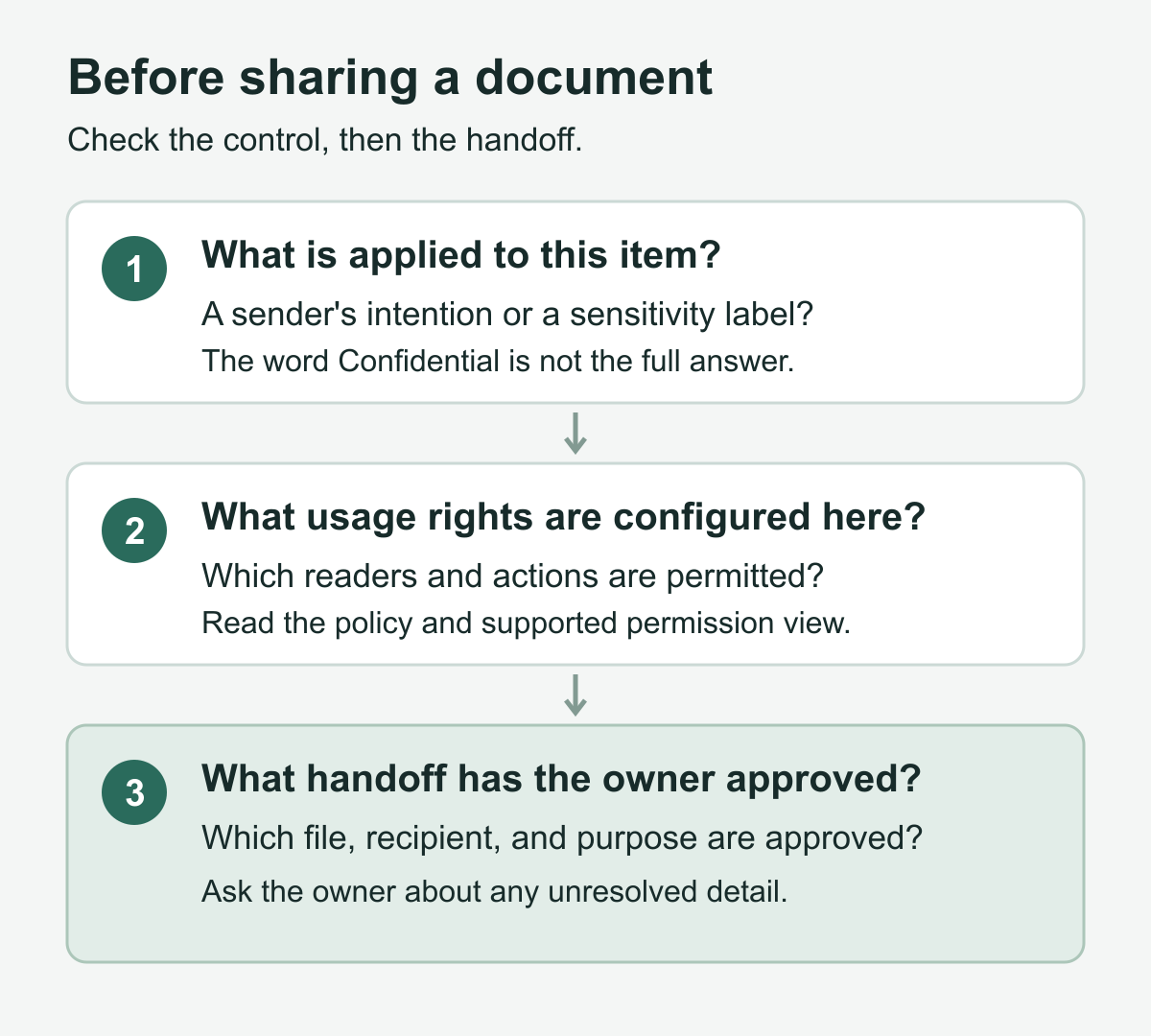
A confidentiality notice, an Outlook sensitivity level, and a Microsoft Purview sensitivity label are not interchangeable. Start by identifying which one you are looking at.
Your workplace defines its own label meanings
Microsoft explains that organizations customize sensitivity labels. A label can classify content without encryption, or apply configured protections. Its name alone is not sufficient.
A useful sharing decision answers four questions
- Which exact document or message needs to leave your team?
- Which person and approved account should receive that material?
- What work must that person actually perform with it?
- Who can approve that disclosure and its transfer method?
First, Identify What “Confidential” Refers To
Outlook sensitivity levels communicate the sender’s intention
Outlook’s built-in Normal, Personal, Private, and Confidential sensitivity levels are different from Purview labels. Confidential does not prevent a recipient manually forwarding the message.
There is a specific exception worth knowing: Microsoft says recipient Inbox rules do not forward or redirect messages marked Private. That is not general protection against disclosure.
If a message needs restrictions on what recipients can do, a request to treat it confidentially is not a substitute for the appropriate protection.
An applied sensitivity label can carry configured protection
A Purview label can combine classification with markings or encryption. Administrators can define different reader and usage permissions, or configure supported labels for users to choose permissions.
A heading or watermark is not a complete permission record. Read the organization’s label description, including any more specific choice beneath a broad category.
Do not translate another company’s label into your own policy by name. Two organizations can use identical wording for different handling requirements.
Encryption and forwarding restrictions are not the same choice
Microsoft’s label encryption guidance distinguishes Encrypt-Only from Do Not Forward. Encrypt-Only can allow recipients to copy, print, and forward; Do Not Forward restricts those actions.
Encryption can enforce access and usage rights, but you still need the configured audience. Some configurations permit any authenticated user rather than a narrow named group.
Consequently, saying that a message is encrypted does not answer whether it has the restrictions your particular handoff requires.
A team or site label has a different scope
A label on a Team, group, or SharePoint site can govern workspace access and sharing. Microsoft documents these container-level controls separately from item protection.
Files do not automatically inherit that container’s sensitivity label or item-level encryption. Other configured policies may label files, but the container label alone does not establish that.
A familiar project workspace therefore cannot answer every question about a particular document. Inspect the item you intend to send, not just the room containing it.
Check the Actual File Before Choosing a Transfer Route
Read the applied label and its explanation
Microsoft’s file-label guide describes where supported apps show the current label and organization-provided description. Available labels and behavior depend on account, app, and organizational configuration.
Supported Windows and Mac apps provide permission views. The web apps do not currently show sensitivity-label permissions; mobile capabilities also differ. Ask IT when your view is incomplete.
A missing icon or unavailable command is not enough to conclude that the file lacks protection. Establish the applicable configuration instead of guessing from appearance.
File-sharing access is another separate check
Review the file’s sharing audience as well as its label. A person’s permissions can come from a group or another link, not just their individual entry.
Separate your own access from the recipient’s needs
You may be able to open the document because of your role. That tells you about your access, not whether a new recipient should receive the same material.
Describe the proposed task before discussing permissions. Someone checking a delivery date may need a short approved extract, not the complete planning document.
Likewise, an external reviewer may need to leave comments without becoming part of an internal conversation. Clarify that request before promising a particular delivery arrangement.
Keep the sharing record specific
Use the following table as a conversation aid, not a replacement for company policy. An unanswered row is a reason to ask the responsible owner.
| Record | Write down | Avoid substituting |
|---|---|---|
| Exact material | The intended file and its relevant version | A folder name that contains several drafts |
| Purpose | The recipient’s actual task and necessary information | A vague request to send everything available |
| Recipient | The intended person and approved business identity | An informal description of a whole partner company |
| Handling decision | The owner’s instruction for this particular disclosure | Your assumption about what Confidential usually means |
| Delivery | The approved place and method for this handoff | Whatever happens to be easiest to open |
| Open question | The remaining issue and who will resolve it | An unexplained delay with no responsible contact |
Three Sharing Situations That Need Different Decisions
These hypothetical examples show how to frame the decision. They are not reports of real incidents or descriptions of a particular organization’s label policy.
A supplier needs one date from an internal planning draft
Imagine a planning document containing delivery dates, staffing discussions, and several unannounced changes. A supplier asks for the date affecting their own work.
You know the supplier and understand the request. The difficulty is not recognizing the person; it is deciding how much of the document belongs in that conversation.
Do not begin by asking how to make the entire file accessible. First ask the document owner whether an approved answer can provide the one necessary date.
Explain what the supplier needs and identify the draft you were considering. That gives the owner a concrete choice between answering the question and releasing the document.
If an approved extract is appropriate, let the responsible person determine its content and handling. Do not create an unprotected copy just to get around restrictions.
Your handoff record should show which material was approved. Recording only that the supplier was approved leaves the central disclosure question unanswered.
The useful outcome may be a short response rather than a file transfer. Finishing the business task does not always require giving someone the underlying document.
An authorized reviewer can read but needs to contribute
Now imagine a reviewer who has been approved to read a confidential proposal. They ask you for an editable version because they want to suggest changes.
Before requesting broader rights, clarify what contribution is needed. A list of comments for the document owner may serve the purpose without changing the review arrangement.
If direct editing really is required, tell the owner exactly why. They can decide whether the review task should change and involve the appropriate administrator.
Do not treat the reviewer’s ability to read as permission to reproduce the proposal elsewhere. Keep the requested contribution within the handling instructions already approved.
For this handoff, record the difference between the present task and the proposed one. “Needs to suggest wording” is more useful than “the protection is broken.”
There may be a legitimate reason to approve editing, or a legitimate reason to decline. The point is to obtain that decision rather than manufacture a workaround.
A project room is labeled, but the departing file needs checking
Finally, imagine a document prepared inside a restricted project room. The team wants to give a consultant the final deliverable without including the working discussion.
The owner identifies the deliverable, but several similarly named files remain in the folder. Begin by agreeing on the exact version intended for the consultant.
Then clarify whether the consultant should receive that file alone or join the project workspace. Those are different business decisions, even if either could support the project.
Do not invite someone into the whole project merely because sharing one deliverable is inconvenient. Ask the owner to specify the intended boundary before access changes are considered.
When requesting help, describe both the project location and the outgoing file. A statement that the room is confidential leaves the actual deliverable unidentified.
Keep the final instruction with the handoff record. If the consultant later asks for another draft, assess that separate request rather than treating the first approval as unlimited.
When Access Is Blocked, Diagnose the Mismatch Without Removing Protection
-
Identify the account and the exact file involved. Microsoft notes that restricted-file access can fail because of account rights or unsupported app capabilities.
Its restricted-file guidance distinguishes those causes. Ask IT to check the relevant account and supported app rather than trying unrelated accounts.
-
Describe the missing task, not just the error. Say whether the recipient cannot open the file or can read it but cannot perform the approved work.
That distinction helps the owner decide whether the issue concerns delivery, access, or the requested task. Do not include document contents in an unrestricted support conversation.
-
Keep the existing restrictions while asking for help. Avoid removing labels, changing classifications, or sending the same material through a personal account to meet the deadline.
A convenient alternate route is not necessarily an authorized one. Give the owner the deadline and ask for an approved way to complete the work.
-
Confirm the revised instruction before resending anything. If the owner changes the intended deliverable or recipient, update the handoff record before preparing the next message.
Do not leave an obsolete attachment in a draft that now describes a different document. Recheck that the message and its actual contents agree.
What to Do If You Already Shared the Wrong Material
-
Tell the responsible internal team without waiting for certainty. Identify the file, intended recipient, actual recipient, transfer method, and approximate time using your approved incident channel.
Separate what you know from what you fear happened. Sending a file is an observation; assuming somebody read every page is a conclusion requiring evidence.
-
Ask the owner to review actual sharing access. For OneDrive or SharePoint, Microsoft documents permission sources and link controls. A person may have access through several routes.
Removing one link or direct permission may leave other access intact. Have the authorized owner review the relevant routes rather than changing unrelated project permissions.
-
State whether you sent a link or a separate copy. Your organization needs that distinction when assessing what can still be controlled and what requires further response.
Preserve the relevant message and follow internal instructions. Do not erase the evidence, ask others to conceal the mistake, or claim the incident is resolved without confirmation.
-
Let the organization decide the appropriate next contact. Your manager, security team, or privacy lead may need to coordinate instructions for the recipient.
Do not promise that changing access retrieves previously copied information. Rights management also cannot prevent every screenshot, photograph, or manual transcription by someone who could view the content.
Use This Short Record Before Your Next Handoff
Keep essential decisions in your organization’s normal workflow. The optional checklist below helps turn a vague permission question into a focused request for the responsible person.
Open the questions for a specific document handoff
- The material I propose to share is this exact version.
- The recipient needs this information for this stated task.
- The responsible owner has approved this particular disclosure.
- The intended recipient will use this approved business identity.
- The proposed transfer follows the owner’s current handling instruction.
- The unresolved question belongs to this named internal contact.
For example, tell the owner that the consultant needs to review the final delivery schedule, while the file also contains internal staffing notes.
Ask whether they approve that complete file or want a different deliverable. This is a more answerable question than asking whether confidential documents are generally safe to send.
Frequently Asked Questions
Does every Confidential label encrypt a document?
Some labels classify content without encryption, while others apply configured protections. Use your organization’s description and the actual item’s protection details, not a universal interpretation of Confidential.
Is Outlook’s Private sensitivity level a confidentiality guarantee?
Microsoft documents a narrow exception for Inbox-rule forwarding and redirection. It is not a general barrier to manual disclosure or a replacement for rights management.
Does Do Not Forward work like Encrypt-Only?
Those options apply different usage restrictions. Encrypt-Only can allow forwarding, copying, and printing, so confirm the protection required for the intended message.
Does a confidential SharePoint site label encrypt every file inside?
The container label does not automatically apply item labels or encryption to its files. Review the particular document and any separate policies governing it.
Does my ability to open a file prove I may send it externally?
Your ability to read is not the owner’s approval for a new disclosure. Establish the intended recipient, material, purpose, and handling instruction before sending.
Should I remove the label if the intended recipient cannot open it?
Keep the protection and ask the owner or IT to resolve the mismatch. Do not downgrade the file or move it to a personal account.
The Bottom Line
Treat Confidential as the beginning of a handling decision, not its conclusion. Identify the applied control, the actual material, and the recipient’s approved task before sharing.
If you already shared the wrong material, notify its owner through your workplace’s incident process. Identify the file, recipient, and delivery method without resending it.

Join the discussion
0 commentsShare your experience or ask a question about this article.
Community experiences
Did this happen to you?
Your experience could help someone recognize the same scam. Submit a private report for our team to review.
I experienced this tooReports are reviewed before publication. Sharing publicly is always your choice.
Discussion
Start the conversation
Have a question or something useful to share? Add the first comment.