

The invitation sounds ordinary: join a small Minecraft server, install its custom mod, and play with a new group. The file even ends in .jar, exactly like many legitimate Minecraft mods.
That familiar format is what makes the Minecraft mod scam dangerous. A Java archive can add features to a game, but it can also run code that has nothing to do with Minecraft.
When the invitation comes from a stranger on Discord and the mod exists nowhere reputable, the real game may be happening outside the game.
Overview
A friendly server invite delivers the malicious file
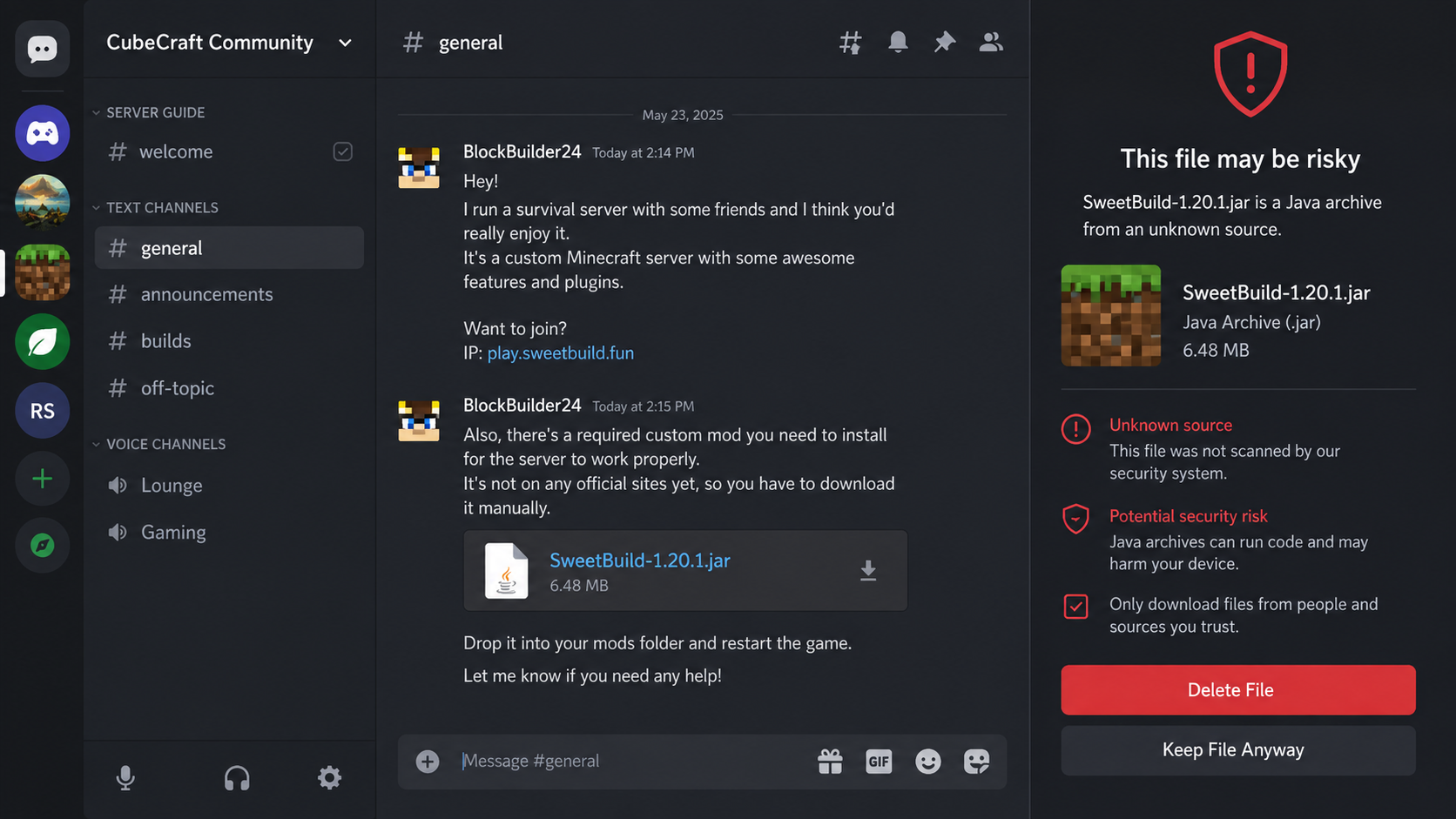
The Minecraft mod scam usually begins in a Discord direct message, gaming server, forum, or private chat. A new contact says they run a survival server, need help testing a build, or want another player for a small community.
Joining requires a custom mod. The operator sends a Java archive directly, links to an unfamiliar file host, or places the download in a Discord channel. They may claim the mod is private, too new for a public repository, or necessary because the server has special features.
A recent victim report described exactly this path. After running the supposed mod, account settings changed and unauthorized charges appeared. The important story is not one server name. It is a repeatable malware-delivery method that can be reused with new accounts, communities, and filenames.
The JAR file can steal far more than a game account
A .jar file is not a harmless collection of Minecraft textures. It is a Java program. When executed by a mod loader or opened directly, it can read files, contact remote servers, launch other components, and interfere with applications on the computer.
Security researchers at G DATA documented a Minecraft lure associated with SugarSMP that spread through Discord and delivered a malicious mod. The analyzed malware targeted browser data, Discord and Telegram information, Steam credentials, cryptocurrency wallets, and two-factor authentication material. It could also modify Discord to maintain access.
That research confirms the larger pattern. A Minecraft invitation can be the social wrapper for an information stealer and remote-control tool.
Changing the Discord name does not change the scam
Malicious communities can disappear, rename themselves, switch invite links, or use compromised accounts to approach new players. A clean search result for one username or server is not proof that the file is safe.
Discord’s own safety guidance tells users not to download programs or run code they do not recognize. The platform also warns that attackers may use suspicious links, fake login pages, and malicious files to compromise accounts.
Warning signs include:
- A stranger quickly invites you to a private Minecraft server.
- The server requires a mod sent through a direct message.
- The file is missing from established mod repositories.
- The sender says antivirus detections are false positives.
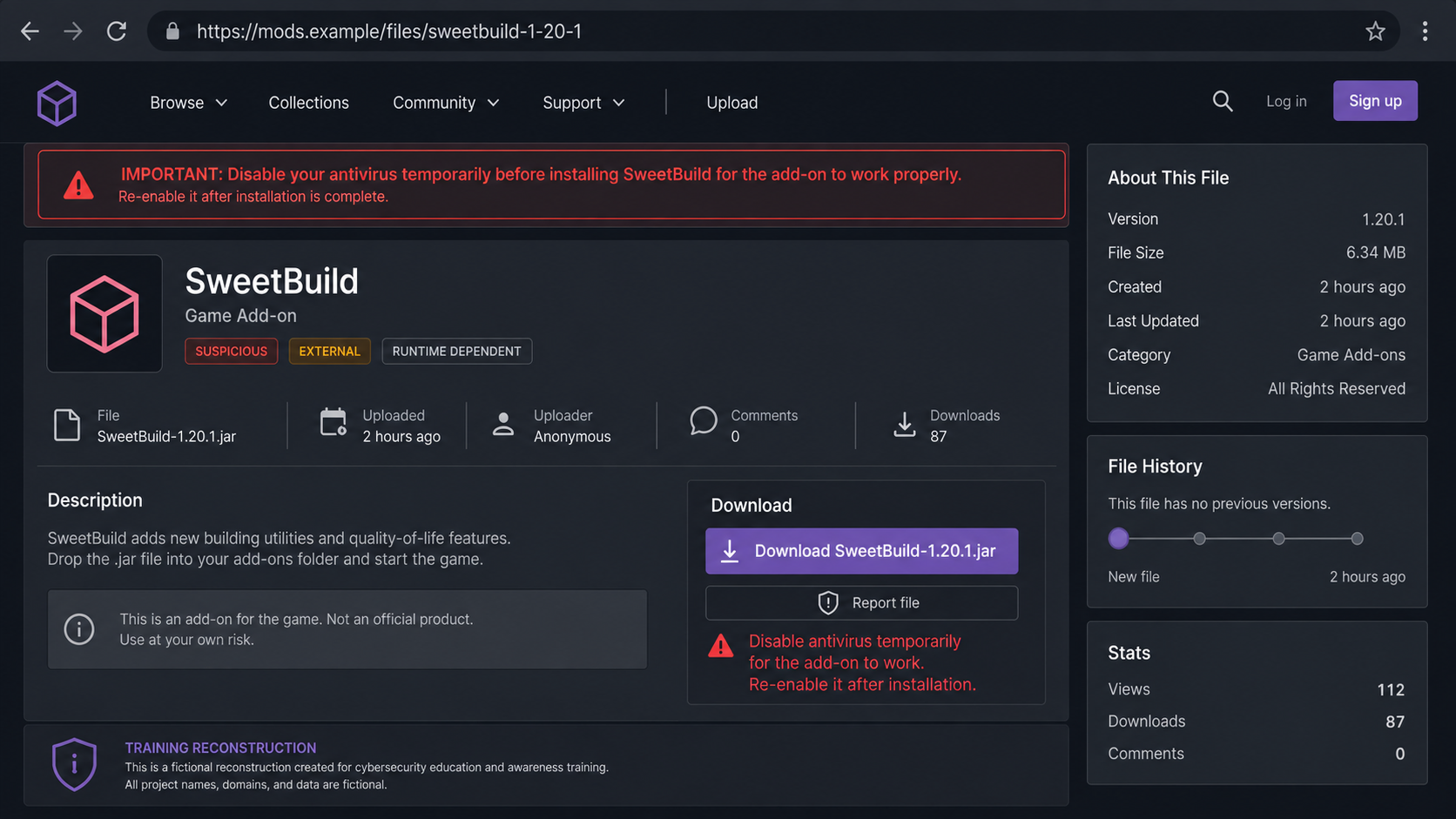
- You are told to disable security software before installation.
- The archive uses a vague or copied project name.
- The server has many members but little real conversation.
- The sender pressures you to launch the game immediately.
- A password, code, or screen share is requested after installation.
How the Minecraft Mod Scam Works
Step 1: The attacker finds players in public communities
Minecraft forums, Discord servers, social media posts, livestream chats, and public profiles reveal who plays the game. The operator does not need a detailed target list. A simple message can be sent to many players until someone answers.
The first conversation may be casual. The stranger asks about a favorite version, compliments a build, or says a mutual server needs another player. This small amount of personal attention makes the later file feel like part of a friendship rather than an unsolicited download.
Step 2: A private server creates a reason for custom software
The attacker says the server uses special maps, voice chat, anti-cheat, shaders, or gameplay mechanics. A custom mod now sounds functional instead of suspicious.
Private software also explains why the victim cannot find reviews. If questions arise, the operator may say the project is in beta or available only to approved members.
Step 3: The malicious JAR is delivered
The file may arrive as a Discord attachment, compressed archive, cloud-storage link, or cloned mod page. Its icon and filename can imitate Forge, Fabric, OptiFine, a popular utility, or a fictional server pack.
A VirusTotal result with few detections is not a guarantee. New or customized malware can initially avoid signatures, and a scan may show only what engines recognized at that moment.
Step 4: Helpful instructions get the victim to run it
The sender explains where to place the file and may troubleshoot Java or mod-loader errors. If Windows or the browser displays a warning, the attacker calls it normal for an unsigned community mod.
Some victims are asked to install an unofficial launcher or additional dependency. Each extra component increases the attacker’s opportunity to run code with the user’s permissions.
Step 5: The malware collects sessions, passwords, and wallets
Once executed, an information stealer can search browser profiles for saved passwords, cookies, autofill data, and cryptocurrency extensions. It can collect Discord tokens, Telegram data, Steam sessions, system information, and files matching wallet or credential patterns.
A stolen session cookie may let the attacker enter an account without immediately typing the password. This is why changing one password from the infected computer may not end the compromise.
Step 6: Account access turns into money and leverage
Saved payment methods can be used for purchases such as Discord boosts, game items, or gift cards. Crypto wallets can be drained. Stolen gaming accounts can be sold, and email access can reset passwords on many other services.
The operator may also search private messages and files for embarrassing material, then demand money. In other cases, there is no conversation at all. The accounts simply disappear and fraudulent charges begin.
Step 7: Compromised accounts recruit the next victims
A message from a known friend is more persuasive than one from a stranger. The malware or operator can use a stolen Discord account to send the same server invitation to contacts and communities.
This recycling makes the campaign look organic. The sender may be a genuine friend whose account is no longer under their control.
Why a Minecraft Mod Can Behave Like Malware
Minecraft Java Edition supports a large modding ecosystem. That flexibility is useful, but it means a mod runs as code on the computer rather than as a passive picture or configuration file.
Legitimate projects reduce risk through public histories, recognizable maintainers, source code, release signatures, community review, and distribution through established platforms. None of those signals is perfect, but together they create traceability.
A file delivered privately provides almost none of that context. The sender controls the explanation, download, installation steps, and supposed support. If the program behaves badly, the server and account can vanish.
Do not treat a popular game as a security boundary. Java code launched for Minecraft can interact with data outside the game when the operating system permits it.
What to Check Before Opening a Mod File
A flashy trailer and an active Discord server say nothing about the safety of a downloadable JAR. Before running a mod, look for a public project history, a recognizable developer identity, and source code that has existed for more than a few days.
Look for independent discussion outside the server that supplied the file. A newly created download page supported only by accounts in one Discord is a serious warning sign.
Check whether the filename, version, and download source match the project’s official listing. Attackers often reuse the name of a legitimate utility or add words such as beta, patch, optimized, or private build.
A file can launch Minecraft normally and still steal browser sessions in the background, so successful installation is not evidence that it is clean.
Upload an unknown file to a reputable multi-engine scanner before opening it, but understand the limit of that check. Fresh or lightly modified malware may not be detected immediately. A clean result should be one piece of evidence, not permission to ignore a suspicious delivery method or an anonymous developer.
Parents should also treat unexpected collaboration offers as account-security events. A child may believe they are helping to test a server rather than installing software.
Keep game accounts separate from administrator accounts, do not store payment cards in the same browser profile, and make sure important email and gaming accounts have multifactor authentication before a stranger ever sends a file.
If a server demands that members disable antivirus protection, ignore a browser warning, or run a command to make the mod work, stop immediately. Legitimate compatibility problems do not require users to hide a file from security tools.
That instruction is often the clearest moment when a friendly gaming invitation turns into a malware delivery attempt.
Company, Address, and Fulfillment Checks
Find the mod through an established source
Search for the exact project on well-known mod repositories and the developer’s verified pages. Compare filenames, hashes, version history, comments, and release dates. Do not let the sender provide every verification link.
Inspect the Discord community, not just its member count
Look for genuine conversations, older announcements, known moderators, and an invite linked from an independent official site. Thousands of silent accounts can be bots, purchased members, or inactive users.
Check the file before execution
Keep the archive closed. Scan it with installed security software and a reputable multi-engine service if privacy allows. A clean result lowers one concern but does not prove an unknown program is trustworthy.
Define what the software should need
A Minecraft mod should not require a Discord token, browser password, cryptocurrency seed phrase, remote desktop session, security exclusion, or administrator access without a specific and independently verified reason. Excessive permissions are a stop sign.
What to Do if You Have Fallen Victim to This Scam
- Disconnect the computer from the internet. This can interrupt active data theft and remote control while you prepare a clean recovery path.
- Use a different clean device for passwords. Start with the primary email account, then Discord, Microsoft, Steam, financial services, and any account saved in the browser.
- Revoke active sessions and tokens. Use each service’s security page to sign out other devices, remove unknown applications, and reset recovery methods. A password change alone may not invalidate every stolen session.
- Protect payment accounts. Contact card issuers and payment providers about unauthorized purchases. Remove saved cards from compromised gaming and chat accounts until recovery is complete.
- Secure cryptocurrency separately. If a wallet seed phrase or private key was stored on the device, move remaining assets from a clean system to a new wallet created with a new seed. Never reuse the exposed wallet.
- Run a full malware scan. Remove the JAR and related launchers, then use Malwarebytes or another trusted security product for a complete scan. If infection is confirmed or uncertainty remains, back up personal documents carefully and consider a clean operating-system reinstall.
- Review browser data exposure. Assume saved passwords, cookies, autofill details, and extensions may have been read. Reset browser synchronization only after the account and device are secure.
- Report the account, server, and file. Preserve the message link, user ID, server ID, invite, filename, file hash, and timestamps. Report them to Discord and the hosting service without publicly redistributing the malware.
- Warn contacts. Tell friends not to trust recent invitations or files from the compromised account. Use another communication channel if Discord access is uncertain.
- Add web protection after cleanup. AdGuard can reduce access to known malicious sites and redirects, but it cannot make an unknown JAR safe.
- Ignore recovery scammers. No Discord stranger can recover accounts or crypto by charging an upfront fee.
Frequently Asked Questions
Are all Minecraft JAR mods dangerous?
No. The format is normal for Java mods. The risk comes from running untrusted code, especially when it is sent privately and lacks a verifiable developer, public history, or reputable distribution page.
Can downloading the file infect me without opening it?
Most malware needs to be executed or exploited through vulnerable software. If you only downloaded the archive, do not open it. Delete it, update the system, and scan the device.
Why did antivirus show no warning?
New, customized, or obfuscated malware may not be recognized immediately. Security tools are important layers, not certificates that unknown programs are safe.
Does changing my Discord password remove the malware?
No. A password change can help invalidate account access, but it does not remove a malicious program from the computer. Clean the device and revoke sessions before trusting it again.
What if the file came from a friend?
Verify through another channel. The friend’s account may be compromised and sending the lure automatically. Ask a specific question and confirm the download from an independent official source.
Should I publish the malicious file so others can test it?
No. Preserve it safely for a security vendor or platform report, but do not redistribute a live payload. Share hashes, filenames, and sanitized evidence when appropriate.
The Bottom Line
The Minecraft mod scam turns a normal part of gaming into a route for account theft, financial fraud, and extortion. The file can look exactly like a real mod because malicious and legitimate Java archives use the same format.
Do not run a private mod simply because a friendly Discord user explains it well. Verify the project outside the conversation, keep security warnings enabled, and treat any executed unknown JAR as a possible system compromise rather than a single lost game account.

Join the discussion
0 commentsShare your experience or ask a question about this article.
Discussion
Start the conversation
Have a question or something useful to share? Add the first comment.