

Curious whether MyMobileMachine.com – also known as Automatic Cash Machine, Dumb Money, or My Phone ATM – is a legitimate opportunity or just another online scam? This comprehensive My Mobile Machine review cuts through the hype. We break down everything: from deceptive ad tactics to recurring charges – and most importantly, how to avoid falling prey. Keep reading to arm yourself with the knowledge you need.
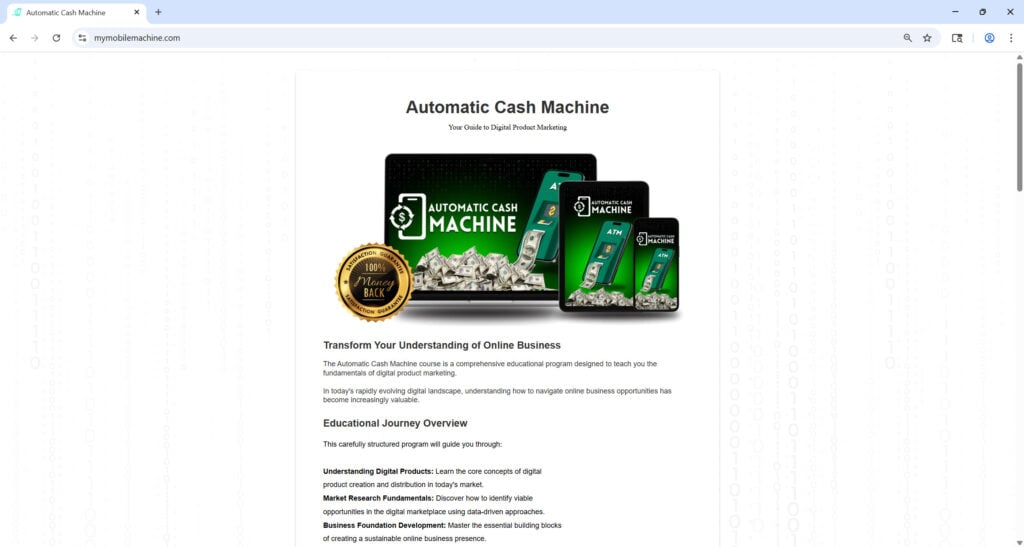
Scam Overview
The myth of turning your smartphone into a money-printing machine is nothing new. Versions like Automatic Cash Machine, Cash Phone, and Phone ATM continually reemerge under different names – but follow the same playbook.
1. The Ad Sales Pitch
- Scammers use emotionally charged video ads to grab attention – imagine someone getting laid off or struggling financially, only to discover this “7-minute phone trick” that earned them thousands.
- Common promises include: “Tap your phone for 7 minutes and earn $1,000+ per day” with zero selling, no advertising, and supposedly zero risk.
2. The Rebranding Tactic
- Once a name gets flagged or scrutinized, they pivot to a new one – My Mobile Machine, Phone ATM, Cash Phone, Automatic Cash Machine, etc.
- Same visuals: stock footage of cash, laptop, and smartphone displays; the landing pages look nearly identical.
- This constant rebranding helps them avoid negative reviews and continue attracting new victims.
3. The Consistency in Deception
- Despite rebrands, the content remains superficial: big earnings claims, vague references to “algorithm” or “automated system.”
- Frequently appears as “educational package” or “digital marketing course” priced at $47–$67.
- What you get inside is often a repackaged PDF and a handful of public YouTube links, nothing revolutionary. The real value sits with their affiliates and upsellers, not the purchaser.
4. License to Charge Repeatedly
- Many victims report recurring charges – $47 monthly or upsells for “premium access” – even after requesting refunds.
- Credit card companies eventually block them, but not before draining bank accounts and raising emotional stress.
5. Affiliated Cookie-Cutter Sales Funnel
- Landing pages include fake countdown timers, bogus testimonial counters (“29 people watching now!”), and stock imagery.
- No physical address, no transparent contact info. If they pretend to include customer service, it’s often just an email funnel.
6. Why It Gains Traction
- The allure of passive income during financial uncertainty is powerful.
- Many people don’t research before buying, which allows these scams to propagate quickly within online communities.
This scam has been also investigated by Jordan Liles on his YouTube channel, where he offers a detailed video on the subject. We recommend watching his content for a comprehensive understanding of the scam.
Next, let’s break down exactly how scammers carry out this scam from start to finish.
How The Scam Works
Step 1: Clickbait Ad Discovery
- You come across a social media or YouTube ad with shocking claims of money-making success in minutes.
- Ads feature dramatic visuals – fast cash, luxury lifestyles, AI/algorithm lingo.
Step 2: Redirect to Sales Funnel
- The ad directs you to a slick landing page on MyMobileMachine.com or similar domain.
- You’re greeted with an emotional video sold as a story – “day one I paid off debt…week three I quit my job.”
- Key familiar lines: “Tap your phone 7 minutes daily,” “no selling, no recruiting,” “uses proprietary AI algorithm.”
Step 3: Emotional Manipulation
- The video triggers financial insecurity and FOMO (fear of missing out).
- Fake urgency: “limited seats available,” “spots almost gone” – all intended to make you click impulsively.
Step 4: Paid Access
- At the end, you’re prompted to enter your email, phone, and payment to unlock access. The fee: typically $47.
- A 60-day “money-back guarantee” is promised – often impossible to use in reality.
Step 5: Member Portal Access
- You receive login credentials and find a basic member area with:
- A PDF e-book recycling free online advice.
- A recorded webinar or robotic narration about generic affiliate marketing or drop-shipping.
- No actual tools, no platform, no proprietary system.
Step 6: Upsells and Subscriptions
- Shortly after the initial purchase, you receive offers to upgrade – for “advanced training” or “priority coaching” costing hundreds or thousands more.
- Even if you refuse, your card may still be billed due to prechecked boxes or hidden subscription agreements.
Step 7: Recurring Charges
- Victims report multiple charges – monthly $47–$67 – or even larger upsells from partner companies.
- Scammers may use third-party processors, making it difficult to track or dispute.
Step 8: Support Illusion
- Member area may provide an email form or chatbot link. Replies are rarely helpful – mostly generic customer-service responses.
- Refund requests are ignored or delayed. Some victims report escalating to PayPal disputes.
Step 9: Rebranding & Repeat
- Negative reviews appear; current domain disappears.
- New site launches a few weeks later with a different brand but identical tactics.
- Scammers rely on affiliates to promote under whichever name is trending.
What to Do if You’ve Fallen Victim
- Document Everything
- Save screenshots of ads, landing pages, receipts, and member area content. This supports your claim.
- Contact Your Bank or Card Issuer Immediately
- Initiate a chargeback for unauthorized or deceptive charges.
- Request a Redemption or Refund
- Email customer support demanding a refund under the 60-day guarantee. Be persistent.
- File a Fraudulent Charge Dispute
- If ignored or declined, escalate through your financial institution’s dispute resolution process.
- Monitor Your Financial Statements
- Watch for recurring charges – scammers often run ongoing payments even after cancellation.
- Change Passwords & Secure Accounts
- If you provided personal info, change passwords and enable two-factor authentication.
- Report to Authorities
- File a complaint with your consumer protection agency (e.g., FTC in the U.S., Competition and Markets Authority in the U.K.).
- Warn Others
- Leave honest reviews on platforms like Trustpilot and site-specific forums to expose the scam.
- Consult Professional Advice if Needed
- For unauthorized withdrawals, consider getting legal advice or contacting a financial advisor.
- Stay Educated & Watch for Rebranded Versions
- Monitor for new names like “Pocket ATM System,” “WiFi Profits App,” or “Mobile Money Machine.” Spread awareness so others are informed.
Frequently Asked Questions About the My Mobile Machine Scam
What is MyMobileMachine.com and is it a scam?
MyMobileMachine.com claims to offer a simple system or course that teaches you how to make money online using your phone. However, investigations and user reports show it is part of a broader scam operation known as the “7-Minute Phone Trick.” It promises effortless income but delivers vague content, misleading upsells, and in some cases, recurring unauthorized charges.
Is Automatic Cash Machine a legitimate course or a scam?
Automatic Cash Machine is just one of many names used by scammers to promote the same scheme. While it is framed as a legitimate digital product marketing course, the content is shallow, generic, and often repurposed from free sources. The goal is not to educate but to trap victims in a cycle of upsells and fake promises.
Why do they charge $47, and what do you actually get?
The $47 payment is marketed as a one-time fee for accessing an online system or training program. In reality, it typically gives access to low-quality PDFs, vague video content, and recycled affiliate marketing advice. Users report receiving little to no actionable instruction on actually earning money.
Are there hidden or recurring charges after the $47 payment?
Yes, many users report recurring charges ranging from $47 to $67 monthly, often without clear consent. These charges are frequently disguised as subscriptions or “bonus features” that were never requested. Victims also note difficulties canceling or getting refunds.
How can I get a refund from MyMobileMachine.com?
You can try contacting their support through the email provided in your confirmation or access page. If they do not respond or refuse a refund, immediately contact your bank or payment provider to initiate a chargeback. Many victims have successfully recovered funds by disputing the transaction as fraud.
Is there any real system or app behind MyMobileMachine.com?
No. Despite the flashy marketing about “automatic income,” there is no proprietary system, app, or technology involved. The so-called method is a loosely described and incomplete guide to affiliate marketing that lacks substance or proven results.
How can I spot similar scams in the future?
Look out for red flags such as:
- Promises of instant money with no skills or effort
- No clear explanation of how the system works
- Fake countdowns or urgency tactics (“only 3 spots left”)
- Reused templates or websites across multiple domains
- Rebranded names with identical visuals and copy
Is My Mobile Machine related to other scams like Pocket ATM, WiFi Profits, or 7-Minute Trick?
Yes. These are all different brand names used by the same network of scammers. They often launch new names after negative reviews surface to stay ahead of consumer watchdogs and search engine warnings.
Can I trust the testimonials shown on their website or sales video?
No. Most testimonials are either stock photos, actors, or AI-generated avatars. The earnings they claim are not verified and often have fine print disclaimers stating the results are not typical or guaranteed.
What should I do if I already gave them my information?
If you submitted personal or payment info, take the following steps:
- Cancel the card used for the transaction.
- Monitor your bank account for suspicious activity.
- Contact your bank to dispute any charges.
- Change any passwords associated with the email you used.
- Report the scam to consumer protection agencies like the FTC, BBB, or your country’s equivalent.
The Bottom Line
MyMobileMachine.com – and all its rebranded versions – relies on time-tested internet scam tactics: emotional manipulation, vague hype, recurring charges, and never delivering real tools or systems. The only real beneficiary? The scammers running the show and their affiliates.
If you’re interested in making money online, legitimate routes exist – but they require consistent effort: freelancing, content creation, e-commerce, advertising, and real services. Never buy into get-rich-quick systems that demand payment upfront, promise huge returns in minutes, and refuse to provide transparent evidence. Stay informed, think critically, and steer clear of hype-driven traps.








