


NosyPeek promises a shortcut into someone else’s Snapchat activity. Enter a username, choose the private information you want, and the page appears ready to reveal it.
Before trusting those blurred pictures or completing anything to unlock them, look at where the supposed results actually come from.
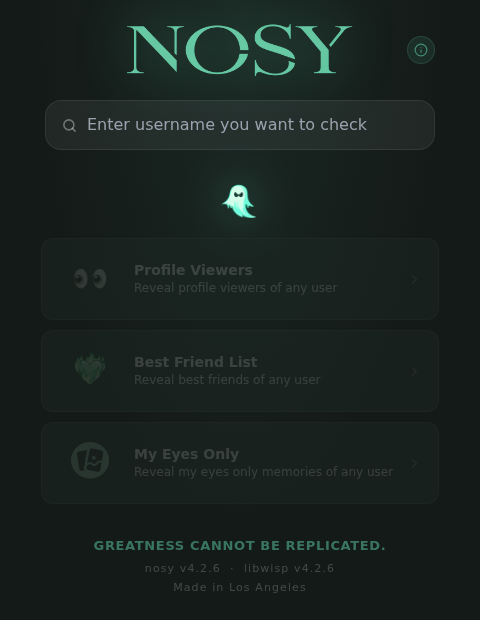
Overview
What NosyPeek promises
NosyPeek, at nosypeek.com, advertises three Snapchat lookups: profile viewers, a best-friends list, and private Memories stored in My Eyes Only.
The attraction is access without the account owner’s cooperation. The site’s own descriptions promise information about any username, not information you have permission to retrieve.
What supplies the results
The captured application builds its previews from preset names, generated avatars, calculated scores, and stock photographs. Those ingredients are inside the public website code.
A username helps shuffle the presentation. It does not turn those sample names or pictures into evidence about a real person’s Snapchat account.
Where the page sends you
The result overlay sends visitors to a separate key route at nosypeek.site. Meanwhile, the captured version’s Continue button is permanently disabled in its code.
- The apparent private information is generated locally.
- Blur conceals sample material, not demonstrated Snapchat records.
- A key prompt moves the visitor toward another destination.
- Completing outside offers cannot authenticate an invented preview.
Do not use NosyPeek to investigate another person or recover private photographs. Its manufactured results are enough to reject the service without guessing about further harm.
The Names, Avatars, and Scores Are Built Into the Page
The strongest finding is not a missing business address or an unfamiliar domain. It is the way NosyPeek produces the information it wants you to trust.
The public script contains a fixed collection of names. Its friend-list function shuffles that collection and constructs eight entries for the displayed account.
The shuffle is seeded from the supplied username. In ordinary language, the username becomes a number that helps choose the same-looking collection for that input.
This can make the display feel personalized. Different text can produce a different arrangement, while repeating an input can make the output appear consistent.
Neither behavior establishes a connection to Snapchat. A calculator can generate consistent answers from an input without knowing anything about the person associated with it.
The avatars are also generated. The page constructs DiceBear avatar addresses rather than supplying verified profile photographs belonging to the supposed friends.
Scores accompanying the entries come from local calculations too. A convincing number does not become a real interaction count because it sits beside a username.
This distinction matters if you arrived worried about a relationship, a child’s account, or someone viewing your profile. The presentation can encourage conclusions about innocent people.
Do not confront somebody using names or scores shown by this tool. The code explains their appearance without requiring those people to have interacted with anyone.
NosyPeek therefore fails before any debate about its accuracy percentage. A list assembled from sample names is not an imperfect version of a genuine private-account lookup.
The My Eyes Only Preview Uses Stock Pictures
The private-photo claim deserves particular attention. My Eyes Only is the Snapchat feature people use to protect selected Memories behind a separate passcode.
NosyPeek’s corresponding display selects twenty pictures from a hardcoded list of Pexels image addresses. It also generates video-like duration labels and applies a blur.
That construction reverses the impression created by the screen. The pictures are not demonstrated private photographs that were retrieved first and hidden afterward.
They are available sample images being presented through a private-gallery design. The blur prevents visitors from easily recognizing what is underneath.
A blurred portrait, room, or landscape is especially easy to interpret through expectation. Someone already anxious about an account may imagine details the picture never established.
Do not send more money or information to sharpen such a preview. Unlocking its display would not change where its underlying pictures originated.
In this version, the actual picture selection and formatting are visible in the delivered application. That is direct evidence about the advertised tool, not a theoretical warning.
The finding concerns the captured build. It does not require claiming that every site with a similar name has identical software or an identical operator.
How the NosyPeek Scam Works
Step 1: Turn curiosity into a private-account lookup
The homepage asks for a username and organizes its features around information visitors may believe is hidden from them.
That is an effective hook because it offers something the ordinary Snapchat interface does not simply hand to a stranger.
The first decision should be whether the service can substantiate that access, not whether you are willing to complete one small task.
Step 2: Make sample information look specific
Names, avatars, scores, and gallery tiles give the result a finished shape. The username-based calculations make that shape seem connected to the account requested.
However, the inspected functions generate the material locally. They do not establish that the displayed friends, viewers, or photographs came from that Snapchat account.
A polished interface can hide this gap. Visual detail is persuasive precisely because visitors cannot immediately compare the alleged private data with an authoritative record.
Step 3: Put the supposed answer behind a key
The result overlay points its Receive Key control to nosypeek.site/cl/i/1xj37d. That is a separate destination from the initial nosypeek.com page.
The important change is practical: you are no longer simply reading a result. You are being encouraged to take another action to obtain the promised answer.
The initial preview has already failed the authenticity test. An outside requirement cannot repair that failure, whatever the next page asks you to do.
Step 4: Keep the reveal out of reach
The captured overlay defines its Continue control as disabled. This is an explicit setting in the application, not a conclusion drawn from one slow loading attempt.
There is no demonstrated working unlock in that code path. Waiting longer or repeating the same task is not a sound response to a disabled control.
We did not acquire a key or complete an outside offer. The confirmed deception is the manufactured private-data display, not an unobserved claim about every downstream page.
What Snapchat Actually Says About Private Memories
Snapchat’s My Eyes Only support guidance explains that forgetting and resetting the passcode deletes the Snaps stored under the old one.
Support cannot recover that forgotten passcode or restore those deleted Snaps. A website promising a stranger’s protected gallery should not be mistaken for an official recovery service.
This is not a reason to reset your passcode as an experiment. Resetting it can destroy the very content you want to keep.
If your problem concerns your own account, use Snapchat’s app and support pages directly. Keep recovery separate from a third-party site’s claim to expose someone else’s information.
Snapchat also warns about unauthorized apps and plugins that use account credentials and can put accounts at risk.
That official warning does not mean NosyPeek was observed stealing a password. It explains why a request for credentials or an unofficial plugin would require a different response.
You should not provide a Snapchat password, verification code, recovery code, or My Eyes Only passcode to prove that you qualify for a private-data reveal.
Do Not Treat the Preview as Proof of Hacking
Seeing your username above a blurred gallery can be frightening. Here, the local sample-data functions provide a much more direct explanation than an account breach.
Someone can put a publicly visible username into a webpage without controlling the corresponding account. A matching name at the top does not authenticate everything underneath.
Likewise, an invented friend’s name is not evidence of a secret conversation. Do not spread screenshots as accusations or use them to demand access to another person’s account.
If someone sends you a NosyPeek screenshot as a threat, preserve the message. Check actual account alerts and sessions through Snapchat rather than accepting the screenshot’s story.
Do not pay a stranger to remove a supposed leaked gallery based solely on this interface. Payment would not establish that the alleged gallery ever existed.
There are separate situations involving genuine stolen accounts or intimate-image abuse. Those require the real messages, account activity, and relevant platform reporting tools, not speculation from sample tiles.
The sensible distinction is between evidence of unauthorized access and a display designed to suggest access. NosyPeek’s captured previews fall into the second category.
What to Do If You Used NosyPeek
- Stop at the key gate. Close the page instead of repeating tasks. The apparent private results are manufactured, so they are not a reason to continue.
- Keep the relevant record. Save the page address, messages that directed you there, and any offer or payment receipt. Do not collect another person’s private information.
- Separate a username from a password. Typing only a public username is not the same as handing over account credentials. Base your response on what you actually disclosed.
- Secure credentials you did disclose. If another page received your real password, change it through the genuine service. Change reused passwords on affected accounts too.
- Review actual account activity. Check Snapchat’s official security settings for unfamiliar sessions or alerts. Remove access you do not recognize and enable available two-factor authentication.
- Check anything you installed. Remove an unwanted app, browser extension, or profile through your device’s normal controls. Record its exact name before removing it.
- Find the real merchant if you paid. Use the receipt and statement descriptor. Request cancellation or a refund from that merchant rather than guessing which page billed you.
- Escalate an unauthorized charge. Contact the payment provider using its official app or statement number. Explain the actual transaction and provide your saved evidence.
- Ignore paid unlock and recovery pitches. A person offering a secret replacement key or guaranteed account recovery may be extending the same problem through another channel.
Match further cleanup to the exposure. A page visit alone does not justify wiping a phone, deleting protected Memories, or paying for a security product.
If you installed unfamiliar software or now see persistent unwanted behavior, follow a removal guide for that actual app and operating system, not a supposed Snapchat unlock.
If you merely entered an email into an outside offer, watch for related messages and avoid their links. That alone is not a reason to change every password.
For a trial or subscription, keep the cancellation confirmation and check the next statement. Uninstalling an app does not necessarily cancel a separate paid agreement.
Describe what happened accurately when reporting it. A fabricated-results service, an unwanted subscription, and a stolen Snapchat account are different problems with different evidence.
The Connecting Animation Is Driven by a Timer
There is another revealing detail in NosyPeek’s code. Before showing its previews, the application runs a loading sequence lasting roughly thirteen seconds.
Preset messages describe loading, connecting to the supplied username, and opening the selected viewer. The username is inserted into those messages by the page itself.
The transitions follow timers. They do not wait for a demonstrated Snapchat response confirming that an account’s private records were retrieved.
When that interval ends, the application selects the corresponding local preview component. This connects the persuasive waiting screen directly to the sample-data functions already described.
To a visitor, the delay may feel like a search taking place. In the inspected implementation, elapsed time is what advances the display toward its result.
The practical lesson is specific: a message claiming a connection is not a connection record. Do not confuse a familiar username and a short wait with authenticated access.
NosyPeek’s connecting screen, private-looking preview, and key barrier are parts of one presentation. None supplies a reason to complete another offer or confront the account owner.
Our LockVade investigation examines another Snapchat lookup pitch. Similar promises warrant scrutiny, but they do not establish common ownership between the sites.
Frequently Asked Questions
Is NosyPeek a real Snapchat private-data viewer?
No. The captured application manufactures its previews from preset names, generated avatars, calculated scores, and stock images. It does not demonstrate the private access it advertises.
Are the blurred My Eyes Only pictures real?
The inspected version builds that gallery from a hardcoded Pexels image list and adds blur. Those pictures are not demonstrated Memories belonging to the username entered.
Why can different usernames produce different-looking results?
The page uses the username to seed local calculations. That can change the selection or order without retrieving any real friends or private photographs.
Will completing the key requirement make NosyPeek work?
Do not complete it. The preview is already fabricated, and the captured Continue control is disabled. There is no demonstrated legitimate reveal worth pursuing through that gate.
Does a NosyPeek screenshot mean my Snapchat was hacked?
Not by itself. Check genuine security alerts and account activity through Snapchat. A username displayed over sample results does not prove unauthorized access.
What if I already gave another page information or money?
Act on the actual exposure: secure disclosed credentials, remove unwanted installations, and use receipts to identify charges. Contact your payment provider about unauthorized transactions.
The Bottom Line
Do not use NosyPeek or complete tasks to unlock its results. The captured application builds the supposed private information from sample material rather than demonstrated Snapchat records.
If you already continued, deal with the information, installation, or payment you actually provided. Use Snapchat directly for account security and leave someone else’s private account alone.

Join the discussion
0 commentsShare your experience or ask a question about this article.
Discussion
Start the conversation
Have a question or something useful to share? Add the first comment.