


A page promises to show who someone talks to on Snapchat. All it appears to need is a username, and the lookup is advertised as free.
That is the invitation behind LockVade.online. Before curiosity carries you past the first button, it is worth understanding what the page actually offers.
Overview
A public username is being sold as a doorway to private activity
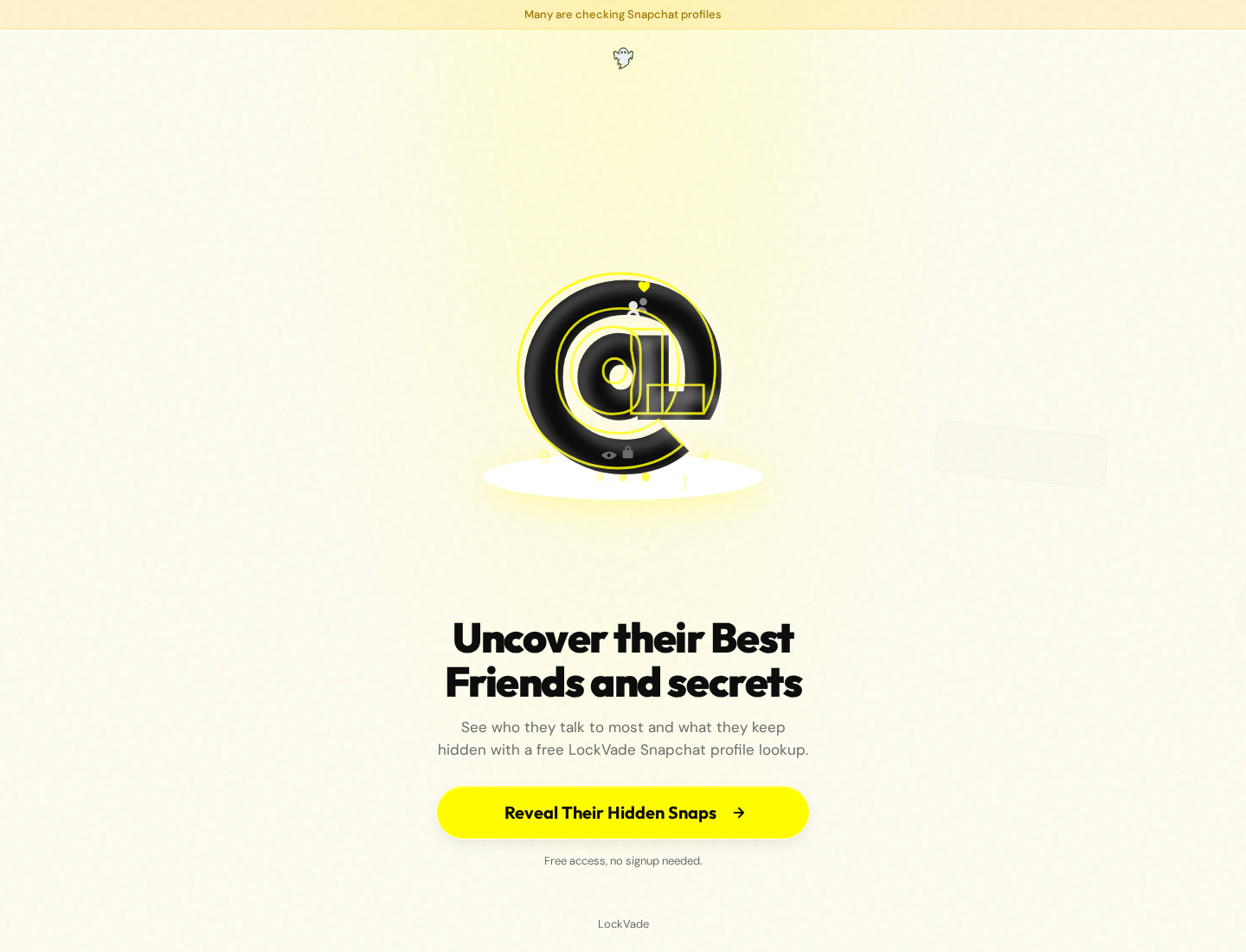
LockVade’s landing page promises information about a person’s Best Friends and hidden Snapchat activity. It describes free access without an initial signup.
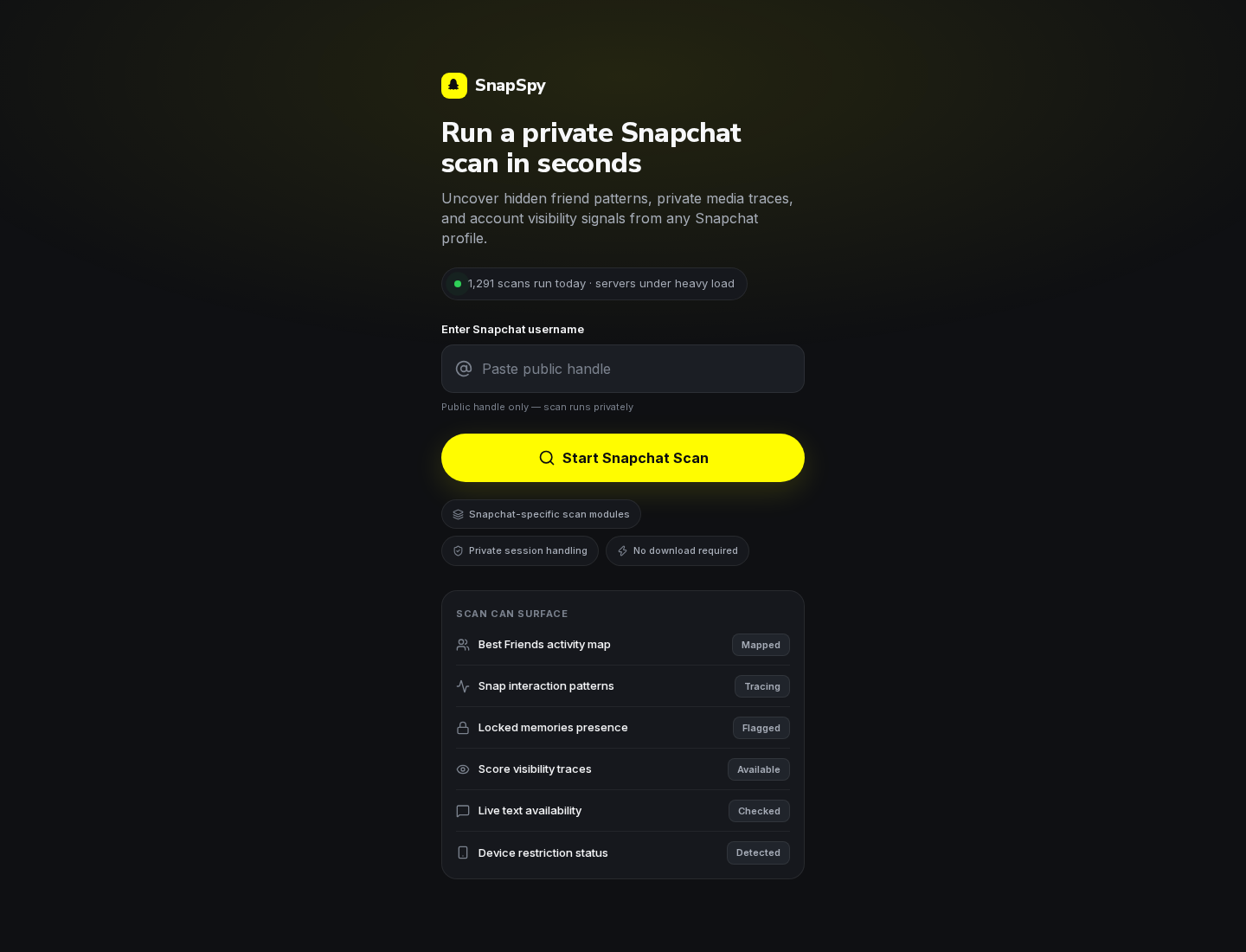
The linked page uses SnapSpy branding and asks for a Snapchat username. Its advertised categories include interaction patterns, locked-memory presence, and live-text availability.
Those labels suggest access far beyond an ordinary public-profile search. The page does not demonstrate an authorized connection to the private information it describes.
The important distinction is a claim versus an authenticated result
The page includes messages about matching a profile, inspecting archive references, preparing results, and completing a final check to reveal findings.
Text describing a completed scan is not evidence that Snapchat supplied account data. A convincing interface can display progress labels without proving their underlying meaning.
No username was submitted for this investigation. The findings concern the public offer and its page content, not a successful attempt to inspect someone else’s account.
What you should not hand over for the promised reveal
- Your Snapchat password, a login code, or a My Eyes Only passcode.
- Card information for a supposedly free identity or age check.
- Permission to install an unknown profile viewer, browser extension, or remote-access tool.
- Personal details requested by another offer in exchange for unlocking alleged private results.
Do not use LockVade to seek private Snapchat information. Its promotional claims do not provide a trustworthy basis for sharing data, installing software, or paying.
What a Snapchat Username Can and Cannot Establish
A username can help locate an account. It does not grant another website permission to enter that account or inspect content protected by its owner’s settings.
Public profiles may expose information their owners deliberately share. Public visibility is different from access to private conversations, restricted Memories, or a hidden relationship map.
This distinction matters because a site can mix ordinary public information with more impressive claims. A familiar avatar does not authenticate everything displayed beside it.
A correct display name likewise cannot prove that a supposed message trace came from Snapchat. Basic recognition and private access are separate questions.
Snapchat’s My Eyes Only guidance explains that the feature requires its passcode. Support cannot recover its protected contents when that passcode is lost.
LockVade’s reference to locked-memory presence should not be read as proof that it can defeat that protection. A category label is not an authenticated technical capability.
Be especially skeptical when a tool promises useful secrets about any account, without the owner authorizing access or the service explaining a credible lawful data source.
How the LockVade Lookup Funnel Works
Step 1: The landing page makes a private question feel answerable
The first page focuses on hidden Snaps and social relationships. It is designed around the question a curious visitor already wants answered.
Calling the lookup free lowers the apparent cost of continuing. A person may decide there is little to lose because no payment is requested immediately.
But the value being requested can change later. Your time, contact information, account access, or participation in another offer can all become part of the journey.
Evaluate the claim before the first click. The absence of a price does not make an unsupported private-access promise more credible.
Step 2: SnapSpy branding adds a technical-looking scan
The next page lists scan modules and asks for a public handle. It emphasizes private session handling and says no download is required.
These assurances describe the presentation. They do not identify a Snapchat-approved integration, a data provider, or permission from the person being searched.
The page also displays a daily scan counter and a heavy-load message. Those elements can imply a busy service without proving that its findings are genuine.
Do not confuse the appearance of an analytical tool with a verified ability to access the material it names.
Step 3: Several categories imply that something has already been found
The public page contains status terms such as mapped, flagged, checked, and indexed beside categories of alleged account information.
Later interface text refers to preparing a private result view and finding interaction trails. These are the page’s descriptions, not independent findings about a real account.
Before believing such a result, ask what was actually verified. A number, a graph label, or an animated stage does not answer that question.
A visitor should never use unverified output from a third-party lookup to accuse, threaten, or confront another person.
Step 4: A final check stands between curiosity and the promised information
The result section says a protected view has been prepared and asks the visitor to complete a check. The explanation invokes bots and server costs.
That is the moment to reassess, not to assume one final task will make the earlier claim true. A verification label is not a safety guarantee.
If a separate offer asks for a survey, registration, download, or card, assess that transaction on its own terms. It cannot authenticate the alleged Snapchat findings.
The exact final destination was not followed here. No particular subscription price, charge, or successful delivery of private data should be inferred from this article.
Snapchat Is Not the Service Making These Promises
A yellow design and a familiar ghost symbol can encourage an association with Snapchat. They do not establish that Snapchat operates or endorses the page.
Snapchat does allow certain third-party integrations. That fact should not be stretched into approval for a website promising access to another person’s protected activity.
Its official third-party app guidance warns that unauthorized tools can expose accounts and cause access problems.
A genuine connection flow should make clear which service is asking, which account is authorizing it, and which permissions are being granted.
An unrelated website asking you to type a Snapchat password is not the same as a secure authorization process. Do not share the password to test the distinction.
The right conclusion is not that Snapchat’s own service is a scam. The problem is a separate site’s unsupported promise about what it can reveal.
Why These Pages Can Be Persuasive Without Proving Anything
A private question creates a powerful reason to keep going. Once you have spent time waiting, abandoning the process can feel like wasting that effort.
A final check can turn that feeling into pressure. You may think the answer is already waiting and only one small obstacle remains.
Progress graphics make the process feel measurable. But a progress bar measures only what its developer chooses to display unless independent activity supports it.
Similarly, labels such as secure session or protected delivery can sound protective while explaining little about who operates the service or receives submitted information.
Look for something more concrete: an identifiable operator, a meaningful privacy policy, an explained data source, and a service that respects the account owner’s permissions.
The examined landing and scan pages do not supply that level of accountability. That is a reason to leave, not a reason to experiment with more information.
Is the Risk a Scam, Malware, or a Subscription?
These are different possibilities and should not be bundled together. The public evidence supports a warning about the private-access pitch and its result-gating presentation.
It does not establish that every visitor receives malware, that every onward offer charges money, or that a specific recurring payment is universal.
If you entered information on another page, identify that page separately. Its operator and billing conditions may differ from the lookup that sent you there.
A card request deserves attention even if the amount shown is $0. A trial or verification transaction can have later conditions that need to be understood.
Conversely, visiting a page without installing anything does not prove infection. The response should follow what you actually did, rather than the most frightening possibility.
Keep the central verdict clear: do not trust this offer as a way to obtain private Snapchat information, and do not pay to pursue the alleged reveal.
What to Do If You Used LockVade
-
Stop the lookup and close related offer pages. Do not keep completing checks because an earlier screen said the results were ready.
Save the address and any messages already received if you need a record. There is no need to submit another handle or continue the funnel for proof.
-
List exactly what you disclosed. Separate a public username from your email, telephone number, account password, login code, identification, or payment information.
This makes the next steps manageable. A public handle alone is not equivalent to giving someone access to your Snapchat account.
-
Secure Snapchat if its credentials were entered. Open the official app or genuine account service directly, change the password, and review available session controls.
Check your recovery email and phone details. Enable two-factor authentication, and reject unexpected login prompts rather than approving them to finish a supposed check.
-
Replace reused passwords on other services. Start with the email account that receives password resets. Choose a different strong password for each account.
Do not send anyone a My Eyes Only passcode. If a page claims that sharing it will help protect or inspect an account, end the interaction.
-
Investigate a payment through the actual merchant. If you entered card details, find the receipt, full amount, merchant descriptor, and any trial or renewal wording.
Request cancellation in writing if needed. For unauthorized charges or an unresolved misrepresentation, contact your card provider promptly and ask about its dispute process.
-
Remove anything installed along the way. Review recent apps and browser extensions. Uninstall an unwanted viewer or cleaner through the normal supported controls.
If suspicious software was downloaded to Windows, a Malwarebytes Free scan can help check for unwanted components. Review findings instead of blindly deleting system files.
AdGuard can reduce exposure to advertising and tracking. It cannot unlock Snapchat content or undo credentials already shared.
MalwareTips may earn a commission through software links. Scanning is conditional on your exposure, not a requirement merely because you read the landing page.
-
Remove unwanted browser permissions. If you allowed notifications, open your browser’s site settings, find the relevant domain, and revoke that permission.
Notification spam can imitate a security alert without demonstrating a device infection. Do not install a tool advertised by those alerts.
-
Seek help for threats without sending another payment. Preserve blackmail messages and report them to the platform and appropriate authorities.
A claim that someone has private material is not proof they obtained it. Do not provide more images, credentials, or money to test whether the threat is real.
If Someone Uses a Lookup Result Against You
An image of a supposed friend map or private activity report can look personal without being authentic. Ask what genuinely connects it to your account.
Do not accept a third-party site’s status labels as proof of misconduct. Such output lacks the context and authentication needed for that conclusion.
If someone is harassing you, tighten relevant privacy settings, block the contact when appropriate, and retain threatening messages before reporting them.
Account protection is useful regardless of the site’s story. Review unfamiliar sessions and recovery details through Snapchat itself, not through the accuser’s link.
If you are worried about your own saved content, use official support instructions. Do not erase Memories or reset a forgotten private-content passcode without understanding the consequences.
Most importantly, do not let a suspicious website become the authority in a personal dispute. Unsupported technical language is not reliable evidence about another person.
Frequently Asked Questions
Can LockVade reveal another person’s private Snapchat messages?
The offer does not demonstrate authenticated access to those messages. Do not treat its advertised scan categories or result-ready wording as proof of private account access.
Is LockVade.online an official Snapchat service?
The examined pages do not establish an official Snapchat relationship. Matching colors, symbols, and Snapchat terminology are not authorization.
Does entering a public username mean my account was hacked?
No. A public handle alone is not a password or login code. Review your actual exposure before assuming an account takeover.
Should I complete a check to unlock the results?
No. Do not provide money, sensitive details, or software permissions to pursue an unsupported private-data claim. A final-check label does not make an offer safe.
Does LockVade automatically charge a subscription?
A universal subscription was not established. If you supplied payment details to an onward offer, inspect that merchant’s receipt and renewal conditions separately.
What is the first step after sharing my Snapchat password?
Change it through Snapchat’s genuine service, review sessions and recovery details, and enable two-factor authentication. Replace the same password anywhere else you used it.
The Bottom Line
Do not use LockVade as a shortcut into someone’s private Snapchat activity. The page’s promises and technical-looking labels are not trustworthy proof of access.
If you already continued, stop the checks and secure whatever you actually exposed. Handle any payment with its merchant and your provider, not another alleged unlocking service.

Reviews & discussion
0 commentsShare a firsthand experience, or ask a question.
Community reviews
lockvade.online
Moderated reader experiences, not an editorial verdict.
Start the conversation
Have a question or something useful to share? Add the first comment.