


A Snapchat security code arrives unexpectedly, followed by a text from someone calling themselves the support team. They say another code will fix the problem.
That exchange can feel like account protection in progress. A criminal case involving hundreds of women shows why the conversation deserves a much closer look.
Overview
The code request is the attack
Fake Snapchat support texts ask you to send back an account-access code or private passcode. The sender uses the claimed security problem to obtain the missing credential.
A code genuinely generated by Snapchat does not authenticate the person asking for it. Someone attempting to access your account can cause that legitimate code to arrive.
This campaign resulted in a criminal conviction
Kyle Svara pleaded guilty in a phishing and account-theft case and received a 76-month prison sentence in July 2026. Investigators confirmed at least 517 unauthorized Snapchat account accesses.
The operation used thousands of messages to reach private images, which were sold or traded. Snapchat’s name supplied cover for the criminal’s requests.
Snapchat says support does not need your secret
Snap’s security guidance says it will not ask for passwords, codes, or PINs that provide account access. Do not send those details to a supposed representative.
- Keep login codes inside the login process you initiated.
- Ignore requests to provide another code after expiration.
- Never disclose the passcode protecting My Eyes Only.
- Review active sessions if you already replied.
What the Svara Case Revealed
The Justice Department’s sentencing announcement describes a campaign using anonymized telephone numbers and messages claiming to represent Snap. The conduct occurred between May 2020 and February 2021.
The 2026 sentence is a recent development in that historical case. It does not mean every text arriving today comes from Svara or his associates.
The government’s sentencing memorandum records more than 4,500 outgoing messages to at least 1,571 unique telephone numbers. Those are message and number counts, not interchangeable victim totals.
Investigators connected approximately 759 numbers with victims and confirmed at least 517 account intrusions. The memorandum also describes attempts to obtain the separate My Eyes Only passcode.
After gaining access, Svara downloaded private images and distributed stolen material through sales or trades. Enabling two-factor authentication could then lock the legitimate account holder out.
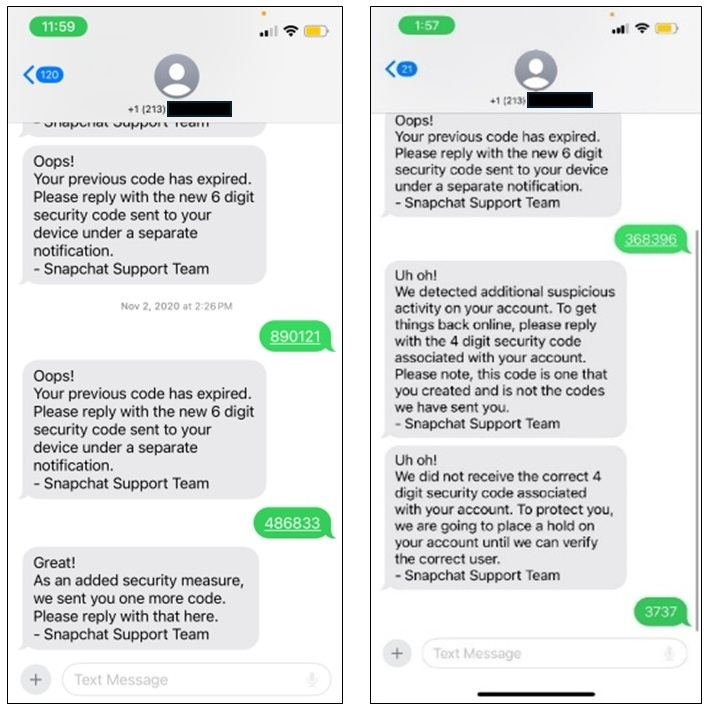
The original text exhibit is particularly revealing: purported support keeps requesting fresh codes. When one barrier remains, another supposedly protective request appears.
That sequence matters more than whether a message looks polished. The sender is asking the account holder to remove the barrier protecting their account.
The case also documents people commissioning unauthorized access. Former Northeastern University coach Steve Waithe paid Svara to target accounts of women he coached or otherwise knew.
That does not identify who requested any particular intrusion outside the case. It explains why an attacker might target someone’s private content rather than immediately demand money.
It also changes how friends should respond to stolen material. Do not request copies, trade access, or treat an advertised account-hacking service as harmless curiosity.
How the Fake Snapchat Support Text Scam Works
Step 1: The attacker identifies an account holder
In the documented case, Svara collected telephone numbers, email addresses, and Snapchat usernames. Personal familiarity was therefore no guarantee that the sender had a legitimate reason to contact someone.
A message can feel unusually convincing when it concerns an account you really use. That relevance still does not give the sender authority over it.
Step 2: A real security code creates the opening
The attacker attempts account access, prompting the service to send a code to the rightful user. The user receives a real notification alongside the fraudulent conversation.
Because the two events happen together, they can appear to confirm each other. In reality, the attacker may have caused the event they now claim to resolve.
If you did not request the sign-in, do not approve it or share its code. Open Snapchat independently and review your account through its own controls.
Step 3: The supposed support team requests the code
The exhibit shows requests to reply with a newly issued six-digit code. The message attributes the request to the Snapchat Support Team.
One request says the earlier code expired, encouraging another attempt. Expiration does not make sharing the replacement safe; it gives the impostor another opportunity.
You might think you are proving ownership to support. What you are actually providing is information that can let another person complete access.
Step 4: Another secret becomes another security check
After the initial access request, messages in the exhibit seek a four-digit code created by the user. That is distinct from a newly delivered login code.
The sentencing memorandum identifies attempts to reach My Eyes Only. A claim that your account needs further protection does not justify disclosing that additional passcode.
The danger is cumulative: each successful answer can reveal another protected area. Stop the conversation rather than keep supplying credentials until the sender says everything is fixed.
Step 5: The attacker keeps access and takes content
Once inside, an intruder can reach information available to the compromised account. In this case, private images were stolen and circulated without the account holders’ permission.
An attacker can also alter security settings and make recovery harder. An unexpected authentication change should therefore prompt action even if your password still seems to work.
Regaining the account stops further access only after the intruder is removed. It cannot automatically erase copies of material already downloaded elsewhere.
Why a Genuine Snapchat Code Can Be Part of a Fake Conversation
The distinction is between the service generating the code and the person requesting it from you. The first can be genuine while the second is fraudulent.
Think of the code as a temporary key issued for a specific access attempt. Whoever supplies that key in the relevant process may complete the attempt.
A stranger does not become support because they know when the key arrived. They may be watching their own attempt and waiting for your reply.
The same principle applies when the message claims a previous code failed. Repeated requests can reflect repeated access attempts rather than a legitimate support procedure.
Do not judge the request by how many digits it contains. A login code and a private passcode serve different purposes, but both can protect sensitive access.
The security guidance published by Snap expressly warns against unsolicited support messages requesting passwords, codes, or PINs. That is the rule to follow when the conversation sounds urgent.
A genuine account notification can still deserve attention. Address it through the app or the official account website you opened yourself, without continuing the unsolicited exchange.
What My Eyes Only Changes About the Risk
My Eyes Only adds a separate passcode to protected content. Giving away an account-access code and giving away this passcode are different exposures.
The original exhibit shows the impostor distinguishing a user-created code from codes sent by the service. The wording tries to turn that extra protection into another support requirement.
Snapchat’s compromised-account instructions say a representative will never ask for your My Eyes Only passcode. Support does not need that secret to help you.
If you supplied it, tell the official support process exactly which information was disclosed. Saying only that you received suspicious texts can understate the exposure.
Do not experiment with resetting private-content settings before understanding the consequences shown by the app. Account recovery and recovery of protected content are not necessarily the same process.
Snapchat’s forgotten-passcode instructions say resetting My Eyes Only deletes the Snaps protected by the previous passcode. Support cannot recover those deleted Snaps or the forgotten passcode.
Read that warning before choosing Forgot Passcode during a stressful recovery attempt. A destructive reset should not be mistaken for a way to retrieve the old protected material.
If you still know the existing passcode, follow the relevant official procedure for that situation. Do not apply a forgotten-code reset simply because an unsolicited helper recommends it.
Keep the account password and private-content passcode distinct in your report to support. Explaining which was disclosed helps describe the actual exposure without revealing either secret again.
Also avoid anyone claiming they can secretly recover another person’s private images. The Svara case shows that a paid hacking offer can mean theft from an actual person.
Signs to Check Without Continuing the Conversation
Look for login alerts, unfamiliar active sessions, or changes to the email address and mobile number associated with your account. Use the app rather than the sender’s directions.
Snapchat also lists unfamiliar two-factor authentication, unauthorized posts, and messages reported by friends among possible signs of compromise. Any one should be assessed in context.
An unfamiliar session is a concrete lead, not a reason to interrogate the suspect texter. Preserve what you can and use the account’s own removal controls.
A session list has limits: it shows active sessions rather than every credential saved on another device. Do not treat an empty list as a complete historical investigation.
If nothing was disclosed and no access is apparent, save and report the text, then block the sender. Receiving the request alone does not prove an account intrusion.
If a friend says your account sent strange requests, contact them another way. Ask what they received without asking them to open questionable links or forward private material.
Check whether Snapchat notified you about a data export you never requested. Its compromised-account guidance lists that event among warning signs, alongside unauthorized changes and unfamiliar sessions.
Keep the export notice and its timestamp for support. Deleting the email might remove a useful record of what the intruder attempted after obtaining access.
What to Do if You Have Fallen Victim to This Scam
-
Stop sending codes and secure your recovery channels
End the text conversation, then open your email and Snapchat independently to check whether their recovery details still belong to you.
If your email uses a password shared with Snapchat, replace it too. Protecting an account is harder when an intruder controls the mailbox receiving its recovery messages.
-
Change the Snapchat password through official controls
Use the app or accounts.snapchat.com, entered independently. Choose a new password you do not reuse, then verify the registered mobile number and email address.
If access has already been lost, follow Snapchat’s compromised-account support route. Do not pay a social-media recovery account or send that person another verification code.
-
Remove unfamiliar active sessions
On the official account website, open Session Management, select Log Out beside an unfamiliar device or browser, and confirm the action.
Snapchat’s session-management instructions explain the corresponding app controls. Session termination can take time, so follow up if an unfamiliar session remains.
Review authentication settings after recovery and enable the protection appropriate to your account. Keep any recovery information private rather than sending it to the person who contacted you.
-
Preserve the messages and report the intrusion
Keep the sender’s number, message times, code requests, account alerts, and unauthorized changes. Report the impersonation through official Snapchat support and account-reporting routes.
For stolen private material, threats, or financial demands, report the conduct to police or IC3. Describe what happened without circulating intimate images as informal proof.
-
Limit further harm without paying the attacker
If the account contacted friends, warn them through another trusted channel. Explain that any requests for codes, payments, or private information were unauthorized.
If someone threatens to publish images, preserve the threat and seek official reporting help. Payment cannot guarantee deletion of copies or stop another demand.
Never download or redistribute suspected sexual images of minors while gathering evidence. Preserve the message identifiers and report the location through the platform and appropriate authorities.
Frequently Asked Questions
Does a real security code mean the sender works for Snapchat?
A real code can be triggered by an unauthorized access attempt. It authenticates neither an unsolicited text conversation nor the person asking you to disclose it.
Will Snapchat support ask for my My Eyes Only passcode?
Snapchat expressly says its representatives will not ask for that passcode. Keep it private even if the sender claims another security problem has appeared.
What if the sender says the previous code expired?
Do not send the replacement code either. Repeated requests appeared in the original case exhibit and can provide repeated opportunities to complete unauthorized access.
Does changing my password remove every active session?
Review Session Management separately and remove unfamiliar devices. Follow Snapchat’s account-security instructions rather than assuming a single password change has checked every access route.
Are all current Snapchat support scams connected to Svara?
The conviction documents a particular historical campaign. A similar message today can use the same technique without establishing the identity of its sender.
Will recovering my account delete stolen image copies?
Account recovery does not erase material already copied elsewhere. Preserve evidence, report unauthorized distribution, and avoid recovery promises that require payment or additional secrets.
The Bottom Line
Do not send Snapchat codes or private passcodes to anyone claiming to fix your account. The Svara case shows how that request became large-scale account theft.
If you already replied, secure recovery details, change the password, remove unfamiliar sessions, and report what was exposed. Keep every further code out of the conversation.

Join the discussion
0 commentsShare your experience or ask a question about this article.
Community experiences
Did this happen to you?
Your experience could help someone recognize the same scam. Submit a private report for our team to review.
I experienced this tooReports are reviewed before publication. Sharing publicly is always your choice.
Discussion
Start the conversation
Have a question or something useful to share? Add the first comment.