


An email says someone has sent you a registered letter through AR24. You weren’t expecting official correspondence, but there’s a deadline to open it.
Before following the invitation, look closely at what you’re being asked to do next. The delivery notice is only the beginning of this story.
Overview
A document notice becomes an account request
The AR24 registered letter email scam uses the idea of important correspondence to draw recipients toward a fake Microsoft sign-in process.
Swiss police described this campaign on September 9, 2026. Their example moves from an electronic registered-letter notice to Microsoft 365/Copilot styling, then requests login information and a verification code.
The document is the attraction, but access to a Microsoft account is the target. AR24 and Microsoft are being impersonated, not identified as the scammers.
The legitimate service gives you another route
AR24 really does deliver electronic registered letters. That means an unexpected notice deserves verification, rather than an automatic assumption that every such message is fraudulent.
The company provides an official notification checker using the recipient’s email address and the notification reference. Open it independently, outside the suspicious message.
A number printed in an email is not its own authentication. The useful result comes from checking the reference through the actual service.
The exposure determines the response
- Receiving the message alone does not mean someone accessed your account.
- Opening the link is different from submitting a password or approving a sign-in.
- A verification code belongs to an authentication process, not an unfamiliar document viewer.
- Personal Microsoft accounts and employer-managed accounts require different recovery routes.
- A password change should not replace reviewing sessions, security information, and mailbox settings.
If the notice takes you to an unrelated Microsoft-looking page, stop there. Verify the letter through AR24 before entering any account information.
What a Real AR24 Notification Does and Doesn’t Require
Electronic registered delivery is a real service, not an invented term. A delivery email can legitimately tell a recipient that correspondence is waiting.
That familiarity is what makes this approach persuasive. You may feel obliged to discover who wrote to you before deciding whether the email deserves your attention.
However, confirming a delivery and handing over the password to your email account are not the same task.
AR24’s own phishing guidance says receiving a notification does not require providing your mailbox password or banking details.
The distinction is specifically your mailbox password. Don’t confuse it with legitimate identity checks or a separate account you knowingly maintain with a delivery service.
For a genuine notice, follow the company’s verification instructions on its independently opened website. Do not use the suspicious page to decide which requests are normal.
AR24 also explains where its notification reference appears and identifies its sending domain. A familiar display name alone does not establish that origin.
Check the actual address, not just the word AR24 beside an avatar. Keep the original email available so you can compare the full details.
When a Registered Letter Turns Into a Microsoft Login
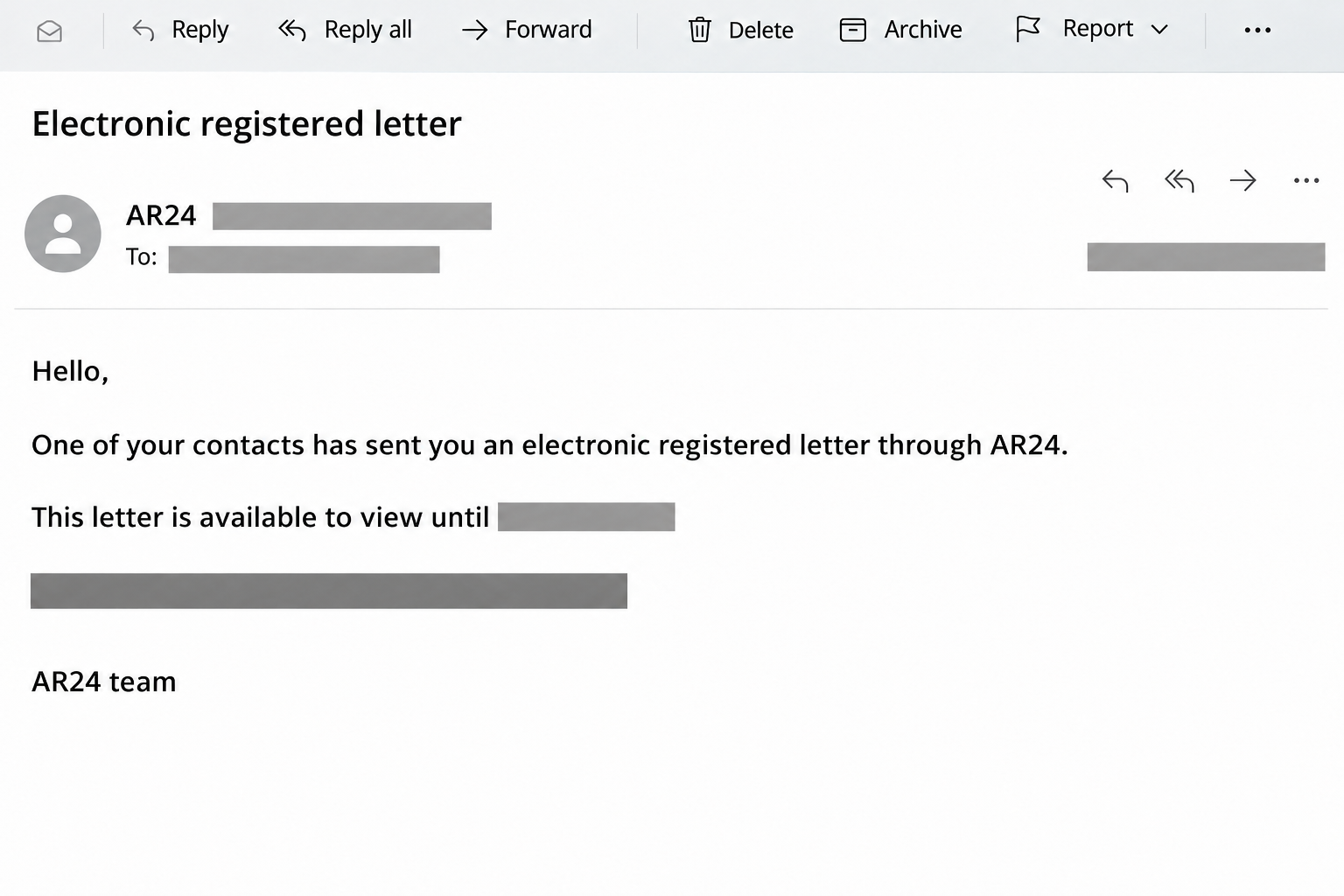
The police example advertises a letter from one of the recipient’s contacts and supplies an availability deadline.
Its invitation leads to a counterfeit document page using Microsoft branding. The change of service is the crucial moment to stop and question the request.
The notice pictured here is an English-language reconstruction. The reported French email used the same registered-letter hook, with identifying details concealed in the illustration.
The documented pages request an email address, password, and verification code. Police describe attempted account takeover, not proof that every recipient’s account was successfully compromised.
No executable attachment, malware installation, or payment demand is documented in this example. The immediate response therefore centers on account access, not paying for device cleanup.
How the AR24 Registered Letter Email Scam Works
Step 1: Important-looking correspondence creates a reason to investigate
A registered letter sounds more consequential than ordinary promotional mail. Someone may worry about missing a business document or leaving an important matter unanswered.
The deadline strengthens that feeling without explaining why a Microsoft password would be necessary. Urgency and authentication are separate questions, even when they appear in the same email.
Checking independently lets you answer the first question without accepting the second request. You do not need to investigate through the sender’s chosen link.
Step 2: Familiar software branding makes the detour feel routine
The counterfeit portal uses Microsoft 365/Copilot imagery to present the supposed letter as a document awaiting access.
Someone who regularly opens shared files may recognize that visual language. Recognition can make the service change seem like a normal part of retrieving the correspondence.
But a copied logo cannot connect an unfamiliar page to your employer, Microsoft, or AR24. Ask why this particular destination should receive your account information.
Step 3: A login form changes what you are giving away
Entering a mailbox password is not simply acknowledging that a letter exists. It gives the receiving party information used to access a separate account.
The advertised task remains reading correspondence, while the actual request concerns account authentication. That mismatch is more important than whether the form looks professionally designed.
If you already entered anything, do not repeat the process to see whether the letter eventually appears. Move to the genuine account’s security controls instead.
Step 4: A verification request can extend the deception
The next request asks for a code, making the sequence resemble a familiar security check. A code can feel reassuring because legitimate services use them too.
That reassurance is misplaced when the destination is an impostor. Supplying an extra authentication factor can help an attacker attempt access rather than protect the document.
Step 5: The letter can keep you focused on the wrong outcome
A missing document may look like a loading problem or failed delivery. Meanwhile, the more urgent question is whether you disclosed information that protects your Microsoft account.
You do not need a confirmed fraudulent login before asking your IT team for help. Tell them what you entered and approximately when it happened.
Verify the Letter Without Repeating the Trap
Open AR24 through an address you obtain independently. Its verification form requests the notified recipient’s email and the reference found in the message.
Those fields are different from the password used to open your mailbox. Do not add that password to a supposed verification request.
Read the result from the genuine service, not a page linked by a stranger. Merely seeing a plausible reference format does not complete the check.
If you recognize the supposed sender, contact them through a channel you already know. Avoid asking for reassurance by replying to the suspicious email itself.
Do not dismiss all registered correspondence because of this scam. Verify the notice promptly through the legitimate delivery service, especially if you may have a real matter pending.
A Letter Reference Is Not a Microsoft Security Code
Two different kinds of numbers can appear during this situation, but they serve different purposes. Mixing them up makes the counterfeit process easier to accept.
An AR24 reference identifies a delivery notification for checking through the actual service. It is not a reason to surrender access to the mailbox receiving that notification.
Microsoft’s security-code guidance describes codes used to verify account access. Those codes belong to the Microsoft action you intentionally started, not a stranger’s document invitation.
Even receiving a real security message would not authenticate the web page asking you to copy its code. The message and the destination need separate scrutiny.
Pause if checking a letter has turned into confirming access to an unrelated account, because receiving correspondence and authenticating a Microsoft sign-in are different tasks.
If you already shared a code, include that fact in your account incident report. Don’t keep trying new codes to overcome the document page’s supposed error.
What to Do if You Have Fallen Victim to This Scam
-
Stop the interaction and preserve the original message. Close the suspicious page and keep the email, destination address, approximate time, and a private record of what you supplied.
Do not send your actual password or a fresh code to anyone investigating. They need to know which information was exposed, not receive the secret itself.
If you only saw the email, use your mail service’s reporting option. If you clicked but entered nothing, record that distinction instead of assuming a takeover occurred.
-
For a work or school account, contact IT immediately. Use your organization’s established support route and explain that the message impersonated registered delivery before requesting Microsoft credentials.
Say whether you entered a password, submitted a verification code, or approved a notification. Include the affected account and timing so administrators can investigate the right events.
Microsoft’s compromised mailbox procedure covers containing access and checking persistence, rather than treating a password reset as the entire response.
-
Secure a personal Microsoft account through the real recovery route. On a device you trust, open Microsoft’s account website independently and change the exposed password.
Choose a new password that is not used elsewhere. Change it on other affected services if you reused the disclosed password there.
If you cannot sign in, use Microsoft’s account recovery guidance. Do not search for a paid recovery agent or give an unsolicited caller your codes.
-
End unwanted access instead of only closing your own tab. For personal accounts, open additional security options and follow Microsoft’s sign-out-everywhere instructions.
Microsoft says this can take up to 24 hours and excludes Xbox consoles. Do not interpret selecting the option as proof that every session ended instantly.
For managed accounts, ask IT to use the appropriate access-revocation process, including refresh-token and application-session considerations. Administrator action depends on the environment.
-
Review sign-ins with enough context to interpret them. Personal accounts have a recent activity page; work and school accounts have My Sign-ins guidance.
Compare times, applications, devices, and the recorded result with your own activity. An approximate location alone can be misleading, particularly when mobile networks route traffic elsewhere.
A failed attempt and a successful sign-in are different findings. Report unfamiliar events, but don’t use a quiet-looking activity list as your only reason to ignore exposed credentials.
-
Inspect security information and mailbox changes. Check recovery contacts and authentication methods for changes you did not make. Ask IT to handle unfamiliar managed-account registrations.
For a compromised work mailbox, administrators should also examine suspicious forwarding, inbox rules, and application permissions. These checks concern possible persistence, not an assertion that this campaign changed them.
Review sent messages and alert affected contacts through a trusted channel if unauthorized mail appears. Preserve evidence before removing suspicious settings or messages.
-
Report the impersonation through the proper channels. AR24’s official guidance provides its phishing-reporting address. Use that independently verified route rather than replying to the sender.
In Outlook.com, select the message and choose Report, then Report phishing. Microsoft’s reporting instructions explain the available controls and their limits.
If this affected an employer, preserve the message for its security team. Do not forward an active phishing link widely as an informal warning.
What Account Checks Can Tell You
Investigating a sign-in is about establishing what happened, not collecting alarming screenshots. An unfamiliar location can reflect network routing, while an unexplained successful login deserves prompt attention.
Microsoft’s personal activity history does not display every account event. Its absence of a particular entry should not overrule the fact that you knowingly disclosed a password.
For organizations, administrators can compare sign-in records with mailbox activity and the time of the phishing interaction. That helps separate an attempted login from actual access and subsequent misuse.
They may need to block the account during containment, revoke sessions, and review affected applications. Simply logging out of the browser you used does not perform those actions.
Access can also depend on an application’s own session. Microsoft explains why revoking identity access and ending every application’s existing session are not always simultaneous.
Keep following the account-specific recovery instructions until the checks are complete. You can verify the original letter separately without returning to the counterfeit document portal.
Frequently Asked Questions
Is AR24 itself a scam service?
No, AR24 is a legitimate electronic registered-delivery service. This case concerns criminals imitating its notices and directing recipients toward a counterfeit Microsoft account request.
Should an AR24 notice ask for my Microsoft mailbox password?
AR24 says receiving its notification does not require your mailbox password. Stop if an unfamiliar document page asks for that secret, and verify the delivery independently.
Does a reference number prove the email is authentic?
A reference should be checked through AR24’s genuine verification tool. A convincing-looking number, recognizable display name, or copied logo cannot authenticate the message by itself.
Am I safe if the page rejected my verification code?
A rejection message does not prove your earlier information remained private. Secure the affected account and tell IT if it is managed by your employer or school.
Does this mean every Microsoft verification code was bypassed?
No, the documented scam requests a code to help attempt account access. That is not proof of successful takeover, a specific toolkit, or universal defeat of multifactor authentication.
Should I ignore every electronic registered-letter notice now?
No, verify a notice through the genuine delivery service instead. You can take important correspondence seriously without entering your mailbox password through an unsolicited document link.
The Bottom Line
Do not enter Microsoft credentials through this AR24 registered letter email scam. Verify the delivery independently; a document invitation is not permission to hand over your mailbox.
If you supplied a password or code, secure the real account now. Involve IT for managed accounts and review sessions and security changes, not just the missing letter.

Join the discussion
0 commentsShare your experience or ask a question about this article.
Community experiences
Did this happen to you?
Your experience could help someone recognize the same scam. Submit a private report for our team to review.
I experienced this tooReports are reviewed before publication. Sharing publicly is always your choice.
Discussion
Start the conversation
Have a question or something useful to share? Add the first comment.