

Products that promise to remove skin tags overnight with a few drops may sound like a dream come true. That’s precisely the kind of appeal Nutri Derma Guard is banking on. Promoted as a natural solution for removing skin tags, warts, and moles, this product is flooding social media and niche websites with glowing testimonials and dramatic before-and-after images. But is it actually effective—or is it another overhyped offer you should think twice about?
Overview: What the Claims Say and What We Know
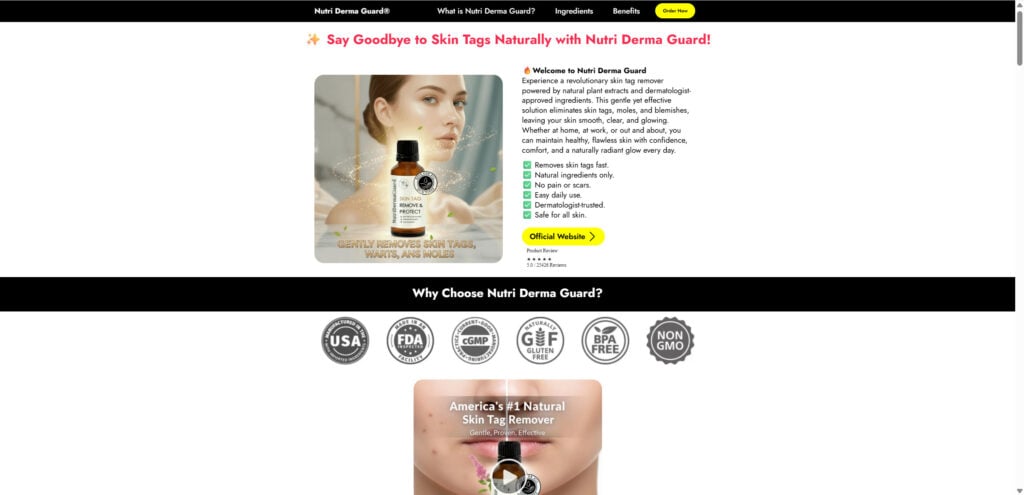
The marketing around Nutri Derma Guard positions it as a breakthrough, home‑use formula that will “gently remove skin tags, moles and warts” without painful clinic procedures. It claims to be “dermatologist‑trusted”, “made in an FDA‑inspected, GMP‑certified USA facility,” and “safe for all skin types”. On the sales page you’ll see multiple ingredients listed (e.g., castor oil, tea tree oil, salicylic acid) and numerous glowing testimonials.
On the face of it: if it worked as promised, it would be genuinely useful. Ease, affordability, no scarring, no freezing, no surgery—these are real benefits in theory.
But there are significant issues:
Lack of Robust Clinical Evidence
While some ingredients (tea tree oil, salicylic acid) have known dermatological uses, the claim that this single blended product can reliably remove skin tags and moles without dermatologist supervision is unverified. Many skin tags require evaluation to rule out underlying concerns. Unsupervised removal can lead to bleeding, infection or misdiagnosis.
The sales materials talk about “dermatologist approved” and “USA GMP‑certified lab”, but there’s no easily verifiable documentation (clinical trial results, physician endorsements, published data) to support those strong claims.
The Structure of the Marketing Funnel
- The product is heavily promoted via flashy images: “Verified Purchase”, before‑and‑after photos, multiple bottles, big discounts for bulk purchases.
- The pricing is tiered: e.g., 1 bottle at ~$69, 3 bottles at ~$59 each, 6 bottles at ~$49 each—a structure that incentivizes higher purchase volumes.
- Trust badges are used: “Made in USA”, “FDA–Inspected Facility”, “cGMP”, “Non‑GMO”. While these badges look impressive, they may not be independently verifiable or relevant to the specific claims being made (e.g., removal of skin tags).
- Countdown timers or phrases like “Special Price Today Only” push urgency, encouraging immediate purchase.
Hidden Risks
- Without full ingredient disclosure and third‑party testing, the user may face skin irritation, allergic reactions, or ineffective treatment.
- If the product doesn’t work, the cost is lost. Buying multiple bottles increases the financial risk.
- Because it is marketed as an alternative to professional treatment, there is the risk that users delay seeing a dermatologist when they should.
Consumer Reviews and Transparency
While the product site displays “Verified Purchase” testimonials (e.g., “Finally, my skin feels smooth again!”), there is little external verification of these claims. Search on independent review platforms may reveal few credible reviews or significant complaints about non‑delivery, ineffective results or refund problems.
Summary of Concerns
In short, Nutri Derma Guard walks a fine line. It offers a product in a space where legitimate treatment exists (dermatologists remove skin tags), but it makes elevated claims without clear evidence, uses heavy marketing tactics, and pressures consumers into large purchases. For many buyers, this means the promise may not fulfill, and they may end up disappointed or misled.
How the Nutri Derma Guard Operation Works
Understanding the full flow—from first ad to post‑purchase outcome—can help you recognise this type of marketing when you encounter it. Below is a detailed breakdown of how Nutri Derma Guard’s funnel appears to operate.
Step 1: Attention‑Grabbing Advertisement
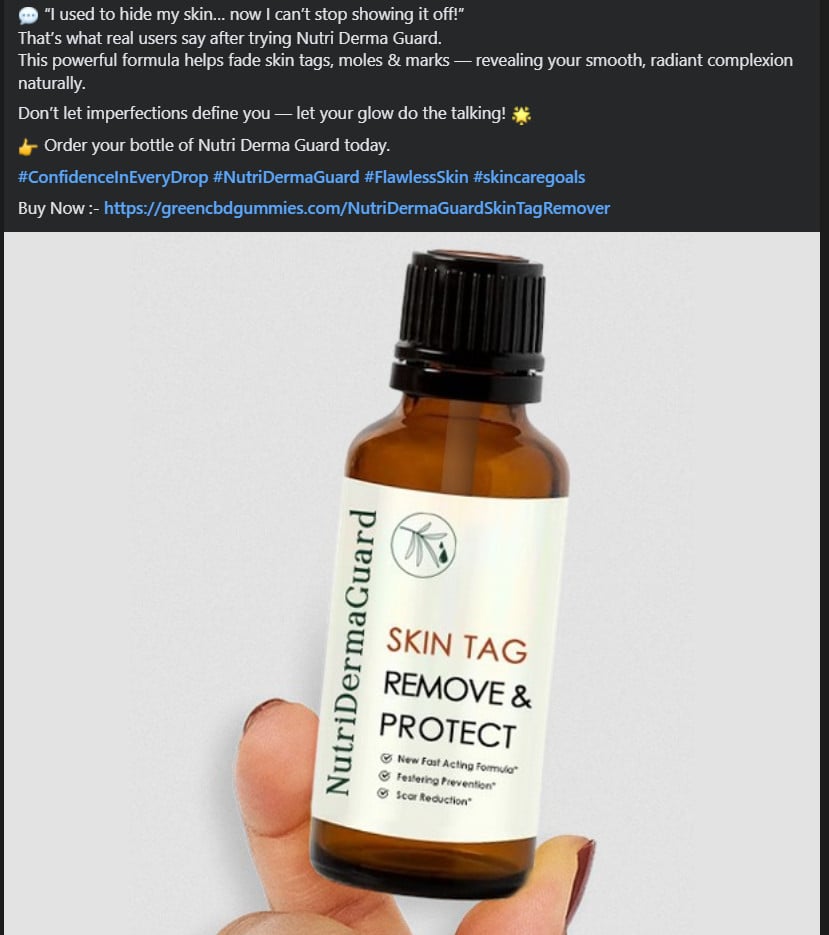
You see an ad on social media (Facebook, Instagram) showing a person saying: “I used to hide my skin… now I can’t stop showing it off!” with a picture of skin tag removal or clear skin. The ad headline may highlight “Skin Tag Remover & Protect” or “Say Goodbye to Skin Tags Naturally”. The image shows a bottle with professional design. The ad links you to a website.
Step 2: Landing Page Designed to Build Credibility
Clicking through, you land on a site that claims “Say Goodbye to Skin Tags Naturally with Nutri Derma Guard!” It shows:
- a prominent product image
- bullet points: “Removes skin tags fast”, “Natural ingredients only”, “No pain or scars”
- trust badges: USA manufacturing, FDA‑ inspected facility, Non‑GMO, etc.
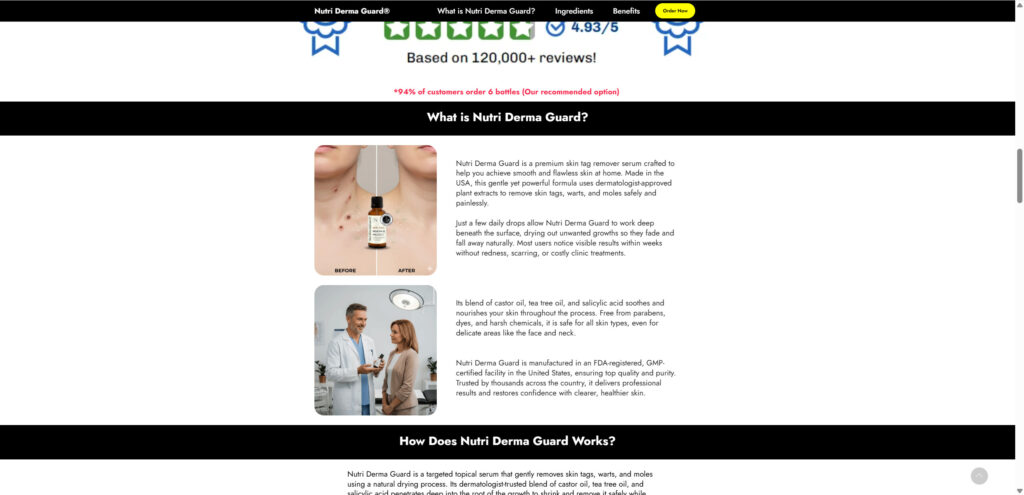
- before‑and‑after photos of skin tag removal (though such photos are common stock images)
- “Verified Purchase” testimonials with names, ages, cities, praising instant results
Step 3: Presentation of Ingredients and Science
Scrolling further you’ll find a section listing ingredients: castor oil, tea tree oil, salicylic acid, aloe vera, vitamin E (tocopheryl acetate). Each is given a description of how it “acts” on skin tags, removes them naturally, prevents scars. This section includes statements like “clinically proven natural ingredients”, “dermatologist‑trusted”, “safe for sensitive skin”.
Step 4: Offer and Price Presentation
Then comes the pricing table:
- 1 Bottle: $69
- 3 Bottles: $59 each (total ~$177)
- 6 Bottles: $49 each (total ~$294)
Often the “best value” is prominently displayed (6 bottles) with the suggestion you need multiple bottles for full effect. It may claim “Based on 120,000+ reviews!” even when independent reviews are scarce.
Step 5: Urgency & Scarcity Tactics
The page may use a countdown timer (“Special Offer Ends in 00:12:34”) or a message like “Only 8 bottles left at this price” to create urgency. You’re prompted to act now.
Step 6: Checkout Process
At checkout you provide your personal details and payment information. The page may say “One‑time payment, no autoship” but the hidden terms may differ. You pay, receive order confirmation, maybe receive tracking.
Step 7: Use / Non‑Use of Product + Outcome
You either receive the product or you don’t. If you receive it: you try it, may see little to no effect, or the product may cause irritation. If you don’t receive it: you may be waiting, contacting support, getting delayed shipping, or nothing at all.
Step 8: Refund/Return Challenges
If you are unhappy, you try to utilise the “60‑day money‑back guarantee”. This may involve submitting a form, sending proof, or contacting support. The company may be slow, non‑responsive or impose hidden conditions. Subscriptions may continue unexpectedly.
Step 9: Data‑Harvest & Recurring Charges
The system may harvest your email, phone, address, and link you to affiliate networks. Some users report being billed again or enrolled in auto‑renew plans without clear consent. The original website might go offline or rebrand to avoid complaints.
Step 10: Repeat/Rebrand & Exit
Once complaints mount or the brand becomes too exposed, the operators may shut the site, change the domain, launch a new product with a different name but same mechanics. The cycle repeats.
Not the First Time We’ve Seen This
Nutri Derma Guard’s promotional playbook is strikingly familiar. It mimics earlier aggressive campaigns like DropFit’s “Ice and Gelatin Trick” for weight loss and other so-called miracle health solutions that have popped up over the years. These ads often follow the same structure:
- Heavy use of Facebook and Instagram ads
- Fake reviews and doctored images
- Claims of celebrity or doctor endorsements
- Urgency tactics (like countdown timers or “low stock” alerts)
- “Doctor recommended” labels with no actual medical backing
Like many before it, Nutri Derma Guard seems to rely more on aggressive digital marketing than scientific credibility. Consumers who have fallen for these tactics in the past are understandably wary of new products that follow the same patterns.
What to Do If You’ve Fallen Victim to This Type of Offer
If you purchased Nutri Derma Guard and now see no results, suspect recurring charges, or feel misled, follow these steps:
- Contact Your Bank or Credit Card Provider Immediately
• Report the transaction as potentially misleading or fraudulent.
• Ask for a chargeback under “misrepresented product” or “unauthorized recurring billing”.
• If recurring charges appear, request they block future payments to this merchant. - Document Everything
• Capture screenshots of the original advertisement, landing page with pricing, product claims, countdown timers.
• Keep your order confirmation email, shipping/tracking info.
• Keep a log of your attempts to contact customer service and their responses (if any). - Request a Refund or Cancel Subscription
• Use the advertised “60‑day money‑back guarantee”—submit a written request referencing the guarantee and date of purchase.
• If enrolled in a subscription plan without clear consent, request cancellation in writing and send proof to your bank. - Report to Consumer Protection Agencies
• File a complaint with the U.S. Federal Trade Commission (FTC) via reportfraud.ftc.gov.
• Report to the Better Business Bureau (BBB) via bbb.org/scamtracker.
• If you live outside the U.S., report to your national consumer protection authority. - Monitor Your Online Accounts & Data
• If you provided personal data or payment details, monitor your bank statements for unauthorized transactions.
• Consider changing passwords if you used the same email or credentials elsewhere.
• If you suspect identity exposure, consider placing a fraud alert on your credit file. - Warn Others & Share Your Experience
• Post your experience on review websites, consumer forums, Reddit (e.g., r/scams).
• Share screenshots of the ad or funnel—public awareness reduces the pool of victims.
• Consider writing to your local consumer‑advocate or news outlet if many in your region are affected. - Seek Legitimate Medical Advice for Skin‑Tag Removal
• If the condition (skin tags, moles, warts) persists or looks concerning, consult a dermatologist. Some skin lesions require medical evaluation.
• Avoid relying solely on unverified product claims. Professional removal methods (cryotherapy, excision) may be more suitable and safe.
The Bottom Line
Nutri Derma Guard presents itself as an easy, natural fix for skin tags, moles and blemishes—but the marketing tactics, lack of robust clinical evidence, aggressive upsells and typical funnel mechanics raise serious concerns. If a product promises dramatic results with no effort, be skeptical.
While some ingredients may offer benefit when used appropriately, no over‑the‑counter drop can reliably replace dermatologic evaluation and safe removal of skin growths. Before spending your money, examine the evidence, ask tough questions, and consider whether the offer aligns with credible medical advice.
If you’re looking to remove skin tags or blemishes, consult a qualified dermatologist. Don’t rely on hype, thin guarantees, or high‑pressure sales pitches. Be informed—and protect your money, your health and your skin.

Join the discussion
0 commentsShare your experience or ask a question about this article.
Discussion
Start the conversation
Have a question or something useful to share? Add the first comment.