

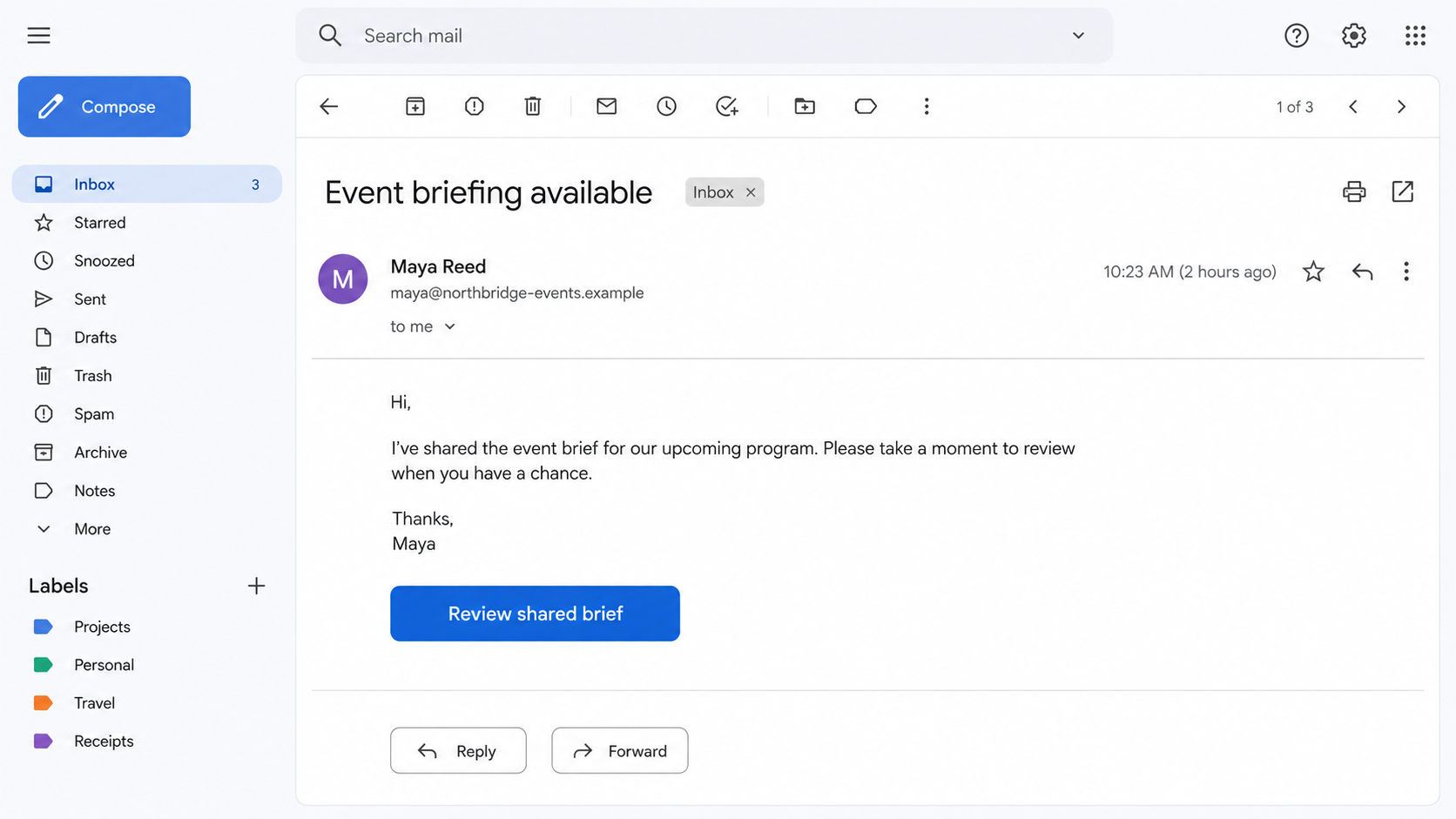
OAuth consent phishing can begin with an ordinary request to review a document, join an event, or open a file shared by someone you recognize.
The page that follows may look reassuringly familiar. That is why this warning deserves a careful read before you click anything.
Overview
The sign-in page can be real while the request is malicious
OAuth is a legitimate system that lets one service work with another.
A calendar app might ask to view your calendar, or a photo-printing site might ask to read selected pictures. Your main password stays with the account provider.
Consent phishing abuses that useful design. The criminal registers an app, gives it a reassuring name, and sends a link that begins a genuine authorization process.
The victim is not necessarily handing a password to a fake site. The victim is authorizing an attacker-controlled app.
This is not the usual fake password form. The attacker can arrange the flow so that your password is entered only on a genuine Microsoft or Google page.
The unfamiliar app is what should stop you. Its name may sound like a file viewer, identity checker, meeting tool, or document service.
The permission list can include email, cloud files, contacts, and the ability to act as you.
If you approve that list, the provider issues the app a token. The attacker may then use that token without ever learning the password you carefully protected.
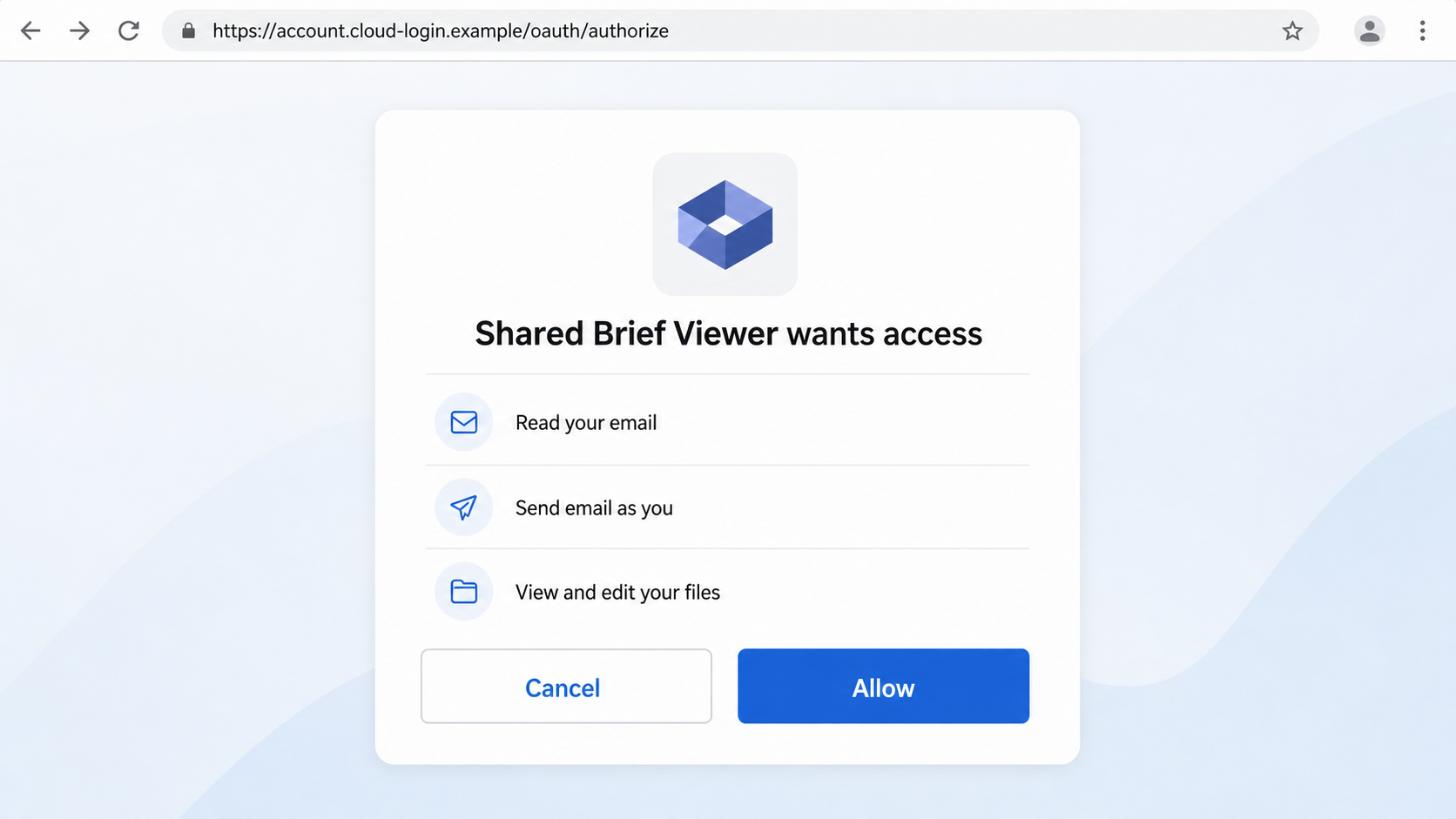
The dangerous words are in the permission list
The request may ask to read mail, send messages, view contacts, download files, or retain access when the user is away.
A rushed person sees a familiar provider and presses Allow without translating those permissions into consequences.
Watch for combinations such as:
- read, compose, send, or delete email;
- view or edit every file in cloud storage;
- access contacts, calendars, or profile data;
- maintain access after you close the browser;
- act on your behalf or use your identity;
- permissions that have no connection to the promised task.
A password change alone may leave the door open
The FBI’s September 2026 warning explains that an OAuth token can provide persistent account access until the malicious app or token is revoked.
Changing a password is still sensible after an incident, but it is not the complete fix.
This is why the scam is so effective.
It borrows the real provider’s login, can get around the victim’s expectations about multi-factor authentication, and leaves behind an access method many people do not know how to inspect.
Why the Real Login Page Does Not Make the App Safe
A genuine login page proves where you entered your password. It does not certify the app asking for permission afterward.
Think of the provider as a building receptionist. The receptionist confirms your identity, then asks whether a visitor may receive a key to certain rooms.
The receptionist can be genuine while the visitor’s story is false.
The app name and icon are often supplied by its developer. Words such as Secure Document Viewer, Shared Brief, Account Verification, or Event Portal are descriptions, not endorsements.
The permission screen is therefore not a routine obstacle to click through. It is the contract.
If the supposed document viewer requests the right to send email or edit all cloud files, the request does not match the job.
This differs from the Kali365 device-code phishing scam, which tricks a person into entering an attacker-supplied code on a legitimate Microsoft page.
Both attacks can produce tokens and survive ordinary password habits, but the action presented to the victim is different.
It also differs from a classic fake login page. If the page is counterfeit, the immediate problem is stolen credentials.
In consent phishing, the attacker may receive delegated access even though the provider handled the authentication correctly.
How the OAuth Consent Phishing Scam Works
Step 1: The attacker registers an innocent-looking app
The criminal creates an application with a legitimate cloud identity platform. The app may be named to resemble a file-sharing tool, news portal, identity service, or event system.
The name is chosen for the story, not for technical accuracy.
A file viewer should not need to send mail, but a busy recipient may focus on the document and ignore that mismatch.
Step 2: Broad permissions are built into the request
The app is configured to request access that will be useful after compromise. That can include mail, files, contacts, and long-lived access.
Some providers or organizations block sensitive permissions or require administrator approval. Personal accounts and loosely managed environments may present the request directly to the user.
Step 3: A believable person supplies the reason to click
The lure arrives by email, text, or a commercial messaging app. The FBI has observed impersonation of government officials, media figures, event coordinators, and planners.
The message can be tailored. A public speaker receives an event brief. A researcher receives a draft article. A family member of a prominent person receives a shared file.
The story only needs to make the authorization link feel timely.
Step 4: The provider authenticates the victim normally
The link opens the real provider’s authorization service. If the user is not signed in, the genuine provider asks for a password and may complete MFA.
This familiar step lowers suspicion. The victim notices the correct domain and concludes that the entire journey is approved. In reality, authentication answers only who the user is.
It does not answer whether the requesting app deserves access.
Step 5: The victim grants the requested access
A consent page displays the app’s identity and permissions. The attacker relies on the user treating Allow like a cookie banner or a routine sign-in confirmation.
Once approved, the platform issues access and possibly refresh tokens. The exact reach depends on the granted scopes, account type, organization policy, and provider.
Step 6: The token becomes a quiet way back in
The attacker uses the authorized app to retrieve data or perform allowed actions.
There may be no password failure and no stream of MFA prompts because the app is presenting a valid token.
If mail access was granted, the criminal may read private conversations, search for invoices, learn relationships, and send fresh phishing from the victim’s account.
Cloud files can reveal contracts, identity documents, photos, or internal plans.
Step 7: Stolen trust expands the attack
An email sent from a real account is far more persuasive than the original cold message.
The attacker can reply inside genuine threads, share more malicious apps, or change payment instructions at the right moment.
The account owner may change the password and feel safe while the app remains authorized. Unless the token and consent grant are removed, suspicious access can continue.
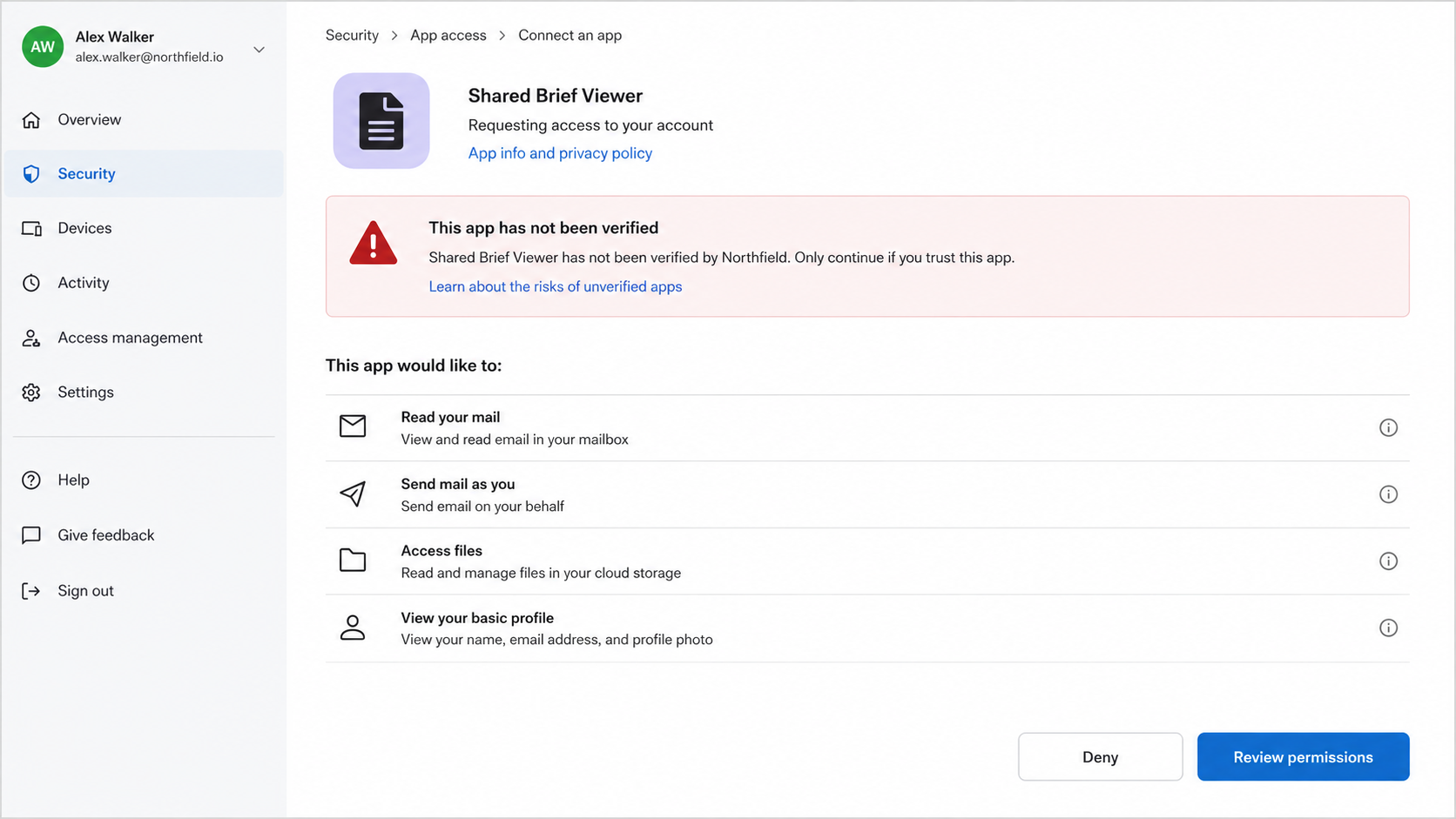
The next screen can reveal the strongest evidence. Account activity, publisher details, and token permissions often show whether the request belongs to a trusted workflow.
Company, Address, and Fulfillment Checks
The app name is not a verified company identity
Read the publisher or developer information shown by the provider. A polished name and icon can be self-declared.
Look for a verified publisher, a familiar tenant, and a real business relationship that explains the request.
Even verified software should receive only the permissions required for the task. Verification is useful context, not permission to stop reading.
The authorization address belongs to the provider, not the app
A Microsoft or Google hostname means that provider is handling consent. It does not mean the provider owns the third-party app or wrote the message that led you there.
Inspect the redirect destination, developer domain, privacy link, and publisher details. If they are missing, unrelated, newly introduced, or impossible to connect to the sender, cancel.
Real support will let you verify through a known channel
Contact the sender using a phone number, address, or chat you already had. Do not reply to the unfamiliar account and ask whether its own link is legitimate.
A genuine organizer or colleague can describe the file, resend it through an established system, or confirm the request inside an existing conversation.
The access trail must match a real business need
Ask what data the app needs, why it needs it, how long access lasts, and where you can revoke it.
A simple document review should not require mailbox-wide or cloud-wide authority.
Organizations should keep an inventory of approved apps and make high-risk consent an administrator decision.
Personal users should periodically review connected applications instead of assuming unused access expires on its own.
Warning Signs on the Consent Screen
The most useful clue is a mismatch between the promised action and the requested power. Do not judge the screen only by its colors or domain.
- An unexpected message starts the authorization flow.
- The app name is generic and the publisher is unfamiliar or unverified.
- A file viewer wants email, contacts, or full drive access.
- The request includes sending messages or acting as you.
- The app asks to maintain access when you are not using it.
- The sender pressures you to approve before a meeting or deadline.
- You cannot find the app in your employer’s approved software list.
If the request is legitimate, delaying it long enough to verify will not destroy the underlying business. A criminal’s story often depends on making that pause feel impossible.
What the Attacker Can Do After You Click Allow
There is no single permission bundle, so the damage varies. Read the actual grant before assuming the best or worst.
Email access can expose password-reset messages, private correspondence, travel details, invoices, and contact lists.
Send permission lets the attacker exploit the victim’s identity without obviously logging into the normal mailbox interface.
File access can expose documents that make the next scam more convincing. Contracts reveal counterparties. Calendars reveal when executives are traveling. Shared folders reveal projects and collaborators.
A token can also create a confusing incident timeline. The user may see no changed password and no unfamiliar MFA prompt.
Administrators need to inspect application consent, token activity, mailbox rules, delegates, and sign-in logs together.
Do not assume that a clean antivirus scan means nothing happened. Consent phishing can succeed without installing a file.
A scan is still useful if you downloaded an attachment or the lure passed through other pages, but the key repair happens in the account.
How to Check and Revoke a Suspicious App
Open the account provider from a trusted bookmark or type its address yourself. Find the security area for connected apps, third-party access, applications, or consented permissions.
Review entries you do not recognize and expand their permission details.
Record the app name, publisher, grant date, and scopes before removal if an employer or investigator may need the evidence.
Revoke the malicious app and invalidate its active sessions or tokens.
On a work account, contact IT or the identity administrator because tenant-level consent, mailbox changes, or additional affected users may require broader action.
Then check sent mail, deleted mail, forwarding rules, delegates, recent files, sharing settings, recovery methods, and connected devices.
A thief with email access may have established a second path before you noticed.
What to Do if You Have Fallen Victim to This Scam
- Disconnect the malicious app. Open the real account settings independently and revoke its access. Do not revisit the link in the message.
- Invalidate sessions and tokens. Use the provider’s sign-out-everywhere or session controls. Work-account users should ask IT to revoke refresh tokens and review tenant consent.
- Change the password anyway. The scam may have included another credential page. Choose a new, unique password and do not reuse the previous one elsewhere.
- Review MFA and recovery settings. Remove unfamiliar devices, passkeys, phone numbers, app passwords, backup codes, and authentication methods.
- Inspect what the app could reach. Check sent and deleted mail, cloud-file activity, sharing links, inbox rules, delegates, and recent downloads.
- Warn contacts from a clean channel. Tell them to ignore unusual files, payment changes, or consent requests sent from your account.
- Contact financial partners quickly. If invoices or bank instructions were changed, call the bank and affected business using known numbers. Ask about a hold or recall.
- Preserve evidence. Save the original message, headers, full link, app name, requested permissions, login alerts, and relevant audit entries.
- Scan if anything was downloaded. Malwarebytes can check for malicious files or unwanted software that may have accompanied the lure. A scan does not revoke an OAuth token, so complete the account steps too.
- Block follow-up traps. AdGuard can reduce exposure to known phishing pages and malicious ads while you investigate. It cannot decide whether a legitimate consent page is safe, so keep reading permissions.
- Report the campaign. Send workplace incidents to your security team and file a report with the FBI Internet Crime Complaint Center when appropriate.
- Ignore recovery impostors. Anyone who promises to remove access for an upfront fee or asks for your password, code, or remote-control session may be starting a second scam.
Frequently Asked Questions
Is OAuth itself a scam?
No. OAuth is a widely used authorization framework. The scam is the false story used to persuade you to authorize an attacker-controlled app.
Can the login page really be Microsoft or Google?
Yes. A malicious app can direct you through the provider’s genuine authorization service. The crucial checks are the requesting app, publisher, and permissions.
Will changing my password remove the app?
Do not rely on that. Revoke the app and its tokens explicitly, then change the password and review sessions because the lure may have used more than one technique.
Does MFA stop consent phishing?
MFA protects the authentication step, but it cannot make a bad permission choice safe. An authorized token may be issued after the user completes genuine MFA and clicks Allow.
What if I clicked the link but pressed Cancel?
If you did not approve permissions or enter credentials on any unexpected page, the account may be unaffected.
Close the page, report the message, and review recent security activity if you are unsure.
How can a company prevent employees from approving these apps?
Use an approved-app inventory, restrict user consent for high-risk scopes, require administrator review, monitor new grants, and teach staff that the permission list is the decision point.
The Bottom Line
The OAuth consent phishing scam succeeds because the screen looks more legitimate than ordinary phishing. The danger is access granted to an app you never verified.
Do not click Allow merely because the provider’s domain is real. Match every permission to the task, verify the sender independently, and cancel unexpected requests.
If you approved the app, revoke its permissions and active tokens first. Change your password too, but remember that step alone may leave access open.

Join the discussion
0 commentsShare your experience or ask a question about this article.
Discussion
Start the conversation
Have a question or something useful to share? Add the first comment.