

Social media allows news to spread rapidly, but that also enables misinformation and manipulation. One exploitative scam co-opting a true tragedy is the “missing officer” Facebook scam using the name and photos of Jonathan Diller.
In March 2024, NYPD officer Jonathan Diller was killed in the line of duty. His funeral made headlines. Now his name and image are being misused in fabricated missing persons posts designed to go viral by playing on emotions.
This guide will uncover how scammers are profiting off Officer Diller’s story, detail the misleading posts, and provide tips to recognize and stop these deceptive Facebook scams. Don’t enable exploitation – know what to watch for and how to protect your community.
The Tragic Story of Officer Jonathan Diller
To understand how scammers are manipulating this real loss, let’s first revisit the factual events around Officer Jonathan Diller’s death.
On March 12, 2024, 31-year-old NYPD officer Jonathan Diller was shot and killed while conducting a traffic stop in the Far Rockaway neighborhood of Queens, New York.
Per news reports, Officer Diller and his partner pulled over a vehicle for improper license plates. As they approached the stopped car, one of the occupants suddenly opened fire, fatally striking Diller. His partner returned fire while calling for backup.
Tragically, Jonathan Diller died from his wounds shortly after arriving at the hospital. The married father of two young boys was just 31 years old.
Diller’s funeral was held on March 30, 2024 on Long Island after a long procession from the funeral home to the church. The fallen officer was laid to rest as hundreds of fellow police officers and officials paid respects.
This real tragedy is now being exploited online.
The “Missing Officer” Facebook Scam
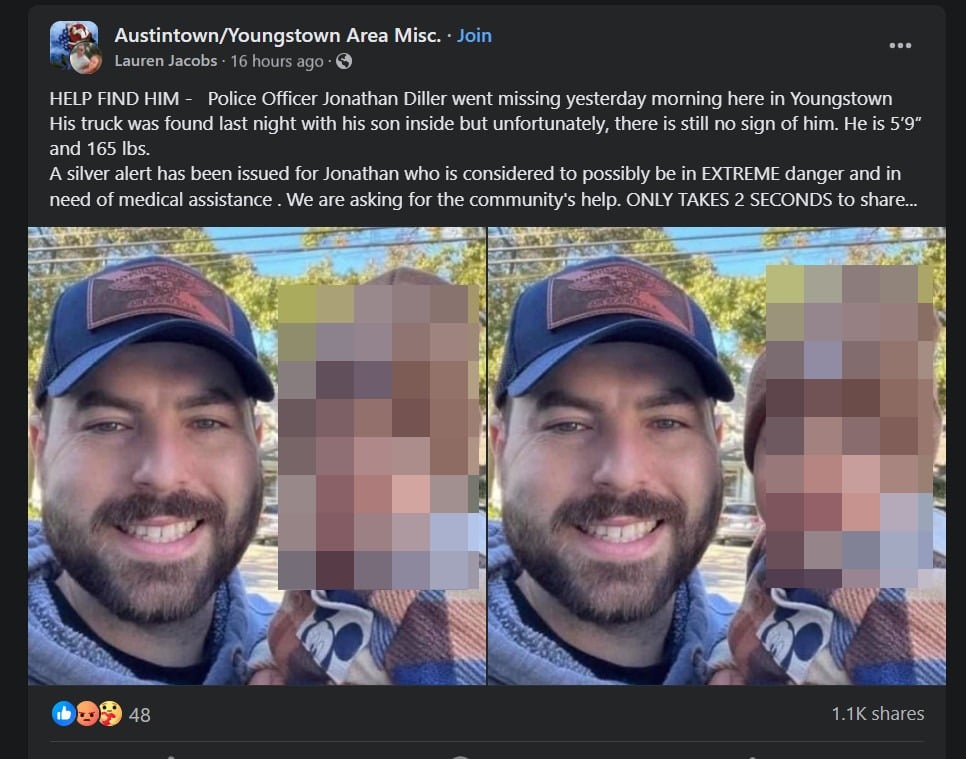
Months after Officer Diller’s very public death, viral Facebook posts have surfaced claiming “Police Officer Jonathan Diller went missing yesterday.”
These posts typically include a photo of Diller smiling while holding a child. The misleading text claims he has mysteriously disappeared and urges users to share to “help find him.”
But given the facts around Officer Diller’s death, these posts are categorically fake. So why are they spreading?
It’s a calculated scam to generate shares and page “likes” – also known as “like-farming.”
By using Diller’s name/photo along with an emotional story, scammers aim to trigger an instinctive urgency to share and help. But the real motive is gaining visibility and traffic, not finding a missing person.
Let’s examine the scam details and how to recognize these fraudulent viral posts.
Anatomy of the “Missing Officer Jonathan Diller” Facebook Scam
These fabricated missing person posts tend to follow a formula:
- Post Title: Dramatic wording like “URGENT: Missing Officer Needs Our Help!”
- Image: A photo of Officer Jonathan Diller, often with his child to increase emotion.
- Story: Fictional tale that “Officer Diller went missing yesterday” in a random town and needs to be found.
- Request: Pleas to “Share this immediately!” so the post goes viral.
The goal is pressed urgency – manipulating users to share without scrutiny. But a closer look reveals multiple red flags:
Red Flag #1: Details Don’t Add Up
The posts mention Officer Diller went missing in a random town completely unrelated to his NYPD service. There have been no legitimate news reports of his disappearance.
Red Flag #2: No Useful Details
There are no specifics on investigatory agencies involved or who to contact with information. No amber alert has been issued.
Red Flag #3: Not From Family
These posts come from random accounts, not Diller’s family members who know he tragically passed away.
Red Flag #4: “Share Only” Ask
Instead of sharing useful tips or who to call, the sole call-to-action is pressuring users to share the post.
Once you recognize these signs, it becomes clear the motive is fabricated virality, not public safety.
How the “Missing Officer” Facebook Scam Spreads
These scam posts leverage user psychology to spread quickly:
1. Scammers Create Emotional Post
To lower skepticism, they craft a worrying post about a seemingly real missing person. Using a fallen officer’s photo adds false urgency.
2. Post to High-Traffic Pages
For visibility, scammers post these on groups with broad reach vs. their own profiles. Popular buy/sell groups are common targets.
3. Users Share Reactionally
Well-meaning users see a “missing person” and share first, ask questions later. Scammers bank on reactions outpacing critical thought.
4. Post Spreads Widely
With each user sharing the scam, it reaches exponentially more people unvetted. Soon it’s everywhere.
5. Scammers Gain Likes & Follows
Now the fraudulent post and associated page have expanded their audience through manipulation, completing the scam.
Why “Like-Farming” Scams Matter
On the surface, these scams involve no stolen money or data. But by artificially inflating page popularity, like-farming has indirect risks:
- Pages appear more credible, misleading users
- Increases ad revenue for scammers at expense of real engagement
- Can mask harmful pages spreading misinfo, hate, or conspiracies
- Exploits users’ caring instincts to spread falsities
While the financial gains per scam post may be small, the cumulative harm of enabling misinformation and manipulation matters.
How to Spot These Facebook Scams
Stay vigilant against emotional manipulation online. Watch for:
- Too urgent or dramatic wording in post title
- Story claims a highly unusual or improbable scenario
- Missing specifics on investigatory agencies or who to contact
- Pleas to share only vs. providing useful tips or resources
- Original poster is a random or questionable account
- Comments calling it a scam or asking for proof
Headlines aiming to shock or provoke are red flags. Apply critical thought before sharing any suspicious viral content.
What to Do If You See This Scam
- Don’t share the post – this only enables the scam to spread.
- Leave comments warning others of the fraudulent nature. Share links to news of Diller’s death.
- Report the fake profile to Facebook.
- Alert friends who reshared the scam post so they can delete it.
- Use it as a lesson to fact check before sharing posts that seem dubious.
The Bottom Line
Online scams are constantly evolving. While like-farming may seem low risk or petty, enabling deception causes wider societal harm.
Fallen officers like Jonathan Diller deserve our real remembrance, not exploitation. When a post seems deliberately manipulative, pause and dig deeper.
With vigilance and care, we can protect our online spaces from misinformation – and ensure tragedies like Officer Diller’s are honored, not used for gain.
Frequently Asked Questions About the “Missing Officer Jonathan Diller” Facebook Scam
1. What is this “Missing Officer” scam on Facebook?
Scammers create fake posts claiming fallen NYPD Officer Jonathan Diller is mysteriously missing. It aims to go viral by exploiting emotion and urgency to gain page likes/follows.
2. How does the Officer Diller missing person scam work?
It uses Diller’s name/photo with dramatic wording like “PLEASE SHARE!” to trigger concerned users to share the post widely without fact checking first.
3. What are examples of posts for this Facebook scam?
Posts like “EMERGENCY: Officer Jonathan Diller Went Missing Yesterday Morning!” or “ALERT: Officer Diller Disappeared From His Home Last Night!”
4. What are some red flags of this Facebook scam?
Details don’t add up, no useful info, not from a verified source, solely asks to share, disables comments, uses stock images of Diller, etc.
5. Why do people fall for this manipulative Facebook scam?
It exploits user emotions and desire to urgently help someone seemingly in danger before thinking critically.
6. How can I avoid falling for this “missing officer” scam?
Fact check details, apply logic, check sources, look for verification outside of post, watch for overly dramatic language.
7. What should I do if I see this scam on Facebook?
Do NOT share it. Comment it’s fake, report the profile. Notify friends who shared so they can delete it.
8. How can I honor Officer Diller’s memory appropriately?
Support police charities, advocate for policies protecting officers, educate yourself on risks they face, reject anti-police rhetoric.
9. Are fake missing persons reports illegal?
Not necessarily, but may violate laws against defamation, fraud if collecting donation money, or misuse of images.
10. How can I stay vigilant against manipulation on social media?
Check sources, verify details, watch for confirmation bias, reverse image search, beware emotional exploitation, use critical thought.ely to stop spreading false information. Comment it’s a scam, report the profile, and tell your own connections who also shared.

Join the discussion
0 commentsShare your experience or ask a question about this article.
Discussion
Start the conversation
Have a question or something useful to share? Add the first comment.