

It starts with a deal that looks almost unfair.
An “Official Olympics Shop” ad flashes past on Facebook or Google, promising up to 80% off Milano Cortina 2026 merchandise. The photos look authentic. The branding looks familiar. The page layout feels “right.”
And then your brain does what it always does in a hurry: it trusts the visuals.
A minute later, you are on a store that looks like the real thing, browsing beanies, hoodies, mascots, mugs, keychains. Everything is discounted. The countdown is implied. Stock feels limited.
The danger is not obvious until it is too late.
This article breaks down the Olympics Shop scam sites behind those “80% off” ads, how the operation works, the small details that expose the fraud, and exactly what to do if you already entered your information or paid.
Scam Overview
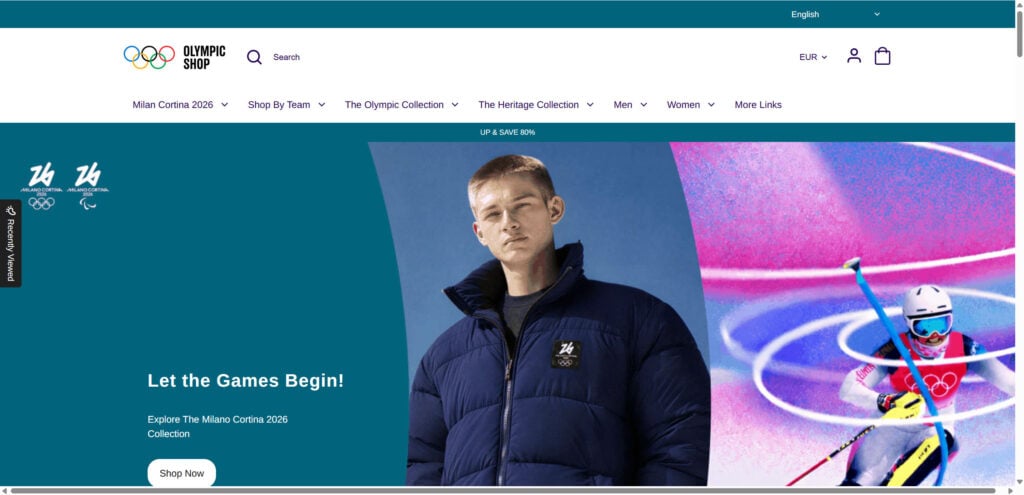
The “Olympics Shop” scam is a coordinated wave of lookalike online stores that impersonate the official Olympic merchandise shop and push extreme discounts, often up to 80% off Milano Cortina 2026 items.
The campaign is effective for one simple reason: the scam sites are not crude.
They are near-perfect clones designed to trigger visual trust.
The fake store copies the same product photography, the same category names, the same overall layout structure, and very similar navigation elements. On mobile or when you are scrolling quickly, it is easy to miss that anything is off.
That is exactly the point.
What the ads look like
The ads use urgent, salesy language that mimics legitimate e-commerce promos, including lines such as:
- “Exclusive! Up to 80% OFF Olympics Official Gear”
- “30 Days No Excuse Free Return”
- “Get Yours Before Out of Stock”
- “Today Only 80% Off”
They also appear in multiple languages, including Italian-style phrasing (“sconti fino all’80%”) to match the Milano Cortina theme and make the offer feel localized and legitimate.
At a glance, the creative looks professional.
It uses official-looking Olympic imagery and clean product visuals, which lowers skepticism before the click.
What happens after the click
Once the user clicks, one of two things usually happens:
- The ad lands directly on a fake storefront using a lookalike domain.
- The ad preview appears “official,” but the click silently redirects to a different domain that is not affiliated with any official Olympics entity.
This redirect behavior matters because it helps scammers evade moderation. The platform or reviewer sees something clean, while real users get sent elsewhere.
Why the sites feel legitimate
The fake shops borrow trust signals from the real store, including:
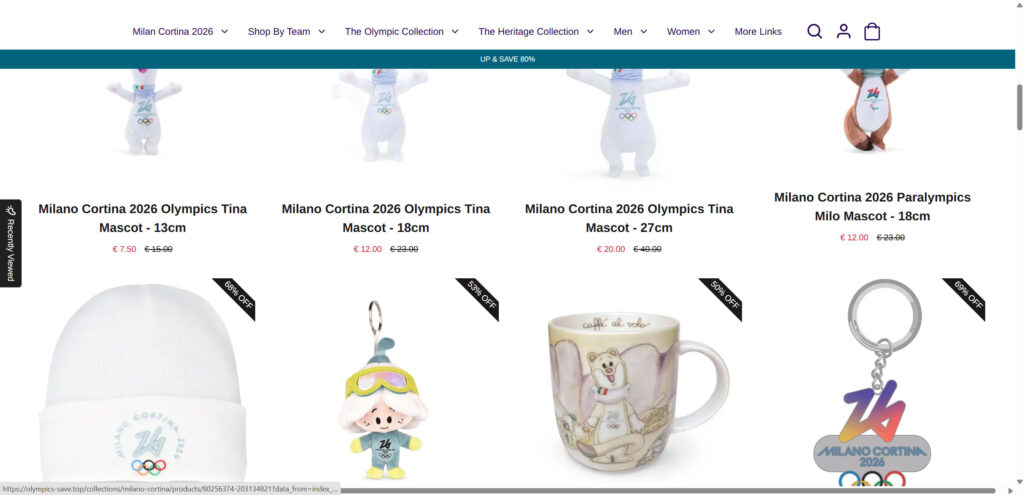
- Professional product photos and consistent styling
- A familiar teal/white color scheme
- Official-looking logos and event references (Milano Cortina 2026)
- Navigation that matches real retail patterns (Men, Women, Collections, Accessories)
- Return and shipping language that sounds credible
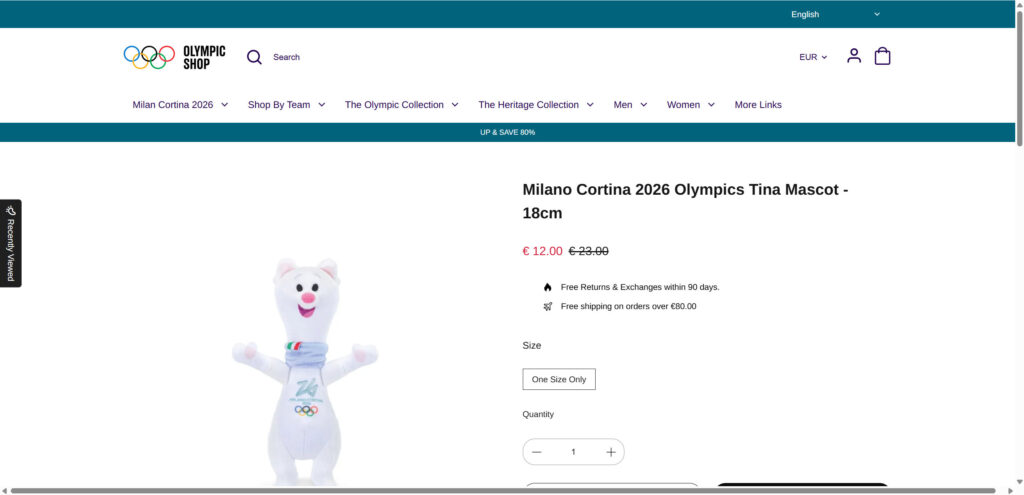
Examples like “Free Returns & Exchanges within 90 days” and “Free shipping on orders over $80”, which are the kinds of policies shoppers expect from a large, official retailer.
The problem is not the design.
The problem is who is collecting the payment details.
The tiny detail that gives it away
One of the clearest tells in your comparison is the discount framing:
- A legitimate store might offer something like “Sign up & save 15%.”
- The scam store pushes “Up & save 80%.”
That single change reveals the core tactic: inflate the discount to short-circuit caution.
When people see 80% off official merchandise, they stop verifying and start trying to “lock it in.”
The real risks to users
These sites can expose shoppers to several overlapping risks, not just one.
1) Payment card theft and fraudulent charges
The most direct risk is entering card details into a checkout controlled by scammers. Even if the “order” appears to go through, the goal can be harvesting your card number, expiration date, and security code.
2) Personal data harvesting
Checkout pages collect valuable identity data, including:
- Full name
- Shipping address
- Phone number
- Email address
Even if the card does not get hit immediately, that personal data can be resold or used for follow-up fraud (phishing, fake delivery texts, account takeover attempts).
3) Counterfeit goods or no delivery
Some victims receive low-quality counterfeit items. Others receive nothing at all. A common pattern is a fake tracking number, vague shipping updates, then silence.
4) The site disappears after taking payments
These operations often burn domains quickly. Once complaints rise, the site goes offline and the scammers rotate to new domains and new ads.
Evidence of coordinated scam infrastructure
This type of campaign is rarely “one scammer, one site.” It looks organized and repeatable.
The footprint you shared shows a burst of domain registrations clustered tightly together, including domains such as:
- olympics2026[.]store
- Olympicseu[.]shop
- olympics-sale[.]top
- olympics-hot[.]top
- olympics-top[.]shop
- Olympicssportswear[.]shop
- Olympexapparel[.]shop
- Lifestylecollection[.]shop
- 2026olympics[.]store
And then more lookalikes appearing immediately after, including:
- Olymponline[.]top
- Postolympicsale[.]com
- sale-olympics[.]top
- olympics-save[.]top
- olympicssportswears[.]shop
- olympicsfashionhub[.]shop
That kind of rapid, patterned domain creation is a hallmark of an operation that expects takedowns and has a pipeline ready.
Newly created Facebook pages pushing the ads
Another strong indicator you noted is that the Facebook pages running these ads are often newly created, sometimes the same day as the domain registration.
That “fast launch” pattern typically looks like this:
- Register domain
- Clone the official store design
- Create a new social page
- Run aggressive discount ads
- Collect payments and data
- Rotate to a new domain when reports spike
Legitimate global brands do not usually create brand-new pages and immediately run 80% off campaigns tied to major international events.
Why this scam is spreading now
Milano Cortina 2026 is a perfect lure.
It is high-interest, widely recognizable, and emotionally positive. People are primed to buy souvenirs, gifts, and collectibles, especially when the items look official and limited.
Scammers lean into that momentum and add a price shock (80% off) to make the decision feel urgent.
The result is a high-converting trap: trust + urgency + checkout.
How The Scam Works
Below is a step-by-step breakdown of how Olympics Shop scam sites typically operate.
Step 1: Create a believable “official” storefront clone
The first move is cloning.
Scammers copy the front-end of an official-looking Olympics merchandise store, including:
- Layout and navigation structure
- Fonts, spacing, product card styling
- “Collection” naming
- Product images and descriptions
- Promotional banners
The fake store uses a prominent banner reading “UP & SAVE 80%” across the top, in the same spot where a legitimate store would place a smaller email sign-up offer.
This is not an accident.
It is a deliberate swap: keep everything familiar, change only what increases urgency.
Step 2: Use a lookalike domain that passes quick visual checks
The domain is the hinge of the entire scam.
Most users do not read URLs carefully, especially on mobile. Scammers exploit this with domains that “feel” related to the Olympics, such as:
- olympics2026[.]store
- olympics-sale[.]top
- olympics-save[.]top
- olympics-top[.]shop
- Olympicseu[.]shop
These domains are not subtle. They do not need to be.
They only need to survive a fast glance while the user is focused on the discount.
A common psychological trick is stacking familiar words (“olympics,” “2026,” “shop,” “sale”) to make the URL look inevitable.
Step 3: Launch ads that mimic legitimate promotions
Once the site is live, the scammers push paid ads.
These ads are optimized for impulse clicks:
- Very high discount numbers (often 70% to 90%)
- Time pressure language (“today only,” “before out of stock”)
- “Free returns” reassurance
- Official-looking imagery and event branding
The ad creative you shared is a textbook example of how they lower resistance:
- It looks polished.
- It uses “official gear” framing.
- It promises a generous return policy.
- It adds scarcity.
It is designed to get clicks from normal shoppers, not tech-savvy investigators.
Step 4: Use redirects and cloaking to evade moderation
A more advanced tactic appears when the ad preview looks “official,” but the click sends the user elsewhere.
This can happen through:
- Redirect chains (multiple hops before landing)
- Conditional redirects based on device, country, or referrer
- “Clean” pages for reviewers, “dirty” pages for real traffic
This matters for enforcement. Even when a platform removes one URL, the operation can keep running by swapping destination domains.
It also explains why users often say: “The ad looked real.”
They are not imagining it. The ad can be engineered to look real.
Step 5: Push the shopper toward checkout fast
Once you land on the fake store, the site experience is tuned for conversion.
Common techniques include:
- Large discount banners (like “UP & SAVE 80%”)
- Prominent “Shop Now” calls to action
- A clean, familiar category structure
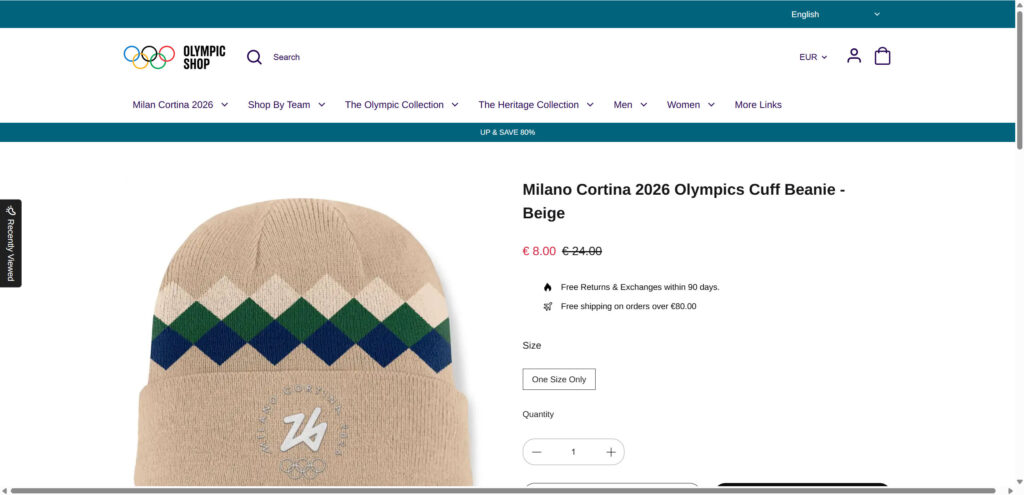
- Popular items priced unusually low (for example, a beanie at $8 instead of $24, displayed on the page in EUR)
- Return and shipping policy blurbs placed near price and quantity selectors
Your product page show this exact layout: price on the right, a short list of “benefits” beneath it, then size and quantity. It is designed to feel safe and routine.
The more routine it feels, the less likely a shopper is to pause and verify the domain.
Step 6: Collect payment details and personal information
The checkout is the main payload.
Even if the scammers are “selling” something, the real value is what the shopper types in:
- Card details
- Billing address
- Email and phone number
- Full shipping information
From the scammer’s perspective, this is a package they can monetize multiple ways:
- Use the card immediately for fraudulent purchases
- Sell the card data to other criminals
- Use the personal data for targeted phishing
- Attempt account takeovers using the email address as a starting point
This is why victims sometimes see problems weeks later, not the same day.
Step 7: Send fake confirmations and stall with tracking theater
Many operations add a thin layer of “post-purchase” credibility.
Victims may receive:
- An order confirmation email
- A generic receipt
- A tracking number that either never updates or points to a meaningless tracking page
This serves two purposes:
- It reduces chargebacks in the first 24 to 48 hours.
- It buys time to run more ads before the domain gets reported.
In some cases, the scammers ship something cheap to create a delivery record, which can confuse disputes. The item might be unrelated, low quality, or counterfeit.
Step 8: Rotate domains and restart under new names
When complaints rise, the operation pivots.
Because the domains are cheap and the site is cloned, they can move quickly:
- Domain goes down
- New domain goes live
- New Facebook page launches
- New ads start again
The domain registration clusters you shared strongly suggest this rotation model.
It is the same playbook, repeated.
The red flags shoppers can actually spot in real time
Most advice online is too vague. Here are the tells that matter, especially for this specific Olympics Shop scam pattern.
Red flags on the ad itself
- Discounts pushed to 80% (or higher) for “official” event merchandise
- Brand-new pages running aggressive sales immediately
- Generic “official gear” language with no verifiable brand page history
- Scarcity lines that feel templated (“before out of stock”)
Red flags on the website
- The domain is not a known official domain or a verified partner domain
- The discount messaging is extreme and constant (“Up & Save 80%”)
- Minor layout inconsistencies compared to the true official shop (small font rendering differences, spacing, slightly off header alignment)
- Policies that sound polished but lack a real company footprint (no meaningful contact info, vague address, unresponsive support email)
Red flags after checkout
- Confirmation emails from unrelated domains
- Tracking numbers that do not match major carriers or never progress
- Sudden unrelated charges on the card days later
- Customer support that stops responding after payment
What To Do If You Have Fallen Victim to This Scam
If you clicked one of these Olympics Shop ads and entered information, act quickly. The goal is to limit damage, lock down accounts, and create a paper trail for disputes.
- Call your bank or card issuer immediately
Tell them you believe your card details were entered on a fraudulent merchant site. Ask them to:- Block the merchant (if they can see it)
- Issue a new card number
- Review recent authorizations for suspicious activity
- Dispute the transaction and request a chargeback
If you paid and you suspect fraud, initiate a dispute as soon as possible.
Use clear language: “This merchant is impersonating the official Olympics Shop. The website is a lookalike domain.” - Freeze or lock your card temporarily if your bank supports it
If you are still investigating, locking the card can stop immediate misuse while you gather details. - Change passwords for any accounts that share your checkout email
Start with:- Your email account password
- Any shopping accounts tied to that email
- Any accounts where you reused the same password
- Enable 2-factor authentication on your email account
Your email inbox is the key to password resets. Protect it with 2FA immediately. - Monitor your statements for at least 60 days
Fraud can be delayed. Watch for:- Small test charges (often $1 to $5)
- Charges from unfamiliar “online retail” names
- International charges you do not recognize
- If you created an account on the scam site, assume the password is compromised
If you used a password you have used elsewhere, treat it as exposed. Change it anywhere it was reused. - Save evidence before the site disappears
Take screenshots of:- The ad (if possible)
- The product page
- The checkout page
- The order confirmation page
- The URL showing the domain
- Report the scam to the platform that served the ad
Report the ad and the page to Facebook, Instagram, or Google (wherever you saw it).
This helps trigger review and removal, and it creates a record that the ad was fraudulent. - Report to your local consumer protection agency (optional but useful)
If you are in the US, report to FTC.
If you are in the EU/UK, report through your local fraud reporting channel.
Even if you do not get a direct response, reporting helps connect patterns across victims. - Watch for follow-up phishing pretending to be “support”
After a scam purchase, victims often receive:
- “Your package is held” delivery texts
- “Confirm your address” emails
- Fake refund offers
- Recovery scams claiming they can get your money back
Do not click links. Go directly to the carrier or bank through official channels.
- If you used a debit card, treat this as urgent
Debit cards can be riskier because the money leaves your account faster. Push your bank for immediate protective steps.
The Bottom Line
The Olympics Shop scam sites work because they do not look like scams.
They look like the official store, with the same photos, the same categories, and the same polished shopping flow. The only thing that changes is the domain and the intensity of the discount.
That is why “Up & Save 80%” is not a harmless promo. It is the hook.
If you see Olympics Shop ads pushing 80% off Milano Cortina 2026 merchandise, assume you are dealing with a lookalike operation until you prove otherwise. Verify the domain through an official Olympics site or a verified partner link, not through the ad itself.
If you already bought something, move fast: contact your bank, dispute the charge, replace the card, and lock down your email and passwords. The sooner you act, the less room the scammers have to turn one impulsive purchase into a larger fraud event.
FAQs
1) Are these “Olympics Shop 80% off” ads real?
Often, no. Many ads using “Official Olympics Shop” branding and extreme discounts (like 70% to 90%) lead to lookalike domains that impersonate an official merchandise store.
2) How can I tell if an Olympics Shop website is fake?
Focus on the domain and the discount behavior:
- The URL is not an official or verified partner domain.
- The site pushes a constant “Up & Save 80%” style banner.
- The page looks nearly identical to the official shop, but with inflated deals and urgency.
- Contact info is vague, unresponsive, or missing.
3) Why do the scam sites look so professional?
Because they are clones. Scammers copy the same product photos, layout, and collections to trigger visual trust and reduce the chance you stop to verify the URL.
4) What happens if I buy from one of these fake stores?
Common outcomes include:
- Your payment card details are captured and later abused.
- Your personal details (name, address, email, phone) are harvested.
- You receive counterfeit merchandise or nothing at all.
- You get a fake tracking number or misleading shipping updates.
5) I entered my card details but did not complete checkout. Am I still at risk?
Yes. If you typed in full card data and submitted it on a fraudulent checkout page, assume it may be compromised. Monitor your account and consider replacing the card if you are unsure.
6) What should I do immediately if I already paid?
Do these steps in order:
- Call your card issuer, report fraud risk, and request a new card number.
- Dispute the transaction and ask about a chargeback.
- Monitor for small “test” charges over the next days.
- Save screenshots of the site, product page, checkout, and the domain.
7) Can I get my money back if it was a scam site?
Often, yes, but it depends on your payment method:
- Credit card: Chargebacks are usually your best path.
- Debit card: Act fast; protections vary and funds may leave immediately.
- PayPal: Open a dispute quickly (goods not received or counterfeit).
- Crypto/wire transfers: Recovery is unlikely.
8) Why do these scam sites use so many different domains?
Because domains get reported and taken down. The operation survives by rotating to new lookalike domains registered in batches, then relaunching ads.
9) Why does the ad preview sometimes look official, but the site is not?
Scammers can use redirects or cloaking so reviewers see one destination, while real users get sent to a different domain. This helps them evade moderation and keep campaigns running longer.
10) Is it safe to enter my email or create an account on these sites?
No. Even without payment, giving your email and personal details can lead to:
- Targeted phishing emails
- Fake delivery texts
- Account takeover attempts (especially if you reuse passwords)








