

If you have received an email claiming that you have won a free Oral-B electric toothbrush, you might be tempted to click on the link and claim your prize. However, this is a scam email that could put your personal and financial information at risk. In this blog post, we will explain what the Oral-B scam email is, how it works, and what you should do if you have fallen victim to it.
What is the Oral-B scam email?
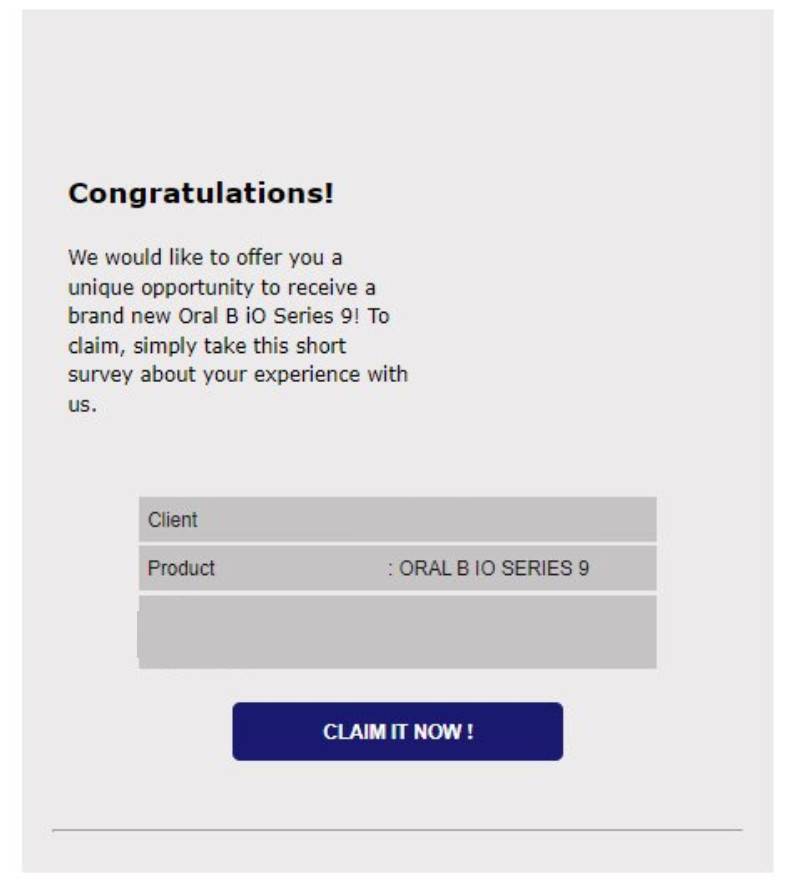
The Oral-B scam email is a phishing email that pretends to be from Oral-B, a well-known brand of oral hygiene products. The email claims that you have been randomly selected as a winner of a free Oral-B electric toothbrush, and asks you to click on a link to confirm your details and claim your prize. The link leads to a fake website that looks like the official Oral-B website, but is actually designed to steal your personal and financial information.
How does the Oral-B scam email works?
The Oral-B scam email works by exploiting your curiosity and greed. The email uses the logo and name of Oral-B to make it look legitimate and trustworthy. The email also creates a sense of urgency by saying that you have a limited time to claim your prize, and that there are only a few toothbrushes left. The email also tries to persuade you by saying that the toothbrush is worth $200, and that it will improve your oral health and appearance.
If you click on the link in the email, you will be taken to a fake website that looks like the official Oral-B website. The website will ask you to fill in a form with your name, address, phone number, email, and credit card details. The website will then tell you that you have successfully claimed your prize, and that you will receive your toothbrush in a few days. However, this is a lie. The scammers behind the email will use your information to make fraudulent purchases or transactions, or sell it to other criminals.
How can I identify a Oral-B scam email?
Phishing emails can be hard to spot, but there are some signs that can help you identify them. Here are some tips on how to recognize a phishing email:
- Check the sender’s address. Phishing emails often use fake or spoofed addresses that look similar to the real ones, but have slight differences or errors. For example, instead of customerservice@oralb.com, they might use customerservice@orab.com or customerservice@oralb.co.
- Check the spelling and grammar. Phishing emails often have spelling and grammar mistakes, or use poor or informal language.
- Check the links and attachments. Phishing emails often have links or attachments that lead to fake or malicious websites or files. Do not click on any links or attachments in an email unless you are sure they are safe and legitimate. You can hover over a link with your mouse cursor to see where it leads before clicking on it.
- Check the tone and content. Phishing emails often use emotional or persuasive language to make you act quickly or impulsively. They may also ask for personal or financial information that is not relevant or appropriate for the situation.
- Check your common sense. Phishing emails often offer something that is too good to be true, such as a free gift, a lottery win, or a refund. They may also threaten you with negative consequences if you do not comply, such as losing your account, facing legal action, or missing an opportunity. If something sounds suspicious or unrealistic, it probably is.
What to do if you have fallen victim to a Oral-B scam email?
If you have fallen victim to the Oral-B scam email, you should take immediate action to protect yourself and your money. Here are some steps you can take:
- Contact your bank or credit card company and inform them of the fraud. Ask them to cancel your card and issue a new one.
- Change your passwords for your online accounts, especially those related to your email, banking, or shopping.
- Report the scam email to Oral-B by forwarding it to their customer service address: customerservice@oralb.com
- Report the scam email to your local authorities or consumer protection agency.
- Delete the scam email from your inbox and trash folder.
Conclusion
The Oral-B scam email is a phishing email that tries to trick you into giving away your personal and financial information by offering you a free electric toothbrush. The email is not from Oral-B, but from scammers who want to steal your money or identity. Do not click on any links or attachments in the email, and do not fill in any forms on the fake website. If you have fallen victim to the scam, contact your bank or credit card company, change your passwords, report the scam, and delete the email.

Join the discussion
0 commentsShare your experience or ask a question about this article.
Discussion
Start the conversation
Have a question or something useful to share? Add the first comment.