

At first glance, the website Outlets-shoes.com may appear to be a legitimate online retailer selling various items. However, upon closer inspection, several concerning factors indicate this site may not actually be trustworthy. This article will break down the warning signs that shoppers should be aware of before providing any information to Outlets-shoes.com.
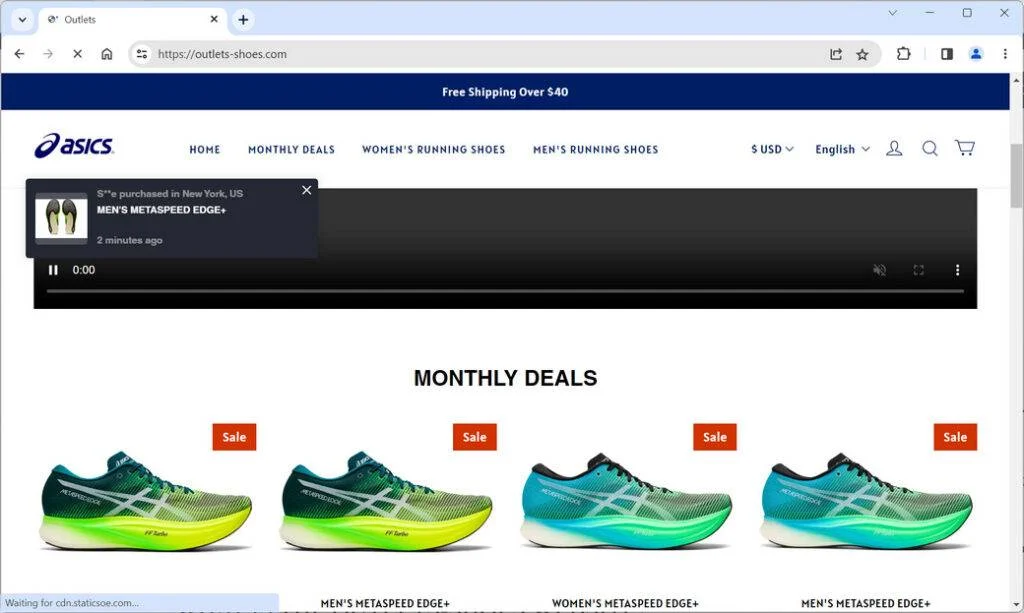
Overview of Outlets-shoes.com
Outlets-shoes.com on the surface advertises itself as an e-commerce store selling a wide selection of items at discounted prices. The website has a professional looking template and displays various product images across multiple categories.
However, visitors should take caution, as several details about Outlets-shoes.com raise some red flags:
- Questionable Business Address
The contact page for Outlets-shoes.com provides a business address that does not appear to be real. Searches for this address show that it does not actually exist – a common sign of a fraudulent site. Genuine companies display their valid registered addresses. - Duplicated Website Content
Much of the product descriptions and other content on Outlets-shoes.com is copied word-for-word from other e-commerce sites. This lifting of content indicates the owners did not create original info about the company. Unoriginal content hints that the site may not be legitimate. - Suspicious Product Images
The product images used on Outlets-shoes.com also look identical to photos on other retailers’ sites. The photos seem to be taken from third-party vendors rather than representing items they directly sell and ship. This suggests deceitful practices. - Anonymous Domain Ownership
Looking up the Outlets-shoes.com domain registration reveals that the owners’ information is hidden through domain privacy services. No names or contact details are publicly provided. This lack of transparency about who owns or operates the site is concerning. - No Company Details
There are no identifiable information about who founded or runs Outlets-shoes.com on the website or anywhere else online. The entire company remains anonymous with no documentation, LinkedIn profiles, or evidence of being an established brand.
In summary, the obscured domain ownership, fabricated address, stolen content, anonymity surrounding the owners, and lack of original product imagery all indicate consumers should be wary of providing payment or personal data to Outlets-shoes.com. More investigation is merited before trusting this site.
Assessing an Online Retailer’s Legitimacy
When evaluating any e-commerce site, here are key indicators to research before making purchases:
- Search for solid company information like an address, phone number, and leadership team details. Avoid sites that are completely anonymous.
- Verify the business address and contact info match records and are not fake or copied from elsewhere.
- Look up the domain registration data to see if owners are transparently listed. Hidden ownership can signal risks.
- Review other sites to check if content like product descriptions has been plagiarized. Original unique content indicates more legitimacy.
- Reverse image search product photos to see if they are copied from other sources or unique to the site.
- Search for valid security and trust insignias like McAfee SECURE, Norton Secured, and BBB accreditation.
- Look up reviews from independent consumer sites like Trustpilot and the Better Business Bureau. Authentic reviews help identify frauds.
Taking the time to thoroughly vet an online retailer using these tips can help identify scam sites masquerading as legitimate stores. Evaluate Outlets-shoes.com closely across these key indicators before considering purchasing.
Protecting Your Information and Purchases Online
To avoid providing your data to fraudulent retailers, keep these precautions in mind:
- Stick to well-established e-commerce sites with long histories and many customer reviews. Avoid brand new sites you cannot verify.
- Check for secure checkout marks from trusted third parties before entering payment information anywhere.
- Use credit cards when possible for the added protection against fraudulent charges. Avoid risky direct payments like wire transfers on new sites.
- Do not provide more personal information than absolutely necessary during checkout.
- Carefully inspect sites for misspellings, grammatical errors, and anything else unprofessional which could denote scammers.
- Trust your instincts. If a website appears suspicious, it is better to avoid it entirely rather than risk fraud.
Exercising caution when shopping online involves taking the time to thoroughly vet sites and only providing information at secure, reputable retailers. While not definitive, Outlets-shoes.com displays enough dubious signs to warrant caution before purchasing.
What to Do If You Already Placed an Order
If you already made a purchase on Outlets-shoes.com, here are some important actions to take:
- Contact your credit card company or payment processor immediately to report unauthorized charges or request a chargeback on pending transactions.
- Monitor your credit card statements closely for any suspicious activity and dispute any unknown charges promptly. Consider canceling the card if you see fraudulent use.
- Check your credit reports for any indications of identity theft such as new accounts opened in your name. Place a fraud alert if needed.
- If you receive any products, inspect them closely for indications they are counterfeit, used, or otherwise misrepresented from the listings.
- Attempt to return products immediately if possible based on the stated policies. Document any issues if returns are rejected.
- Notify the FTC if you believe you encountered a scam website to help protect other consumers.
- Leave reviews about your experience to warn other potential customers wherever the website is advertised.
If you purchased on Outlets-shoes.com, take precautions in case it is a fraudulent operation. Monitoring statements closely and reporting concerns can help minimize damages from potential scams.
Conclusion
Based on multiple questionable factors like the fabricated address, anonymized domain ownership, and unoriginal content, consumers should be very wary of making any purchases or providing personal data to Outlets-shoes.com. This website requires extensive further verification before any level of trust can be established. Overall, it is safer to avoid unfamiliar sites like Outlets-shoes.com that raise any red flags signaling potential fraud. Carefully evaluating legitimacy is key to secure online shopping.

Reviews & discussion
0 commentsShare a firsthand experience, or ask a question.
Community reviews
outlets-shoes.com
Moderated reader experiences, not an editorial verdict.
Start the conversation
Have a question or something useful to share? Add the first comment.