

If you are looking for a cute and fluffy companion, you might be tempted by the ads of OWowpet.com, a website that claims to sell adorable puppies. However, before you fall in love with their pictures and send them your money, you should know that this site is nothing but a scam. In this blog post, we will explain what the OWowpet.com scam is, how it works, and what to do if you have fallen victim to it.
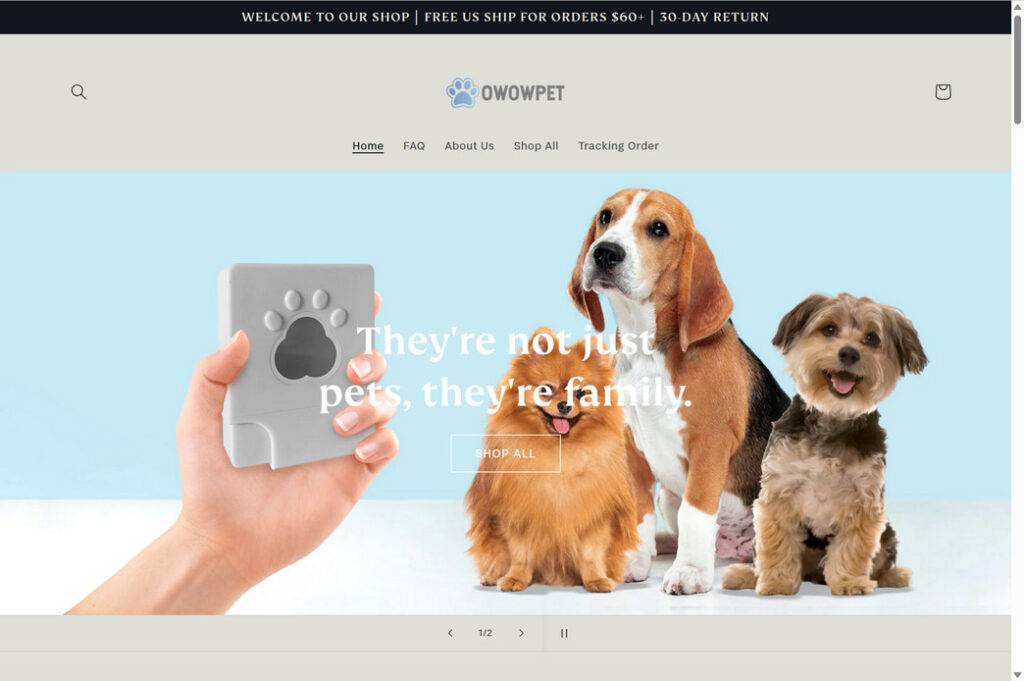
What is the OWowpet.com scam?
The OWowpet.com scam is a type of online fraud that targets people who are looking for a pet. The scammers create a fake website that looks legitimate and professional, with photos and videos of cute puppies, testimonials from happy customers, and contact details. They also advertise their site on social media platforms, such as Facebook, TikTok, and Instagram, to lure potential buyers.
The scammers claim that they have a litter of puppies available for sale, and that they can ship them anywhere in the country or even internationally. They offer attractive prices, discounts, and guarantees. They also claim that they are registered breeders and that their puppies are healthy, vaccinated, and microchipped.
However, the truth is that none of these puppies exist. The scammers use stolen or stock photos and videos of other dogs, and they make up fake names and stories for them. They also use fake or hacked email addresses and phone numbers to communicate with their victims. Their only goal is to get as much money as possible from unsuspecting buyers.
How does the OWowpet.com scam works?
The OWowpet.com scam works by following a typical pattern of online pet scams. Here are the steps that the scammers usually take:
- They create a fake website and social media accounts to advertise their puppies.
- They respond to inquiries from interested buyers and ask them to fill out an application form with their personal and shipping details.
- They send an invoice for the puppy’s price, which is usually between $500 and $1000, depending on the breed and size. They ask the buyer to make a deposit of $650 through PayPal, bank transfer, or Bitcoin.
- They send a confirmation email with a tracking number and a delivery date for the puppy.
- They contact the buyer again before the delivery date and claim that there is a problem with the shipping company or the customs. They ask for more money to cover additional fees, such as insurance, taxes, quarantine, or vaccination. They threaten to cancel the delivery or report the buyer for animal abandonment if they don’t pay.
- They repeat this process until the buyer realizes that they have been scammed or runs out of money. They then stop responding to any calls or emails from the buyer.
- They delete their website and social media accounts and create new ones with different names and domains to continue their scam.
What to do if you have fallen victim to the OWowpet.com scam?
If you have fallen victim to the OWowpet.com scam, you should take the following actions:
- Stop all communication with the scammers and do not send them any more money.
- Report the scam to your local authorities, such as the police or the consumer protection agency.
- Report the scam to your payment provider, such as PayPal or your bank, and try to dispute or reverse the charges.
- Report the scam to the online platforms where you found or contacted the scammers, such as Facebook or Instagram, and ask them to remove their ads and accounts.
- Report the scam to other websites that warn about online pet scams, such as petscams.com or ipata.org.
- Contact a reputable animal shelter or rescue organization in your area and adopt a real dog that needs a loving home.
- If you suspect your device is infected with malware, run a scan with Malwarebytes Free.
Conclusion
The OWowpet.com scam is one of many online pet scams that prey on people’s emotions and desire for a furry friend. The scammers use fake websites and social media accounts to advertise non-existent puppies and trick buyers into sending them money. The best way to avoid falling victim to this scam is to do your research before buying a pet online, look for red flags such as low prices, poor grammar, or pressure tactics, and always meet the seller and the puppy in person before making any payments. Remember: if it sounds too good to be true, it probably is.

Reviews & discussion
0 commentsShare a firsthand experience, or ask a question.
Community reviews
owowpet.com
Moderated reader experiences, not an editorial verdict.
Start the conversation
Have a question or something useful to share? Add the first comment.