

A text claiming to be a ParkingEye Outstanding Parking Balance Notice is circulating among UK motorists. Although the message appears official, several warning signs suggest it is part of a sophisticated payment scam.
Scam Overview
If you received a text headed “ParkingEye – Outstanding Parking Balance Notice”, do not pay it. The message is a phishing scam that impersonates ParkingEye; it is not a genuine parking charge.
The text claims that “current payment information” shows an uncleared parking balance linked to your vehicle. It warns that additional charges or unspecified “administrative limitations” may follow if the balance is not paid quickly. A link is presented as ParkingEye’s official payment website, and the recipient is told to enter a vehicle registration number to view the supposed parking session.
There is no parking ticket behind this text. The message does not identify a car park, provide an entry or exit time, give the date of the alleged incident, or include a Parking Charge reference number. In many cases, the sender does not even know whether the recipient owns a vehicle. The same generic message can be sent to thousands of random phone numbers.
This broad targeting is effective because ParkingEye is a familiar name and many people regularly use privately managed car parks. A recipient who has recently visited a supermarket, hospital, retail park, gym, or airport may wonder whether they forgot to pay or overstayed without realizing it. The scammers exploit that uncertainty. They do not need to know where you parked; they only need the message to arrive when a recent journey is fresh in your mind.
The payment amount shown on the fraudulent website is usually kept small enough to appear manageable. That is intentional. Someone who might investigate an unexpected £70 or £100 charge may pay a few pounds simply to make the problem disappear. However, settling the displayed amount is not the real purpose of the page. The fake checkout is built to capture the information entered into it.
Depending on the version of the site, victims may be asked for their vehicle registration, full name, home address, email address, phone number, card number, expiration date, and security code. Some fraudulent pages may also request a bank verification code or ask the victim to approve a transaction in their banking app. That information can be used for further card payments, account takeover attempts, identity-based fraud, or more convincing follow-up scams.
The small initial payment may be processed, declined, or followed by a fake error message. None of those outcomes proves the site is safe. The card data may already have been transmitted to the criminals. They can then try repeated unauthorized charges—sometimes beginning with low-value transactions that are easier to overlook—until the card is frozen or canceled, the bank blocks the activity, or the available balance or credit is exhausted.
ParkingEye has issued a clear warning that it does not send parking charges by text message or email. A genuine ParkingEye charge is delivered by post. It includes a parking charge reference number, the location and date of the alleged parking event, and instructions explaining how to pay or appeal. ParkingEye’s official scam warning confirms that messages like this are fraudulent.
Receiving the text therefore does not mean you have a late payment, penalty, or outstanding parking session. Do not click the link, reply to the sender, or test the site with invented details. If you already submitted card information, treat the card as compromised and contact your bank immediately.
What the ParkingEye scam text looks like
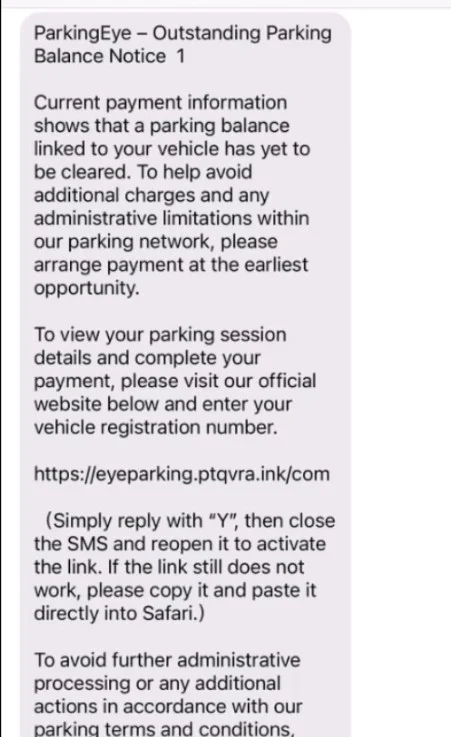
The wording may change, but current versions use a message similar to this:
ParkingEye – Outstanding Parking Balance Notice 1
Current payment information shows that a parking balance linked to your vehicle has yet to be cleared. To help avoid additional charges and any administrative limitations within our parking network, please arrange payment at the earliest opportunity.
To view your parking session details and complete your payment, please visit our official website below and enter your vehicle registration number.
hxxps://leveparking[.]ptqvra[.]ink/com
(Simply reply with “Y”, then close the SMS and reopen it to activate the link. If the link still does not work, please copy it and paste it directly into Safari.)
To avoid further administrative processing or any additional actions in accordance with our parking terms and conditions, please complete payment at your earliest convenience.
Thank you for your cooperation.
ParkingEye Customer Services
The message pressures the recipient to pay at the “earliest opportunity” to avoid additional charges or restrictions. It may also instruct iPhone users to reply with “Y,” close the message, and reopen it to activate the link.
That unusual instruction is an important warning sign. Phones may prevent links from unknown senders from becoming clickable. Asking you to reply is a trick intended to bypass that protection and can also confirm to the scammers that your phone number is active.
In the example shown, the link uses a domain resembling:
leveparking[.]ptqvra[.]ink
This is not a ParkingEye domain. The company’s official website ends in parkingeye.co.uk. Adding a parking-related word to a random domain does not make the site legitimate.
How the ParkingEye Outstanding Parking Balance scam works
This is a form of SMS phishing, also known as smishing. The campaign combines brand impersonation, social engineering, a fake ticket lookup, and payment-card theft. Although the pages and wording can change, the operation generally works as follows.
1. The criminals prepare disposable websites
Before the texts are sent, the scammers register inexpensive domains containing words such as “parking,” “notice,” “vehicle,” or “payment.” Other parts of the address may consist of random letters, and the domain can use an unusual ending such as .ink, .top, or .click.
The scammers then place a fake ParkingEye payment page on the domain. Logos, colors, buttons, legal-looking text, and security icons may be copied from legitimate websites. A professional appearance does not make the page genuine; copying the visible design of a real site is easy, while the form behind it can send every entry to the criminals.
These domains are disposable. Once one is reported, blocked, or removed, the campaign can move to a new address while continuing to use the same text and page template.
2. The message is distributed to large lists of phone numbers
The text may be sent to leaked, purchased, automatically generated, or randomly selected numbers. The recipient does not need to have visited a ParkingEye location—or to own a car—to be targeted.
The sender name or number is not reliable proof of origin. Scam messages may arrive from an ordinary mobile number, a changing number, an email-to-text account, or a sender label chosen to resemble a known organization. Criminals may also use techniques that make a message appear more credible on the phone’s screen.
Because millions of people use car parks, a percentage of recipients will have parked somewhere recently. That coincidence makes the false claim feel personally relevant even though the message contains no genuine vehicle or parking data.
3. Vague wording creates doubt while urgency discourages checking
The text does not normally identify the precise incident. Instead, it refers to “a parking balance linked to your vehicle,” “current payment information,” or “administrative processing.” This vague language lets recipients fill in the missing details themselves.
At the same time, the message warns of extra charges, restrictions, or further action. The goal is to move the victim from uncertainty to payment before they stop to verify the sender. The scammers deliberately present payment as the fastest and least stressful way to prevent the situation from becoming more expensive.
4. The victim is told to activate or manually open the link
Some phones restrict clickable links in messages from unknown senders. The scam therefore instructs the recipient to reply with “Y,” close the message, and reopen it, or copy and paste the address into Safari.
This is not a normal parking-payment procedure. It is an attempt to get around a security feature that is preventing the malicious link from opening. Replying may also confirm that the number belongs to someone who reads and responds to messages, potentially making it more valuable for future scam campaigns.
5. A fake registration lookup makes the story feel personalized
The fraudulent page commonly begins by asking for a vehicle registration number. This creates the impression that the site is checking a real ParkingEye database. In reality, the page may accept almost any entry and display the same “outstanding balance found” result to every visitor.
The page might show a loading animation, pause for several seconds, or move through multiple screens to imitate a live database search. These visual effects are not evidence that a parking session exists. They are part of the script designed to make the result feel specific to the victim.
Entering the registration number also adds a real piece of vehicle information to the data the scammers have already collected, such as the phone number and IP address. That information can later be used to make another fraudulent message sound more convincing.
6. The site requests a deliberately small payment
After the fake lookup, the site claims a balance is due. The amount may be much lower than a normal parking charge because a small payment feels low-risk and may not seem worth disputing. It also shifts the victim’s attention toward completing a routine checkout rather than questioning whether the ticket is real.
The amount on the screen should not be mistaken for the limit of the theft. A payment page needs the same core card information whether it displays £2, £5, or a much larger amount. The scammers are interested in the reusable payment credentials, not just the small sum shown to the victim.
7. Personal and card information is sent to the scammers
The checkout form may collect the cardholder’s name, billing address, card number, expiration date, and CVV security code. It may also request an email address and phone number under the pretense of sending a receipt.
The data can be captured as soon as a field is submitted or when the victim presses the payment button. A later error page, declined-payment message, or endless loading screen does not mean the theft failed. By that stage, the information may already have reached a server or messaging account controlled by the criminals.
8. The card may be tested with low-value transactions
Stolen card details are often more useful if the criminals can determine that the card is active. They may try one or more small card-not-present transactions that are less likely to trigger an immediate alert or attract the victim’s attention.
The transactions may appear under unfamiliar merchant names that have no obvious connection to ParkingEye. If a small charge succeeds, additional attempts can follow. The criminals may continue taking low amounts, try larger purchases, use the card with other merchants, or pass the details to another fraud group.
This activity should not be treated as a legitimate subscription merely because several charges appear. The victim did not knowingly authorize an ongoing service. The correct response is to tell the bank that the card details were entered on a phishing site and ask for the card to be blocked and replaced.
9. Bank-verification prompts may be used in a second stage
Some card payments require an additional check, such as a one-time passcode or approval inside a banking app. A more advanced version of the scam may display a fake verification screen, ask the victim to type in a code sent by the bank, or follow up by phone while pretending to be the bank’s fraud department.
A genuine bank code may describe the merchant or transaction being approved. Never provide a code or approve a request unless the amount, merchant, and action exactly match a purchase you intentionally initiated on a verified website. The small “parking payment” can be used as cover for a different or much larger transaction.
10. Stolen information can fuel follow-up scams
The danger may continue after the first payment attempt. A criminal who has the victim’s name, phone number, vehicle registration, address, and partial banking information can create a more personalized second message or call.
The victim may be contacted by someone pretending to be ParkingEye, a bank employee, a card-security specialist, or a fraud investigator. The caller may accurately repeat information entered on the fake page to gain trust, then ask for another payment, a verification code, remote access to the phone, or a transfer to a “safe account.”
This is why victims should stop communicating with the sender and contact their bank only through the number on the back of the card or inside the bank’s official app. Card details exposed to the fake site should be considered compromised even if the original small payment appears to have failed.
Why the message is clearly fraudulent
Several details expose the scam:
- ParkingEye does not issue parking charges by text or email. Genuine notices are sent by post.
- The web address is unrelated to ParkingEye. The link in the screenshot uses random-looking words and the
.inkextension instead ofparkingeye.co.uk. - There is no parking charge reference number. A real notice contains a unique reference needed to review, pay, or appeal the charge.
- No car park, date, or time is identified. The wording is intentionally generic so the same text can be sent to anyone.
- The message asks you to reply to activate the link. This is a tactic used to get around phone security features.
- It relies on vague threats. Phrases such as “administrative limitations” sound official but do not explain what action is supposedly being taken.
- It asks for card details through an unsolicited link. Unexpected messages should never be used as a starting point for a payment.
The text does not prove that the sender knows your registration number, where you parked, or whether you even own a car. Its lack of specific information is precisely what allows the same template to target a large number of people.
What to do if you receive the text
If you have not entered any information, take these steps:
- Do not click the link. Do not copy it into Safari or another browser.
- Do not reply, including with “Y.” A reply may confirm that your number is active.
- Forward the message to 7726. UK mobile customers can report suspicious texts to their provider free of charge. The provider can investigate and block the sender. Instructions are available from the UK National Cyber Security Centre.
- Report the fraudulent website to the NCSC. Its scam website reporting service can be used to submit the link for investigation.
- Block the sender and delete the message.
If you are worried that a genuine ParkingEye charge might exist, do not use the text link. Type parkingeye.co.uk into your browser yourself and use the contact or payment information on the official website. A real payment requires the reference contained in the notice sent to you by post.
What to do if you entered your card details or paid
Treat the card as compromised even if the payment was only a few pounds and no additional transaction has appeared yet.
- Freeze the card immediately in your banking app, if that option is available.
- Call your bank or card issuer using the number on the back of the card or its official app. Explain that you entered the card details on a phishing website. Ask the bank to cancel and replace the card, not merely block the first charge.
- Tell the bank about every unauthorized transaction. Ask how to dispute the payment and whether any pending or recurring card payments have been created.
- Review your account frequently. Watch for small, unfamiliar charges as well as larger purchases. Continue checking after the card is replaced because some transactions may appear later.
- Do not approve unexpected verification requests. Never share a one-time passcode or approve a banking-app prompt for a payment you did not initiate. A caller claiming to help reverse the fraud may be the same scammer attempting a second stage of the attack.
- Change any password you entered on the fake site. If that password was reused elsewhere, change it on every affected account and enable two-factor authentication.
- Report the fraud. Victims in England, Wales, and Northern Ireland can use Report Fraud or call 0300 123 2040. In Scotland, contact Police Scotland on 101.
The NCSC also advises anyone who has shared bank details through a phishing message to contact their bank immediately. Acting quickly gives the bank the best chance to stop further card use.
What if you only clicked the link?
Opening the page does not automatically mean your bank card has been stolen. If you did not enter information, approve a notification, download a file, or install an app or configuration profile, the risk is lower.
Close the page without interacting with it and report the link. If the site prompted you to download or install anything, remove it and run a security scan. On a work phone or computer, notify your IT department. If you entered a password, personal information, card details, or a one-time code, follow the recovery steps above immediately.
Frequently asked questions
Is the ParkingEye Outstanding Parking Balance text genuine?
No. ParkingEye says it does not send parking charges by text or email. A text directing you to pay an “outstanding parking balance” through a link is fraudulent.
Does receiving the text mean I really have a parking ticket?
No. These messages are sent broadly and contain no credible evidence of a parking event. A genuine ParkingEye charge arrives by post with a reference number, location, date, and vehicle details.
Is it safe to pay if the amount is very small?
No. The low amount is used to reduce suspicion. The fake checkout can capture all the information needed for additional card-not-present transactions.
Can the sender name be faked?
Yes. A message can display a familiar company name or appear in the same conversation as a legitimate text. The sender label alone does not prove who sent it. Verify unexpected requests through contact details obtained independently from the company’s official website.
Can I check the ticket by entering only my registration number?
Do not enter anything into the linked site. Even if a registration number alone cannot authorize a payment, submitting it gives criminals more information and confirms that someone is interacting with the scam. Verify any suspected charge only through ParkingEye’s official website and a notice received by post.
The bottom line
The ParkingEye Outstanding Parking Balance message is a card-stealing phishing scam. There is no parking ticket associated with the text, and paying the small requested amount will not settle a legitimate charge. It can instead expose your card to repeated unauthorized transactions.
Do not click the link, do not reply, and do not enter your registration or payment information. Forward the text to 7726, delete it, and contact your bank immediately if you have already submitted card details.

Join the discussion
0 commentsShare your experience or ask a question about this article.
Discussion
Start the conversation
Have a question or something useful to share? Add the first comment.