

A notice saying six important emails never reached your inbox is hard to ignore. The subjects look like ordinary business, and the deadline feels painfully short.
That believable inconvenience is the hook. What waits behind the retrieval button matters much more than the messages listed in the warning.
Overview
What appears in the warning
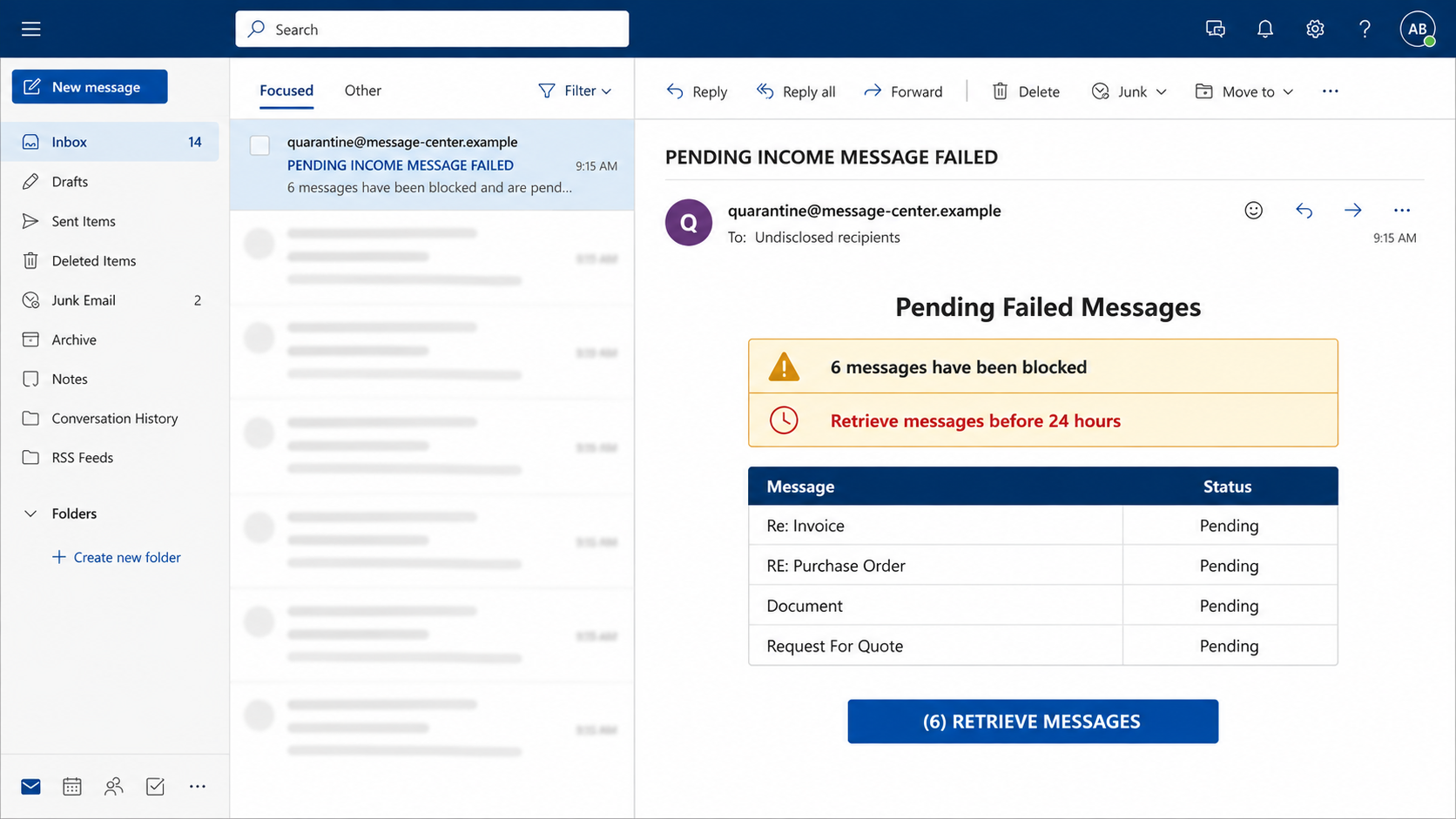
The Pending Failed Messages email claims an incoming mail filter quarantined six messages. It says they will be permanently lost unless retrieved within 24 hours.
A table provides tempting subject lines such as “Re: Invoice,” “Purchase Order,” “Document,” and “Request For Quote.” Each resembles work that could require attention.
A single button promises to retrieve all six messages. The message may use generic server language rather than naming a specific mail provider.
What the button really opens
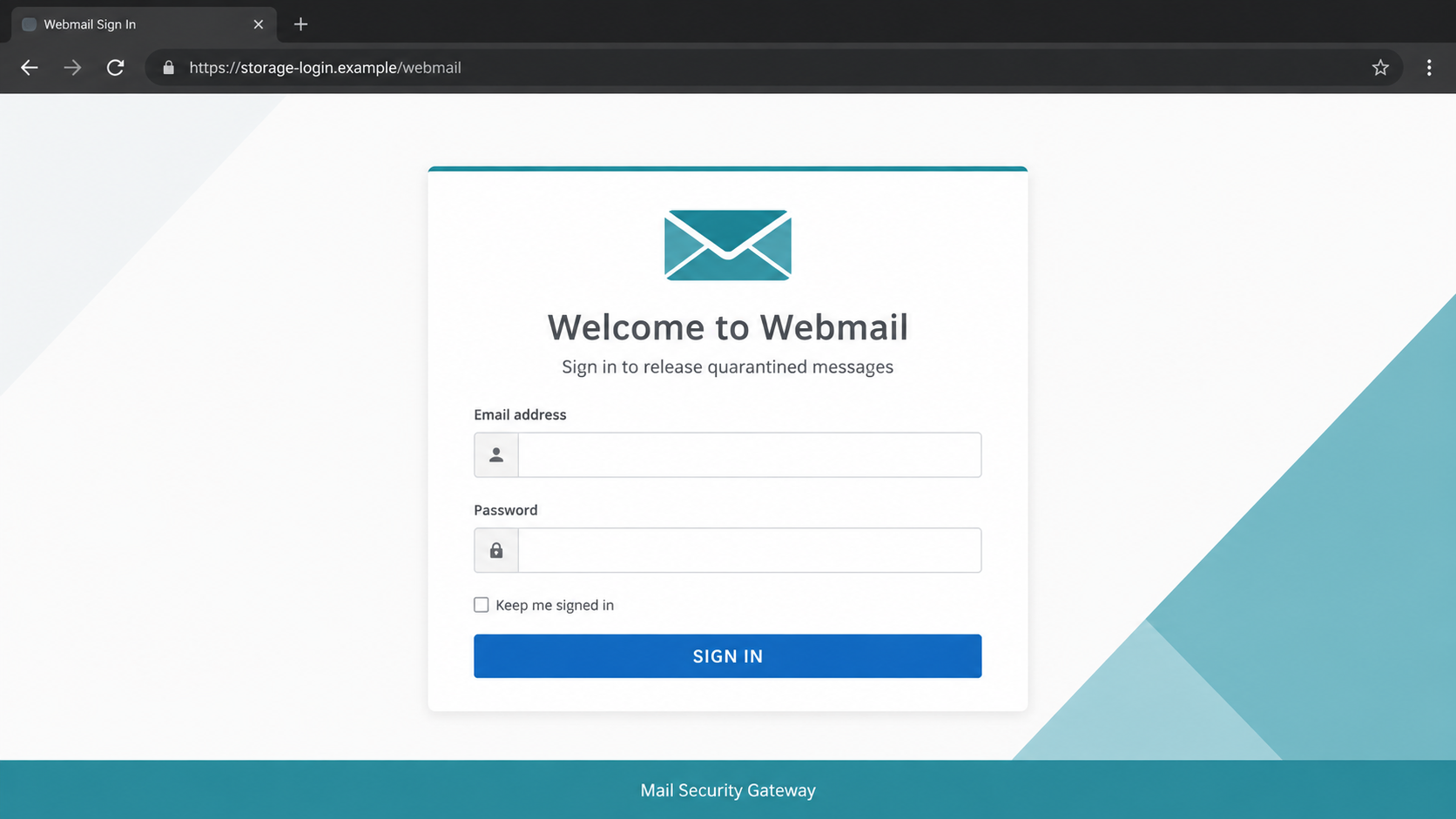
The examined link led through cloud-hosted infrastructure to a counterfeit webmail login. It requested a username and password instead of releasing quarantined mail.
The listed messages are bait. There is no evidence that six genuine emails are waiting, nor that the sender controls the recipient’s spam filter.
Any credentials entered into the imitation portal can be collected by its operators. They can then test the password against the targeted mailbox.
Clues that expose the setup
- The alert invents an exact number of withheld messages without identifying the actual provider.
- Every subject is broad enough to interest almost any office worker.
- The 24-hour deletion claim pressures recipients to skip normal support channels.
- The retrieval button leads away from the organization’s recognized mail domain.
- The landing page requests complete credentials merely to release messages.
- A familiar cloud-hosting address is used as borrowed credibility.
Real quarantine systems usually identify the organization, filtering product, recipient, and release process. Their reports can be verified inside the authenticated mail environment.
A legitimate digest may include release controls, but an unexpected password prompt on another domain is a reason to stop immediately.
Open the company’s webmail or security portal independently. If no matching quarantine event appears there, the email’s table is merely a prop.
How the Pending Failed Messages Scam Works
Step 1: Familiar business subjects create curiosity
The operators choose labels with wide appeal. Invoices interest accounting, purchase orders interest sales, and requests for quotes interest almost every customer-facing department.
None needs a real sender or detailed preview. The recipient mentally supplies a likely customer, supplier, or colleague and worries about appearing unresponsive.
The number six makes the warning feel machine-generated. It also suggests a larger delivery problem than one isolated piece of spam.
Busy employees may click simply to clear the queue. That routine instinct is exactly what the campaign exploits.
Step 2: A false deletion deadline removes patience
The warning says retrieval must happen within 24 hours. This manufactured cutoff discourages recipients from waiting for IT or checking the system carefully.
Permanent deletion sounds final, especially when an invoice or customer request could affect revenue. The supposed business cost overshadows the security risk.
Scammers often vary the window between several hours and a few days. The number is not evidence of a real retention policy.
Actual organizations usually document quarantine retention periods. An administrator can verify them without following an email button.
Step 3: The release link borrows legitimate infrastructure
The examined campaign used Google Firebase Storage infrastructure in its link chain. That association can make the address appear safer during a hurried glance.
Google did not send the message or endorse the page. Public cloud services can host ordinary files, while attackers can misuse them like any other infrastructure.
The first link may also redirect elsewhere. Multiple hops make the final destination difficult to predict and allow operators to replace a disabled phishing page.
A security decision should depend on who controls the destination, not the reputation of one service appearing somewhere in the URL.
Step 4: A generic login welcomes almost anyone
The counterfeit page may say “Welcome to Webmail” and present standard username and password fields. Generic styling supports many different targets.
Other versions customize the page using the recipient’s domain. Either design avoids proving that a real quarantine service knows anything about the mailbox.
The request itself is suspicious. A mail-filter notification should not require credentials on an unrelated webpage before displaying basic quarantine information.
Password managers can provide a useful clue. They often refuse to autofill because the phishing domain does not match the saved provider.
Step 5: Credentials are submitted to the impostor
The form records whatever the visitor enters. A fake loading animation or incorrect-password error can make the process feel normal while data is transmitted.
Some kits request credentials twice to reduce typing errors. Others redirect to the genuine provider, leaving the victim unsure whether anything happened.
If multi-factor authentication is enabled, the operators may trigger a sign-in immediately. They can ask for a code or hope the victim approves a prompt.
Never share an authentication code after following an unsolicited email. The code may authorize the attacker’s session, not release any messages.
Step 6: The stolen inbox supports believable impersonation
Once inside, intruders can read real threads and learn how the owner writes. They may reply inside an existing conversation instead of starting obvious spam.
Finance mailboxes expose invoices and payment schedules. Sales accounts reveal customers, quotes, and pending contracts. Personal mailboxes contain password-reset paths.
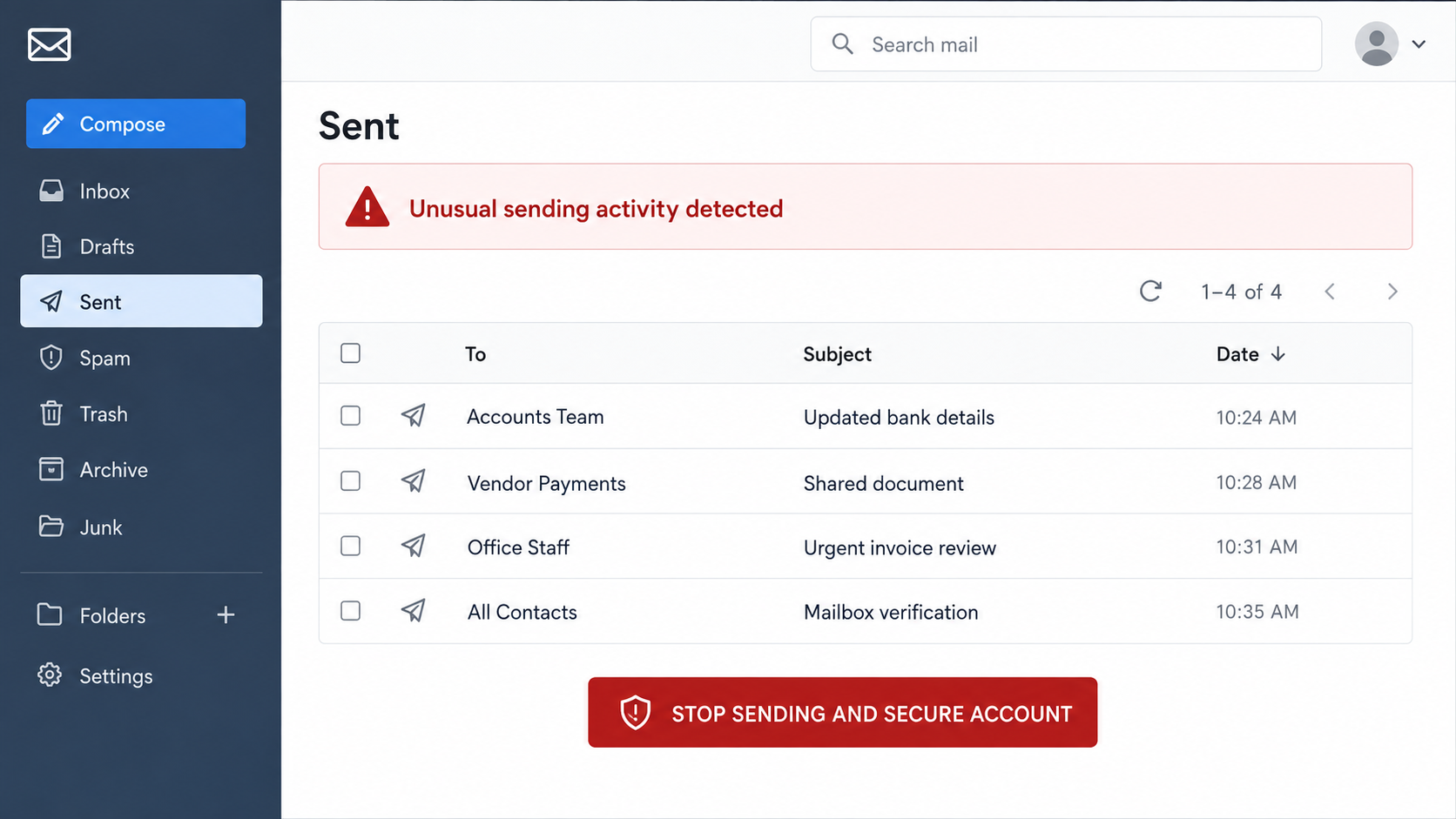
A compromised address can distribute more fake quarantine notices to colleagues. Messages from a known coworker are likely to receive less scrutiny.
The owner may not notice immediately. Attackers often avoid noisy changes until they understand which conversations are most useful.
Step 7: Rules and applications help conceal access
Mailbox rules can forward selected messages outside the organization. Other filters can hide replies, security alerts, or warnings sent by suspicious contacts.
An intruder may authorize an application, create an app password, or register another recovery method. Those paths can survive an ordinary password reset.
Sent mail might be deleted, but copies can remain in trash, recoverable items, or audit logs. Business administrators should review all available evidence.
This persistence explains why complete account cleanup matters. A changed password is essential, but it is only the first layer.
How to Check a Real Quarantine Notice
Start inside the known mailbox
Use your normal bookmark or company portal. Look for a quarantine, security, or message-center area without using the email’s links.
If your organization uses a separate filtering product, reach it through internal documentation. Do not search for the name and click a sponsored result.
Compare the report with actual policy
Ask how long quarantined messages are retained and whether users can release them. Many systems let only administrators release certain categories.
A deadline inconsistent with company policy is strong evidence of deception. The same applies when the message lists controls your system never uses.
Verify important senders another way
If an invoice or quote might truly be missing, contact the supposed sender through a saved number or established thread. Do not reply to the warning.
This approach resolves the business concern without touching the suspicious portal. A genuine sender can resend the document through an approved channel.
Why the Fake Message List Feels Personal
Each subject line maps to a common responsibility
“Invoice” reaches finance, while “Purchase Order” reaches procurement and sales. “Document” remains broad enough to interest practically anyone.
“Request For Quote” adds a possible customer opportunity. Ignoring it could appear costly, so a recipient may prioritize retrieval over careful checking.
The subjects are selected for coverage, not accuracy. They reveal nothing about what the target’s mailbox actually contains.
The table imitates automated evidence
Rows, timestamps, and status labels make the list look like data exported from a mail server. Visual structure can feel more trustworthy than prose.
Yet a table inside an email is still content chosen by its sender. It does not prove that any filtering system generated those entries.
Look for the same event inside the real quarantine console. If the system has no record, the table carries no authority.
Six messages imply a continuing technical failure
One missing email could be ordinary spam. Six suggests a growing delivery problem that might continue unless the recipient intervenes.
That implied escalation creates pressure beyond the listed subjects. Readers may worry that future mail will also disappear.
A genuine service outage should appear in official status information or administrator alerts. An isolated external login page cannot repair mail delivery.
Company, Address, and Fulfillment Checks
No identifiable provider stands behind the alert
A generic “mail server” cannot explain who quarantined the messages. Real administrative alerts normally match the branding and terminology already used by the organization.
Inspect the sender domain, reply-to address, and authentication results in the headers. A display name alone has almost no evidentiary value.
Cloud hosting does not prove legitimacy
Firebase, object storage, and website platforms serve millions of legitimate users. Their presence in a link does not mean the provider reviewed the page.
Attackers favor services that deploy content quickly and look familiar. Report abuse to the hosting service, but do not accuse it of operating the campaign.
The login domain should match the service
Read the address from right to left and identify the registered domain. A provider’s name appearing in a path or subdomain can still be deceptive.
Misspellings, added security words, and unusual endings are common. When uncertain, close the tab and navigate from a trusted starting point.
Internal support is the authoritative contact
Employees should send the original message to their security team using the company’s reporting method. Administrators can inspect delivery and block related indicators.
Personal users should contact their mail provider through its official help center. Never use telephone numbers or live chat presented by the suspect page.
A real support agent should not need your password. No legitimate technician should ask for a multi-factor code generated for a sign-in.
Preserve the message until reporting is complete. Headers, redirect URLs, and timestamps can connect apparently separate emails to one campaign.
What to Do if You Have Fallen Victim to This Scam
- Break off the interaction. Close every related tab. Do not retry the password or provide a code after an unexpected authentication prompt.
- Change your email password safely. Open the genuine provider directly on a trusted device. Use a new, unique password rather than a variation.
- Revoke existing sessions. Sign out all devices and remove unfamiliar trusted browsers. A password change may not invalidate every active session automatically.
- Review multi-factor settings. Enable strong protection, delete unknown methods, and reject prompts you did not initiate. Regenerate backup codes if exposure is possible.
- Remove hidden access. Inspect forwarding, inbox rules, delegates, connected apps, app passwords, recovery contacts, and automatic replies for unauthorized changes.
- Search mailbox history. Examine sent, deleted, archive, spam, and recoverable folders. Look for new payment requests or phishing sent to contacts.
- Notify your organization quickly. Workplace victims should contact IT and security by telephone or internal chat. Administrators may need to revoke tokens and inspect logs.
- Protect related accounts. Replace reused passwords and review services whose resets arrive by email. Prioritize financial and cloud accounts.
- Check the device when necessary. If a file downloaded or software was installed, disconnect it and run a complete Malwarebytes scan before handling sensitive accounts.
- Block repeat redirects. AdGuard can filter known malicious domains and deceptive advertisements. Keep browser and operating-system protections enabled as well.
- Document and report the campaign. Save the message, full headers, destination URLs, and sign-in alerts. Send them to the provider and appropriate fraud authority.
Someone who only read the email probably did not lose account access. Use the phishing-report control and remove the message from every synchronized mailbox.
If a password was entered, act even when the page reported an error. That error may have appeared only after the credential was successfully collected.
Frequently Asked Questions
Are six messages really waiting for retrieval?
There is no evidence they exist in the examined campaign. Confirm quarantine status through the real mail portal or your organization’s administrator.
Is a Firebase link automatically safe?
No. Legitimate cloud infrastructure can host deceptive content. Judge the complete destination and expected workflow, not a familiar company name inside the address.
Why are invoice and purchase-order subjects listed?
They are broad business lures. Each creates curiosity across many departments without requiring the operators to know the recipient’s actual correspondence.
What if my password manager filled the form?
Autofill alone may not submit data, but treat any completed submission as exposure. Change the password and review sessions immediately.
Can the sender steal money with only an email password?
It can enable resets or convincing impersonation. In business mail, access may also support fraudulent invoice and bank-detail requests.
How should a company handle the email?
Security staff should preserve headers, block indicators, search for other recipients, revoke compromised sessions, and warn users without forwarding active links broadly.
The Bottom Line
The Pending Failed Messages scam fabricates a small workplace emergency, then replaces message retrieval with password theft. The convincing subject table is only bait.
Verify quarantine notices inside the real mail system. If credentials were entered, secure the entire mailbox environment, including sessions, rules, applications, and linked accounts.

Join the discussion
0 commentsShare your experience or ask a question about this article.
Discussion
Start the conversation
Have a question or something useful to share? Add the first comment.