

A Mail Support notice says new messages are waiting in quarantine. Review them promptly, it urges, or an invoice, customer request, or other important communication could remain out of sight.
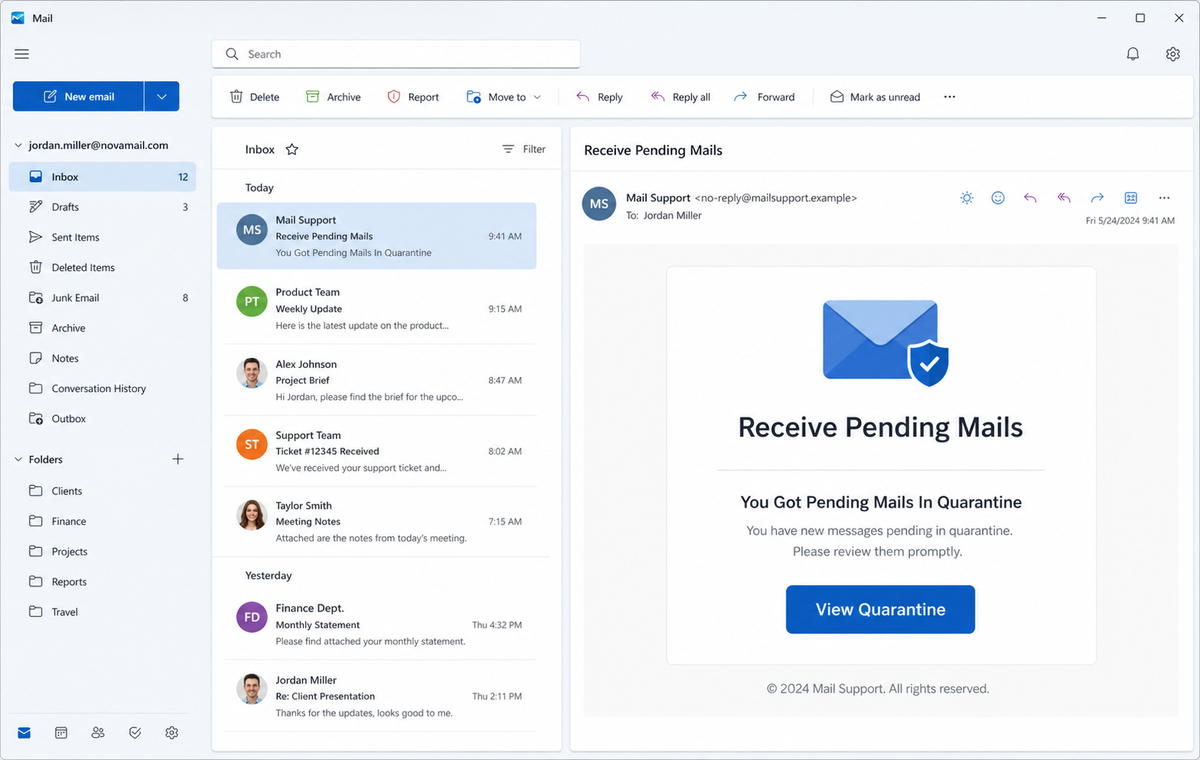
The Pending Mails in Quarantine Email Scam turns that curiosity into a password request. View Quarantine opens a fake provider login, not the protected quarantine area for the recipient's real organization.
The message does not need to identify what was held. Uncertainty does the work, especially when the recipient is already expecting documents or depends on email for time-sensitive business.
Do not open the queue through the alert. Visit the real provider's quarantine portal or ask the known mail administrator to confirm whether any messages are actually waiting.
Overview
The lure promises access to unseen important messages
The subject reads “Receive Pending Mails,” and the body says new emails were identified in quarantine. A View Quarantine button invites the recipient to inspect them before something valuable is missed.
No sender, subject, reason, received time, expiration date, or policy is shown for the supposed messages. The empty claim lets each recipient imagine the communication they most fear overlooking.
A fake session-expired screen makes password entry feel routine
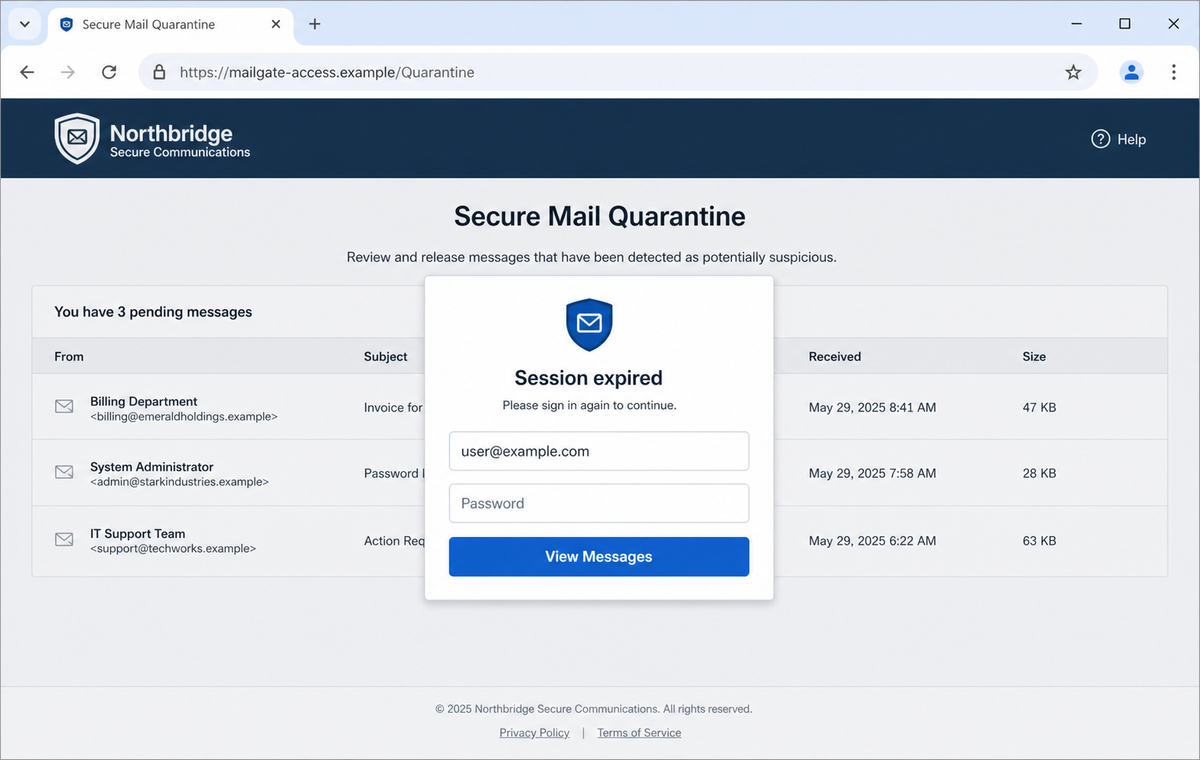
The destination imitated the recipient's provider and displayed a session-expired prompt. The email address was prefilled, leaving the password as the only apparent step before the quarantine list would become available.
A session can expire on a legitimate portal, but an unsolicited link cannot establish where that session existed. The full destination hostname must belong to the known mail service before any credential is entered.
Borrowed security branding supplies false reassurance
One version displayed ESET branding even though ESET had no connection to the campaign. A familiar security name can make the page feel inspected or protected at exactly the moment it asks for a password.
Logos are not live endorsements. The phishing kit can copy images and adapt the rest of its design for Gmail or another provider after reading the recipient's email address.
- The subject says pending mail is ready to receive.
- A generic Mail Support identity claims messages are quarantined.
- No genuine message details appear before the button.
- Urgency comes from the possibility of missing important communication.
- View Quarantine is the only offered route to the alleged queue.
- The landing page may imitate the recipient's usual provider.
- A session-expired popup explains why the password is requested again.
- The email address can be prefilled from a URL parameter.
- A real security logo may be copied without authorization.
- Submitted credentials can expose mail, resets, files, and contacts.
What a Real Email Quarantine Portal Should Show
Legitimate mail-security systems quarantine suspicious or unwanted messages so users or administrators can review them under policy. The exact actions depend on the organization and why the message was held.
Microsoft, for example, directs users to its Defender portal on security.microsoft.com, where a quarantine entry can show sender, subject, received time, expiration, reason, recipient, and message identifiers.
Available actions may include preview, release, request release, delete, view headers, or block the sender. Some high-risk messages remain visible only to administrators, a restriction that protects users from unsafe content.
Those details create an auditable queue. A generic notification that hides every message attribute and immediately asks for the mailbox password provides none of the evidence expected from a real quarantine workflow.
Organizations can send genuine quarantine summaries, but recipients should be able to reach the same queue from the known security portal. Independent navigation removes the sender's button from the trust decision.
When the company uses another vendor, IT can identify the correct portal and policy. The recipient should not guess based on copied logos in a surprise message.
Why the Pending Quarantine Notice Fails Basic Checks
The notification does not list even one credible message. Real systems normally provide enough metadata to distinguish a held invoice from spam without exposing dangerous content.
The unsubscribe link is another misplaced detail. Security quarantine notifications are governed by organizational policy, not ordinary promotional subscriptions that a recipient casually leaves through an email footer.
The session-expired explanation appears only after the user follows the lure. A session on the real provider does not carry over to an unrelated website merely because that site displays a familiar login panel.
Provider matching comes from the submitted address, not from an authenticated relationship. Anyone who knows a recipient uses a certain mail domain can build the corresponding visual theme.
The copied ESET mark does not prove that ESET scanned or endorsed the page. Security companies, banks, delivery services, and cloud providers are frequently impersonated because their logos reduce hesitation.
The password field has no legitimate role in previewing an unverified queue. The safe route is to open the established quarantine portal first and authenticate only after confirming its registered domain.
How the Pending Mails in Quarantine Email Scam Works
Step 1: The campaign targets mailboxes that receive valuable documents
Business and personal addresses are collected from public pages, breached lists, mailing databases, and predictable naming formats. Attackers do not need to know what the recipient is expecting.
The phrase pending mails is broad enough to suggest invoices, contracts, applications, shipping notices, or internal requests.
Step 2: An invisible message queue creates curiosity and anxiety
The email says something important may be trapped but withholds the sender and subject. That missing information encourages the recipient to click simply to discover whether the queue matters.
Prompt review language makes delay feel like a business risk rather than a security precaution.
Step 3: View Quarantine starts from the attacker's link
Instead of directing users to a documented provider portal, the button controls the entire journey. Redirects and encoded parameters can pass the recipient address to the final page.
The email client may show only the button label, hiding the unrelated destination until the browser opens.
Step 4: A provider-matched page displays a believable queue
The phishing kit can show Gmail-like, Microsoft-like, or generic hosted-mail styling. Invented message rows in the background make the page appear to contain information waiting behind authentication.
The rows are interface decoration and do not prove that any mail server supplied them.
Step 5: Session expired justifies collecting the password again
A centered popup says the session ended and preloads the email address. Reauthentication seems reasonable because sensitive quarantined content may require a fresh sign-in on a real service.
On the fake site, the password is transmitted to the criminal rather than used to unlock a mailbox.
Step 6: Stolen credentials are tested and persistence is added
Attackers attempt the password on the real provider, trigger multi-factor prompts, or ask for an authentication code through another page. Once inside, they may create forwarding rules and app passwords.
Deleting sent messages and alerts helps the intruder remain unnoticed while monitoring the account.
Step 7: The trusted inbox becomes a launch point
A hijacked account can send new document, invoice, or quarantine lures to colleagues and customers. Messages from a familiar address are more likely to bypass human suspicion.
Private email also reveals relationships and ongoing transactions that allow highly tailored payment or identity fraud.
Company and Checkout Checks
Open the known quarantine portal directly
Use the provider application, an administrator bookmark, or the documented security portal. For Microsoft 365, the recognized route begins on security.microsoft.com rather than an unknown page from the email.
Look for the same queue and message count after independent authentication.
Compare real message metadata
A proper entry should identify details such as sender, subject, received time, expiration, reason, and recipient according to policy. A claim with no inspectable attributes is not a usable quarantine record.
Ask IT to confirm the message identifier when the notification remains uncertain.
Check the domain before accepting a session prompt
A session-expired message is meaningful only on the established provider hostname. Read the registered domain in the address bar before entering a password.
Matching graphics and a prefilled email field are content supplied by the site, not proof of where the browser is connected.
Treat security logos as claims to verify
Do not assume a copied antivirus or provider logo represents a scan, partnership, or endorsement. Confirm the product through the organization's licensed tools and administrator.
Report unauthorized branding to the impersonated company, but do not continue interacting with the page to gather more evidence.
Warning Signs to Check Before You Act
- The sender is the generic label Mail Support.
- The email says messages exist but lists no verifiable metadata.
- Urgency depends on an unspecified important communication.
- View Quarantine is the only route to the supposed queue.
- An unsubscribe link appears in a security-policy notification.
- The destination does not match the established provider portal.
- A fake message table appears before authentication is proven.
- Session expired is displayed on a site never visited before.
- The email address is prefilled to imitate account recognition.
- The page requests the current webmail password.
- A real security-company logo is used without a verifiable relationship.
- No matching held messages appear after direct provider sign-in.
Quarantine is a real security feature, but its legitimacy comes from the known provider portal and auditable message details. A copied interface on an unrelated host is still a credential trap.
What to Do if You Have Fallen Victim to This Scam
- Change the exposed password immediately. Open the email provider's official quarantine portal and account security dashboard through a saved bookmark or its official application, not through the Pending Mails in Quarantine message. Create a fresh, unique password for the account exposed by that pending-mails message. Replace similar passwords anywhere else they were reused.
- Start with the credentials exposed to the pending quarantine message. Create a fresh, unique password for the account exposed by that pending-mails message. Replace similar passwords anywhere else they were reused. Compare every sign-in method after this pending-mails case with the owner's devices. Unrecognized numbers, addresses, keys, and app passwords must go.
- End the access created through the pending quarantine message. Sign out all other sessions from the provider’s real quarantine portal, revoke unfamiliar OAuth grants, and reconnect trusted mail applications only after the password change. This closes tokens that can survive a simple reset.
- Review the mailbox for changes connected with the pending quarantine message. Remove unknown forwarding addresses, delegates, inbox rules, filters, and automatic replies. Examine mail activity from the time of this pending-mails incident. Unfamiliar sent messages or deleted security alerts can reveal what followed this pending-mails incident.
- Protect the wider account chain. Prioritize webmail, shared documents, and linked business accounts. Reset credentials on services whose recovery messages reach the inbox exposed by that pending-mails message. Begin with financial and administrator accounts.
- Ask the mail administrator to review quarantine and sign-in logs. Provide the original message with full headers, the phishing URL, timestamps, and screenshots. Ask the administrator to search for similar deliveries, block the campaign, review successful sign-ins, and confirm whether any real quarantined mail exists.
- Check the device used to open the pending quarantine message. Run a complete Malwarebytes scan if that pending-mails message delivered a file, extension, or remote-support tool. Clean the device before changing sensitive passwords there.
- Reduce the chance of reopening a related page. AdGuard or another reputable DNS and content blocker may stop known phishing hosts and malicious advertisements tied to the pending quarantine message. Blocklists may not recognize the next domain used for this pending-mails case. Verify every address before entering account information.
- Report the phishing message. Use the mail provider's Report Phishing control and notify the email provider, the impersonated security company, and the organization's mail administrator. The raw headers from this pending-mails incident should be preserved before reporting. They are especially valuable when the campaign reached multiple inboxes.
- Warn mail administrator, coworkers, and recent senders through a separate channel. Explain that the pending quarantine message may have exposed the account and ask them to distrust recent file shares, password requests, invoices, payment changes, or urgent replies until the timeline is confirmed.
- Expect follow-up fraud based on the pending quarantine message. A supposed recovery expert mentioning this pending-mails incident may belong to the same operation. Work only with a professional you verify yourself. Choose recovery help for this pending-mails phishing attempt through organizations you contact independently. Avoid strangers who appear in messages or search ads.
Frequently Asked Questions
Is the Pending Mails in Quarantine email genuine?
The campaign described here is phishing. It claims unseen messages are waiting and sends recipients to a provider-matched password form rather than the real quarantine portal.
Do legitimate providers quarantine email?
Yes. Mail-security systems hold spam, phishing, malware, and policy-matched messages. Genuine entries should be reviewable through the organization's documented provider portal.
Why does the page show a session-expired warning?
The warning makes repeated password entry feel normal. It has no authority when displayed on an unrelated hostname that was reached only through the suspicious email.
Does the ESET or other security logo make it safe?
No. A webpage can copy a security-company logo without permission. Verify the portal domain and your organization's actual mail-security product.
Can opening a quarantine email infect my device?
Reading the notification alone normally does not install malware. Risk increases if you follow links, enter credentials, open delivered files, enable macros, or install software.
What if I really am waiting for an important email?
Contact the sender through a known channel and inspect the official quarantine portal independently. Urgency does not make the message's button a trustworthy route.
The Bottom Line
The Pending Mails in Quarantine Email Scam exploits the fear of missing a valuable message, then turns a fake queue and session warning into a webmail password request.
Check quarantine from the provider or administrator route you already know. Real entries have policy context and message metadata, while copied logos and provider-matched themes are easy to manufacture.
If credentials were submitted, change the password, enable strong authentication, revoke sessions, remove forwarding rules, secure linked accounts, notify IT, warn contacts, scan downloaded content, and report the page.

Join the discussion
0 commentsShare your experience or ask a question about this article.
Discussion
Start the conversation
Have a question or something useful to share? Add the first comment.