

You contact support about a checking-account problem. A follow-up call arrives at just the right moment, and the person seems to know what you needed.
The QuickBooks code-sharing scam exploits that context. A conversation that feels connected to your own request still needs a clear boundary around what you authorize.
Overview
The concern is a deceptive code request, not QuickBooks itself
This scam uses a support explanation to obtain a verification code or account authorization. The caller’s stated purpose can differ from the action the code enables.
QuickBooks and Intuit are legitimate services. Intuit’s fraud guidance warns about impersonation and verification-code requests outside the normal sign-in process.
A genuine support issue does not authenticate every subsequent contact. Caller ID, a case reference, or knowledge of your business can make an unverified request feel familiar.
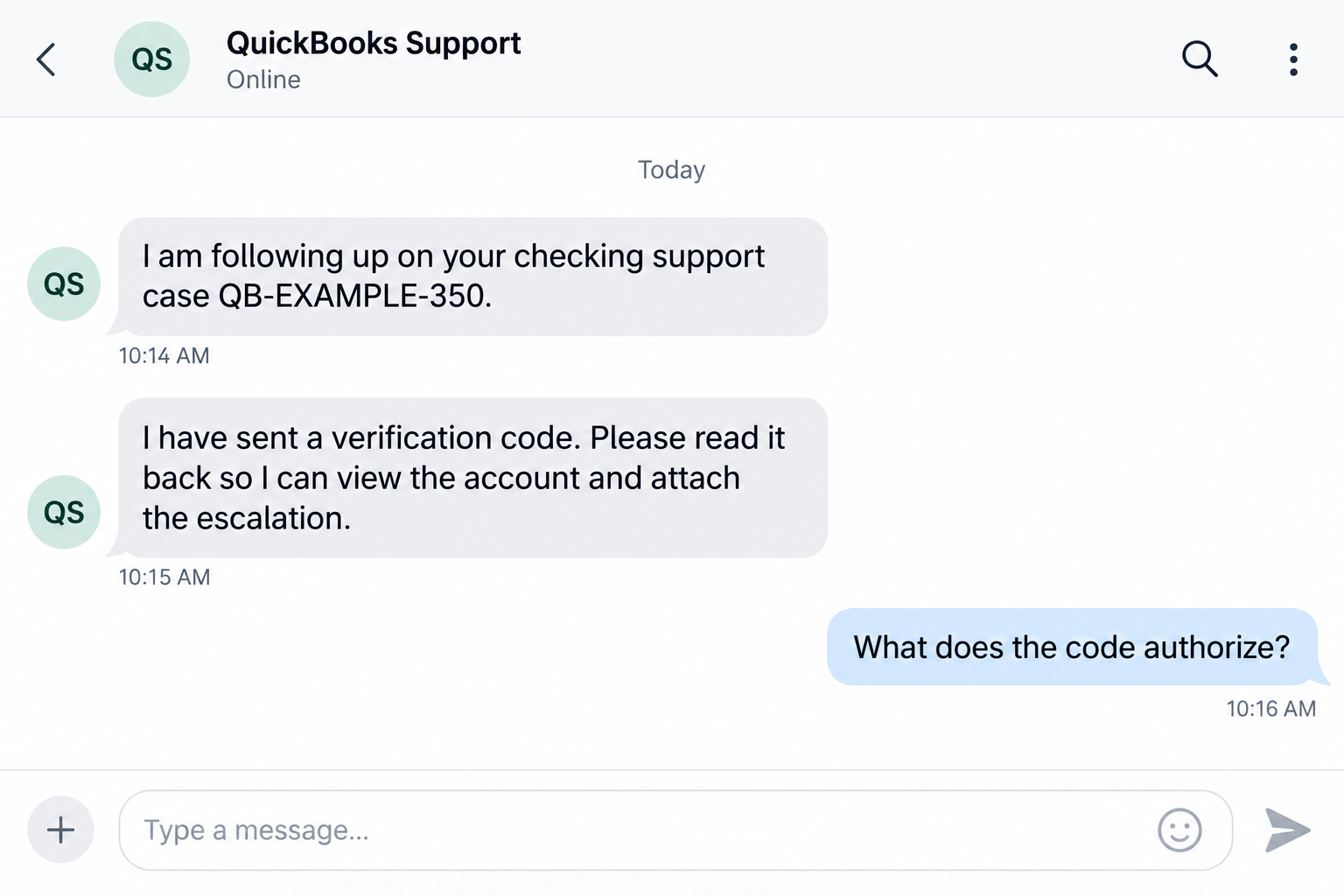
Do not share a code marked private or approve money movement just because a caller says it is needed to view an account.
Reported checking incidents involved a callback and unauthorized transfers
One customer described contacting support about a missing tax form, receiving a callback, and sharing a code supposedly needed for account viewing and escalation.
The customer then reported an unauthorized $5,000 instant transfer and a $75 fee. Other public customer reports describe similar callback and checking-account concerns.
The original reporter later said Intuit reimbursed the full $5,075. That resolution matters, but it is not a guarantee that every reported incident will have the same outcome.
- You already have a real support issue or account task.
- An incoming contact claims to be handling that issue.
- Account or ticket details are offered as reassurance.
- A code is described as a harmless viewing or escalation step.
- The message’s warning or actual authorization is unclear.
- Money movement or account changes follow that you did not intend.
The reports do not establish an insider or platform breach
Public accounts do not provide the technical evidence needed to determine how each caller obtained information or who caused each unauthorized transfer.
Do not turn speculation about employees, a chatbot, suppressed notifications, or account access into a finding. Those explanations remain unproven.
This report addresses the deceptive code-sharing pattern and practical protections. It is not a claim that all support callbacks, routine identity checks, or dispute decisions are scams.
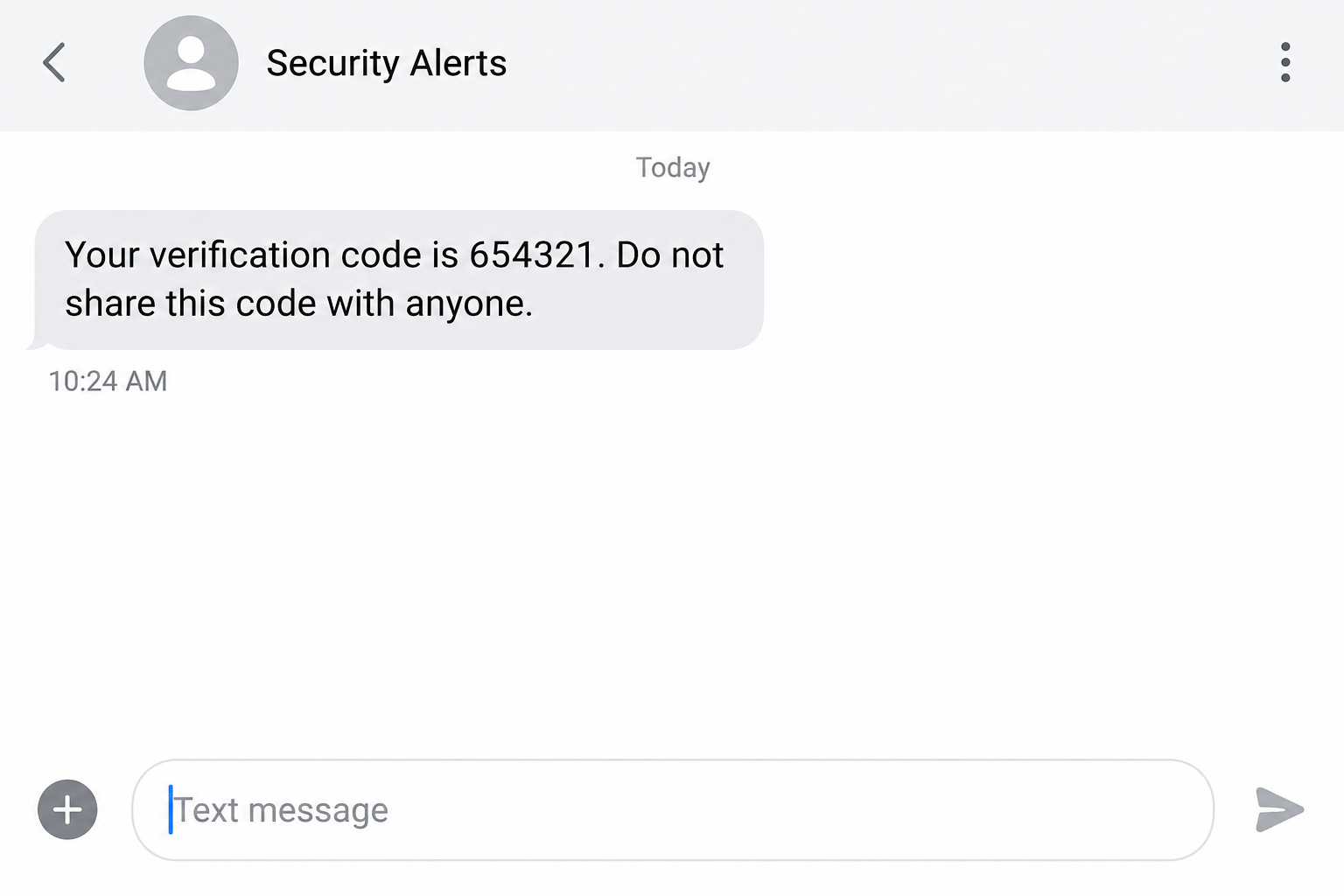
The reconstructed screens illustrate the reported request and generic code warning. They are not actual customer messages, transcripts, or proof of a particular technical compromise.
Why an Expected Callback Still Needs Its Own Check
An unexpected bank call is easier to question than one arriving after you have asked for help. The real support task supplies a believable reason to listen.
You may also have spent a long time trying to reach the right department. A person who says they can finally resolve the issue feels useful.
The contact can exploit that relief. A code request sounds like the small remaining step between you and finishing the task.
But finishing the support task and authorizing a financial action are different things. The caller’s explanation must not replace understanding what the account is asking you to approve.
Knowing a business address or ticket detail does not settle that question. It may make the call more specific without establishing the caller’s authority.
Nor does a matching incoming number prove identity. Caller-ID information can be misleading, so it should not be your sole verification method.
The right pause is practical, not confrontational. Stop the code request, reopen your established support route, and verify the contact and proposed action there.
You do not need to keep explaining yourself to the incoming caller. A genuine account problem can still be resolved through authenticated support.
How the QuickBooks Code-Sharing Scam Works
Step 1: A real account task creates the context
The person is already looking for a document, fixing a checking problem, or contacting support. That task makes follow-up communication seem expected.
In the detailed customer report, the original need was a tax form. The reported theft was not the form itself, but what happened during the subsequent interaction.
Do not assume you caused a scam by needing support. The useful lesson is to verify a new request even when its timing fits your real task.
Keep a record of the support route you used, case reference, and what assistance was promised. It can help you compare later contact with the original process.
A callback should not create unlimited permission to access funds. Each account change or financial instruction still needs its own clear purpose.
Step 2: The incoming person claims to continue the support case
The caller says the issue has been escalated or assigned to them. They may reference information that makes the conversation feel connected to your account.
That connection is a claim to verify. The public reports do not establish one explanation for how the information became available.
Do not infer a proven breach or dishonest employee from the timing alone. Equally, do not treat familiarity as permission to ignore the requested action.
Use the official account or support channel to confirm the callback. Avoid a number or link newly supplied by the person whose identity you are checking.
If they offer another incoming call as proof, that does not make the check independent. You still need a route outside their control.
Step 3: A verification code is described as account viewing or escalation
The person introduces a code request as part of helping you. The explanation may sound less sensitive than signing in or moving money.
A verification code can be connected to different account actions. Its actual role depends on the service and request, not simply what the caller says.
Read the entire message and any account prompt. A warning not to share the code is meaningful, even when the person asking claims to be support.
Do not approve an unfamiliar sign-in, recovery, recipient change, or transfer to make a caller’s explanation work. Stop when the requested authorization does not match your task.
Intuit’s phishing and fraud guidance explains the danger of requests for credentials and codes outside the normal process.
Step 4: Access or authorization can lead to activity you did not intend
If an attacker obtains useful access or approval, they may be able to make account changes or initiate financial activity. The exact action varies.
The customer report describes an instant transfer discovered after the call. It does not establish a universal technical sequence for every incident.
Do not assume that withholding a later card detail protects everything already exposed. A previously shared code or approval may need separate investigation.
Check the account through its official interface. Look for transactions, new recipients, profile changes, or access that you do not recognize.
Save the visible record and contact the real provider promptly. Avoid repeatedly refreshing the account while continuing to follow the suspicious caller’s instructions.
Step 5: The incident needs a financial response and an account response
An unauthorized transfer and exposed account access are related but different problems. A password change alone may not address money already moved.
Likewise, a payment investigation does not automatically remove unfamiliar sessions or reverse account changes. Ask the provider about both sides of the incident.
The original customer’s later reimbursement should be reported fairly. It does not identify the perpetrator, prove every allegation, or establish a standard refund timetable.
Do not pay a new contact to speed up the dispute. Use your established case references and authenticated bank or product support.
If the person calls again claiming the problem is fixed, verify that through the genuine account. Their reassurance is not a substitute for confirmed records.
Caller Identity, Code Purpose, and Payment Authorization Are Separate
A recognizable caller is not enough
You might recognize a number, company name, or case reference. Those details can be useful context, but they do not independently authorize the request.
Reopen support through the official product or company website. Intuit’s contact page provides established product-support routes.
Ask whether the specific contact and action fit your case. You should not need a stranger’s new link to verify your existing account.
A legitimate code can be used under a false explanation
A code arriving from a genuine service does not prove that the caller’s description is accurate. An attacker may have triggered an actual account action.
Do not focus only on the sender of the SMS. Also ask why it arrived and what the person wants you to do with it.
When the message says not to share it, do not let a verbal assurance override that boundary. Confirm the process independently before continuing.
Looking at an account is not consent to move money
A support task can involve reviewing account information without authorizing a transfer. Treat any money movement, new recipient, or financial permission as a separate decision.
If a prompt mentions an action you did not request, cancel it. Do not approve it because the caller says the wording is generic.
Report exactly what you saw and shared. Avoid guessing whether the code was for login, viewing, recovery, or transfer when the message did not clearly establish that.
What the Reported Reimbursement Does and Does Not Mean
The original customer updated the public account to say Intuit reimbursed the money and fee. Leaving out that update would misrepresent the reported outcome.
It still does not prove how the fraud happened. A reimbursement is a financial resolution, not a published technical finding about the support chain.
Nor does one resolution establish your account’s protections or dispute deadline. Business checking products and transaction types can have different terms.
Ask the actual checking provider what process applies to your payment. Keep copies of submissions, supporting records, responses, and case numbers.
A disputed or denied claim is not, by itself, proof that the provider runs a scam. Keep the criminal activity and the dispute-handling concern separate.
If the loss is substantial or the process is unclear, seek qualified advice appropriate to your account and jurisdiction. Do not rely on a private recovery solicitor’s guarantee.
What to Do if You Have Fallen Victim to This Scam
-
Stop the code request and further approvals. End the interaction if the purpose is unclear or the message tells you not to share the code.
Do not provide another code to reverse the first one. Contact authenticated support through the product or official site instead.
-
Check account activity from a trusted route. Review transactions, recipients, profile details, and available security events in the real account.
Record anything unexpected without using the caller’s links. If access is blocked, use the provider’s official recovery and fraud-reporting process.
-
Contact the checking provider about money movement immediately. Explain the callback, what you shared, and the transaction you did not intend.
Ask about stopping pending activity, protecting remaining funds, and the applicable dispute process. Keep the transfer amount and any separate fee clearly identified.
-
Notify genuine QuickBooks or Intuit support. Provide your established case reference, the contact timeline, and the reported unauthorized activity.
Ask them to assess account access and coordinate the appropriate escalation. Do not submit banking passwords or fresh authentication codes in an unsolicited message.
-
Secure exposed credentials and sessions. Change compromised or reused passwords through official services and review unfamiliar access or recovery information.
Keep multifactor authentication enabled. Do not approve unexpected requests while completing recovery, even if another caller claims they belong to the fraud team.
-
Save the incident record privately. Preserve SMS wording, call details, case references, transaction records, correspondence, and the sequence of what happened.
Do not publish live codes, full account numbers, employee information, or identity documents. Factual records are more useful than assumptions about who was responsible.
-
Inspect technical exposure if it occurred. Malwarebytes can assist on supported devices after an untrusted file, app, or remote-access installation.
AdGuard can add protection against known phishing pages and malicious ads. It does not authenticate a caller or cancel an instant transfer.
If no software was installed, do not assume the call infected your device. Tell trusted technical support what links, files, or permissions were actually involved.
-
Report the fraudulent interaction through established channels. Intuit publishes a security-reporting route on its security contact page.
For internet-enabled financial theft in the United States, also report through IC3 and appropriate local authorities. Keep your financial dispute separate but coordinated.
-
Follow up on confirmed records, not new promises. Track your legitimate cases and ask for the applicable decisions and documentation.
Reject anyone demanding payment to release a reimbursement or remove the alleged breach. A second support story does not make an unverified caller safe.
Frequently Asked Questions
Does every QuickBooks support callback indicate fraud?
No. Genuine support contact can occur. Verify the person and action through an established channel, and keep private codes and financial authorization under your control.
Can a genuine SMS code still be involved in a scam?
Yes. The service sending the code may be real while the caller’s explanation is false. Check why it arrived and what action it relates to.
Does knowledge of my support ticket prove the caller is genuine?
Not by itself. The public reports do not establish how each caller learned those details. Confirm the contact through the official support route.
Have an insider or QuickBooks platform breach been confirmed here?
No. The material reviewed does not establish those causes. This article concerns reported deceptive code requests and unauthorized activity, not an accusation against identified staff.
Did the customer reporting a $5,000 transfer recover the money?
The original reporter later said Intuit reimbursed the $5,000 and $75 fee. That reported resolution does not guarantee the result of another person’s dispute.
What if I shared a code but see no unauthorized transaction?
Contact genuine support to assess the action and account exposure. Review activity and access, and do not supply further codes to the incoming contact.
The Bottom Line
The QuickBooks code-sharing scam takes advantage of a moment when a support callback feels expected. Familiar context does not establish what the code will authorize.
Keep a do-not-share code private, verify the contact independently, and report unintended account or payment activity through the real checking provider and authenticated support.

Join the discussion
0 commentsShare your experience or ask a question about this article.
Discussion
Start the conversation
Have a question or something useful to share? Add the first comment.