

A job that fits around your playlists sounds like a welcome break from the usual application grind. That appeal helped put Rateify.online on music fans’ radar.
If a link, message, or old post brought you here, pause before signing up. The name on the offer is only the beginning of the story.
Overview
The attraction was a paid Spotify listening job
Rateify.online became associated with a pitch offering $36 an hour for reviewing music on Spotify. That is an employment promise, not simply a recommendation to enjoy music.
The important question is who would employ you and pay that wage. A recognizable streaming name cannot answer it, even when the page looks polished.
Do not treat the Rateify offer as Spotify recruitment. Spotify identifies its own careers route and warns that lookalike hiring pages can be fraudulent.
There is a real company behind the streaming service. That does not make an unrelated site’s promise of easy reviewing work part of its business.
The domain’s current content tells a different story
Visitors can encounter Turkish-language material promoting Jojobet gambling access instead of the music offer. Other visits stop at a Cloudflare block, depending on the access route.
Neither result supplied the advertised Spotify reviewer vacancy. Do not follow a gambling link or enter credentials there while trying to recover a music-job application.
A changed page does not identify who controlled the earlier promotion. The useful distinction is simpler: the old job pitch and today’s destination are different.
Check the employer, not the promise of easy money
Before sharing information, establish these details independently:
- The employer’s own listing for the exact role.
- A job description explaining the work, location, and selection process.
- A recruiter whose identity can be checked outside the message.
- The company or agency responsible for your contract and pay.
- An application that does not require purchases, deposits, or unrelated subscriptions.
If the supposed job disappears when you ask for those basics, stop. Completing extra forms will not repair the missing employment relationship.
What Happened to Rateify.online?
An old link can continue circulating long after a landing page changes. Search results, reposted videos, saved messages, and copied advertisements can keep the original promise alive.
That is why a current visitor may see something completely different from the Spotify offer described elsewhere. Do not assume a replacement page holds your application.
The Turkish content currently promotes gambling access and account registration, not music feedback. It should not be presented as a new stage of Spotify’s hiring process.
The access-block page is also not an employment decision. It does not mean your application failed, that a wage is waiting, or that paying will restore access.
Keep a copy of the original message if you still have it. Its destination, sender, promised payment, and any later instructions matter more than a changed homepage.
There is no reason to keep testing alternate entry links to unlock this offer. Start a fresh search through the real employer instead.
How to Check a Real Spotify Job
Begin at the careers site yourself
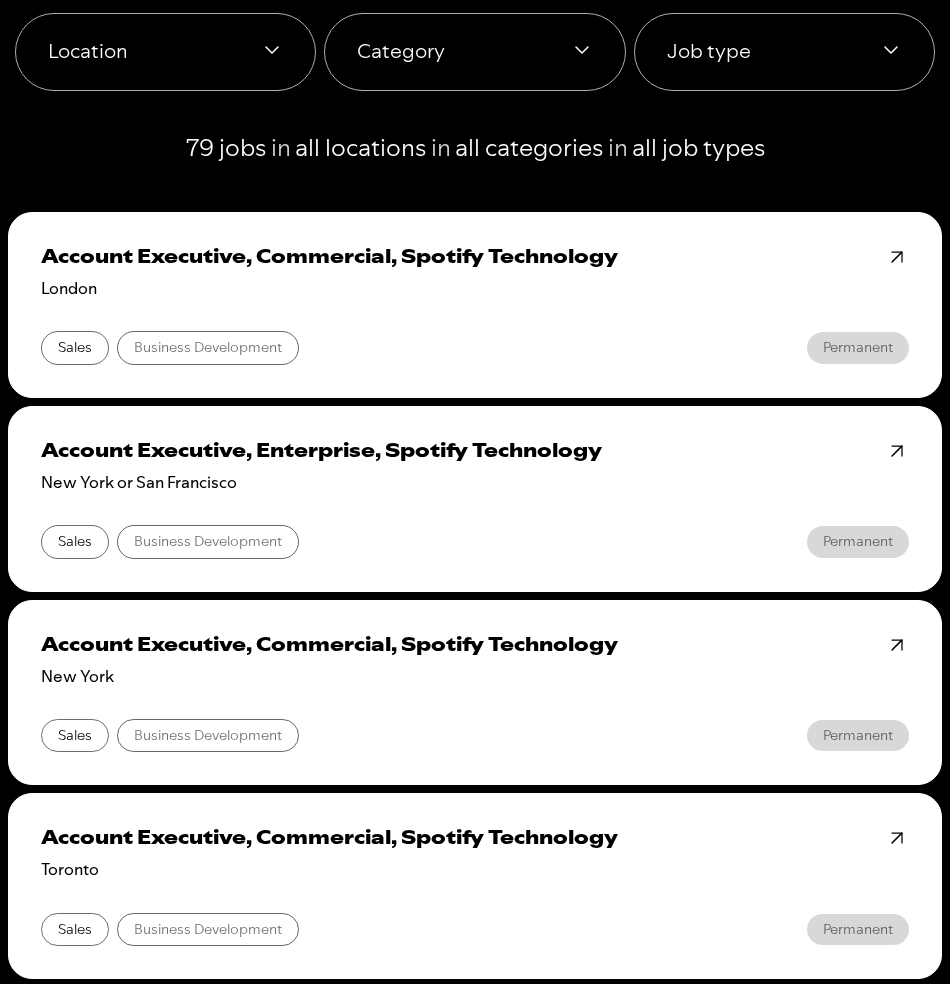
Open Spotify’s official jobs directory independently. Compare the exact vacancy with the offer you received, rather than searching only for the company name.
Real listings identify a particular function and location. A role may be remote or flexible without becoming an open invitation for everyone to collect an hourly listening wage.
A genuine job title copied into a message is still only a starting point. Check whether the application route and recruiter actually belong to that vacancy.
Expect a hiring process, not instant wage activation
Spotify’s hiring guidance describes applications, interviews, and an eventual decision. It explicitly warns against offer letters arriving before contact with a recruiter.
The same guidance identifies Life at Spotify and Spotify’s Lever route for full-time applications. A recruiter should be able to explain how your application connects.
Not every external recruiting platform is automatically fraudulent. The problem is an unverified route claiming employer authority without a matching vacancy or credible recruitment trail.
Separate a job from a market-research invitation
A researcher might ask for feedback on listening habits. A publication might commission music criticism. Neither arrangement becomes a Spotify salaried position because Spotify appears in the conversation.
Ask what you are being paid to deliver, how compensation is calculated, and who owes it. A survey incentive and an hourly employment contract are different commitments.
You should not have to buy a subscription merely to discover which kind of opportunity was advertised. Clear terms need to come before your participation.
How the Fake Spotify Reviewer Job Pitch Works
The stages below explain the impersonation pattern behind these offers. They are warning signs to recognize, not a claim that today’s changed Rateify page reproduces every stage.
Step 1: Turn an everyday interest into an apparent vacancy
The pitch begins with something familiar: listening to songs. Adding an attractive hourly rate makes an ordinary leisure activity sound like an overlooked paid role.
That framing matters. Someone seeking extra income may focus on fitting the work around family, study, or an existing job before checking who is hiring.
A music-service logo, artist names, or a green application button can supply familiarity without supplying authority. None is an employment contract.
The first useful interruption is a specific question: where is the employer’s listing? A promoter’s own repeated claim is not an independent answer.
Step 2: Make an application button feel like acceptance
A short quiz or registration screen can create the impression that the main hurdle is already cleared. An encouraging confirmation makes continuing feel productive.
But permission to fill out another form is not a job offer. It does not establish paid hours, duties, a manager, or a payday.
If the next page belongs to a general job-alert service, read what it actually offers. Receiving advertisements for vacancies is different from being employed.
Keep track of changes in the domain and business name. Your consent on one screen should not be mistaken for verification of another company’s claim.
Step 3: Replace recruitment with commercial activity
The critical warning is a demand to complete unrelated offers, subscribe, purchase training, or install an app before the promised position becomes available.
Each action can have its own consequences. A trial may renew, a form may authorize marketing, and an installation may request permissions unrelated to music.
That is not the same as a legitimate employer supplying equipment after hiring. Ask why becoming a customer is supposedly necessary to become an employee.
A third-party advertiser can have a genuine product while the surrounding recruitment promise remains misleading. Judge both parts instead of treating one as proof of the other.
Step 4: Use the expected payout to justify another demand
Stop if a recruiter introduces a deposit, activation charge, or withdrawal fee. The promised wage is supposed to flow toward you, not become a reason to pay.
The FTC’s task-scam warning describes another variation: simple activities create an apparent balance, followed by demands for the user’s own money.
A number increasing on a screen is not a bank transfer. Paying a new fee does not verify an earlier earnings claim.
If a dashboard or chat shows a balance, preserve it with the associated demands. Do not recruit friends or make another payment to prove it is withdrawable.
Why These Offers Can Still Cause Trouble Without a Payment
Your contact details may outlast the page
An application can collect a name, email address, or phone number without ever producing work. Later messages may refer to that information to sound familiar.
Read the privacy and marketing choices before submitting. A job-search alert, an advertiser’s mailing list, and an employer’s applicant record are not interchangeable.
Do not give identity documents or banking information to someone merely because they know which offer you clicked. Verify the organization and purpose first.
A payment request can arrive under another name
Look at the merchant on a receipt rather than assuming Spotify collected the money. An unrelated trial or training seller must be contacted about its own charge.
Canceling Spotify Premium would not automatically cancel a separate advertiser’s subscription. Likewise, deleting a job-site account may leave a paid trial running.
Commercial tasks are not an employment contract
Compare our GroceryClaims investigation and Starbucks voucher-offer investigation: sponsored deals and reward conditions can replace the benefit a visitor expected.
Those are reward offers, not Spotify vacancies or proof of a common operator. The practical comparison is the switch from an appealing promise to commercial tasks.
What If the Offer Asked You to Connect Spotify?
Connecting an app can be different from handing over a password. You may have approved access through a permission screen without typing credentials into the promoter’s form.
That approval still deserves attention. Think about what the app requested and whether you understood its purpose before agreeing.
Spotify’s connected-app instructions explain how to open your Apps page and remove an application’s access. Use the account site directly.
Remove an unfamiliar connection associated with the offer. If its name differs from the job page, preserve that name with your other records before revoking it.
For an account you suspect someone else accessed, Spotify also provides a sign-out-everywhere control under Security and privacy. Review connected apps as well.
Its account-protection guidance notes that partner devices require separate access removal. Signing out and revoking an application’s permission are related but not identical actions.
Finally, keep job verification separate from app authorization. A genuine permission screen can let an app connect, but it cannot confirm the developer’s promise of paid employment.
What to Do If You Fell for the Spotify Job Scam
-
Stop the application and preserve the sequence. Save the recruitment message, sender details, website addresses, confirmations, and screenshots of payment or download instructions.
Write down what you actually supplied. A page visit, a submitted phone number, a reused password, and a bank payment need different responses.
-
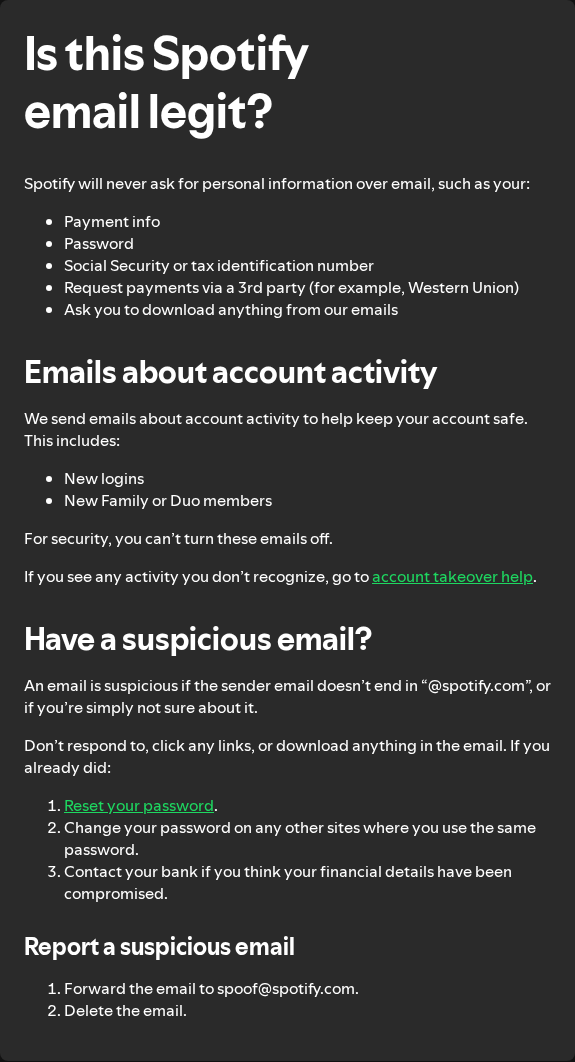
Report the impersonation through Spotify’s genuine channel. Its suspicious-email advice directs recipients to forward suspicious messages to spoof@spotify.com, then delete them.
Keep your own evidence copy first. Do not forward passwords, banking credentials, or identity documents to the supposed recruiter while asking for verification.
-
Protect any account credentials you disclosed. If you entered your Spotify password on an untrusted form, reset it through Spotify directly and review account access.
Change the same password anywhere else you reused it, especially your email account. Do not follow a new password-reset link supplied by the recruiter.
Authenticate later billing alerts through the service itself. A message repeating Spotify’s name does not establish that the sender controls your subscription.
-
Trace and challenge any payment. Identify the actual merchant and product on the receipt. Request cancellation or a refund from that business, stating the problem accurately.
Contact the payment provider promptly about unauthorized charges or money obtained through deception. Ask which evidence and deadlines apply to your payment method.
For a trial, cancel future renewal separately and retain confirmation. A request to stop billing is not automatically a refund of the first charge.
Our DICK’S YETI giveaway investigation examines small shipping-fee requests hiding a different transaction. An application fee deserves the same scrutiny, not an assumption it is harmless.
-
Respond proportionately to exposed information. Expect follow-up approaches if you supplied contact details, but do not treat every later message as authentic recruitment.
If identity documents or a Social Security number were disclosed, use IdentityTheft.gov for a tailored US recovery plan. Elsewhere, consult your national identity-protection service.
-
Check anything you installed or authorized. Remove unfamiliar extensions or applications added for the offer, and review any website notification permission you granted.
Use Malwarebytes if you installed suspicious software or have continuing unwanted behavior. AdGuard can help limit advertising redirects; neither tool authenticates a job or reverses payments.
A simple visit does not prove infection. Avoid a factory reset or deletion of personal files merely because a job page disappointed you.
-
Warn contacts without spreading the live link. If you recommended the offer, explain that the recruitment claim was not trustworthy and ask them to stop.
The FTC’s job-scam guidance explains reporting and payment-recovery steps. Be wary of anyone charging another fee to recover supposed wages.
Check Unwanted Apps and Permissions After the Job Offer
Step 1: Separate a page visit from an installation
Close the recruitment page. If you only looked at it and nothing changed on your device, there is no reason to install a scanner for this offer.
A Spotify account connection is not necessarily an installed program. Remove unfamiliar account access using the Spotify instructions above, rather than searching your computer for it.
If you downloaded a recruiter’s file, leave it unopened. Record its filename and remove the unwanted download without running it as a test.
For software you actually installed, note its name and when it appeared. Use that information to identify the right item in the following checks.
Step 2: Remove permissions that keep the pitch appearing
Alerts arriving after you close the page may be website notifications. Their presence does not prove that a program is installed or that the warning is genuine.
- Chrome on a computer: Choose Settings, Privacy and security, Site settings, then Notifications. Block the unfamiliar website that was allowed to notify you.
- Chrome on Android: Choose Settings, Site settings, then Notifications. Disable the unwanted site’s permission. Some notifications also provide an Unsubscribe control.
- Safari on Mac: Choose Settings, Websites, then Notifications. Set that website to Deny.
Use the website name shown on the notification. Do not click a supposed virus warning to reach its advertised cleanup service.
For a Chrome extension installed during the application, open Extensions and Manage extensions from Chrome’s menu. Find that extension, choose Remove, then confirm.
On managed work or school equipment, ask the administrator about enforced extensions. Do not try to bypass the organization’s controls.
Step 3: Uninstall an app obtained through the offer
Save any personal material stored inside an unwanted app before removing it. Leave unrelated programs, browser profiles, and system folders alone.
- Windows: Open Settings and Apps, then find the installed-app list. Select the unwanted program’s Uninstall option. The list’s name varies between Windows versions.
- Mac: Check Applications in Finder. Use the unwanted app’s own uninstaller when available; otherwise move that app to the Trash.
- Android: In Google Play, select your profile, Manage apps & devices, then Manage. Select the unwanted app and tap Uninstall.
App removal does not settle a subscription or refund. Follow the billing steps above even if the app has disappeared from your device.
For an iPhone or iPad, use Apple’s app-removal controls or support if needed. The Android scanner instructions below do not apply to those devices.
Step 4: Use a scanner if an installation or symptoms justify it
Consider scanning after running an untrusted installer or when unwanted redirects continue. Update your existing security software first; purchasing another product is not a required recovery step.
Malwarebytes offers free manual checks. Download the correct platform version from the official destination, install it normally, and decline any trial or upgrade you do not want.
Windows and Mac
Our Malwarebytes Windows link and Malwarebytes Mac link lead to the respective vendor pages. Choose a manual Custom scan for the relevant locations.
- Windows: Select the Scanner tile’s three-dot menu, then Advanced Scan and Custom Scan. Select the relevant folders and choose Start Custom Scan.
- Mac: Select the Scanner tile, not its Scan button. Open Advanced scans in the Scan tab, select Custom scan, then choose the location in Finder.
- On Mac, choose Open to begin. Let either scan complete, inspect the detections, and follow its quarantine instructions. Restart only if requested.
A Custom scan checks the locations you selected. Malwarebytes lists Custom scans as free, while its Threat Scan and continuous protection are paid features.
Android
For an Android installation, use the official app through our Malwarebytes Android link. Its manual scanner is free; paid protection is optional.
- On the app’s dashboard, find Device and tap Scan now. The first scan may request storage access to check files as well as apps.
- Afterward, inspect any detection. Open the menu beside an unwanted app and choose Uninstall app, then respond to Android’s confirmation.
- Do not mark an unfamiliar detection Always allow merely to dismiss it. Save the result if you need help identifying the item.
Optional ongoing protection is available through our Windows Premium link or Mac protection link. Neither purchase is needed to use the free checks described here.
These product links are affiliate links. Check the actual platform, price, and renewal terms before choosing a paid plan.
Step 5: Check the outcome without escalating blindly
Check whether the unwanted alert, app, or extension returns during normal use. A result with no detections does not certify every account or browser permission as safe.
For persistent Windows problems, a free ESET Online Scanner check provides another opinion. It is a Windows tool, not a phone or Mac scanner.
Do not run scanners simultaneously or keep adding tools without understanding the results. Ask for assistance if a detection returns or removal is blocked.
Our help forums cover Windows, Mac, and mobile devices. Share the unwanted item’s name and relevant scan findings, not passwords or private documents.
Do not erase your device over this job pitch. If qualified support recommends a reset for a diagnosed problem, arrange backups and account access before proceeding.
AdGuard is an optional ad-filtering choice for future browsing. It does not remove an installed app, restore wages, or establish that a recruiter is genuine.
Frequently Asked Questions
Is Rateify.online a legitimate Spotify job site?
No. Do not use it as Spotify recruitment. Verify positions from Life at Spotify, and reject a promise that cannot be matched to an authentic vacancy.
Can I earn $36 an hour reviewing Spotify songs?
The Rateify pitch does not establish that wage. Real audio-related work requires an identifiable employer or client and clear payment terms, not merely a streaming-service name.
Why does Rateify.online show something unrelated now?
The address can now show gambling-access material or an access block, rather than a Spotify application. Do not treat either as a route to paid work.
Does Spotify ever use an external application website?
Yes. Its hiring guidance names a Spotify Lever route. Start from the official careers directory so you can verify the vacancy and destination together.
I only entered my email or phone number. What should I do?
Stop submitting more information and scrutinize follow-up contacts. Protect credentials only if disclosed or reused, and review payments or installations if those occurred.
Should I pay to activate the reviewer job or release wages?
No. Spotify says applicants are not charged for an interview. A demand for money to unlock supposed pay is a reason to stop and preserve evidence.
The Bottom Line
Do not pursue the Rateify.online Spotify job pitch or pay to unlock its promised income. The genuine recruitment route is independently accessible through Spotify’s careers site.
Already responded? Recover the original message, identify what you exposed, and act on that exposure. Deal with credentials, subscriptions, payments, and installations separately.

Reviews & discussion
0 commentsShare a firsthand experience, or ask a question.
Community reviews
rateify.online
Moderated reader experiences, not an editorial verdict.
Reviews
Be the first to review
Approved reviews for this site or product will appear here.