

Have you received an alarming text message claiming to be from the New York Department of Motor Vehicles (DMV), stating you owe an outstanding traffic ticket? It might look authentic, but beware—it’s part of a sophisticated scam designed to steal your personal and financial information. Read on to learn exactly how this scam operates, how to recognize it, and what to do if you’ve already been tricked.
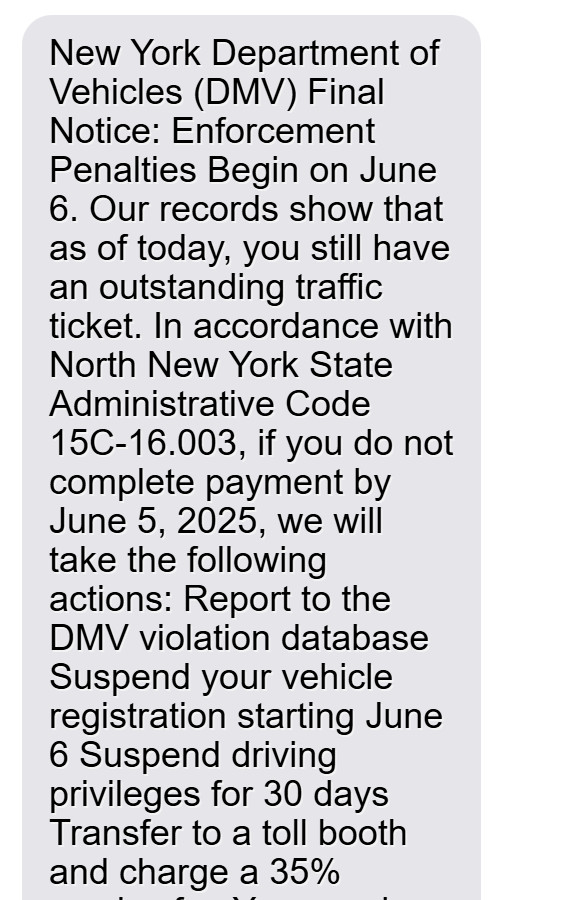
Scam Overview
The New York DMV Final Notice text scam is a widespread phishing attempt targeting New York drivers with frightening urgency and false legal threats. Victims typically receive texts that appear official, claiming they have an unpaid traffic violation. The scammers threaten severe penalties, such as suspended licenses, vehicle registration suspension, prosecution, and even negative impacts on credit scores.
The messages leverage official-sounding terms like “New York Department of Vehicles,” reference fake administrative codes such as “North New York State Administrative Code 15C-16.003,” and demand immediate action. Such believable yet fraudulent elements are designed to convince recipients to pay without verifying the legitimacy.
Why Do Victims Fall for This Scam?
- Authority and Trust: Messages claiming to be from government bodies like the DMV naturally instill trust and urgency in recipients.
- Fear and Urgency: Threats of legal penalties, fines, or credit damage trigger panic responses, leading to impulsive actions.
- Believable Language: Use of realistic-sounding legal jargon and codes makes the messages appear authentic.
- Small Payment Requests: A modest payment of approximately $5-$15 seems insignificant enough to avoid raising suspicion.
Typical Scam Message Example:
New York Department of Vehicles (DMV) Final Notice: Enforcement Penalties Begin on June 6.
Our records show that as of today, you still have an outstanding traffic ticket. In accordance with North New York State Administrative Code 15C-16.003, if you do not complete payment by June 5, 2025, we will take the following actions:
- Report to the DMV violation database
- Suspend your vehicle registration starting June 6
- Suspend driving privileges for 30 days
- Transfer to a toll booth and charge a 35% service fee
- You may be prosecuted and your credit score will be affected
Pay Now: [Malicious Link]
What Are Scammers After?
The main goal is financial and identity theft. Scammers harvest personal data (name, address, phone number) and financial information (credit/debit card details). This stolen information is then used for unauthorized purchases, sold on the dark web, or leveraged for identity fraud.
How the Scam Works
Step 1: Mass Distribution of Scam Messages
Scammers send bulk text messages to thousands of recipients, often from spoofed numbers appearing local or authoritative (e.g., labeled as “NY DMV”). They acquire these phone numbers through leaked databases, dark web marketplaces, or automated scraping tools.
Step 2: Crafting Urgent and Threatening Messages
The messages use alarming language:
- Immediate deadlines (e.g., “payment by June 5, 2025”)
- Legal-sounding threats (e.g., license suspension, prosecution)
- Fake administrative codes (“15C-16.003”)
These tactics create urgency and fear, prompting victims to act quickly without verification.
Step 3: Deceptive Links Embedded in Messages
Included in the text is a link that appears legitimate (e.g., “portal.gov-mee.vip”). These domains mimic official government websites, cleverly designed to deceive recipients into believing they’re interacting with the real New York DMV.
Step 4: Fake DMV Payment Portal
Clicking the link redirects users to a fraudulent website resembling an authentic DMV payment platform. Scammers meticulously duplicate official logos, colors, and branding to reduce suspicion.
Step 5: Harvesting Sensitive Information
Victims entering the fake portal are asked for:
- Full Name
- Address
- Phone Number
- Email Address
- Credit/Debit Card Details
- Sometimes, driver’s license numbers or Social Security numbers
Step 6: False Confirmation to Maintain Deception
Upon entering the information, victims receive fake confirmation messages indicating successful payment processing, reassuring them and reducing suspicion immediately.
Step 7: Exploitation of Victims’ Data
Within days (sometimes hours), scammers exploit collected information:
- Testing small unauthorized card transactions
- Making large fraudulent purchases
- Selling sensitive personal data on dark web forums
Step 8: Cover-Up and Domain Rotation
Once identified or reported, scammers quickly switch website domains and phone numbers, allowing the scam to continue unnoticed by authorities.
Step 9: Secondary and Follow-Up Scams
Victims who provided details may receive follow-up scams:
- Fraudulent “refund” messages asking for further banking details
- Phishing calls or emails impersonating banks or fraud departments
What to Do if You’ve Fallen Victim
If you’ve clicked a link or submitted your information, take immediate action:
1. Contact Your Bank Immediately
- Report fraudulent activity
- Cancel your compromised card
- Request replacement and dispute unauthorized charges
2. Place a Fraud Alert on Your Credit Report
- Contact Experian, Equifax, or TransUnion
- Request a 90-day fraud alert
3. Consider a Credit Freeze
- Prevent scammers from opening new accounts in your name
4. Report to Authorities
- FTC: Submit a complaint via reportfraud.ftc.gov
- New York Attorney General: File consumer complaints through their online portal
- Local Law Enforcement: Document the incident officially
5. Update Passwords & Enable Two-Factor Authentication (2FA)
- Secure critical accounts: banking, email, and social media
6. Monitor Your Financial Statements
- Regularly review bank statements and credit reports for suspicious activity
7. Warn Friends and Family
- Share details to help prevent others from falling victim
The Bottom Line
The New York DMV Final Notice text scam is an advanced phishing scam relying on fear and urgency to trick New York residents into surrendering sensitive information. Remember:
- The real New York DMV will never request payments via text.
- Always verify directly with official sources.
- Quick response to suspected scams can limit damage significantly.
Stay informed, cautious, and proactive. Awareness is your best defense against this dangerous scam.
Frequently Asked Questions About the New York DMV “Final Notice” Text Scam
What is the New York DMV “Final Notice” text scam?
The New York DMV “Final Notice” text scam is a sophisticated phishing attempt designed to trick New York residents into providing personal and financial information. Victims receive fake text messages claiming they have outstanding traffic tickets and must pay immediately to avoid penalties like license suspension or credit damage.
Does the New York DMV send text messages about unpaid tickets?
No. The New York Department of Motor Vehicles (DMV) never sends unsolicited texts demanding immediate payments for unpaid traffic tickets. Legitimate notices are typically sent via official mail or secure New York government websites ending with “.gov.”
How can I identify a fake New York DMV text message?
Watch for these scam indicators:
- Urgent warnings with immediate deadlines.
- Threats of severe penalties, including license suspension and prosecution.
- Use of fabricated administrative codes (e.g., “Administrative Code 15C-16.003”).
- Suspicious links that do not end with “.gov” (e.g., “portal.gov-mee.vip”).
What happens if I click on the link in the scam message?
Clicking on the link leads you to a fake New York DMV payment portal. The fraudulent website collects sensitive data such as your name, address, phone number, email address, and credit/debit card details. Scammers use this stolen information for financial fraud and identity theft.
Is “portal.gov-mee.vip” an official New York DMV website?
No. Official New York DMV websites always end with “.gov” and do not use unusual domain endings like “.vip,” “.win,” “.info,” or “.xyz.” Any URL that deviates from this standard is likely a scam.
How much money do scammers usually request in these messages?
Scammers typically request a small payment—usually between $5 to $15. The modest amount is deliberate, intended to seem credible and prompt quick payment without raising suspicion.
What should I do if I submitted my personal information?
Take these steps immediately:
- Contact your bank or credit card company: Report your card as compromised and request cancellation and a replacement.
- Place a fraud alert on your credit report: Contact Experian, Equifax, or TransUnion to set up a fraud alert.
- Consider a credit freeze: Protect your identity by preventing scammers from opening new accounts in your name.
- Report the scam: File complaints with the FTC at reportfraud.ftc.gov, the New York Attorney General’s office, and your local law enforcement agency.
- Update passwords and enable two-factor authentication (2FA): Secure your email, banking, and other sensitive accounts immediately.
- Monitor your financial and credit accounts closely: Regularly check for unauthorized transactions or new account openings.
How do scammers use my stolen information?
Scammers use your information to:
- Make unauthorized purchases or financial transactions.
- Commit identity theft by opening new accounts, loans, or services in your name.
- Sell your personal data to criminals on dark web marketplaces.
- Conduct further targeted scams or phishing attempts.
How can I report a scam message?
You should report scam messages by:
- Forwarding suspicious texts to 7726 (SPAM) to alert your mobile carrier.
- Filing a complaint with the Federal Trade Commission at reportfraud.ftc.gov.
- Contacting the New York Attorney General’s consumer protection division.
- Reporting the incident to your local law enforcement for further documentation.
Does the New York DMV ever request payment via text?
No. The New York DMV never requests payments or sensitive information via text message. All official payment requests from the New York DMV come through secure mail or directly through government websites ending in “.gov.”
Who are the typical targets of this scam?
While anyone with a mobile phone can be targeted, scammers typically focus on:
- Older adults who may be less familiar with digital scams.
- Individuals unfamiliar with official DMV procedures.
- People who react quickly due to fear of penalties or legal issues.
What can I do to protect myself from future scams?
To safeguard against future scams, follow these recommendations:
- Never click links or respond to unsolicited texts requesting sensitive information.
- Verify any unexpected communications by contacting the New York DMV directly via official channels.
- Use reliable mobile security software that detects phishing links.
- Regularly update and use strong, unique passwords.
- Activate two-factor authentication (2FA) on all financial and sensitive accounts.
- Educate yourself regularly about current scams through trusted sources like the FTC, state government, and cybersecurity websites.
What exact wording does this scam usually include?
Typical scam wording includes phrases like:
“New York Department of Vehicles (DMV) Final Notice: Enforcement Penalties Begin on June 6… If you do not complete payment by June 5, we will suspend your license and vehicle registration…”
These messages use authoritative language, threats, and urgency to trigger immediate action.








