

ReviewVoucher.com is a deceptive website falsely claiming to offer $750 Costco gift cards in exchange for completing online surveys.
This article will expose how the scam works, provide tips to avoid falling victim, and explain what to do if you shared personal information.
Overview of the ReviewVoucher.com Scam
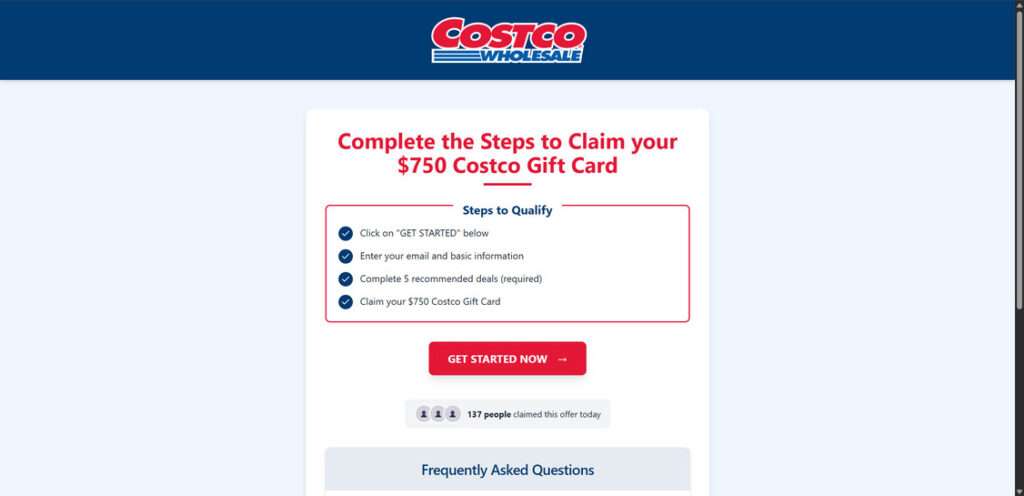
ReviewVoucher.com is the latest shady website running an insidious scam that falsely promises $750 Costco gift cards. This deceptive site claims shoppers can earn gift cards just for completing online surveys. However, it is a complete fraud designed to exploit unsuspecting consumers and steal personal information.
This scam works by utilizing compelling ads on social media and spam emails to drive traffic to ReviewVoucher.com. The ads show the Costco logo and tantalizing headlines like “Get a $750 Costco Gift Card – Limited Time Only!” that entice people to click through.
Once on the site, you are greeted with the Costco name and branding throughout. The homepage states “Complete our surveys and earn a $750 Costco gift card!” At first glance, it appears to be an official Costco rewards program.
To get started, it prompts you to enter personal details like your name, email address, phone number, home address, birthday, and more via an online form. Supposedly, this registers you to receive the promised gift card after finishing the surveys.
In reality, this is just a deceptive tactic to harvest your personal information. The data collected is either used fraudulently or gets sold to cybercriminal networks involved in identity theft and online scams.
After submitting your information, you are redirected through a series of shady websites that pay affiliate commissions to the owners of ReviewVoucher.com. These sites pressure visitors to sign up for useless subscriptions, download malware disguised as apps, enter contests that steal your data, and more.
Each click, download, signup, or purchase made through these affiliate offers earns money for the scammers. You receive absolutely nothing in return, despite the false promises. There are no real opportunities to complete surveys, no $750 gift cards ever sent out, and no way to earn the rewards promoted.
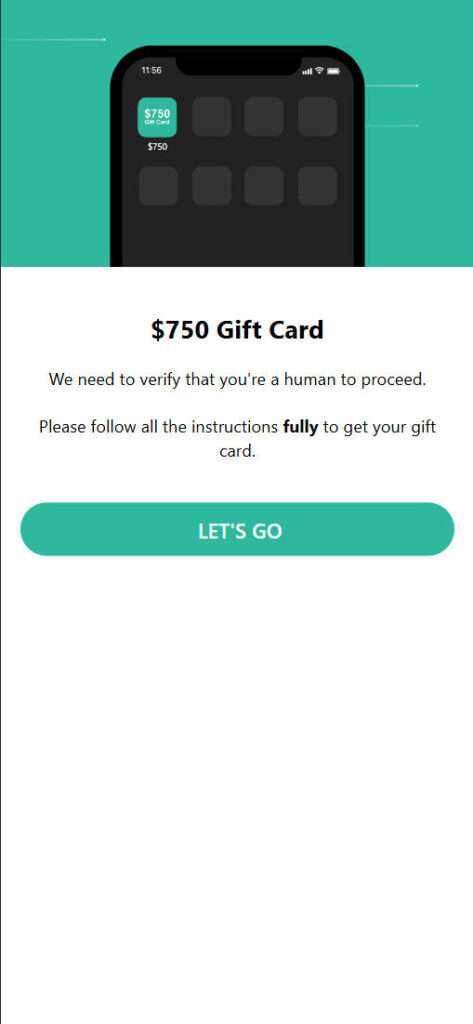
ReviewVoucher.com has no actual association with the Costco brand. It is a fraudulent website set up solely to exploit victims and profit from affiliate link commissions. The promises of easy free gift cards are completely bogus.
This scam is particularly deceptive and insidious because of how convincingly it impersonates the real Costco company. The website design, logos, and messaging make it appear credible at first glance.
Victims provide their sensitive personal information believing they are giving it to Costco. In reality, it goes straight to cybercriminals involved in a variety of fraudulent activities and black market data sales.
Avoid any suspicious offers related to ReviewVoucher.com and do not trust compelling ads that guarantee free gift cards. Many are affiliate marketing scams intended to either sell your data or trick you into unwanted purchases that line the scammers’ pockets.
Be extremely cautious before entering personal details into any unfamiliar website. Only provide it to established, reputable sites that clearly explain how your information will be used. As this scam shows, promises of easy free rewards are almost always totally illegitimate.
How the ReviewVoucher.com Scam Works
Here is a step-by-step look at how the ReviewVoucher.com scam operates to trick unsuspecting people:
Step 1: Scam Ads Promote ReviewVoucher.com
The scammers behind this scheme utilize online ads and emails to drive traffic to the fraudulent ReviewVoucher.com website.
These ads contain eye-catching images implying visitors can earn $750 Costco Gift Cards. For example,they may show a Costco logo with text like “Geta750 Gift Card – Limited Time Only!”
The compelling ads target shoppers and entice them to click through to ReviewVoucher.com.
Step 2: ReviewVoucher.com Claims You Can Earn a Gift Card
When you arrive at ReviewVoucher.com, the site has the look and feel of an official Costco page. The Costco logo is prominently shown.
The headline says “Get a $750 Costco Gift Card!” and the page claims you simply need to complete some surveys to earn the card.
To get started, it asks you to enter your email address and personal details via an online form. According to the site, this registers you to receive the gift card after completing the surveys.
This creates the illusion that ReviewVoucher.com is run by Costco to distribute gift cards. But it’s a total scam.
Step 3: Form Collects Personal Information
If you complete the online form, you must provide your name, email address, phone number, home address, date of birth, and more.
The scammers behind ReviewVoucher.com use this tactic to harvest personal information from victims. Your data can then be used for identity theft or sold to other scammers.
Step 4: You Are Redirected to Shady Websites
After submitting your information, the site automatically redirects you to various shady websites.
These sites pay commissions to ReviewVoucher.com owners when you sign up for offers, make purchases, download malware, etc.
Typical landing pages include:
- Sites offering free ebooks/PDFs that collect your data to re-target you with offers.
- Mobile app download pages that attempt to trick you into installing malware or unwanted programs.
- Sales pages for subscriptions to useless services like horoscope text alerts, IQ games, etc.
- Online contests that collect your email and phone number to sell to other scammers.
With every click, download, or purchase through these links, the scammers earn affiliate commissions. But you gain nothing of value in return.
Step 5: Scammers Profit, You Get Nothing
The purpose of the ReviewVoucher.com scam is simply to earn affiliate payouts by exploiting victims.
You never receive any promised Costco gift cards or opportunities to complete surveys. Those claims are totally bogus.
At best, victims waste time providing personal data and getting bombarded with junk offers. At worst, many fall victim to identity theft or download malware onto their devices.
Meanwhile, the scammers behind ReviewVoucher.com rake in commissions from every conversion generated through their affiliate links. Don’t let them fool you with this insidious scam.
What to Do If You Fell Victim to the Scam
If you entered personal information at ReviewVoucher.com or clicked through to any shady websites, take these steps immediately:
- Contact your bank/credit card company if you see any unauthorized charges. Ask them to reverse any fraudulent subscriptions or purchases.
- Monitor your credit card statements closely for suspicious charges from scammers who now have your information.
- Place a fraud alert on your credit reports to help protect against potential identity theft.
- Run antivirus scans on all your devices to check for and remove any downloaded malware.
- Change passwords on your online accounts that use the same credentials you entered on the scam site.
- Use email filters to block further spam messages from ReviewVoucher.com or other shady senders.
- Report the scam to the FTC to help get ReviewVoucher.com shut down.
- Warn your friends and family about this deceptive gift card scam so they avoid becoming victims too.
How to Stay Safe Online
Here are 10 tips to help you avoid falling for online scams:
- Use strong and unique passwords for each account. Avoid reusing the same credentials across multiple sites.
- Don’t click links or open attachments from unknown or suspicious sources. These could contain malware.
- Be wary of offers that seem too good to be true, like free gift cards or easy ways to make money. Many are scams.
- Don’t enter your personal information on unfamiliar websites. Look for the secure lock icon in the browser.
- Use secure and reputable websites when making online purchases. Avoid offers with pressure tactics.
- Keep software updated on all your devices. Security patches protect you from new exploits.
- Use comprehensive antivirus protection. Malwarebytes blocks the latest threats that standard antivirus can miss.
- Back up your data regularly. This gives you a restore point if malware encrypts your files.
- Don’t download pirated software or content. These sources often hide malware.
- Protect your Wi-Fi network with a strong and unique password. This prevents snoops from accessing your data.
Frequently Asked Questions About the ReviewVoucher.com Scam
Here are answers to common questions regarding the misleading claims and tactics used by ReviewVoucher.com:
What is ReviewVoucher.com?
ReviewVoucher.com is a fraudulent website that claims to offer $750 Costco gift cards in exchange for completing online surveys. It has no actual association with Costco.
How does the ReviewVoucher.com scam work?
The site lures victims in with ads implying they can earn gift cards. You are prompted to enter personal details to register. Then you are redirected to shady sites that pay commissions to the scammers when you download offers or make purchases.
Does ReviewVoucher.com send $750 Costco gift cards if you complete surveys?
No. The promises of gift cards for completing surveys are totally false. No cards are ever sent out, and there are no actual survey opportunities.
What happens after you submit your personal information?
Your data is likely used fraudulently or sold to other scammers. You are then redirected to various websites that pay affiliate commissions to the ReviewVoucher.com owners when you sign up for offers.
What types of websites might you get redirected to?
Shady offers like free PDF downloads that steal your info, mobile app installs containing malware, subscriptions to useless services, online contests, and more.
Is any personal information entered on ReviewVoucher.com secure?
No, any data collected is used fraudulently or sold to scammers involved in identity theft and other cybercrimes. Never enter real credentials on suspicious sites.
What should you do if you provided your information to ReviewVoucher.com?
Contact your bank about unauthorized charges, put a fraud alert on your credit, run antivirus scans, change account passwords, block unwanted emails, and report the scam immediately.
How can you avoid the ReviewVoucher.com scam?
Avoid clicking related ads, ignore unbelievable free gift card offers, don’t input your details on questionable websites, and be cautious sharing any personal information online.
The Bottom Line
ReviewVoucher.com is a fraudulent website promoting a fake opportunity to earn $750 Costco gift cards by completing surveys. In reality, it steals personal information and redirects victims to shady offers to generate illicit affiliate commissions.
No gift cards are ever awarded. The claims are completely fake and are only intended to exploit and deceive victims. Avoid sponsored ads and questionable offers tied to ReviewVoucher.com.
Be extremely cautious about providing your personal data to unfamiliar websites, especially those touting free gift cards or other prizes. Many are front ends for data harvesting scams or affiliate marketing ploys.
Carefully guard your information online and stick to reputable, secure sites to avoid falling victim to manipulative scams like this.

Join the discussion
0 commentsShare your experience or ask a question about this article.
Discussion
Start the conversation
Have a question or something useful to share? Add the first comment.