

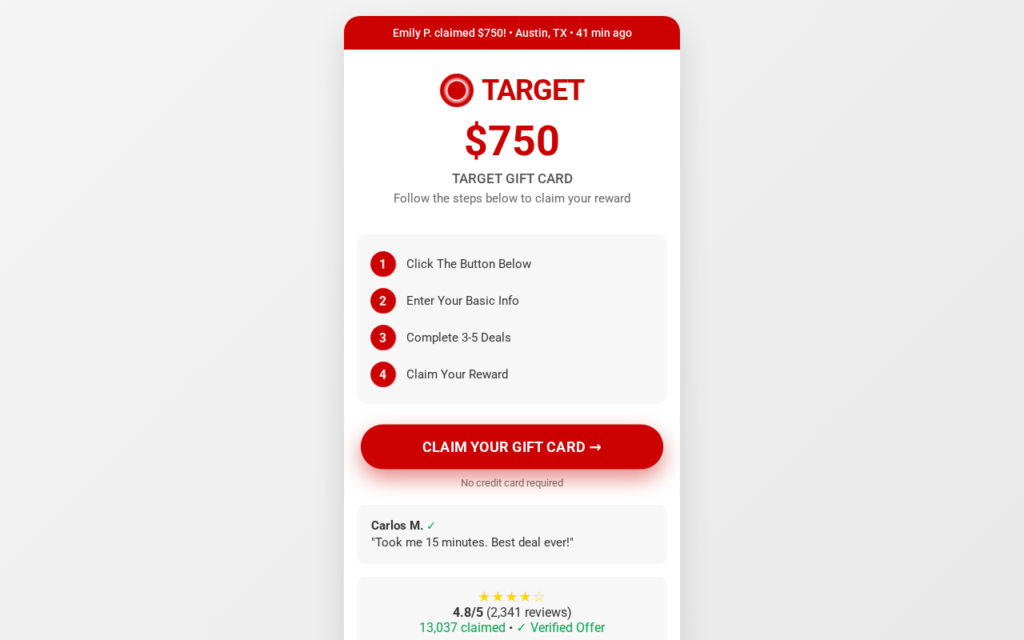
A free gift card worth hundreds from a store you already shop at, in exchange for a few minutes online, sounds like a lucky break. Revsaved.com presents exactly that kind of offer, with a big reward headline, a famous retail brand and a short list of easy-looking steps.
The page looks simple, but the important details sit behind its bright button. Following that path reveals a very different deal from the one most visitors expect: there is no gift card waiting at the end, only a chain of sponsored offers that pay someone else for your time, your data and sometimes your money.
Overview
This is not a real retailer promotion
Revsaved.com uses a well-known retailer’s name, colors or logo as the attention magnet. The retailer does not run the offer, does not approve it and does not send out the card.
The domain is not the retailer’s official website, and the claim button does not lead to the retailer either. It sends visitors through a third-party affiliate tracking link.
The “simple steps” are only the doorway
The page says you can claim the reward after entering your email, sharing some basic details and completing a few “recommended deals.” That summary leaves out what those deals actually are.
Sponsored deals can be paid trials, subscriptions, app installs, games, loan or credit card applications and purchases from separate companies. Each one comes with its own price, cancellation rules and data collection.
The real product is you
Whoever runs Revsaved.com is paid a commission when visitors sign up, hand over their details or complete offers. The gift card headline exists to feed that affiliate funnel, not to give anything away.
Before entering any information, understand the warning signs:
- Revsaved.com is not affiliated with the retailer whose name it uses
- The claim button opens a third-party affiliate tracking link
- The reward depends on completing several sponsored deals
- Those deals may cost money or start recurring charges
- The site does not identify a real company that will deliver the card
- The promised reward is far larger than anything a normal promotion gives away
We found enough evidence to treat the Revsaved.com gift card offer as deceptive. Nobody should assume the headline describes a free, guaranteed gift card.
How the Revsaved.com Gift Card Scam Works
Reward funnels like Revsaved.com follow the same script every time. Only the brand name and the domain change. Here is how it works, step by step.
Step 1: An ad or a message promises a big gift card
Most visitors arrive from a spam email, a text message or a social media ad. The message says you have been “selected” to test products, review a store or claim a gift card worth hundreds from a famous retailer.
The number is large enough to stop you scrolling, and the familiar store name supplies trust that an unknown website could never build on its own.
Step 2: The landing page makes it look quick and finite
Revsaved.com shows three or four numbered steps: click the button, enter your email, complete a few deals, claim your card. “Complete 4-5 deals” sounds modest and measurable, like a short task with a clear ending.
Countdown timers, “limited cards left” banners and counters of people who “already claimed” add pressure to act before you think. None of these numbers can be verified.
Step 3: The claim button crosses into an affiliate network
When you click “Claim,” “Start Now” or “Get Started,” you do not reach the retailer. You are sent through a tracking link from a cost-per-action (CPA) affiliate network. The link carries an offer ID and the operator’s affiliate ID.
Affiliate tracking is common technology. Here, however, it proves that every click is monetized and that the visitor is being sold as a lead, not rewarded as a winner.
Step 4: Your personal details start the lead funnel
The next pages ask for your email address, then your name, phone number, home address, date of birth and answers to “survey” questions about your income, shopping habits and interests.
Every answer makes you a more valuable marketing lead. Even if you give up on the reward, your details can keep generating emails, texts and calls from companies you have never heard of.
Step 5: Sponsored “deals” create real obligations
To “unlock” the gift card you must complete sponsored offers: free trials that turn into paid subscriptions, streaming or meal kit plans, mobile games that must reach a certain level, insurance quotes, and loan or credit card applications.
Each completed deal pays the operator a commission. Many require a payment card, and some become expensive if a cancellation deadline passes unnoticed.
Step 6: The gift card never arrives
After a few deals you are told you need more, that an offer “did not track,” that you missed a deadline or that your claim is “pending review.” The reward keeps moving out of reach.
By then the operator has already been paid for your sign-ups, and there is nobody to contact about the missing card. The gift card was the bait; the deals were the business.
Why the Retailer’s Name Changes the Decision
Big retailers regularly warn customers about fake surveys, reward messages and gift card offers that misuse their name. They advise people not to enter information through links they did not expect.
A small “not affiliated with” line at the bottom of a page like Revsaved.com does not cancel the first impression created by a huge branded headline. A reasonable visitor can still believe the store supplied the card or stands behind it.
Never treat a brand’s name in a headline as proof. Check the address bar, where the button really leads, who the promoter is, and whether the retailer itself announces the promotion on its official website.
The Financial and Privacy Risks
- Recurring charges: free trials and discounted subscriptions that renew at full price.
- Credit checks: loan and credit card applications that can leave hard inquiries on your credit file.
- Spam and robocalls: your email, phone number and address shared with marketing partners.
- Follow-up scams: your details can end up on lists used for phishing, fake delivery messages and more “you won” offers.
- Wasted time: hours spent on surveys, games and offers for a reward that never comes.
How to Spot a Fake Gift Card Offer
- The reward is huge and the effort is small. Real promotions do not hand out gift cards worth hundreds for filling in a form.
- “Complete a few deals” is required. This phrase is the clearest sign of a paid affiliate funnel.
- The domain is not the retailer’s. A store name inside an unknown domain is an advertiser, not the store.
- The button leaves the site. Hover over it before clicking and look where it really points.
- No company, address or support channel. Nobody is named as responsible for sending the card.
- The retailer’s own website says nothing about it. Genuine promotions are published on official channels.
What to Do If You Entered Your Details on Revsaved.com
1. Cancel every trial and subscription you started
Go back through each “deal” you completed and cancel it before the trial period ends. Save the cancellation confirmations.
2. Check your bank and card statements
Look for small test charges and recurring payments you do not recognize. Dispute them with your bank, and ask for a new card if you entered card details on an unknown site.
3. Watch your credit report
If you filled in a loan or credit card application, check your credit report for new inquiries or accounts you did not open.
4. Expect more scam messages
Treat follow-up emails and texts about “your reward,” “your gift card” or “a problem with your claim” with suspicion. Do not click their links.
5. Unsubscribe, block and report
Unsubscribe from the marketing lists you were added to, block the numbers that start calling, and report Revsaved.com to the retailer whose brand it uses, to the platform that showed you the ad, and to your national consumer protection agency.
Frequently Asked Questions About Revsaved.com
Is the Revsaved.com gift card real?
No. Revsaved.com is an affiliate landing page. Its job is to collect your details and get you to complete paid offers. The retailer is not involved and does not send out the reward.
Is Revsaved.com connected to the store it names?
No. The store’s name and logo are used to make the offer look trustworthy. Genuine promotions run on the retailer’s own official domain.
How does Revsaved.com make money?
Through affiliate commissions. Every email address submitted, every survey answered and every sponsored deal completed is paid for by an advertiser, and the operator keeps a share.
I already completed some deals. Will I get the gift card?
It is very unlikely. Focus on cancelling trials and subscriptions, checking your statements and protecting your accounts.
Why does the same offer keep appearing on new websites?
These pages are cheap to build and get reported quickly, so operators move the same funnel to a new domain and a new brand every few days. The structure never changes: a big gift card, a few “simple steps” and a list of deals.
The Bottom Line
Revsaved.com uses a famous store’s name and a large gift card to pull visitors into a paid affiliate funnel. The “deals” are the business, your personal details are the product, and the gift card is only the bait.
If a website asks you to complete sponsored deals to claim a free gift card, close the page. If you already took part, cancel any trials, check your statements and ignore follow-up “reward” messages.

Reviews & discussion
0 commentsShare a firsthand experience, or ask a question.
Community reviews
revsaved.com
Moderated reader experiences, not an editorial verdict.
Start the conversation
Have a question or something useful to share? Add the first comment.