


The order confirmation says you bought a camera or a set of wallet cards. A month later, the same name shows up again on your bank statement.
That second payment may belong to Savvy VIP, a separate membership sold alongside the gadgets. The charge can be easy to miss if you only look for the word Savvy.
Overview
The free reward comes with a paid activation
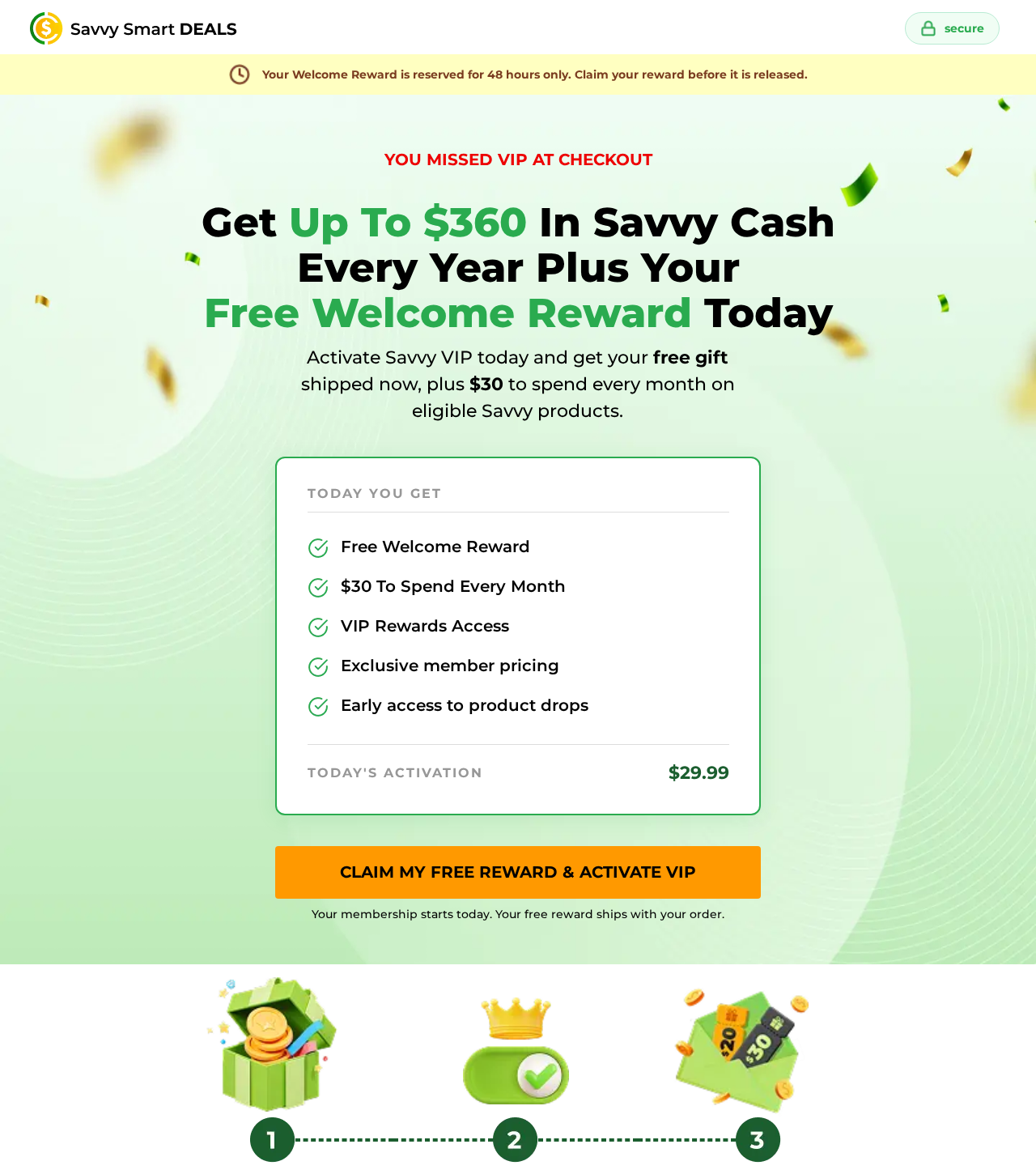
The offer calls the welcome gift free, but the linked order page shows $29.99 to activate VIP today. Its disclosure lists another $29.99 every 30 days until cancellation.
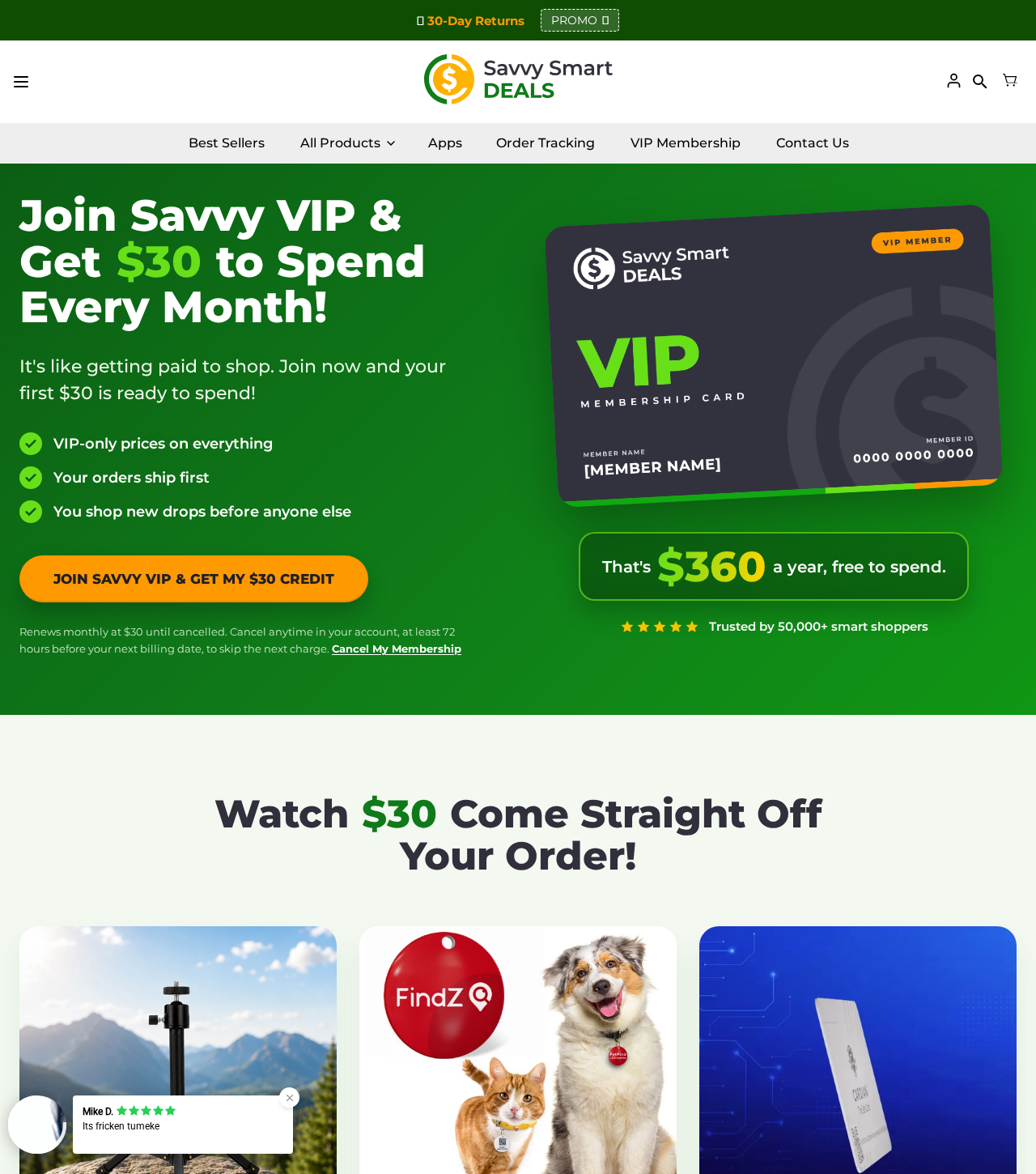
The store’s VIP page rounds the program to $30 a month. The promised $30 credit is money you can spend only with Savvy, not a cash rebate.
Your statement may still show the gadget’s name
Savvy’s contact page lists five statement descriptors. It says a VIP renewal can appear under the same name as the original purchase, even when no new gadget ships.
That makes the receipt, date, amount, and card record more useful than the description alone. A matching name identifies the merchant, not what you agreed to pay.
Stopping renewal and getting money back are separate
Savvy’s terms ask for cancellation at least 72 hours before renewal. The online route begins with email verification, which is not the same as a completed cancellation.
- Have a charge? Match it to the original order and look for a separate membership record.
- Want out? Save the cancellation confirmation and ask about any upcoming charge.
- Dispute consent? Ask for the actual enrollment record and a refund for each disputed payment.
- Returning hardware? Open a separate return request and keep its tracking and authorization.
Do not activate VIP just to claim a free gadget. The offer can make sense only if you deliberately want a paid store membership and understand its rules.
How the Savvy VIP Offer Turns a Free Gift Into a Paid Plan
Step 1: The offer tells you that you missed VIP
The membership order page presents itself as a second chance after checkout. It tells shoppers they missed VIP, then puts a time limit on the welcome reward.
The offer mentions a pet tag, laundry ball, and action camera as reward choices. The point of the gift is to get you to activate the plan.
There is a difference between receiving a free accessory with an existing order and paying to join a plan that includes an accessory. This page sells the latter.
The reward page gives shoppers 48 hours to act. That is the time shown for the gift offer, not the cancellation window for an existing subscription.
Step 2: Activation costs $29.99 before the next month starts
The activation amount is visible on the reward page. The disclosure farther down says the next charge is another $29.99 after 30 days unless you cancel.
That is not the same as starting a free trial. The price of this specific offer begins today, even though the gift itself is presented as free.
The page promotes using a card on file for activation. Do not press the activation button just to inspect the gift if you do not want the plan.
If your receipt says you joined through a different promotion, use its actual dates and amount. The current reward page cannot reconstruct what an older offer showed you.
Check the line above the payment button as well as the offer headline. Write down the first charge, renewal amount, frequency, and what the button actually authorizes.
The timing can change how much a one-off purchase costs. One activation plus two renewals at this rate would total $89.97 before any additional shopping.
Step 3: The monthly credit brings you back to the store
The VIP page says credits cover up to 80% of an item’s price and do not cover shipping. Any unused monthly credit resets rather than building up.
Suppose an eligible item costs $20. An 80% limit would let you apply at most $16 of credit, leaving at least $4 plus shipping to pay.
That example illustrates the cap, not a quote for a particular item. The actual credit applied depends on the eligible price and terms at checkout.
If you had no plans to buy anything else, that is a poor trade. The monthly fee leaves your account whether or not you use the credit.
The membership pitch describes priority shipping and coverage on eligible purchases. Read which items qualify before assigning any value to those benefits for something you already bought.
Step 4: The next charge may look like the first order
The charge descriptor can keep the original product name. A shopper may see Cardian or GuardHouse again and assume a duplicate shipment rather than a VIP renewal.
Look for a matching membership email or account entry, then compare the interval between payments. Neither a familiar descriptor nor a charge near $30 proves enrollment.
For the camera itself, see our separate GuardHouse Camera investigation. The concern here is the separate Savvy plan that can appear across different product orders.
Who Is Charging You, and Which Payment Are You Looking At?
Five names can point to the same merchant
Savvy’s contact page lists CARDIAN8007976129 for Cardian, GUARDHOUSE8007976129 for GuardHouse, STARSCOPE8007976129 for Starscope, and BLAUXSHOP8007976129 for Blaux.
It lists SAVVY8007976129 for other Savvy orders. These are the merchant’s published examples. Banks may insert spaces, shorten the text, or display a separate merchant label.
Check the actual spelling and date before attributing a charge. A similar product name or a number in an unexpected text is not a substitute for your statement.
The contact page names Savvy Smart Ecomm Ltd. beside its business addresses. It labels a different location as the return address. Neither identifies the factory that made your gadget.
The checkout price and the store’s headline differ by a cent
The store advertises $30 monthly, while the reward order page specifies $29.99 on activation and every 30 days. The cent is useful for identification, not evidence of an overcharge.
The timing matters more than the rounding. Every 30 days need not fall on the same date each calendar month, so ask for the next scheduled date.
Buyers also describe charges unrelated to the membership, such as extra products or warranties. Ask the merchant to itemize those separately instead of treating every extra as VIP.
Two published phone numbers serve different pages
The statement help and terms list 800-797-6129. The VIP page gives 833-573-8561 for member support. Both point customers to the same published support email.
For a charge you never authorized, contact the card issuer independently. Use its app or the number on your card, not a number forwarded in a message.
When contacting the merchant, provide an order number and the relevant charge amount and date. Do not send a full card number, password, or sign-in code.
Canceling VIP does not start a merchandise return
Savvy’s store policy describes 30 days from delivery for eligible returns and asks buyers to use the facility address supplied by support. That concerns the physical order.
The terms separately say they generally do not give partial credit for unused subscription time. That provision does not resolve whether a charge was authorized in the first place.
If you’re disputing a renewal and sending back a camera, open two requests. Ask for a separate reply identifying each item or charge and the outcome.
Do not mail the product to an office address from a card lookup. For an approved return, use the address supplied for your order and save the carrier receipt.
What the Customer Records Add
In an April 2026 BBB complaint, a Cardian buyer reported two $29.99 charges after a three-card order. The buyer said they had not activated the membership emails.
Savvy replied that a full refund had been processed. The buyer accepted the response as satisfactory if carried out. That exchange does not show the original consent screen.
A different BBB complaint describes a charge the writer could not tie to any order. That is a different issue from agreeing to a plan and forgetting to cancel.
These reports are reasons to check the itemized record, not proof every buyer was enrolled by default. The publicly accessible reward page was inspected without activating or paying.
If the merchant says a confirmation email was sent, ask for the time and destination and check the order’s email account. A notice alone is not the enrollment record.
The most useful comparison is the screen you saw against the charge that posted. A receipt with one amount and a later bank entry are separate records.
If you have only a screenshot of a welcome gift, preserve it, but look for the full page as well. The price or terms may be farther down.
What to Do If You Were Charged for Savvy VIP
- Build a short timeline. Note the gadget order date, the first VIP charge you can find, every later charge, and the date you asked to cancel.
- Find the right account. Search for VIP, welcome reward, Savvy Cash, and the product name. Use the email address on the original order in the member portal.
- Finish cancellation. Request the sign-in link through the merchant’s own membership page. Follow through to the final cancellation confirmation rather than stopping at the email.
- Save written proof. Keep the confirmation, reference number, and effective date. If the portal says there is no active plan but charges continue, send a written request.
- Request a separate refund. List each amount and date, explain why it is disputed, and ask for the enrollment record and a refund to the original payment method.
- Ask your payment provider about deadlines. If the merchant cannot explain the charge or another one posts after cancellation, provide your statement, correspondence, and enrollment dispute.
Use the 72-hour cutoff as the safest deadline under Savvy’s published terms. If the date is closer or has passed, cancel anyway and ask when billing will stop.
The online cancellation flow describes a retention offer. If you want out, decline it and continue until you see a confirmation or get one in writing.
If the sign-in link does not arrive, check the spam folder and verify the address against your receipt. Do not keep waiting past the renewal date.
Ask support to acknowledge your request if the portal fails. Save the first time you tried, any error, and the time you sent the written cancellation.
If you only ordered merchandise, say so plainly. If you did join VIP but canceled, say when. Those are different disputes, and accurate wording helps the issuer.
If you cannot find an order at all, tell your issuer promptly instead of waiting for the merchant to locate one. You do not need to invent an order number.
The FTC’s subscription guidance recommends keeping cancellation records and checking statements afterward. Ask your card issuer about the options for your specific payment method.
Savvy’s terms mention a service that can carry billing details to a replacement card. Ask your issuer about stopping the recurring merchant charge, not just replacing the card.
If an approved refund has not appeared, ask for the exact amount, issue date, and reference. A reply saying the request was received is not proof of payment.
Check whether the issuer’s entry is pending or posted. Save a dated copy either way, and do not mistake a temporary authorization or dispute credit for a settled refund.
Frequently Asked Questions
Is the Savvy VIP welcome reward actually free?
The gift is presented as included, but the activation is not free. The linked reward offer lists $29.99 today and recurring billing unless you cancel.
Why does my statement say Cardian or GuardHouse instead of Savvy?
The merchant says it uses product-specific billing names and may reuse the initial descriptor for VIP. Ask for an itemized record before assuming the reason for the charge.
Can I get the $30 Savvy credit paid back to my card?
No. The offer describes store credit for eligible purchases, not a cash refund. Credit does not cover all of an item’s price or the shipping charge.
What is the last day to stop the next VIP renewal?
The terms specify at least 72 hours before the scheduled billing date. Check that date and save the confirmation. Do not count from the day the product arrived.
Will returning a gadget automatically cancel my membership?
Do not count on it. Request the merchandise return and VIP cancellation separately, and retain both responses. A shipping label is not a membership confirmation.
Does a $29.99 payment prove I joined VIP?
No. The amount matches the reward offer, but you need the actual enrollment record. If you did not approve the charge, explain that to the merchant and issuer.
The Bottom Line
Skip Savvy VIP if you only want the welcome gift or a one-time gadget purchase. The activation is paid, the plan renews, and the credit stays in the store.
If a charge already posted, identify the exact payment, cancel in writing, and ask separately for a refund. Contact your issuer promptly if you did not authorize it.

Join the discussion
0 commentsShare your experience or ask a question about this article.
Discussion
Start the conversation
Have a question or something useful to share? Add the first comment.