


If SearchUSAPeople lists your address, its removal instructions point to InfoTracer. Start with the record you actually saw and make a privacy request, not a purchase.
Afterward, check the live listing and the search result separately. An old snippet can outlast a change to the listing, and another website may have its own copy.
Overview
SearchUSAPeople sends removal requests to InfoTracer
SearchUSAPeople’s removal instructions identify InfoTracer as the database it uses and direct readers there to request removal of identifying information from the relevant search records.
That gives you a better starting point than contacting the first website with a similar name. There are multiple U.S. people search services, and their removal routes aren’t interchangeable.
Check the actual destination in the address bar if a search engine surfaced the listing.
The name in the results heading alone isn’t enough to tell you which service produced it.
A broker listing, a search result and a public record are separate
InfoTracer can handle requests about its search results. A search engine, by contrast, may display a link or extract text from a page where the information is published.
A government office or other records custodian is another source. SearchUSAPeople itself says opting out through InfoTracer alone does not remove the information from public records.
From a practical standpoint, determine which copy you are looking at before reporting it. Otherwise you may get a confirmation from one provider while the copy bothering you never changes.
Keep the removal work focused
- Save the exact address for the listing that exposed your information, without posting it publicly.
- Compare enough details to identify your own entry, particularly when several people share your name.
- Use the public privacy request route, not a search report or membership checkout.
- Keep any confirmation or reference so you can follow up on the same request.
- Check whether a remaining result belongs to InfoTracer, another broker, or an old search index.
Identify the Correct Listing Without Exposing More Information
Start with the result you already found
Record the website and page address privately. Do not include a screenshot of your family connections or address history merely to identify one listing.
If your own listing has a name variant or an older address, note the details that distinguish it. A familiar neighborhood is more useful than a matching first name alone.
Do not select every record with your name. A listing about someone else may contain a similar age or city, so check for a combination that identifies the right record.
Keep an eye on the address bar as you move between pages. A link from one people-search site can open a different company’s report, with its own controls.
An old address is still relevant for finding the old record
If you moved from one state to another, a result containing an old address could be the one you need to identify.
Do not search only by where you live today.
Use the location shown with the listing to distinguish it. If the service gives you several plausible matches, pause and review them without opening or buying an unrelated person’s report.
Where the form asks for the state, follow its instructions and use information that helps locate the listing you actually found.
Ask the privacy contact if the right state is unclear.
You can keep your private note minimal: website, listing address, approximate date, and a small clue from the result.
Don’t build an extensive file of data you wanted less widely available.
When the site name and the domain disagree
Someone may send you a screenshot labeled USA People Search that is not from SearchUSAPeople. Check the actual domain on the page before using any privacy form.
A link from a search engine might go to a different site than the caption suggests. If you end up at another provider, check its own privacy route.
Don’t assume a web result is current either.
When you open it, look to see whether the details are still on the page or survive only in part of the search snippet.
Use the InfoTracer Privacy Request Instead of Ordering a Report
Follow the removal instructions, not the search form
The SearchUSAPeople removal page can still display its ordinary people-search fields. Read down to its removal section, where it discusses the relationship with InfoTracer.
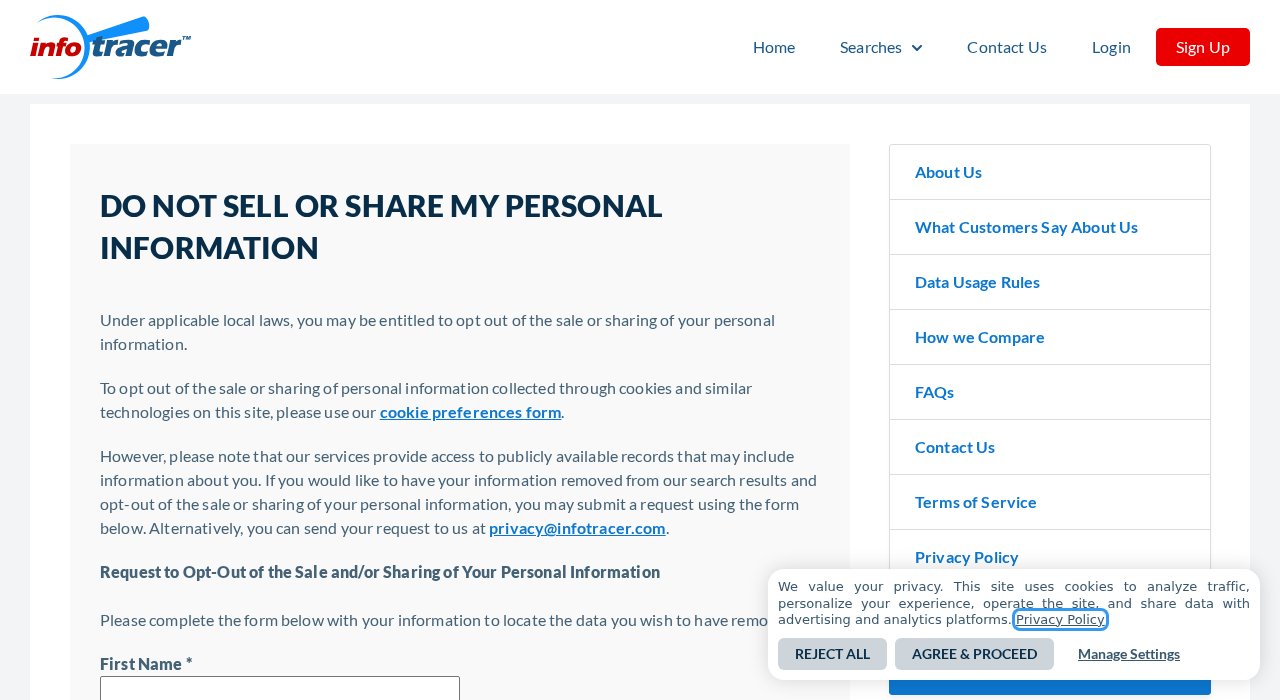
InfoTracer’s public privacy request page separates cookie choices from removal of information in search results. Use the request about the record, not just its cookie banner.
The form covers the sale or sharing of personal information. The same page explicitly directs readers to the form for removal from search results.
You do not need to purchase a background report to use this public request.
If you see a price or plan selection, confirm that you have not left the removal route.
Provide only what the privacy process needs
Check the page address before typing anything. It should be an InfoTracer page you reached deliberately, not a copy linked in an unsolicited message offering removal.
The public form asks for information to help locate the data you want removed.
Enter what the form requires and review it so you aren’t asking to remove the wrong person’s record.
If a later step asks you to identify a result, compare it with the original listing before selecting it. Don’t guess about what an additional person or alias means.
If the form requests confirmation by email, check the mailbox you used and verify the message against the request you just started.
Do not turn an unrelated email into a submission.
Use the privacy contact if the form is not enough
InfoTracer lists a privacy contact on the same page as an alternative to the form. Use that published contact if you cannot identify the old record through the form.
If a record remains, send the listing reference and your previous case number. Explain which part of the listing still appears.
Do not send passwords, a payment card, or extra identity documents in an unsolicited reply. If an official verification step is required, first check that you’re using the provider’s channel.
If a request is confirmed, save the reference and date instead of copying your address history into another folder. That gives you enough information to continue without recreating the exposure.
What to Do When SearchUSAPeople Shows Your Address
- Confirm the original website and identify your own listing. Save the specific URL and a short distinguishing note, keeping both out of shared documents or public posts.
- Open SearchUSAPeople’s removal instructions and then the official InfoTracer privacy form. Choose the request that addresses records in results rather than cookie settings or a paid report.
- Follow the public form’s instructions and verify the record before confirming. If you cannot find the correct listing, use the privacy contact published on the same page.
- Keep a private confirmation and revisit the original source after processing. Do not assume the absence of a search snippet means the live page has changed.
- If a copy remains elsewhere, identify its source before making another request. Use the relevant search engine process or contact the separate site that still publishes it.
Check the live page before addressing a stale search snippet
Start from the exact address you saved. If the details no longer appear there, but Google still displays the old text, the index may not have caught up.
Google offers a refresh process for outdated results where a page has changed or disappeared.
Use it when the snippet is stale, not as a substitute for contacting an unchanged website.
If the contact details are still visible and the result meets Google’s rules, see its personal information removal guidance. Results removal does not delete the original page.
Record which action you requested in each place. A search engine’s approval and a broker’s record removal are not confirmations of the same event.
Treat a second listing as evidence to check
If a new result appears, compare its website and details with the old one. It may be a different record, a mirror, or an unrelated person with the same name.
If it is another copy of your data on the same service, follow up with the prior reference and the new listing address.
Avoid resubmitting the same request repeatedly without checking.
A different site needs its own request.
Where the original source is a county or agency, speak to that custodian about correction or privacy options rather than relying on the broker.
Keep your follow-up proportional
If the problem is a public address and there is also a safety concern, address the safety issue alongside the removal work.
It can take time for search listings to change.
Document public exposure without making it more public. If you must seek help, share the minimum details with the relevant provider or support service rather than reposting the listing.
Consider rechecking occasionally when you move or discover a new name variation. SearchUSAPeople says it cannot guarantee the information will never appear again in another form.
Two examples that show why the exact source matters
Say you find your former address when you search your name. The search result names SearchUSAPeople, and the same address still appears when you open the page.
In that case, begin with the removal route the site identifies. If the page later changes but the old address remains in the snippet, handle the search engine separately.
Now picture a result from a county records portal that remains after the broker entry is gone. The broker is not the publisher of the second copy.
Keep those entries separate in your notes. If you contact a public office, ask about the exact type of record instead of asking it to change a third-party search page.
Follow up when the first response is ambiguous
If a response says your request was received, do not mistake that for confirmation of removal. Check for a reference number or a later outcome you can verify.
If the provider says it could not locate the entry, compare the name variant and address with the listing again. Tell the privacy team which specific match it missed.
When the same name appears in several states, state only the part relevant to the listing that concerns you. A long history of unrelated addresses adds more data to protect.
If the form or page stops working, try the provider’s published privacy contact before an unrelated removal service. Keep the error and the date so you can describe what happened.
Avoid sending the information from the listing to a stranger who claims to remove it. A convincing message is not proof that the sender represents either service.
Frequently Asked Questions
Where do I request removal from SearchUSAPeople?
SearchUSAPeople’s removal instructions direct you to InfoTracer. Use the InfoTracer privacy request that deals with search records, and keep track of the exact result you want removed.
Check the domain that actually contains the result first. A similarly named people-search service won’t necessarily have any connection to InfoTracer.
Does rejecting cookies remove my address?
Rejecting cookies changes a browsing preference, not the record that displays your address. InfoTracer’s privacy page discusses these as separate actions.
Use the record removal process if the listing is the problem. Recheck the listing itself after processing to see whether the result changed.
Do I have to pay to remove a record?
InfoTracer publishes a public privacy request form and an alternate contact on the privacy page. You don’t need to buy a background report to start the request.
If you see a subscription screen, verify where you are. Paying for access to a report is a separate action and is not evidence you filed an opt-out.
Why is Google still showing an address that disappeared?
A search engine may still display text from an older version of the page. Check the exact result’s destination before deciding between a source removal and an outdated result refresh.
If the destination still publishes the address, address the live page too. Removing the Google result will not erase those details from the site.
Can this erase a court or property record?
No, the SearchUSAPeople opt-out instructions distinguish broker results from public records at their source. The request does not take a court or property record out of a government system.
If you believe a source record is incorrect or eligible for protection, ask the office that holds it. Procedures depend on the record and the responsible agency.
Will the same record ever appear again?
SearchUSAPeople does not guarantee that information will stay out of every future result.
An address might be shown elsewhere or appear again in a record that differs from the old one.
Keep a reference to your original request. If the information returns, compare the actual page and provider first so you know where to follow up.
The Bottom Line
The SearchUSAPeople opt-out starts with a specific listing and continues through InfoTracer’s privacy process. You don’t need to order a report or send your address history to an intermediary.
Afterward, verify the live result before addressing older snippets or copies on other sites. Those are separate checks, and completing one is not proof that the others are resolved.

Join the discussion
0 commentsShare your experience or ask a question about this article.
Community experiences
Did this happen to you?
Your experience could help someone recognize the same scam. Submit a private report for our team to review.
I experienced this tooReports are reviewed before publication. Sharing publicly is always your choice.
Discussion
Start the conversation
Have a question or something useful to share? Add the first comment.